

We may receive a commission from our partners if you click on a link to review or purchase a product or service. Click to Learn More
A CRM database is a business tool used to track and organize customer information throughout your business. These databases are supported by customer relationship management (CRM) software, which businesses use to streamline and automate a wide range of businesses processes.
In the modern age, handling all your customer information in basic spreadsheets just isn’t enough. You may be able to keep track of simple trends, but if you want robust, thorough, in-depth reporting that can actually inform your strategy effectively, a comprehensive CRM database is a must.
In this guide, we’ll explain what a CRM database is, what it can do, how it can help your business, and the best way to get started today. If you’re really keen to get started, check out our CRM comparison page to skip the nitty gritty details and get right to building your CRM database.

Get Started with CRM
Our in-depth research found that top providers to help your business grow.
What Is a CRM Database?
A CRM database is a digital resource containing customer data from across your company, which is collected by your customer relationship management (CRM) system. This data can include customer contact information, purchase history, sales interactions, and more. Simply put, CRM databases are used to help businesses track and manage their customer relationships.
Why would a business want to track and manage their customer relationships? Well, if you’ve ever had to tell five different customer service representatives the same information or received a coupon for a product you’ve already purchased, you’ll understand how frustrating it can be when businesses don’t know anything about their customers.
With a CRM database, you won’t be that business. You’ll understand your customers, you’ll know information about them, and you’ll be able to provide a personalized experience that will, most likely, lead to more sales and better productivity.
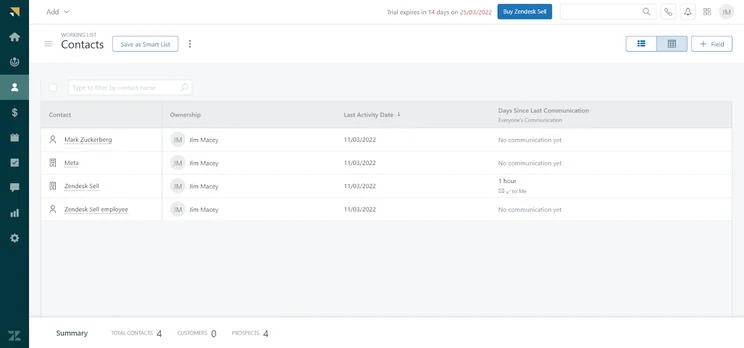
CRM Database in Zendesk Sell
Image: Tech.co testing
What You Can Do With a CRM Database
Now that you know what a CRM database is, it’s time to learn a bit more about how it can serve your business. Below are a list of things that a CRM database can do:
Collect customer data
Collecting customer data is the heart of the CRM database. The collected information includes basic information, such as phone numbers, email addresses, names, and titles. It also keeps track of advanced details like communication history, purchase history, lead source, and other information about their business.
Additionally, a CRM database is only as good as the data inside it, which means you’ll want to make sure your data is as up to date as possible. Otherwise, you’ll be making decisions based on outdated information.
Manage information
Any spreadsheet can collect customer data, but you’re using a CRM, not Microsoft Excel. These platforms do a lot more than just collect data; they allow you to sort and organize it in a helpful way that will benefit your business. You’ll be able to glean valuable insights based on metrics, like lead scores, to understand which sales are important, what customer interactions need attention, and where your marketing budget can be best spent.
When storing customer data, it’s also important to remember that you need to manage it in a secure way. This is because you want your customer to trust you, and because fines have been levied against companies that don’t prioritize user data privacy.
Integrate with CRM software
In most cases, a CRM database is housed within a particular CRM software, like HubSpot or Zendesk. Even better, these platforms allow you database storage and provide a wide range of other functionalities that can help you run your business.
Beyond this, CRM software can integrate with other business resources, like accounting software, which would allow you to treat your CRM as an all-in-one for your businesses operations, rather than having to swap between platforms on a regular basis.
Below is a table of different CRM providers that provide some kind of database functionality within their platform:
|
Free plan
|
Free trial
|
Starting price
|
Verdict
|
Data cap in basic plan
|
Lead capture
|
Accept payments
|
Onboarding
|
Get started
Click to get started and compare prices for your business
|
||
|---|---|---|---|---|---|---|---|---|---|---|
|
SPONSORED
 |
 |
 |
 |
 |
 |
 |
||||
|
Salesforce Sales Cloud |
Zoho CRM |
Sales Hub |
Sugar Sell |
Freshsales |
Microsoft Dynamics 365 Sales |
Keap |
||||
|
|
|
|
|
|
|
|
||||
|
30 days |
15 days |
|
7 days |
21 days |
30 days |
14 days |
||||
|
$25/user/month |
$14/user/month |
$9/user/month |
$19/user/month |
$9/user/month |
$65/user/month |
$249/month |
||||
|
A scalable, highly customizable platform that’s great for managing teams |
An attractive option, with lots of features for a low price |
A scalable tool that’s perfect for managing contracts and payments |
A reasonably priced platform offering solid customization options |
A low-cost option that’s great for engaging potential customers online |
An expensive, robust tool for analytics that’s better suited to current Microsoft users |
A suitable all-in-one platform for sales and marketing but a bit expensive |
||||
|
File storage: 1GB |
200MB |
5 documents |
60GB |
2GB per user |
Database: 10GB |
Unlimited |
||||
|
Web forms only |
|
|
Web forms only |
|
|
Web forms only |
||||
|
|
|
Stripe integration |
|
|
|
|
||||
|
|
|
|
|
|
|
|
||||
| Try Salesforce | Try Zoho CRM | Try HubSpot | Get Quotes | Compare Quotes | Get Quotes | Try Keap |
What Are the Benefits of a CRM Database?
You know what a CRM database is and what it can do, but how does it benefit your business? Here are some of the key benefits of utilizing a CRM database at your business:
- Improved customer relationships: Tracking all that information makes customer interactions seamless, encouraging customer retention and simplifying customer support processes from the ground up.
- Enhanced sales and marketing strategy: By collecting data on sales and marketing metrics, like lead scores and recent sales, you can see where your team needs to focus their energy, and where they can take a step back.
- More informed decision making: All this data allows for some seriously valuable reporting, particularly when it’s accurate. Use this data to inform your future strategy and ensure success in the long run.
- Improved efficiency: Hopefully you aren’t still using paper to track customer data, but even upgrading from a spreadsheet to a full-on CRM database will yield more data, more insights, and will improve efficiency when looking into all of it.
Simply put, more data is always a good thing when it comes to running your business. A CRM database will increase the amount of data you track and allows you to organize it in a meaningful way.
For more information, check out our CRM database example guide today
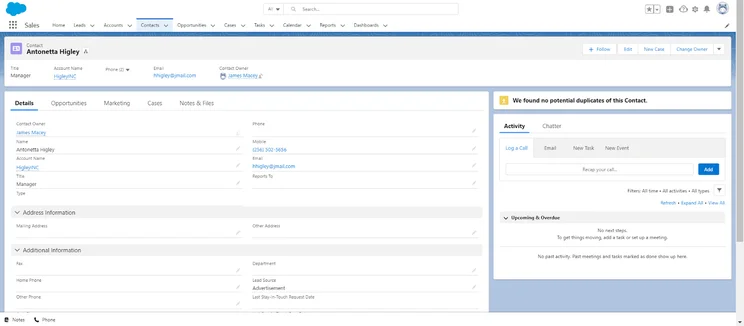
Contact information page on Salesforce
Image: Tech.co testing
How to Get Started with a CRM Database
Now that you’re equipped with enough information about CRM databases, it’s time to take action and get started. After all, these helpful business tools aren’t going to set themselves up, which is why we’ve outlined a few steps you should take to launch your CRM database strategy:
- Establish your goals: The last thing you want in a CRM database strategy is aimlessness. Make sure you know what you want from all this customer data, so you can use it to the advantage of your business.
- Identify your customers: Knowing who your customers are will allow you to efficiently track their data, yielding better reporting down the road.
- Define your sales journey: How does a customer go from “potential” to “closed” with your business? This data will be useful when it comes to see where you lost a client should a sale falls through.
- Find the right CRM software: Building your own CRM database takes a lot of time and effort, whereas there are plenty of top CRM providers out there that can track and organize customer data efficiently while improving productivity at your business.
- Collect data: Once you’re set up with a CRM software provider, the data collection process will be built into your everyday processes. This means you can get weekly, monthly, or yearly reports with actionable insights.
If you want to get started with a CRM database, check out our CRM comparison page with information about the top providers on the market today.
In short, yes, your business should absolutely use a CRM database to streamline business operations. As we’ve shown in this guide, these digital resources are integral when it comes to making informed decisions, retaining customers, and generally getting the most out of your customer data. With plenty of CRM software with database capabilities, you’ll be on your way to a more organized and streamlined work experience.
If you want to get started with CRM software today, be sure to check out our CRM comparison page, which outlines the prices, features, pros, and cons of different providers that can provide you with a CRM database, as well as other functionalities to improve your business.
Frequently Asked Questions
Customer relationship management (CRM) software is a digital tool used by businesses to organize, facilitate, and automate business processes like sales, marketing, and customer service requests. A CRM database is often part of CRM software, being the place where the tool stores all the customer data you need to run the platform.
By effectively organizing your customer data, a CRM database can improve your business in many ways, including increase revenue, provide detailed reporting, and facilitate better customer interactions.
Most CRM providers offer a robust set of security protocols that will keep your customer data safe. Still, no provider is completely impervious, so it’s best to backup information just in case.
One of the benefits of CRM databases is that they can be integrated with other software, like sales, marketing, and customer service tools, but it depends on which CRM you sign up for. This is hugely helpful, as it will allow you to utilize the software as an all-in-one hub, rather than having to switch between platforms.
If you click on, sign up to a service through, or make a purchase through the links on our site, or use our quotes tool to receive custom pricing for your business needs, we may earn a referral fee from the supplier(s) of the technology you’re interested in. This helps Tech.co to provide free information and reviews, and carries no additional cost to you. Most importantly, it doesn’t affect our editorial impartiality. Ratings and rankings on Tech.co cannot be bought. Our reviews are based on objective research analysis. Rare exceptions to this will be marked clearly as a ‘sponsored’ table column, or explained by a full advertising disclosure on the page, in place of this one. Click to return to top of page


