
We may receive a commission from our partners if you click on a link to review or purchase a product or service. Click to Learn More
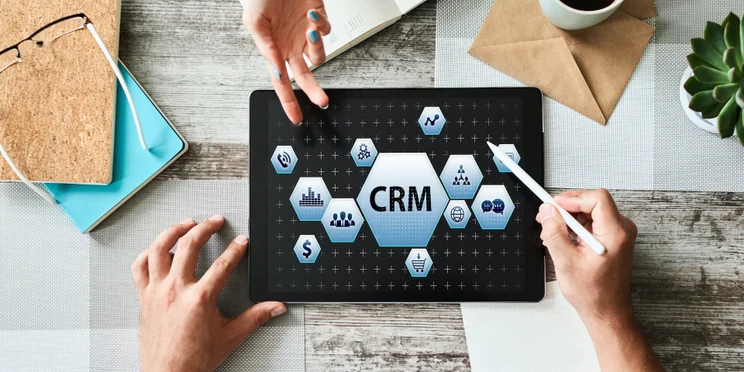
Customer relationship management (CRM) software is a set of tools that help businesses track and manage customer interactions. The best CRM software can help businesses to better understand their customers, improve customer service, and increase sales.
Powerful cloud-based CRM software can do all the tracking to let you monitor key customer data points. This can include purchase history, contact information, upcoming important dates, new sales opportunities, and even a client communication history. It’s a fantastic way for businesses to manage a current client’s requirements, track new client leads, and get your team focused on serving your customers.
CRM software is a very useful tool, but it’s trickier than investing in an email service or office productivity suite. Unlike those more standardized applications, there is no way that a generic piece of CRM software could fit every business’ needs. Each company has specific demands that won’t apply to others. But one thing is in common across all businesses, and that’s the simple fact that bad customer service can translate to a fortune in lost income.
What works for selling photocopiers in New York City is going to be different from what a caterer in Colorado needs to stay on top of their business. That’s why a solid piece of CRM software must be good at tracking data, but also flexible enough to be tailored to the requirements of a particular industry or business.
Before you buy, let’s take a look at what CRM software is, and what it can do to help you manage and grow your business. Plus, you’ll be able to find out exactly how much the average CRM software costs by using our customized quote tool.
What does CRM stand for?
CRM stands for Customer Relationship Management. That sounds like a fancy term – it could be applied to a pen-and-paper rolodex or client purchase history ledger that companies have maintained for decades. But modern CRM software is really so much more than that.
CRM software turns customer data into actionable information to help you find and track sales opportunities and better serve your customers. If a client is unhappy with their service or product, for example, a quick glance at the communication history can prompt you to take action before things take a turn for the worse.
The idea is to have a central location with as much relevant data about your customers as possible, and then use that data to build repeat business. It’s really that simple.
Don’t think if it as a punishing manual task, either. The best CRM software can automate these essential processes for you.
In This Guide:
- What Does CRM Stand For?
- What Is CRM?
- CRM For Sales
- CRM For Marketing
- CRM For Customer Service
- CRM For Small Business
- Best CRM Software to Choose
- Using Free CRM Software
- Frequently Asked Questions
What is Customer Relationship Management?
At its core, customer relationship management – whether software-based or not – is about maintaining and tracking your clientele to better serve their needs, and those of your business. And that means data.
This data may include contact information, or a record of all the interactions you have with those customers – such as phone calls, emails, and (if appropriate for your business) service quotes.
Selling Suits and CRM
It can all sound a bit opaque, so let’s think of a real-world application. I had my first introduction to the importance of CRM when I began my working career by selling suits. A wise veteran of that business advised me to keep a notebook tracking all my major sales and customer information. I used that book to follow-up with customers, talk to them about upcoming sales, and book appointments for future visits.
In my old notebook, I would have single pages dedicated to customers who made large purchases and were likely to need my services on an ongoing basis. Each page would have the person’s name, phone number, and address, as well as what they bought from me and when those transactions happened. Every week or so I would go through the book to see who needed a follow-up phone call, who might be interested in a particular in-store sale, or who I just needed to reconnect with.
This record-keeping was about taking care of my clients’ needs and generating repeat business. For the early 1990s, a notebook was one of the easiest ways to maintain my clientele. But, today, CRM software can do that same job far more comprehensively and intelligently.
CRM Software Solutions
These days, CRM software helps businesses to automate vast amounts of customer data at scale.

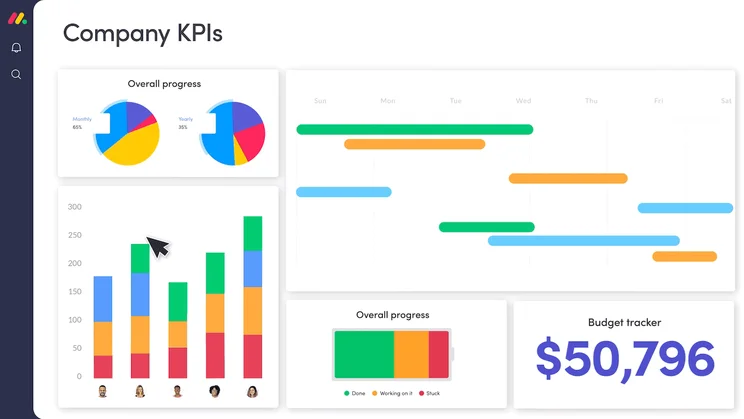
For instance, a brewery might use a CRM platform to track the various pubs they service. The brewery could use automated mechanisms within the software to alert those pubs to seasonal brews coming up that might fit their particular context (location, pub clientele, and so on), or invite particular buyers to special on-site events.
Alternatively, an e-commerce business could use CRM software to build a high-converting sales funnel, a marketing model that helps businesses track their customer’s buying journey. By using the tools, the site could draw more leads into the tunnel, and convert more prospects into paying customers.
CRM is well worth the effort in return sales and all around customer satisfaction, and modern CRM software solutions remove much of the tedium of analog solutions or files spread across your office PCs by centralizing the necessary data and making it easier to surface the relevant information with a few clicks.
Best CRM Software to Choose
There are numerous CRM options out there on the internet, and we couldn’t possibly name them all in the space we have here. If you’re after more detail, we recommend starting with our dedicated Guide to The Best CRM Software. If you’re after a brief overview, there are some major names in the CRM space that everyone looking at this type of software should know about. Take a look at our comprehensive table to get a better understanding of the CRM landscape.
|
Free trial
|
Starting price
|
Most expensive plan
|
Verdict
|
Email marketing
|
Social marketing
|
Marketing campaigns
|
API
|
Email Comms Channel
|
Phone Comms Channel
|
Website Live Chat Comms Channel
|
||
|---|---|---|---|---|---|---|---|---|---|---|---|---|
|
BEST FOR SALES
 |
BEST FOR MARKETING
 |
FEATURED
 |
 |
 |
 |
 |
 |
 |
 |

|
||
|
Salesforce |
HubSpot |
monday CRM |
Zendesk |
Freshsales CRM |
Pipedrive |
Microsoft Dynamics 365 |
Zoho CRM |
SugarAI |
Keap |
Sendinblue |
||
|
30 days |
14 days |
14 days |
30 days |
21 days |
14 days |
30 days |
15 days |
7 days |
14 days |
|
||
|
$25/user/month |
$9/user/month |
$12/user/month |
$19/user/month |
$9/user/month |
$14/user/month |
$65/user/month |
$14/user/month |
Custom |
$249/month |
$25 per month |
||
|
$550/user/month |
$3,600/user/month |
$28/user/month |
$169/user/month |
$59/user/month |
$99/user/month |
$150/user/month |
$52/user/month |
Custom |
$249/month |
$POA |
||
|
An incredibly popular and customizable CRM for all businesses, with excellent communication tools |
An easy-to-use and highly scalable platform ideal for growing businesses, with an excellent free plan |
Popular option with a modern, easily customizable interface and a great Free Trial |
A robust platform aimed at businesses looking to scale |
A highly intuitive CRM that is packed with plenty of features and even has a free plan option |
Core CRM features in flexible pricing plans make this one of the best value CRM options for any small business |
A robust CRM platform that embeds brilliantly with Microsoft products |
An attractive option, with lots of features for a low price |
A great all-round CRM with a great, easy to understand dashboard |
A suitable all-in-one platform for sales and marketing but a bit expensive |
A decent choice for email marketing that falls behind in some other areas |
||
|
|
|
|
|
|
|
|
|
|
|
|
||
|
|
|
|
|
|
|
|
|
|
|
|
||
|
|
|
|
|
|
|
|
|
|
|
|
||
|
Open |
Limited |
Open |
Open |
Open |
Open |
Yes |
Limited |
Open |
Limited |
Open |
||
|
|
|
|
|
|
|
|
|
|
|
|
||
|
|
|
|
Requires Telephony integration on Support plans, available on Suite plans |
|
Add-on required |
|
|
|
|
|||
|
|
|
|
|
|
|
Add-on required |
|
|
|
|
Zoho CRM
Many people are familiar with Zoho for its online document-editing suite, but it also has a popular CRM software platform. Its most basic paid offering includes housing customer contact data, tasks, events, call logs, lead tracking, and sales forecasting.
Higher priced tiers include added features such an interactive automated assistant, email integration, and greater levels of customization. There is also a free option.
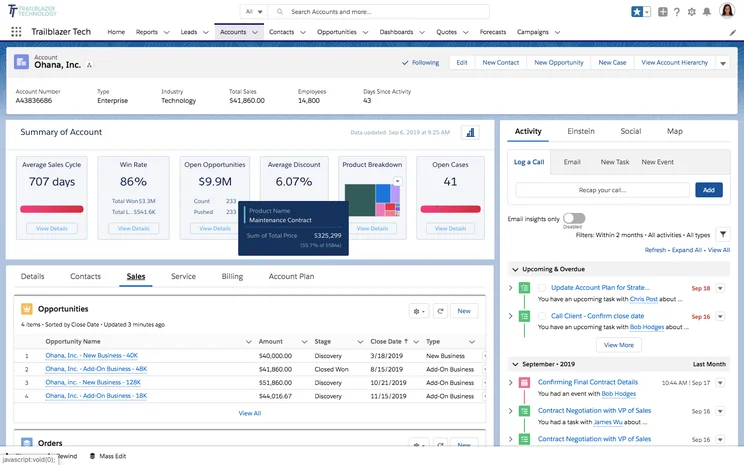
Salesforce
Salesforce is undoubtedly the biggest name in CRM software. While it may not have been the first to enter the market, it certainly nudged the concept of customer relationship management into the mainstream. The company’s basic offering includes tasks, leads, accounts, contacts, notes, files, call-tracking, and more.
Salesforce has a number of additional services beyond its CRM offering. These include managing individualized marketing campaigns and personalized shopping experiences. It’s a very full-featured offering and the current leader in CRM.
Salesforce is in fact such a big name that there’s a temptation to view it as the only game in town. That’s not the case, of course – there are lots of great Salesforce alternatives, and the important thing is choosing the best software for your own business needs.
Hubspot
HubSpot takes something of a freemium approach by offering its CRM for free, and then requiring paid subscriptions for supporting CRM-style services called hubs. These complementary services are similar to Salesforce and address other facets of your business including marketing, sales, and service.
Even these premium services have free offerings on HubSpot, however, with the price escalating as you need premium features within each category. The sales hub, for example, offers the ability to create customized email templates in its paid tiers.
Microsoft Dynamics
It wouldn’t be a proper business software platform if it didn’t get attention from Microsoft. The Windows publisher also offers a CRM solution called Microsoft Dynamics. The advantage with Microsoft’s offering is that it can integrate seamlessly with other Microsoft software you might already be using from email to the company’s “augmented reality” HoloLens headsets. It also uses an interface that will be familiar to users of other Microsoft software.
Zendesk
If you’ve ever had to deal with a customer service representative online it’s likely you’ve interacted with a company using Zendesk software for customer support. While Zendesk isn’t a CRM platform in the strictest sense, some companies will use it as such since it can house customer contact information, and support tickets can be used as tasks, and provide space for notes, and these can be assigned to employees.
Zendesk can also integrate with a number of third-party CRM platforms such as Salesforce and Zoho. The company recently acquired Base CRM and the company behind, it suggesting Base will have deeper integration with Zendesk in the coming months.
Apptivo
Rounding out our top examples of CRM software is Apptivo. This company’s focus is as a CRM for small and medium businesses. It offers email lead generation, lead conversion, and a customizable interface. It also integrates with many popular services including Google’s G Suite for businesses, Microsoft Office 365, and Slack making it easy to get your data into and out of Apptivo’s CRM.
CRM for Sales
While there are some all-around CRM that can handle everything, the reality is that most have a specialty. When it comes to sales, an option like Salesforce is obvious, as it provides a wide range of lead-focused features that can turn your team around. You’ll also want to keep an eye out for business infrastructure features, training options, and business integrations for a CRM for sales, so check out our research below for some more information:
|
Free plan
|
Free trial
|
Starting price
|
Verdict
|
Data cap in basic plan
|
Lead capture
|
Accept payments
|
Onboarding
|
Get started
Click to get started and compare prices for your business
|
||
|---|---|---|---|---|---|---|---|---|---|---|
|
SPONSORED
|
|
|
 |
 |
 |
|
||||
|
Salesforce Sales Cloud |
Zoho CRM |
Sales Hub |
Sugar Sell |
Freshsales |
Microsoft Dynamics 365 Sales |
Keap |
||||
|
|
|
|
|
|
|
|
||||
|
30 days |
15 days |
|
7 days |
21 days |
30 days |
14 days |
||||
|
$25/user/month |
$14/user/month |
$9/user/month |
$19/user/month |
$9/user/month |
$65/user/month |
$249/month |
||||
|
A scalable, highly customizable platform that’s great for managing teams |
An attractive option, with lots of features for a low price |
A scalable tool that’s perfect for managing contracts and payments |
A reasonably priced platform offering solid customization options |
A low-cost option that’s great for engaging potential customers online |
An expensive, robust tool for analytics that’s better suited to current Microsoft users |
A suitable all-in-one platform for sales and marketing but a bit expensive |
||||
|
File storage: 1GB |
200MB |
5 documents |
60GB |
2GB per user |
Database: 10GB |
Unlimited |
||||
|
Web forms only |
|
|
Web forms only |
|
|
Web forms only |
||||
|
|
|
Stripe integration |
|
|
|
|
||||
|
|
|
|
|
|
|
|
||||
| Try Salesforce | Try Zoho CRM | Try HubSpot | Get Quotes | Compare Quotes | Get Quotes | Try Keap |
CRM for Marketing
Just to prepare you, marketing CRM often costs a lot more than your average sales or service CRM. That’s because marketing CRM is often laden with automation features that can save you a lot of time but require a lot of work.
When looking for CRM for marketing, it’s important to consider which types of marketing you want to partake in: email, social, paid, or content. Certain options will provide all four — like HubSpot, which is our top-rated pick for marketing — while others focus on only one or two.
Just like with CRM for sales, CRM for marketing can also offer team infrastructure features, training, and business integrations, so keep an eye out for those, and check out our well-research list of the best CRM for marketing below:
|
Free plan
|
Free trial
|
Starting price
|
Verdict
|
Email marketing
|
Social marketing
|
Content marketing
|
Paid marketing
|
Omnichannel features
|
Get started
Click to get started and compare prices for your business
|
||
|---|---|---|---|---|---|---|---|---|---|---|---|
|
SPONSORED
|
|
 |
 |
|
|||||||
|
Salesforce Marketing Cloud |
Marketing Hub |
Freshmarketer |
Sugar Market |
Keap |
|||||||
|
|
|
|
|
|
|||||||
|
|
|
21 days |
|
14 days |
|||||||
|
$25/user/month |
$9/user/month |
$15/month |
Custom |
$249/month |
|||||||
|
A very expensive option that provides robust email and omnichannel features |
The best option for businesses looking to scale |
A good option for email, but not great for scalability |
A good budget option for covering multiple marketing channels |
A suitable all-in-one platform for sales and marketing but a bit expensive |
|||||||
|
|
|
|
|
|
|||||||
|
|
|
|
|
|
|||||||
|
|
|
|
|
|
|||||||
|
|
|
|
|
|
|||||||
|
|
|
|
|
|
|||||||
| Try Salesforce | Try Hubspot | Get Quotes | Get Quotes | Try Keap |
CRM for Customer Service
In most cases, CRM for customer service is going to be priced and planned out similar to CRM for sales. You’ll certainly be paying less than you would for CRM for marketing, because the number of features is decidedly less.
For CRM for customer service, you want to take note of the channel by which you can communication with your customers. Ticketing system, social integrations, and feedback options are all important to consider, as some providers will be missing some of these key options.
Security features are another vital factor to consider, as you’ll be dealing with a lot of customer data and information. And as always, team infrastructure and training options can go a long way in helping your team adapt to the new software.
|
Free plan
|
Free trial
|
Starting price
|
Verdict
|
Email Comms Channel
|
Phone Comms Channel
|
Website Live Chat Comms Channel
|
Get started
Click to get started and compare prices for your business
|
||
|---|---|---|---|---|---|---|---|---|---|
|
BEST OVERALL
|
 |
 |
 |
|
 |
 |
|||
|
Zendesk |
Freshdesk |
Zoho Desk |
Microsoft Dynamics 365 Customer Service |
Salesforce Service Cloud |
ManageEngine |
Sugar Serve |
|||
|
|
|
|
|
|
|
|
|||
|
30 days |
21 days |
15 days |
30 days |
30 days |
30 days |
|
|||
|
$19/user/month |
$19/user/month |
$14/user/month |
$50/user/month |
$25/user/month |
$13/user/month |
$80/user/month |
|||
|
A robust platform aimed at businesses looking to scale |
A practical option with lots of channels but no survey functionality |
An affordable option with plenty of features for smaller businesses |
A great, customizable platform aimed at larger businesses |
An fully-featured yet pricey CRM solution with excellent team management tools. |
A solid budget option with low costs and few features |
A weak offering with few native service channels available |
|||
|
|
|
|
|
|
|
|
|||
|
Requires Telephony integration on Support plans, available on Suite plans |
Available with Omnichannel plans |
|
Available with Enterprise plan |
Requires Telephony integration/Voice add-on on all plans |
|
|
|||
|
|
Available with Omnichannel plans |
Available with Enterprise plan |
|
Limited to 1 license (Essentials), unavailable (Pro), additional cost (Enterprise) |
|
|
|||
| Try Zendesk | Try Freshdesk | Try Zoho Desk | Get Quotes | Try Salesforce | Try ManageEngine | Get Quotes |
CRM for Small Business
Is customer relationship management software right for your small business?
If you’re having trouble keeping all your customer data organized, or feel you’re not as connected to your customers as you should be then the answer is likely yes.
The idea with CRM software is to track all opportunities – whether that’s leads for new business, or ongoing customer contracts and contact information. That way, you can get a better idea of what your customer’s needs are, since all the data is right in front of you.
It also helps you get a solid sense of how to communicate with individuals, since their conversation history can be captured and made available to everyone from salespeople to customer service reps.
Fortunately, we’ve done a lot of research on the best CRM platforms for small businesses, so you can get started today if you’re interested. Take a look at the table below, and scroll down for a few individual reviews of our top picks.
|
Plan
|
Price
Billed annually
|
Free trial
|
Users
|
Storage
|
Generative AI features
|
Try it
|
||
|---|---|---|---|---|---|---|---|---|
|
SPONSORED
 |
BEST OVERALL
 |
BEST VALUE
|
 |
|
||||
|
Salesforce Sales Cloud |
Zoho CRM |
HubSpot |
Freshsales Suite |
monday CRM |
||||
|
Starter Suite |
Professional |
Free |
Growth |
Pro |
||||
|
$25/user/month |
$23/user/month |
Free |
$9/user/month |
$28/user/month |
||||
|
30 days |
15 days |
|
21 days |
14 days |
||||
|
Unlimited |
Unlimited |
2 |
Unlimited |
Unlimited |
||||
|
File storage: 1GB |
User: 20MB |
Unlimited |
2GB |
100GB |
||||
|
|
|
|
|
|
||||
| Try Salesforce | Try Zoho | Try HubSpot | See CRM Deals | Try monday CRM |
Should You Use Free CRM Software?
These days you can get a free version of any software product and CRM software is no exception.
It may be tempting to choose a free version that offers all the main features you’re looking for in a CRM platform; however, this isn’t a particularly wise choice.
A CRM service will host all relevant data for your customer base. That’s not something you want to entrust to just anyone, and paying for a service puts a responsibility on the part of the service provider that may not be there with free services.
For a good example of what you can enjoy with free CRM, vs paid-for software, check out our guide to HubSpot (free) vs Salesforce. For more Salesforce specific plans, instead go to Salesforce Pricing.
Plus, with paid services often come enhanced features and greater flexibility to customize the product for your specific needs.
If you really want to transform your business, finding a CRM solution within your budget is often a better choice than the completely free options. The good news? It only takes a moment to fill out our CRM Software Compare Quotes tool – this can match you with tailored quotes from CRM suppliers.
Frequently Asked Questions
In most cases, CRM software prices are based on a per user per month basis, increasing in cost based on how many people you need to use the platform. Pricing can range from $8 per user per month to around $300 per user per month for enterprise businesses.
A few benefits of CRM software include: better customer understanding, improved productivity, boosted customer retention, improved communication across your team, added scalability down the line, and a whole lot more.
CRM software is a digital business resource that allows companies to manage and analyze customer data and information. Its goal is to help you understand how your customers interact with your business and to better organize and automated day to day operations.
If you click on, sign up to a service through, or make a purchase through the links on our site, or use our quotes tool to receive custom pricing for your business needs, we may earn a referral fee from the supplier(s) of the technology you’re interested in. This helps Tech.co to provide free information and reviews, and carries no additional cost to you. Most importantly, it doesn’t affect our editorial impartiality. Ratings and rankings on Tech.co cannot be bought. Our reviews are based on objective research analysis. Rare exceptions to this will be marked clearly as a ‘sponsored’ table column, or explained by a full advertising disclosure on the page, in place of this one. Click to return to top of page


