
We may receive a commission from our partners if you click on a link to review or purchase a product or service. Click to Learn More
GstThHubSpot and Salesforce are highly capable CRM systems for small businesses, but which one is better? Well, our research found that when it comes to HubSpot vs Salesforce, it really depends on your particular CRM needs.
HubSpot is generally a better choice for small teams, offering low priced starter plans and a free plan, giving you access to robust sales features at no cost. Plus, the intuitive interface is a much better fit for teams that aren’t as familiar with this kind of software, making it perfect for beginners.
Salesforce, on the other hand, is better suited for larger teams with some serious analytics needs, providing users with customizable, in-depth reporting tools that can improve customer service efforts of your business. Salesforce is generally more expensive across the board, though, with no free plan and AI features exclusive to the more expensive plans.
In this guide, we’ll cover the pros and cons of each CRM — covering features, pricing, and ease of use — to explain when and why one might be a better fit for your business.
|
Free plan
|
Free trial
|
Best for
|
Starting price
|
Pros
|
Cons
|
Verdict
|
||
|---|---|---|---|---|---|---|---|---|
|
BEST FOR ANALYTICS
|
BEST FOR VALUE
 |
|||||||
|
HubSpot |
||||||||
|
|
|
|||||||
|
30 days |
14 days |
|||||||
|
In-depth analytics |
Scalability |
|||||||
|
$9/user/month |
||||||||
|
|
|||||||
|
|
|||||||
|
An incredibly popular and customizable CRM for all businesses, with excellent analytics tools |
An easy-to-use and highly scalable platform ideal for growing businesses, with an excellent free plan |
HubSpot vs. Salesforce – Which Should You Choose?
If you don’t have time to read our full Salesforce review or HubSpot review, I’ve listed below the fundamental differences between the two popular CRMs that I found during our recent CRM research and testing series:
- HubSpot is better for small teams than Salesforce
- Salesforce is better for larger teams than HubSpot
- HubSpot has better sales features, while Salesforce offers better customer service features.
- HubSpot offers an easier-to-use interface than Salesforce
- Salesforce offers better analytics and reporting tools than HubSpot
- HubSpot offers AI features at a lower price point than Salesforce
While they remain pretty similar, HubSpot’s free forever plan is a big differentiator. And even though Salesforce has rejigged its small business pricing recently, there’s still no free plan, and the prices are higher than HubSpot’s comparable plans. All in all, HubSpot’s speedy, modern interface and its generally lower price point make it the best option for small teams.
That said, Salesforce is better for growing businesses because it allows users to store large amounts of information from emails, tasks, call logs, and contact information, to outreach campaign and lead information. Along with that, it has the tools needed to draw out insights you can use to improve your processes at scale.
After using both HubSpot and Salesforce, our research found that HubSpot is the best for small businesses. In this HubSpot vs Salesforce comparison, HubSpot is cheaper than Salesforce, on top of its great free plan, and it’s quicker to set up and has more out-of-the-box functionality. That being said, it’s still pretty pricey compared to the rest of the market, but it’s still more affordable than Salesforce.
Additionally, HubSpot is easier to use than Salesforce, with an interface that felt a bit more streamlined and modern. However, this is largely due to the fact that Salesforce offers some more advanced functionality, particularly when it comes to analytics and reporting. So, while dashboards feel a bit crowded, they are packed with valuable information for your growing business.
Beyond its robust analytics and reporting tools, Salesforce also offers more communication tools for customer support, which makes it a clear recommendation for service teams.


Salesforce offers a 30-day free trial, cancel anytime
Find out if you're eligible and see prices today
Salesforce vs HubSpot: Pros and Cons
If you want to cut straight to the chase, here’s a quick tour of the strengths and weaknesses of Salesforce and HubSpot based on the time we’ve spent testing and reviewing both platforms in full.
HubSpot pros and cons:
HubSpot CRM

In Short
-
Pros
- Sales and marketing features for growing businesses on all plans
- Tidy, easy-to-navigate interface
- Shared team inbox makes chasing leads and support tickets much less complex
- Feature-rich free plan
- Easy-to-use AI and automation tools
-
Cons
- Scarce customer support on the free plan
- 5 document storage limit on free plan
- Mandatory, one-time onboarding fees on premium plans
Pricing
-
 Free plan available
-
Starter: $7/user/month
-
Professional: $1,300/month/includes 6 seats
-
Enterprise: $4,700/month/includes 8 seats
Images
Salesforce pros and cons:
Salesforce CRM
In Short
-
Pros
- 30-day free trial, so you can try the software before you buy
- Lots of analytics and data provided, great for finding insights
- Wide range of customer support options are assuring to have
- Generative AI (Einstein) is genuinely useful, especially for forecasting
-
Cons
- A lot more expensive than almost all other competitors, so not for teams on a budget
- Lacks lead capture and communication features to compete with providers like HubSpot
- The interface can feel a little cramped and intimidating at times
-
Essentials: $25/user/month
-
Professional: $80/user/month
-
Enterprise: $165/user/month
-
Unlimited: $330/user/month
-
Unlimited+: $500/user/month
-
30-day free trial
Images
HubSpot vs Salesforce: Head-to-Head
Now that you understand the basics of how Salesforce and HubSpot differ on pricing and functionality, it’s time to dig a little deeper. In this section, we’ll explore how HubSpot and Salesforce compare on everything, including:
In summary, HubSpot is a more lightweight program, with a cleaner, tidier interface than Salesforce, and a huge range of marketing and sales tools available. It’s easier to use, so will be good for small teams filled with newbies who’ve never used a CRM before. It’s easier to build automations and use the AI assistant in HubSpot than in Salesforce.
Salesforce is better for growing businesses. It offers better collaboration tools and analytical sales dashboards that can handle a lot more data, making it better for forecasting. It’s also a better all-round option for customer service teams. Like HubSpot, Salesforce ensures robust AI tools are available, but it’s a bit more expensive.
Salesforce vs HubSpot: Features
Because Salesforce and HubSpot are both considered high-end CRM options, they both offer a vast array of features for a myriad of purposes. As we’ve said a few times now, it all comes down to what you need those features for.
Marketing features
When it comes to the specific features on Salesforce Marketing Cloud versus HubSpot Marketing Hub, we found the latter to offer more functionality. In fact, HubSpot’s Marketing Hub is our top choice for CRM for marketing, thanks to its vast array of marketing channels, including content, social, web, email, and paid. It’s got a great marketing email designer with a Canva integration, so you can make your official company correspondence look authentic, professional, and unique.
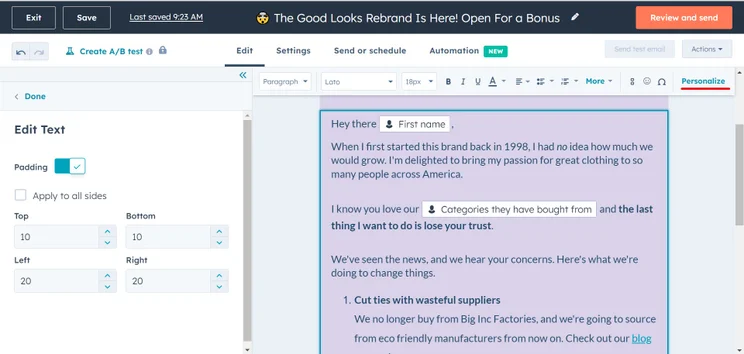
We were able to easily personalize a company email in HubSpot. Image: Tech.co testing
In comparison, Salesforce offers some basic options for channels like social, paid, and content, which is why we give HubSpot the advantage on this one.
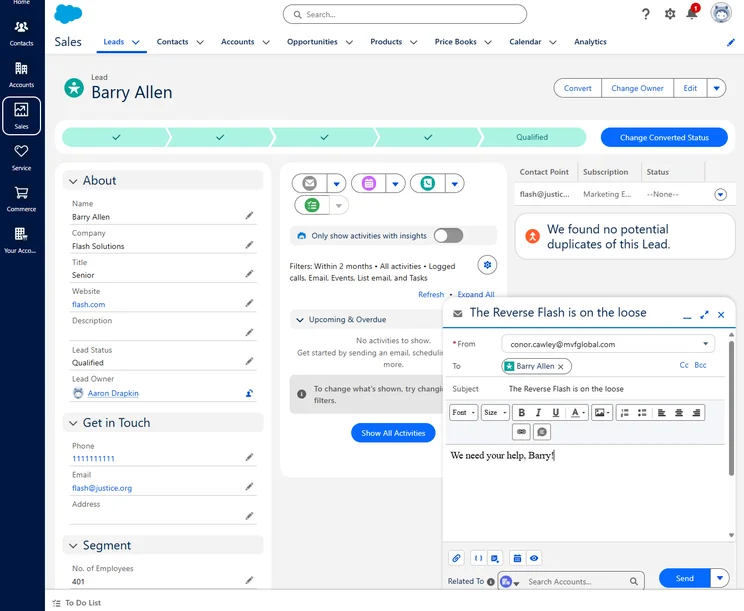
We were able to email leads directly from Salesforce, but we did have to connect our Gmail or Outlook account beforehand. Source: Tech.co testing
Another big reason HubSpot has the edge in marketing is its shared inbox, allowing users to centralize all of their communications, regardless of what platforms they’re connecting with customers on. Salesforce doesn’t offer this. There’s support for PPC ads, too, which Salesforce doesn’t offer. When you add in the fact that you can get started with HubSpot for cheaper, it’s the clear choice for marketing teams.
Sales features
We gave HubSpot the edge of sales features against Salesforce, but it was a close one. HubSpot beats Salesforce on features like lead capture and lead conversion, and it offers more avenues to capture leads from, including webpages and forms.
Still, if sales analytics and forecasting are important to you, Salesforce is definitely the way to go. You’ll be able to track a lot more metrics and have a bit more freedom when it comes to customizing and organizing your sales pipeline. On top of that, the automation features are closely targeted around speeding up the deals process, which means they’re actually useful.
Both options provide AI-powered lead scoring capabilities, so if that was a requirement for you, you’re in good hands with either Salesforce or HubSpot.
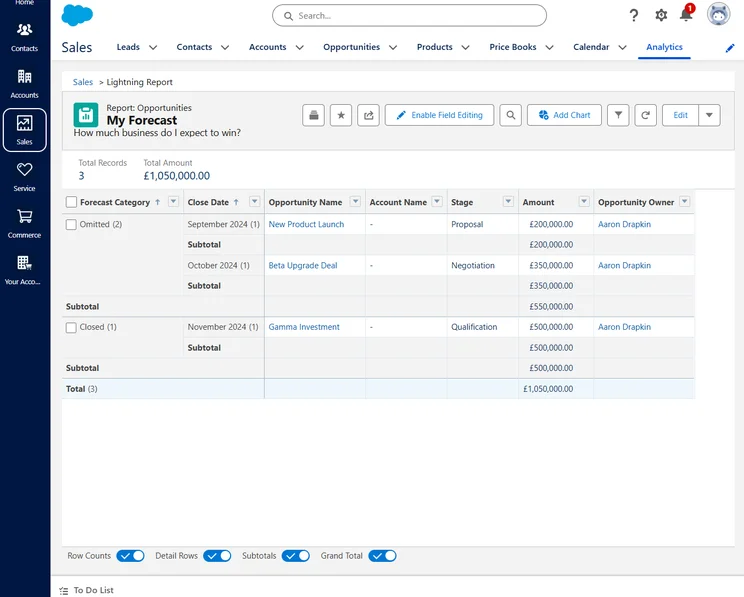
We were able to easily create sales forecasts that projected our potential earnings. Source: Tech.co testing
However, HubSpot offers plenty of its own sales forecasting features, including ones that facilitate recurring revenue tracking and custom goal setting. What’s more, not all businesses will need these advanced features, especially with Salesforce’s price tag attached. So it’s essentially a tie between these two popular options, and your budget is likely to play a significant role.
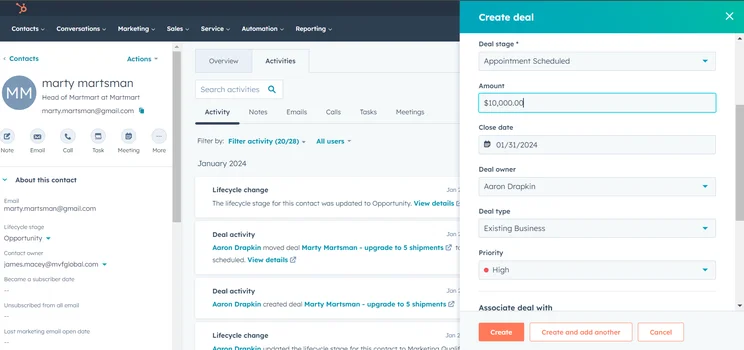
We found creating a deal in the sales area of HubSpot to be very easy. Image: Tech.co testing
Service features
This is where Salesforce really shines. We found customer support CRM features thoroughly embedded in the Salesforce Service Cloud, giving it an edge over HubSpot’s Service Hub. While HubSpot provides basic support features like a live chat function and features like a playbook maker so you can create handy guides for your team, it’s much more basic than Salesforce’s service offering.
Salesforce provides more communication channels, more ticketing channels, and more offline functionality than HubSpot. The omnichannel routing tools included in Salesforce make assigning tickets to users based on a variety of factors (such as their experience) super easy for managers/supervisors to organize on a large scale.
The only weak spot we found for Salesforce when it comes to customer service features is customer feedback functionality, like surveys, as the CRM offers none to speak of. Plus, some features included in HubSpot, such as a customer portal and the ability to build your own knowledge base, are only available in Salesforce if you purchase an add-on. But aside from that, Salesforce is effectively the whole package.
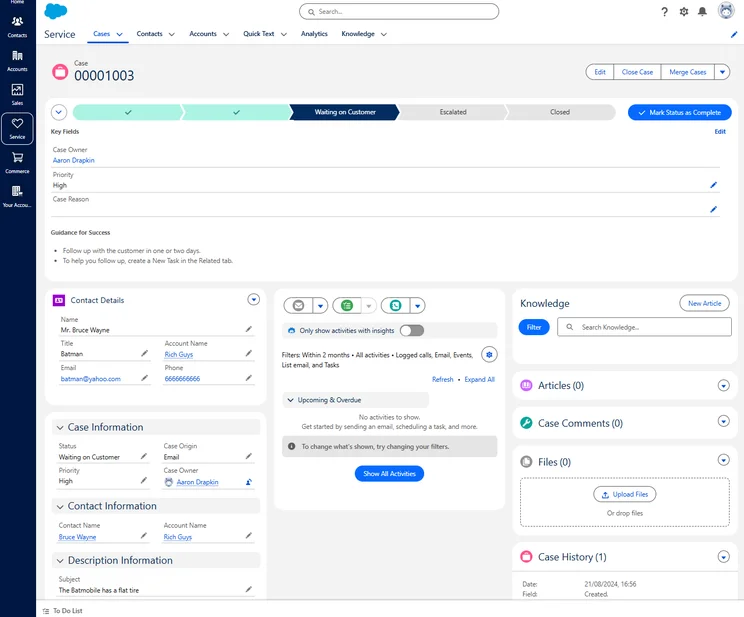
We were able to access both sales and customer service functionality seamlessly, with each case providing plenty of information to help a customer. Image: Tech.co testing
HubSpot is easier to use than Salesforce
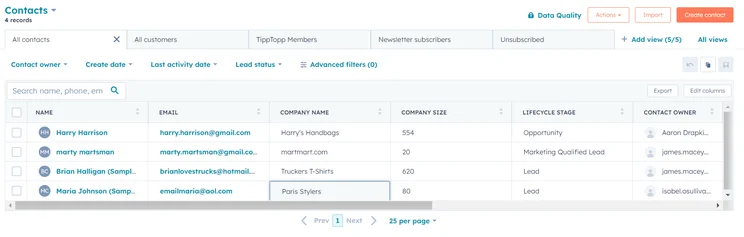
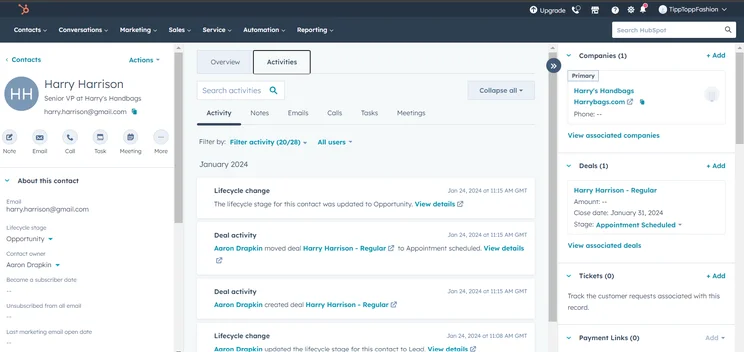
With HubSpot, you’re getting a comprehensive, intuitive interface that is easy to navigate, even if you aren’t familiar with CRM software. The biggest highlight is the tidy user interface where you view all the information related to a contact. It’s a lot less intimidating than Salesforce, and I liked the way that the cells in the main contact table could be edited with a single click.
While a massive feature catalog is a huge benefit for Salesforce, I found that it does create some extra work, which can impede ease of use to an extent – particularly for beginners. I found the platform laden with specific terminology that needs to be learned before it makes any sense, which could create a learning curve for those unfamiliar with the software.
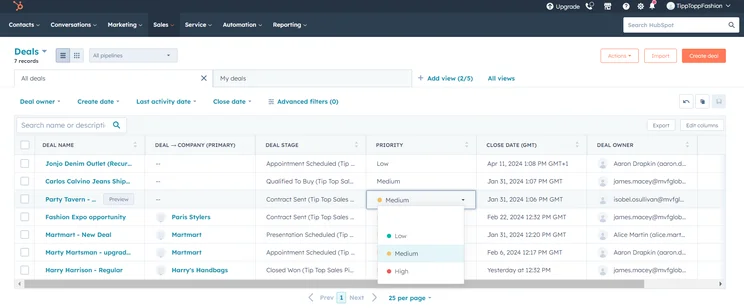
We were able to edit your contact database and sales pipeline at the click of a mouse in HubSpot. Image: Tech.co testing
HubSpot has a clear way of presenting a holistic view of who your contact is, what interaction you’ve had, and where they work. Simply put, HubSpot is built for ease of use, with a simple layout that will let you easily access all the tools available on the platform. There’s even a little help icon at the bottom of some screens, which will provide you with tailored advice on how to move forward.
In fact, HubSpot is so dedicated to improving ease of use that it tested its software on drunk users to be sure it’s as straightforward as possible, no matter how impaired you might be.
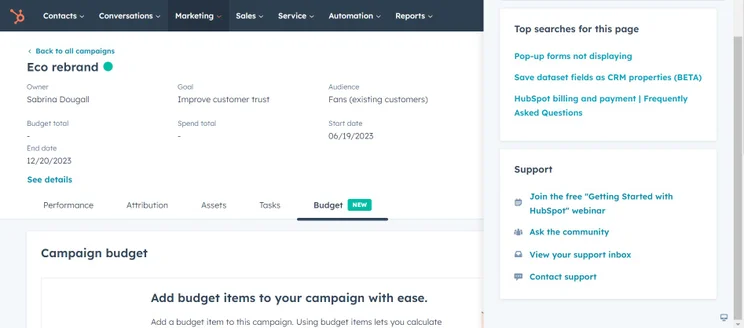
The help options just pop up in the HubSpot interface, which made it easy for us to find where we were going. Image: Tech.co testing
Salesforce has better customer support
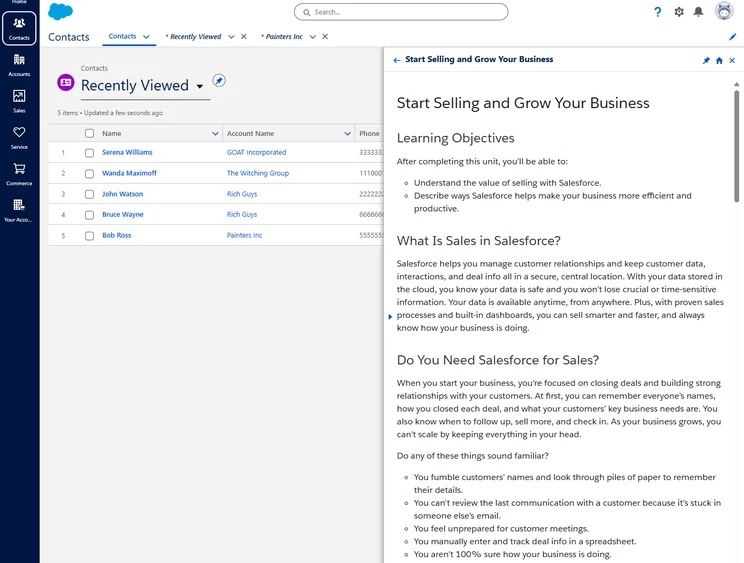
While Salesforce may be lacking in the ease-of-use department, I found the customer support options to be quite robust, which can make it worth the hassle. Not only does Salesforce offer a huge catalog of online documentation and tutorial videos that can help you figure out any issues, but you’ll also become part of the massive Salesforce community of users, who can help you solve any problems.
Our researchers found that HubSpot does not offer 24/7 live support on any of its plans, even the ones that cost thousands of dollars per month. Salesforce, on the other hand, provides it for an additional cost, and includes it for all Unlimited plans.
If you require an actual person to walk you through the complications of Salesforce, you’re all set there, too. Once you’re logged into the platform, you can phone, email, and live chat with representatives to hammer out the details of your problem, so you don’t have to rely on forms and forums to get it done.
Salesforce has better reporting and analytics
As you might expect, Salesforce’s robust feature catalog comes with equally robust reporting and analytics functionality. I found the built-in system to be widely customizable, just like the rest of the platform, giving you complete control over what you track and how you track it.
Plus, with the new analytics add-on Tableau, you’ll be able to get a full 360-degree view of how your customers interact with your business, giving you more actionable insights for improving sales.
HubSpot also offers a lot of reporting tools, and they’re comparable to Salesforce. However, the only metric you get in every plan is to view revenue data, while other features like custom reports and sales forecasts are only available in the more expensive plans, which means you’ll have to pay a lot to get access to the same features.
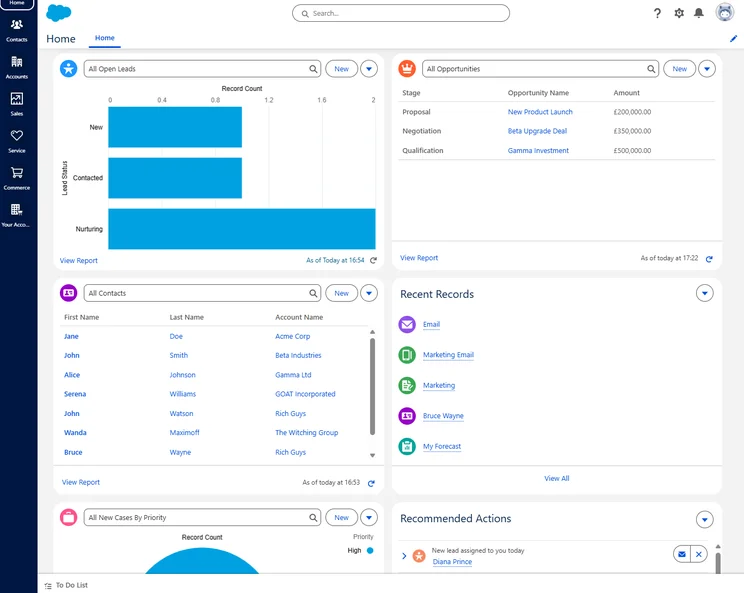
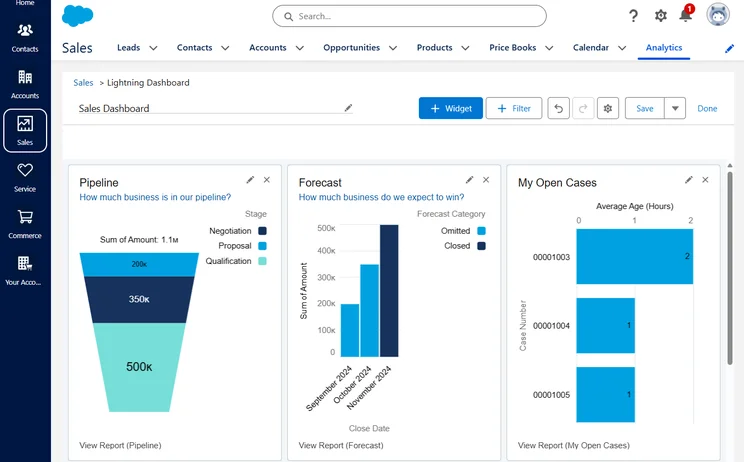
The Salesforce Home dashboard is a customizable hub that hosted all of the important information we needed for our sales and service business. Image: Tech.co testing
HubSpot and Salesforce offer lots of integrations with other software
While both HubSpot and Salesforce are considered two of the most robust CRM options on the market, they can’t do it all. In that case, you might be interested in integrating these platforms with other third-party apps that can, in fact, do it all. Fortunately, both Salesforce and HubSpot offer a lot when it comes to integrations, so no need to worry there.
Both HubSpot and Salesforce have massive app stores that can unlock a wide range of functionalities for your business. They can integrate with Google Workplace, WordPress, Microsoft Teams, FreshBooks, LinkedIn, Slack Eventbrite, and dozens of other platforms and programs. For both providers, the list well and truly goes on.
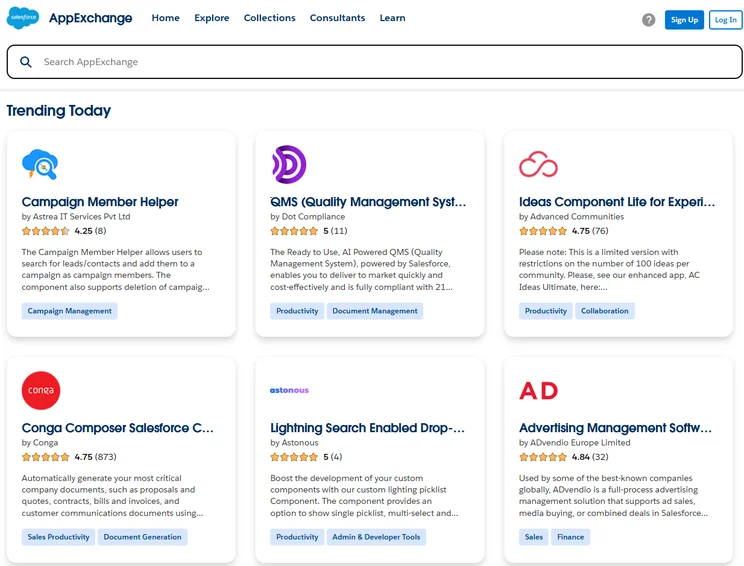
Salesforce offers a wide range of integrations for its service. Image: Tech.co testing
HubSpot Salesforce Integration
If you really can’t decide between the two, HubSpot has a feature that allows you to sync information from Salesforce into HubSpot and then back again. This is very different from the usual features that let you import data from Salesforce in order to migrate to a new platform. It seems curious to offer deep integration with a competitor, but there are situations where this integration could become useful. If you already use HubSpot’s Marketing Hub, for example, but the sales team is on Salesforce, then this integration could help bridge the gap between the data held by the two teams.
HubSpot’s integration is bi-directional, which means you can send information to Salesforce as well as pull information from it. There are limits to how much data you can pull from Salesforce on any given day, depending on how many API calls your contract with Salesforce allows.
This feature is nice enough if you need it, though having both teams on the same platform would be much easier and offer more seamless data sharing. However, the Salesforce integration is not available on the free or Starter tiers, requiring at least Sales Hub Professional.
HubSpot has simpler implementation and training
Because HubSpot is easy to use, the setup process is pretty easy. You won’t have to spend a lot of time setting up your metrics, analytics, or integrations, as most of them will be set up for you upon installation. If you do need a bit of help, you can sign up for onboarding sessions for between $1,500 and $7,000 for your whole team, which is not cheap.
More specifically, the first part of the onboarding process for HubSpot — where you’re following a demo — is quite easy to follow and provides hands-on information on how to use the platform.
With Salesforce, you’re a lot more likely to need help getting started, and the company offers a wide range of helpful tools to do so. Between the online community of users and the robust support team, you’ll be taken care of – and you’ll need it, too, due to the complicated nature of the CRM. Salesforce even offers training seminars, which can cost up to $1,000. Again, it’s definitely not the cheapest option.
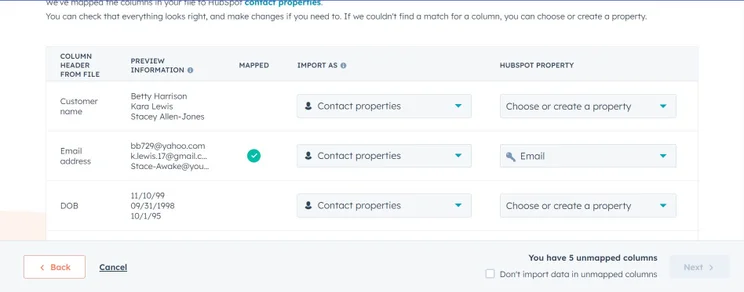
In fact, I found that the setup process for Salesforce was a bit longer than HubSpot’s, if only because of all the data that Salesforce can handle and the ease of customer data import on HubSpot (pictured below).
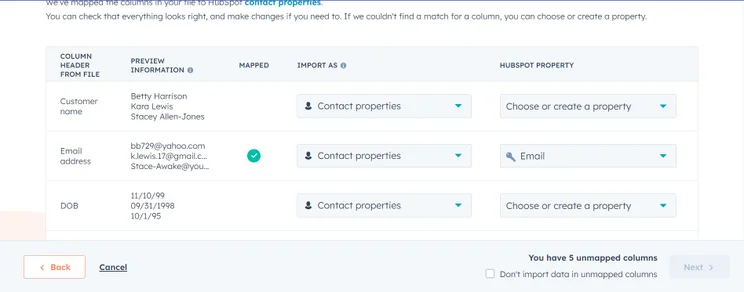
Importing customer data into HubSpot, which was a really quick process for us. Image: Tech.co testing
HubSpot has better automation than Salesforce
Salesforce is a highly customizable platform, so you can create approval processes for whatever you want. For example, on the Professional plan upwards, you can create automation triggered by email updates and notifications, and you can program the software to automatically update fields and cells with information when certain actions occur. However, you’ll need at least the Enterprise plan if you’d like access to the flow builder, which will let you build and roll out processes at the click of a button.
However, HubSpot will let you automate more, and for less money. Complex automation building is available as early on as the Starter plan, in all of HubSpot’s different hubs. Admittedly, you can achieve the same things with HubSpot’s automation builder as Salesforce’s, it’s just a bit easier.
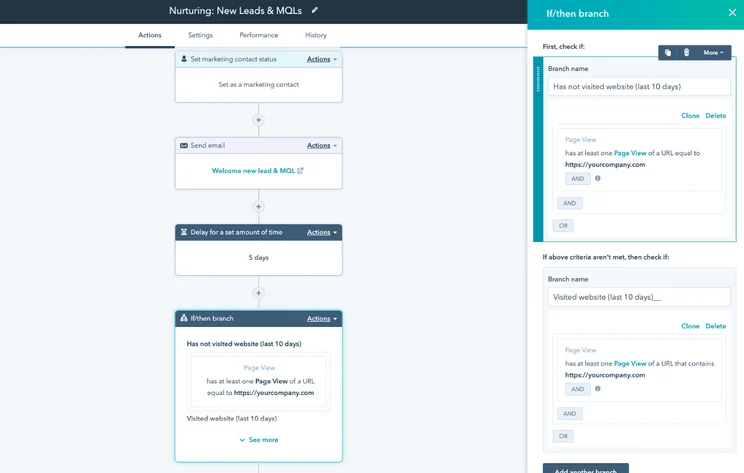
We were able to easily build automations in HubSpot. Image: HubSpot
For example, in HubSpot, you can automate email drip campaigns so you’re not forgetting to follow up on leads, or send ones that satisfy specific conditions through to your sales team. You can also automatically change the status of tickets and leads based on the time since they were last contacted (which you can customize yourself).
The presence of these targeted automation features for marketing is one of the key reasons why HubSpot is better than Salesforce in this regard.
Salesforce’s AI is more powerful than HubSpot
This matchup is a close one. Both Salesforce and HubSpot provide “AI assistants” of sorts, and they’re both useful. But in the end, Salesforce’s Einstein AI comes out on top. The tool can help you automate a wide range of processes, from lead management to customer onboarding, with a world-leading company’s resources behind it.
However, it is generative AI after all, so it can be tasked with generating text for emails or websites, and sourcing the insights needed to make sales forecasts. Einstein is designed to help businesses with large amounts of information leverage insights and create sales forecasts and predictions. However, you’ll spend a lot more time tinkering with it than HubSpot’s AI and automation features, given the depth of functionality available.
HubSpot’s AI assistant can be called upon to help with a wide range of tasks, including generating email subject lines and copy. While it’s not quite as good at piecing data points together to create actionable insights, it still makes the software a lot easier to use. For instance, you can ask it to generate customized reports based on a few short prompts, rather than building them yourself.
Perhaps more importantly, many of HubSpot’s AI features are available at a notably lower price than Salesforce. The Breeze AI assistant, for example, is available on all HubSpot plans, including the free plan. The generative AI functionality on Salesforce is only included in the Einstein 1 Sales plan, which is a staggering $550 per user, per month. It is available as a paid add-on for the Enterprise ($175 per user, per month) and the Unlimited plan ($350 per user per month), but both are still more expensive than HubSpot.
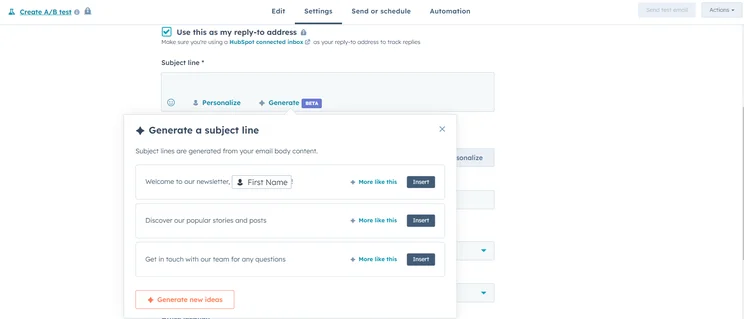
We were able to generate an email subject line using HubSpot’s AI assistant. Image: Tech.co Testing
HubSpot vs Salesforce Pricing
HubSpot pricing starts at $7 per user, per month, while Salesforce pricing starts at $25 per user, per month. On top of that, HubSpot offers a great free plan, while Salesforce only offers a 30-day free trial. Consequently, HubSpot clearly has the edge when it comes to value, particularly for small businesses that are low on resources.
Beyond that, HubSpot and Salesforce offer a myriad of pricing plan options for each of their sales, marketing, and customer service platforms.
HubSpot Hub pricing
First off, we’ll start with the Hubs. HubSpot offers six different types of service, or Hubs: Marketing Hub, Sales Hub, Service Hub, Content Hub, Data Hub, and Revenue Hub. Find out how HubSpot’s Hubs match up against each other just below or read on for an in-depth look at each Hub.
Check out our complete guide to HubSpot pricing for more information
|
Free plan
|
Starting price
|
Most expensive plan
|
Verdict
|
||
|---|---|---|---|---|---|
|
|
|
|
|||
|
Sales Hub |
Marketing Hub |
Service Hub |
|||
|
|
|
|
|||
|
$9/user/month |
$9/user/month |
$9/user/month |
|||
|
$150/user/month |
$3,600/month |
$150/user/month |
|||
|
A scalable tool that’s perfect for managing contracts and payments |
The best option for businesses looking to scale |
A solid option with good functionality, but others do it cheaper |
Salesforce Cloud pricing
Similar to HubSpot’s Hubs, Salesforce offers different types of services depending on your needs, dubbed Clouds, for sales, marketing, and service, as well as a Suite plan for smaller businesses. Each one offers a different set of pricing plans, but Salesforce offers some mix-and-match options that can save you some money if you want dual functionality, as well as two plans for small businesses.
Check out our full guide to Salesforce pricing for more information
|
Free plan
|
Free trial
|
Starting price
|
Most expensive plan
|
Verdict
|
||
|---|---|---|---|---|---|---|
|
|
|
|
|
|||
|
|
|
|
|
|||
|
30 days |
30 days |
30 days |
|
|||
|
A multi-purpose starter plan for small businesses new to the CRM world. |
A scalable, highly customizable platform that’s great for managing teams |
A fully-featured yet pricey CRM solution with excellent team management tools. |
A very expensive option that provides robust email and omnichannel features |
Do HubSpot or Salesforce offer a free plan?
Yes, HubSpot does offer a free forever plan that is surprisingly robust, providing users with sales, marketing, and customer service functionality in one service. Comparatively, Salesforce has no free plan to speak of, and only allows for a 30-day free trial, which isn’t sustainable for small businesses.
However, both Salesforce and HubSpot have paid-for small business offerings that are affordable and functional for all the basics you need in sales, marketing, and customer service. HubSpot calls it the Customer Platform, while Salesforce calls it Suite.
|
Plan
|
Price
Billed annually
|
Free trial
|
Users
|
|
|---|---|---|---|---|
|
|
|
 |
|
|
|
Free |
Starter |
Starter Suite |
Pro Suite |
|
|
Free |
$25/user/month |
$100/user/month |
||
|
|
|
|
|
|
|
2 |
Unlimited |
325 max. |
Unlimited |
How Did We Research HubSpot and Salesforce?
We take our impartial research and analysis seriously, so you can have complete confidence that we’re giving you the clearest, most useful recommendations.
After conducting an initial exploration to identify the most relevant, popular, and established CRM tools in the market, we put them through their paces to find out more about their strengths and weaknesses. In total, we analyzed 13 CRM systems, grading them across 84 areas of investigation.
Based on years of market research and CRM product testing, we’ve established a CRM research methodology to score products, which consists of six main assessment categories and 13 subcategories. This covers everything, from the available features and scalability capacity to the product’s value for money, and much more.
Our main testing categories for CRM systems are:
- Features: The functionalities and capabilities provided by the CRM software, such as contact management, lead and opportunity tracking, and task and activity management.
- Help and support: The resources and assistance available to users when they encounter issues or require guidance while using the CRM software.
- Customization: The ability to tailor the CRM software to suit the specific needs and processes of the organization, e.g. customizing fields, layouts, and workflows.
- Scalability: The ability of the CRM software to accommodate the growth and changing needs of the organization, such as the capacity to handle a growing customer database.
- Price: The cost associated with using the CRM software. It includes factors such as licensing fees, subscription plans, and additional charges for add-on modules or features.
- Team structure — sales CRM: Determining if a platform makes it easier to manage large sales teams, including team dashboards, team hierarchies, and team inboxes.
- Usability — small business CRM: Assessing the simplicity of the interface, the ease of navigating through menus and options, and the overall user experience.
When it comes to calculating a product’s final score, not all testing areas are weighted evenly, as we know some aspects matter more to our readers than others, which are merely “nice to have.” After hundreds of hours, our process is complete, and the results should ensure you can find the best solution for your needs.
At Tech.co, we have a number of full-time in-house researchers, who re-run this testing process regularly, to ensure our results remain reflective of the present day.
HubSpot’s cheaper prices and tidy interface will make it a better option for small businesses, while superior lead capture features and a shared team inbox set it apart from Salesforce when it comes to sales and marketing features. What’s more, HubSpot’s AI assistant is better integrated, making the platform generally easier to use, especially for beginners.
Salesforce, on the other hand, has better features for managing customer service tickets and will be better for growing businesses that need the most advanced reporting and analytics tools on the market. Its sales forecasting features are notably better than HubSpot’s, which can help you better plan for the future of your team.
All that to say, Salesforce and HubSpot have clear use cases, but deciding which one is better really depends on what you need it for. Remember, if you’re still unsure, HubSpot has a free plan and Salesforce has a free trial, so you can see for yourself whether they’ll suit your business.
If you click on, sign up to a service through, or make a purchase through the links on our site, or use our quotes tool to receive custom pricing for your business needs, we may earn a referral fee from the supplier(s) of the technology you’re interested in. This helps Tech.co to provide free information and reviews, and carries no additional cost to you. Most importantly, it doesn’t affect our editorial impartiality. Ratings and rankings on Tech.co cannot be bought. Our reviews are based on objective research analysis. Rare exceptions to this will be marked clearly as a ‘sponsored’ table column, or explained by a full advertising disclosure on the page, in place of this one. Click to return to top of page


