

We may receive a commission from our partners if you click on a link to review or purchase a product or service. Click to Learn More
Salesforce is the most popular customer relationship management (CRM) software in the world, and it just launched a free forever plan that offers basic sales and customer service functionality for small businesses. We got our hands on it for this review.
To be clear, though, while it is fairly basic compared with other paid options, the Salesforce free plan provides a lot of functionality for sales and customer service businesses. You get access to Salesforce’s classic sales funnel interface, for tracking everything from leads to closed deals, as well as its well-known analytics dashboard and reporting tools.
In this review, we’ll cover all the features that are available with the Salesforce free plan, as well as how it compares with other free CRM options across the industry.
- The free forever plan from Salesforce has no time limit and allows for up to two users.
- The Salesforce free plan offers functionality for sales and customer service businesses, but you’ll need a paid plan for marketing features.
- You’ll get access to features, like the sales pipeline and customer service case tools, as well as the customizable home dashboard and analytics features.
- None of the Agentforce AI features are available with the free forever plan, so you’ll need a paid plan for those automation tools.
- If you do want a paid plan from Salesforce, the lowest price you’ll be able to find is the $25 per user, per month Starter Suite plan.
Salesforce Free Plan Key Features
As you can imagine, the Salesforce free plan is a bit more limited in functionality than the paid options from the popular CRM. However, in our analysis, we found that there are still a lot of tools to take advantage of that can help your business get started with managing customer relationships.
Here are some of the key features from the Salesforce free plan that are available right now.
Sales pipeline feature
The sales pipeline functionality is one of the signature tools within the Salesforce CRM, and yes, they did include it in the free plan. If you aren’t familiar, this intuitive tool allowed us to comprehensively track and monitor exactly where a contact is within our sales pipeline.
In addition to the interactive and color-coded bar at the top of every contact, we were also able to check the status in the various lists on the platform, so we were always aware of how far along a customer was in the process.
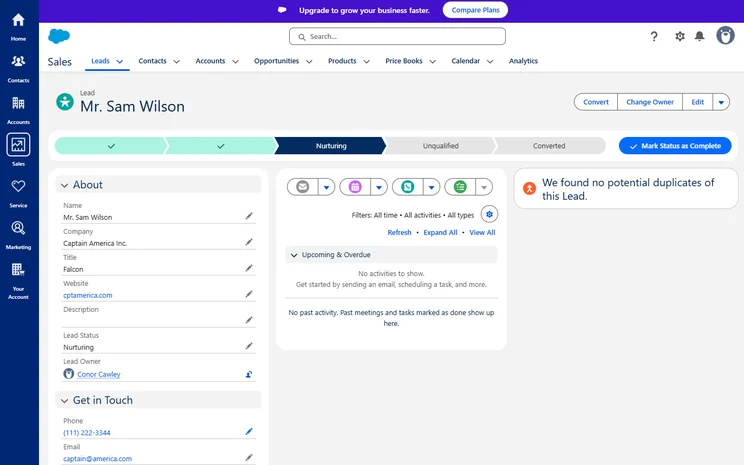
The Salesforce sales pipeline allowed us to track a contact from lead to conversion. Source: Tech.co testing
Customer service cases
Salesforce is generally more focused on sales, which you can probably tell from the name, but if users of the free plan are worried about their ability to use it for customer service, don’t worry! The Salesforce free plan also offers service features for addressing and resolving cases for your customers.
Like the sales platform, you’ll also be able to keep track of where your customers are in the service system with an intuitive and interactive timeline at the top of each case card. You can also email clients, create tasks, and log calls directly within each card, which allowed us to tackle all the basics of customer service on one page.
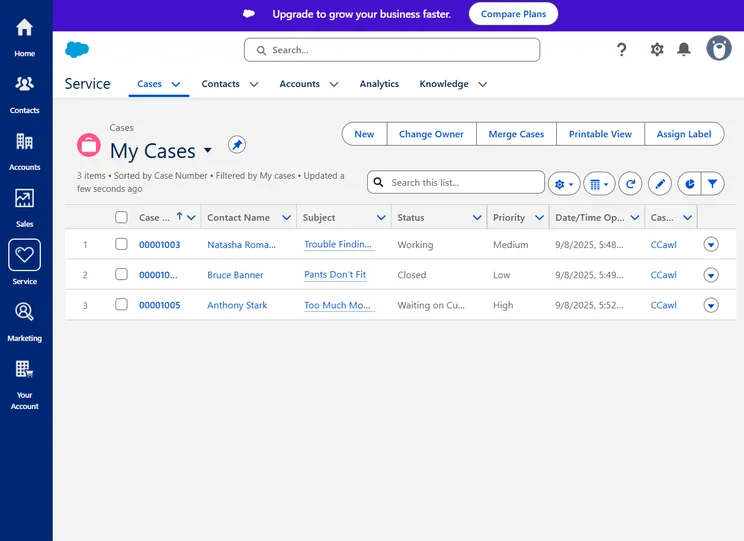
The Salesforce free plan allowed us to track customer service cases from issue to resolution. Source: Tech.co testing
Analytics and reporting
One of the most valuable aspects of the Salesforce platform is the robust set of reporting tools that allows users to get valuable insights about their customer relationships, including how much they’re making, how much they’re forecasted to make, and where they can still make sales or close cases.
Luckily, this feature is available for both the sales and customer service systems, so we were able to create a wealth of helpful reports directly in the platform to track leads converted and cases closed alike.
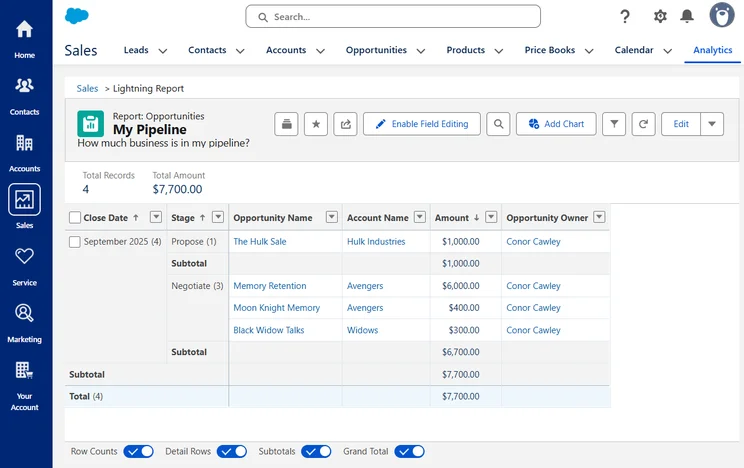
Salesforce offers a wide range of reporting tools that allowed us to see how we’re doing based on a variety of metrics. Source: Tech.co testing
Is the Salesforce Free Plan Easy to Use?
Salesforce isn’t the easiest to use CRM, because it offers a lot of functionality in the paid plans and that can be a bit intimidating for beginners. However, with the free plan, a lot of that functionality isn’t available, which leaves a stripped-back, intuitive interface that we were able to get the hang of pretty quickly.
That was largely due to the helpful setup guide that provided specific, step-by-step suggestions for what we needed to do to get Salesforce ready to track our sales and customer service customers. Everything from adding leads and contacts to closing leads appeared on the banner, which offered a lot more helpful tips than expected.
The Salesforce free plan guided us through the set up process, offering suggestions for what to do next. Source: Tech.co testing
Beyond that, the Salesforce free plan keeps it fairly simple. There’s a sidebar that houses the Sales and Service icons, which take you to the respective dashboards for each. It’s a lot of lists, with everything from leads, opportunities, products, and cases, which then take you to the in-depth customer cards, featuring Salesforce’s pipeline banner feature.
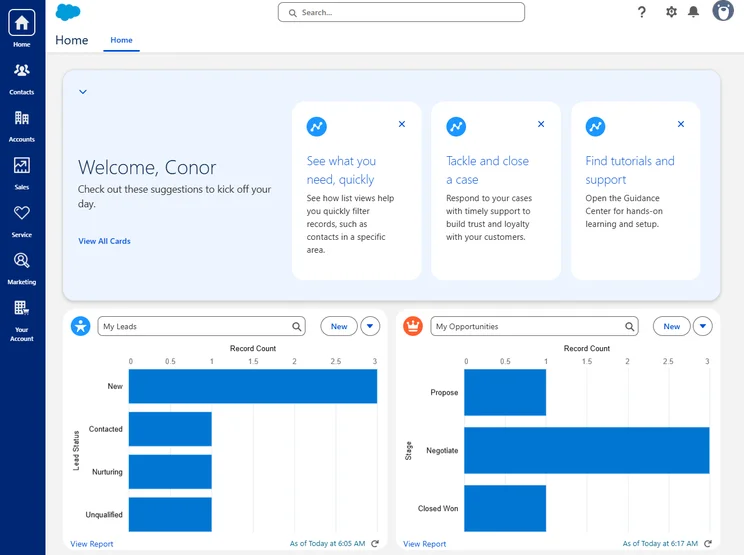
One of the best parts of Salesforce, in both the free and paid plans, is the home dashboard, though. It provided a customizable snapshot of our business, tracking whatever metrics we needed in whatever style we wanted. Suffice it to say, the Salesforce free plan is definitely an easy-to-use experience, even if you’re new to the software.
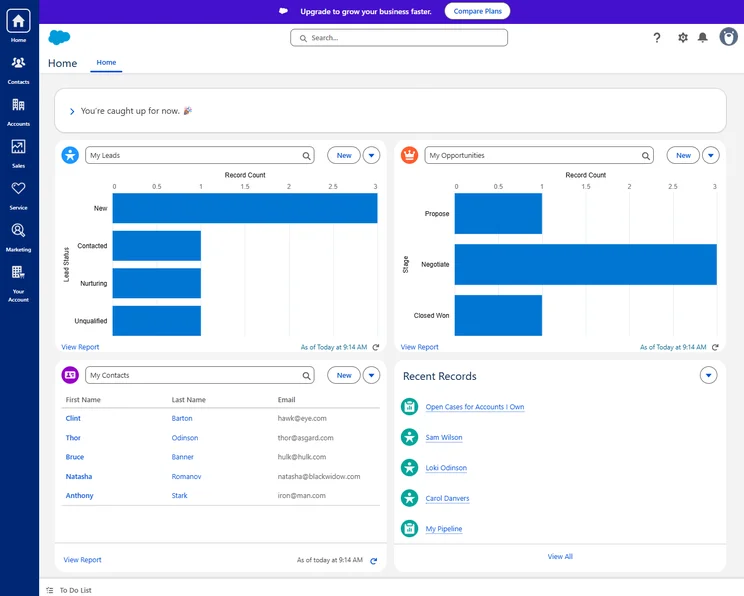
The Salesforce free plan does include the home dashboard, featuring customizable metrics that gave us a clear picture of how we’re doing. Source: Tech.co testing
How Does Salesforce Compare With Other Free CRMs?
One of the few things that prevented Salesforce from being our top-rated CRM for small businesses was the cost. In addition to the high starting price of $25 per user, per month, and the exorbitant prices of its enterprise-level plans (as high as $550 per user, per month), Salesforce didn’t have a free plan.
Now that it does, however, it’s worth comparing how it matches up against other free CRM platforms, so you can evaluate which one is the best fit for your business.Its biggest competition in this regard is HubSpot, which offers arguably the most robust free CRM platform on the market, with tools for sales, service, marketing, content, and data, all rolled into one. It’s only free for up to two users, though, which is the same as Salesforce.
Zoho CRM is our best CRM for small business, according to in-depth research, because it not only provides a robust free plan for up to three users, but it also has low-cost and flexible pricing options, starting at $14 per user, per month, and getting no higher than $57 per user, per month. Plus, it offers a lot of functionality in its free plan, including leads, documents, and mobile apps.
|
Price
Billed annually
|
Users
|
Sales
|
Customer service
|
Marketing
|
||
|---|---|---|---|---|---|---|
 |
 |
|

|
|||
|
Salesforce |
HubSpot |
|||||
|
Free |
Free |
|||||
|
2 |
2 |
3 |
3 |
|||
|
|
|
|
|
|||
|
|
|
|
|
|||
|
|
|
|
|
Our Methodology: How Do We Evaluate CRM Software?
We take our impartial research and analysis seriously, so you can have complete confidence that we’re giving you the clearest, most useful recommendations.
After conducting an initial exploration to identify the most relevant, popular, and established CRM tools in the market, we put them through their paces to find out more about their strengths and weaknesses. In total, we analyzed 13 CRM systems, grading them across 84 areas of investigation.
Based on years of market research and CRM product testing, we’ve established a CRM research methodology to score products, which consists of six main assessment categories and 13 subcategories. This covers everything, from the available features and scalability capacity to the product’s value for money, and much more.
Our main testing categories for CRM systems are:
- Features: The functionalities and capabilities provided by the CRM software, such as contact management, lead and opportunity tracking, and task and activity management.
- Help and support: The resources and assistance available to users when they encounter issues or require guidance while using the CRM software.
- Customization: The ability to tailor the CRM software to suit the specific needs and processes of the organization, e.g. customizing fields, layouts, and workflows.
- Scalability: The ability of the CRM software to accommodate the growth and changing needs of the organization, such as the capacity to handle a growing customer database.
- Price: The cost associated with using the CRM software. It includes factors such as licensing fees, subscription plans, and additional charges for add-on modules or features.
- Team structure — sales CRM: Determining if a platform makes it easier to manage large sales teams, including team dashboards, team hierarchies, and team inboxes.
- Usability — small business CRM: Assessing the simplicity of the interface, the ease of navigating through menus and options, and the overall user experience.
When it comes to calculating a product’s final score, not all testing areas are weighted evenly, as we know some aspects matter more to our readers than others, which are merely “nice to have.” After hundreds of hours, our process is complete, and the results should ensure you can find the best solution for your needs.
At Tech.co, we have a number of full-time in-house researchers, who re-run this testing process regularly, to ensure our results remain reflective of the present day.
Salesforce is considered one of the best CRM options on the market in 2026, and the addition of a free plan is obviously an improvement. But does the Salesforce free plan make sense for businesses that need a free CRM?
In our experience with the platform, the free plan from Salesforce offers quite a bit of functionality that can really help smaller businesses get started with monitoring and analyzing customer interactions.
The patented sales pipeline feature from Salesforce makes it easy to track all your contacts’ progress through your team, and the customer service case features allow for basic resolutions to simple problems at your business.
On top of all that, it offers all the analytics and reporting tools found with Salesforce, including the customizable home dashboard that gives you a clear snapshot of your leads, opportunities, and any other metrics that are important to your business.
More importantly, Salesforce will allow you to scale beyond the free plan, with a vast selection of (slightly expensive) paid plans that will give you more functionality, more users, and more analytics as your business grows.
Check out our Salesforce pricing guide to learn how much it costs.


