We may receive a commission from our partners if you click on a link to review or purchase a product or service. Click to Learn More
HubSpot is a highly scalable CRM platform best suited to growing businesses that can get started with its free plan, and later upgrade to more robust paid options.
Its advanced features such as generative AI, team goals and KPIs, automation, A/B testing, and detailed sales forecasting mean that businesses using HubSpot are often better placed to avoid a time-consuming migration if they decide to upgrade.
I found that HubSpot is one of the best CRMs for startups when I tested it, and found it offers a varied and expansive set of plans and features that most businesses will find useful.
- HubSpot is a highly customizable CRM that can scale and grow with small teams, by offering advanced tools like Breeze AI, omnichannel automation, and detailed sales forecasting.
- HubSpot’s free plan is a strong starting point for small teams. However, it lacks automation and AI content tools, and HubSpot branding is included on customer emails.
- HubSpot Hubs typically range from $9 to $150 per user, per month, but costs can scale significantly for advanced marketing needs, reaching up to $3,600 per user, per month.
- For businesses prioritizing affordability and features, Zoho CRM is a strong alternative and Freshsales Suite offers more comprehensive 24/5 customer support across email and phone.
- All of our recommendations are based on hands-on testing time with HubSpot’s free plan, as well as the in-depth research and analysis of HubSpot and its competitors.
In this HubSpot review:
My Experience Using HubSpot: Test Results
I started with HubSpot’s free plan and walked through setting up the platform, as well as key functions including managing contacts, engaging with customers, managing sales leads, and resolving service tickets.
HubSpot’s free plan has all the features a small to medium-sized team with a small customer base will need to manage a very basic marketing campaign or an uncomplicated sales pipeline.
You’ll have a space to manage all your contacts in the free plan, but you won’t be paying for features you don’t necessarily need. Then, when your business feels like it has outgrown the current plan you’re using, you can upgrade your HubSpot plan, and avoid an arduous migration.
The HubSpot Professional plan has the kind of features that businesses looking to branch out and engage with more customers would need, such as SEO support, social media marketing support, and custom reporting tools.

Setting up
When I logged in to HubSpot, I was presented with introductory guidance that gave me the basics of the platform.
This was led by HubSpot’s AI onboarding assistant, Breeze, which was able to confirm my goals and build me a bespoke dashboard with all the features I’d need. Breeze is available at any time in the right hand sidebar.
I was then able to add marketing contacts in the “Contacts” section, and customize each column the way I wanted it:
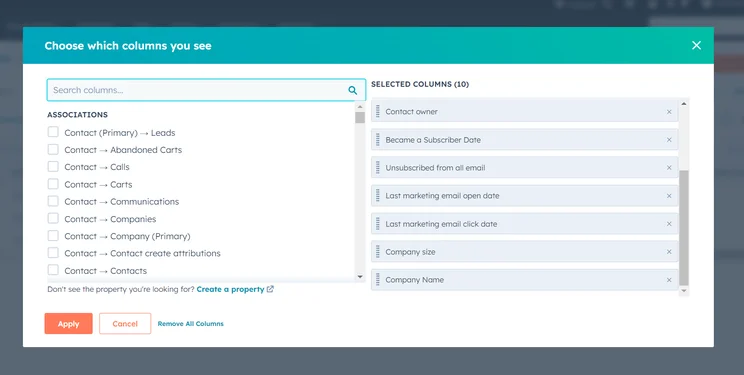
HubSpot had plenty of options for me to choose from when customizing my contacts table. Source: Tech.co testing
The main table could be edited by simply clicking on different cells and columns. However, you can also click on individual marketing contacts and adjust the information contained within their profile, which will then automatically appear in the table.
Managing contacts
What I loved about HubSpot is that if you make changes in one part of the interface, it’ll update the whole system, saving you potentially hours of corrective work.
As changes are logged in the change history of individual contacts, you’re also able to go back and retrace data. This is particularly useful in your sales hub — not having enough data on when a client was last contacted could lead to a disjointed conversation where your team looks unprepared.
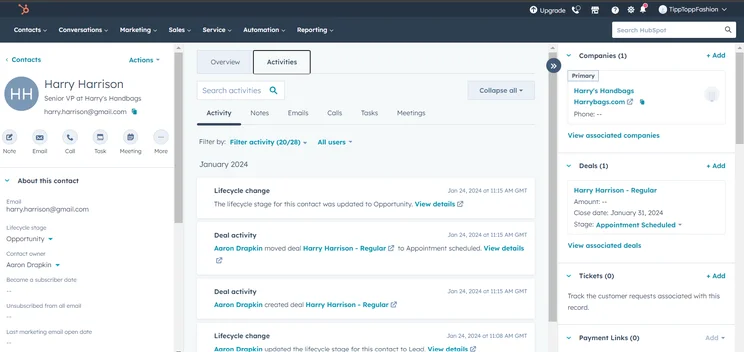
I could easily view the activity history of each contact in the system. Source: Tech.co testing
You can also take this one step further by integrating HubSpot with a voice over internet protocol (VoIP) provider, which automatically syncs data between your CRM and your VoIP to streamline the inbound and outbound communication process.
HubSpot’s free edition also includes a unified email box, a dashboard able to store up to 10 reports, and “custom properties,” that can be used to link specific types of data to marketing contacts, as well as ongoing deals sales.
Engaging with customers
HubSpot offers email marketing support on all plans and an email designer you can use to make your correspondence look professional and authentic.
HubSpot’s free plan allows users to send 2,000 branded emails per month to their marketing contacts. They will, however, include HubSpot branding, which is removed on paid plans.
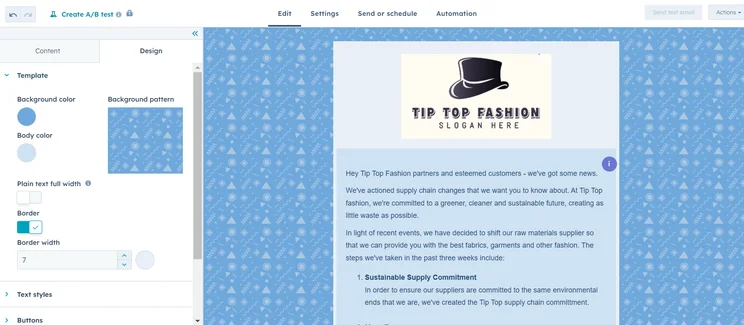
I was able to design and send emails to customers in HubSpot. Source: Tech.co testing
I’d recommend HubSpot for businesses wanting to level up their newsletter game. When I tested the email designer, I was able to make stylish content that showcased the latest information and deals on my site. However, I wasn’t able to access HubSpot’s AI content generation tool, as I was only using the free plan.
On the paid plans, you’re able to A/B test different emails, to work out what has the biggest impact, and a sequencing feature allows you to automate and re-run multi-stage outreach processes.
HubSpot’s paid plans also offers a powerful omnichannel marketing automation, which allows users to sync interactions across email, social media, SMS, and more, to create a single, unified dashboard to monitor customer experiences. This will save your business numerous hours of data collection.
You can also see who is interacting with what ads and the vital data needed to improve conversions/lead generation. HubSpot’s AI tool can “remix” your content for different social media platforms that you’ve decided to run campaigns on, saving you time from having to re-make different assets.
Managing sales leads
I was able to quickly pinpoint how to manage sales leads in HubSpot, because so much was already set up when I logged in, such as the “deal stage” column.
Likewise, I found the “My Deals” tab useful for separating deals I assigned to myself from those I assigned to members of my team.
This makes HubSpot a great CRM system for accountants, sales teams, and any business that wants clarity over where other members of their team have got to with clients.
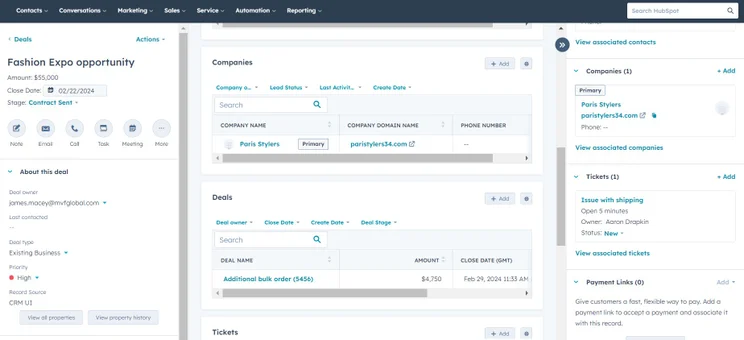
I was able to quickly view sales lead information with HubSpot. Source: Tech.co testing
I appreciated the highly integrated layout of HubSpot when I tested its sales lead features. I was able to create tickets in a marketing contact, but also add a deal when I’m using the service hub. This is a great setup for businesses that don’t want to trawl through countless menus to find the right section to input information.
Resolving service tickets
HubSpot manages customer support via a dedicated “tickets” area in the service menu, which is available on all plans.
HubSpot’s free tier provides one ticket pipeline, while the Professional plan supports up to 15. This makes the latter perfect for businesses managing ever-growing numbers of support requests from clients and/or customers.
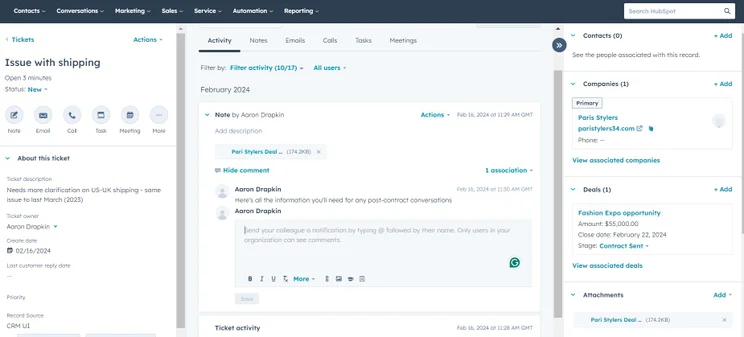
HubSpot’s plain interface made it easy for me to manage tickets and leave notes. Source: Tech.co testing
On HubSpot’s paid plans, you’ll get to send out feedback surveys, which your clients can use to help your business navigate relationships in the future.
You can also build your own knowledge base in HubSpot, where customers can go to solve their problems without having to contact you. This is a great addition for teams managing a high volume of support requests.
HubSpot Sales CRM
I also tested HubSpot’s Sales CRM platform, and found it to be one of the most customizable platforms I’ve tested. This is because I found it easy to complete actions such as pulling in data from contact lists, adding company information, and changing the structure of pipelines.
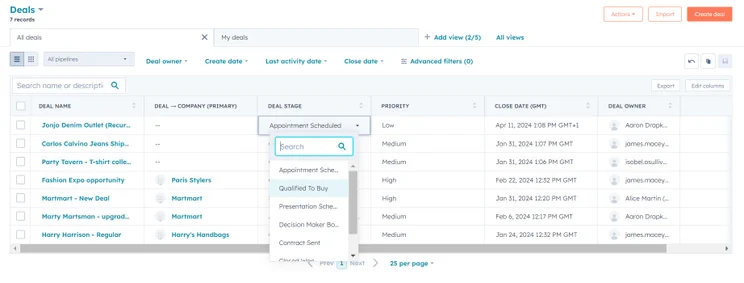
The sales pipeline in HubSpot is visually simple and easy to navigate, and I was able to easily change the details of columns. Source: Tech.co testing
HubSpot provides internal communication tools within its platform, making it easy for users to contact other team members, as well as a unified inbox, which helps organize customer correspondence.
There are also team KPIs and individual goal features to help gamify the sales process and make it more incentivizing for your employees.
HubSpot Plans: Features Reviewed
HubSpot has a huge range of plans geared towards slightly different parts of the customer relationship journey. Each plan has a “Starter”, “Professional”, and “Enterprise” version.You’re able to create bundles with the features of different plans to build a custom suite package. There’s also a CRM Suite plan which is like a super-charged version of the free plan — just as multi-purpose, but with more features.
Free plan
- Basic marketing, sales, and service features
- Integrations with email platforms
- No automation building
- No social media marketing or sales forecasting
Sales Hub
HubSpot’s Sales Hub starts from $9 per user, per month, with its most expensive plan being $150 per user, per month.
- Manage a small pipeline of leads and deals
- Starter plan includes task queues and automation
- Professional plan includes option to build a sales playbook
Marketing Hub
HubSpot’s Marketing Hub starts from $9 per user, per month, with its most expensive plan being $3,600 per user, per month.
- Branding on the free plan, removed on paid plan
- Customizable reporting tools
Service Hub
HubSpot’s Service Hub starts from $9 per user, per month, and its most expensive option is $150 per user, per month.
- Basic ticketing system on free plan
- Customer feedback surveys and payment processing options on paid plan
- Remove HubSpot branding on paid plan
Other HubSpot plans
Along with HubSpot’s more well-known sales, service, and marketing plans, the provider also has a Smart CRM plan starting from $45 per month.
There’s now also a Data plan (from $9 per user, per month) and a commerce plan (from $48 per month) for teams or businesses building online stores and merch platforms.
How Does HubSpot Compare With Competitors?
HubSpot’s free plan holds its own against many of the industry’s most popular paid plans.
However, as it’s still a free plan, businesses that really want to get the most out of the platform will be better off upgrading to a paid option.
- Better for customer support – Freshsales Suite: Freshsales offers 24-hour support, five days a week, via email, phone, and live chat on all of its plans, including its paid plan. HubSpot’s free plan, on the other hand, only grants users access to HubSpot’s community forum, which may not be as effective at handling complex queries.
- Better for features – Zoho CRM: Zoho offers more features overall than HubSpot, including an additional user on its free plan, offering three instead of HubSpot’s two. Plus, Zoho is cheaper on its paid tiers than HubSpot, making it a better choice for businesses that want to upgrade with more features later down the line.
Here are some other platforms to consider:
|
Plan
|
Price
Billed annually
|
Free trial
|
Users
|
Storage
|
Generative AI features
|
Try it
|
||
|---|---|---|---|---|---|---|---|---|
|
SPONSORED
 |
BEST OVERALL
 |
BEST VALUE
 |
 |
 |
||||
|
Salesforce Sales Cloud |
Zoho CRM |
HubSpot |
Freshsales Suite |
monday CRM |
||||
|
Starter Suite |
Professional |
Free |
Growth |
Pro |
||||
|
$25/user/month |
$23/user/month |
Free |
$9/user/month |
$28/user/month |
||||
|
30 days |
15 days |
|
21 days |
14 days |
||||
|
Unlimited |
Unlimited |
2 |
Unlimited |
Unlimited |
||||
|
File storage: 1GB |
User: 20MB |
Unlimited |
2GB |
100GB |
||||
|
|
|
|
|
|
||||
| Try Salesforce | Try Zoho | Try HubSpot | See CRM Deals | Try monday CRM |
How Did We Rate and Review HubSpot?
At Tech.co, we always conduct research into and test the software we’re writing about — and that includes HubSpot, as well as the other CRM tools that we review on our site.
Along with testing the product myself by inputting my own sales, marketing, and service-based data, we’ve also conducted thorough tests of the provider’s free and paid plans using a research framework made up of more than 50 different parameters.
They were categorized into several core assessment areas, including usability, help and support, customization, scalability, and team infrastructure tools. The scores achieved by providers in these areas subsequently determined their overall scores.
Although we have commercial partnerships with some of the providers we talk about on Tech.co, it’s our independent product research that ensures we’ll always remain editorially independent. Our research findings are the sole factor that determines our rankings, recommendations, reviews, and ratings.
HubSpot is a CRM platform that allows teams to generate actionable insights from their customer database. What’s more, AI assistant Breeze makes the platform easy to navigate, and tools such as a content generator and omnichannel marketing integration are well-positioned to save time for businesses on simple and repetitive tasks.
HubSpot is ideal for small businesses that want a software program that can grow with them.
However, HubSpot can get expensive on the later plans, so we’d recommend an option such as Zoho CRM as an alternative. But if you’ve got a bit of your budget to throw at a truly transformative software program, you can treat HubSpot as a long-term investment.
FAQs
Yes — HubSpot makes the process of setting up your contact base and using the tools contained within the interface very straightforward, because you can edit most things with a click of a button. The menus are also structured very simply, so it’s hard to get lost.
HubSpot’s free plan is limited when compared with the Professional and Enterprise plans. However, these more advanced plans don’t come cheap. While HubSpot is good for a small team, growing businesses will quickly find the free plan too restrictive to use.
Freshworks provides the best range of marketing, sales, and service CRM plans and is a solid alternative to HubSpot. This is because its plans are a little more affordable than HubSpot’s — especially when you consider the onboarding fee.


