

We may receive a commission from our partners if you click on a link to review or purchase a product or service. Click to Learn More
Workflows consist of repeatable task sequences designed to eliminate operational bottlenecks. The best workflow examples include project planning and kickoff, lead qualification, and marketing campaigns.
By eliminating bottlenecks and increasing accountability, workflows enable businesses to quickly scale operations to meet growing demand.
Modern workflows have gone beyond simple automation. With AI now built into platforms like monday.com’s AI Work Platform, teams are working alongside AI agents that can execute work, surface insights, and keep projects moving with minimal manual input.
-
Workflows improve team efficiency by establishing clear accountability and keeping complex or repetitive processes on track.
-
Automated workflows reduce manual errors and free up staff to focus on higher-value work.
-
AI agents on monday.com’s AI Work Platform go beyond automation; executing work, surfacing insights, and keeping projects moving alongside your team.
-
With solutions like monday CRM, sales teams can automate lead qualification, follow-ups, and pipeline management end-to-end.
-
All-in-one platforms eliminate the overhead of managing disconnected tools, keeping your data, workflows, and agents in one place.
Key Project Management Workflow Examples
Project management workflows powered by AI keep complex work on track by using AI agents to execute tasks, surface project risks, and automate tracking alongside your team.
1. Project planning and kickoff
A typical kickoff workflow looks like this:
- Brief or requirements submitted
- Project scope defined and approved
- Tasks created and assigned
- Timelines and dependencies set
- Kickoff communicated to stakeholders
monday agents can take a project brief and automatically generate a task structure, then assign work based on team capacity, and flag missing information before anyone on your team starts working.
2. Project status and reporting
A reporting workflow typically involves:
- Collecting status updates from team members
- Identifying blockers or at-risk tasks
- Compiling updates into a report
- Sharing with stakeholders
A reporting agent on the monday AI Work Platform can pull live data from your boards, generate relevant updates, and identify risks before they become blockers.
Key Sales Workflow Examples
Automated sales workflows qualify leads, nurture prospects, and accelerate deal closures by reducing manual tracking and administrative tasks.
1. Lead qualification workflow
Sales teams use lead qualification to identify their most viable prospects.
- Customer submits form
- Lead scored based on existing criteria
- Marketing team sends welcome email
- Sales team adds lead to database
- Sales team follows up with qualified leads
Automating this process free ups time to focus on pursuing qualified leads, rather than sifting through ill-fitting ones.
Lead scoring assigns each lead a numeric value based on different factors, including job title, company size, and engagement signals.
For example, a software-as-a-service (SaaS) business might score a senior leader at a mid-sized tech company highly.
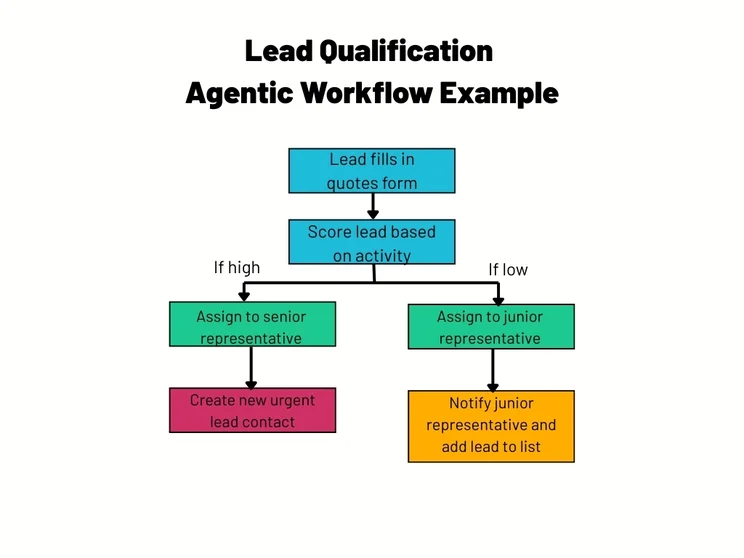
An example of an automated lead qualification workflow. Source: Tech.co
How to automate lead qualification workflows
Use CRM software to automate lead qualification workflows. For example, monday CRM centralizes all your leads in the Leads board. Built-in AI automatically scores and routes leads to the right rep based on territory and other criteria.
monday CRM’s AI blocks allow users to implement quick AI automations, like scoring incoming leads.
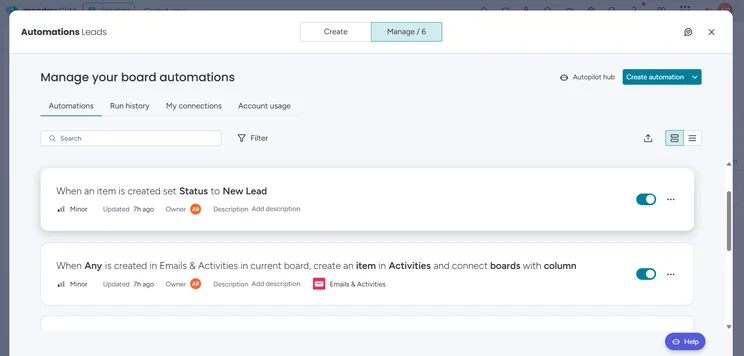
monday CRM lets users manage automations. Source: Tech.co
2. Post-meeting workflow
Automating post-meeting follow-ups prevents sales deals from stalling by consistently capturing next steps. According to industry data, 80% of sales requires at least five follow-up interactions before a deal is closed, but manually writing each email is time-consuming.
monday CRM’s AI Notetaker transcribes meetings in real time, generating summaries, transcripts, and follow-up action items directly in your workspace, so next steps are captured automatically, and nothing falls through the cracks.
Learn more about how to automate SDR workflows with AI.
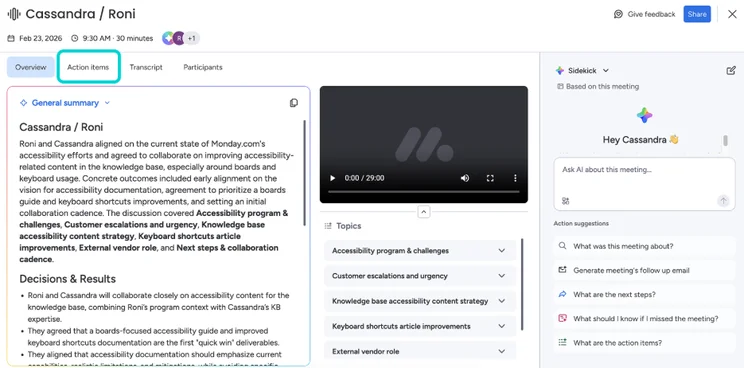
AI Notetaker summarizes meetings and generates “next steps” to streamline post-call workflows. Source: monday.com
Key Marketing Workflow Examples
Marketing teams juggle multiple campaigns, stakeholders, and deadlines. A structured workflow keeps everything moving, and with AI agents handling execution, teams can focus on strategy rather than coordination.
1. Marketing campaign workflows
Marketing teams use workflows to execute campaigns, from planning through to deployment. This typically involves:
- Defining aims and deliverables
- Resourcing
- Producing content
- Reviewing
- Launching
On the monday AI Work Platform, agents take on the operational load at each stage, researching competitors, drafting briefs, and tracking launch readiness across teams.
The Competitor Research agent, for example, tracks key competitors and consolidates signals into a structured weekly briefing.
2. Email and campaign workflows
Comprising triggers, conditional logic, actions, delays, and segmentation, email workflows have high potential for automation.
To set up a “welcome” sequence, segment your audience, then structure your sequence of emails. Once this framework is established, start building the content.
monday campaigns, available as an add-on for monday CRM, provides detailed metrics to evaluate performance, including open rate, click-through rate (CTR), and more. Once you’ve picked your KPIs, you can measure how successful your campaign has been.
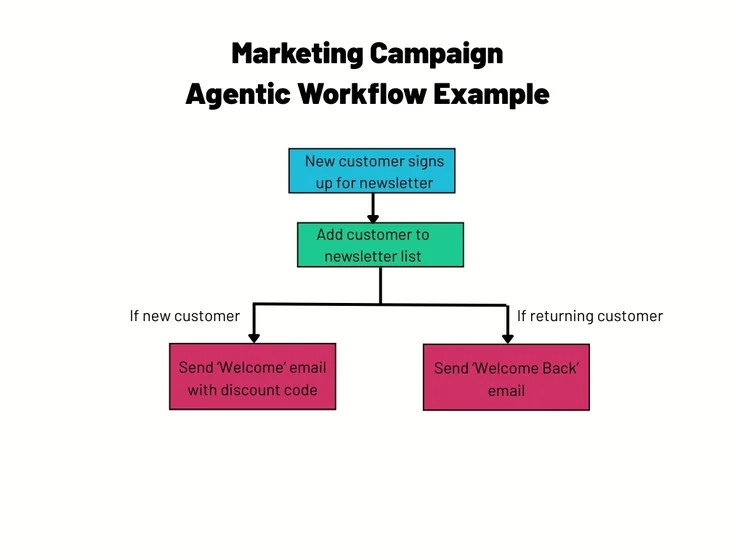
“Welcome” emails can be a key brand touchpoint for your business. Source: Tech.co
All-in-One vs Connected Tools for Workflow Automation
Managing workflows across multiple disconnected tools creates issues, such as siloed data, broken integrations, and high maintenance.
On the other hand, all-in-one platforms centralize your data, workflows, and agents.
monday.com’s AI Work Platform connects to over 200 tools, including Gmail, Salesforce, and Slack via two-way sync.
In addition, agents are built in to your boards, so they can make contextual decisions on your behalf.
Modern automated workflows put people and AI agents on the same team to get things done more quickly and efficiently.
Integrated and AI-native platforms, such as monday.com’s AI Work Platform, give teams the tools to streamline a sales pipeline, coordinate a marketing campaign, or keep complex projects on track.
FAQs
In general, setting up an automated workflow can take anywhere from a few minutes to several days, depending on how complex the workflow is. Additionally, you need to factor in a familiarity period, which can vary based on how comfortable team members are with automated processes.
The best safeguards are clear goal-setting, clean data, and human-in-the-loop checkpoints at critical stages. Regularly auditing agent decisions and input/output logs helps catch issues early.
monday.com’s AI Work Platform also includes built-in monitoring tools so teams can identify and resolve problems before they impact wider operations.
Multi-agent orchestration handles this. A lead agent coordinates specialist agents, delegating tasks and sequencing outputs so they feed into one another cleanly.
On monday.com’s AI Work Platform, teams can manage multiple workflows across boards and departments from a single place.
An agentic workflow is made up of an LLM, memory, planning and orchestration, tools and integrations, prompt engineering, and feedback mechanisms. Together, these components allow agents to reason, act, and improve over time.
Agents should only ever have access to the data they need to complete a specific task, following the principle of least privilege.
monday.com’s AI Work Platform supports this with data encryption, granular permissions, and compliance with SOC 2 Type II and ISO certifications, so sensitive data stays protected throughout.


