

We may receive a commission from our partners if you click on a link to review or purchase a product or service. Click to Learn More
Audit your process, customize stages based on your workflow, and iterate as necessary to build a high-performing sales pipeline.
A sales pipeline is a visual roadmap that tracks a lead from initial contact to closed deal, allowing businesses to organize leads and predict revenue. Sales pipelines reveal bottlenecks, prioritize high-value leads, and give your team a repeatable process for closing.
Sales pipelines break down when teams skip the hard parts. With tools like monday CRM, you can build robust pipelines to accelerate the sales process.
- Audit before you build: Mapping your last five deals reveals the natural stages your pipeline should reflect.
- Customize your stages: A default template is a starting point, not a finished pipeline. Stages like prospecting and follow-up need to match your real sales motion.
- Automate to stay consistent: The biggest pipeline mistakes, like moving too fast, going quiet, and ignoring at-risk deals, can be corrected with the right automations.
- Analyze wins and losses: Deal data tells you where your pipeline leaks. Use it to forecast smarter, not just track outcomes.
- Know who you’re selling to: A pipeline is only as good as the leads in it. A clear ideal customer profile is what separates a productive pipeline from a busy one.
What Is a Sales Pipeline and Why Should You Build One?
A sales pipeline visually tracks leads from initial contact to closed deal, enabling teams to identify bottlenecks, prioritize high-value opportunities, and accurately forecast revenue.
Pipeline management surfaces problems, like a lead stuck at the same stage for two weeks, a rep skipping follow-ups, or a deal size that’s quietly shrinking.
Knowing how to build a strong sales pipeline has several big benefits:
- Surface obstacles quickly: See where a lead is stuck before the trail goes cold.
- Strengthen client relationships: Every step in a sales pipeline gives employees a chance to connect with their client while building trust along the way.
- Structured work process: A defined sales pipeline means everyone follows the same processes.
- Increase deal visibility: Quickly identify which deals offer the most value and should be prioritized.
How To Build a Strong Sales Pipeline: Step-by-Step Guide
To build a sales pipeline, you’ll need to:
- Audit your sales journey
- Deploy a sales pipeline board template
- Customize your pipeline stages
- Add lead data
- Set up automations
- Analyze deals
Your CRM can support a sales pipeline that fits your business needs. I’ll use monday CRM as an example in the steps below, but you’ll be able to build a similar pipeline with other software alternatives as well.
Step 1. Audit your sales journey
Audit your five most recent closed deals to map the natural stages, common interactions, and typical buyer milestones of your actual sales motion.
Then, see if you can group these interactions into six or seven broad stages: the initial prospecting, your proposal, and further negotiation.
Doing this will give you insight into how your specific sales pipeline functions.
Step 2. Deploy a sales pipeline board template
The right template will automatically create a list of groups through which you can move items. Each lead becomes an item, and each group represents a stage of your sales pipeline.
monday CRM offers a Comprehensive Sales Pipeline Management template that covers the full pipeline in four linked boards:
- Leads Board: Track potential customers through early stages, with last-interaction dates to keep follow-ups on schedule.
- Contacts Board: Consolidate contact details, linked accounts, and associated deal values in one view.
- Accounts Board: Organize company-level information and links contacts and deals for a complete account picture.
- Deals Board: Track each opportunity by stage, owner, value, and expected close date, with close probability and forecast value calculated automatically.
The template also ships with over a dozen pre-built dashboards, covering monthly and annual targets, pipeline conversion rates, forecasted revenue by stage, and deal progress by rep.
Built-in automations handle the basics: new leads are automatically assigned a status, last-interaction dates update whenever there’s activity, and reps are notified when emails are opened or received.
If you need more data, monday agents can handle initial outreach, qualify leads, coordinate schedules, and personalize follow-ups, so your reps focus on deals that are ready to move.
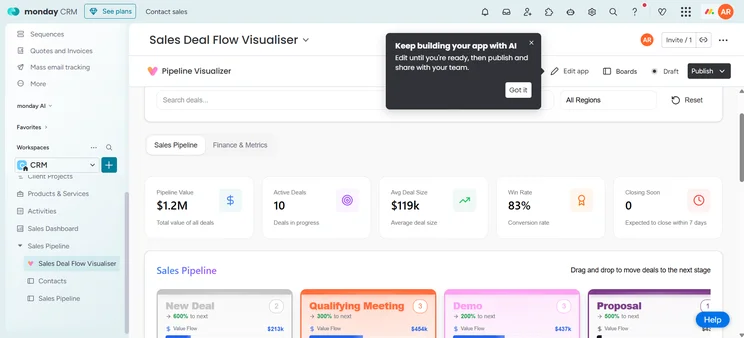
monday CRM’s Sales Deal Flow Visualizer allows users to track their entire sales pipeline from a single board. Source: Tech.co testing
Step 3. Customize your pipeline stages
Customize your pipeline based on the stages of your sales process, adding them to the pipeline template in your CRM.
Most teams should consider adding these two stages:
- Prospecting: Pre-deal work to convert a contact into a qualified lead.
- Define exit criteria: Define the required milestones for moving a prospect forward, such as a response.
- Follow-up: Post-close communication to maintain the relationship, build trust, and surface upsell opportunities.
Add new stages to your monday CRM pipeline by using monday vibe. Simply describe the stage you want in plain language, and it builds it into your pipeline without any technical setup.

monday vibe allows you to add new pipeline stages, like “Follow Up,” just by describing what you need. Source: Tech.co testing
Step 4. Add lead data
Test your pipeline by creating an item or profile for a lead. Items can be dragged and dropped as deals progress.
If the process makes sense, add more leads. You’ll be able to track and manage them all in one place, so deals don’t go cold because they fell off the radar.
Log the following lead management information:
- Name
- Sales rep
- Region
- Level of priority
- Deal size
- Forecasted revenue
For richer lead data, monday CRM’s AI Notetaker joins your calls on Zoom, Google Meet, or Microsoft Teams and handles the note-taking automatically, transcribing in real time, identifying speakers, and generating a summary with action items after the call.
Recordings are searchable by keyword, so you can pull up any past conversation to check what a prospect said about budget, timeline, or requirements. Action items detected in the call can be pushed directly to your boards, keeping your pipeline updated without manual entry.
Step 5. Set up automations
Set up automations to avoid lead leaks. With monday CRM’s no-code automation builder, you set the trigger and the action, and the pipeline handles the follow-through.
Common automations include:
- Three-day follow-up reminder, so no lead goes quiet by accident
- Deal handoffs to legal or finance when a deal reaches the right stage
- Lead scoring updates, keeping your priority list accurate as deals develop
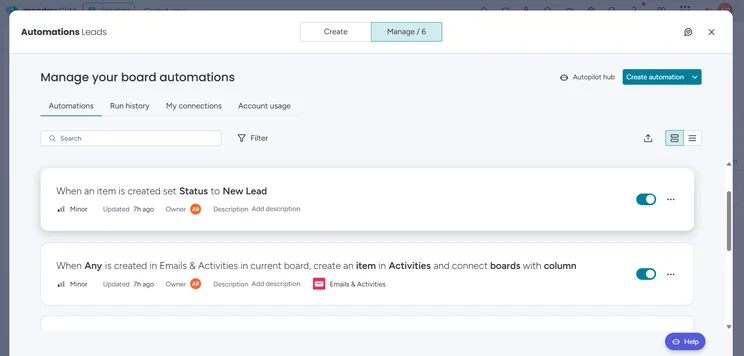
Get started with smart AI-powered suggestions for automations in monday CRM. Source: Tech.co testing
Step 6. Analyze deals
Regularly analyzing your pipeline data tells you where deals stall, which reps need support, and which patterns separate wins from losses.
Key metrics to track:
- Conversion rate: A declining rate signals a structural issue somewhere in your pipeline.
- Age of leads: Stalling deals could indicate a bottleneck or drop in lead quality.
- Pipeline coverage: The total number of active deals should stay relatively stable. Sharp drops or spikes are worth investigating.
monday CRM surfaces this data by analyzing your won and lost deals, so post-deal reviews become a habit rather than a manual exercise.
AI forecasting helps teams look ahead using historical pipeline data to project future revenue and flag at-risk deals.
5 Common Mistakes In Sales Pipeline Development (And How to Fix Them)
Even well-structured pipelines break down in predictable ways. Here are five mistakes to watch for and how to fix them.
| Problem | Solution |
|---|---|
| Misreading your ICP | If conversion rates are low across the board, the issue is often who’s entering the pipeline. Revisit your ideal customer profile and tighten your qualifying criteria. |
| Poor lead pacing | Moving too fast puts pressure on leads before they’re ready; too slow, and momentum dies. Use automations to set consistent follow-up intervals so outreach is timely without relying on a rep to remember. |
| Unreliable data | Missing fields, outdated contacts, and inconsistent logging make forecasting guesswork. Establish clear data standards from the start and use monday CRM’s AI blocks to auto-populate fields and flag gaps. |
| Ignoring deal signals | A lead that’s gone quiet or changed their engagement pattern is telling you something. If something feels off, act on it directly rather than letting the deal age out. |
| Overloading reps without automation | When reps are managing too many deals manually, follow-ups slip, and deals stall. Automations for handoffs, reminders, and lead scoring take the administrative load off your team so they can focus on selling. |
Tips for Making Sure Your Sales Pipeline Converts
To keep your sales pipeline converting, continuously evaluate and iterate it over time.
Define your ideal customer
- Identify a clear customer profile, so that your team can qualify leads faster and more consistently.
- Prioritize quality over quantity.
Manage active leads at all stages
- Keep adding new leads continuously.
- Deals drop out at every stage, and you don’t want a dry pipeline because you stopped prospecting while closing.
Check in with your direct reports
- A pipeline creates structure, but it doesn’t replace communication.
- Regular check-ins surface misunderstandings before they affect deals.
Use your data
- The benefit of using a CRM is that it tracks average deal size, forecasted revenue, and conversion trends out of the box.
- The data tells you if deal sizes are shrinking or cycle times are growing, so you can adjust accordingly.
Track email engagement
- Plug-ins for Gmail or Outlook can show you when a lead has opened your message or clicked a link.
Integrate your calendar
- Connecting your pipeline to Google Calendar or a similar tool helps reps stay on top of follow-ups without switching between platforms.
To build a better sales pipeline, audit your sales journey, deploy a sales pipeline board template, customize your stages, plug in data, set up relevant automations, and start analyzing your deals.
monday CRM gives you the template structure, dashboards, and automation tools to get a pipeline running quickly, with AI capabilities built in throughout: agents that handle early-stage outreach and lead qualification, AI Notetaker to capture and action what comes out of customer calls, and analytics that surface pipeline trends before they become problems.
FAQs
This depends on your pipeline management process. Your pipeline might include a stage dedicated to these potential buyers or it might start with the initial contact with a lead. Iteration is your friend: if you’re in doubt, try both options and pick the most efficient process.
Lead qualification processes can vary, but many salespeople will use a specific framework. One option, BANT (budget, authority, need, timeline), gives you a quick checklist for assessing a lead’s financial interest and deal urgency.
Common red flags include a lack of engagement, a lack of interest leading to slow movement, and a poor fit with the ideal customer profile.


