

We may receive a commission from our partners if you click on a link to review or purchase a product or service. Click to Learn More
As far as CRM platforms go, we found that monday CRM is one of the better options out there, providing users with an intuitive, color-coordinated interface that is easy to use. In fact, we found that monday CRM is the best CRM for beginners, thanks to its selection of pre-made templates that can get you started right away.
We also found monday CRM to be one of the most customizable options in our research, providing custom objects throughout the system to hold whatever data you need them to. It’s also equipped with a wide range of easy-to-use reporting tools, so finding out how your team is performing is quick and straightforward. All that for the starting price of only $12 per user, per month makes monday CRM one of our top picks for businesses.
In this review, we’ll cover everything about monday CRM, from the pricing and features to support and security, so you can make the right decision for your business when it comes to customer relationship management.
- Price: monday CRM pricing starts at $12 per user, per month, with more advanced plans costing $17 per user, per month, and $28 per user, per month
- Free options: monday CRM does not have a free plan, but there is a 14-day free trial to test it out before you buy. There is a free version of the monday work management platform, but that is a project management tool, not a CRM.
- Ease of use: monday CRM was the easiest to use CRM in our research, offering an intuitive, color-coordinated interface that provides simple navigation tools.
- Customizability: monday CRM is very customizable, with users able to create custom objects throughout the platform. Custom dashboards for reporting are also available.
- Competitors: monday CRM is easier to use than Salesforce, more customizable than Freshsales, and provides a slightly lower starting price than Zoho CRM and Pipedrive.
Getting Started with monday CRM
monday CRM’s process is very streamlined, especially compared to rivals like Salesmate. To get started with the platform, all you need to do is follow these steps:
- Choose your board – You start off by choosing between a variety of templates, or “boards,” which are shown in the screenshot above. Each measures a different set of business metrics, from active leads to contact forms.
- Set up automation – You’ll be able to add codeless automation capabilities right into these boards, so your processes will already be saving you time.
- Customize the platform – Once you’re set up with your template, you can customize even more by dragging and dropping dashboards, lists, and other analytic and productivity tools into and around your template, helping you create the ultimate central hub for your business.
- Create custom apps – You can even create and package custom apps along with monday CRM, although that system is currently in beta, so there might be a few glitches early on.
monday CRM

In Short
-
Pros
- 14-day free trial
- Simple and modern layout with basic color-coded system
- Custom fields across platform, including customizable dashboards
- Many reports: deals, activity, recurring revenue, and more
-
Cons
- Workflow automations are capped monthly
- No centralized inbox to improve team management
- No phone support on any plan, but live chat is available
Pricing
-
 Basic: $12/user/month
-
Standard: $17/user/month
-
Pro: $28/user/month
Images
How Much Does monday CRM Cost?
monday CRM offers three different pricing plans: Basic, Standard, and Pro. Each one gives users access to unlimited boards, over 20 column types, embedded forms, the mobile app for Android and iOS devices, and the Kanban visualization that monday CRM is known for.
Like most CRM platforms, monday CRM uses a per-user pricing model, so you’ll have to pay the monthly subscription fee for each user on the system. It’s also worth noting that monday CRM requires you to have at least three users on all paid plans, so the minimum monthly payment will be $36 per month.
Here’s a quick look at all three pricing plans, as well as the Ultimate plan, which is aimed at larger businesses with custom pricing.
|
Plan
|
Price
Billed annually
|
Users
|
Storage
|
Lead scoring
|
Custom automation builder
|
Activity timeline
|
|
|---|---|---|---|---|---|---|---|
 |
|
|
|
||||
|
Basic |
Standard |
Pro |
Ultimate |
||||
|
$12/user/month |
$17/user/month |
$28/user/month |
Custom |
||||
|
Unlimited |
Unlimited |
Unlimited |
Unlimited |
||||
|
5GB |
20GB |
100GB |
1000GB |
||||
|
|
|
|
|
||||
|
|
250 actions/month |
25,000 actions/month |
25,000 actions/month |
||||
|
1 week |
6 months |
1 year |
5 years |
Basic – $12 per user, per month
The Basic plan starts at $12 per user, per month, and is best for small teams that need a simple task-management solution that they can all access. Try doing too much, however, and you’ll bump up against its limitations, like the maximum five columns per board, the 1,000 active contacts and deals, and the lack of quoting and invoicing features.
This plan does offer lead-capturing functionality through web forms, as well as a centralized comms hub and access to the helpful monday CRM mobile app.
Standard – $17 per user, per month
Starting at $17 per user per month, the Standard plan offers more customizability, thanks to additional views, a 5-board dashboard, and support for automations and integrations. Guest access is another big perk, as it allows teams to collaborate externally.
Most notably, however, is that this plan unlocks some of the AI features from the CRM, including AI writing and AI columns functionality, although you’ll have to pay for more expensive plans to get access to the premium features.
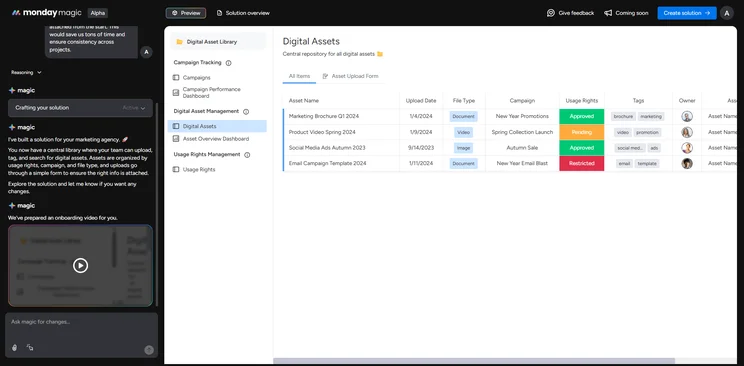
The monday magic AI tool creates new boards or solutions for monday.com users when prompted. Source: Tech.co testing
Pro – $28 per user, per month
Starting at $28 per user per month, Pro is for large operations that can’t afford to be as tight-knit as they once were. New tools like time tracking and private boards make sense for a sprawling team, as they’re designed to help managers keep an eye on team members who might otherwise slip through the cracks.
This plan unlocks premium AI features too, like AI web search and research and the SDR agent that can qualify leads for you instantly. Plus, storage, dashboards, automations, and integrations are all expanded far more than ever in order to support a heavier total workload.
Ultimate – Custom
In addition to these three plans, monday CRM offers an enterprise-level plan for 40+ users, now called the Ultimate plan, which includes a wide range of additional features that can be necessary for specific businesses.
Add-ons like HIPAA compliance, audit logs, and tailored onboarding can be incredibly helpful, but only if you’re a larger company that can afford the presumably larger cost. To get specific pricing, you’ll have to contact monday CRM directly.
Does monday CRM offer a free plan?
monday CRM does not currently offer a permanently free option for businesses, as the service discontinued its Individual CRM plan in 2022.
However, all of monday CRM’s CRM plans are available with a 14-day free trial. If you’re a student or a nonprofit, you may be able to access a free or discounted version, however, “after filling out the relevant forms,” according to monday CRM’s FAQ section.
In a November 2025 update, monday CRM made it possible to control automations and workflows across your entire account with the new Autopilot hub. This new tab features helpful tools like automation health analysis, usage reporting, workflow lists, and connections information, so you can stay fully informed when it comes to the automation in your system.
Core monday CRM Features
monday CRM is all about what you can add to your boards, and the software offers some incredibly helpful features that will make tracking your business easier than ever.
Workload
With the Workload board, monday CRM will let users track and manage employee assignments in real time. The simple, color-coordinated dashboard displays each worker in a list, along with their projects in a row with them. You can see in a simple snapshot exactly who has finished what, who is currently working on a project, and which assignments are yet to begin.
The Workload board also features daily, weekly, monthly, and yearly calendars, so you can get a clear picture of what’s going on today or even next year. Plus, like competitors like HubSpot, Zoho CRM, and Sugar CRM, the boast boasts an easy drag-and-drop functionality, allowing you to adjust deadlines and assignments with ease to avoid any miscommunications.
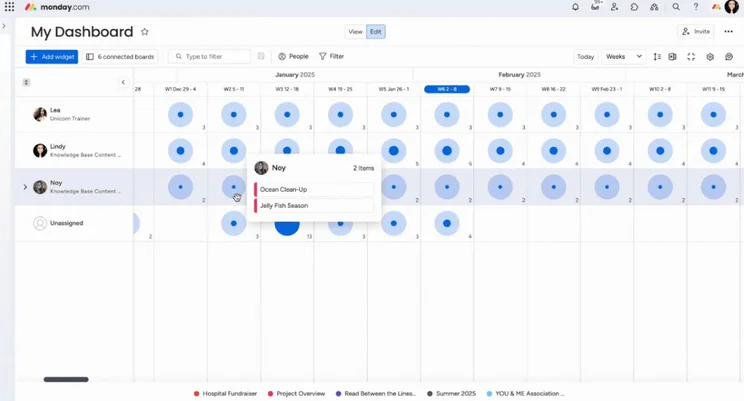
The Workload board allows users to view the allocation of resources in a comprehensive and intuitive way. Source: monday.com
Sales operations
monday CRM offers a number of different user-friendly templates to help you view and manage your sales pipeline. Its CRM template (pictured below) stores data from new and converted leads and lets you track your sales throughout each stage of the pipeline.
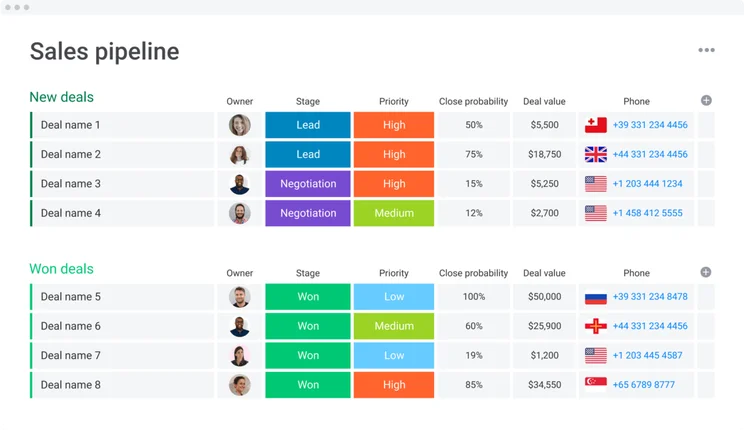
monday CRM’s sales pipeline templates lets you store important customer data, and track activity as the lead journey progresses. Source: monday CRM
monday CRM also includes templates that let you track supporting sales information and customer projects. These handy boards make it easy for users to monitor the before and after-purchase experience, and like monday’s workload board, the templates are highly amendable and can be customized to cater directly to your business needs.
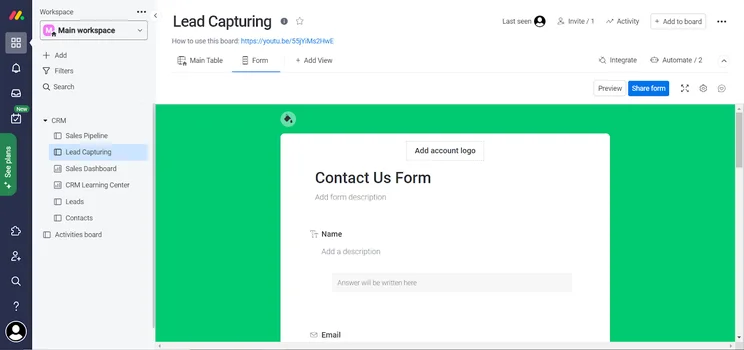
Web form lead capturing with monday CRM. Source: Tech.co testing
Timeline
If you’re looking for an even more detailed view of what projects are due in a given timeframe, the Timeline board is built for you. This allows you to specifically plan out exactly when deliverables should be met, and who should be delivering them. If Workload is the project-based board, Timeline is the chronology-based board, giving you specific timings for when everything will be developed.
monday CRM’s Timeline Widget also works with its Timeline Column, to give users a visual representation of their timelines and deadlines at a glance. Like everything else in monday, its Timeline feature is completely customizable too; you’ll be able to adjust options like week numbers, groupings, and color coding in a couple of clicks.
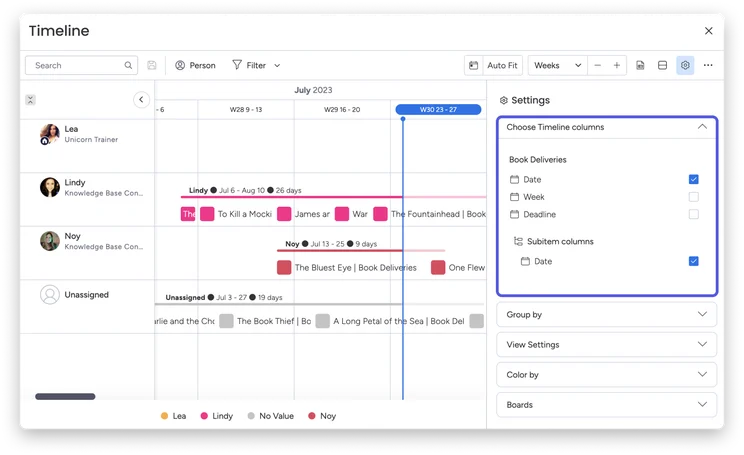
monday CRM lets you edit your timeline by date, deadline, type of work, and more. Source: monday CRM
Charts
Analytical reporting is key when it comes to taking full advantage of CRM software, and monday CRM passes with flying colors… literally. The color-coordinated graphs can keep you posted on project progress, budget numbers, working tickets, and even time tracking for employees. And they look pretty good, too!
You’re able to choose between a wide selection of chart types as well, including bar charts if you’re comparing data across different categories, line charts to visualize trends over time, or pie charts if you want to track metrics like different portions and percentages. Users can customize the formatting, colors, filters, and labels on the charts, and even add interactive elements that drill down into the data even further.
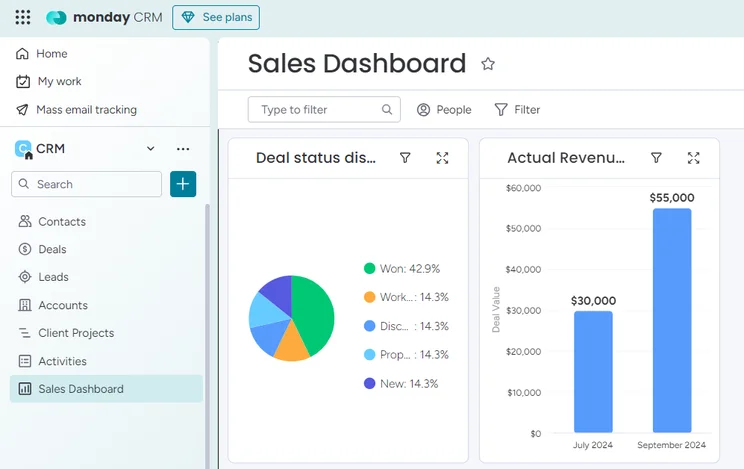
monday lets you view your sales data through a wide variety of interactive, customizable charts. Source: Tech.co testing
AI features
As CRM platforms continue to streamline key processes with artificial intelligence, monday CRM has recently rolled out a crop of time-saving AI features. The software’s automations can now be enhanced with AI, allowing users to categorize data, extract information, and summarize text in a few clicks.
monday CRM’s also boasts AI templates, enabling users to choose from its pre-selected templates to automatically use AI with several columns that flow together. You’ll be able to find templates tailored to your industry, or project type, and they’re easy to access through the platform’s left side menu.
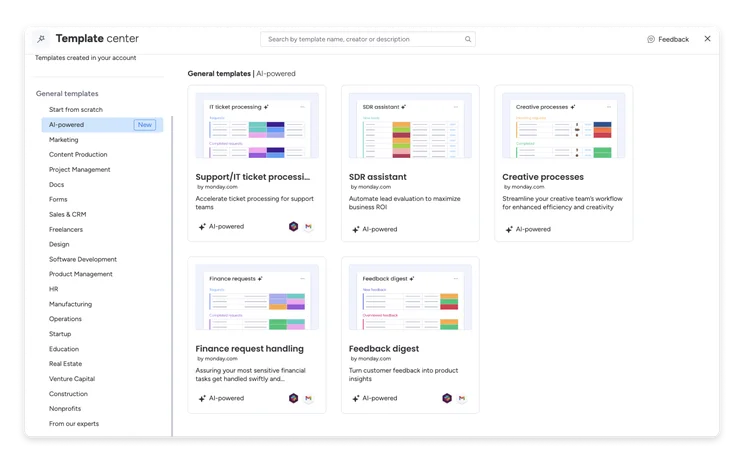
monday CRM’s AI templates give you a jump start when you’re creating new boards. Source: monday CRM
monday CRM even lets you determine the sentiment of customer feedback, emails, and other text data, using its Sentiment Analysis tool. The unique feature helps teams “read between the lines” to gain deeper insights from customer interactions, helping them to save the time and effort associated with analyzing text manually.
With other CRM platforms like Zoho CRM and FreshSales lacking these advanced AI capabilities, our research found that monday is currently the solution out there for businesses wanting to streamline sales processes with artificial intelligence.
Check out our guide to the best CRM for AI to learn more
Integrations
All-in-one solutions just make life easier for everyone, particularly in the business world.
monday CRM is fully aware of this, which is why it offers a wide range of integrations with popular business software. Slack, Gmail, HubSpot, Mailchimp, and more than 50 other services can be easily integrated into the CRM, so you can truly control everything from one hub.
monday’s variety of third-party integrations makes the solution a safe bet for small businesses that are interested in connecting the service with well-known names. However, if you manage complex CRM processes and need a piece of software that’s able to integrate with specific systems, we’d recommend using Salesforce CRM, as the provider’s AppExchange gives you a choice of over 3,000 apps.
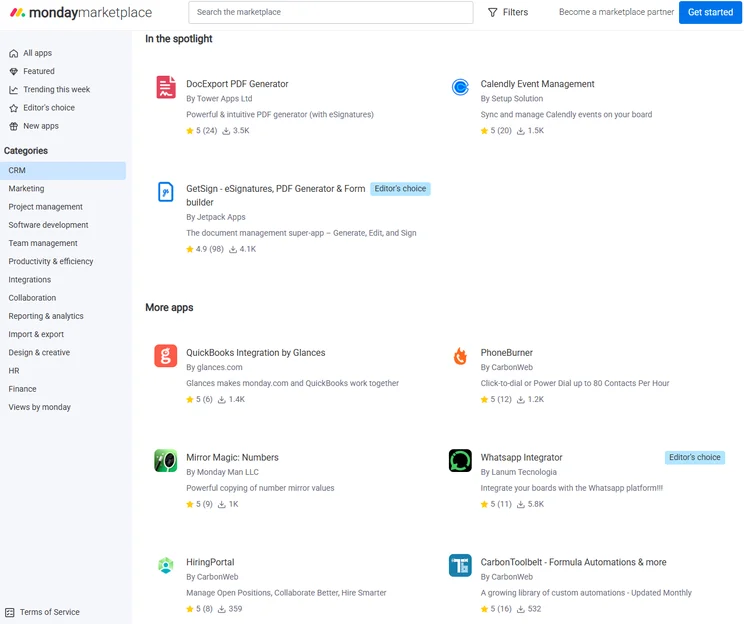
monday CRM can integrate with a variety of third party apps for a more complete solution. Source: Tech.co testing
Setup and Customer Support
monday CRM is all about providing you with the tools you need to figure things out yourself. The provider’s help page is filled to the rafters with community forums, webinar links, video tutorials, frequently asked question lists, and step-by-step guides for users to take customer support into their own hands.
Unfortunately, it doesn’t look like monday CRM is too easy to reach over the phone, though. No live chat option appears to be readily available on the website, and every “Contact” button available leads to a variety of embedded forms. Still, these forms lead to eventual communication with support representatives, and the wealth of online resources definitely makes up for the lack of readily available live options.
If you’re looking for some extra support while resolving queries, we’d recommend using a platform like Zoho Books or Salesforce instead, as both CRM systems offer useful AI chatbots that are accessible 24/7.
What’s the Difference Between monday CRM and monday work management?
It’s important to remember that monday.com offers a lot of different business software, and understanding the difference between them can help you avoid any confusion when deciding on what platform to use.
For starters, monday CRM is a customer relationship management software, while the monday work management platform is a project management tool. Both are based on the Work OS interface from monday.com, and they both allow teams to better collaborate and automate business operations.
However, there are some notable differences between the two platforms that businesses need to understand before moving forward.
monday CRM
- Platform: Customer relationship management
- Purpose: Prioritizes external communication with potential clients
- Best for: Sales, customer service, and marketing teams
- Key features: Sales pipelines, lead qualification, customer onboarding
- Price: Starts at $12 per user, per month
monday work management
- Platform: Project management
- Purpose: Prioritizes internal communication with team members
- Best for: Project management, HR, and operations teams
- Key features: Project boards, Gantt charts, timeline views
- Price: Starts at $9 per user, per month
Check out our monday work management review to learn more
monday CRM Alternatives
In our research, we found that monday CRM is in the top three when it comes to CRM options for small businesses. Not only does its shallow learning curve make it a safe bet for beginners, but its ample customization options also lend itself well to sales businesses with complex workflows.
However, there are some other quality alternatives out there that might fit your needs better, including Zoho CRM and Freshsales Suite. Here’s why:
|
Plan
|
Price
Billed annually
|
Free trial
|
Users
|
Storage
|
Generative AI features
|
Try it
|
||
|---|---|---|---|---|---|---|---|---|
|
SPONSORED
 |
BEST OVERALL
 |
BEST VALUE
 |
 |
 |
||||
|
Salesforce Sales Cloud |
Zoho CRM |
HubSpot |
Freshsales Suite |
monday CRM |
||||
|
Starter Suite |
Professional |
Free |
Growth |
Pro |
||||
|
$25/user/month |
$23/user/month |
Free |
$9/user/month |
$28/user/month |
||||
|
30 days |
15 days |
|
21 days |
14 days |
||||
|
Unlimited |
Unlimited |
2 |
Unlimited |
Unlimited |
||||
|
File storage: 1GB |
User: 20MB |
Unlimited |
2GB |
100GB |
||||
|
|
|
|
|
|
||||
| Try Salesforce | Try Zoho | Try HubSpot | See CRM Deals | Try monday CRM |
monday CRM vs Zoho CRM
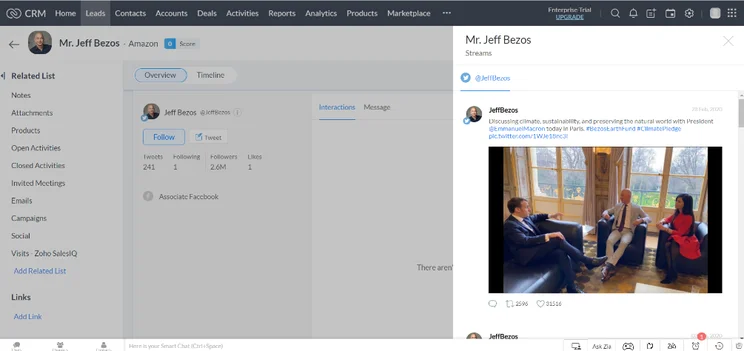
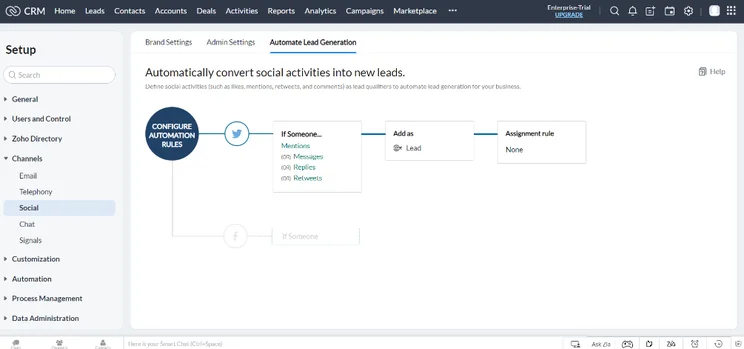
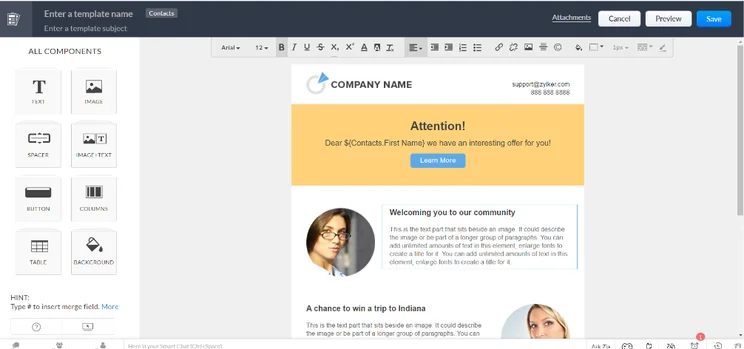
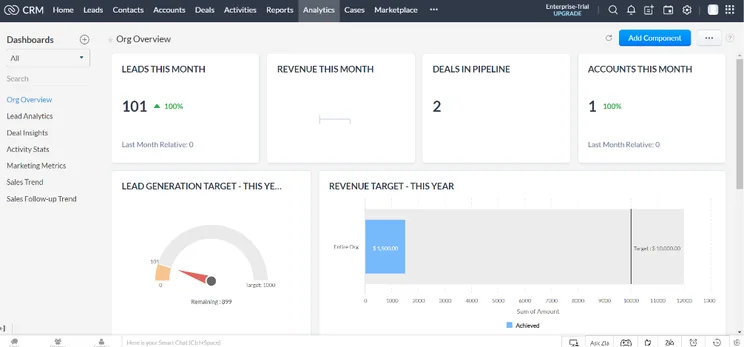
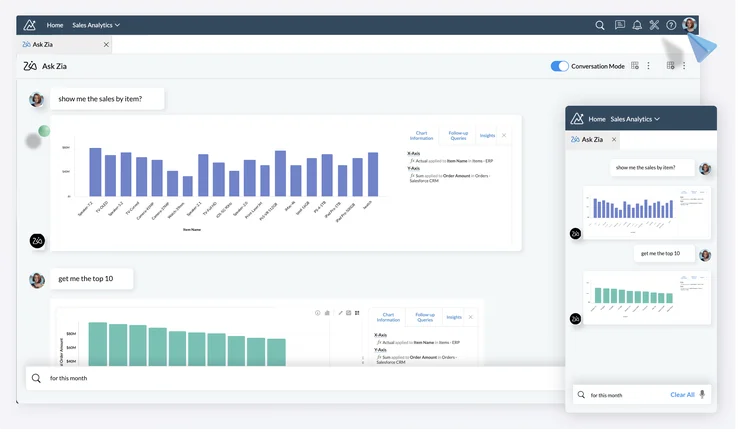
Top to bottom, Zoho CRM is just the best CRM for small businesses. With prices starting from $14 per user, per month, it isn’t too expensive, it’s easy to use, and it offers features covering sales, service, and marketing, which puts it far ahead of many options out there.
Compared to monday CRM, Zoho CRM has a bit more standardized experience. It’s obviously not as customizable as monday.com, but it offers some useful sales features monday lacks, including in-house campaign management. The platform also connects seamlessly with Zoho’s suite of apps – including Zoho Bookings, Zoho Forms, Zoho Campaigns, to name a few. Plus, with more support options, you can get used to the platform a lot faster.
Zoho CRM

In Short
-
Pros
- 15-day free trial
- Sales and marketing functionality available in free plan
- Highly customizable dashboards and fields across platform
- Integrates with other Zoho services or the vast app library
-
Cons
- No spam prevention on web forms
- Onboarding assistance for your team costs extra
- Team management functionality lacking, with limited storage space
Pricing
-
Free plan available
-
Standard: $14/user/month
-
Professional: $23/user/month
-
Enterprise: $40/user/month
-
Ultimate: $52/user/month
Images
monday CRM vs Freshsales Suite
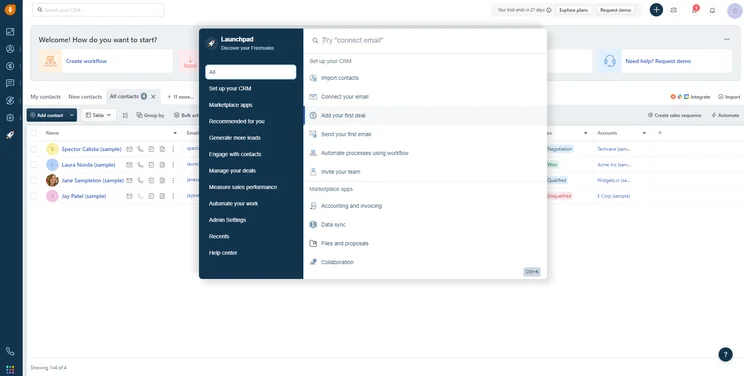
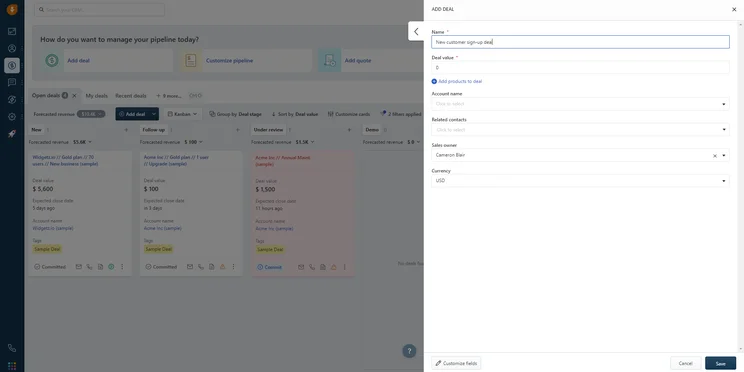
If you can do without the customer service aspect of CRM software, Freshsales Suite is your best option as a small business. Great functionality in an easy-to-use package, which makes for a shallow learning curve and improved productivity.
Again, compared to monday CRM, it’s just easier to use and still more functional. While both are full-fledged sales CRM options, Freshsales makes it easier to get a full picture of your sales insights with its 360-degree Customer View, even if it isn’t as customizable as monday.com. Plus, it has better support options, so you can figure out any problems easily.
Freshsales Suite

In Short
-
Pros
- 21-day free trial
- Fast data imports for simple, speedy setup process
- Extensive reporting functionality with customizable dashboards
- Time tracking features to manage team productivity
-
Cons
- Fewer custom field options than competitors
- Only offers Facebook and Instagram social media integrations
- Capped at 1,000 marketing actions, so larger businesses will be limited
Pricing
-
Growth: $9/user/month
-
Pro: $39/user/month
-
Enterprise: $59/user/month
Images
How Did We Research Monday CRM?
We take our impartial research and analysis seriously, so you can have complete confidence that we’re giving you the clearest, most useful recommendations.
After conducting an initial exploration to identify the most relevant, popular, and established CRM tools in the market, we put them through their paces to find out more about their strengths and weaknesses. In total, we analyzed 13 CRM systems, grading them across 84 areas of investigation.
Based on years of market research and CRM product testing, we’ve established a CRM research methodology to score products, which consists of six main assessment categories and 13 subcategories. This covers everything, from the available features and scalability capacity to the product’s value for money, and much more.
Our main testing categories for CRM systems are:
- Features: The functionalities and capabilities provided by the CRM software, such as contact management, lead and opportunity tracking, and task and activity management.
- Help and support: The resources and assistance available to users when they encounter issues or require guidance while using the CRM software.
- Customization: The ability to tailor the CRM software to suit the specific needs and processes of the organization, e.g. customizing fields, layouts, and workflows.
- Scalability: The ability of the CRM software to accommodate the growth and changing needs of the organization, such as the capacity to handle a growing customer database.
- Price: The cost associated with using the CRM software. It includes factors such as licensing fees, subscription plans, and additional charges for add-on modules or features.
- Team structure — sales CRM: Determining if a platform makes it easier to manage large sales teams, including team dashboards, team hierarchies, and team inboxes.
- Usability — small business CRM: Assessing the simplicity of the interface, the ease of navigating through menus and options, and the overall user experience.
When it comes to calculating a product’s final score, not all testing areas are weighted evenly, as we know some aspects matter more to our readers than others, which are merely “nice to have.” After hundreds of hours, our process is complete, and the results should ensure you can find the best solution for your needs.
At Tech.co, we have a number of full-time in-house researchers, who re-run this testing process regularly, to ensure our results remain reflective of the present day.
monday CRM is in a league of its own when it comes to customizability. The color-coordinated interface, combined with the simple drag-and-drop tailoring of dashboards, makes monday CRM an easy-to-use option for any small business looking to improve its sales workflow, especially those with complex sales processes.
monday CRM’s raft of useful AI features makes it a great choice for sales teams interested in streamlining core processes, too. However, if your business requires a greater selection of CRM features, Zoho Books might be a better fit as it acts more like a dedicated CRM platform, while Salesforce offers a bigger crop of third-party integrations.
The real trick with deciding on any CRM software is knowing exactly how it will work for your business. The best way to find out is to put it to the test. There’s nothing to lose with a 14-day free trial for monday CRM, so you can make up your mind. To get started, simply hit the button below.
If you click on, sign up to a service through, or make a purchase through the links on our site, or use our quotes tool to receive custom pricing for your business needs, we may earn a referral fee from the supplier(s) of the technology you’re interested in. This helps Tech.co to provide free information and reviews, and carries no additional cost to you. Most importantly, it doesn’t affect our editorial impartiality. Ratings and rankings on Tech.co cannot be bought. Our reviews are based on objective research analysis. Rare exceptions to this will be marked clearly as a ‘sponsored’ table column, or explained by a full advertising disclosure on the page, in place of this one. Click to return to top of page


