





We may receive a commission from our partners if you click on a link to review or purchase a product or service. Click to Learn More
The best simple CRM is Freshsales Suite, thanks to its easy setup process and thorough customizability options. In our research, which evaluated 13 different CRM platforms across 84 categories of investigation, Freshsales Suite was the easiest to use platform.
There are a lot of top CRM platforms that are easy to use though, and if Freshsales Suite doesn’t fit your needs, we can help you find an alternative. Zoho CRM, for example, was also found to offer a substantially simple interface for beginners, and it offers a bit more overall functionality than other options on this list.
In this guide, you’ll learn about some of the easiest to use CRM platforms on the market, including what they can do and how much they cost, so you can make the right decision for your business.
- Freshsales Suite is rated the best overall simple CRM in Tech.co’s in-depth research.
- Zoho CRM excels in offers a simple interface and is easy to get to grips with.
- Pipedrive is a pricier offering but comes with very robust security offerings.
- monday CRM provides access to customizable and easy to use reporting tools for helpful insights into your business.
- HubSpot CRM features a solid free plan, which makes it a good choice for smaller businesses looking for a cost effective solution.
- Key considerations when selecting a simple CRM should be as ease of use, pricing, customer support, and customizability.
Reviewing 5 Simple CRM Systems
A simple CRM system may seem basic, but just because it’s simple doesn’t mean it’s not powerful. These tools can supercharge your productivity, analytical power, and connectivity for boosted sales, marketing, and customer service. Ultimately, an easy CRM system could transform your business’s growth.
Tech.co has independently researched and tested all the market-leading CRM software so you can trust that these really are the simplest CRM systems to use. Don’t believe us? You can always start with a free trial to see for yourself, risk-free. Below are the best simple CRM systems for easy setup and ongoing use from day one.
The best simple CRM Systems are:
- Freshsales Suite – Simplest CRM to use
- Zoho CRM – Best CRM for simple onboarding
- Pipedrive – Best for easy setup process
- monday CRM – Best for simple analytics
- HubSpot CRM – Best for growing businesses
|
Free plan
|
Free trial
|
Starting price
|
Pros
|
Cons
|
Get started
Click to get started and compare prices for your business
|
||
|---|---|---|---|---|---|---|---|
|
FEATURED PROVIDER
 |
EASIEST TO USE
 |
 |
 |
 |
 |
||
|
Creatio |
Freshsales |
Zoho CRM |
Pipedrive |
monday CRM |
HubSpot |
||
|
|
|
|
|
|
|
||
|
|
21 days |
15 days |
14 days |
14 days |
14 days |
||
|
$25/user/month |
$9/user/month |
$14/user/month |
$14/user/month |
$12/user/month |
$9/user/month |
||
|
|
|
|
|
|
||
|
|
|
|
|
|
||
| Try Creatio | Compare Quotes | Try Zoho CRM | Try Pipedrive | Try monday CRM | Try HubSpot |
1. Freshsales Suite – Best for Ease of Use
- Starting price: $9 per user, per month
- Free plan: Yes
Freshsales Suite was built to be a CRM for small businesses, and it’s at the top spot for all the ease of use that comes with that goal. With it, you’ll get speedy uploads and a clean interface, plus a fast setup and great marketing tools to keep your business growing.
It all adds up: Our researchers gave Freshsales a high 4.7/5 usability score on our last round of testing due to its simple interface and useful customization options, matching or beating every other CRM we tested.
Freshsales Suite

In Short
-
Pros
- 21-day free trial
- Fast data imports for simple, speedy setup process
- Extensive reporting functionality with customizable dashboards
- Time tracking features to manage team productivity
-
Cons
- Fewer custom field options than competitors
- Only offers Facebook and Instagram social media integrations
- Capped at 1,000 marketing actions, so larger businesses will be limited
Pricing
-
 Growth: $9/user/month
-
Pro: $39/user/month
-
Enterprise: $59/user/month
Images
Why is Freshsales Suite easy to use?
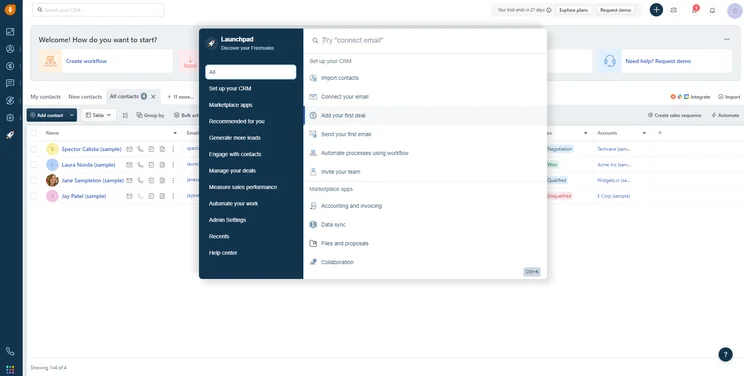
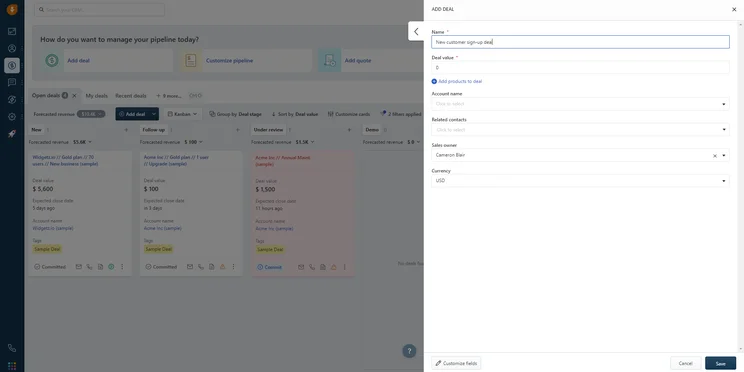
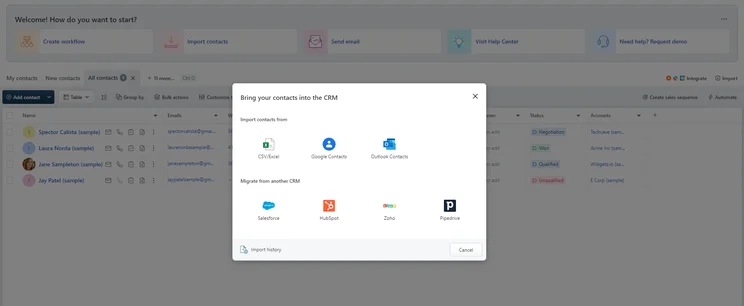
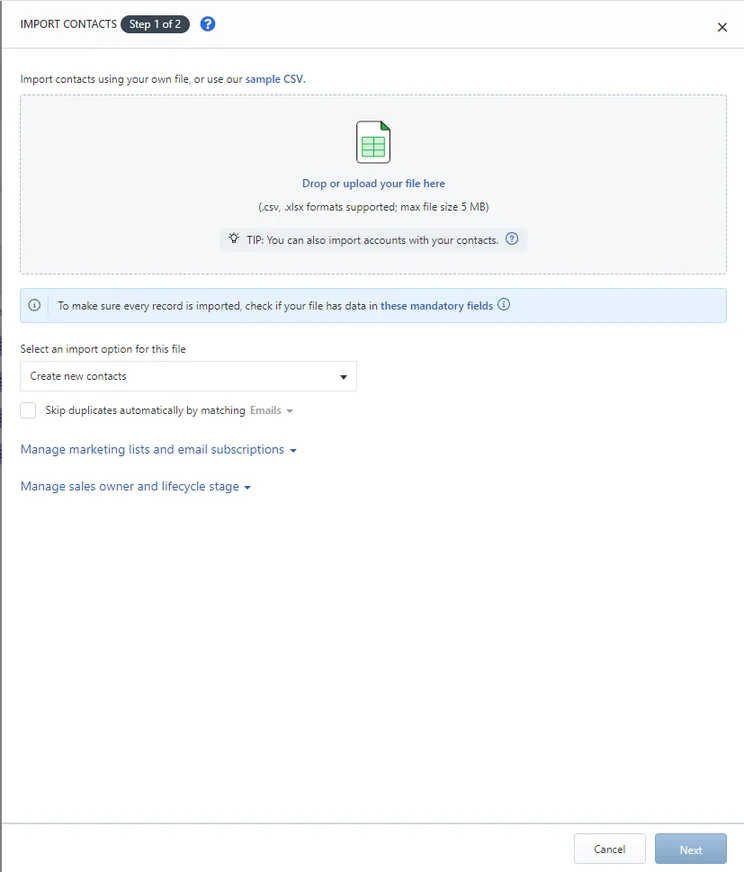
Freshales Suite will guide you through the entire setup process, which includes importing data, making email connections, and adding users. Freshsales’s clear signposting means the process is incredibly easy.
There are also a number of time-saving aspects to Freshsales’ offering, including a vast library of ready-made dashboards that you can use if you don’t want to build your own. Integrating with email apps such as Gmail during the setup process is also straightforward. In our testing, we found the ability to import contacts across a variety of sources, including other CRM platforms such as Salesforce, to be extremely beneficial for email marketing and communication. These perks make Freshsales a great option for users wanting to get set up with a platform quickly.
The ease of use does come with some limitations, though. Our tests found that some specific functionality for particular businesses, like gyms, is a bit restricted. However, if you’re just looking to manage simple CRM processes like consumer tracking or lead generation, the platform will be straightforward to navigate.
Not every CRM system is easy to learn or to use. Luckily, there are a few areas you can look to when trying to find one that keeps things simple.
Freshsales Suite is a great example of a CRM that does everything right: The interface makes sense and loads quickly, the setup process is straightforward, the marketing tools are comprehensive, and the high-quality customer service can answer any questions. The provider has some limits, though. Marketing contacts are capped at 1,000 across all paid plans, and you won’t have a lot of social media integrations.
Other options include Zoho CRM, which does have great social media features on top of simple onboarding, great support, and low costs. Pipedrive is a great “premium” CRM, since it’s both easy to use and has high-level functionality that includes plenty of automations and notifications, as well as chatbot creation.

Who should use Freshsales Suite
- Newbies to CRM software – Freshsales Suite was found to be the easiest to use CRM in our research, which means that those unfamiliar with the technology will be able to figure it out quickly.
- Businesses that need sales and marketing – Many CRM platforms offer specific functionality for sales, marketing, or customer service, but Freshsales Suite combines sales and marketing into one easy to use platform.
- Small to medium-sized businesses – Freshsales Suite is the small business-focused platform, allowing a maximum of 500 marketing contacts, so larger businesses should probably look for a more enterprise-facing solution.
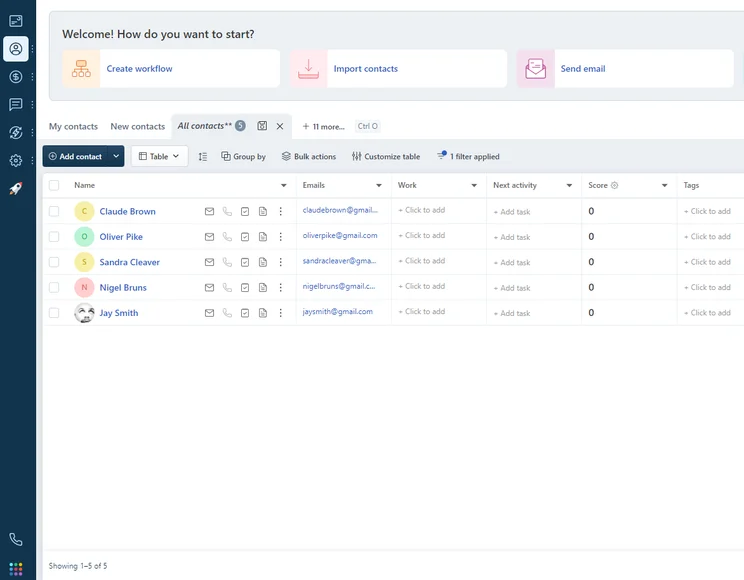
When I used the Freshsales interface, I was impressed by how easy it was to track contacts through the customizable dashboard. Source: Tech.co testing
Freshsales Suite pricing
Freshsales offer three different pricing plans to choose from, each allowing for up to 500 marketing contacts for your business. The prices listed below are available for those willing to sign up for an annual contract, but the prices increase if you opt for monthly bills instead.
- Growth – $9 per user, per month
- Pro – $39 per user, per month
- Enterprise – $59 per user, per month
On top of that, Freshsales Suite does offer a free forever plan for up to three users. Other limitations include only 100 marketing contracts, limited customization, and less segmentation options.
|
Plan
|
Price
Billed annually
|
Users
|
Storage
|
Email marketing
|
Omnichannel features
|
|
|---|---|---|---|---|---|---|
|
|
BEST FOR SMB
|
|
|
|||
|
$9/user/month |
$39/user/month |
$59/user/month |
||||
|
3 |
Unlimited |
Unlimited |
Unlimited |
|||
|
None |
2 GB |
5 GB per user |
100 GB per user |
|||
|
|
|
|
|
|||
|
|
|
|
|
2. Zoho CRM – Best for easy CRM onboarding
- Starting price: $14 per user, per month
- Free plan: Yes
Zoho CRM manages to offer plans at cheaper price points than its closest competitors, while at the same time providing a more user-friendly and feature-rich experience. Plus, it’ll integrate with Zoho’s suite of other useful business products, which is great news if you already use them. For instance, if you’re interested in unlocking the benefits of CRM and VoIP, Zoho users can integrate with Zoho Phonebridge.
Zoho CRM

In Short
-
Pros
- 15-day free trial
- Sales and marketing functionality available in free plan
- Highly customizable dashboards and fields across platform
- Integrates with other Zoho services or the vast app library
-
Cons
- No spam prevention on web forms
- Onboarding assistance for your team costs extra
- Team management functionality lacking, with limited storage space
Pricing
-
Free plan available
-
Standard: $14/user/month
-
Professional: $23/user/month
-
Enterprise: $40/user/month
-
Ultimate: $52/user/month
Images
Why is Zoho CRM easy to use?
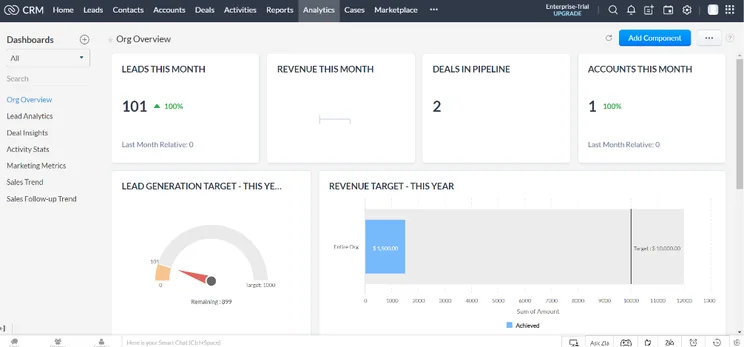
Zoho CRM was pretty close to taking the top spot for the easiest CRM to use, and our research actually found that it’s the best option for small businesses, given its low price and large feature catalog. Plus, it has a great free plan, which is always a boon for any small business on a budget.
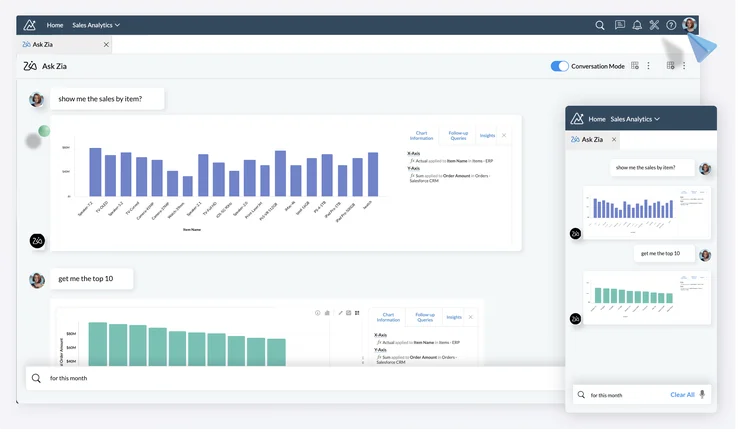
After testing out Zoho CRM we were impressed with its great usability and clearly signposted features. However, it wasn’t quite as easy to navigate as Freshsales due to longer upload times and fewer onboarding details. It comes with a larger feature catalog than you’ll find with Freshsales, too, which will be ideal for businesses with complex CRM needs, but could overwhelm smaller businesses.
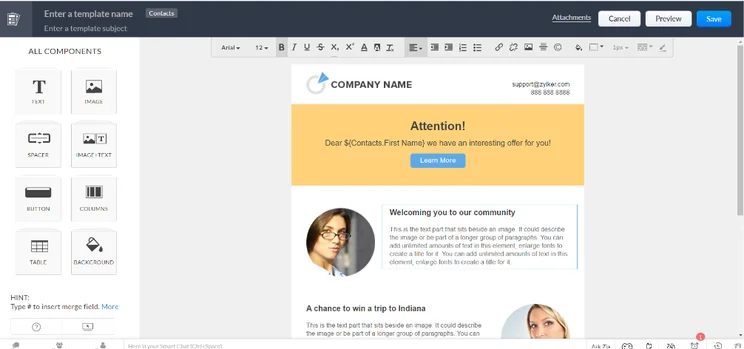
Zoho CRM provides an onboarding tour, which gives you a great indication of where you currently are in the process. We found that the ‘CRM checklist’ gave us a great introduction in our tests, and thought it would be particularly beneficial for people who have never used the software before. However, it isn’t as detailed or extensive as Freshsales Suite, and it took slightly longer to upload data (although it was much quicker than providers such as HubSpot).
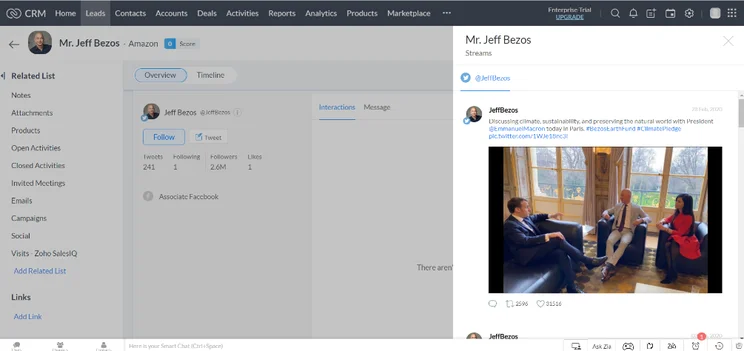
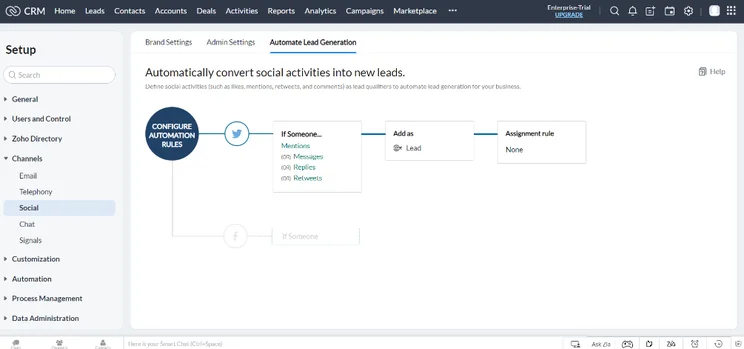
There are some other nice touches, too, such as social media workflows, within which you can automatically add a lead to a database based on their interaction with your social media account.
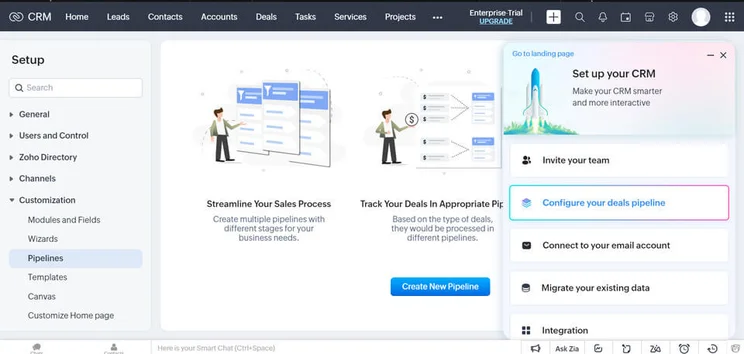
Zoho CRM gave me an intro into setting up their sales pipeline. Image: Tech.co’s testing process.
Who should use Zoho CRM
- Sales-focused businesses – Zoho CRM is a primarily sales-focused CRM, so if that is your industry, this platform is an absolute no-brainer.
- Businesses that need customizability – Zoho CRM was found to be one of the most customizable platforms in our research, while still being very easy to use.
- Businesses on a budget – In addition to its free plan, Zoho CRM offers a wide range of affordable plans that aren’t too expensive for any sized business to handle.
Zoho CRM pricing
Zoho CRM offers four different paid plans that are available to users. The prices listed below are for users willing to sign up for an annual contract, which can save you up to 32% off. If you want to be billed monthly, you’ll have to pay a bit more.
- Standard – $14 per user, per month
- Professional – $23 per user, per month
- Enterprise – $40 per user, per month
- Ultimate – $52 per user, per month
Zoho CRM also has a free forever plan for up to three users, but it lacks certain functionality found in the paid plans, including sales forecasting, calendar booking, and social media integration.
Check out our Zoho CRM pricing guide for more information
|
Plan
|
Price
Billed annually
|
Users
|
Storage
|
Support
|
|
|---|---|---|---|---|---|
|
TRY FOR FREE
|
|
BEST FOR SMB
|
|
|
|
|
Free |
Standard |
Professional |
Enterprise |
Ultimate |
Plus |
|
$23/user/month |
|||||
|
3 |
Unlimited |
Unlimited |
Unlimited |
Unlimited |
Unlimited |
|
User: n/a |
User: n/a |
User: 20MB |
User: 50MB |
User: 100mb |
User: 1GB |
|
Basic |
Standard |
Live chat, phone, email |
Standard |
24/7 live |
24/7 live |
3. Pipedrive – Best for Simple Setup Process
- Starting price: $14 per user, per month
- Free plan: No
Pipedrive is certainly the ‘Premium’ offering on this list, providing a primarily sales-focused CRM that teams can use to hunt down and close leads with ease. And with a simple and clean design, alongside plenty of features, you could do a lot worse, even for the high cost.
It might be a bit pricier than some other providers, but it definitely has the functionality to back up the cost, including top-notch security.
Pipedrive

In Short
-
Pros
- Unlimited contact database for larger businesses with lots of clients
- Great security tools include user permissions and multi-factor authentication
- 24/7 live support via chat and phone
-
Cons
- 24/7 support only available in more expensive plans
- Can’t create custom task types within the platform
- Web form creation is a paid add-on
Pricing
-
14-day free trial
-
 Lite: $14/seat/month
-
Growth: $39/seat/month
-
Premium: $59/seat/month
-
Ultimate: $79/user/month
Images
Why is Pipedrive easy to use?
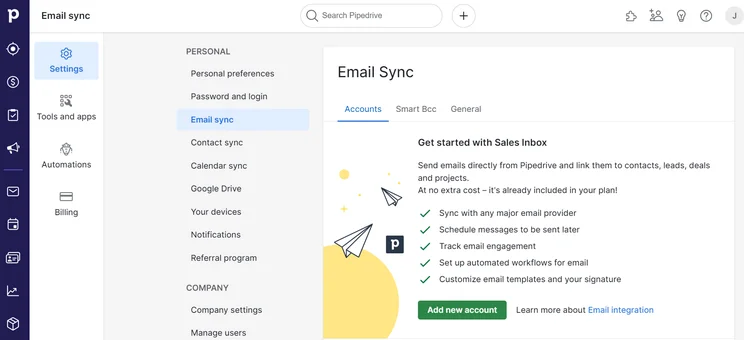
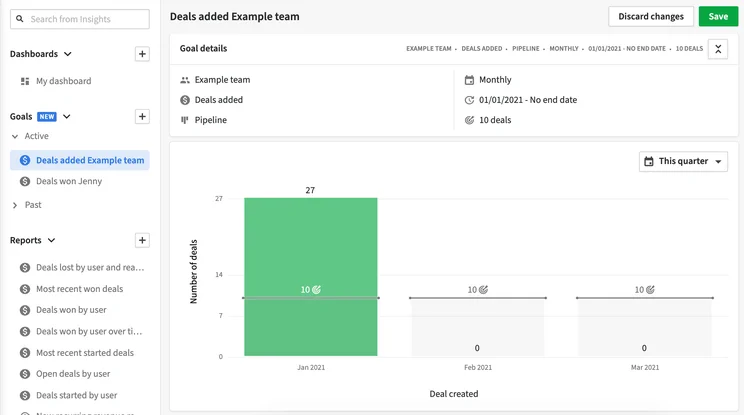
On the whole, Pipedrive offers the functionality you’ll need to do this successfully, and aside from Freshsales and Zoho CRM, was the provider we found the easiest to use. Specifically, the setup was incredibly easy, providing a simple form-based process that took care of all the nitty gritty details for you.
Pipedrive excels when it comes to security features – it has the best range of options to secure the data you keep inside the system out of the providers we tested. We found it particularly useful that Pipedrive can send you email notifications if users do anything suspicious, such as deleting any data or failing to log in after three attempts. This makes Pipedrive a serious option for anyone who puts data security at the top of their priorities – and with data breaches now so common, why wouldn’t you?
However, Pipedrive plans are a lot more expensive on the whole than Zoho CRM and Freshsales, and you’ll need to pay for some additional features, such as the lead-booster add-on ($32.50 per month on top of your Pipedrive subscription).
That being said, being both easy to use and highly functional is not a given by any means in this space — and Pipedrive can do both. You can always take a look at some Pipedrive CRM alternatives, though, if it doesn’t seem like the right fit for your business.
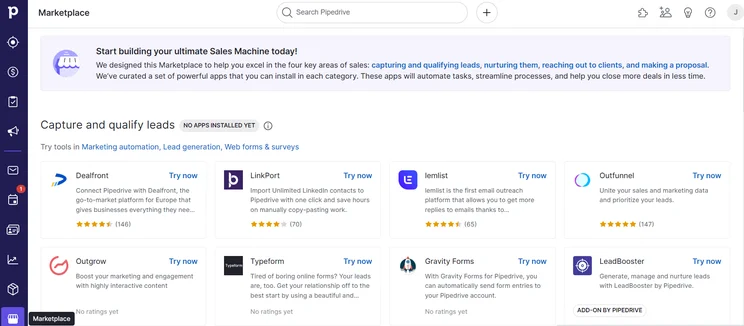
The Pipedrive marketplace offered us a range of third-party integrations for ease of use. Source: Tech.co testing
Who should use Pipedrive
- Businesses with a flexible budget – With no free plan and expensive paid plans, Pipedrive is a definitely a premium solution that could cost you a lot, especially if you need the add-ons.
- Businesses that need security – Pipedrive offers the best security features we tested, offering a full-on security center to manage all aspects of your business’ privacy concerns.
- Businesses that need integrations – Pipedrive offers a huge library of third-party integrations, allowing you to customize the platform for your particular needs.
Pipedrive pricing
Pipedrive offers four different pricing plans to choose from. Like the other options on this list, you can save money by opting for an annual plan, in this case, up to 42% off. If you want to pay monthly, you’ll have to pay a bit extra.
- Lite – $14 per user, per month
- Growth – $39 per user, per month
- Premium – $39 per user, per month
- Ultimate – $99 per user, per month
Pipedrive does not offer a free forever plan, but there is a 14-day free trial that allows you to test out the various paid plans without a big financial commitment.
Check out our Pipedrive pricing guide for more information
|
Plan
|
Price
Billed annually
|
Users
|
||
|---|---|---|---|---|
|
|
BEST FOR SMB
|
|
|
|
|
Lite |
Growth |
Premium |
Ultimate |
Enterprise |
|
$14/user/month |
$39/user/month |
$49/user/month |
$79/user/month |
|
|
Unlimited |
Unlimited |
Unlimited |
Unlimited |
Unlimited |
4. monday CRM – Best for Customization
- Starting price: $12 per user, per month
- Free plan: No
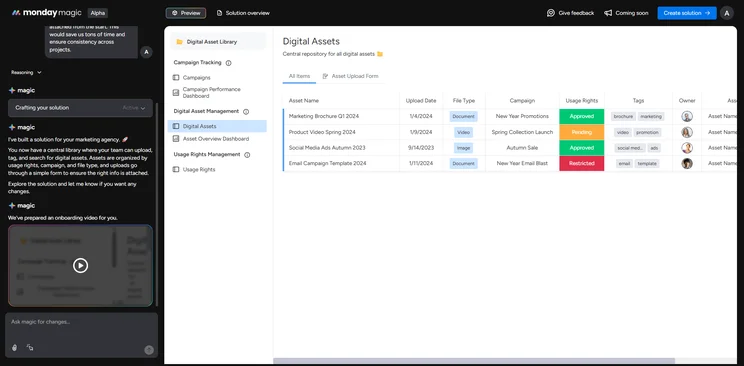
Once just a productivity app, now a full-fledged sales CRM, monday CRM still provides an easy-to-use experience and offers more functionality across the board. It may not have all the bells and whistles associated with some other CRM products like Freshsales, but we found that it has its advantages over them too, including the low price.
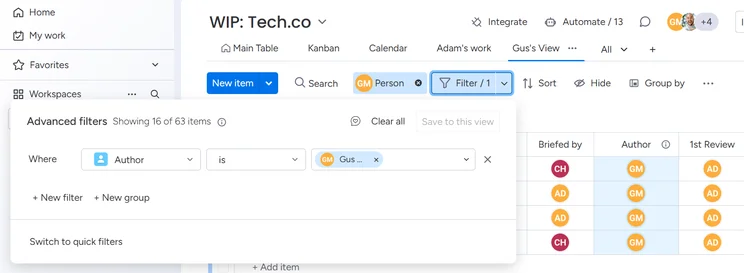
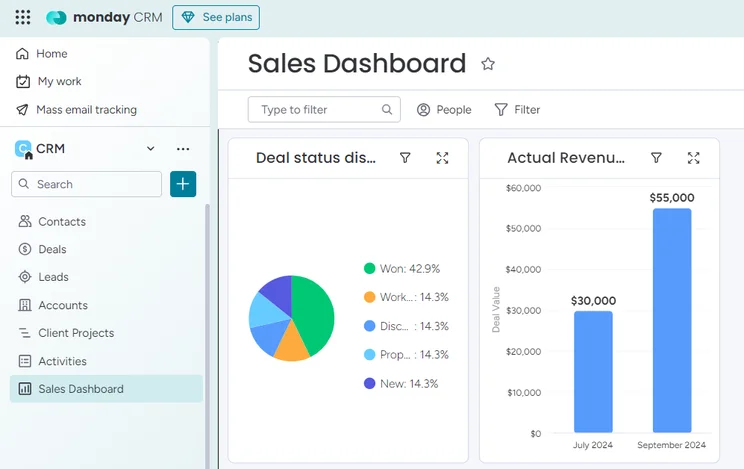
In general, monday CRM does fair in our research, with above-average usability, thanks in part to robust customization potential. That customizability bleeds into the analytics as well, allowing you to create different dashboards for different metrics, so it’s easy to see exactly what you want and when.
Check out our monday CRM review for more information
monday CRM

In Short
-
Pros
- 14-day free trial
- Simple and modern layout with basic color-coded system
- Custom fields across platform, including customizable dashboards
- Many reports: deals, activity, recurring revenue, and more
-
Cons
- Workflow automations are capped monthly
- No centralized inbox to improve team management
- No phone support on any plan, but live chat is available
Pricing
-
Basic: $12/user/month
-
Standard: $17/user/month
-
Pro: $28/user/month
Images
Why is monday CRM easy to use?
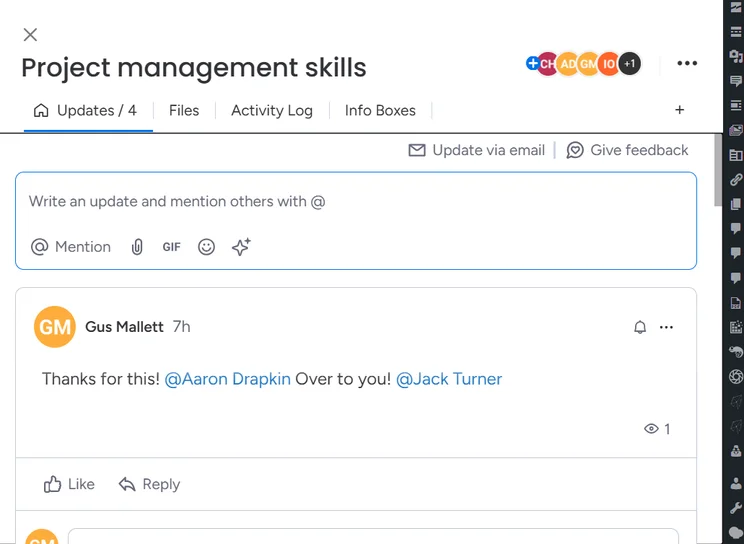
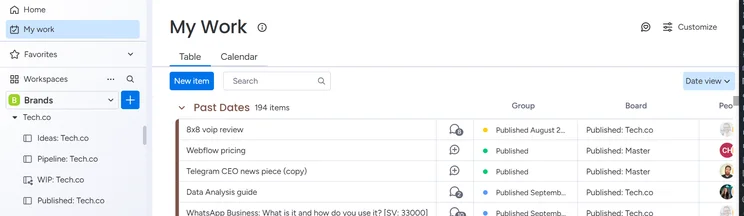
From an ease-of-use standpoint, monday CRM is an excellent choice for beginners. We found the interface to be decidedly intuitive, utilizing white space to create a decluttered experience for users during our testing. That, combined with the simple, color-coded organization of labels and other markets, made monday CRM simple to use for our team in the testing and analysis process.
Beyond the general experience, monday CRM was also easy to set up, providing speedy data imports that allow you to get all the information input with ease. In our testing, it took just over 8 minutes to import all of our data accurately into the software. We were also able to create useful automations in just a few steps, providing a flexible system that allowed our team to save some serious time.
If you’re having trouble, customer support was helpful and responsive with monday CRM. We were able to easily get in contact with a representative via the live chat function, who provided video walkthroughs to solve the issues we were having.
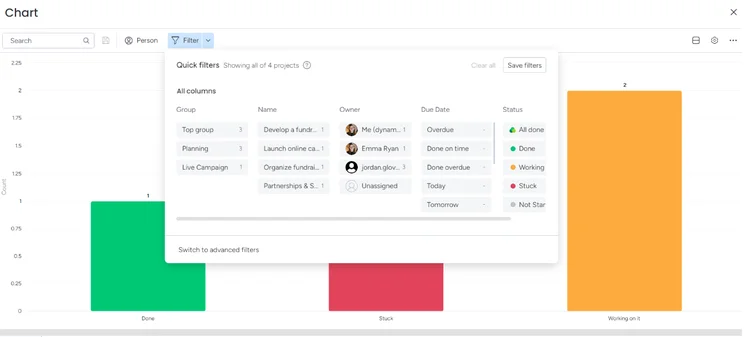
The monday CRM interface let us create own charts with plenty of customizable features. Source: Tech.co testing
Who should use monday CRM
- Businesses on a budget – monday CRM has no free plan, but its paid plans are all affordable and shouldn’t cost too much, even for advanced features.
- Data-focused businesses – monday CRM makes it easy to create reports that are easy to understand, making it perfect for businesses in need of robust analytics.
- Businesses that need customizability – monday CRM was the most customizable platform on the list with dozens of custom fields and objects throughout the system.
monday CRM pricing
monday CRM provides three pricing plans, as well as an Enterprise plan that provides custom pricing for larger businesses. Beyond that, though, monday CRM is quite affordable, and you can save 18% by signing up for an annual contract instead of a monthly option.
- Basic – $12 per user, per month
- Standard – $17 per user, per month
- Pro – $28 per user, per month
While monday does offer a free plan for its work management platform, monday CRM does not offer a free plan for users. However, there is a 14-day free trial to test it out before you buy.
Check out our monday CRM pricing guide to learn more
|
Plan
|
Price
Billed annually
|
Users
|
Storage
|
|
|---|---|---|---|---|
 |
|
|
|
|
|
Basic |
Standard |
Pro |
Ultimate |
|
|
$12/user/month |
$17/user/month |
$28/user/month |
Custom |
|
|
Unlimited |
Unlimited |
Unlimited |
Unlimited |
|
|
5GB |
20GB |
100GB |
1000GB |
5. HubSpot CRM – Best for Growing Businesses
- Starting price: $15 per user, per month
- Free plan: Yes
HubSpot is a highly customizable CRM platform that has a feature-rich free plan functioning as an all-in-one product, although more specific benefits and features for sales, marketing, and customer service teams can be derived from the provider’s paid plans, including workflow automation and advanced campaign tools.
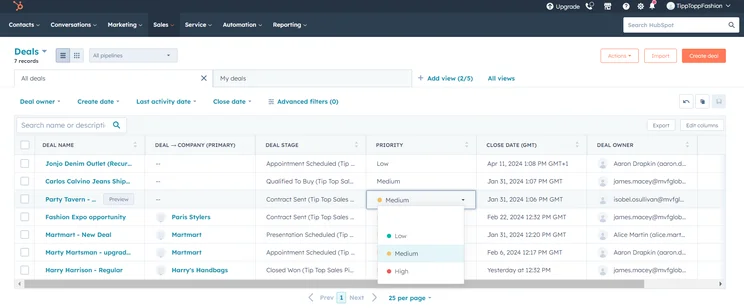
Our researchers rated HubSpot’s usability on par with monday CRM, though a little below the other providers in this guide: It remains easy to navigate, as it clearly marks how to get in and out of menus and processes. We also enjoyed the level of customizability in our testing that came with editing the sales pipeline, which helped to reflect the unique processes of each business. Tracking sales pipelines and marketing contacts can be complicated at the best of times, but HubSpot makes it relatively easy for beginners compared to competitors.
HubSpot CRM

In Short
-
Pros
- Sales and marketing features for growing businesses on all plans
- Tidy, easy-to-navigate interface
- Shared team inbox makes chasing leads and support tickets much less complex
- Feature-rich free plan
- Easy-to-use AI and automation tools
-
Cons
- Scarce customer support on the free plan
- 5 document storage limit on free plan
- Mandatory, one-time onboarding fees on premium plans
Pricing
-
Free plan available
-
Starter: $7/user/month
-
Professional: $1,300/month/includes 6 seats
-
Enterprise: $4,700/month/includes 8 seats
Images
Why is HubSpot easy to use?
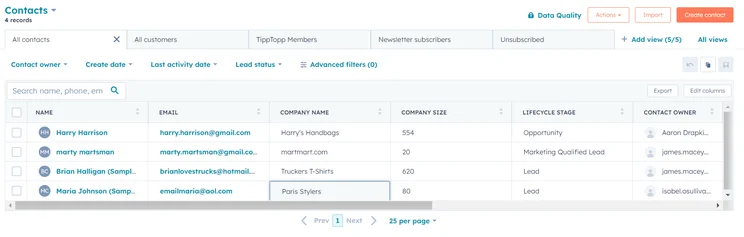
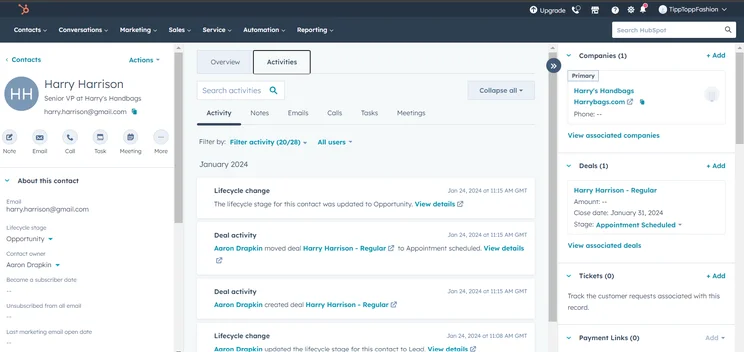
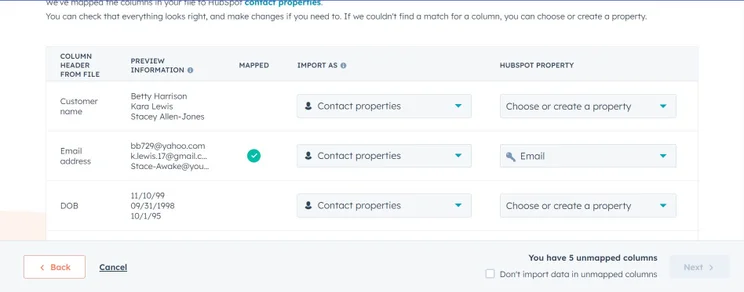
Intuitive and easy to use, HubSpot’s free plan will let you get a taste of the software without paying anything, and it gives you access to a range of sales, marketing, and CRM features. There’s enough included to help you manage a basic marketing or sales campaign and provide a way to keep track of all of your customers, so a great place to start for teams who haven’t used a CRM platform before.
However, marketing, sales, and customer service teams — especially rapidly growing ones — will get more out of HubSpot’s paid plans as they start to grow and increase their contact bases and campaign sizes. For example, marketing teams will be able to run A/B tests on different email formats and remove HubSpot branding from their correspondence. Sales teams, on the other hand, will get access to powerful forecasting tools and advanced team management features when they upgrade.
Other features reserved for paying members include social and SEO campaigns. If you want to improve your brand’s customer relationships and continue to bring in new ones simultaneously, an upgrade is worth considering. If you’d like to test these features out, you can always sign up for a 14-day free trial of HubSpot’s paid plans, all of which have a cheaper starting price per user than any of the other providers on this list.
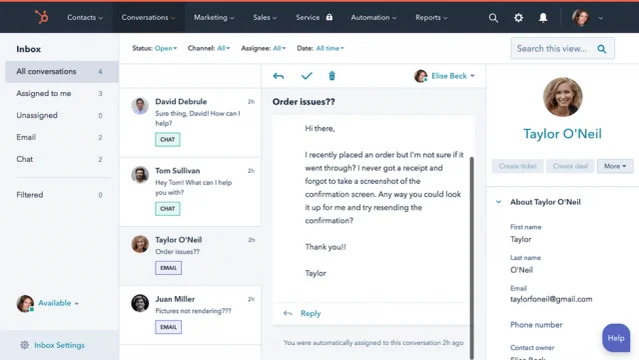
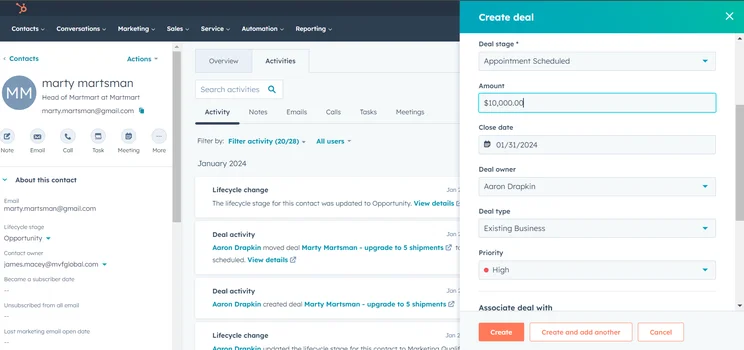
The customer conversation page in HubSpot CRM made it easy for us to stay abreast of our funnel. Source: Tech.co testing
Who should use HubSpot
- Businesses that need a free plan – HubSpot CRM easily has the best free plan available across our research, with functionality for sales, marketing, and customer service.
- Growth-minded businesses – In addition to being great for small businesses, HubSpot offers some of the most robust enterprise-level solutions, making it great for businesses that plan to grow.
- Diversified businesses – HubSpot offers sales, marketing, customer service, commerce, and operations functionality, all in its free plan, so businesses with diverse needs will be right at home.
HubSpot pricing
HubSpot pricing is decidedly more complicated than other options on this list. It offers a range of “hubs” for different industries, like the Sales Hub and Marketing Hub, which each have their own set of uniquely priced plans.
Below, we’ve listed the Sales Hub pricing plans to get you started, but you’ll want to do a bit of research to be sure that this is what you’ll pay for your particular needs.
- Starter – $9 per user, per month
- Professional – $90 per user, per month
- Enterprise – $150 per user, per month
As we’ve mentioned, HubSpot does have a free forever plan with some serious functionality that can get you started at no cost. It does have some notable limitations, like no marketing automation, fewer email templates, and no 1-on-1 customer support options.
Check out our HubSpot pricing page for more information
|
Plan
|
Price
Billed annually
|
Users
|
Storage
|
|
|---|---|---|---|---|
|
BEST FOR SMB
|
|
|
|
|
|
Free |
Starter |
Professional |
Enterprise |
|
|
Free |
$9/user/month |
$90/user/month |
$150/user/month |
|
|
2 |
Unlimited |
Unlimited |
Unlimited |
|
|
5 documents |
5000 documents |
5000 documents |
5000 documents |
Best Free and Simple CRM Software
Every single CRM on this list (except Pipedrive) offers a free forever plan that will allow you to enjoy basic features at no cost. However, these plans are often quite limited and can’t handle the load of your average business. Still, if you’re a small business that wants to get the ball rolling without worrying about your budget, there are lots of options to choose from.
Here are some of the best free CRMs that are also easy to use:
- HubSpot – This CRM offers the best free CRM across our research and it isn’t particularly close. The surprisingly impressive feature list beats out a lot of paid plans, honestly, and it’s interface is still simple enough for beginners to feel comfortable.
- Zoho CRM – This CRM is our top CRM for small businesses, mostly because it offers a robust free plan with lots of functionality, as well as an intuitive platform with excellent onboarding features.
- Freshsales – That’s right, our top pick for simple CRMs also offers a free plan, although there is a strict user maximum of three users. It’s also more functionally limited than HubSpot or Zoho CRM.
While free CRM platforms may sound appealing to businesses with limited budgets, they should typically be used more as an extended free trial rather than a long term solution. Free plans are quite limited, particularly for larger businesses, so you’ll likely have to opt for a paid plan eventually.
On top of that, for beginners, free plans typically offer limited customer support options, so if you run into any problems, you’ll be out of luck.
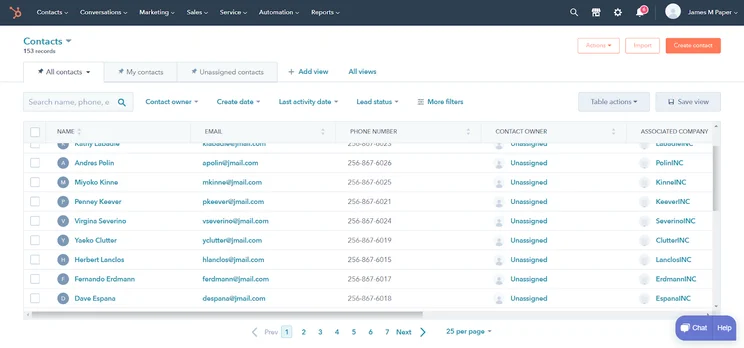
The contacts page on HubSpot’s free plan provides much of the same functionality as paid plans from other providers. Source: Tech.co testing
Choosing a Simple CRM Software
Landing on your ideal simple CRM system shouldn’t be too difficult, as long as you know what you’re looking for. Aside from prioritizing CRM general factors, there are some additional green flags to look out for, to ensure your chosen system is able to meet your needs.
Ease of use
Certain CRM software is a lot easier to use than others.
When shopping around for a simple CRM system, we recommend prioritizing options with intuitive interfaces, streamlined setup processes, and user-friendly mobile apps to help you manage customer relationships on the go. In our tests, we found that Freshsales’ simple layout and interface contributed to its ease of use.
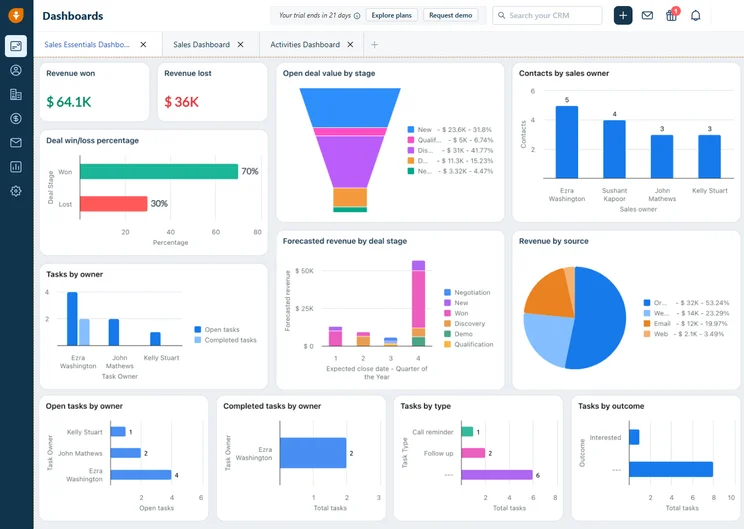
The home dashboard for Freshsales Suite provided our team with an easy-to-navigate interface to monitor our business. Source: Tech.co testing
Pricing factors
With so many businesses still feeling the squeeze from the economic turbulence of the last few years, pricing will naturally make its way to the forefront of many companies’ decision-making processes.
It’s all about getting bang for your buck — especially when it comes to contact database sizes, which vary widely from plan to plan but also from provider to provider. If you are looking for an accessible pricing option, Freshsales impressed us most during testing.
Customizability
Customizability is an incredibly important factor for some companies searching for the ideal CRM software. The manner of the customization is important too — again, another reason monday CRM excels. It’s easy to sculpt the software to do what you want to do without delving into the system settings or getting lost in menus.
Our researchers were impressed by monday CRM’s extensive customization options across the entire platform during testing.
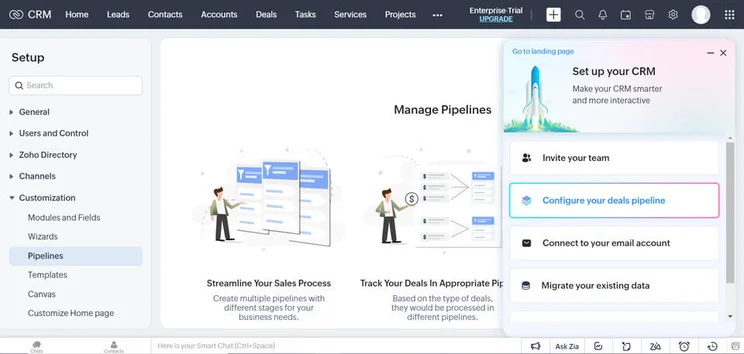
Zoho CRM allowed us to customize our sales pipeline to match our needs. Source: Tech.co testing
Customer support
Customer support can make or break a provider — especially if usability is important to you. There’s a surprising gulf between providers in terms of what customer support options they offer, so we’d advise prioritizing systems that offer round-the-clock availability, and a range of channels for resolving queries.
We found Pipedrive’s 24/7 live support via both chat and phone to be particularly valuable in our tests.
Features
Choosing the right CRM software for your business will include assessing and comparing the features on offer. Some CRM software plans have better marketing features, while others focus on sales, so it’s critical for buyers to work out what essential capabilities they need first, and work backward from there.
Pipedrive’s extensive security features caught our eye during testing, making it a great option for businesses wanting to focus on privacy and security.
Integrations
Whether you’re trying to populate your platform with data from social media or want to automate some of your day-to-day operations, you will likely need some third-party integrations to ensure your system runs as smoothly and efficiently as possible. During our tests, we enjoyed being able to integrate Zoho CRM with a vast array of other business products on offer.
If you have specific needs, you should consider platforms that offer API integration too.
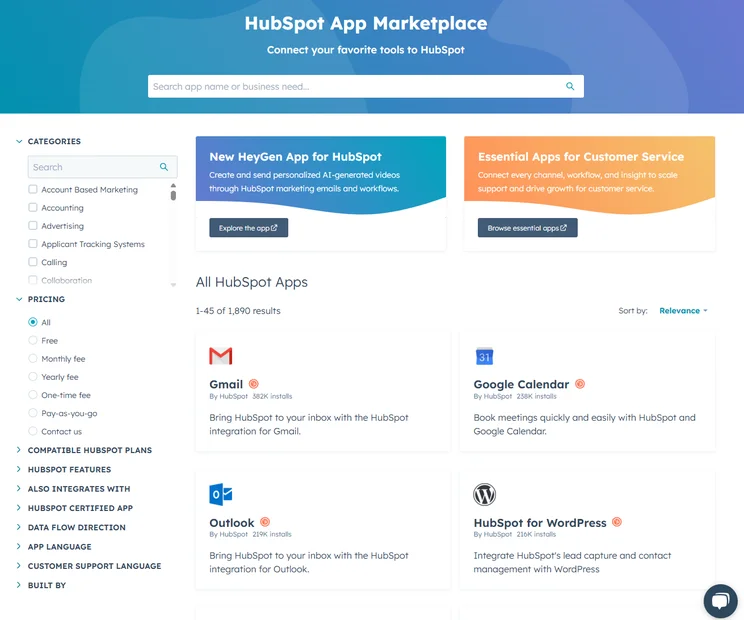
HubSpot offers a wide range of integrations with its platform. Source: Tech.co testing

New to CRM and looking for an easy system to get started?
Find the simplest CRM with the lowest price quote
How We Ranked the Most Simple CRM Systems
We take our impartial research and analysis seriously, so you can have complete confidence that we’re giving you the clearest, most useful recommendations.
After conducting an initial exploration to identify the most relevant, popular, and established CRM tools in the market, we put them through their paces to find out more about their strengths and weaknesses. In total, we analyzed 13 CRM systems, grading them across 84 areas of investigation.
Based on years of market research and CRM product testing, we’ve established a CRM research methodology to score products, which consists of six main assessment categories and 13 subcategories. This covers everything, from the available features and scalability capacity to the product’s value for money, and much more.
Our main testing categories for CRM systems are:
- Features: The functionalities and capabilities provided by the CRM software, such as contact management, lead and opportunity tracking, and task and activity management.
- Help and support: The resources and assistance available to users when they encounter issues or require guidance while using the CRM software.
- Customization: The ability to tailor the CRM software to suit the specific needs and processes of the organization, e.g. customizing fields, layouts, and workflows.
- Scalability: The ability of the CRM software to accommodate the growth and changing needs of the organization, such as the capacity to handle a growing customer database.
- Price: The cost associated with using the CRM software. It includes factors such as licensing fees, subscription plans, and additional charges for add-on modules or features.
- Team structure — sales CRM: Determining if a platform makes it easier to manage large sales teams, including team dashboards, team hierarchies, and team inboxes.
- Usability — small business CRM: Assessing the simplicity of the interface, the ease of navigating through menus and options, and the overall user experience.
When it comes to calculating a product’s final score, not all testing areas are weighted evenly, as we know some aspects matter more to our readers than others, which are merely “nice to have.” After hundreds of hours, our process is complete, and the results should ensure you can find the best solution for your needs.
At Tech.co, we have a number of full-time in-house researchers, who re-run this testing process regularly, to ensure our results remain reflective of the present day.
Freshsales Suite is the simplest CRM system to use because it has the most intuitive interface, imports contact lists quickly, walks you through the setup process with helpful popups, and has the most simple-yet-effective features on offer. It also offers unique features such as an AI tool that really helps it stand out from the crowd as a helpful CRM.
Need more options? Zoho CRM is another top CRM that’s easy to onboard and use, making it a great value for its cost. In addition to a virtual onboarding tour, the Zoho software comes with automations that make it easy to track your social media conversations with every lead.
Check out our CRM quotes tool below to collect personalized prices on Freshsales, Zoho, or another simple CRM that fits your needs.
If you click on, sign up to a service through, or make a purchase through the links on our site, or use our quotes tool to receive custom pricing for your business needs, we may earn a referral fee from the supplier(s) of the technology you’re interested in. This helps Tech.co to provide free information and reviews, and carries no additional cost to you. Most importantly, it doesn’t affect our editorial impartiality. Ratings and rankings on Tech.co cannot be bought. Our reviews are based on objective research analysis. Rare exceptions to this will be marked clearly as a ‘sponsored’ table column, or explained by a full advertising disclosure on the page, in place of this one. Click to return to top of page


