
We may receive a commission from our partners if you click on a link to review or purchase a product or service. Click to Learn More
Zendesk pricing plans start at just $19 per user, per month for the Support and Sell platforms, which are aimed at providing sales and customer service functionality functionality.
On top of that, Zendesk CRM offers a Suite platform, which starts at $55 per user, per month and bundles assorted Zendesk products together, like Guide, Chat, and Talk, which allow businesses to communicate with clients and customers more efficiently through different channels, like help centers, messaging widgets, and call support.
In this guide to Zendesk pricing, we’ll walk you through the various price plans for each tier of Zendesk CRM, as well as a few ways that can help you save money on the platform. We also compare Zendesk to other CRM providers and explain why it’s one of the best CRMs for small business.
Zendesk Pricing Plans Overview
When it comes to paying for Zendesk CRM, you’ve got three distinct options, each with their own set of pricing plans: Support, Sell, and Suite. Click the below links to be taken to in-depth reviews, or read on for some more basic details:
Zendesk lets businesses pay for services on an annual or monthly bases, but unless you’re planning on sticking with the plans for less than nine months, it’s more economical to sign up annually.
Read on for more information about what these specific Zendesk CRM plans offer and how much they will cost your business.
Our research into CRM software revealed that Zendesk Support is one of, if not the best helpdesk software that you can use. On the other hand, Zendesk Sell is one of the worst CRM for sales on the market. Subsequently, we’d recommend looking elsewhere for your software needs, unless you’re already utilizing Zendesk Support and need to add sales functionality after the fact.

Zendesk Sell Pricing
You’ll be able to check out three different pricing plans, Team, Growth, Professional, and Enterprise. Here’s how they compare:
|
Plan
|
Price
Billed annually
|
Users
|
Storage
|
Lead scoring
|
Custom automation builder
|
|
|---|---|---|---|---|---|---|
|
BEST FOR SMB
 |
|
|
|
|||
|
Sell Team |
Sell Growth |
Sell Professional |
Sell Enterprise |
|||
|
$19/user/month |
||||||
|
Unlimited |
Unlimited |
Unlimited |
Unlimited |
|||
|
2GB per user |
5GB per user |
10GB per user |
25GB per user |
|||
|
|
|
|
|
|||
|
|
|
|
|
Zendesk Sell Team
The Team plan for Zendesk Sell costs $19 per user per month, billed annually.
This is obviously the lowest tier plan for Zendesk Sell, and as such, is aimed at smaller teams that don’t require a whole lot of functionality. It allows for up to three paid users, offers email integration for seamless workflows, and provides a single custom sales pipeline for your business.
You’ll also have access to a full featured mobile CRM on your smartphone, so you can improve productivity while on the go.
All of Zendesk Sell’s plans include task and appointment setting too. When our team of testers tried the task-list feature firsthand, they loved its versatility and found it really user-friendly. It’s pretty rare for such useful task management features to be included on entry-level CRM tiers too, making this plan a pretty solid return on investment for smaller businesses after a one-size-fits-all tool.
Zendesk Sell Growth
The Professional plan for Zendesk Sell costs $55 per user per month, billed annually.
This is where you’ll start to see some really impressive features for your sales-focused CRM. For one, it allows for unlimited users, although it’s important to remember that you’ll be paying more for each one you add.
The extra cost is worth it though, as this plan adds a wide range of email features, including unlimited templates and personalized bulk sending. You’ll also get access to a more robust analytics and reporting platform, so you know exactly what works and what doesn’t.
After testing these analytic capabilities ourselves, we were impressed by the granular level of control they gave its users. The platform provides multiple menu views and reporting styles to help you measure a wide variety of metrics. In our opinion, this more than justifies this plans larger price tag, especially for teams with ambitions growth targets.
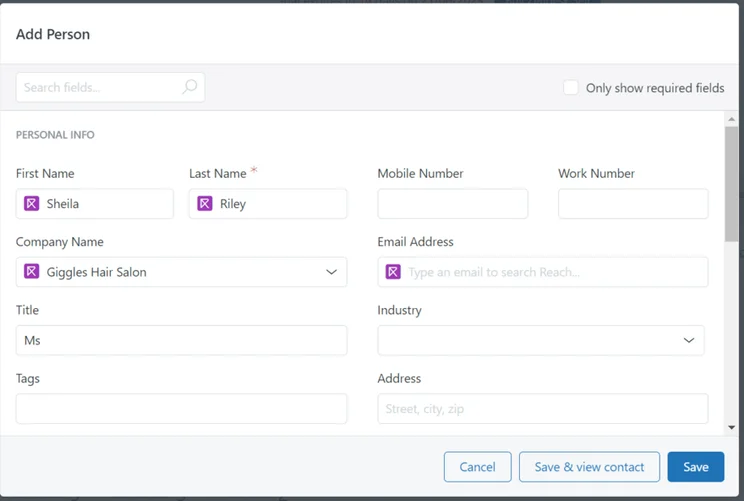
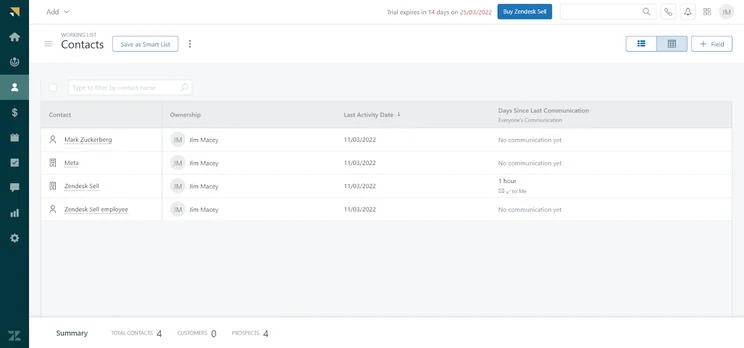
The contact database from Zendesk Sell made it easy to view information for our team, available on the Team plan. Image: Tech.co testing
Zendesk Sell Professional
The Enterprise plan for Zendesk Sell costs $115 per user per month, billed annually.
As you can probably guess from the name, this plan is aimed at larger businesses with a lot of sales to manage. You’ll enjoy two custom sales pipelines, activity reports, product catalogs, task automation, and custom notifications.
Simply put, this plan is aimed at those businesses looking to really ramp up sales in the ecommerce space. Particularly with the built-in lead and deal scoring, you’ll be able seriously improve your sales with this plan, if you can afford the added cost. Plus, it comes with more advanced team management infrastructure, so you can easily manage multiple teams at larger businesses.
Zendesk Sell Enterprise
The Elite plan for Zendesk Sell costs $169 per user, per month, billed annually.
The biggest difference between the Elite plan and the other less expensive plans is the number of sales pipelines you’re allowed to take advantage of. While the two less expensive plans allow for only one and the Enterprise plan allows for two, the Elite plan allows for unlimited sales pipelines, so you can seamlessly manage multiple teams on a single platform.
Outside of that, you also get access to advanced analytics and API functionality, on top of a substantial increase in the amount of storage allowed per user (25GB). The added cost is substantial at nearly double the Enterprise plan, but these added features are nothing to scoff at if you think they could improve your business in a meaningful way.
Unfortunately, our research into the best CRM for sales found that Zendesk Sell misses the mark in a few key categories like lead capture and onboarding. Even worse, Zendesk Sell is markedly more expensive than our top sales CRMs, with a starting price of $19 per user, per month and a enterprise-level plan at $169 per user, per month.
In comparison, the Zoho CRM starting price comes out to only $14 per user, per month, offers five different pricing plans depending on your needs, but none of them are more expensive than $57 per user, per month. Considering Zoho CRM also offers more sales features, we feel comfortable saying that Zendesk Sell isn’t a good value unless you’re already set up with Zendesk for customer support.
Check out our Zendesk Sell review for more information
Zendesk Support Pricing
Zendesk Support offers three pricing plans: Team, Professional, and Enterprise. We break them down below:
|
Plan
|
Price
Billed annually
|
Users
|
Email Comms Channel
|
Phone Comms Channel
|
Website Live Chat Comms Channel
|
Social Media Channels
|
Customer feedback
|
Custom reports
|
|
|---|---|---|---|---|---|---|---|---|---|
|
|
|
|
|||||||
|
Support Team |
Support Professional |
Support Enterprise |
|||||||
|
Unlimited |
Unlimited |
Unlimited |
|||||||
|
|
|
|
|||||||
|
Requires Telephony integration |
|
|
|||||||
|
|
|
|
|||||||
|
Facebook + Twitter |
|
|
|||||||
|
|
|
|
|||||||
|
|
|
|
Zendesk Support Team
The Team plan costs $19 per user, per month billed annually and offers 8/5 email support from the Zendesk team.
Team includes granular ticket grouping, custom business triggers and automations, custom user and organization fields, the ability to group contacts by a single organization, performance dashboards, public apps and integrations, an API rate limit of 200 RPM, and subdomain mapping, with access to over 90 computer-telephony integrations available as an add-on.
While still priced fairly low, particularly compared to competitors, this is a noticeable price hike, ostensibly justified by the additional features which offer grouping tools to help a business operating a single brand better track both customers and agents. That said, Team doesn’t have a lot of extra customization for its price, and you might want to consider jumping straight to the next tier.
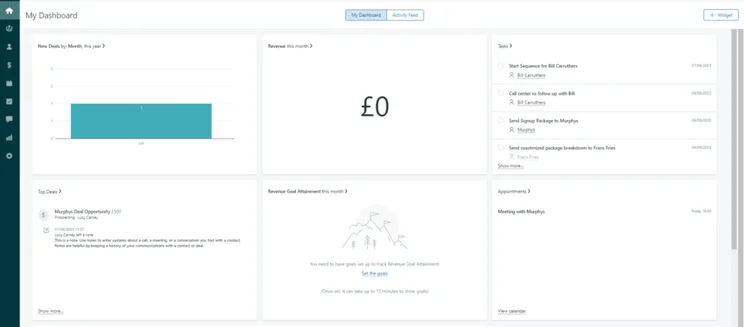
The home dashboard for Zendesk is clearly and helpful for keeping track of our data. Source: Tech.co testing
Zendesk Support Professional
Support’s Professional plan costs $55 per user, per month and, and offers 24/5 phone and email support from the Zendesk team.
Features include everything in Team, plus: Dynamic ticket content that matches each user’s language preference, the ability to define support business hours, SLA management, customer satisfaction ratings and follow-up surveys, automatic redaction, dashboards and reporting powered by Zendesk Explore (customizable with an add-on), an API rate limit of 400 RPM, and private custom apps and integrations.
Additional paid add-ons include extra storage, multiple ticket forms, conditional ticket fields, customer lists based on tags and user fields, and a collaboration add-on that gives agents greater messaging and commenting flexibility.
The Professional plan is a top option for businesses with a large group of customers that will need to be grouped by factors including tags, language used, and business hours.
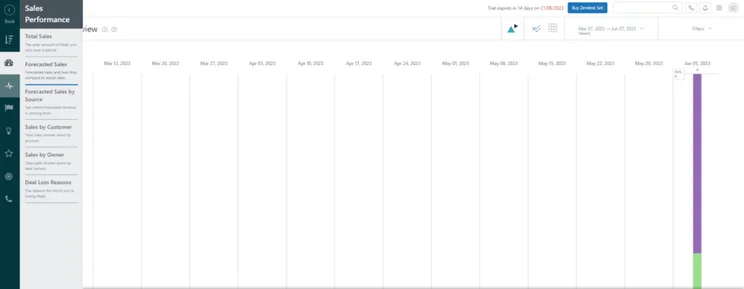
Zendesk allowed us to access analytics reports to track progress. Source: Tech.co testing
Zendesk Support Enterprise
The Support Enterprise plan costs $115 per user, per month, and it comes with guaranteed 24/7 phone and email support from the Zendesk team.
Features include everything in the Professional plan, plus: Skills-based routing, Guided Mode for automated ticket sorting, up to 20 active contextual workspaces, custom roles and permissions, a sandbox environment, multi-brand support for up to five brands (or up to 300 brands with an add-on), an AI-powered Satisfaction Prediction, an email compliance archive, ticket rules analysis, audit logs, and an API rate limit of 700 RPM. Paid add-ons include a 99.9% uptime SLA, a specific data center location, the ability to configure for HIPAA, and a premium production sandbox (separate from the test environment, which is included).
Enterprise’s features are powerful but only worth it if you have a team that knows how to use them and an operation large enough to benefit from implementing them at scale. It’s worth looking into if you have a global business operating multiple brands and is likely the best Zendesk offering for a truly large company.
If you’re just looking for a CRM to help your customer support efforts, Zendesk is the best helpdesk software you can get, according to our research. It offers the largest support feature catalog and excellent customization options, which allowed our team to really make the platform work for our needs.
The only category Zendesk Support suffered in was its pricing options. This is largely due to the fact that many features are relegated to the more expensive plans, which are pretty high up there for the industry. The Enterprise plan, for example, costs $99 per user, per month, which is more than double the cost of Zoho Desk’s most expensive plan at only $40 per user, per month.
Still, it offers low-cost options, like a starting plan at only $19 per user, per month, and these features just present an opportunity to scale as necessary, which is why we still consider it the best option for customer service.
Zendesk Suite Pricing
This plan comes in five pricing plans: Team, Growth, Professional, Enterprise, and Enterprise Plus. Here’s how they compare:
|
Plan
|
Price
Billed annually
|
Users
|
Forum suppot
|
Customer feedback
|
Custom reports
|
|
|---|---|---|---|---|---|---|
|
|
|
|
|
|
||
|
Suite Team |
Suite Growth |
Suite Professional |
Suite Enterprise |
Suite Enterprise Plus |
||
|
Unlimited |
Unlimited |
Unlimited |
Unlimited |
Unlimited |
||
|
|
|
|
|
|
||
|
|
|
|
|
|
||
|
|
|
|
|
|
Zendesk Suite Team
Team is available for $55 per agent, per month, billed annually.
While it’s the lowest Suite tier available, you still get access to all the bundled products mentioned above, so there’s no need to fret. With plenty of automation features, a unified agent workspace, robust APIs, you’ll be get the full experience, while still saving a bit of money.
The primary feature that makes Suite more attractive than the outright Support plans is that it provides additional communication channels to keep in contact with team members and clients alike.
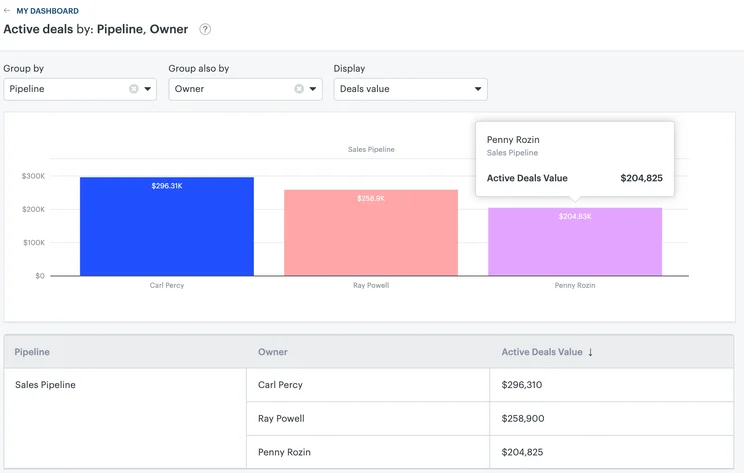
The Active Deals widget in Zendesk sell helped us track deals in real-time. Source: Tech.co testing
Zendesk Suite Growth
Growth is available for $89 per agent, per month, billed annually.
This plan is a bit more robust, aimed at medium-sized businesses that want to ramp up their overall customer offerings. This plan offers multiple help centers — as opposed to the one in the Team plan — a self-service customer portal, and even more automated responses via chatbot. Plus, it offers multilingual support, so if you’re an international business, this plan is an absolute must.
Zendesk Suite Professional
Professional is available for $115 per agent, per month, billed annually.
This is the most attractive bundle for the average small to mid-size business: It includes all the essential features needed for a full CRM at a reasonable price, as well as plenty of additional perks, including the addition of extensive data analytics tools that can help you run your business more efficiently.
If your operation has a high need for customer support or a rapidly growing customer base, Zendesk Professional Suite is a simple, fast way to start serving them across all channels.
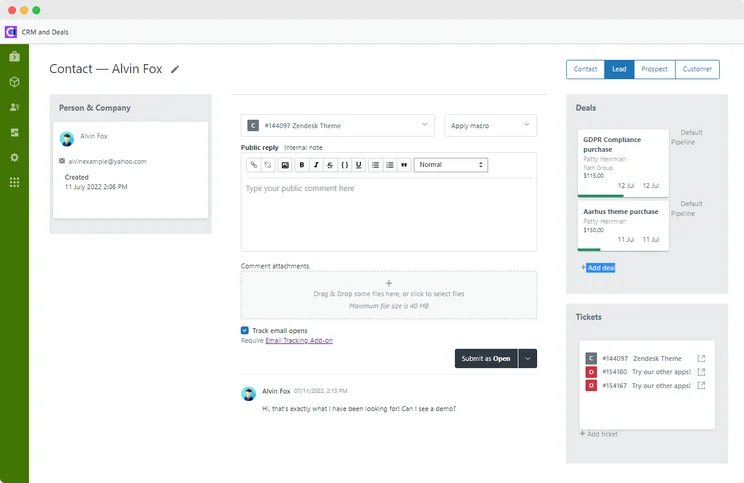
The lead profile in Zendesk allowed us to view valuable data to make the sale. Source: Tech.co testing
Zendesk Suite Enterprise
The Enterprise suite is priced at $1169 per agent, per month. It offers every single feature from the Professional suite, plus more features and AI abilities, 24/7 support, and greater customization.
Enterprise is a great choice for a business with the same staff operating across multiple brands. As for company size, this plan will be attractive for both large companies and scrappy-but-growing ones. You can always upgrade, however, so many businesses may want to start with the Professional suite first.
Zendesk Suite Enterprise Plus
Zendesk Suite also offers an Enterprise Plus plan, but you will have to contact the sales team to get an exact quote for your business.
If the Enterprise plan just isn’t enough for you, then we have good news: there’s more! The Enterprise Plus plan from Zendesk Suite adds an advanced sandbox environment and improved disaster recovery, as well as access to an add-on for a high-volume API.
As we mentioned, Zendesk Suite is a more robust customer service option combines Zendesk products like Support, Guide, Gather, Chat, Talk, Explore, and Sunshine into one pricing plan, offering you some serious functionality at a discounted price.
With those add-ons, Zendesk Suite offers a more omnichannel customer support experience, allowing for ticketing through more communication channels, like SMS, forum, and chatbot. You’ll also be able to communicate with customers via instant messaging apps, like Messenger, WhatsApp, and WeChat.
Due to these impressive and varied capabilities, our researchers think Zendesk Support provides businesses with a pretty solid return on their investments, especially compared to similar solutions on the market.
Zendesk Add-On Pricing
In addition to Advanced AI, Zendesk offers a wide range of other add-on services. Here’s a breakdown of some of your options if you have a bit of extra coin to improve the functionality of the Zendesk platform.
- Workforce Management ($25/user/month) – A helpful scheduling solution that tracks team performance and capacity in real time for your team.
- Quality Assurance ($35/user/month) – An in-depth analytics platform that automatically tracks conversations across all channels to quickly resolve problems and speed up ticket times.
- Advanced Data Privacy and Protection ($50/user/month) – Additional compliance and privacy protocols to prioritize security for high-risk businesses in need of protection.
There are also some options to bundle these add-ons together to save even more money, like combining the Quality Assurance option with the Workforce Management add-on for only $50 per user, per month in the Workforce Engagement Bundle.
Zendesk Guide, Chat and Talk
These services all help businesses fulfil tickets in additional mediums: Guide enables help centers, Chat enables messaging widgets, and Talk enables telephone call support.
Zendesk Guide
This service helps businesses build a customized knowledge base for their agents and/or their customers.
- Customer Portal — allows customers to find solutions to their own requests
- Knowledge Capture app — allows agents to build and refer to a knowledge base to quickly resolve their tickets
Zendesk Chat
This service lets agents chat with customers through a website widget.
- Pre-chat form — asks customers pre-set questions before connecting them to a live agent
- Shortcuts — allows agents to set keystroke shortcuts to chat more quickly to common concerns
- Integrations — The chat widget can be connected to WordPress, Shopify, Salesforce or JIRA.
- Chat history — Chat logs only last 14 days on Chat Lite, but are unlimited on every other tier of Chat’s service plans.
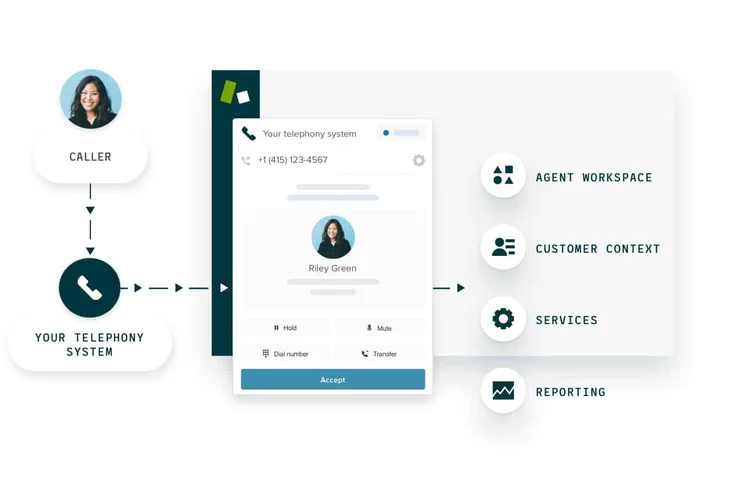
A screenshot of the Zendesk Talk interface.
Photo: Zendesk
Zendesk Talk
This service helps businesses create online call centers built into Zendesk CRM.
- Local or toll-free numbers — chose a number or port in an existing one.
- Voicemails — customer voicemails can be easily turned into tickets or tied to a workflow trigger
- Answer in browser — Agents can take inbound or make outbound calls from within the Zendesk interface.
How Much Do AI Features Cost with Zendesk?
Today, virtually all business software providers are rolling out new AI features that are aimed to helping professionals save time and understand data better than ever. Zendesk is no different, offering a range of AI-powered tools that can improve sales and customer service efforts on your team.
The most notable of these features are the Zendesk AI Agents, the chatbots provided to Support and Suite users that can help clients solve problems and find information. Even better, these AI Agents come with their own analytics dashboard, so you can see exactly how these chatbots interaction with your customers and fine tune the experience.
So how much will this cost? Zendesk makes the AI Agents features available across all paid plans, so you’ll be able to utilize them for as little as $19 per user, per month.
Zendesk also offers an Advanced AI add-on for $50 per user, per month, and this option adds generative AI writing tools, AI-powered workflows, and an agent copilot to guide your team members.
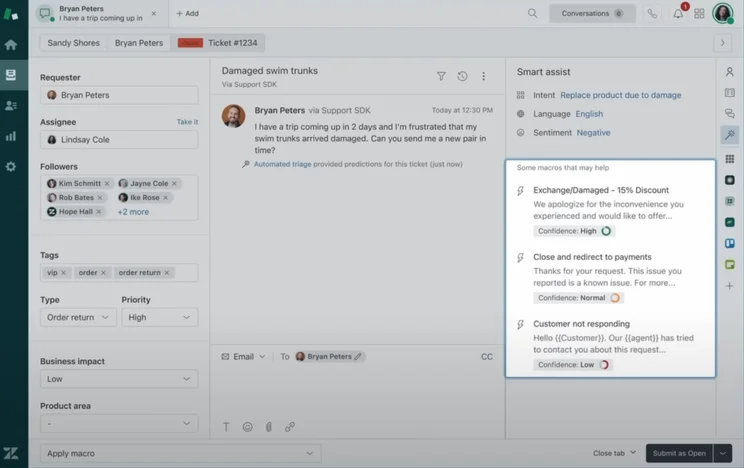
Zendesk AI Assist provides users with helpful insights about customers. Source: Zendesk
How to Save Money on Zendesk
Given Zendesk’s status as a more expensive CRM, it’s safe to assume that you want to save a bit of money when it comes to subscribing. Fortunately, there are a few tricks that can help you keep costs low while still taking advantage of the top tier Zendesk platform.
- Keep users low – Zendesk offers per user pricing, which means you’ll have to pay more when more people use the platform. Luckily, there are lots of automation and time-saving features, like light agents and side conversations, that can keep your user count low and your savings high.
- Scale slowly – Zendesk has a lot of pricing plans with a variety of different features, and you might not need all of them. Start with the cheaper pricing plans, and scale up as you see necessary, rather than over-spending before you’re familiar with the platform.
- Use the free trial – There’s no free plan available with Zendesk, but the 14-day free trial can give you a bit of insight into what kind of features you’ll actually need. Plus, you’ll enjoy at least two weeks’ worth of savings before you make a commitment, which certainly doesn’t hurt.
- Sign up for annual plans – Zendesk offers users to be billed either monthly or annually. With annual plans, you can save 20% off the price, keeping costs low if you’re willing to commit to a long-term CRM solution.
Honestly, though, the best way to make sure you’re spending as little as necessary on Zendesk is to find the right plan for your team. Luckily, you’re here investigating your options, so clearly, you’re on the right path!
Is Zendesk a Good CRM System?
As far as return on investment is concerned, CRM can reportedly make you $8.71 for every dollar you spend, so finding the right one can make a big difference.
For customer service, it doesn’t get much better than Zendesk. Yes, the price can be a bit high, particularly if you opt for the Suite plans, but it offers more features and better customization than any other CRM in our research. Combined with Zendesk AI, which provides insights and automation to improve and speed up your process, Zendesk for customer service is one of the best helpdesk software options on the market.
For sales, it’s another story. Zendesk Sell doesn’t compete as admirably against other CRMs for sales. Zendesk lacks substantially when it comes to lead capture and communication features, native video conferencing, or auto-response functionality across any of its paid plans, all of which are available with options like Freshsales. On top of that, it offers no custom reports across all plans, a feature that is available with virtually every other CRM provider in our research.
Zendesk

In Short
-
Pros
- 14-day free trial
- Unmatched selection of customer service features
- Offers good customizability
- Robust help and support tools with 24/7 availability
-
Cons
- Limited team infrastructure features
- A bit on the expensive side, especially high tier plans
- Most advanced features like AI cost extra
Pricing
-
 Support Team: $19/user/month
-
Suite Team: $55/user/month
-
Suite Professional: $115/user/month
-
 Suite Enterprise: $169/user/month
Images

Zendesk Alternatives
According to our research, Zendesk is one of the best CRM for customer support, offering a wide range of features with exemplary support for a surprisingly reasonable price. However, there are plenty of other great options out there depending on what your business actually needs.
Salesforce Service Hub, for example, is a popular option if you’re looking for robust analytics and data visualization, but it’s a bit expensive compared to Zendesk. Freshdesk pricing is comparable to Zendesk and still offers a lot of features. Additionally, if you’re a small business, Zoho CRM pricing makes it our top choice, offering the best bang for your buck.
Let’s take a look at our Zendesk alternatives guide for more info and check out how Zendesk stacks up against other CRM services for customer support in this helpful table that outlines features and payment plans.
|
Free plan
|
Free trial
|
Starting price
|
Most expensive plan
|
Score
|
Get started
Click to get started and compare prices for your business
|
||
|---|---|---|---|---|---|---|---|
|
SPONSORED
 |
|
 |
 |
 |
 |
||
|
Salesforce Service Cloud |
Zendesk |
Freshdesk |
Zoho Desk |
Microsoft Dynamics 365 Customer Service |
ManageEngine |
||
|
|
|
|
|
|
|
||
|
30 days |
30 days |
21 days |
15 days |
30 days |
30 days |
||
|
$25/user/month |
$19/user/month |
$19/user/month |
$14/user/month |
$50/user/month |
$13/user/month |
||
|
$330/user/month |
$169/user/month |
$119/user/month |
$40/user/month |
$95/user/month |
$50/user/month |
||
|
4.3
|
4.7
|
4.5
|
4.5
|
4.1
|
3.6
|
||
| Try Salesforce | Try Zendesk | Try Freshdesk | Try Zoho Desk | Get Quotes | Try ManageEngine |
Zendesk Sell Alternatives
Unlike Zendesk, Zendesk Sell doesn’t quite compare as favorably to the other best CRM for sales that we have reviewed. The platform has limited features in some key areas like lead communication and customer support, which puts it well behind other options.
Again, Salesforce is an even more popular option for sales, but when you compare Salesforce and Zendesk, the Salesforce price is a bit intimidating. Freshsales is a good alternative in the same price range and offers a bit more when it comes to features. HubSpot is another Salesforce-like option, offering a lot for a comparable price tag, but does offer a few more budget options, so might be a good fit.
Check out how Zendesk Sell stacks up against other sales-focused CRM services in the table below, outlining features and payment plans.
|
Free plan
|
Free trial
|
Best for
|
Starting price
|
Verdict
|
Data cap in basic plan
|
Lead capture
|
Accept payments
|
Onboarding
|
Get started
Click to get started and compare prices for your business
|
||
|---|---|---|---|---|---|---|---|---|---|---|---|
|
|
BEST ALTERNATIVE
 |
|
 |
 |
 |
 |
 |
||||
|
Zoho CRM |
Salesforce Sales Cloud |
Sales Hub |
Sugar Sell |
Freshsales |
Microsoft Dynamics 365 Sales |
Keap |
|||||
|
|
|
|
|
|
|
|
|
||||
|
30 days |
15 days |
30 days |
|
7 days |
21 days |
30 days |
14 days |
||||
|
Zendesk Support users |
Small businesses |
Sales analytics |
Growing businesses |
Customization |
Beginners |
Microsoft users |
Sales and marketing |
||||
|
$14/user/month |
$25/user/month |
$9/user/month |
$19/user/month |
$9/user/month |
$65/user/month |
$249/month |
|||||
|
Solid feature set and team management infrastructure |
An attractive option, with lots of features for a low price |
A scalable, highly customizable platform that’s great for managing teams |
A scalable tool that’s perfect for managing contracts and payments |
A reasonably priced platform offering solid customization options |
A low-cost option that’s great for engaging potential customers online |
An expensive, robust tool for analytics that’s better suited to current Microsoft users |
A suitable all-in-one platform for sales and marketing but a bit expensive |
||||
|
2GB per user |
200MB |
File storage: 1GB |
5 documents |
60GB |
2GB per user |
Database: 10GB |
Unlimited |
||||
|
Web forms only |
|
Web forms only |
|
Web forms only |
|
|
Web forms only |
||||
|
|
|
|
Stripe integration |
|
|
|
|
||||
|
|
|
|
|
|
|
|
|
||||
| Try Zendesk Sell | Try Zoho CRM | Try Salesforce | Try HubSpot | Get Quotes | Compare Quotes | Get Quotes | Try Keap |
What Is Zendesk Sunshine?
Zendesk Sunshine is Zendesk’s in-house developer platform. It’s built on the Amazon Web Services cloud.
Sunshine allows users to access all of the different Zendesk applications they are subscribed to and has an open API that allows them to easily send or receive data from any third-party or custom integrations.
In addition, it comes with a few CRM-specific features of its own: The “Events” feature tracks customer activity in a timeline, and the “Profiles” feature pulls information from disparate sources together to form a database of individual customer profiles. Sunshine was only launched in November 2018, but it builds on Zendesk’s successes with customer service and customer relationship tools, serving as a single platform that can pull them all together.
Zendesk Sunshine Pricing
Zendesk Sunshine is available in the Suite, which means you can get it from $55 per agent per month. This is a great deal, considering the Sunshine platform on its own will cost you at least $495 per month, although it depends on how many agents you have using it.
How We Evaluate CRMs like Zendesk
We take our impartial research and analysis seriously, so you can have complete confidence that we’re giving you the clearest, most useful recommendations.
After conducting an initial exploration to identify the most relevant, popular, and established CRM tools in the market, we put them through their paces to find out more about their strengths and weaknesses. In total, we analyzed 13 CRM systems, grading them across 84 areas of investigation.
Based on years of market research and CRM product testing, we’ve established a CRM research methodology to score products, which consists of six main assessment categories and 13 subcategories. This covers everything, from the available features and scalability capacity to the product’s value for money, and much more.
Our main testing categories for CRM systems are:
- Features: The functionalities and capabilities provided by the CRM software, such as contact management, lead and opportunity tracking, and task and activity management.
- Help and support: The resources and assistance available to users when they encounter issues or require guidance while using the CRM software.
- Customization: The ability to tailor the CRM software to suit the specific needs and processes of the organization, e.g. customizing fields, layouts, and workflows.
- Scalability: The ability of the CRM software to accommodate the growth and changing needs of the organization, such as the capacity to handle a growing customer database.
- Price: The cost associated with using the CRM software. It includes factors such as licensing fees, subscription plans, and additional charges for add-on modules or features.
- Team structure — sales CRM: Determining if a platform makes it easier to manage large sales teams, including team dashboards, team hierarchies, and team inboxes.
- Usability — small business CRM: Assessing the simplicity of the interface, the ease of navigating through menus and options, and the overall user experience.
When it comes to calculating a product’s final score, not all testing areas are weighted evenly, as we know some aspects matter more to our readers than others, which are merely “nice to have.” After hundreds of hours, our process is complete, and the results should ensure you can find the best solution for your needs.
At Tech.co, we have a number of full-time in-house researchers, who re-run this testing process regularly, to ensure our results remain reflective of the present day.
Zendesk is a highly recommended CRM for customer support, offering a lot of features and plenty of customization options for businesses of all sizes. Prices start a bit high compared to some options, but you get a lot of functionality out of it, particularly given that it offers lots of ways to cut back on the number of necessary users, saving you money in the long run.
When it comes to sales, though, Zendesk Sell doesn’t cut the mustard. It lacks the overall functional of other, better options, while costing more for certain plans. The only way we could recommend trying out Zendesk Sell is if you’re already deep in the trenches with Zendesk Support and want to add sales functionality, given the integrations are actually pretty convenient.
If you click on, sign up to a service through, or make a purchase through the links on our site, or use our quotes tool to receive custom pricing for your business needs, we may earn a referral fee from the supplier(s) of the technology you’re interested in. This helps Tech.co to provide free information and reviews, and carries no additional cost to you. Most importantly, it doesn’t affect our editorial impartiality. Ratings and rankings on Tech.co cannot be bought. Our reviews are based on objective research analysis. Rare exceptions to this will be marked clearly as a ‘sponsored’ table column, or explained by a full advertising disclosure on the page, in place of this one. Click to return to top of page


