






We may receive a commission from our partners if you click on a link to review or purchase a product or service. Click to Learn More
Smartsheet pricing starts at $9 per user, per month for the Pro plan, while the Business plan costs $19 per user, per month. There’s also an Enterprise plan and an Advanced Work Management plan, neither of which have public pricing. As far as project management costs go, Smartsheet is pretty reasonable – not as good as Trello or Jira, but superior to Wrike and Asana.
Users that want to try before they buy can get a 30-day free trial. Smartsheet used to offer a free plan, but it has since changed its subscription model, so now only a limited number of people can use Smartsheet for free. We’ll go into this in more detail further down.
In this guide, we’ll cover all the Smartsheet pricing plans, as well as hidden costs, add-on pricing, and what alternatives might be a better fit for your business.
- Tiered pricing: Smartsheet offers a Pro plan costing $9 per user per month (billed annually as $108) for small teams, a Business plan at $19 per user per month (billed annually as $228) for mid-sized teams, and a custom-priced Enterprise plan.
- Hidden costs: additional costs may increase your total investment, because Smartsheet charges for features such as phone support, training, and online courses.
- No Free plan: Unfortunately, Smartsheet discontinued its limited free plan in 2025, and now only provides a free trial, which lasts 30 days.
- Options for big businesses: Along with the Enterprise plan, for large companies with complex needs, the Advanced Work Management plans offer extensive features like Workapps and integrations with Salesforce and Jira.
In this guide:
A Breakdown of Smartsheet Pricing Plans
In the table below, you’ll find details about each of Smartsheet’s paid plans. You can use the table for a quick, at-a-glance overview of what to expect at each tier, or for more detail, check out the main body of the article.
|
Price (annually)
The amount you'll pay per month, when billed annually
|
Users
|
Projects/boards
|
Automations
|
Gantt chart
|
Resource management
|
Time tracking
|
||
|---|---|---|---|---|---|---|---|---|
|
LOWEST COST
 |
BEST FOR TEAMS
|
|
|
|||||
|
Pro |
Business |
Enterprise |
Advanced Work Management |
|||||
|
$9/user/month |
$19/user/month ($24 per month when billed monthly) |
Custom |
Custom |
|||||
|
1 – 10 |
3 – Unlimited |
10 – Unlimited |
Unlimited |
|||||
|
Unlimited |
Unlimited |
Unlimited |
Unlimited |
|||||
|
250/month |
Unlimited |
Unlimited |
Unlimited |
|||||
|
|
|
|
|
|||||
|
|
Add-on |
Add-on |
Add-on |
|||||
|
|
Available as part of Resource Management |
Available as part of Resource Management |
Available as part of Resource Management |
Smartsheet Pricing Plans
Smartsheet has five plans in total, all geared towards teams of different sizes. You’ll find each of them below, and you can use the links to navigate to their corresponding sections in the article.
While we can’t tell you the pricing for Smartsheet’s Enterprise and Advanced Work Management tiers, it’s worth keeping in mind that there may be some discounts to be had after negotiations with the company.
Smartsheet

In Short
-
Pros
- 30-day free trial available
- The Pro plan ($9/user/month) is good value, with excellent task management features
- Spreadsheet-style interface has a good level of customizability
-
Cons
- Business plan is very expensive compared to monday.com and ClickUp
- Similarly priced providers, like Asana, are easier to use
- Recently discontinued its widely-available free plan
Pricing
-
 Pro plan: $9/user/month
-
Business Plan: $19/user/month
-
Enterprise: Contact Sales
-
Advanced Work Management: Contact Sales
-
30-day free trial
Images
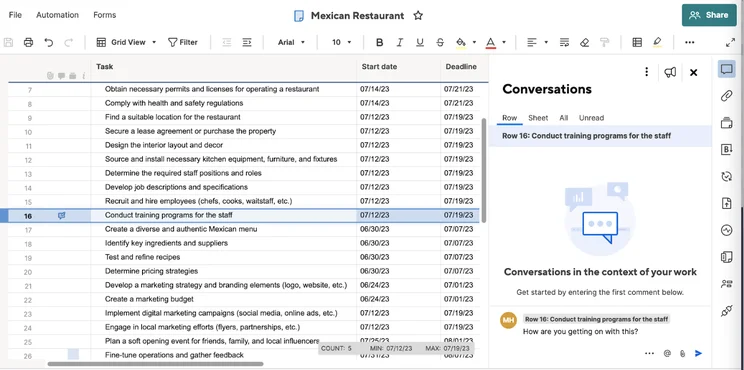
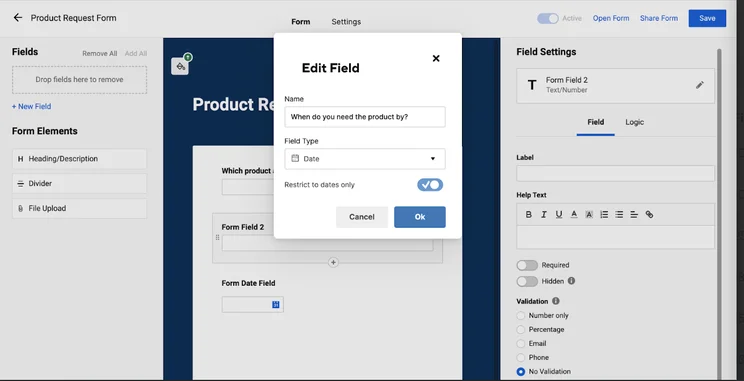
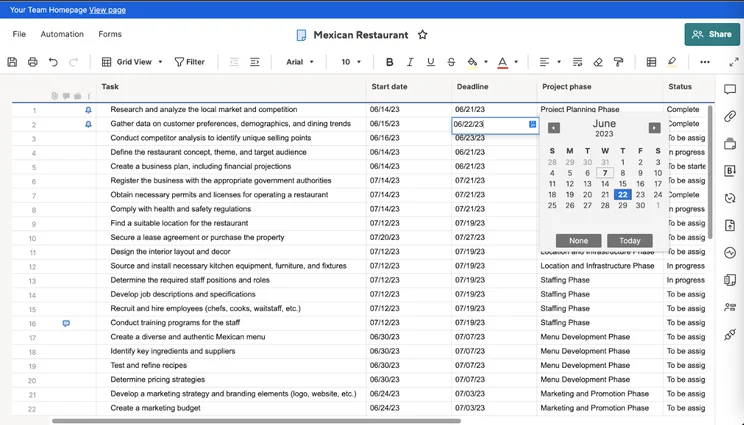
Smartsheet Pro plan costs – $9 per user, per month
Smartsheet’s plans start at $9 per user, per month, billed annually as $108. For that money, you get:
- Unlimited sheets
- Unlimited reports (1 sheet per report)
- Unlimited dashboards (10 widgets per dashboard)
- Private sheets and reports
- Unlimited forms
- Range of integrations, including Microsoft Office, Google Workspace, and Slack
- Grid, Gantt, Card, Calendar views
- Pre-built automation rules (250 per month)
- 20 GB attachment storage
- Single sign-on
- Dependencies
- Export sheets to Excel, Google Sheets, Microsoft Project, PDF, or image
The Pro plan supports Gantt charts, forms, mobile access, and automated workflows, features that are vital for any project management platform. It limits collaborators to 10 per item, which is better than just a flat 10 if you need to incorporate multiple people across multiple projects. However, it omits several useful features such as the activity log and proofing.
With sheets, you can carry out the basics of project management, such as task creation and setting milestones. Support is available via email. Overall, Smartsheet is a pretty good deal for small teams but does miss out on features that would come in handy.
The Pro plan is well-rated and is comparable to ClickUp (from $7 per user, per month) and monday work management’s first paid plan (from $9 per user, per month) in our latest round of project management testing.
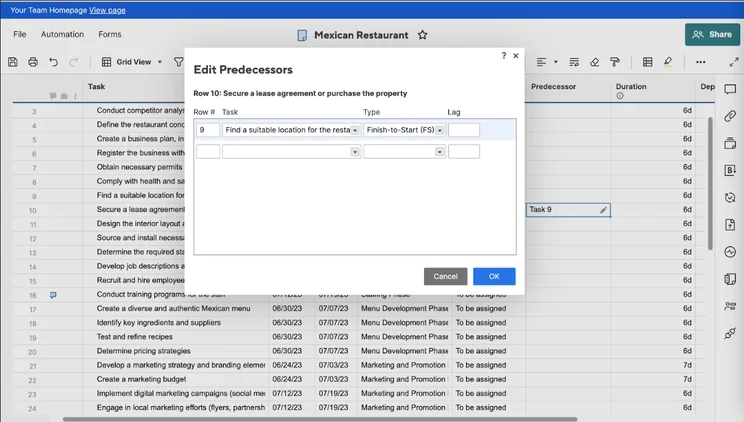
Creating a relationship between tasks in Smartsheet. Image: Tech.co’s testing process.
Here’s how Smartsheet’s Pro plan compares to other similarly priced plans from competitors like monday work management and ClickUp:
|
Price (annually)
The amount you'll pay per month, when billed annually
|
Users
|
Projects/boards
|
Storage
|
Automations
|
Custom project templates
|
Budget Management
|
Kanban board
|
Gantt chart
|
Resource management
|
Calendar
|
Time tracking
|
|||
|---|---|---|---|---|---|---|---|---|---|---|---|---|---|---|
|
|
 |
 |
 |
 |
||||||||||
|
Smartsheet |
monday.com |
ClickUp |
Asana |
Wrike |
||||||||||
|
Pro |
Basic |
Unlimited |
Asana Starter |
Wrike Team |
||||||||||
|
$9/user/month |
$9/user/month |
$7/user/month |
$10.99/user/month |
$10/user/month |
||||||||||
|
1 – 10 |
Unlimited |
Unlimited |
Unlimited |
2 – 15 |
||||||||||
|
Unlimited |
Unlimited |
Unlimited |
Unlimited |
Unlimited |
||||||||||
|
20 GB |
5 GB |
Unlimited |
Unlimited (100MB per file) |
2GB (per user) |
||||||||||
|
250/month |
None |
1,000/month |
Unlimited |
50/user/month |
||||||||||
|
|
|
|
|
|
||||||||||
|
|
|
|
|
|
||||||||||
|
|
|
|
|
|
||||||||||
|
|
|
100 uses per project |
|
|
||||||||||
|
|
|
|
|
|
||||||||||
|
|
|
|
|
|
Smartsheet Business plan costs – $19 per user, per month
If you’ve more than ten users, or are looking for more advanced Project Management capabilities, choose Smartsheet Business. This tier costs $19 per user per month when paid annually. For this price, you get everything in the Pro plan, plus:
- Unlimited collaborators who can view/edit
- Unlimited sheets per report
- Unlimited widgets per dashboard
- Unlimited automations
- Forms with conditional logic
- Document builder
- Proofing
- Brandfolder Integration
- Adobe Creative Cloud extension
- Report grouping and summary
- Baselines
- Activity Log
- Custom Branding
- 1TB Attachment Storage
- User, group, and license management
- Publish sheets, reports, and dashboard
You’ll also get the option to buy add-on customer support packages for the Business plan, which aren’t available to Pro plan users. See Hidden Costs for more on this.
Just like the Pro plan, the Business tier supports card view, Gantt charts, Kanban-style “card” view (see below), mobile access, reminders and notifications, and automated workflows. Access to Resource Management by Smartsheet is also available as an add-on on this plan. It’s a useful tool for solving staffing conflicts and managing remote teams spread out across the globe.
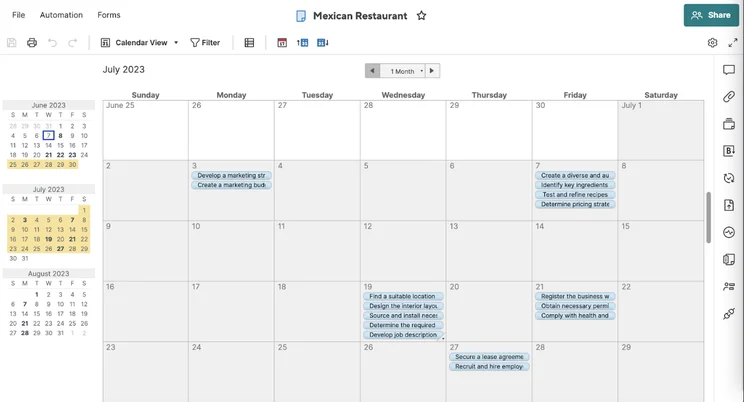
Smartsheet’s calendar view. Image: Tech.co’s testing process.
The Business plan offers a bit more functionality than its predecessor. For instance, you can create forms with fields that follow conditional logic (see below), and Automations are unlimited in the Business plan, so your team can create as many actions as they want.
On the Pro plan, on the other hand, you’re restricted to 250 pre-built automations per month, but some teams will need many more than that if they want to use it to really improve efficiency.
Another good feature of the Business plan is activity logs. The bigger your team, the more useful this function gets; it makes clear who has edited what on any given sheet. And with way more storage available in the Business plan (1TB vs Pro’s 20 GB), you can stay on top of your colleagues’ activities all the way through long-winded, complex projects.
To give you a bit more oversight, there’s also a “planned vs actual” function (called Baseline) that easily lets you view how your actual work schedule differs from what you planned.
It also adds the ability to manage groups and resources, control sheet ownership, and work with custom branding – the latter of which means you can insert your company logo.
The Business plan is ideal for companies or teams between 3 and 50 users who might not need enterprise-grade features, such as single sign-on or deeper administrative control, but still want to maximize their growth and reduce the percentage of resources wasted on projects (which some studies say can be as high as 11.4% of total resources) through better project management.
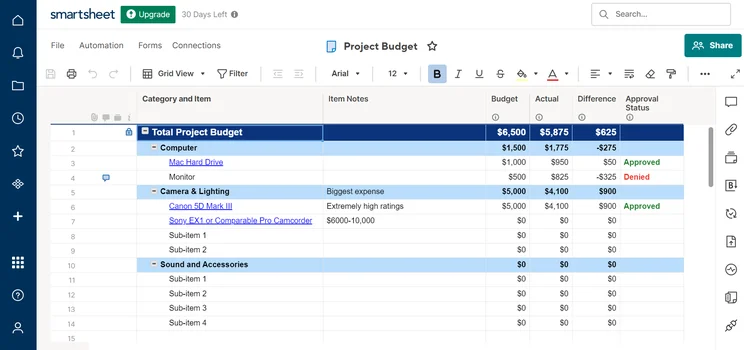
A project budget template provided by Smartsheet. Image: Tech.co’s testing process.
Smartsheet Enterprise plan costs – Custom
The tiers for enterprises lack any public pricing, since Smartsheet negotiates these costs on a case-by-case basis. Popular project management software solutions like monday work management and Asana also apply this policy to their highest tier.
The Enterprise plan and the Advanced Work Management plan are built for large companies looking to streamline complex projects with centralized task tracking and governance controls to manage numerous individuals, pipelines, and information access.
Enterprise offers everything in the Business plan plus:
- Custom welcome and help screens
- Workapps: No-code business apps; curated experiences based on user role
- Unlimited attachment storage
- DocuSign integration
- Directory integration: Replicate your user groups and attributes from LDAP or Active Directory to Smartsheet
- Single sign-on/SAML
- Custom email domains
- A service availability guarantee
- Approved Domain Sharing
- Account discovery
- User merge
- Domain validation – user auto-provisioning
- Chargeback reports
- Backup / recurring backup
- eLearning
- 24/7 phone support
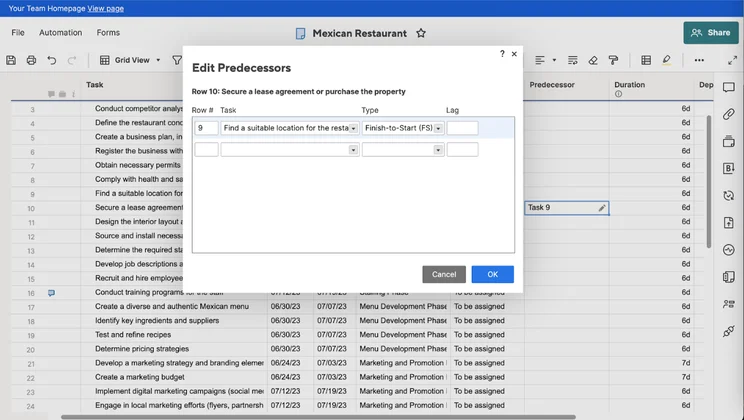
Editing in Smartsheet’s spreadsheet view. Image: Tech.co’s testing process.
Smartsheet Advanced Work Management plan costs – Custom
This is the last tier offered by Smartsheet. As with its predecessor, there’s no public pricing available. It’s aimed at organizations that manage large portfolios and wish to connect across their systems. Alongside everything offered in the Enterprise plan, users can access:
- Control Center
- Dynamic View
- Data Shuttle
- Salesforce and Jira connectors
- DataMesh
- Calendar App
- Pivot App
- Premium Support
Smartsheet’s new subscription model
Smartsheet has dramatically overhauled its subscription model since 2024. The old model had a free plan that allowed users to view, comment, and edit boards for free, but this has been discontinued. You can still view Smartsheet boards for free, but commenting and editing is not strictly reserved for paid users.
At the same time, prospective users can be granted “provisional Member access.” Essentially, this gives you permission to view, comment, and edit boards for a period of 90 days.
After that period has ended, a system administrator either has to either shift this provisional status to full-time paid Member status, free Guest status (granting you the ability to view, comment, and edit, only available to people outside your company), or free viewer status (available to both members of your company and outsiders).
It’s quite a complex model. For more information, you can visit the Smartsheet website.
Smartsheet discounts
If you’re part of a nonprofit and looking for project management software for your organization, Smartsheet might be able to provide you with a discount on one of its annual plans.
In the United States, to be eligible for a reduced fee from Smartsheet, your nonprofit will have to have valid 501c(3) status. Nonprofits and charities headquartered in other countries will have to have equivalent status to qualify.
Some organizations are not eligible, such as schools and other educational institutions, government organizations, or any entity that engages in lobbying, legislative or political activities. Financial institutions are also not eligible.
Smartsheet Pricing: Hidden Costs
When it comes to hidden costs, the first aspect to consider is contract length. Smartsheet’s best prices are offered on an annual basis, so if you’re not ready to commit to this, then monthly prices do increase, slightly.
- Annually, the Pro plan is $9/user/month or $108/user/year
- Monthly, the Pro plan costs $12/user/month or $144/user/year
The same goes for Smartsheet’s Business plans:
- Annually, the Business plan is $19/user/month or $228/user/year
- Monthly, the Pro plan costs $24/user/month or $288/user/year
Smartsheet support add-on costs
Smartsheet also charges extra for Phone support, which isn’t included as standard. Unfortunately, this isn’t available to purchase on the Pro plan, but if you’d like to add Phone support to your Business package, this comes at a cost of $4/user/month for Standard support or $8/user/month for Professional support. Please note that professional support is only available for Smartsheet Gov members.
These packages also come with University eLearning access and, in the case of the Professional Support add-on, 10 lots of 30-minute desk support sessions.
Smartsheet pricing for training
If you’re looking for extra training beyond the standard onboarding, Smartsheet University is available to take you through the basics. This will enable you to access e-learning and instructor-led online courses on topics such as ‘Solution Proficiency’ and ‘Marketing Professional’ tips.
Instructor-led online courses can start from $149 for an individual. For some courses, you can optionally choose to become “Smartsheet Certified” and demonstrate your mastery by passing an exam, which is around $149 per attempt and lasts for one year of Smartsheet certification.
Finally, there are in-person Regional training sessions that can be booked, the fee for which is undisclosed publicly.
Other hidden costs
There are no hidden installation costs or add-on costs for project management integrations or features. The only other so-called “hidden cost” with Smartsheet is its Enterprise pricing, which it doesn’t make publicly available; however, you can bet safely that the more users you’re looking to service, the better deal can be negotiated.
The $19/user/month rate for Smartsheet’s annual Business plan sets the anchor point for custom pricing and we’d wager that Enterprise users might be able to secure the ultimate range of features Smartsheet has to offer for a not-dissimilar price, or perhaps an even lower amount per user, depending on the user number and contract length you’re looking for.
Additional Smartsheet Products and Pricing
Smartsheet offers more than just its basic project management software. Users can opt for Brandfolder by Smartsheet, an added service with its own pricing. We’ve broken down what it entails below.
Brandfolder by Smartsheet pricing
Brandfolder is a digital asset management platform (DAM) created by Smartsheet and geared toward enterprises that manage a myriad of brand assets. It allows creatives and marketers to manage digital brand assets in one, central location, track who’s using them, and make them more easily distributable to clients.
Brandfolder utilizes some of the same time-saving features as Smartsheet – such as automated workflows. To find out more about Brandfolder’s pricing, you have to book a demo on the provider’s website.
What’s New in Smartsheet?
Smartsheet regularly rolls out updates to its service to make sure that your subscription fee goes as far as possible. One recent change: The provider introduced a number of AI enhancements, including formula generation and AI-generated charts. This makes it easier for users who aren’t data literate to organize and display key information.
The platform also plans to roll out a redesigned table view with a refreshed UI, more data capacity, and a series of new features, such as column links. This will create a better user experience overall and make it easier for users to cross-reference information between different sheets.
Furthermore, Smartsheet has also made a number of styling and readability improvements to its chart widget. With this, it hopes to provide a better user experience for customers, by improving spacing, text overflow handling, customizability, and more.
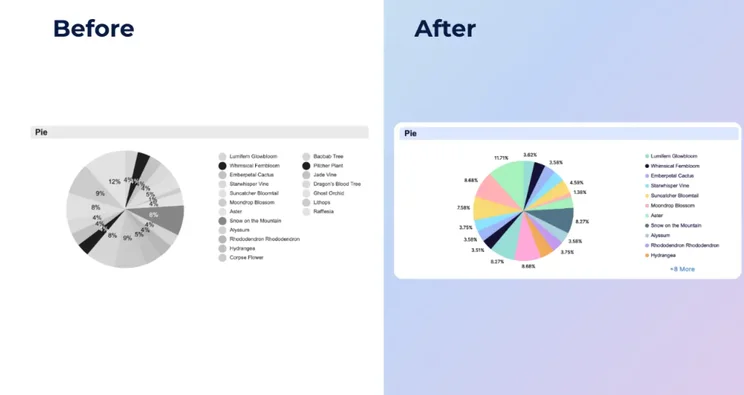
The new Smartsheet chart widget side by side with the previous iteration. Source: Smartsheet
Alongside the aforementioned changes to its subscription model, Smartsheet has also introduced minor UI changes to its Resource Management add-on, to boost the clarity and usability of its “schedule” view. The screen is now less cluttered than previously, which will make it easier to view individuals’ workloads.
Is Smartsheet Free?
As mentioned, Smartsheet no longer offers a free plan. You can, however, still view boards that are shared with you (either as a fellow member of the company in question or externally), and access what is essentially a 90-day free trial if provisioned by a system administrator. It’s a somewhat complicated new subscription model.
Smartsheet also offers a free 30-day trial, and all you have to do is enter your email address to try out either the Pro or Business plan. This means you’ll be able to find out if the software caters to your business’s needs without spending a cent. What’s more, students from accredited higher institutions may be eligible for free licenses. For more information, visit the Smartsheet website.
The Pro plan is the cheapest paid Smartsheet plan on offer, coming in at $9 per user, per month, which is good value considering it is an elite-tier project management tool. It’s the same price as monday work management’s Basic plan ($9 per user, per month) and has a better set of features.
Who Is Smartsheet Best for?
Smartsheet’s costs and features suit absolutely every business. If you’ve never tried Smartsheet before, or you’re thinking of making the switch from another project management provider, here’s the lowdown on the different types of teams that will benefit from Smartsheet in particular:
Teams managing complex projects
Thanks to a myriad of task management and workflow creation tools, including an automation builder and an easy-to-use Gantt chart, Smartsheet can handle multi-faceted, complex projects with ease.
Teams transitioning away from spreadsheets
Smartsheet’s spreadsheet-style default view makes it a particularly easy software program to transition to using if you’re used to managing projects on spreadsheets. The only difference is, Smartsheet’s spreadsheets are infinitely more useful thanks to the provider’s collection of powerful, integrated features.
Teams that want to become more efficient
Smartsheet includes a number of tools for editing workflows, such as custom and pre-built automations, so that all of the most mundane tasks in your day can be completed without you even having to think about it.
If you’re concerned about switching from another project management software program to Smartsheet, don’t worry – the provider has extensive onboarding materials available for customers that address everything from building your first Sheet upwards, and offers significantly more customer support than some other providers we’ve tested.
There are also detailed instructions on how to import your data in a variety of different formats into Smartsheet, which minimizes downtime.
Smartsheet Alternatives
As we’ve covered, Smartsheet is the project management software to go for if you’re familiar with using spreadsheets, or like the approach of Microsoft Project, but want something that’s built for the web. Don’t let the spreadsheets-style view tempt you into thinking this is a database management tool like Airtable, however – Airtable and Smartsheet are quite different, and Smartsheet is very much a “classic” project management tool (plus, Smartsheet costs less than Airtable).
Of course, there are plenty of other options on the market that could be a better fit, depending on your circumstances. Tech and engineering teams, for instance, will get a lot of joy from Jira. At the same time, if finances are an issue, you should consider Trello.
Smartsheet vs ClickUp
We found that Smartsheet isn’t the easiest project management tool to get to grips with, receiving low scores on our ease-of-use testing. Compared to ClickUp, for example, it simply took longer to perform basic tasks like creating reports and finding data.
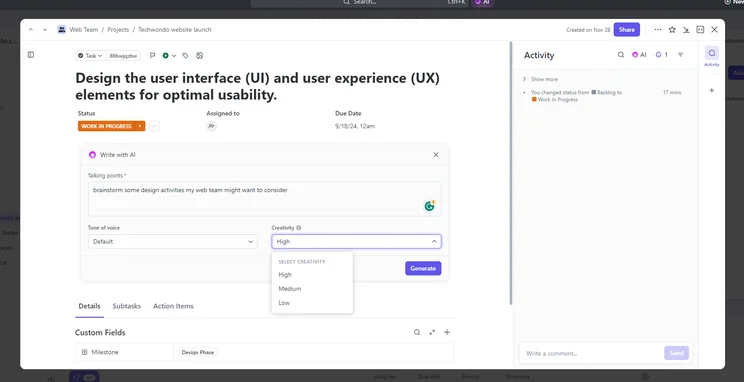
Managing a task in ClickUp. Image: Tech.co’s testing process.
ClickUp had the best range of features for managing tasks out of all the providers we tested. ClickUp also has an impressive range of workflow creation tools and some of the best free project templates, as well as automations, available on all plans. ClickUp’s pricing plans are also better value – its Business plan $7 cheaper than Smartsheet’s.
However, Smartsheet offers 24/7 live support, which ClickUp is noticeably missing, although you do have to pay extra for it. When it comes to security, it’s a toss up, with both offering good protocols to protect data. Smartsheet has a wider variety of data compliance certifications, whereas ClickUp has 2-factor authentication on all plans, and Smartsheet only offers this on its Enterprise plan.
Smartsheet vs monday work management
If you need another alternative to Smartsheet, monday work management is also a great pick for its simple, modern interface and great support options, as well as a wealth of customizable features.
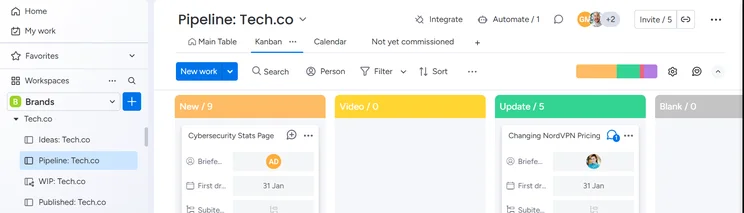
monday work management’s Kanban board. Image: Tech.co’s testing process.
Beyond functionality, monday work management and Smartsheet offer quite similar pricing. The starting price is $9 per month for both, and both offer a $19 per month plan for larger businesses. Where monday work management is different, though, is that it offers an in-between plan, the $12 per month Standard plan, which might be a better fit if you need something more robust that won’t break the bank.
Smartsheet vs Asana
Asana is a really user-friendly, moderately priced project management platform that excels at task management and displaying project data.
Thanks to its variety of project views and useful collaboration tools, it’s actually really easy to sync up with your teammates on Asana.
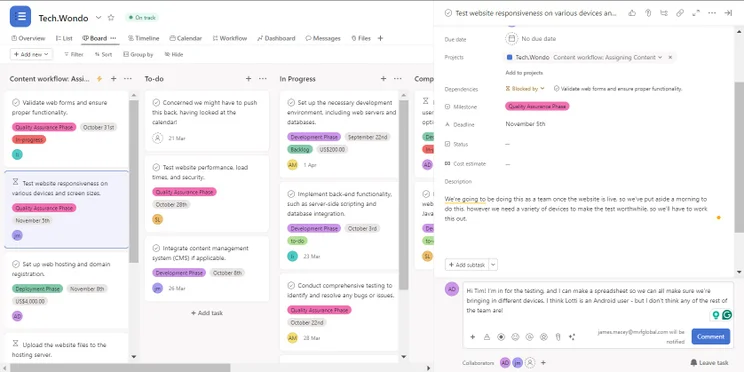
Commenting on a task card to keep my colleagues updated on Asana. Source: Tech.co testing
However, Asana is pretty pricey. It does offer a free plan, albeit a limited one, but its first paid plan starts at $10.99 per user, per month. After this, it shoots up to $24.99 per user, per month for its Advanced plan.
Smartsheet vs Trello
Another option worth considering is Trello. It’s a widely-used tool that is best for users with basic project management needs.
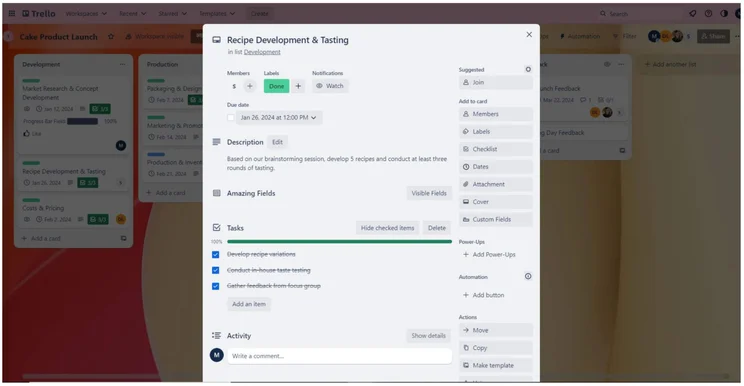
Every Trello project management card can include a list of related tasks. Source: Tech.co testing
If you find that you’ve reached a ceiling with Trello, Smartsheet would be one of the better upgrade options. What’s more, you can import data directly from Trello boards into Smartsheet.
Read our Smartsheet vs monday work management review to see how the providers compare head-to-head and how Smartsheet’s costs match up to monday work management’s, or see our guide to the best project management software. Alternatively, for a quick overview of Smartsheet’s key rivals such as Wrike and Trello’s pricing, you can check out the table below:
About Our Research
Here at Tech.co, we spend a lot of our time researching and rigorously assessing every product, service, and software tool we write about. Our product reviews are based on in-depth market research and complex testing frameworks that are used to put providers through their paces.
For project management, our latest round of testing investigated 10 top providers by analyzing five key areas: ease of use, pricing, functionality, customer support, security, and integrations.
Importantly, all of our opinions, rankings, and verdicts are based on the data-driven research conducted by our team, which allows us to write about software and services with confidence and clarity.
Check out our in-depth research guide to learn more about our process
Methodology: How We Test Project Management Software Platforms
At Tech.co we don’t write about products and services without conducting thorough research, and hands-on testing where applicable. While this process can be time consuming, it’s time well spent if it means we’re providing better, more useful information for your business.
When it comes to project management software, we test out each program first-hand, guided by an in-house research framework consisting of six core assessment areas that break down into a range of smaller subcategories. This framework is based on the factors companies and project managers have told us are important to their everyday usage. The six criteria are:
- Ease of use: After getting five to six participants to test each project management software for an hour, we assessed how easy it was to set up a project with the platforms, how clear their interfaces were, and how easy they were to navigate.
- Pricing: We look at all plan costs. Providers offering lots of features for lower costs will have better pricing scores than those that lock them away on higher-tier plans.
- Customer support: We assess the ways you can contact your project management software provider if something goes wrong. Providers offering 24/7 live support, as well as phone-based support and onboarding assistance, get the best scores.
- Security: For this area, we assess the security options offered by each provider. This includes user-level security features like two-factor authentication, as well as more administrative security measures like user permissions and IP restrictions.
- Integrations: We assess the quantity — and the quality — of the applications each project management software provider integrates with.
- Functionality: This part of our research involves assessing the full feature set that each product provides. We look at four function-based sub-categories as part of this, including task management, project and workflow creation, data visualization, and collaboration.
It’s important to note that not all of these criteria hold equal weight in our testing methodology. This is best practice and based on what businesses have told us is essential, compared with what’s simply “nice to have”.
Because of their central importance to project management, how easy each tool is to use, how much it costs, features for project and workflow creation, and task management had more of an impact overall than other criteria.
Smartsheet is certainly worth considering if you’re in the market for project management software, especially if you spend a lot of time working in spreadsheets already.
According to our most recent research, Smartsheet is the seventh-best project management software provider we tested, but don’t let that fool you, as it offers a solid pick across our research. If customer support is your priority, it’s one of the best options, scoring highly in both areas thanks to its wealth of community help and learning content.
We used to recommend Smartsheet for larger businesses, but now that it has a competitively priced $9 per user, per month Pro plan, it’s a lot more affordable for smaller companies and teams. However, we’d recommend considering ClickUp if you need something cheaper, with the pricing starting at $7 per month, or monday work management for a more customizable platform at the same price.
But if you’re happy using spreadsheets as a way of working and looking for a straightforward and genuinely helpful program for tracking and managing tasks, Smartsheet is certainly going to fulfill your requirements.


