

We may receive a commission from our partners if you click on a link to review or purchase a product or service. Click to Learn More
monday work management is an excellent project management tool, boasting a massive catalog of AI features, an intuitive and colorful interface, and a robust free plan.
To inform this review, we conducted hands-on research of 10 different project management services across 6 core assessment areas. I’ve tested monday Work Management extensively, and you’ll find my thoughts below.
- AI features: monday work management provides an entire catalog of AI features, including AI assistants, note takers, task schedulers, AI analytics, workflow builders, and resource managers.
- Ease of use: monday work management is one of the easiest project management platforms to use, with an intuitive drag-and-drop interface and lots of helpful tips during setup.
- Pricing: monday work management pricing starts at $9 per user, per month, with a more expensive plan that costs $19 per user, per month, with more advanced features like AI time tracking.
- Free plan: monday work management offers a free forever plan with basic features that allows for up to two users.
- Best for: monday work management is ideal for medium-sized and large businesses due to its robust automation features that can streamline operations.
At Tech.co we don’t write about products and services without conducting thorough research and hands-on testing where applicable.
When it comes to project management software, we tested 10 different platforms first-hand with guided in-house research framework consisting of six core assessment areas.
This framework is based on the factors companies and project managers have told us are important to their everyday usage, including ease of use, integrations, security, and overall functionality. that break down into a range of smaller subcategories.
Learn more about our research of monday work management below.
monday Work Management AI Features
monday work management

In Short
-
Pros
- Robust automation features
- Built-in AI tools for workflows and note taking
- Extremely customizable
-
Cons
- Free plan has 2-person user limit
- Strict AI credit limits
- Can get expensive with high AI usage
Pricing
-
 Basic: $9/user/month
-
Standard: $12/user/month
-
Pro: $19/user/month
-
Enterprise: Custom
-
Free plan available
-
14-day free trial
Images
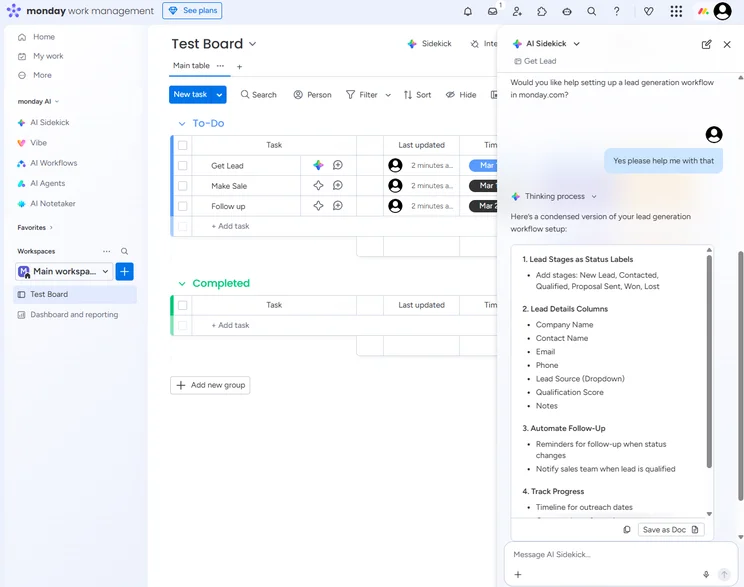
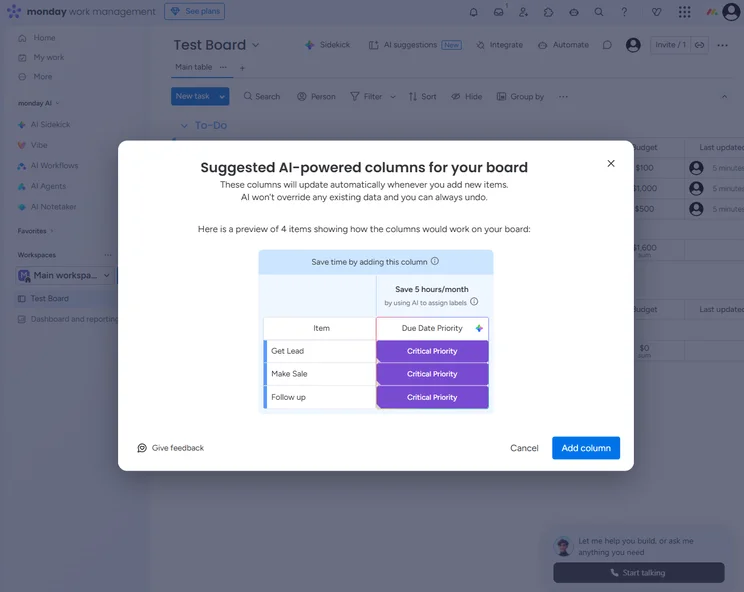
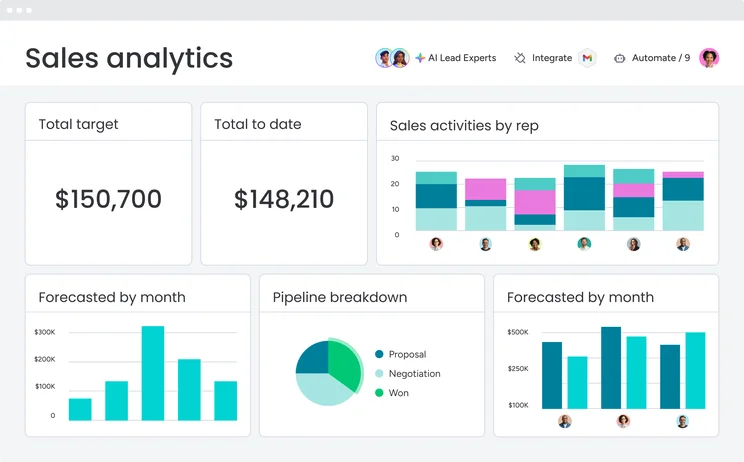
I had the chance to get hands-on with monday work management through the 14-day free trial of the Pro plan. The platform can do a lot, particularly when it comes to AI features, while still providing an easy-to-use interface that isn’t overwhelming.
The drag-and-drop system and the color-coordinated interface made making manual changes and noticing patterns easy. If I ever got stuck, the AI-powered chatbot provided clear instructions and follow-up questions to get me on track.
monday work management also provides 24/7 support for all paid plans, so I could’ve got in touch with a human expert if that ever became necessary.

Conor has been writing for Tech.co for a decade, testing out business software like monday work management to understand how it works, who should use it, and when to find an alternative.
AI Sidekick
AI sidekick is monday’s flagship AI tool that can resolve queries, offer suggestions, and execute actions on your behalf.
It can send messages for you, write updates on monday cards, and generate ideas to help you kick off projects.
It’s an excellent addition to the monday features roster.
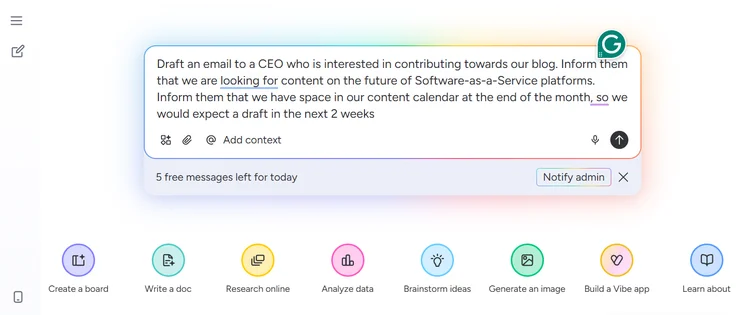
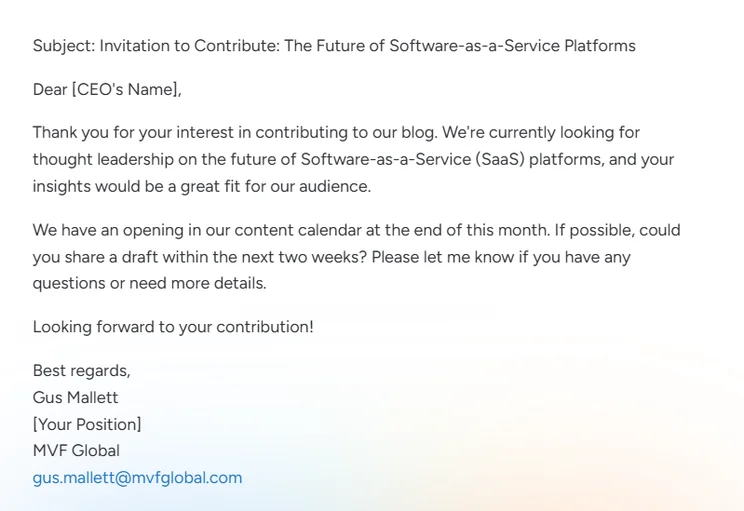
I asked monday AI Sidekick to generate some email copy, which it did in about 5 seconds. Source: Tech.co testing
I have a lot of experience with monday, and as part of the research process for this article, I played around with AI Sidekick.
In short, I was really impressed. I asked the chatbot to draft some email copy for me, which it did in about 5 seconds, and to create a new board for a marketing campaign.
After asking for a few more details, AI Sidekick fulfilled my request, populating my board with placeholder task cards, priority levels, stakeholders, and deadlines.
I’d put AI Sidekick right up there with ClickUp Brain as my two favorite project management AI tools.

AI Agents
With monday AI, you can build powerful agents to handle complex workflows.
These agents assume full responsibility for chosen tasks. For example, you could build an agent to deliver weekly competitor analysis reports. Once set up, you can completely hand the task over to the relevant agent.
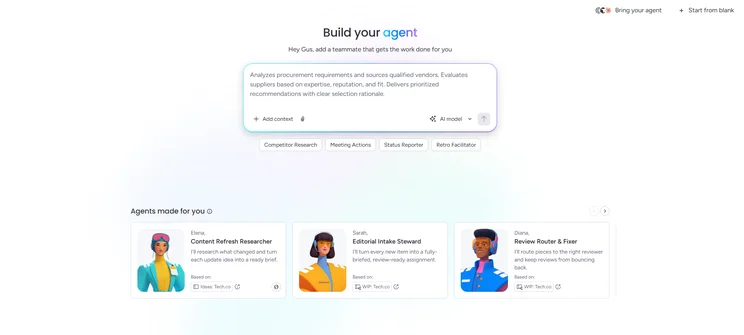
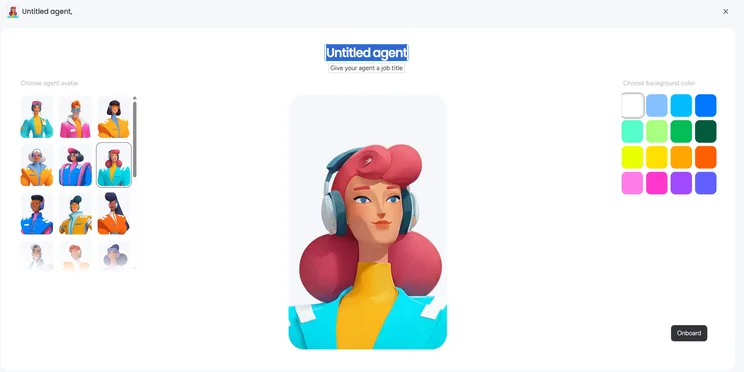
While you can create custom agents from scratch, monday also suggests agents based on your existing boards and workflows. Source: Tech.co testing
I onboarded a pre-built agent, Emma, to clean up one of my overstuffed boards. From selection to deployment, the whole process took just 10 seconds.
From there, I was able to interact with Emma via a dedicated widget, which hovers to the right of the screen, in much the same way you would with a chatbot.
I lodged requests, issued follow-up instructions, and configured Emma to my exact specifications.
The upshot? Emma cleaned up my board, standardized some card templates, and ultimately took over a job that I’d been putting off for some time. I was highly impressed.
AI Blocks
You can use AI Blocks to auto-populate boards with status updates, deadlines, and assigned team members, reducing the need for manual data entry.
AI Blocks are fully configurable, so you can easily build multi-stage workflows to free up your time to focus on business-critical tasks.
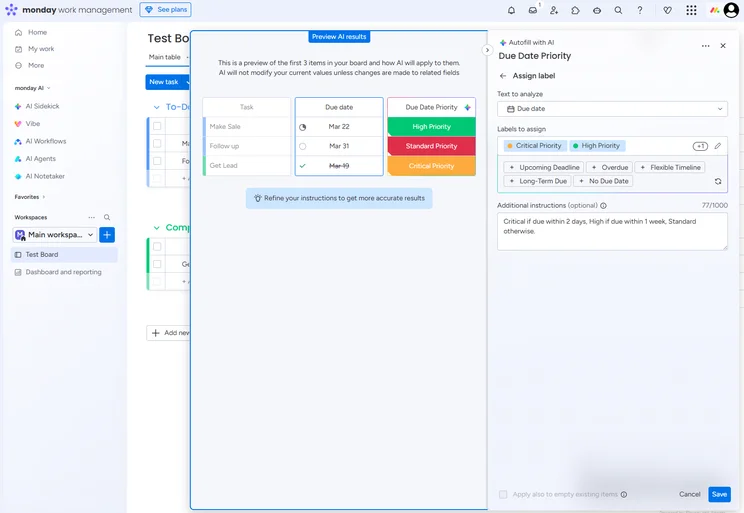
The AI Blocks in monday work management allow you to edit specific automations, so you aren’t left out of the AI decision making process. Source: Tech.co testing
A senior stakeholder at my company asked me to work on a specific content suite. In order to prioritize their requests, I configured AI Blocks to assign a “to-do” status when that stakeholder created a new task card.
With this AI Block in place, I was able to quickly jump on the stakeholder’s ad hoc requests. Ultimately, I delivered the content suite in a timely manner, and the stakeholder was very pleased!
AI Notetaker
AI Notetaker transcribes your meetings in real-time, identifying speakers, unearthing topics, and generating key takeaway summaries.
AI Sidekick is also built in to the AI Notetaker interface, so you can easily ask questions about existing meetings when required.
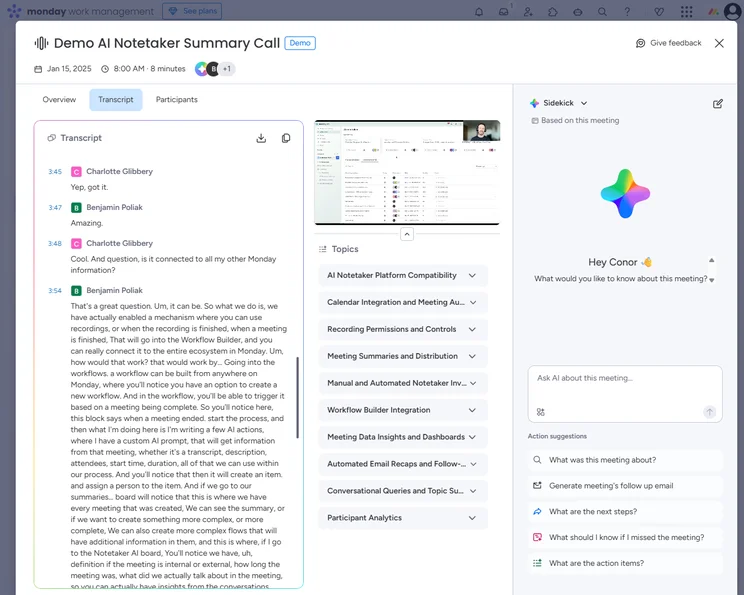
The AI Notetaker in monday work management provides a thorough look at the meeting, including topics and takeaways, as well as a transcript with speaker identification. Source: Tech.co testing
AI Notetaker is one of the best AI transcription tools that I’ve encountered. Most impressively of all, it extracts action items from your meetings in real-time, which can then be automatically assigned to boards.
Another useful part of AI Notetaker is that, if you miss a meeting, it automatically segments the content into topics, so you can locate your desired section instantly, without needing to sit through parts that aren’t relevant to you.
How Much Does monday Work Management cost?
- Free plan: Free
- Basic plan: $9 per user, per month
- Standard plan: $12 per user, per month
- Enterprise plan: Custom pricing
All paid plans including AI Sidekick and AI Note Taker.
|
Price (annually)
The amount you'll pay per month, when billed annually
|
Users
|
Projects/boards
|
Storage
|
Key Features
|
Kanban board
|
Gantt chart
|
Team View
|
Calendar
|
Time tracking
|
AI features
|
||
|---|---|---|---|---|---|---|---|---|---|---|---|---|
 |
|
|
|
|
||||||||
|
Free |
Basic |
Standard |
Pro |
Enterprise |
||||||||
|
Free |
$9/user/month |
$12/user/month |
$19/user/month |
Custom |
||||||||
|
2 |
Unlimited |
Unlimited |
Unlimited |
Unlimited |
||||||||
|
3 |
Unlimited |
Unlimited |
Unlimited |
Unlimited |
||||||||
|
500MB |
5GB |
20GB |
100GB |
1,000GB |
||||||||
|
|
|
|
|
|
||||||||
|
|
|
|
|
|
||||||||
|
|
|
|
|
|
||||||||
|
|
|
|
|
|
||||||||
|
N/A |
|
|
|
|
How We Test Project Management Software
Tech.co evaluates project management platforms like monday work management based on certain criteria to ensure that users are getting the best information about potential business tools.
- Is it easy to use?: After getting five to six participants to test each project management software for an hour, we assessed how easy it was to set up a project with the platforms, how clear their interfaces were, and how easy they were to navigate.
- Is it a good value?: We look at how much the platform costs. Providers offering lots of features for lower costs will have better pricing scores than those that lock them away on higher-tier plans.
- What support options are available?: We assess the ways you can contact your project management software provider if something goes wrong. Providers offering 24/7 live support, as well as phone-based support and onboarding assistance, get the best scores.
- How secure is it?: For this area, we assess the security options offered by each provider. This includes user-level security features, like two-factor authentication, as well as more administrative security measures, like user permissions and IP restrictions.
- How many integrations are available?: We assess the quantity — and the quality — of the applications each project management software provider integrates with.
- What features does it have?: This part of our research involves assessing the full feature set that each product provides. We look at four function-based sub-categories as part of this, including task management, project and workflow creation, data visualization, and collaboration.
It’s important to note that not all of these criteria hold equal weight in our testing methodology. This is best practice and based on what businesses have told us is essential, compared with what’s simply “nice to have”.
Because of their central importance to project management, how easy each tool is to use, how much it costs, features for project and workflow creation, and task management had more of an impact overall than other criteria.
monday Work Management is an excellent choice for medium-sized and large businesses when it comes to project management, because it offers highly functional automation and advanced AI features that can streamline entire departments with the right set of workflows.
monday Work Management also provides an intuitive, color-coordinated interface and 24/7 support, making it easy to use and customize for your business. The cost can get a bit high, especially if you plan to use a lot of AI features, but if you have the resources, they’re clearly worth it.
monday work management Review FAQs
Yes, the AI features in monday Work Management can integrate with other systems to automate tasks in platforms like Gmail, Slack, and Outlook, because it uses the Model Context Protocol (MCP).
All plans from monday Work Management are SOC 2 Type II compliant and offer multi-factor authentication. You’ll have to pay for the Pro plan to get Google authentication and private projects, while advanced security like HIPAA compliance, IP restrictions, and integration permissions are reserved for the Enterprise plan.
No, you do not need to know how to code to use monday Work Management automation features, because its AI Blocks system allows for simple commands to create advanced workflows.
Each AI action in monday work management consumes eight credits, with credits priced at approximately $0.01 each.
The Standard and Pro plans include a one-time allotment of 6,000 credits, as well as five messages per day with AI Sidekick. The Enterprise plan provides 12,000 credits and 100 messages per day with AI Sidekick.
After that, you’ll have to purchase packages of more credits, which can cost as much as $2,400 per year, to continue using monday work management’s AI features.
If you click on, sign up to a service through, or make a purchase through the links on our site, or use our quotes tool to receive custom pricing for your business needs, we may earn a referral fee from the supplier(s) of the technology you’re interested in. This helps Tech.co to provide free information and reviews, and carries no additional cost to you. Most importantly, it doesn’t affect our editorial impartiality. Ratings and rankings on Tech.co cannot be bought. Our reviews are based on objective research analysis. Rare exceptions to this will be marked clearly as a ‘sponsored’ table column, or explained by a full advertising disclosure on the page, in place of this one. Click to return to top of page


