






We may receive a commission from our partners if you click on a link to review or purchase a product or service. Click to Learn More
monday Work Management is the best AI project management platform, due to its outstanding selection of AI features, intuitive and easy-to-use interface, and generous free plan.
Another great option is ClickUp, which features an excellent AI tool, ClickUp Brain, as well as highly competitive pricing.
I’ve tested five of the top project management providers on the market. You’ll find my thoughts below, alongside a dedicated buying guide, so you can make the right decision based on your business needs. The cost of project management software is a key part of that decision, so I’ve set out the pricing for each option, too.
- monday Work Management is the best AI project management tool for businesses that want to build simple automations, because of its plain-language automation builder and easy-to-navigate interface.
- Teamwork is the best option for businesses seeking AI-driven collaboration because of features such as an AI utilization tool, which details the capacity and task assignments of each team member.
- Asana works best for building more complex automations because it pairs its plain-language automation builder with an AI assistant that users can give more detailed instructions to.
- ClickUp stands out for its specific AI agents that are easily specialized to suit a range of business needs, improving the efficiency of repeatable tasks.
- Wrike’s AI tools produced the fastest responses out of all the providers I tested, with the AI content generator taking less than two seconds to provide a brief for a task.
- When considering AI project management software, businesses should consider what tools they will need, their budget, and the overall skill level of their teams.
For AI project management software, I pitted five of the best providers against one another, testing their accuracy, automation capabilities, ease of use, and the overall quality of their features.
All of Tech.co’s reviews are written by writers with years of experience of understanding the needs and pain points of small businesses.
You can read more about our research and testing process further down this page.
What Are the Best AI Project Management Platforms?
|
Price from
All prices listed as per user, per month (billed annually)
|
Free plan
|
Free version user limit
|
Pros
|
Cons
|
AI assistant
|
AI features
|
|||
|---|---|---|---|---|---|---|---|---|---|
 |
 |
 |
 |
 |
|||||
|
monday work management |
Teamwork |
Asana |
ClickUp |
Wrike |
|||||
|
$9/user/month |
$9.99/user/month |
$10.99/user/month |
$7/user/month |
$10/user/month |
|||||
|
|
|
|
|
|
|||||
|
2 |
5 |
2 |
Unlimited |
Unlimited |
|||||
|
|
|
|
|
|||||
|
|
|
|
|
|||||
|
monday AI Sidekick |
TeamworkAI |
Asana AI |
ClickUp Brain |
Wrike Copilot |
|||||
|
|
|
|
|
|||||
| Visit monday | Compare Deals | Compare Deals | Visit ClickUp | Visit Wrike |
- monday Work Management — Best overall
- Teamwork — Best for collaborating
- Asana — Best for building AI workflows
- ClickUp — Best AI features
- Wrike — Fastest AI performance
1. monday Work Management: Best Overall
- Pricing from: $9 per user, per month
monday Work Management is the best AI project management software on the market. It has an excellent range of AI tools, including the ability to build your own apps within the platform, as well as a robust free plan, and an intuitive and colorful interface.
monday work management

In Short
-
Pros
- Robust automation features
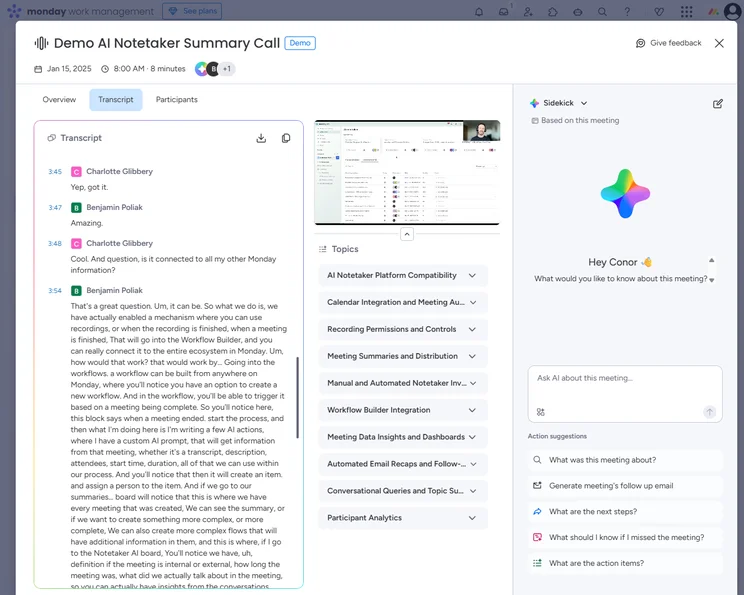
- Built-in AI tools for workflows and note taking
- Extremely customizable
-
Cons
- Free plan has 2-person user limit
- Strict AI credit limits
- Can get expensive with high AI usage
Pricing
-
 Basic: $9/user/month
-
Standard: $12/user/month
-
Pro: $19/user/month
-
Enterprise: Custom
-
Free plan available
-
14-day free trial
Images
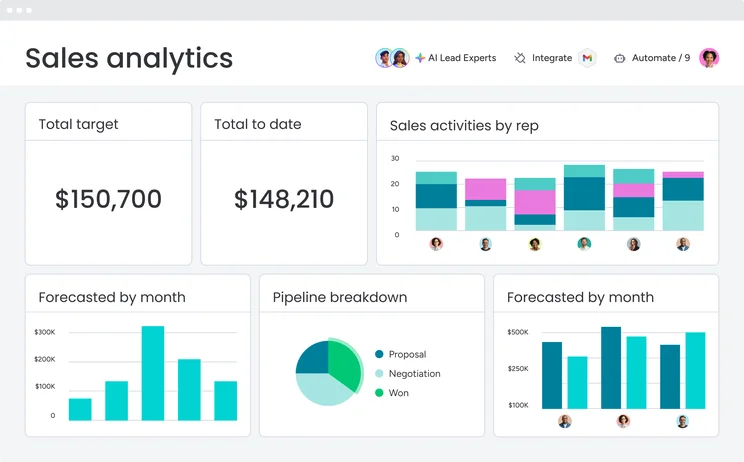
monday is our favorite project management tool here at Tech.co, and quite simply, it’s a joy to use. The drag-and-drop system and color-coordinated interface make it easy to carry out manual changes and spot patterns.
But with such advanced AI tools, you won’t need to perform many manual actions. AI Sidekick can handle most day-to-day tasks for you, freeing you up to focus on the stuff that really matters.
monday is very reasonably priced, and boasts a fantastic free plan, so businesses of all shapes and sizes should be able to find a plan that works for them.

What makes monday Work Management a good AI project management tool?
- AI Sidekick can resolve queries, suggest actions, and execute tasks on your behalf, including sending messages, writing updates on task cards, and kicking off projects.
- Build custom AI agents to manage complex workflows from end to end. For example, you could deploy an agent to maintain your boards.
- The new vibe coding tool means that users can build and deploy apps in the platform, such as an interactive organization chart tailored towards a specific team.
What could monday Work Management improve?
- Some AI suggestions can be inaccurate. During testing, AI Sidekick erroneously tried to change two of the categories on my board.
- Essential project management tools, such as timeline and Gantt charts, are only available on premium tiers.
- No AI features available on the free plan.
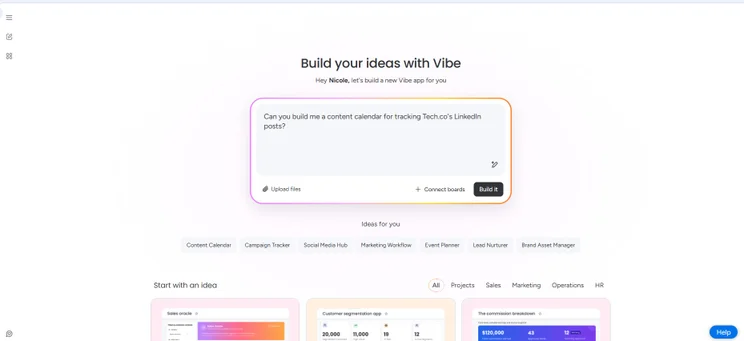
monday Vibe tool prompting home. Source: Tech.co testing
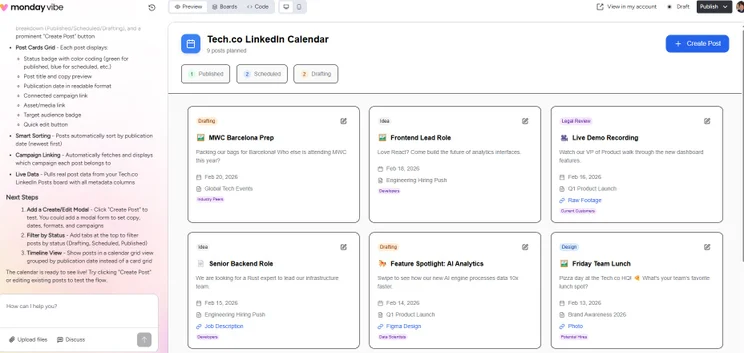
monday Vibe tool initial draft given. Source: Tech.co testing
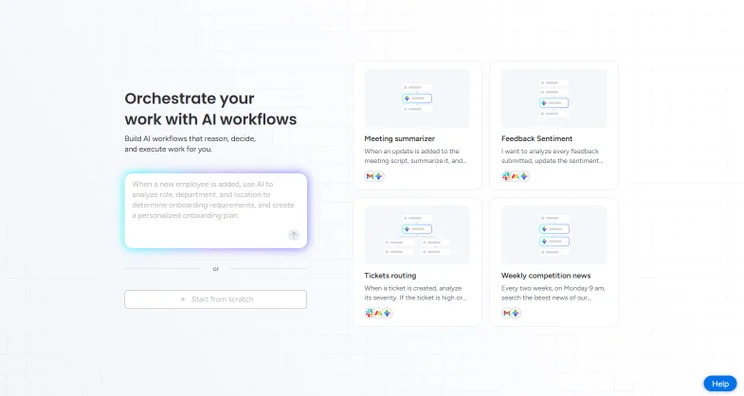
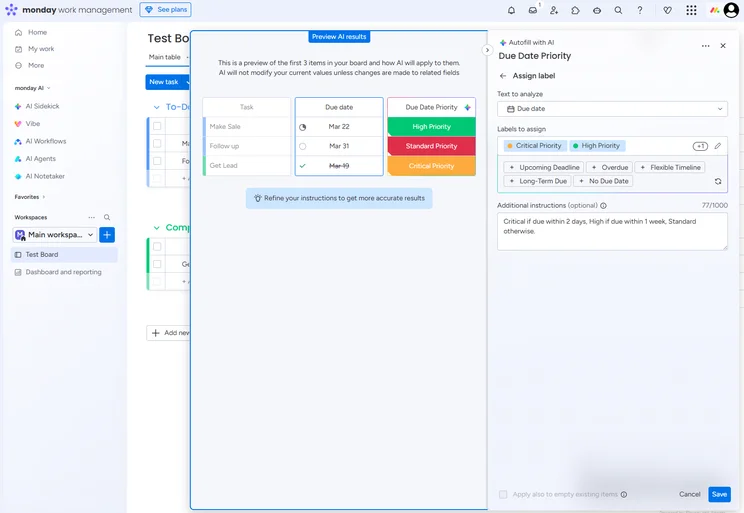
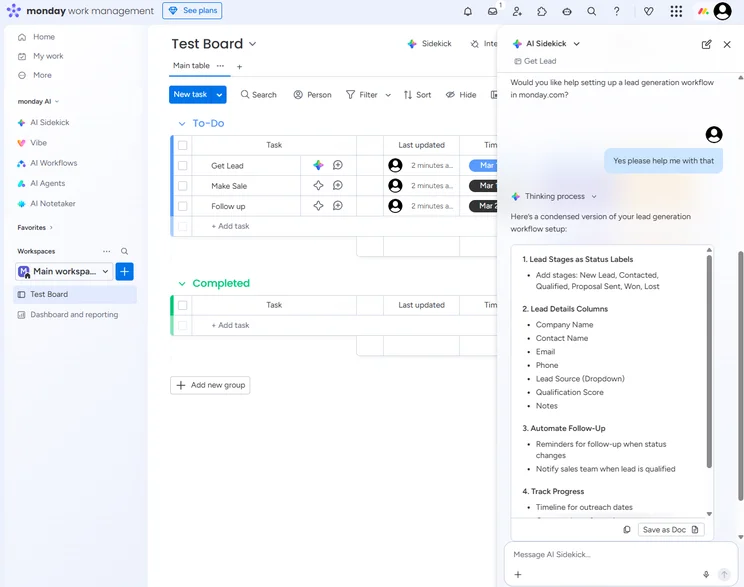
monday AI giving option to build AI workflows. Source: Tech.co testing
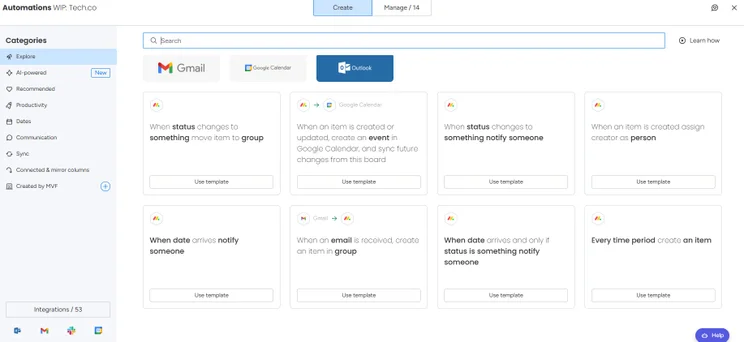
monday example automations. Source: Tech.co testing
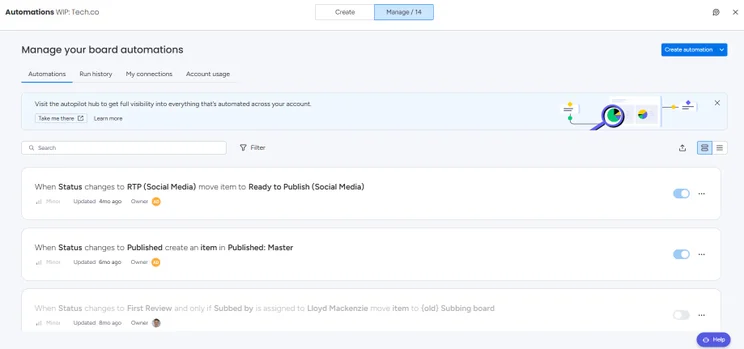
monday AI building automations home. Source: Tech.co testing
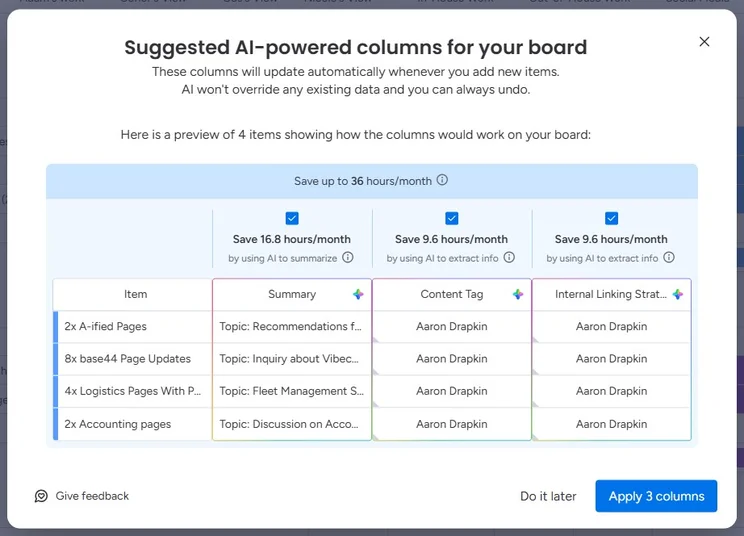
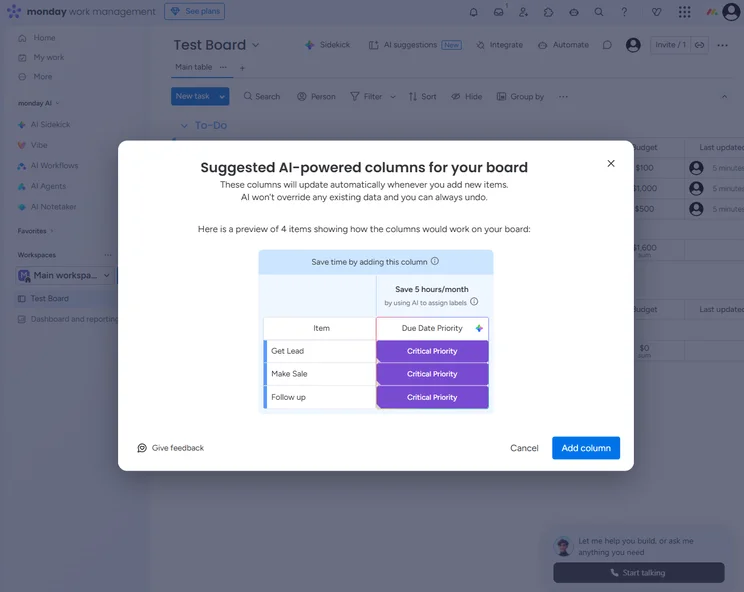
monday AI suggestions with Aaron's name. Source: Tech.co testing
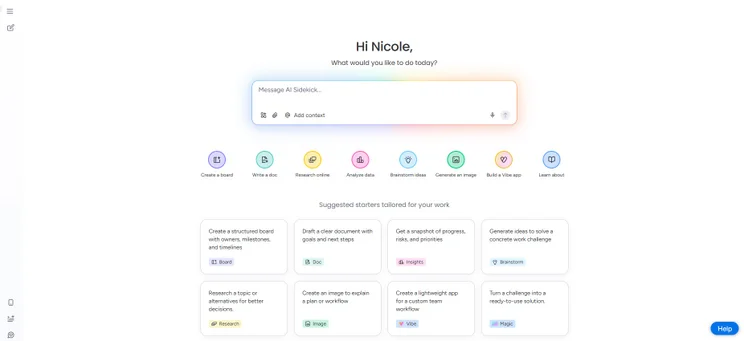
monday AI sidekick home page. Source: Tech.co testing
monday Work Management is a simple, intuitive platform where users can easily become acquainted with its vast suite of AI tools. Source: Tech.co testing
How much does monday Work Management cost?
- Free: Free
- Basic: $9 per seat, per month
- Standard: $12 per seat, per month
- Pro: $19 per seat, per month
- Enterprise: Custom pricing
Check out our full guide on monday Work Management pricing.
2. Teamwork: Best for Collaborating
- Pricing from: $9.99 per user, per month
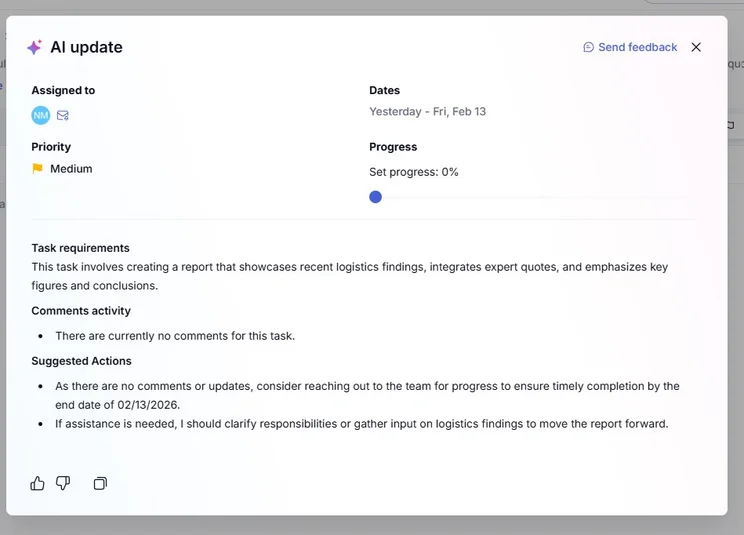
Teamwork is the best AI project management tool for collaborating, because of tools such as an AI filter assistant, which can show tasks based on team member priorities and capacity.
Teamwork

In Short
-
Pros
- Lots of collaboration tools
- Kanban-style boards and Gantt charts available
- Affordable pricing and solid free option
- Great security options
-
Cons
- Limited built-in integrations
- Data visualization isn’t the easiest
Pricing
- Free plan available
- Basics: $9.99/user/month
- Accelerate: $24.99/user/month
- Optimize: custom pricing
- Enterprise: custom pricing
Images
After monday, Teamwork is the most intuitive and easy-to-use project management program that I’ve tested.
It’s really easy to transition between views, build dashboards, and extract insights from your data.
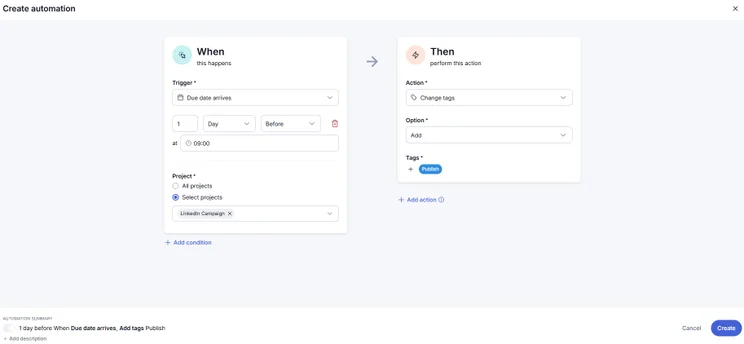
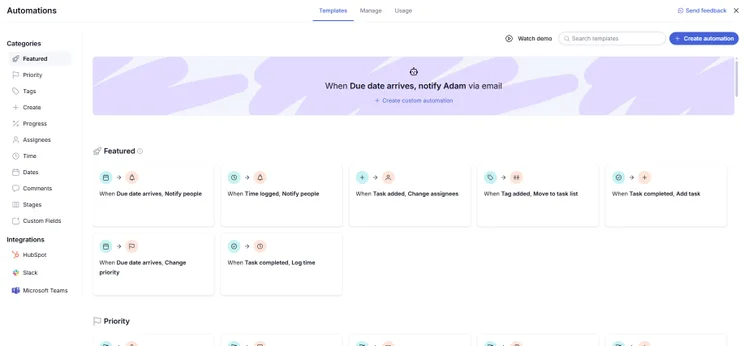
Added to this, its automation builder is much easier to use than the Wrike, ClickUp, and Asana equivalents.
Why is Teamwork a good AI project management tool?
- Tasks have built-in timers that log billable and non-billable hours, so stakeholders are aligned on budget and profitability, where required.
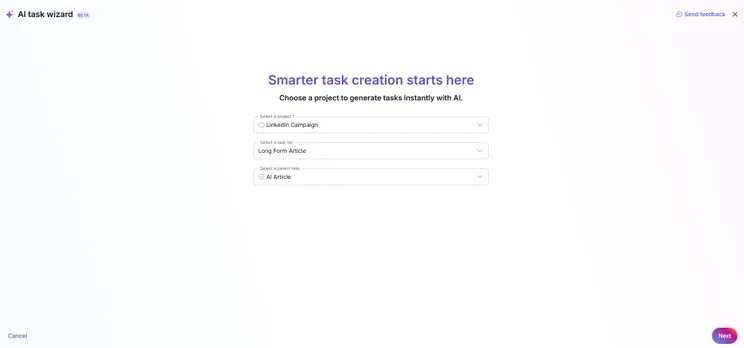
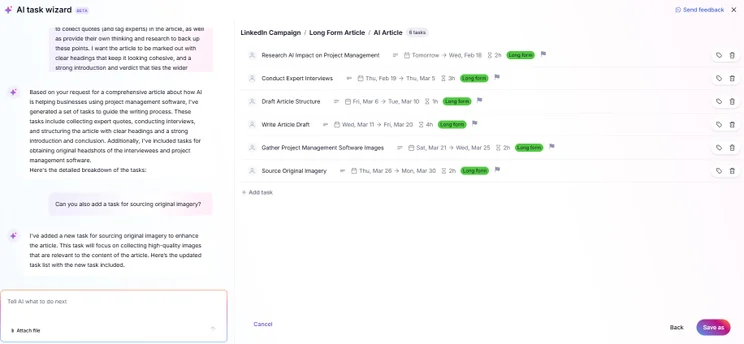
- Dedicated AI task wizard can suggest future tasks based on your existing projects.
- Simple, easy-to-use automation builder which is available on all plans.
What could Teamwork improve?
- Free plan is very limited, with users only able to create up to 5 projects.
- Huge price difference between Basics and Accelerate due to the lack of a mid-tier plan.
- Some high-value features, including a client-facing ticketing inbox, are only available as paid add-ons.
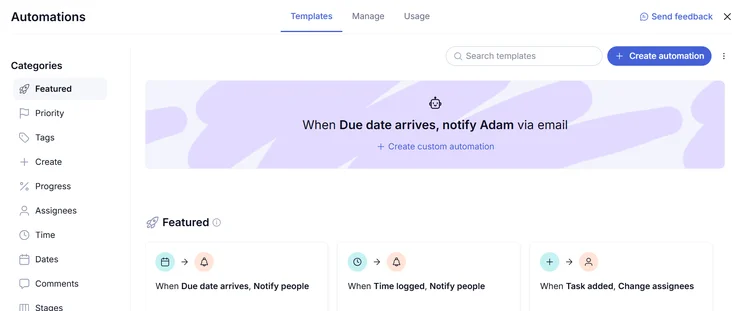
From the Teamwork automations center, you can build custom workflows or choose from a library of pre-built templates. Source: Tech.co testing
How much does Teamwork cost?
- Free: Free
- Basics: $9.99 per user, per month
- Accelerate: $24.99 per user, per month
- Optimize: Custom pricing
- Enterprise: Custom pricing
3. Asana: Best for Building AI Workflows
- Pricing from: $10.99 per user, per month
Asana is the best AI project management tool for building AI workflows. When building an automation, users can give highly specific instructions for more complex functionality.
Asana

In Short
-
Pros
- Unlimited storage
- Plenty of third-party integrations
- Incredibly clean and intuitive interface
- Easy-to-use dashboards and chart builder
-
Cons
- Most key features require the Advanced plan
- Very high prices for larger teams
- No phone-based support
Pricing
-
 Free plan available
-
Starter: $10.99/user/month
-
Advanced: $24.99/user/month
Images
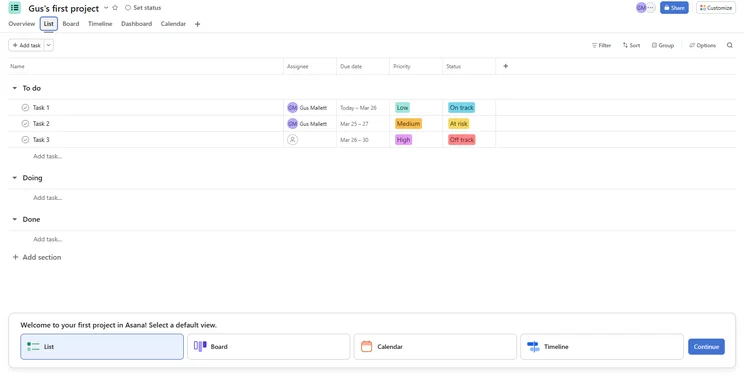
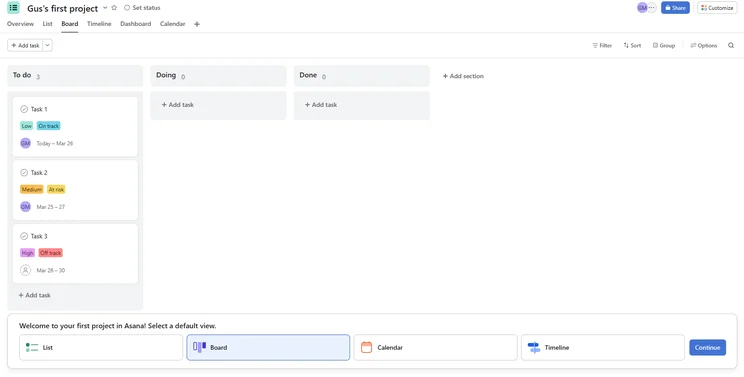
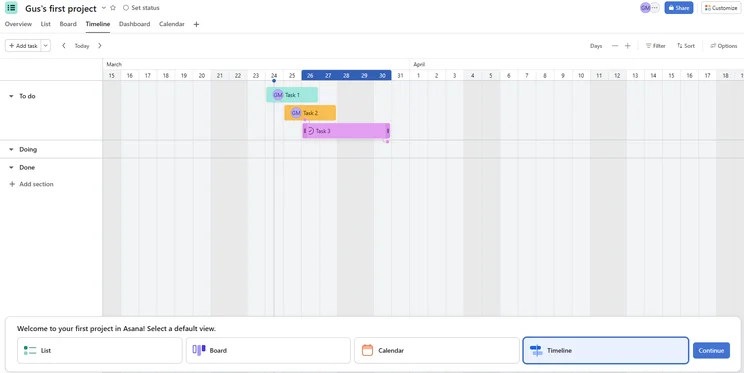
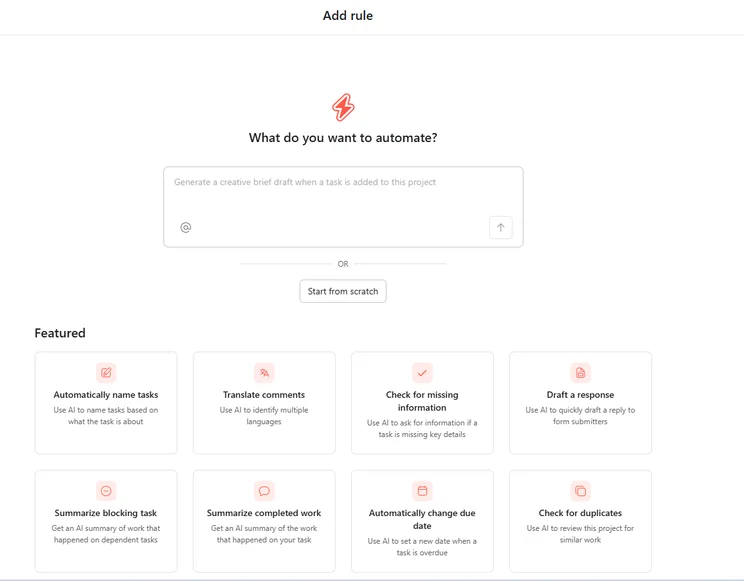
Asana has some of the best data visualization tools around, with a wide selection of customizable, visually appealing charts and widgets to rival monday Work Management.
Also, the automation builder offers the greatest degree of control out of all the providers that I’ve tested, so it’s easy to build powerful, finely tuned automations to your exact specifications.
Why is Asana a good AI project management tool?
- During testing, I found that I could make my automations more complex by issuing follow-up instructions to an AI automation assistant.
- All AI features are routed through a central AI assistant, so you don’t need to navigate a fragmented ecosystem of tools.
- Importing data was much faster than monday Work Management during testing.
What could Asana improve?
- Asana has quite a steep learning curve for first-time users, with some of our testers noting that the automations center was difficult to locate.
- Tasks are restricted to a single assignee, making it difficult for multiple stakeholders to have oversight of a project, without creating multiple subtasks.
- Free plan is limited to two users, so it isn’t suitable for small teams.
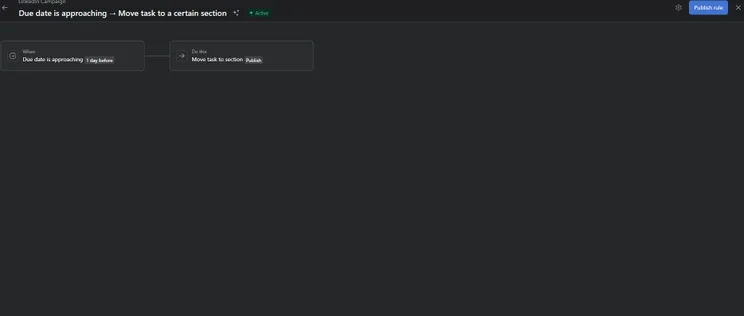
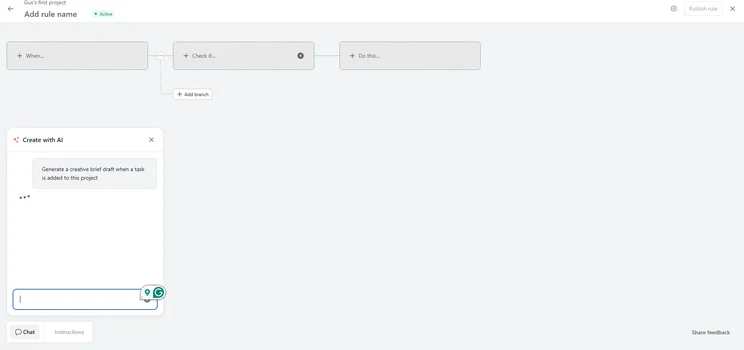
Asana AI building an automation based around due dates. Source: Tech.co testing
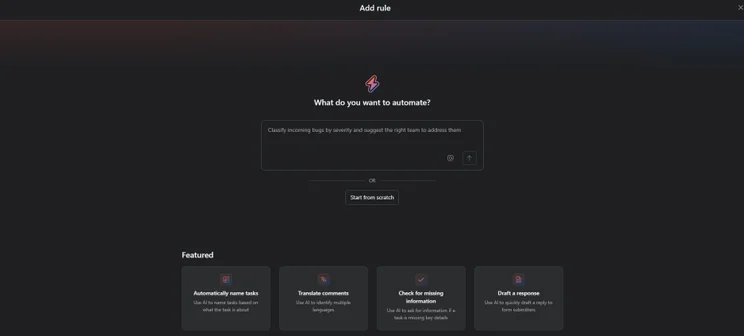
Asana automations, known as rules, builder home screen. Source: Tech.co testing
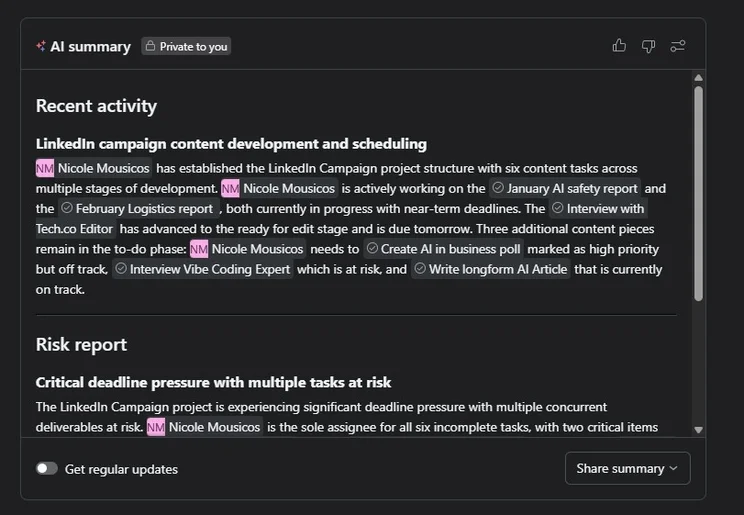
Asana AI created a summary risk report and recent activity log so I could keep track of all my LinkedIn posts. Source: Tech.co testing
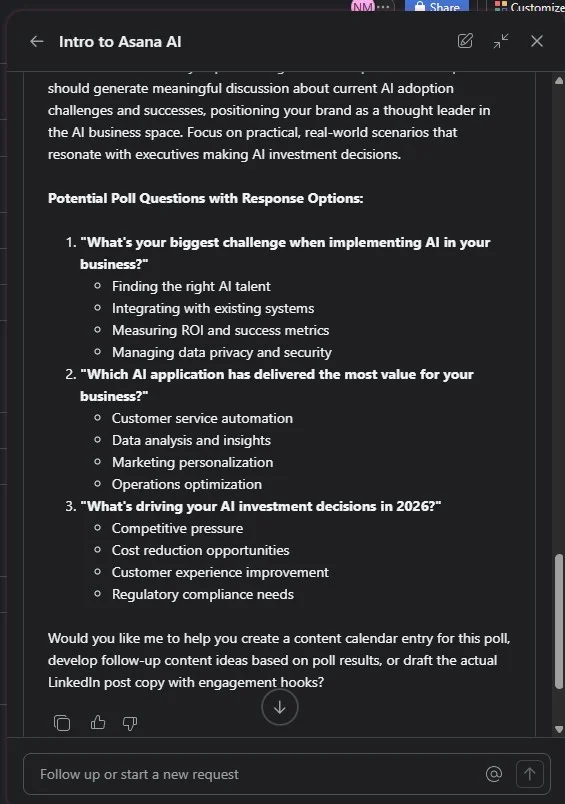
Asana AI content generator helping me brief and generate questions for a LinkedIn poll. Source: Tech.co testing
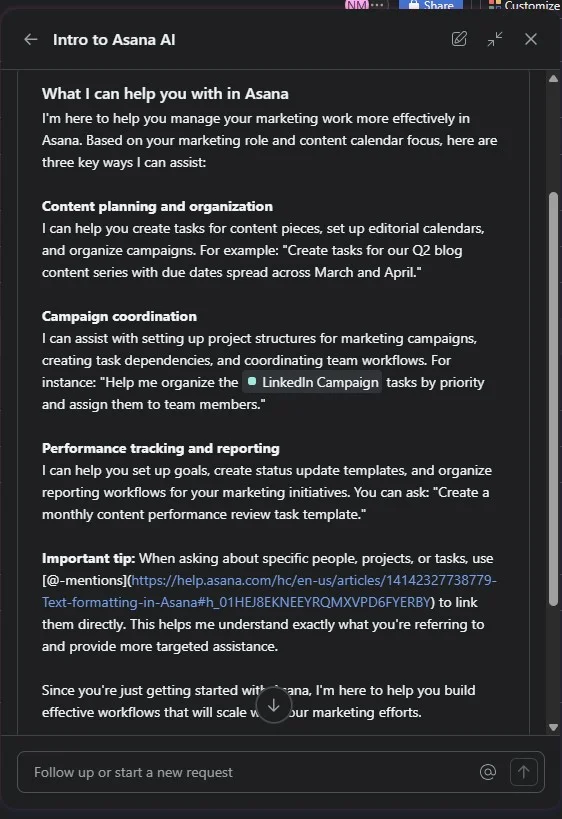
Asana AI gave me a rundown of how it could help me in relation to my project. Source: Tech.co testing
The integration of AI tools into Asana’s automations builder makes it well-equipped to handle the demands of multi-layered and complex actions. Source: Tech.co testing
How much does Asana cost?
- Free: Free
- Starter: $10.99 per user, per month
- Advanced: $24.99 per user, per month
- Enterprise: Custom pricing
Check out our full guide to Asana pricing.
4. ClickUp: Best AI Features
- Pricing from: $7 per user, per month
ClickUp has the best AI features out of all the providers on this list.
ClickUp Brain Max is deeply ingrained into your operations, and works with several different LLMs, including Gemini, ChatGPT-5, DeepSeek, and Claude, as well as other workplace tools, including Figma and Dropbox.
ClickUp

In Short
-
Pros
- 11+ ways to view project progress and data
- Useful “Chat” view for collaboration
- Team view for organizing tasks by team member
- Cheaper than monday Work Management or Wrike
- Agile project management features
- Vast number of features, even on cheap plans
-
Cons
- Customizability can be overwhelming to new users
- Not great at compiling project feedback
- Comparatively clunky automation builder
- Slow to load on our tests
Pricing
- Free plan available
- Unlimited: $7/user/month
- Business: $12/user/month
- Enterprise: custom pricing
Images
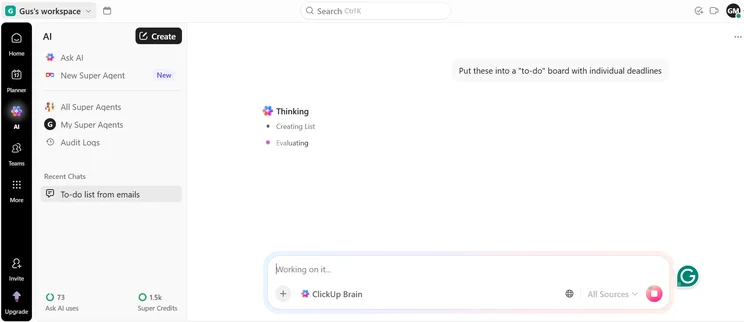
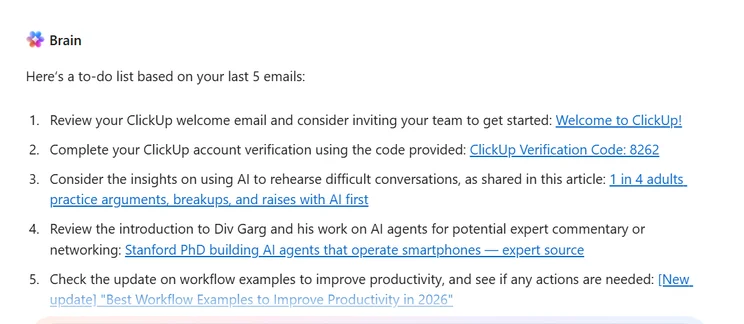
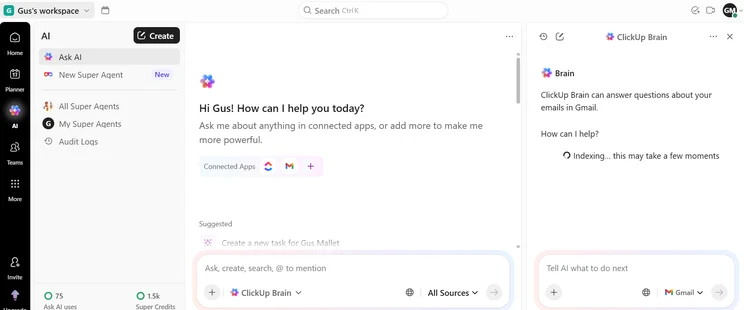
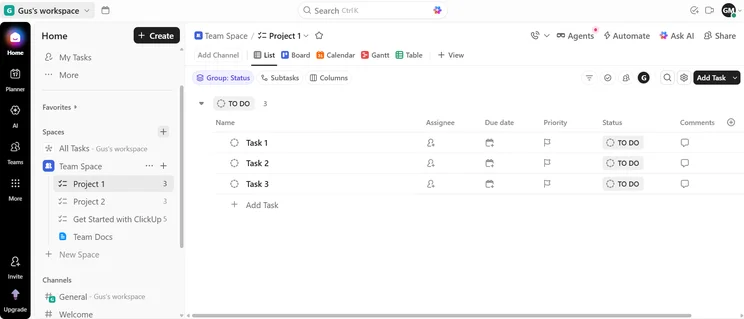
ClickUp has an amazing range of AI tools. During testing, I was particularly enamored with AI Super Agents, which enabled me to build my own dedicated content strategist.
This agent was able to source original concepts for a series of LinkedIn posts, and later monitored their performance once I’d put them live.
A lot of smaller content teams don’t have the luxury of a strategist at the wheel. With ClickUp, that’s no longer something that you have to worry about.
Why is ClickUp a good AI project management tool?
- Dictate commands with your voice, rather than typing, to work significantly more quickly. It also works across apps, including Google Calendar, Slack, and more.
- Universal Search crawls all of your connected apps, so you won’t need to toggle between different platforms.
- With built-in AI web search, you can quickly get citable answers from directly within the ClickUp interface.
What could ClickUp improve?
- ClickUp Brain was slower than competitors during testing, with response times exceeding three minutes or failing to generate entirely.
- The interface can be overwhelming for new users due to the sheer number of features.
- “Advanced tools” are limited to 60 uses on the free plan, which puts a time limit on how long you can use it for.
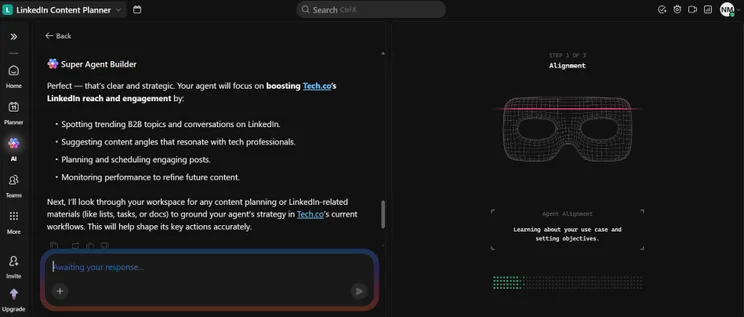
ClickUp AI super agent builder, designing my own content strategist for Tech.co's LinkedIn team. Source: Tech.co testing
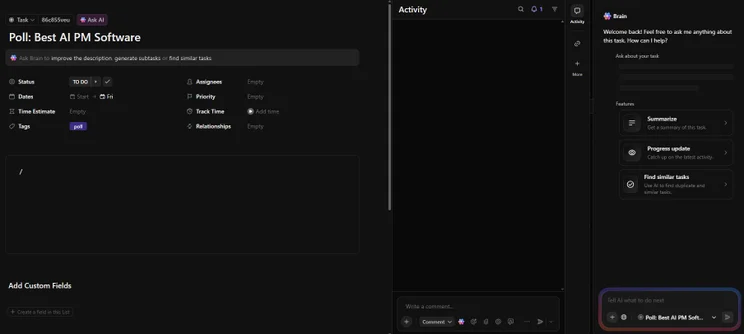
ClickUp Brain offering advice on how I can plan my tasks. Source: Tech.co testing
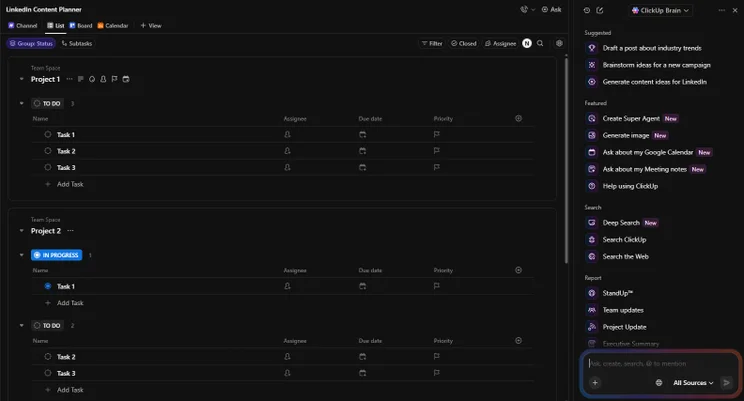
ClickUp Brain AI assistant interface on the right hand side of the dashboard. Source: Tech.co testing
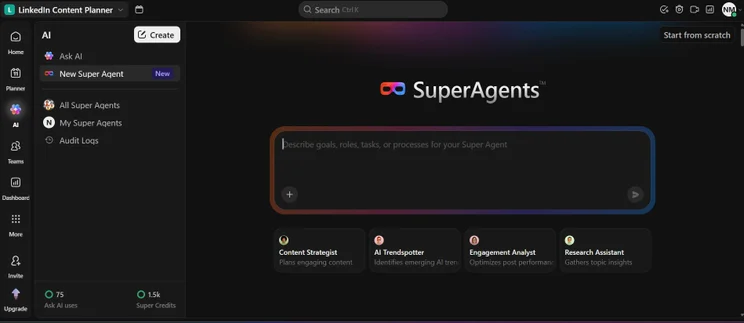
ClickUp Ai designing superagents interface. Source: Tech.co testing
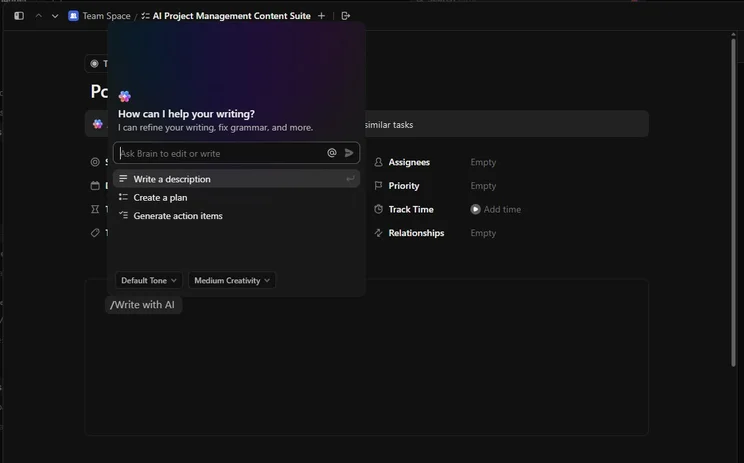
ClickUp AI copy generator helping me write briefs for individual tasks. Source: Tech.co testing
I was really impressed with ClickUp’s Super Agents and how they are able to take on repeatable tasks based on specific projects. Source: Tech.co testing
How much does ClickUp AI cost?
- Free Forever: Free
- Unlimited: $7 per user, per month
- Business: $12 per user, per month
- Enterprise: Custom pricing
Check out our full guide to ClickUp pricing.
5. Wrike: Fastest AI Performance
- Pricing from: $10 per user, per month
Wrike’s AI tools were the fastest in my analysis, delivering results up to 60 seconds faster than competing platforms.
Wrike

In Short
-
Pros
- No-nonsense, robust feature catalog
- Lots of customizability
- Strong task management and data tools
- Huge integrations library
-
Cons
- Not entirely easy to use
- Difficult to use automation builder
- Not the best for collaboration
Pricing
- Free plan available
- Team: $10/user/month
- Business: $25/user/month
- Pinnacle: custom pricing
- Apex: custom pricing
Images
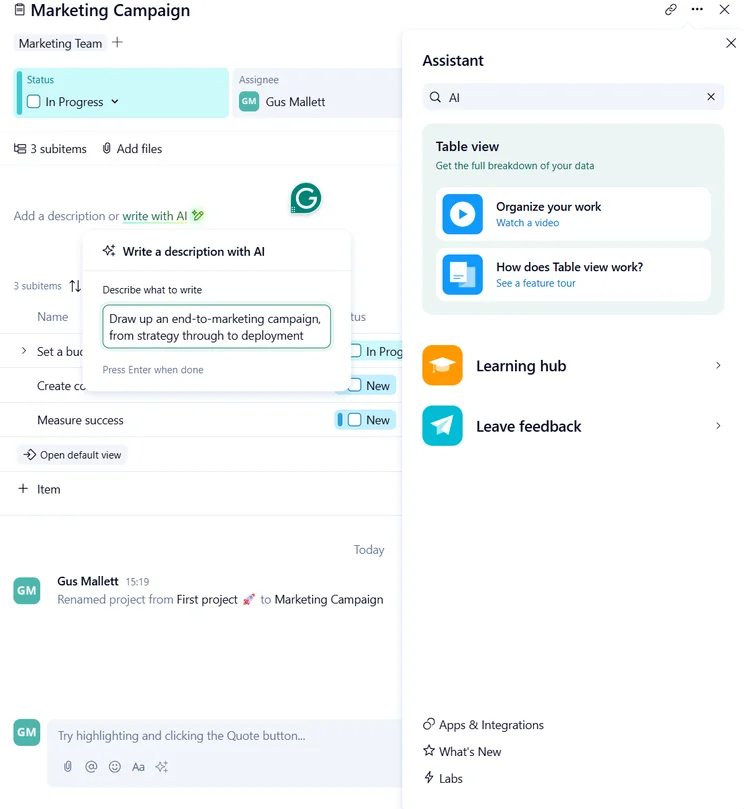
In terms of AI performance speed, Wrike leaves its competitors in the dust. I asked the platform to create an end-to-end marketing campaign for me — which it managed in an incredible two seconds.
For businesses looking to leverage AI for an instant impact, you simply will not find a better platform than Wrike.
Why is Wrike a good AI project management tool?
- Wrike users can create automations either through text prompting or selecting from a list, which works better for repeatable actions. This gives businesses flexibility when building automations.
- The AI Highlights tool gives users a real-time snapshot of their dashboard, including project highlights and insightful data points.
- Unlimited users on the free plan, which is highly unusual across the market.
What could Wrike improve?
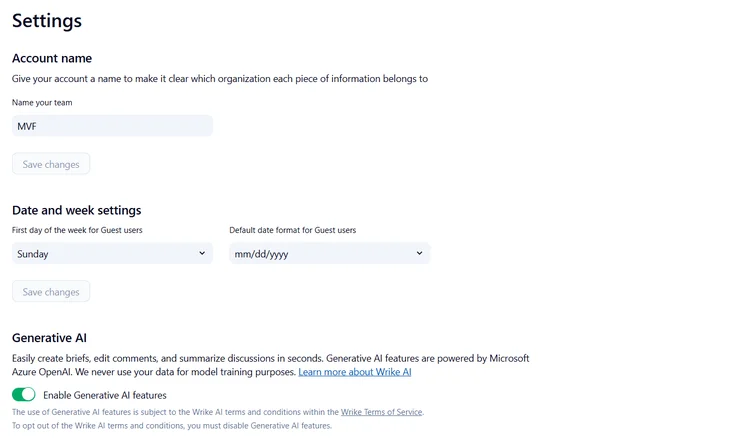
- AI features have to be enabled in Settings, which I found highly confusing on first use.
- Advanced analytics and data visualizations are reserved for the Pinnacle and upwards.
- AI agents are reserved for the Business tier ($25 per user, per month) and upwards.
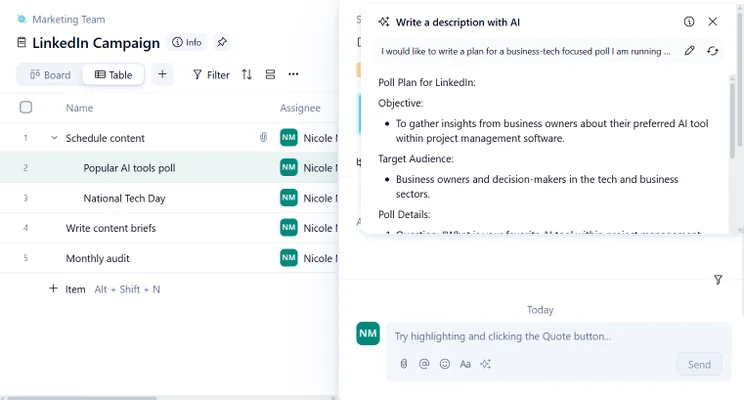
Wrike AI helping me write briefs for LinkedIn posts. Source: Tech.co testing
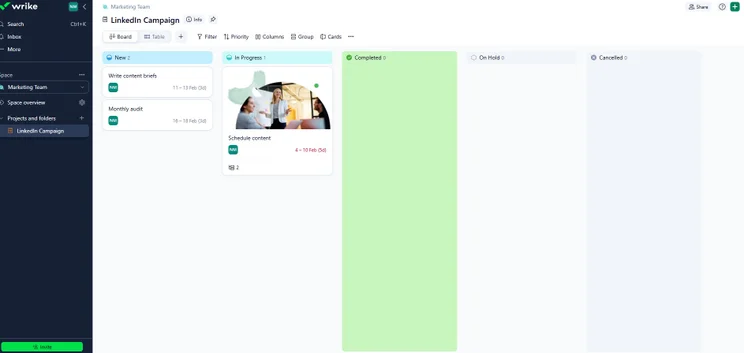
Wrike dashboard in board view. Source: Tech.co testing
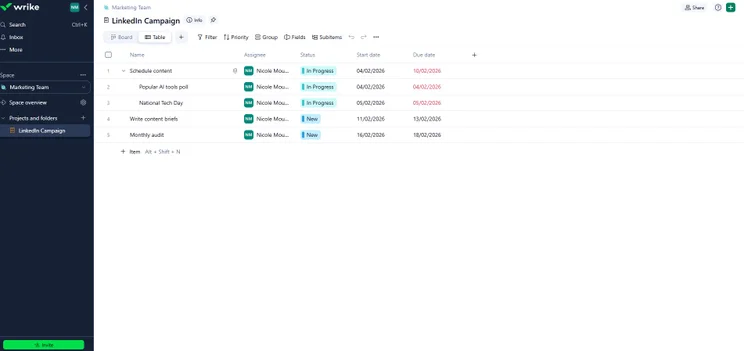
Wrike dashboard in list view. Source: Tech.co testing
Wrike’s AI features are limited on the free plan, but they were able to generate answers for me within a few seconds. Source: Tech.co testing
How much do Wrike’s AI features cost?
- Free: Free
- Team: $10 per user, per month
- Business: $25 per user, per month
- Pinnacle: Custom pricing
- Apex: Custom pricing
Check out our full guide to Wrike pricing.
Methodology: How I Tested Each AI Project Management Platform
To gather my research, I tested the five biggest project management platforms on the market, and evaluated them across a few key areas:
- AI features — does the platform have a broad range of AI features? Are they easy to use? How quickly do they perform? What is the overall impact of the AI features in question?
- Task management features — how does the platform perform in terms of task management? Is it easy to manage projects? Which tools does it have for data visualization?
- Value for money — Does the platform offer a good set of features for the price point? How many tiers does it have? Does it have a free plan?
- Collaboration features — How easy is it to collaborate with teammates on the platform? How easy is it for key stakeholders to have oversight of projects?
Click here to learn more about Tech.co’s research process.
monday Work Management is our top recommendation for businesses starting with AI project management because of its excellent suite of AI features, ease of use, and comprehensive free plan.
Other great options include ClickUp, which has a superior set of AI features, with standouts including ClickUp Brain Max.
FAQs
AI project management software can save time and boost efficiency for small businesses, from automating general tasks, such as assignment and briefing, to generating specific AI agents that can take over whole processes.
AI project management software shouldn’t be seen as a superior option to project managers. Instead, it can provide an efficient environment for managers to work within, allowing routine tasks to be completed quickly.
Teamwork is the best AI software for managing client-facing projects, based on my research. Teamwork allows teams to give certain client permissions, allowing stakeholders to have a hand in and collaborate closely on projects, without sacrificing sensitive data.
Before you choose your project management tool, ask yourself a few questions:
- What is my budget?
- What kind of automations do I want to run?
- What tasks do I need AI tools for?
- What software will best suit my team?
If you click on, sign up to a service through, or make a purchase through the links on our site, or use our quotes tool to receive custom pricing for your business needs, we may earn a referral fee from the supplier(s) of the technology you’re interested in. This helps Tech.co to provide free information and reviews, and carries no additional cost to you. Most importantly, it doesn’t affect our editorial impartiality. Ratings and rankings on Tech.co cannot be bought. Our reviews are based on objective research analysis. Rare exceptions to this will be marked clearly as a ‘sponsored’ table column, or explained by a full advertising disclosure on the page, in place of this one. Click to return to top of page


