


We may receive a commission from our partners if you click on a link to review or purchase a product or service. Click to Learn More
ClickUp pricing starts at just $7 per user, per month (when billed annually), for the Unlimited plan. If your company or team is growing and needs advanced features, then you can opt for the Business tier, which costs just $12 per user, per month, when paid annually.
ClickUp also offers an Enterprise plan, but it has no public pricing. And there’s a free plan with no user limit, which our testers found to be the best free project management software, overall.
ClickUp’s pricing undercuts a lot of the big names on the market — you’ll pay more for paid plans from Wrike, Asana, and Teamwork — making it a great option if you’re concerned about project management costs.
In this guide, we’ve put together everything you need to know about ClickUp pricing and whether or not this provider offers good value for money.
- ClickUp offers five pricing tiers, including a free plan. Its four paid plans range from $7 to $12, while the Enterprise plan has no public pricing.
- The Unlimited plan ($7 per user, per month), is ideal for small teams, while the Business plan ($12 per user, per month) is better suited for mid-sized businesses.
- ClickUp offers great value for money, with a pricing score of 4.4/5, making it more affordable than competitors like monday work management and Smartsheet.
- ClickUp’s free plan is one of the best on the market, offering features like unlimited tasks and two-factor authentication, which are often paid features in other tools.
Overview of ClickUp Pricing Plans
In the table below, you’ll find a breakdown of each ClickUp plan so you can get a quick overview of what you’ll unlock at each tier and how much you can expect to pay. Below, we’ll go into more detail on each, with a look at key features, pricing, and more.
|
Price (annually)
The amount you'll pay per month, when billed annually
|
Users
|
Projects/boards
|
Automations
|
Gantt chart
|
Resource management
|
Time tracking
|
||
|---|---|---|---|---|---|---|---|---|
|
TRY IT FOR FREE
 |
BEST FOR SMALL TEAMS
|
|
|
|||||
|
Free Forever |
Unlimited |
Business |
Enterprise |
|||||
|
Free |
$7/user/month |
$12/user/month |
Contact sales |
|||||
|
Unlimited |
Unlimited |
Unlimited |
Unlimited |
|||||
|
5 |
Unlimited |
Unlimited |
Unlimited |
|||||
|
100/month |
1,000/month |
10,000/month |
250,000/month |
|||||
|
60 uses per project |
|
|
|
|||||
|
60 uses per project |
100 uses per project |
|
|
|||||
|
|
|
|
|
How Did We Test ClickUp Pricing?
When we research project management providers at Tech.co, our research team awards each provider a pricing score. Project management providers that offer more tools on their cheaper plans achieve higher scores, because they’re adding more value to users earlier on in the plan hierarchy.
As we’ve already discussed, ClickUp scores 4.4/5 overall for pricing, which was the third-highest score achieved by any of the providers we tested — beaten only by monday work management (4.7/5) and Teamwork (4.6/5). It achieves high marks because of its excellent task management, data, and collaboration tools.
Its solid usability also contributes to the 4.4/5 pricing-to-value score, although the price of ClickUp’s Unlimited plan, which used to be $5 per user, per month, has now risen to $7 per user, per month.
Still, for a relatively modest outlay, you’ll get a robust feature set, with particular highlights including an easy-to-use Gantt chart, 24/7 support, and resource management, available across all plans.
ClickUp Pricing and Plans Breakdown
ClickUp pricing starts with a free plan and three different paid pricing plans:
Paying for ClickUp’s software on a month-to-month basis is possible, but not as cost-effective in the long run. On a monthly subscription, the Unlimited plan costs $10 per user, per month, and the Business plan costs $19 per user, per month.
As you can see, you’ll be making significant savings if you opt to pay annually.
Does ClickUp have a free plan?
Yes, ClickUp has a free plan, which includes the ability to create unlimited projects and spaces, add unlimited users, use key task management features, and automate aspects of workflows.
Some features included in this ClickUp plan, like a Gantt chart, custom field creation, and automations, have limits on the number of times you can use them. However, many of the best free project management software plans don’t come with them at all.
It is also worth noting that the free tier also limits storage to 100MB.
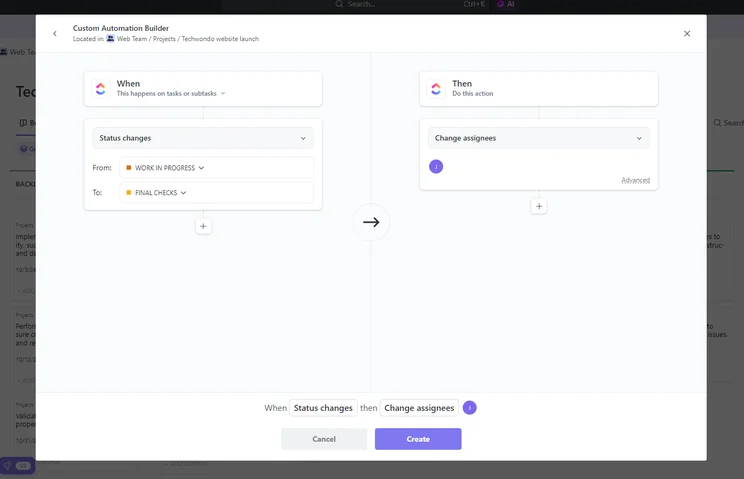
Building a simple automation in ClickUp. Source: Tech.co testing
So, although it’s good that ClickUp offers these features on its free plan in the first place, it’s likely to only suit infrequent use by an individual or a very small team. However, the Unlimited Plan (more on this below) costs just $7 per user, per month, and all of the feature limits are removed.
Importantly, ClickUp’s first paid plan is cheaper than many of its competitors and, thanks to the removal of those pesky limits on the free plan, is excellent value for money — and well worth the upgrade.
Unlimited plan
The next tier up is the Unlimited plan, which charges $7 per user, per month, when billed annually, and $10 per user, per month, when billed monthly. For this pricing, you get unlimited everything, including storage, integrations, features, and advanced reporting.
In fact, this plan helped ClickUp achieve an impressive 4.6/5 for overall functionality in our last round of testing. As a first paid plan goes, we believe it is exceptional — particularly for the $7 price!
This plan comes with several advanced task management and project and workflow creation features, including custom and preset automation, task dependencies, custom fields, Gantt charts, and custom project templates.
However, I found monday work management much easier to use. It’s got a more minimalistic, clearer layout and the learning curve is nowhere near as steep — ClickUp has an almost overwhelming number of features.
What’s more, some members of our project management software testing group experienced long loading times and screen freezes, which lost ClickUp some marks. It scored 3.9/5 overall to monday work management’s 4.5/5.
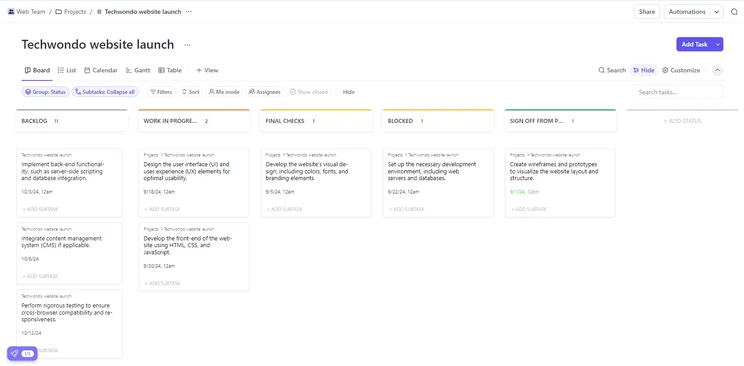
ClickUp's Kanban board. Source: Tech.co testing
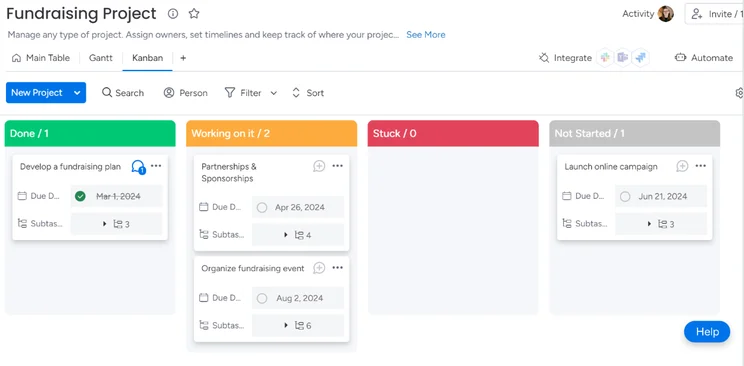
ClickUp’s Kanban board view, pictured first, and monday work management’s Kanban board view, pictured second. Source: Tech.co
monday work management’s first paid plan costs $9 per user, per month, Teamwork’s costs $10.99 per user, per month, and Zoho’s is just $4 per user, per month (all when paid annually) — ClickUp used to be better value for money when this plan was $5 per user, per month.
Business plan
The Business plan retails at $12 per user, per month, when billed annually, and $19 per user, per month, when billed monthly.
The Business tier is great for medium-sized teams, thanks to features like single sign-on and advanced automations. There is also a resource management chart available, which can help you check people’s available resources, along with a KPI tracker, burndown charts, and a widget builder, all of which help you stay on top of project progress.
ClickUp’s Business plan is much cheaper than Smartsheet’s $19 per user, per month, Business plan.
Enterprise plan
The last ClickUp pricing plan is the Enterprise plan, which ClickUp does not provide public pricing for, so you’ll have to contact the sales department for more information.
This plan includes all of the features from the Business plan and the ability to sign in with accounts from multiple providers — not just Google.
The plan also supplies increased API limits for any internal customizations, contracts, and legal review for a customized ClickUp agreement, as well as HIPAA compliance, which is good news for healthcare sector teams because it means the software meets regulatory measures implemented to protect sensitive data.
The Enterprise plan also includes custom onboarding and support, plus a dedicated success manager to ensure that your team will be able to use the platform effectively, improving productivity.
However, ClickUp missed out on top marks for security, scoring 4.4/5. This was because it doesn’t have any IP restriction capabilities, which can be a valuable security asset to large businesses with lots of team members signing in from across the globe. Wrike and monday work management offer this on their Enterprise plans.
For a full breakdown of ClickUp’s features, check out our ClickUp Review.
ClickUp Training Options
In terms of learning, ClickUp offers free training for all customers and has a collection of tutorial videos and other educational resources available online, which just increases its value for money.
There are also ClickUp University courses, as well as ClickUp Live Training. ClickUp Live Training has a wide range of free and paid courses. Paid courses include sessions entitled “Project Management” and “Administer Your Workspace,” which cost a rather expensive $249 each. By contrast, you’ll find that paid courses for monday work management cost in the region of $15 to $50, depending on content.
Paid users will also have the option to add ClickUp Assist to their service. ClickUp Assist provides personalized help with creating workflows, onboarding, and getting your Workspace set up. Interested parties can either purchase Live Group Training or Live 1:1 Training with a specialist, both available as add-ons.
How Does ClickUp Compare With Other Providers?
ClickUp is an excellent project management solution with a raft of advanced task management tools at a very reasonable price. However, it isn’t the only project management provider offering excellent value. Here’s a quick look at its biggest competitors.
Zoho Projects is cheaper than ClickUp, starting at $4/user/month
Smartsheet’s $9/user/month plan has good collaboration tools
monday work management has a very capable free plan suitable for two users
Trello’s $5/user/month plan offers unlimited boards
Now, here’s a full rundown of how ClickUp’s pricing compares to the other top project management software providers we’ve tested:
Zoho Projects vs ClickUp pricing
Zoho Projects got a better pricing score (4.6/5) than ClickUp — it costs just $4 per user, per month, for its Premium plan, while its Enterprise plan is just $2 more ($9 per user, per month) than ClickUp’s first paid plan.
While its pricing is impressive, Zoho Projects does have its limitations. For instance, its support options are pretty average, with email, a community forum, and an FAQs section the only ways to get help, and no onboarding assistance available whatsoever. ClickUp, by contrast, offers a 24/7 support chatbot on all plans, including its free plan.
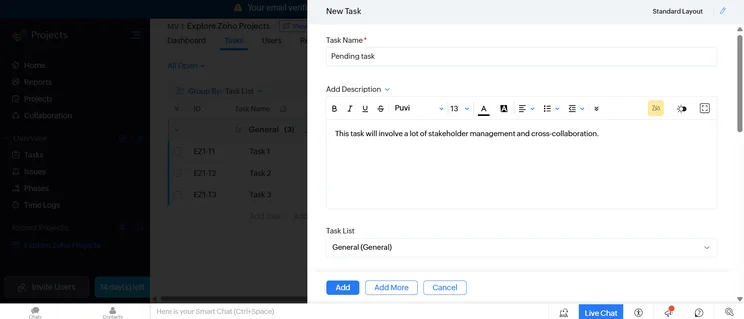
It’s easy enough to add a new task with Zoho Projects, with a free-form text box that will allow you to specify granular details about the project in question. Source: Tech.co testing
Trello vs ClickUp pricing
Another great value alternative, Trello’s pricing starts at $5 per user, per month, going up to $17.50 per user, per month, for its Enterprise plan. You’ll get a decent selection of features, including built-in automation, two-factor authentication, and more than 200 available integrations, on all plans.
However, Trello lacks key project management features like built-in Gantt charts, resource management, or time tracking, on any of its plans. Some of these features may be available as third-party add-ons, which Trello calls Power-Ups, but many of these cost an additional fee.
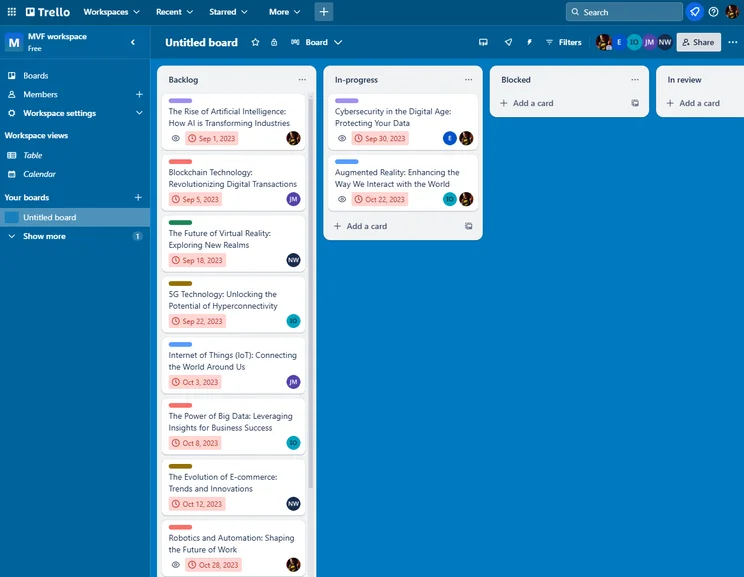
The Trello Kanban board interface was easy to use, even for those of us that had never used it before. Source: Tech.co testing
Smartsheet vs ClickUp pricing
Another worthy ClickUp alternative is Smartsheet. It also offers a free plan, while paid plan pricing starts at $9 per user, per month, but is only for up to 10 users. This is a similar price to ClickUp’s Unlimited plan — but ClickUp doesn’t have any user limits on its free plan.
Smartsheet has a myriad of task management and workflow creation tools, such as a good automation builder and an easy-to-use Gantt chart, making it a great fit for teams managing complex projects.
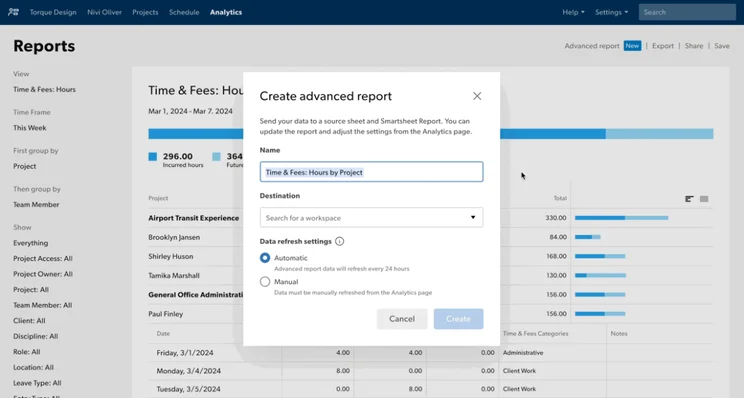
On Smartsheet, you can combine multiple “advanced reports” into a multi-sheet report, which contains huge amounts of data. Source: Smartsheet
|
Price from
All prices listed as per user, per month (billed annually)
|
Free plan
|
Verdict
|
|||||||
|---|---|---|---|---|---|---|---|---|---|
|
Best Overall
 |
Best for Building Automations
 |
Best for Task Management and Collaboration
|
FEATURED: Best for Spreadsheet Fans
 |
 |
 |
 |
 |
 |
 |
|
monday work management |
Teamwork |
ClickUp |
Smartsheet |
Asana |
Wrike |
Trello |
Jira |
Zoho Projects |
Basecamp |
|
$9/user/month |
$9.99/user/month |
$7/user/month |
$9/user/month |
$10.99/user/month |
$10/user/month |
$5/user/month |
$7.91/user/month (300 users) |
$4/user/month |
$15/user/month |
|
|
|
|
|
|
|
10 users |
|
|
|
|
Incredibly easy to use, great for small businesses, and our top-performing provider on test — and there’s a generous free trial period |
A great user experience all round, with an easy-to-use automation builder and great budget tracking capabilities |
Powerful, feature-rich software suitable for teams of all sizes, with an impressive free tier for individuals and a great value plans for teams |
A great tool for spreadsheet-natives, which can take your Excel-based task planning to the next level |
A simple task-list-based project management platform with an acceptable free tier |
A very capable yet pricey service with a huge number of useful integrations, plus a free tier option to try |
A fairly-priced, stripped-down option, best for small teams who need a central location for basic task management |
A great value piece of software that’s ideal for tech, software development, and engineering teams |
A solid project management solution with an attractive free tier for small teams and a very affordable premium plan |
A very basic, relatively limited software that’s a lot simpler than its competitors |
Does ClickUp Have Any Hidden Fees?
ClickUp doesn’t have many hidden costs, which is refreshing. With some providers, there are lots of additional fees involved. Asana, for instance, is blessed with a massive library of available integrations, but some of them command a fee. Other providers, like Jira, have quite a few integrations on their app marketplaces that will fetch a price.
The only thing ClickUp charges extra for is ClickUp Brain, its flagship AI assistant. ClickUp Brain is a so-called “neural network” that allows users to interact with their project management platform as they would a standard AI chatbot.
ClickUp Brain is available as a paid add-on with two price points: AI Standard ($9 per user, per month, when billed annually) and AI Autopilot ($28 per user, per month, when billed annually). With the Free Forever plan, you’re only eligible for a trial of ClickUp Brain.
What’s New?
ClickUp is very generous with its new features and updates, which it rolls out regularly.
Recently, the provider introduced some new features to ClickUp Brain. Among them, users can now perform “Deep Search” to get more comprehensive answers that are drawn from across their entire Workspace history. This will allow you to draw connections between projects across time, which can be really useful during the research process.
Additionally, now you can create, update, and search through Google Calendar meetings through Brain. So, rather than having to navigate to your separate Google Calendar interface to set up a meeting, you can simply ask Brain to do it for you via Text to Speech. It’s a small integration that will make a huge difference to your everyday tasks.
Furthermore, in July, the provider rolled out some new performance enhancements. Among them, you’ll now be able to access results up to 85% faster when filtering by the People Custom Field. This will help you to keep your projects running smoothly — with less downtime and fewer timeouts.
How Do We Evaluate Project Management Software Pricing?
At Tech.co we don’t write about products and services without conducting thorough research, and hands-on testing where applicable. While this process can be time consuming, it’s time well spent if it means we’re providing better, more useful information for your business.
When it comes to project management software, we test out each program first-hand, guided by an in-house research framework consisting of six core assessment areas that break down into a range of smaller subcategories. This framework is based on the factors companies and project managers have told us are important to their everyday usage. The six criteria are:
- Ease of use: After getting five to six participants to test each project management software for an hour, we assessed how easy it was to set up a project with the platforms, how clear their interfaces were, and how easy they were to navigate.
- Pricing: We look at all plan costs. Providers offering lots of features for lower costs will have better pricing scores than those that lock them away on higher-tier plans.
- Customer support: We assess the ways you can contact your project management software provider if something goes wrong. Providers offering 24/7 live support, as well as phone-based support and onboarding assistance, get the best scores.
- Security: For this area, we assess the security options offered by each provider. This includes user-level security features like two-factor authentication, as well as more administrative security measures like user permissions and IP restrictions.
- Integrations: We assess the quantity — and the quality — of the applications each project management software provider integrates with.
- Functionality: This part of our research involves assessing the full feature set that each product provides. We look at four function-based sub-categories as part of this, including task management, project and workflow creation, data visualization, and collaboration.
It’s important to note that not all of these criteria hold equal weight in our testing methodology. This is best practice and based on what businesses have told us is essential, compared with what’s simply “nice to have”.
Because of their central importance to project management, how easy each tool is to use, how much it costs, features for project and workflow creation, and task management had more of an impact overall than other criteria.
ClickUp’s pricing plans start at $7 per user, per month, for the Unlimited plan and, all in all, it’s definitely worth the cost, making it an ideal choice for small businesses and teams. Medium-sized teams will find the $12 per user, per month, Business plan good value for money, too.
In a nutshell, ClickUp charges less and provides more features than competitors like monday work management, which has paid plans starting from $9 per user, per month. It is also cheaper than Smartsheet, which has a $19 per month Business plan, yet this isn’t as good an offering as ClickUp’s equivalent Business plan.
If you have a small team and really don’t want to pay anything at all, we’d recommend Teamwork’s free plan, which has a custom automation builder and time-tracking tool — and we found it easier to use than ClickUp.
If you click on, sign up to a service through, or make a purchase through the links on our site, or use our quotes tool to receive custom pricing for your business needs, we may earn a referral fee from the supplier(s) of the technology you’re interested in. This helps Tech.co to provide free information and reviews, and carries no additional cost to you. Most importantly, it doesn’t affect our editorial impartiality. Ratings and rankings on Tech.co cannot be bought. Our reviews are based on objective research analysis. Rare exceptions to this will be marked clearly as a ‘sponsored’ table column, or explained by a full advertising disclosure on the page, in place of this one. Click to return to top of page


