

Project management is about helping a team plan and deliver a project with a pre-defined goal, within a specific period. Project managers must delegate tasks effectively and intelligently, monitor the progress of a team, communicate clearly with stakeholders, and master project management software.
Competent project managers have always been crucial to the success of businesses operating across all sorts of industries and sectors. However, getting familar with different project management methodologies, as well as the powerful project management tools used by most businesses, is key for anyone on a project team.
In this guide, you’ll learn everything you need to know about project management, from the different frameworks currently being used by businesses to the benefits that an effective process offers.

Looking for Project Management Software?
monday work management came top of our most recent testing series, beating nine other providers
What Is Project Management?
Project management is the concept of taking responsibility for any work with a pre-defined ‘deliverable’ that needs to be completed within a designated timeframe and to a set quality standard. This typically consists of leading and overseeing a team brought together to complete this undertaking.
It’s this fixed timeframe and concept of a final ‘deliverable’ that really sets project management apart from simply ‘management’ of other types of work or groups of people.
Project managers are responsible for ensuring that their team understands the goals and aims of the project and that they have the correct project management tools and resources at their disposal to help them succeed. They’ll also be tasked with setting their project’s scope, budget, and timeline.
The Project Management Process
Below, we’ll go through a standard version of the project management process – but be sure to check out our guide to the five key phases of the project management life cycle for more information and specifics.
Initiation
When initiating a project, you’ll probably establish your project’s core goal or identify the key deliverable that needs to be ready to go before the final deadline.
You’ll probably also identify which members of your team or company are best placed to help you complete it – including their strengths, specialties, and current capacity – and what project management methodology you’d like to use (more on this later).
Planning
As with any work, planning is essential to project success and makes coordinating projects infinitely easier. During the planning phase of your project, you’ll decide on a structure for your project that makes sense to use within the allotted time frame, and consider what challenges or problems you may face in a premortem meeting.
Taking time to properly consider budget constraints and your team’s capacity will make it less likely that you run into surprises in the execution phase. Failure to plan properly can lead to scope creep, multiple deadline extensions, and, ultimately, unhappy staff and stakeholders.
Learn more about how to effectively involve stakeholders in your next project in our guide to stakeholder management.
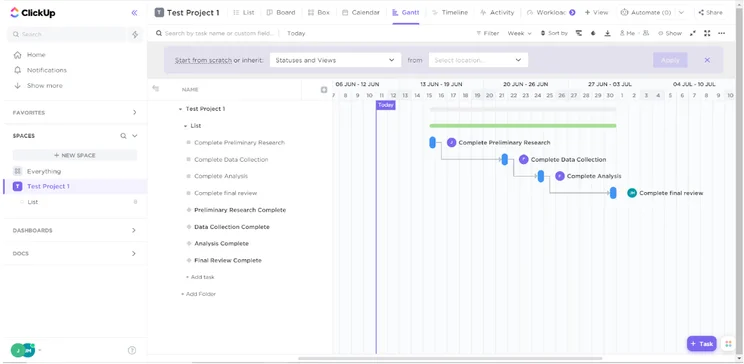
Gantt charts are a common way for project management software to guide users through planning. Source: Tech.co testing
Execution
This phase is where you and your team will start working on the tasks you’ve decided must be completed by the time the project ends. As we’ve covered, appropriate and sufficient planning makes this stage much easier.
However, even with a solid plan, things can break down quickly if you don’t set up defined channels for communication and collaboration, or choose to brush over problems identified by those working on the project.
Monitoring and controlling
Although this is “after” the execution phase, monitoring and controlling your project is something you’ll do alongside the execution phase if you’re a project manager.
As project managers are ultimately accountable for the success or failure of the overall project, it’s crucial they have oversight over the project’s progress. This can be gained from one-on-one catch-ups, team stand-ups, and shared communication channels, or accessing data from project management software like Asana:
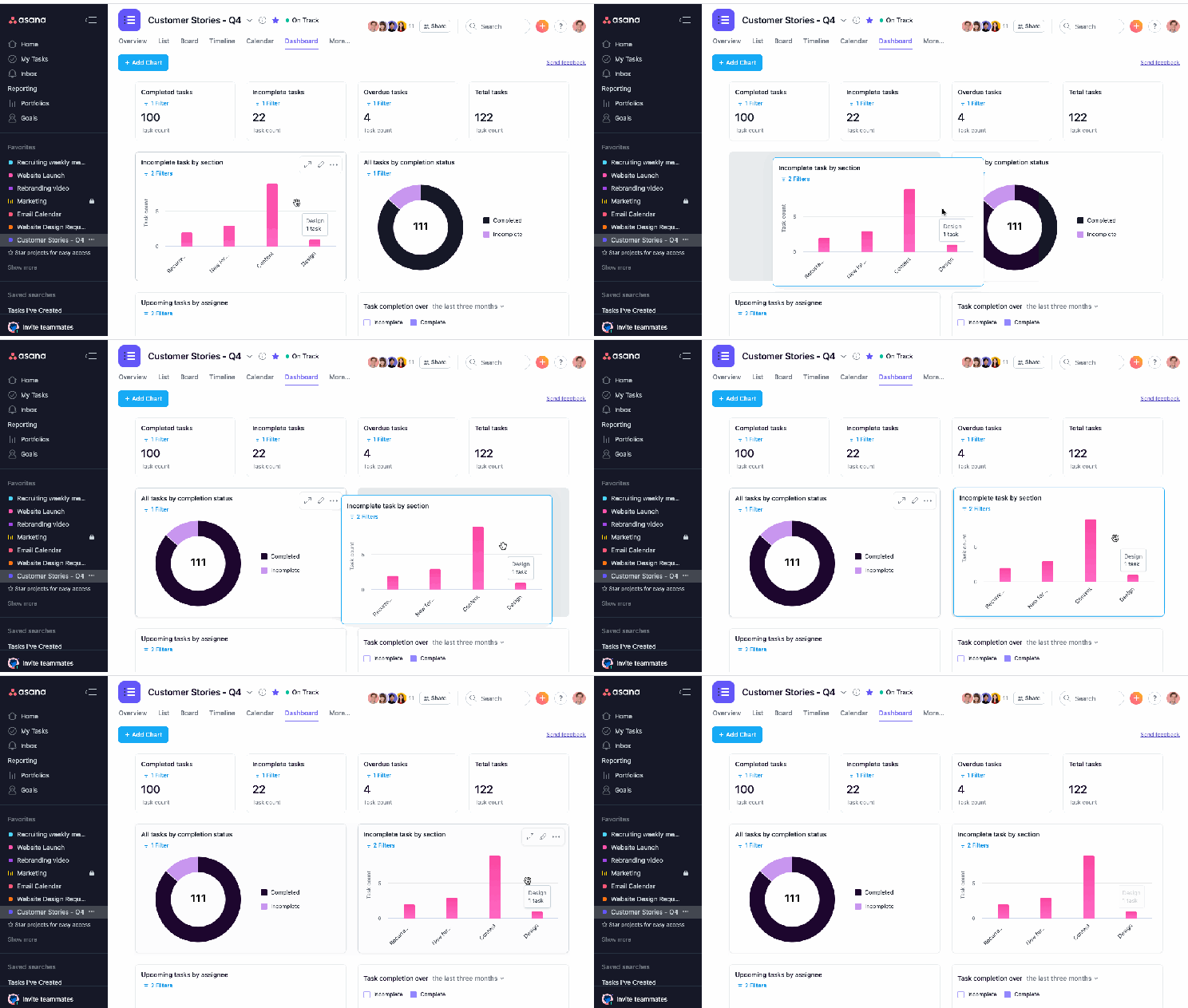
Asana’s dashboard view uses a simple drag-and-drop editor for easy adjustments. Source: Asana.
Closure
Finally, once all deliverables have been submitted, your project will move to the closing stages. Depending on the type of project, you may receive feedback from stakeholders and have to make changes based on their suggestions. In other projects, closure may simply be a formality – a figurative pat on the back.
You may also find yourself compiling feedback from your staff during this stage of the project process. You can use their experiences and feedback to inform the way you manage future projects, preserving the good and removing the bad.
Project Management Methodologies and Frameworks
Projects take place across all industries, but of course, a business operating in one sector might not have the same project needs as one operating in another. Building a block of apartments is very different from building a website, for example.
So, different ways to manage projects have naturally arisen over time – often called methodologies or frameworks. Here’s out overview table, followed by a quick run-through of some of the top project management methodologies.
|
What it does
|
Better For
|
||||
|---|---|---|---|---|---|
|
Scrum |
Waterfall |
Kanban |
Critical Path |
Lean |
MOCHA |
|
Addresses small and impactful steps with short bursts of focus. |
Linear and sequential, completes each phrase before moving to the next. |
Visualizes a project as a series of movable tasks |
Identifies the core sequence of tasks crucial for success |
Prioritizes reducing delays and eliminating waste. |
Focuses on individual roles to clarify all required sign-offs. |
|
Software developers and tech companies |
Construction, manufacturing, and healthcare |
Marketing agencies, creative agencies, and operations management teams |
Aerospace, defense, and construction |
Manufacturers |
Corporations and software developers |
Agile
The “Agile” approach to project management comes from the world of software development. It focuses closely on continuous collaboration, improvement, and evaluation.
The 12 principles of the Agile methodology lay the foundations for the framework. One of the first is “welcoming changing requirements, even late on in the process.” Agile projects are built to deal with this kind of thing occurring.
The manifesto also notes that “the best architectures, requirements, and designs emerge from self-organizing teams” and that it’s best to “build projects around motivated individuals… give them the environment and support they need, and trust them to get the job done.”
Scrum
While “Agile” is a broader philosophy about how to add value to customers, “Scrum” is the implementation of that Agile methodology.
Scrum teams will typically break their projects down into a number of different ‘sprints,’ short bursts of focus on specific areas that will add the most value in the least amount of time. In the world of software development, this has gained traction because it allows teams to push out iterations of products much quicker than other methods of working.
Each scrum team will have a “scrum master,” which is sort of like a project manager. They will run things like sprint retrospectives, used to continuously improve processes.
Find out more about the key principles of scrum and how they can benefit your project.
Waterfall
Waterfall is perhaps one of the most straightforward ways to manage a project. If you’re using the waterfall method, you’ll divide your project into different sequential phases, such that one phase cannot begin until the previous one is completed.
Waterfall is a linear methodology and using it can give you a really clear idea of what the most critical parts of your project are, as well as an accurate timeline. However, it’s not as easy to adjust to changes in requirements or project scope, especially compared to the scrum method.
Waterfall is a good methodology to use if you can afford to spend a lot of time in the planning phase, as it works best when you can iron out the details before you start and minimize the risk of changes to deadlines.
Find out which methodology is best for your project with our side-by-side Agile vs. Waterfall comparison.
Kanban
If you’re using Kanban, you’ll break your project down into smaller tasks and then place them on a board (known as a Kanban board), which has different columns denoting the status of the tasks (e.g. “In Progress”).
Kanban is useful for project managers as it provides a top-level overview of the progress of your project in an immediately easy-to-understand way. It can help inform resource or task reallocation and promote transparency and accountability. Most project management software tools available today, like monday work management, provide some sort of Kanban board view for their users.
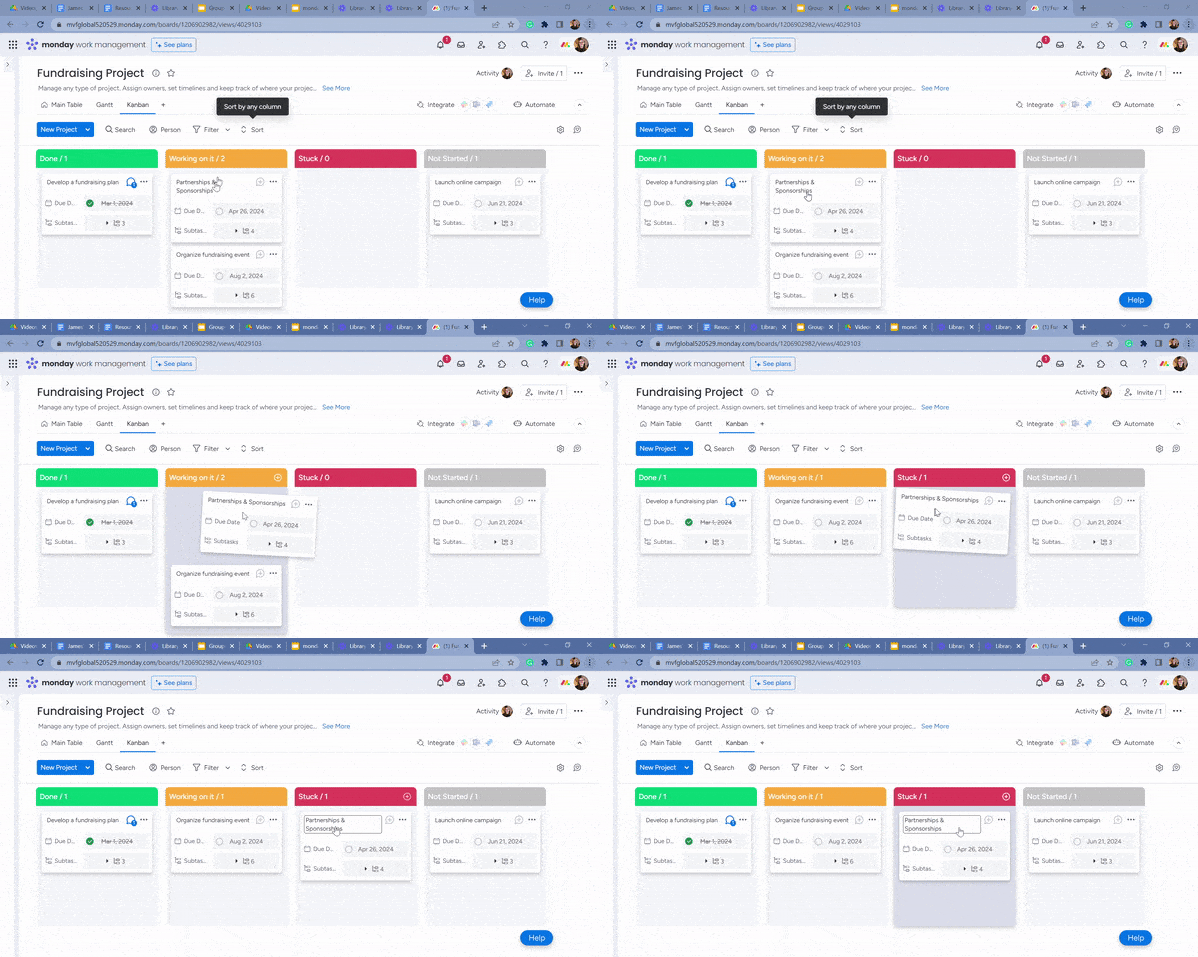
With monday work management’s Kanban board, users can move tasks once each stage has been completed. Source: Tech.co testing.
Find out more about the Kanban method and how it compares to scrum.
Critical Path method
The critical path method involves identifying the tasks within a project that are absolutely crucial to the overall success of the project.
Once these tasks have been identified, you can draw out your project’s “critical path,” and then use this to prioritize your work or decide what order to complete it in.
If you’re managing a project with a huge list of tasks that need completing, the critical path method cuts through the jungle of overlapping and interlocking tasks. It’s a great way to make your team more efficient and ensure they’re focused on only the most important jobs at hand.
PERT charts can be used to display a graphical representation of your team’s critical path while managing a project.
Lean project management
First developed by Henry Ford for workers at Ford Motors, “Lean” manufacturing (as well as project management) focuses on adding more value and less waste in tandem. It’s all about providing project deliverables while using the least amount of resources, money, and materials possible.
The biggest advantage of deploying a lean project management methodology is naturally the cost savings – but it can also lead to increased productivity and efficiency as workers are asked to find innovative ways to do things more quickly and less expensively.
MOCHA
MOCHA is more of a project management framework than a fully-fledged methodology like the others in this section. MOCHA stands for “Manager, Owner, Consultant, Helper, Approver” – which all refer to different individual roles during a project.
Using a MOCHA framework can make communication more efficient and ensure that everyone is on the same page when it comes to seeking sign-off on different aspects of the project. For more information, check out our guide to MOCHA in project management.
The RACI method is another way to clearly define workers’ roles. Learn more about the RACI project management strategy here.
The Three P’s of Project Management
The three P’s of project management are Product, People, and Process. Every aspect or element of a given project can be grouped into one of these three categories.
“Product” typically refers to everything relating to the outcomes and deliverables of your project. “People” is everyone involved – from team members working on the project to the stakeholders who you’re completing the project for. “Process” is the “how” of the project – how you’re going to achieve your goals and the resources you’ll need to do so.
You can use the three P’s in this way to quickly categorize challenges, obstacles, or problems you encounter during the life cycle of a standard project, as well as organize your project activities more generally.
Check out our guide to time management apps to learn more
The Best Project Management Tools and Their Features
In the modern world, the process of delegating tasks effectively requires the right tools.
Top project management software programs give users a range of preset templates that cater to teams in different industries, as well as tools to build their own from scratch if needed. Starting from $8 per user, per month, monday work management has a wide range of templates for marketing, sales, HR, CRM, design, education, and construction projects.
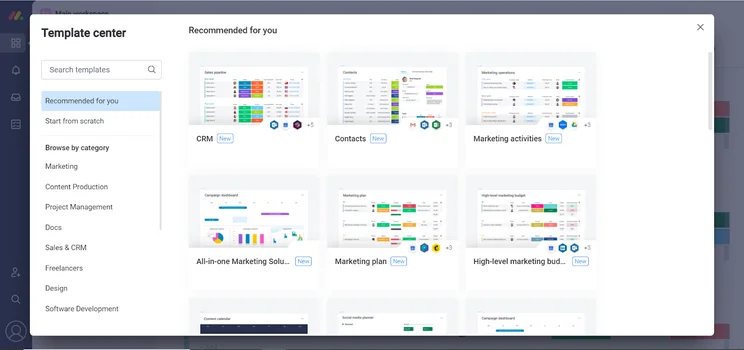
The monday work management template center ensures that the software is easy to customize for your needs.
Source: Tech.co testing.
Almost all major providers offer features to help manage team workflows too: resource management, budget management, and automation builders to handle repetitive administrative duties like notifying team members when tasks are finished. Teamwork, which has plans starting from just $5.99 per user, per month, has an easy text-based automation builder.
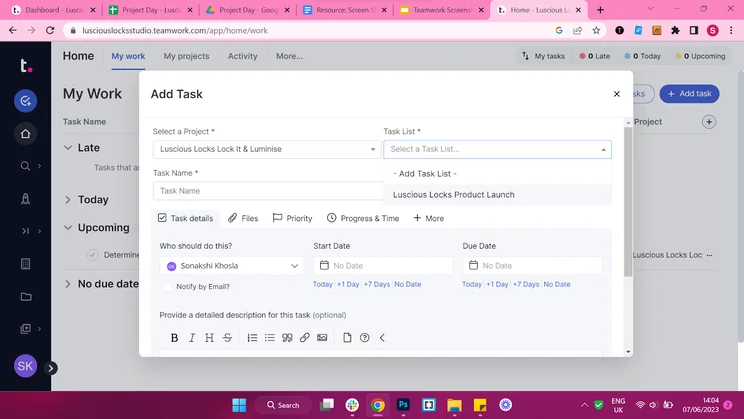
Teamwork’s “Add task” form includes fields for a task list, start date, and due date, among others. Source: Tech.co testing.
Most top providers offer a simple “Table” or “List” view, along with a Gantt chart, Kanban board, and spreadsheet-style view. ClickUp provides more than 15 different ways to view a project while Trello sticks to a more basic Kanban and table approach without all the bells and whistles.
|
Price from
All prices listed as per user, per month (billed annually)
|
Score
The overall score obtained from our most recent round of project management software user testing
|
Verdict
|
|||||||
|---|---|---|---|---|---|---|---|---|---|
|
Best All Round
 |
Great Value and Excellent Automation Builder
 |
Best For Task Management & Collaborating
 |
 |
 |
 |
 |
 |
 |
 |
|
monday work management |
Teamwork |
ClickUp |
Asana |
Wrike |
Trello |
Smartsheet |
Jira |
Zoho Projects |
Basecamp |
|
$9/user/month |
$9.99/user/month |
$7/user/month |
$10.99/user/month |
$10/user/month |
$5/user/month |
$9/user/month |
$7.91/user/month (300 users) |
$4/user/month |
$15/user/month |
|
4.7
|
4.6
|
4.5
|
4.5
|
4.4
|
4.3
|
4.2
|
4.1
|
4.0
|
2.9
|
|
A great task management system due to strong customizability and support team, with a generous free trial |
A great user experience all round, with an easy-to-use automation builder and great budget tracking capabilities |
Slick software with a highly powerful core and an AI assistant, plus a genuinely usable free tier for individuals |
A simple task-list-based project management platform with an acceptable free tier |
A feature-rich service with two plans for enterprises, and a free tier for new users to try |
A fairly-priced, stripped-down option, best for small teams who need a central location for basic task management |
A great tool for spreadsheet-natives, which can take your Excel-based task planning to the next level |
A great value piece of software that’s ideal for tech, software development, and engineering teams |
A solid project management solution with an attractive free tier for small teams and a very affordable premium plan |
A very basic, relatively limited software that’s a lot simpler than its competitors |
Project Management vs. Work Management Software (Work OS)
In the project management software space, some tools (such as monday work management) have begun to market themselves as work management platforms, or “Work OS” software. This isn’t that surprising considering technology is constantly changing the way we manage projects, as well as our day-to-day work.
While project management software used to be designed specifically for completing projects (or collections of projects) work management platforms take this one step further and provide a digital space for all day-to-day work operations to be tracked and completed. These centralized Work OS hubs provide increased visibility for managers and more opportunities for collaboration.
You can use project management software for either of these two purposes – but it’s a particularly good option for managing your day-to-day processes due to its sheer number of features and views, as well as its hierarchy of folders and spaces for different teams.
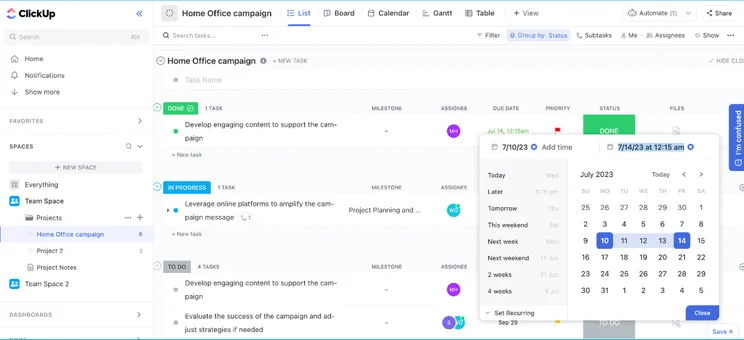
ClickUp’s List view includes groups for “Done,” “In Progress,” and “To Do.” Source: Tech.co testing.
The Benefits of Effective Project Management
Aside from enhancing your own project management skills, managing a project properly will have a decidedly positive impact on both your team and your final product or deliverable. Effective project management can lead to:
- Reduced stress levels throughout the project’s duration
- Motivated, assured, and focused team members
- Better communication and clarity over project goals
- Ample chances for team growth and development
- Mistakes being turned into learning opportunities
- Time and resources being deployed sparingly and intelligently
- Higher quality deliverables and project outcomes
- Working feedback mechanisms that can create tangible change
- Higher volumes of projects being able to be completed
- Minimal risk of budget adjustments or changes
Effectively managing projects is definitely easier when you’re using project management software, especially if you’re managing a highly detailed project. Today, project managers in all sorts of sectors have a huge range of considerations to deal with – so it’s important to take advantage of tech when you can.
What’s in the Future for Project Management Software?
The project management community is continuing to evolve, largely due to new types of software.
More specific CRMs are one area worth keeping an eye on. The two biggest trends are a growing focus on verticalization, a term that refers to hyper-specific CRM tools that are pre-packaged to work best within niche industries, and the rise of “social CRM,” which refers to a form of CRM focused entirely on social media account activity.
Naturally, artificial intelligence is a potential game-changer for any business software, as it offers a host of new functions including natural language processing, sentiment analysis, forecasting, and auto-personalized messages. Other well-known trends will likely stick around, too, from chatbots and no-code solutions to the age-old classic: mobile accessibility.
Project management is now a key concept in almost all businesses – but ensuring you’re managing projects effectively requires significant care, attention, and planning.
Using an established methodology or framework to organize your team, as well as a compatible project management tool such as monday work management, is essential to compete in a world where projects are getting increasingly complex, multi-faceted, and in many cases, require input from team members across the globe.
If you can manage to get the balance right, then there will be a huge range of benefits for you, your team, and your business. Otherwise, you’re going to have to deal with missed and moving deadlines, bank-breaking budgets, and unsatisfied stakeholders.
Frequently Asked Questions
A project is a temporary endeavor with a defined beginning and end, undertaken to achieve a specific goal or set of objectives. Projects are typically unique in nature, meaning they are not routine operations or ongoing activities.
Some good practices that tend to lead to successful projects include clearly defining a project’s objectives and scope, developing a detailed project plan, setting realistic expectations, engaging stakeholders, communicating effectively, assembling a competent team, and managing risks proactively.
Choosing the right project management software starts with a self-assessment one your business’s size, needs, and priorities. The size of your business or team is important as some project management software is ideal for small and medium-sized teams like monday work management or Teamwork, while Wrike is a better option for larger teams. If you need lots of task management features because your project is very detailed, ClickUp will be a better option than Trello – if you’re looking for a basic organizational hub, the opposite will be true.


