

We may receive a commission from our partners if you click on a link to review or purchase a product or service. Click to Learn More
Asana and Trello are both very capable project management software tools designed to help with the planning, monitoring, and delivery of projects. We’ve tested each platform extensively, and found that they offer a range of core task management and workflow creation tools, like a kanban board and an automation builder, as well as a dashboard for displaying project data.
However, Trello and Asana suit very different teams and have distinct differences worth considering. For example, if you have very little software budget to work with, Trello is a lot cheaper than Asana and better value for money. However, Asana offers more advanced features, and if you’re managing a complex, data-intensive project, you might find Trello a little limiting. Here’s how Asana and Trello square up at a glance:
|
Price from
All prices listed as per user, per month (billed annually)
|
Free plan
|
User limit
|
Storage Limit
|
Project limit
|
Pros
|
Cons
|
||
|---|---|---|---|---|---|---|---|---|
|
Best Automation Builder
 |
Best for Basic Task Management
 |
|||||||
|
Asana |
Trello |
|||||||
|
$10.99/user/month |
$5/user/month |
|||||||
|
|
10 users |
|||||||
|
|
|||||||
|
100MB per file (all plans) |
|
|||||||
|
Unlimited (all plans) |
|
|||||||
|
|
|||||||
|
|
Read on to find out why Asana wins this head-to-head or see how these two providers compare to other top project management software by using our comparison tool, which is updated to include the latest deals from a wide range of providers.
Asana vs Trello Head-to-Head: Which Is Best?
In this guide:
We’ll cut to the chase: If you want a very simple, task-tracking app to monitor the progress of a simple project (such as the content pipeline for a blog or webpage) then Trello will be the better option.
If you’re managing a complicated project with lots of team members and want to streamline their workflows, track hundreds of tasks, and keep an eye on how things are progressing, you’ll find Asana more helpful (and less frustrating).
During our testing, Asana proved easier to set up than Trello, because of its excellent task management, data visualization, and workflow creation tools. Trello is great if all you’re looking for is a place to track tasks, but if you’re managing complex projects, you’ll soon find it limiting. For example, aside from task comments, Trello doesn’t really offer many collaboration tools, such as a project message board – so we wouldn’t recommend it as a hub for all of your business’s operations.
However, as we’ve said, Trello is a lot cheaper than Asana, with a starter plan of $5 per user, per month compared to Asana’s $10.99 per user, per month plan.
Key Differences Between Asana and Trello
Asana
- Does provide a custom chart or widget builder
- Excels at complex task management and budget planning
- Offers a lot of different integration options
- Out-of-the-box solution
- Does provide a project message board for collaborating
- Expensive, with first paid plan starting at $10.99 per user, per month
- Does provide a form builder
Trello
- Does not provide a custom chart or widget builder
- Not well-suited to complex task management and budget planning
- Does not integrate with many programs
- Some advanced features are only available as paid add-ons
- Does not provide a project message board for collaborating
- Very cheap, with first paid plan starting at just $5 per user, per month
- Only allows you to build forms through add-ons, known as Power-Ups
When testing Asana and Trello, I found them both relatively easy to set up and use, but Asana was streaks ahead when it came to actually completing common project tasks, such as planning out a project timeline, editing tasks, and commenting on other users’ work. Asana has a more modern interface, and the fact it’s updated much more often than Trello really is evident by the number of features it contains.
Crucially, Asana didn’t get any more difficult to use the more I demanded of it. Trello, unfortunately, was the opposite. While it was fine for tracking tasks in a kanban board, simple collaboration and performing task management duties became quite difficult quite quickly – I was soon searching for add-ons to help me out. It’s much more limited than Asana, monday work management and Wrike, all much better choices for high-level project management.
You’ll appreciate Asana if you’re part of a team of more than 15, as you’ll actually make use of the advanced features that small teams working on basic projects probably won’t need. If you’ve got a lot of project tasks, you’ll be able to use the task dependency tool to connect the ones that need to be completed consecutively together. Trello doesn’t offer this kind of granular task management function in a straightforward way like Asana, or as many project views for tracking progress.

Best for Ease of Use: Asana
Ease of use is always going to be a subjective issue, and these products are among the easiest-to-use project management software on the market. However, our testing group found Asana slightly easier to use than Trello.
Although Trello’s plans are more stripped-back and basic, Asana has a more familiar, “traditional” project management interface, and provides more instructions during setup.
How easy is Trello to use?
New software can be a lot easier to get to grips with if its features are limited. This is the key to Trello’s success, but also a detriment for those looking for more advanced options, which do exist, but aren’t very convenient.
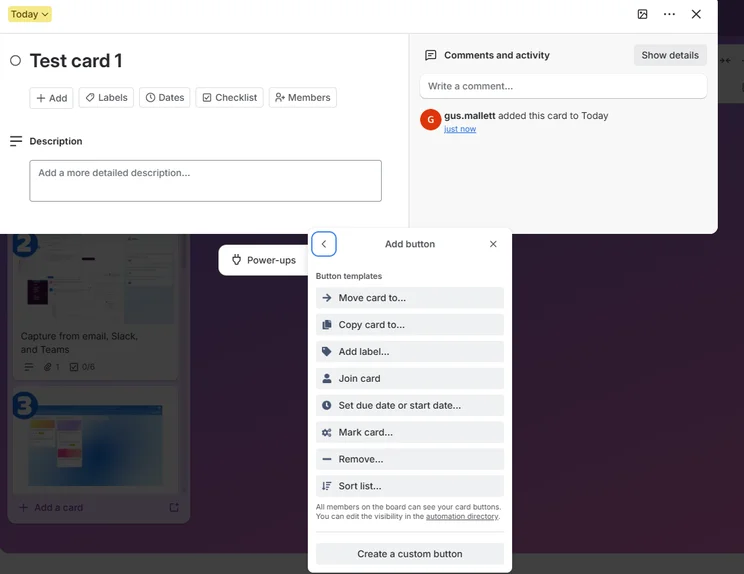
Trello doesn’t seem to overcrowd the interface with too many buttons, which makes navigation easier compared to other platforms, such as Jira and Zoho Projects. To see what we mean, here’s a picture of Trello’s user interface:
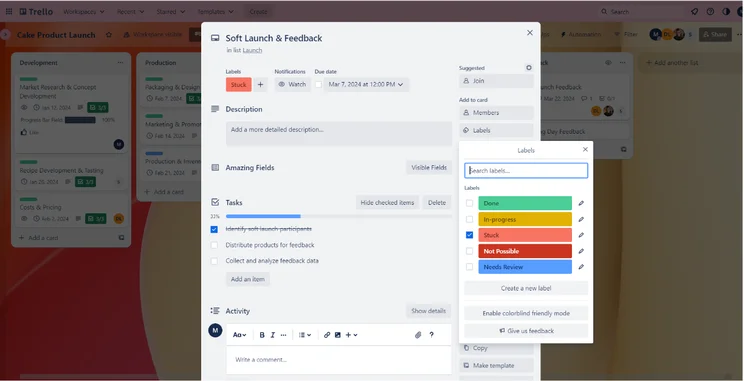
Creating task labels in Trello. Image: Tech.co’s testing process.
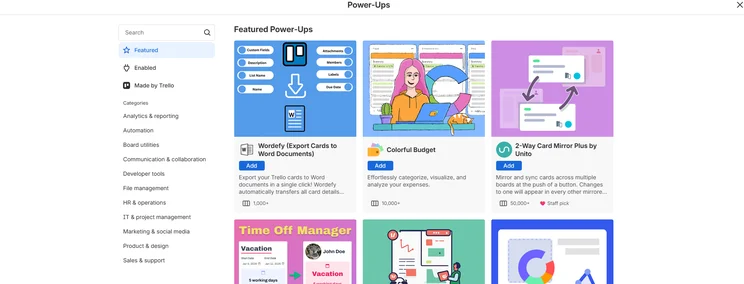
However, although Trello is quite straightforward, it becomes less easy to use when you want to perform more in-depth project management tasks. Asana is more likely to have a dedicated feature for a wider range of tasks and functions, such as automating parts of your workflow – with Trello, you’ll have to look through the Power-Ups directory to find the function you want.
Searching through various Power-Ups in search of the right one for your needs is time-consuming, and can prove highly inconvenient when the issue is time-sensitive.
In addition, there’s no team view or resource management tool, and time-tracking is only available as a Power-Up – so if you’re going to need an overview of your employees’ capacity on a daily basis, a program like Asana – or the very similar Teamwork – will be a better fit for you.
So, while you may initially find Trello simple enough to grasp, it’s certainly not going to be straightforward.
“I didn’t think it’s really suited for project management. I found it unnecessarily convoluted when it came to configuring features like task dependencies.” – Eleanor Grey, a software researcher who participated in our testing series with experience using competing platforms.
How easy is Asana to use?
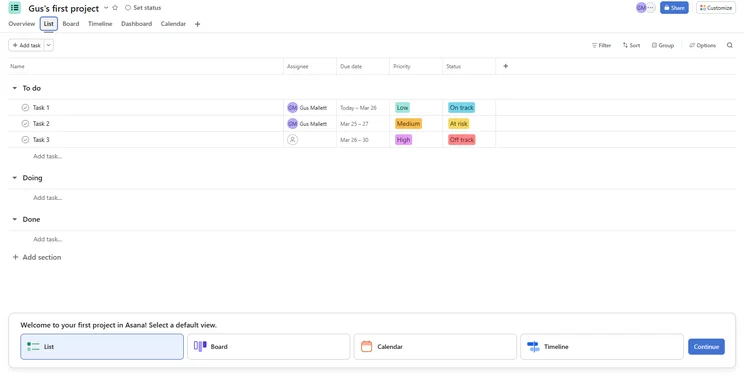
Asana is similar, with an easy layout and an intuitive flow of actions – but it does require quite a lot of setting up because it has way more features than Trello. However, it was a surprisingly smooth process, which is why Asana achieved a marginally better ease of use score than Trello. And, once you’re ready to go, you’re going to be able to complete complex processes quicker with Asana than you will with Trello.
Katie, an SEO Campaigns executive who uses Asana every day, admitted to Tech.co that it did need “a super organized team member to set everything up/get a team started” but that using the software “was easy once that’s done”.
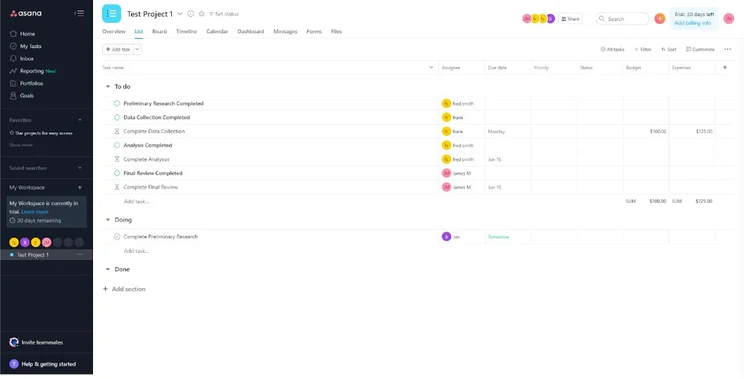
Asana’s List view. Image: Tech.co’s testing process.
The aggregated score achieved by Asana during our ease of use testing series puts it third behind monday work management and Teamwork for ease of use. “It’s quite similar to monday work management” remarked Ollie Simpson, a business software researcher who participated in our project management platform tests. “It was just quite easy, and I didn’t really have to leave the page in search of an answer on Google or a forum at any stage.”
However, Ollie did say that Asana “felt a little bit cramped” compared to its minimalistic competitor, monday work management. You can see what we mean when you open a task management box:
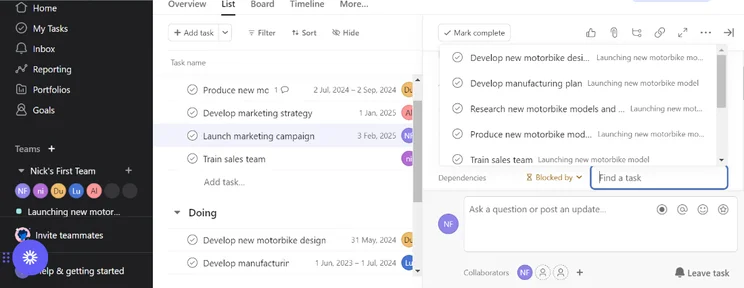
Searching for a task in Asana. Image: Tech.co’s testing process.
If looking at that is giving you a headache, then we’d definitely recommend monday work management’s minimalistic user interface. The clever use of white space in monday work management makes your workspace feel uncluttered.
One member of our testing group who’d never used monday work management said it felt like an Apple product – everything is very intuitively placed. Take a look at our Asana vs monday work management guide for a side-by-side comparison of the two providers.
Best for Features and Functionality: Asana
Asana scores high overall for features and functionality compared to Trello. This is because, as mentioned, many of Trello’s more advanced features are only available as paid Power-Ups.
Views
Asana’s organizational hierarchy is incredibly straightforward. It starts with your “Organization,” but then you can split the software down further into “Teams”. Each team can make their own projects, which are filled with tasks and sub-tasks. By contrast, in Trello, you’ll have a Workspace for your department or team, which is full of different “boards.” Each board will contain a project.
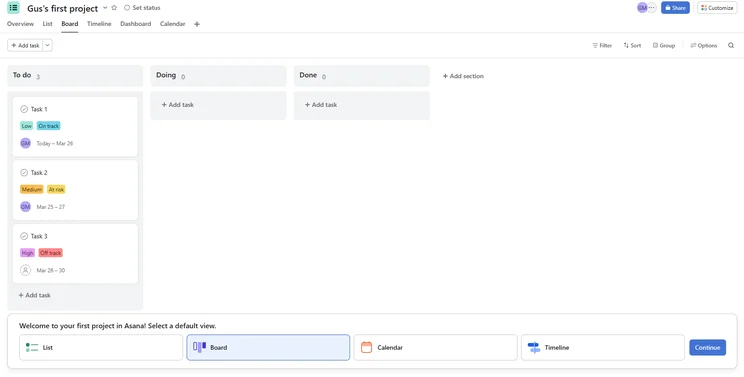
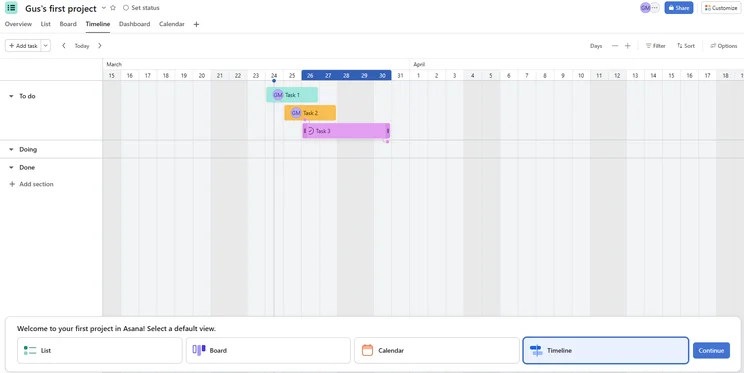
Trello offers a number of different ways to view the progress of your project, including a kanban Board, Timeline, Table, Calendar, and Dashboard view. However, Asana offers all of these views too, as well as a spreadsheet-style view on all of its plans, and a List view (which is pictured in the previous section) for those who like a simple, linear layout.
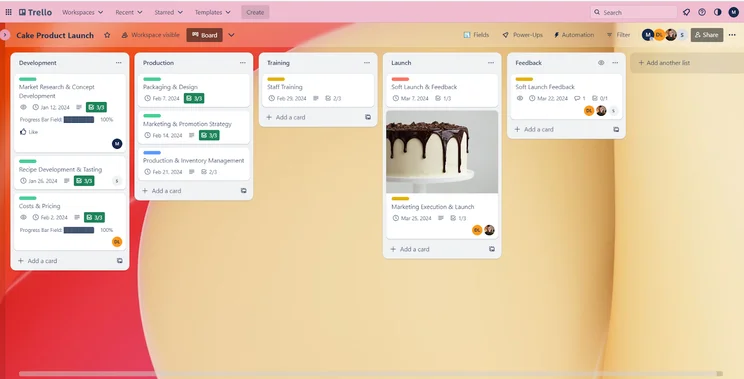
Trello’s kanban board. Image: Tech.co’s testing process.
It’s a little bit easier to flick between these views in Asana, and once you input data into one view, the other views will auto-populate themselves with the same information, which saved us a great deal of time during testing.
Task management
Asana blows Trello away when it comes to task management. It’s a lot easier to manage tasks with Asana because there are more dedicated features than there are in Trello, which makes the software more flexible, and adjustable. Asana scores well for task management, in part thanks to the range of views offered, but also thanks to features like sub-tasks, milestones, custom fields, and task dependencies.
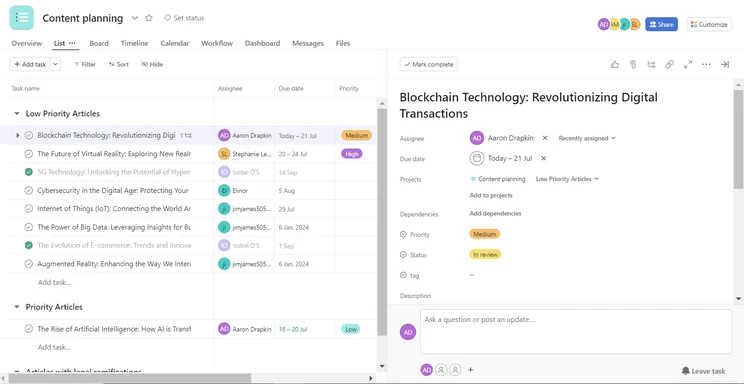
Managing tasks in Asana. Image: Tech.co’s testing process.
You can technically draw dependencies/relations between tasks in Trello, but it’s not very straightforward. Asana, on the other hand, will automate this process by intelligently suggesting tasks that you should be drawing dependencies between.
Asana also has a time-tracking tool that will let you create time estimates for tasks and allow your team members to assign a billing amount to the time they’ve spent working, which Trello only offers as a Power-Up. Along with the provider’s resource management feature, this makes Asana a far better choice for companies working with freelancers or employees on temporary contracts.
Collaboration tools
This is a weak point for both providers but Asana still comes out on top. In Asana and Trello, you’ll be able to comment on tasks and tag your colleagues, which means you can discuss the status and progress of specific tasks, rather than having to take your conversation off the platform.
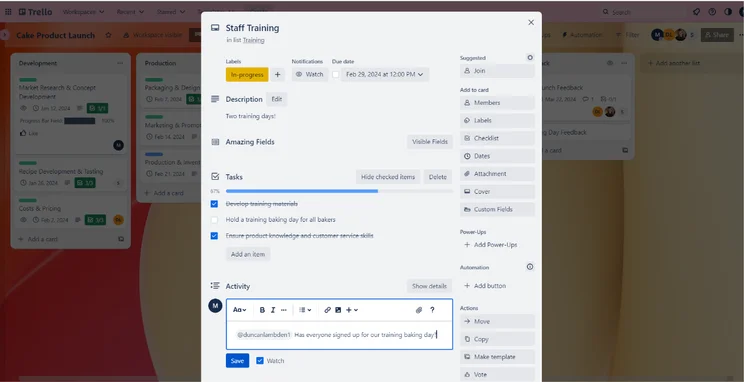
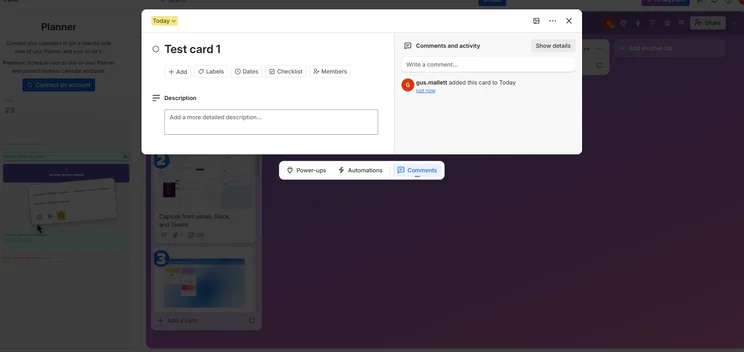
Commenting on tasks in Trello. Image: Tech.co’s testing process.
However, Asana also offers a project message board where team-wide updates can be shared. On the message board, specific tasks can be mentioned, as can specific users. Trello doesn’t offer this function, which is another reason why we don’t recommend it for medium-sized or large teams that have lots of people working on different tasks.
In a similar vein, Asana offers a built-in messenger functionality for teammates to communicate instantly within the platform. Trello, on the other hand, does not. If you’re looking to contact collaborators within Trello, again, you’ll have to peruse its list of Power-Ups, or integrate with Facebook messenger, for example.
Automation
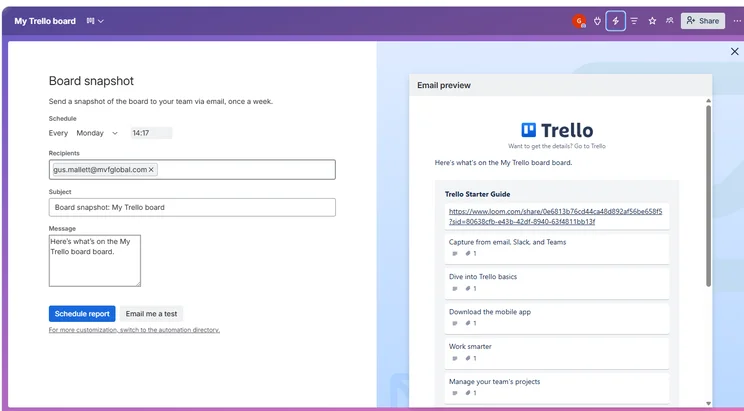
Both Trello and Asana offer automation builders. If you don’t have much of a software budget, Trello will be your best bet. You’ll be able to build automation in Trello with its built-in tool, Butler, on all of its plans – including the free plan.
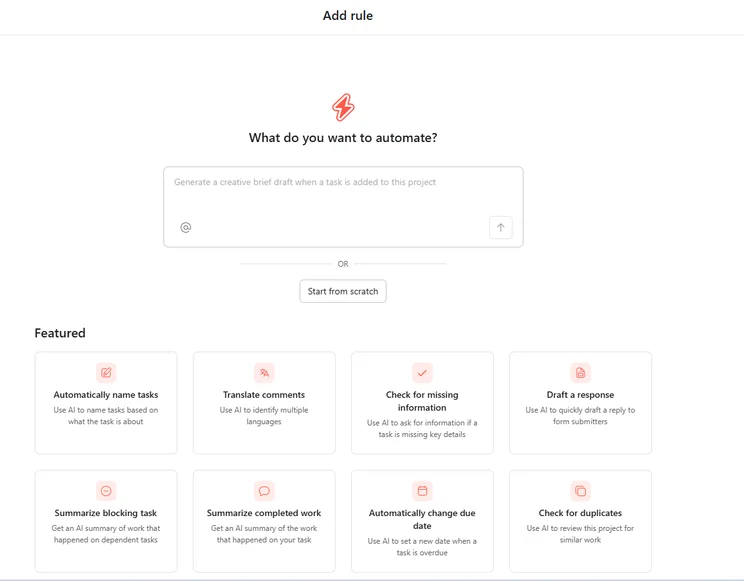
Asana, on the other hand, has a much easier-to-use and more useful automation builder, but it’s only included on the Starter plan and upwards. There’s no limit, however, so you can build as many automated workflows as you like.
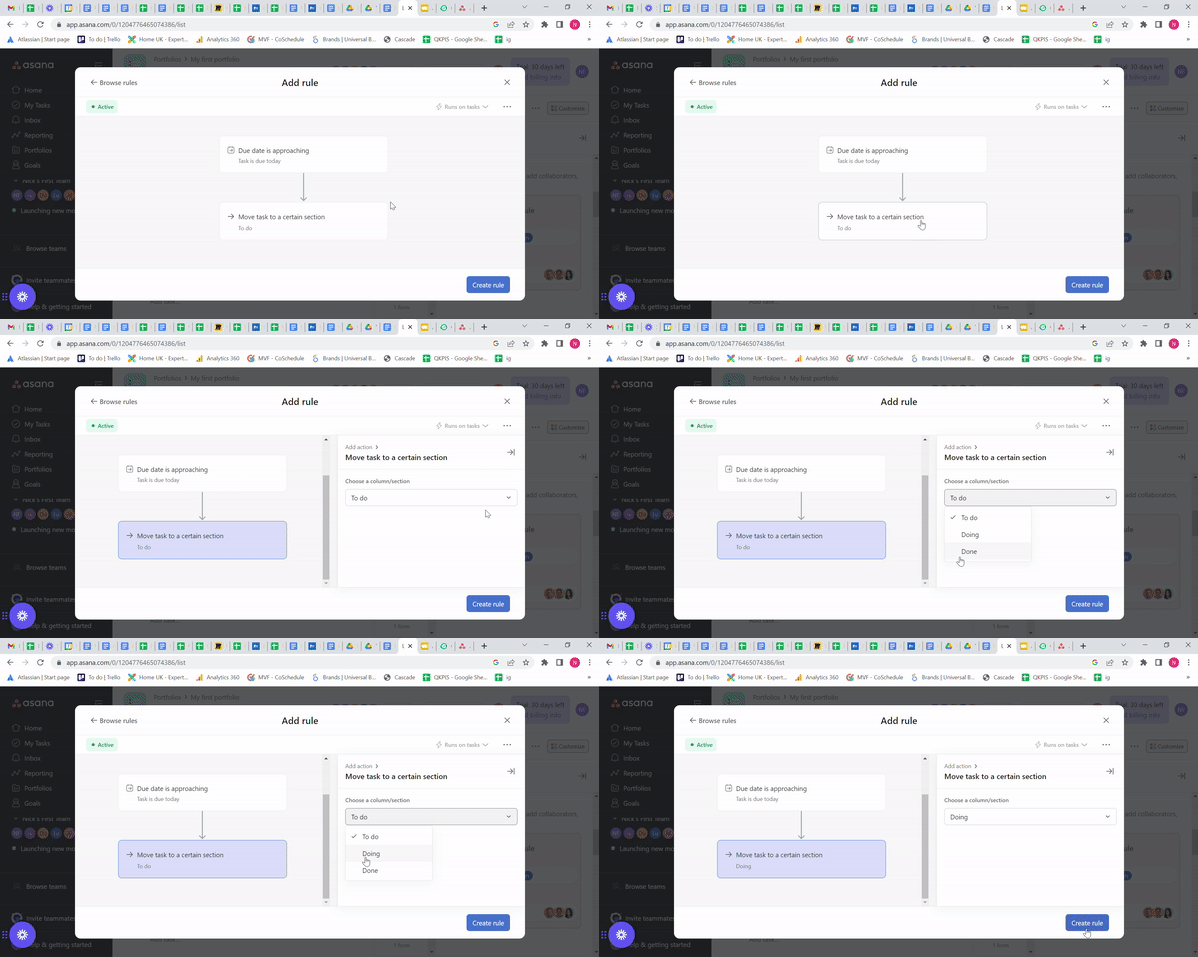
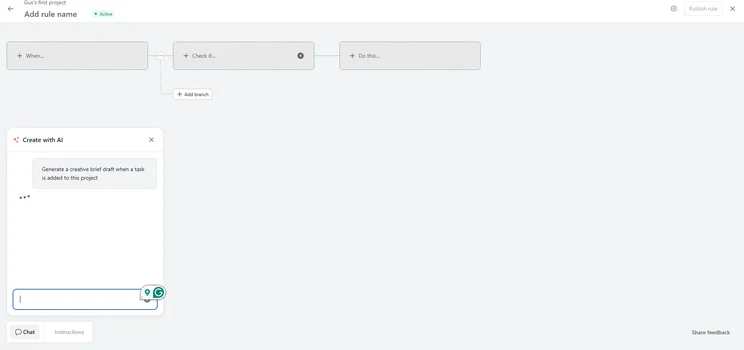
Building automations in Asana. GIF: Tech.co’s testing process.
Asana’s Workflow Builder is used for mapping out repetitive processes and tasks (i.e. workflows). This tool is used for designing, mapping, and visualizing them, so it’s a very handy way of baking standardized workflows into your overall process.
Trello doesn’t supply this feature – and it doesn’t have a built-in form builder for gathering post-project feedback, which Asana does offer.
Data visualization
Overall, Asana’s powerful data visualization tools and its task management features are great. Asana’s dashboard auto-populates with data about your project, but it’s also highly customizable.
You can build your own charts using the 6 chart categories provided, and you can even use data from custom fields you’ve inserted into other parts of your project – but if you’d prefer to use a preset chart to display your data, then there are plenty provided.
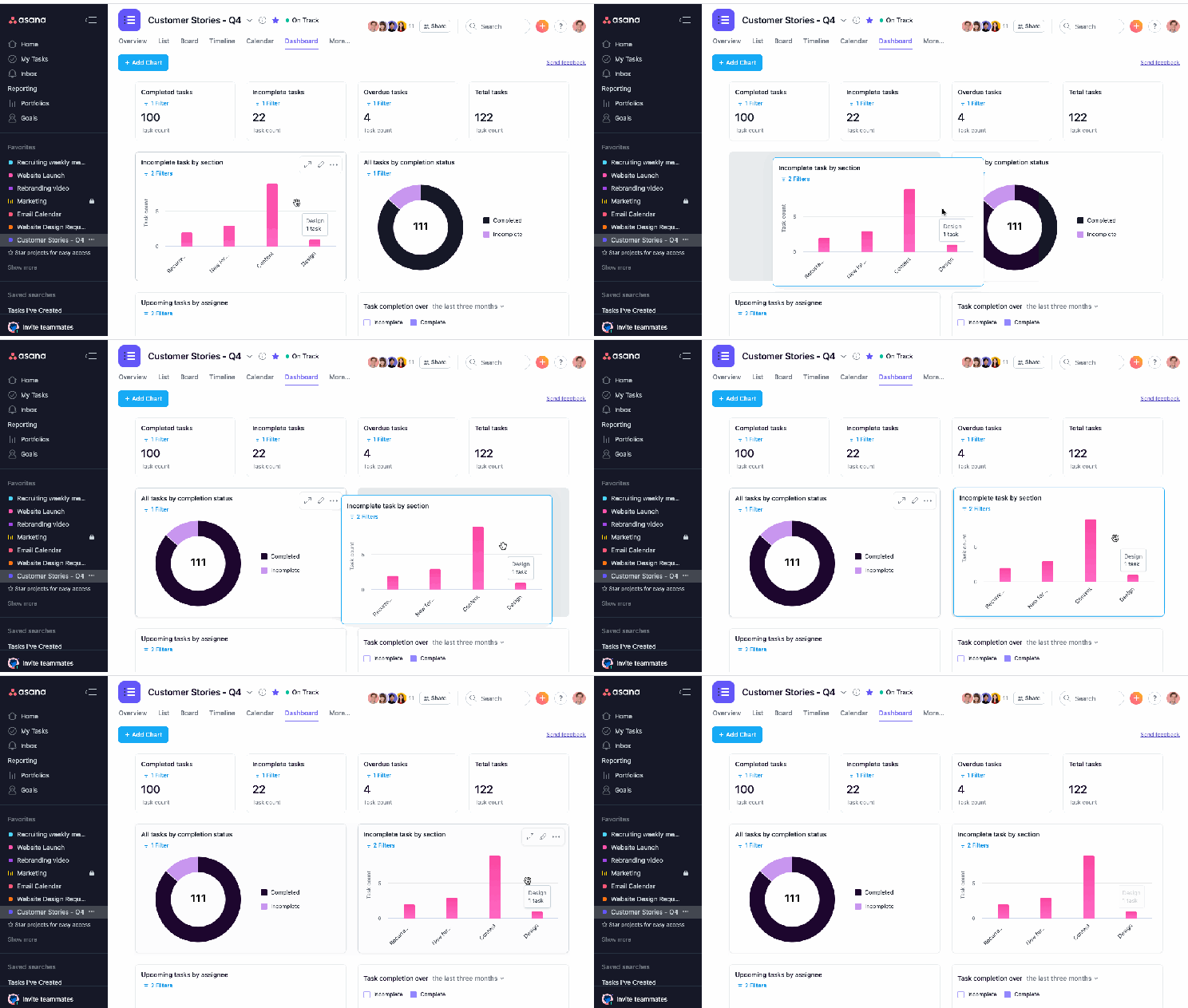
Asana’s dashboard view.
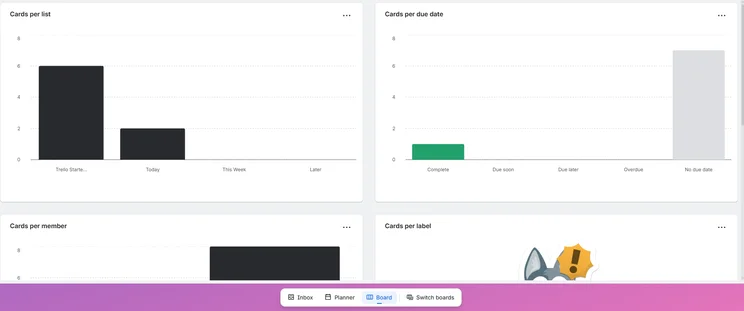
Trello scored low for data visualization, and all in all, it’s just a little more limited than Asana. There are half as many chart types available, and you’ll need at least Trello’s Premium plan ($10 per user, per month) to access any data tools. However, if you’re prepared to spend that much, we’d opt for a provider like Smartsheet, which starts from $9 per user, per month and is better for displaying project data than Trello.
With the data display tools and task management tools available, you’d have to be after some particularly niche services in order for Asana not to fit what you’re looking for — but if you are, you can use our free comparison tool to find a suitable alternative.
Security
Trello and Asana both offer two-factor authentication on all of their plans, and offer single sign-on and Google authentication as well.
Both Asana and Trello will let you control the permissions and access users have, but neither provides IP whitelisting capabilities, which sees them both drop a few points.
Best Value for Money: Trello
You’ll get a lot more value for your money with Trello, especially on the earlier plans – but that’s mainly because Asana is really pricey.
In fact, it’s one of the most expensive project management tools currently available, with providers like monday work management offering similar but significantly cheaper plans. Here’s what Trello and Asana’s plans look like side-by-side:
|
Price (annually)
The amount you'll pay per month, when billed annually
|
Price (monthly)
The amount you'll pay per month, when paying on a rolling monthly basis with no 12-month commitment
|
Users
|
Projects/boards
|
Storage
|
||||
|---|---|---|---|---|---|---|---|---|
 |
|
|
|
|
|
|
|
|
|
Asana Personal |
Trello Free |
Asana Starter |
Trello Standard |
Asana Advanced |
Trello Premium |
Asana Enterprise |
Trello Enterprise |
Asana Enterprise+ |
|
Free |
Free |
$10.99/user/month |
$5/user/month |
$24.99/user/month |
$10/user/month |
Custom |
$17.50/user/month |
Custom |
|
Free |
Free |
$13.49/user/month |
$6 user/month |
$30.49/user/month |
$12.50/user/month |
Custom |
$17.50/user/month (only billed annually) |
On application |
|
2 |
10 |
Unlimited |
Unlimited |
Unlimited |
Unlimited |
Unlimited |
Unlimited |
Unlimited |
|
Unlimited |
10 |
Unlimited |
Unlimited |
Unlimited |
Unlimited |
Unlimited |
Unlimited |
Unlimited |
|
Unlimited (100MB per file) |
Unlimited (10MB per file) |
Unlimited (100MB per file) |
Unlimited (250MB per file) |
Unlimited (100MB per file) |
Unlimited (250MB per file) |
Unlimited (100MB per file) |
Unlimited (250MB per file) |
Unlimited (100MB per file) |
Asana vs Trello: basic/starting plans
Asana’s first paid plan, the Starter Plan ($10.99 per user, per month), is geared toward small to mid-sized teams. You’ll get the ability to build custom charts and widgets as well as access to a dashboard for data, none of which Trello offers on its first paid plan, the Standard plan ($5 per user, per month), which is geared to the same demographic.
With Asana Starter, you’ll get useful task management features initially omitted from Asana’s free plan, such as sub-tasks, milestones, and custom fields – in other words, this Asana plan is built for managing complex tasks. Trello doesn’t include a Gantt chart, sub-tasks, or task dependencies on the Standard plan.
Asana vs Trello: mid-tier plans
Asana Advanced ($24.99 per user, per month) is geared towards, as the provider notes on its website, “teams and companies that need to manage work across initiatives” – which basically means multiple teams working on multiple projects. Trello has a Premium plan for less than half the price ($10 per user, per month) that’s designed for a similar purpose.
On Asana’s Advanced plan, you’ll get advanced integrations and Portfolios, a tool for managing groups of projects rather than just one. This is also the first Asana plan with custom automations you can build yourself, so you’ll have the freedom to streamline what you want rather than picking up pre-built suggestions.
On Trello’s Premium plan, you’ll have access to premium support and workspace-level project templates, as well as unlimited automations. If you’d like to see how these two plans compare to other similarly-priced offerings, visit our comparison page.
Asana vs Trello: plans for enterprises
Both Asana and Trello have plans for Enterprises, however, they’re hard to compare on a pricing front, because Asana has no public pricing. Still, Asana does have usage authorization and user provisioning features, which are vital to keeping your company’s data secure. It has a variety of other features that support data compliance.
Asana actually has two Enterprise plans – Enterprise and Enterprise+. There isn’t a huge amount of difference between the two. The latter offers an audit log, an audit log API, and advanced security and data loss prevention integration support. It’s geared towards very large businesses that need to meet strict compliance requirements.
Trello’s Enterprise plan offers similar user provisioning features, guest access across multiple boards, and an administration feature for Power-Ups.
If you’d like to learn more about these pricing plans, then visit our Trello pricing or Asana pricing pages for a more in-depth look. If you feel like neither Asana nor Trello is the right fit for your business – which is understandable, considering Trello’s limitations – find out more about other Trello alternatives aside from Asana.
Trello vs Asana: Which Provider Has the Best Free Plan?
In short, Asana has the better free plan, despite a 2-user limit. It has better collaboration features than Trello’s free plan, such as a calendar, and more task management features too.
Asana Personal also comes with unlimited projects, integrations, and storage (with files capped at 100MB), so it may prove a good fit for businesses wary of Trello’s 10 boards per workspace limit on its free plan.
Trello’s free plan is decent, but nothing outstanding in the realm of project management free tiers. You can only have 10 projects on the go at any given time, so it’s suited for personal use or very small businesses. There are also key task management features missing, such as Gantt charts and sub-tasks, and collaboration tools like a calendar aren’t included. It should be noted – Asana’s free plan also lacks timeline view and Gantt charts.
In other areas, however, Trello’s free plan is pretty well stocked, at least compared to some other free plans. It includes some of the workflow features that are usually reserved for higher pricing tiers, like project templates and automations – but Asana still edges it overall.
Best for Integrations: Asana
If you’re already using a suite of software apps (such as an email service provider and an invoicing platform) Asana is probably going to be a better choice for you – it’s been around for over a decade and in that time, integrations have been built to over 200 popular apps.
Asana offers many CRM integrations including Salesforce and HubSpot, comms integrations with Slack, Zoom, and Microsoft Teams, as well as a really wide range of reporting and finance integrations.
This variety of third-party CRM options is noteworthy. CRM is an essential part of project management, enabling sales, marketing, and customer-facing teams to convert data into meaningful strategies and drive retention. For instance, by pairing these two tools together, you can give your account managers oversight of where a particular project is in the process.
On the other side of the coin, with oversight of when sales are successfully made, you can reactively execute projects to improve overall business efficiency. This two-way sharing of information has many other mutual benefits for project leaders and sales teams alike.
Trello’s selection isn’t quite as impressive. Although it also integrates with communications apps like Slack and Microsoft Teams, it only offers a few CRM integrations (Salesforce, Zendesk, Freshdesk), and there are currently no finance integrations available for Trello.
However, Trello and Jira are both made by Atlassian, so using them alongside each other works pretty well. If your IT and/or tech teams are using Jira and you spend a lot of time communicating with them for your projects, Trello becomes a logical option. But then again, Asana also integrates with Jira – so the choice really is yours.
Best for Customer Support: Trello
Trello is great for customer support. Like Asana, it provides a knowledge base and community forum for DIY troubleshooting, and you’ll be able to contact Trello for any other issues via email.
However, Trello’s Enterprise plan – which is more than $7 cheaper than Asana’s Advanced plan – has 24/7 live support available, and you can contact the provider by phone, email, or live chat too. Most project management software tools offer two out of those three options – for example, you can’t contact Asana or monday work management by phone.
Asana, on the other hand, offers phone-based support, and 24/7 live support is only available on the Enterprise plans, which have no public pricing.
Asana: Pros, Cons, and Key Features
These are the key features available on Asana’s first paid plan, The Starter plan, which retails at $10.99 per user, per month.
- Unlimited projects and 500 users
- Two-factor authentication, guest access, and user permissions
- Gantt, kanban, and Spreadsheet views
- Sub-tasks, milestones, and task dependencies
- Preset and custom project templates
- Data visualization dashboard, chart, and widget builders
Asana

In Short
-
Pros
- Unlimited storage
- Plenty of third-party integrations
- Incredibly clean and intuitive interface
- Easy-to-use dashboards and chart builder
-
Cons
- Most key features require the Advanced plan
- Very high prices for larger teams
- No phone-based support
Pricing
-
 Free plan available
-
Starter: $10.99/user/month
-
Advanced: $24.99/user/month
Images
Trello: Pros, Cons, and Key Features
Here are the key features you’ll find on Trello’s cheapest paid plan, the Standard plan, which costs $5 per user, per month:
- Unlimited projects, users, and storage
- 1,000 automated actions per month
- Two-factor authentication, guest access, and user permissions
- Gantt, kanban, and Spreadsheet views
- Preset and custom project templates and automations
Trello

In Short
-
Pros
- Kanban-dominant approach
- Automation is available on the free plan
- Cheaper than most competitors
- Live chat support on all paid plans
-
Cons
- Very simple project templates
- Basic functionality, not updated regularly
- Sparse collaboration tools
Pricing
- Free plan available
- Standard: $5/user/month
- Premium: $10/user/month
- Enterprise: $17.50/user/month
Images
Asana vs Trello: Your Other Options
There are plenty of additional rivals to Asana and Trello. In fact, we’ve user-tested 10 of them. ClickUp, for instance, has a free plan, a $7 per user, per month starter plan.
Our researchers loved how easy monday work management was to use, as well as its available range of data visualizations. Here at Tech.co, we’re big fans of monday work management for a variety of reasons. It looks great, it’s incredibly easy to use, you can get set up and running in no time, and it offers a great array of functions.
Jira, on the other hand, will be more suitable than Asana for tech and engineering teams thanks to a huge range of task management tools that are included in all Jira’s plans.
On top of this, we found Smartsheet more usable than both Asana and Trello, as it has more features and makes for an easy transition for spreadsheet users. Smartsheet’s first paid plan is actually cheaper than Asana’s and available for just $9 per user, per month (but there’s no free plan). Check out the best Trello and Asana Alternatives in the table below.
|
Price from
All prices listed as per user, per month (billed annually)
|
Free plan
|
Verdict
|
|||||||
|---|---|---|---|---|---|---|---|---|---|
|
Best Overall
 |
Best for Building Automations
 |
Best for Task Management and Collaboration
 |
FEATURED: Best for Spreadsheet Fans
 |
|
 |
|
 |
 |
 |
|
monday work management |
Teamwork |
ClickUp |
Smartsheet |
Asana |
Wrike |
Trello |
Jira |
Zoho Projects |
Basecamp |
|
$9/user/month |
$9.99/user/month |
$7/user/month |
$9/user/month |
$10.99/user/month |
$10/user/month |
$5/user/month |
$7.91/user/month (300 users) |
$4/user/month |
$15/user/month |
|
|
|
|
|
|
|
10 users |
|
|
|
|
Incredibly easy to use, great for small businesses, and our top-performing provider on test — and there’s a generous free trial period |
A great user experience all round, with an easy-to-use automation builder and great budget tracking capabilities |
Powerful, feature-rich software suitable for teams of all sizes, with an impressive free tier for individuals and a great value plans for teams |
A great tool for spreadsheet-natives, which can take your Excel-based task planning to the next level |
A simple task-list-based project management platform with an acceptable free tier |
A very capable yet pricey service with a huge number of useful integrations, plus a free tier option to try |
A fairly-priced, stripped-down option, best for small teams who need a central location for basic task management |
A great value piece of software that’s ideal for tech, software development, and engineering teams |
A solid project management solution with an attractive free tier for small teams and a very affordable premium plan |
A very basic, relatively limited software that’s a lot simpler than its competitors |
About Our Research: How Asana and Trello Scored Against Other Providers
If you’ve been shopping around for software online for a while, you’ll know that it’s not easy to work out which websites you can trust, and who’s actually testing the products they’re reviewing. Here at Tech.co, however, we perform hours of market research and then create assessment frameworks for different software industries with which to road-test all the top providers.
For project management software apps like Asana and Trello, we focused on ease of use, pricing, functionality, customer support, integrations, and security. “Functionality” – which is quite a broad assessment area – was divided into task management, project and workflow creation, data visualization, and collaboration, and these sub-categories were assessed separately.
We do have commercial partnerships with some of the providers we review and compare against one another, but crucially, this never affects how we rank and review products, which is based solely on the research we conduct. We see our research as key to preserving our editorial independence in this way, and vital to providing our readers with the most accurate and up-to-date information, day in and day out.
|
Ease of use
|
Pricing
|
Customer support
|
Functionality
|
Security
|
||||
|---|---|---|---|---|---|---|---|---|
|
|
|
|
|
 |
|
|
|
|
|
monday work management |
Teamwork |
Asana |
ClickUp |
Wrike |
Trello |
Smartsheet |
Jira |
Zoho Projects |
|
4.5
|
4.3
|
4.2
|
3.9
|
4.1
|
4.1
|
3.6
|
3.2
|
3.2
|
|
3.9
|
4.4
|
3.7
|
4.4
|
3.7
|
4.1
|
4.2
|
4.8
|
4.6
|
|
4.5
|
3.8
|
4.5
|
3.3
|
4.0
|
5.0
|
4.5
|
3.5
|
2.7
|
|
4.2
|
3.7
|
4.1
|
4.6
|
3.7
|
2.9
|
3.2
|
3.1
|
3.3
|
|
5.0
|
5.0
|
4.4
|
4.3
|
5.0
|
4.4
|
4.4
|
4.2
|
4.8
|
Asana and Trello are both capable project management software providers, but Asana is better overall. It offers a better automation builder and a bunch of useful data tools that Trello simply doesn’t, while remaining easier to use.
When compared head-to-head, we found Asana to be better for medium-to-large teams overall – businesses that need the larger set of task management and workflow creation tools that Asana offers.
Trello, on the other hand, is still a good option for smaller teams, especially those who don’t want to spend $10.99 per user, per month on Asana Starter (Trello’s Standard plan is just $5 per user, per month), and only really need project management software for managing basic, simple tasks.
What’s more, the Basic plan ($9 per user, per month) is cheaper than Asana’s Starter plan, despite providing a better overall experience. If you want to find more offers like this one, head over to our project management software comparison page.
Asana vs Trello: Frequently Asked Questions
Asana has room to grow when it comes to collaborative features. It also doesn’t have the most helpful customer support options, and doesn’t offer 24/7 live support like monday work management.
There is a free Trello plan. It’s quite limited, allowing for only ten projects at once, but this does mean it’s well suited for personal use, as you’d have to be pretty busy to be working on more than 10 things. There are no tools for displaying data either, and some key task management features like Gantt charts are omitted from Trello’s free plan.
It’s a dead heat – ClickUp comes out on top vs Asana in some categories, is considerably cheaper, and also has a better free plan, but isn’t as easy to use or simple to set up and doesn’t integrate with as many apps.
Smartsheet doesn’t score as highly as Asana overall. Smartsheet has a wide range of features for managing tasks, dedicated features for things like budget management, and a cheaper starting plan than Asana, coming in at $9 per user, per month. However, we found Asana a lot easier to use when we tested both platforms.
Trello is certainly one of the best project management software platforms on the market. However, there are specific areas where other platforms come out on top. For example, Trello doesn’t have the best data visualization options, while Jira, Wrike, and monday work management all have great data visualization features. It could also have better collaboration features, like the ones offered by Basecamp, Wrike, and ClickUp. Overall, it’s good for managing basic tasks, but if you’ve got a complex project to complete, go for ClickUp or Jira.
If you click on, sign up to a service through, or make a purchase through the links on our site, or use our quotes tool to receive custom pricing for your business needs, we may earn a referral fee from the supplier(s) of the technology you’re interested in. This helps Tech.co to provide free information and reviews, and carries no additional cost to you. Most importantly, it doesn’t affect our editorial impartiality. Ratings and rankings on Tech.co cannot be bought. Our reviews are based on objective research analysis. Rare exceptions to this will be marked clearly as a ‘sponsored’ table column, or explained by a full advertising disclosure on the page, in place of this one. Click to return to top of page


