





We may receive a commission from our partners if you click on a link to review or purchase a product or service. Click to Learn More
While Asana and monday work management are both highly capable, easy-to-use project management software tools, our pick of the bunch is monday work management. The platform is super easy to use and feature-rich, with some excellent tools for managing tasks and collaborating across teams.
Both providers offer free and paid plans geared toward different-sized organizations. You’ll find their interfaces quite similar, offering a central dashboard with multi-use rows that are easily customized using drag-and-drop editing functionality. monday work management, however, is a little more visually oriented, while Asana offers a slightly cleaner interface.
The two providers also include straightforward automation builders and a wide range of task management features, providing more than five project views each. Read on to find out more about them, or check out the table below if you don’t have time.
- monday work management is the better choice for most businesses, as it is easier to use, has superior task management and collaboration tools, and offers great value for money.
- If your business relies heavily on software integrations, Asana would be a better option, as it connects with over 200 apps.
- monday work management’s paid plans are cheaper, with its Pro plan costing almost $6 less per user than Asana’s equivalent.
- For small teams on a tight budget, Asana’s free plan is the superior option, supporting up to 10 users compared with monday work management’s two.
Asana vs monday work management: Head-to-Head
Most businesses will find monday work management to be the better choice — it’s easier to use, quicker to set up, and has better task management, data, and collaboration tools than Asana.
You’re also less likely to be stuck waiting if you have an issue because monday work management has 24/7 live support for Enterprise users. When I used it during testing, support was provided quickly and helped me solve my issue.
However, Asana has better integrations and workflow creation options on offer, and still scored commendably on our ease-of-use tests, and the analytics dashboard features were the only ones I thought came close to monday work management’s.
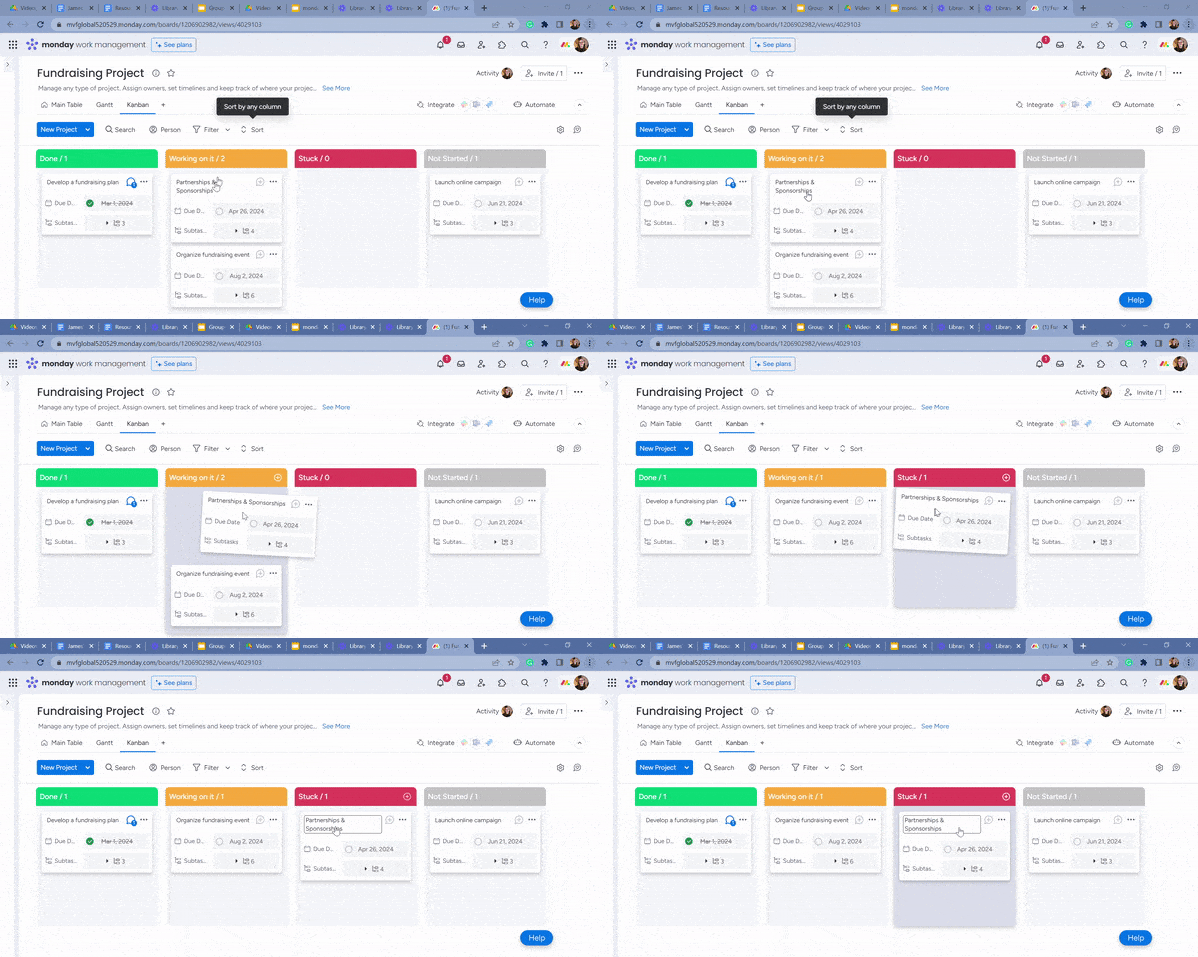
Viewing a project with monday work management’s Kanban board. Source: Tech.co testing
If you’re concerned about the cost implications of a new software tool and you don’t have much budget spare, monday work management’s lower prices will look appealing compared with Asana’s pricey plans.
While monday work management’s first paid plan ($12 per user, per month) is $1.01 more expensive per month than Asana’s first paid plan ($10.99 per user, per month), its Pro plan ($19 per seat, per month) is almost $6 cheaper per month than Asana’s Advanced plan ($24.99 per user, per month).
You’ll find a quick at-a-glance of these two providers in the table below.
|
Price from
All prices listed as per user, per month (billed annually)
|
Score
The overall score obtained from our most recent round of project management software user testing
|
Free plan
|
Free version user limit
|
Workflow management
|
Task management
|
Project limit
|
Support
|
Verdict
|
||
|---|---|---|---|---|---|---|---|---|---|---|
|
Better Value, Easier to Use
 |
Better Integrations
 |
|||||||||
|
monday work management |
Asana |
|||||||||
|
$9/user/month |
$10.99/user/month |
|||||||||
|
4.7
|
4.5
|
|||||||||
|
|
|
|||||||||
|
2 |
2 |
|||||||||
|
|
|||||||||
|
|
|||||||||
|
Unlimited (all plans) |
Unlimited (all plans) |
|||||||||
|
|
|||||||||
|
A great task management system due to strong customizability and support team, with a generous free trial |
A simple task-list-based project management platform with an acceptable free tier |
Who is monday work management best for?
monday work management will suit first-time project management software users who want an easy-to-use tool to get started with. It’s by far the friendliest tool for project management we’ve tested, and you don’t need to be tech-savvy at all to master monday work management.
We’d also recommend monday work management over Asana to any business on a tight budget, as monday work management has much cheaper plans. It’s also better for project teams that need constant lines of communication. We’d also probably opt for monday work management if your project is really data-intensive, as it edges out Asana when it comes to data visualization tools.
monday work management pros
- monday work management is the friendliest project management tool that we’ve tested, boasting a simple interface and quick setup time
- Cheaper than other options on the market, with plans starting at $9 per user, per month
- Excellent range of data visualization tools
monday work management cons
- 24/7 live support is only available on Enterprise plans
- Large boards with multiple stakeholders can cause performance to lag
- Customization options can be overwhelming, especially for new users
Who is Asana best for?
We’d recommend Asana over monday work management if your core decision-making factor for project management software is how it’ll integrate into the existing stack of software you currently use at work.
While monday work management has a number of useful integrations, Asana will seamlessly connect with 53 different data and reporting apps and has 84 communication integrations. What’s more, monday work management doesn’t allow integrations on its free and Standard plans.
Asana is also a better choice if you have absolutely no software budget at all, simply because monday work management’s free plan has a user limit of 2, while Asana’s can support a small team or business of up to 10 people before you have to pay anything. Granted, the plan is limited compared with its paid counterparts, but it’s a pretty good deal considering you aren’t spending a cent.
Asana pros
- Massive library of integrations, featuring over 200 apps across finance, HR, data, marketing, and more
- Excellent security measures, with information backed up and secured by firewall
- Generous free plan, with availability for 10 team members
Asana cons
- Tasks can only be assigned to one team member, which can present issues if the assigned person is unavailable
- Some of the top integrations are only available at higher tiers
- Asana is pretty pricey, with plans starting at $10.99 per user, per month
Although Asana and monday work management are both among the top five project management tools I’ve tested, monday’s user experience is just a little bit smoother, which makes it easier to master. Setting up with monday work management is a bit quicker too — importing your project data is a lot more of an intuitive process than it is with Asana.
monday work management’s interface isn’t quite as cramped or cluttered, there are more views available for you to view your project with, and it’s a little easier to resize things like charts and graphs. monday work management really feels like it’s designed with newbies in mind. My customer support experience with monday work management was a lot quicker and easier too.
The other big difference is the price. Asana’s Advanced plan is almost $6 more expensive per user, per month than monday work management’s Pro projects plan, and if you’ve got a team of any more than 10, that monthly cost is going to start to eat into your bottom line in a much bigger way than monday work management will.
I just can’t justify paying the high price for Asana when the likes of monday work management — which offers more features on cheaper plans — are available.

Does monday work management Have Better Features Than Asana?
Yes, monday work management has better features than Asana. Both platforms offer a healthy range of tools to keep a team operating at peak efficiency, but monday work management comes out on top due to its rich feature set, offering multiple available project views and templates.
Best for Task Management: monday work management
Out of the two platforms, monday work management has the superior task management features. Both offer multiple layouts and task management functionality, but monday work management just shades this one as its layout is less cluttered.
Layout and project views
When it comes to their layout and the different views on offer, monday work management and Asana are pretty similar. Asana lets users track projects in real-time, with a portfolio feature that groups ongoing projects by category, completion level, or priority, with any overdue tasks clearly visible. Each project gets a status indicator, with ranks including “on track,” “at risk,” or “off track.”
monday work management starts off with a “workspace” view, within which you can create different folders, sub-folders, and boards. This means it’s a great option for teams who don’t just need a space to manage projects but also, all their other workplace operations.
When testing monday work management’s plans, I found the layout to be even less cluttered than Asana, which itself has quite a tidy interface. Starting a project on monday work management is incredibly simple — you can create a board, and then add tasks to it.
You’ll then be able to split your tasks into different groups. The minimalistic interface meant I didn’t feel overwhelmed with the settings and features during setup — Asana felt slightly cramped in comparison.
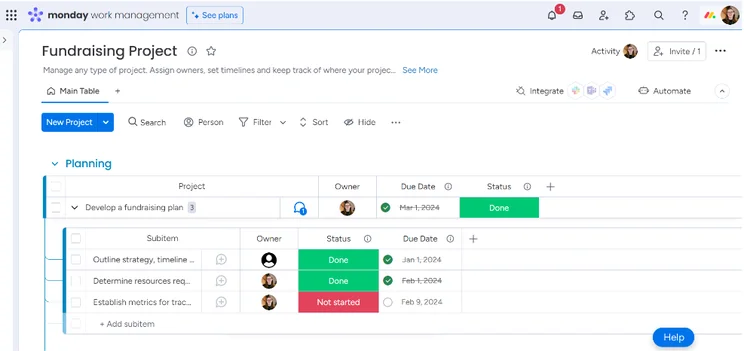
The Main Table view in monday work management, with visible subtasks. Source: Tech.co testing
Both monday work management and Asana provide various views you can use to visualize your tasks/task progress — including a table view, a Kanban board, a Gantt chart/timeline view, a list view, and a spreadsheet-style view. You can simply switch between the views using the top menu bar. Neither provider includes their Gantt chart on their free plan,
Managing tasks
I found the whole process of managing tasks very intuitive when using monday work management and Asana — you can make most changes with a click of a button and minimal menu diving.
Both providers offer features on their paid plans that are suitable for granular task management, such as sub-tasks, task comments, milestones, and task dependencies, while limiting these features on their free plans. Whichever provider you end up choosing, rest assured you’ll be able to manage tasks that demand multiple editors and contributors.
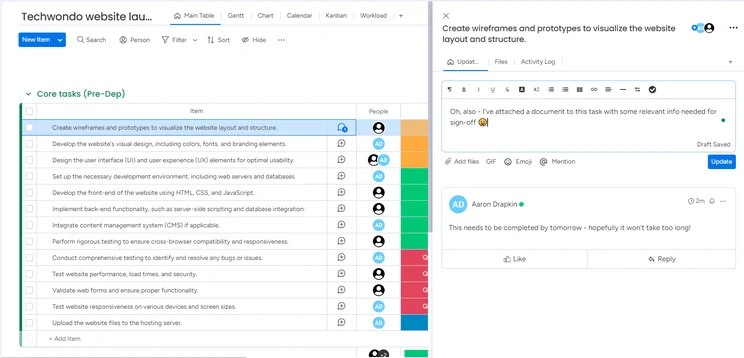
Commenting on tasks in monday work management. Existing comments are visible in a thread format for visibility. Source: Tech.co testing
In Asana, these finer task management tools ensure the critical path of your projects is respected.
“You can make tasks dependent on other tasks being completed, so you’ll be unable to tick them off before the first one is complete,” explains Katie, an SEO Campaigns Executive whose team use Asana. She also commented on how easy it is to assign tasks, and how useful the Timeline view was for tracking project progress.
One thing several members of our group highlighted during testing is that Asana will often make automated suggestions on which tasks should link to each other. Although monday work management doesn’t offer this, it does have an AI tool that is currently in beta, but can perform automated task generation based on basic inputs relating to your project goals.
So, once again, it’s quite hard to split them when it comes to advanced features.
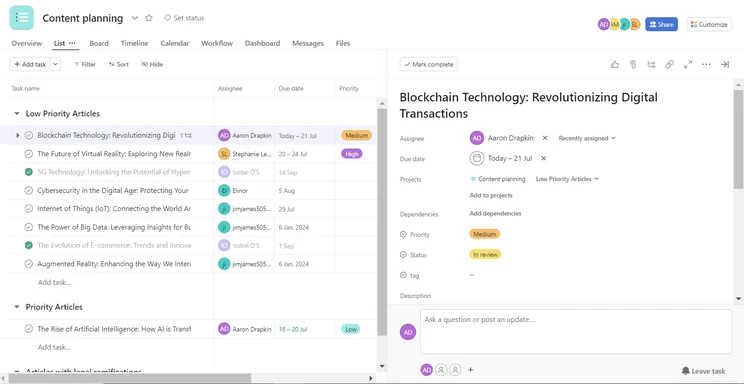
Editing tasks in Asana. Tasks are arranged into helpful groups. Source: Tech.co testing
There are a number of subtle differences that give monday work management the edge over Asana. For example, both providers offer time tracking and the ability to add estimated and actual time fields to templates and sub-tasks, but monday work management will let you assign billing amounts to employees’ time. Asana doesn’t offer this.
Another is the spreadsheet view — monday work management offers a conditional formatting function, whereas Asana doesn’t, and this makes it easier to find tasks and data on monday work management.
While testing monday work management, I often found the feature I needed was just “there” — such as marking tasks as complete. This sounds like something that would be easy to find in most competitors too, but few software programs are built in quite the same way. monday work management packages in the same sort of features for less money than Asana, while remaining tidier and more welcoming.
Head over to our monday work management review for more about the platform’s task management features.
Best for Project and Workflow Creation: Asana
Both platforms offer very similar functionality in this regard, but monday work management falls down in this area due to its plan limitations.
For example, Standard plan ($12 per user, per month) users can make up to 250 automations per month, which may become an issue for larger teams. By contrast, users of Asana’s Starter plan ($10.99 per user, per month) can make unlimited automations.
Project templates
Asana has always offered preset and custom project templates on all plans, including its free plan, whereas monday work management never used to offer this on its no-fee package. However, even on monday work management’s free plan, you can now customize project templates to suit your business’ needs.
On all of monday work management’s plans, you’ll get access to project templates based on nine different organizational departments, as well as four different business types — freelancer, real estate, non-profit, and startup.
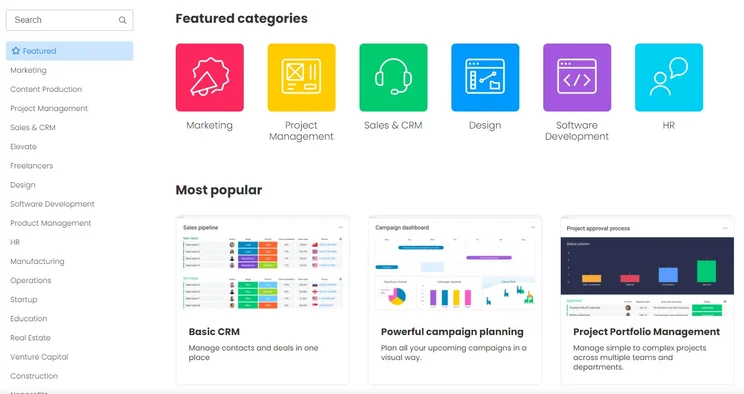
monday work management’s template center has a huge range of preset options so you can get started quickly. Source: Tech.co testing
With Asana, on the other hand, you’ll get access to templates geared toward seven organizational departments, including HR, design, sales, and marketing. All in all, monday work management will be the better option if you want to get up and running quickly with a preset template designed for teams like yours — but Asana is certainly no slouch in this regard.
Automation builders
Asana has one of the best automation builders among the 10 project management tools our testing group reviewed. It was extremely simple to use and very self-explanatory, meaning it didn’t take much time at all to streamline repetitive administrative tasks, like notifying team members when tasks were completed.
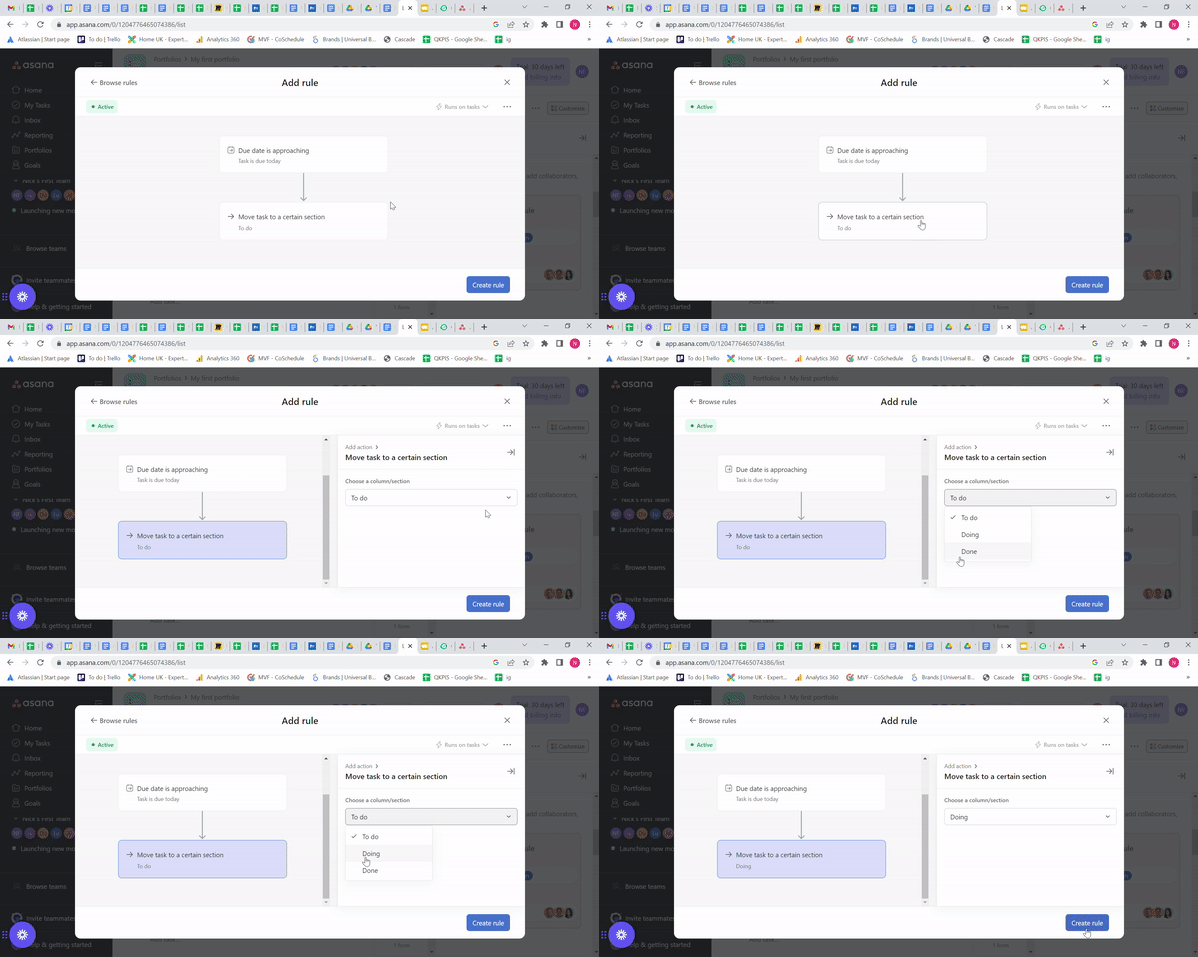
Adding an automation in Asana, with optional columns on display. Source: Tech.co testing
However, much of the same can be said for monday work management’s automation builder, which was just as straightforward. They’re both pretty similar tools in terms of functionality and what they actually let you do, but monday work management’s is text-based and marginally easier to get to grips with.
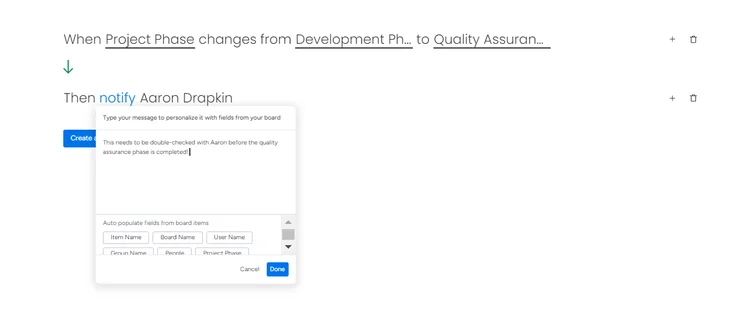
Adding automations in monday work management, highly useful for streamlining workflows. Source: Tech.co testing
Another reason to choose monday work management is the fact the provider will let you build custom automations from the Standard plan ($12 per user, per month) upwards, whereas Asana only offers custom automations on its Advanced ($24.99 per user, per month) and Enterprise plans.
However, if you’re a large business or team, the fact Asana puts no limit on the number of automations you can build might be a decisive factor — monday work management’s Standard plan limits the number of automations you can make to 250 per month. The Pro plan has a 25,000 automation limit, however, and is cheaper than Asana’s Advanced plan.
Workflow designers and form builders
Another big difference between Asana and monday work management is that Asana has a workflow designer on all of its plans, bar its free plan, whereas monday work management doesn’t offer this at all. This is a key reason Asana edges it when it comes to scoring this assessment area.
A workflow designer is a dedicated tool for mapping out repetitive processes and tasks, such as workflows. This tool is used for designing and visualizing them, rather than actually carrying them out, which is what the automation builder is for.
It’s a handy feature to have if you’re intent on really freeing up time for your staff to focus on valuable work, and you feel like administrative tasks are slowing you down.
Both providers offer form builders, another key tool you’ll need if you want to compile post-project feedback. However, Asana’s (pictured below) is a bit easier to use because it opts for the classic drag-and-drop interface that you’ll find in things like email template builders or online graphic design sites.
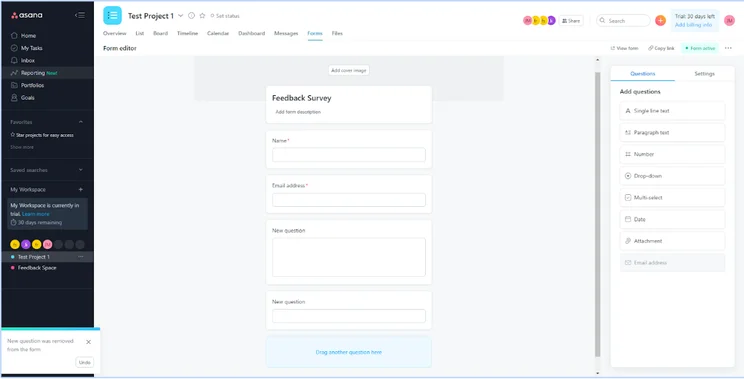
Utilizing the simple form builder in Asana, with a selection of available questions. Source: Tech.co testing
Best for Data Visualization: monday work management
Both providers are excellent when it comes to data visualization, but monday work management takes the crown — it has everything you could need in this area, with a wide variety of different charts and graphs at the user’s disposal.
To its credit, Asana offers list, board, and calendar views on its free plan, which puts it among our list of the best free project management software solutions (although monday work management wins that particular battle, too!).
Building dashboards
If it was Asana versus pretty much any other project management tool, we’d be singing the praises of their data dashboard, which is incredibly clear, easy to edit, and genuinely useful when it comes to gaining insights about your project from performance data. It’s much easier to use than the likes of Wrike, ClickUp, and Jira’s dashboards.
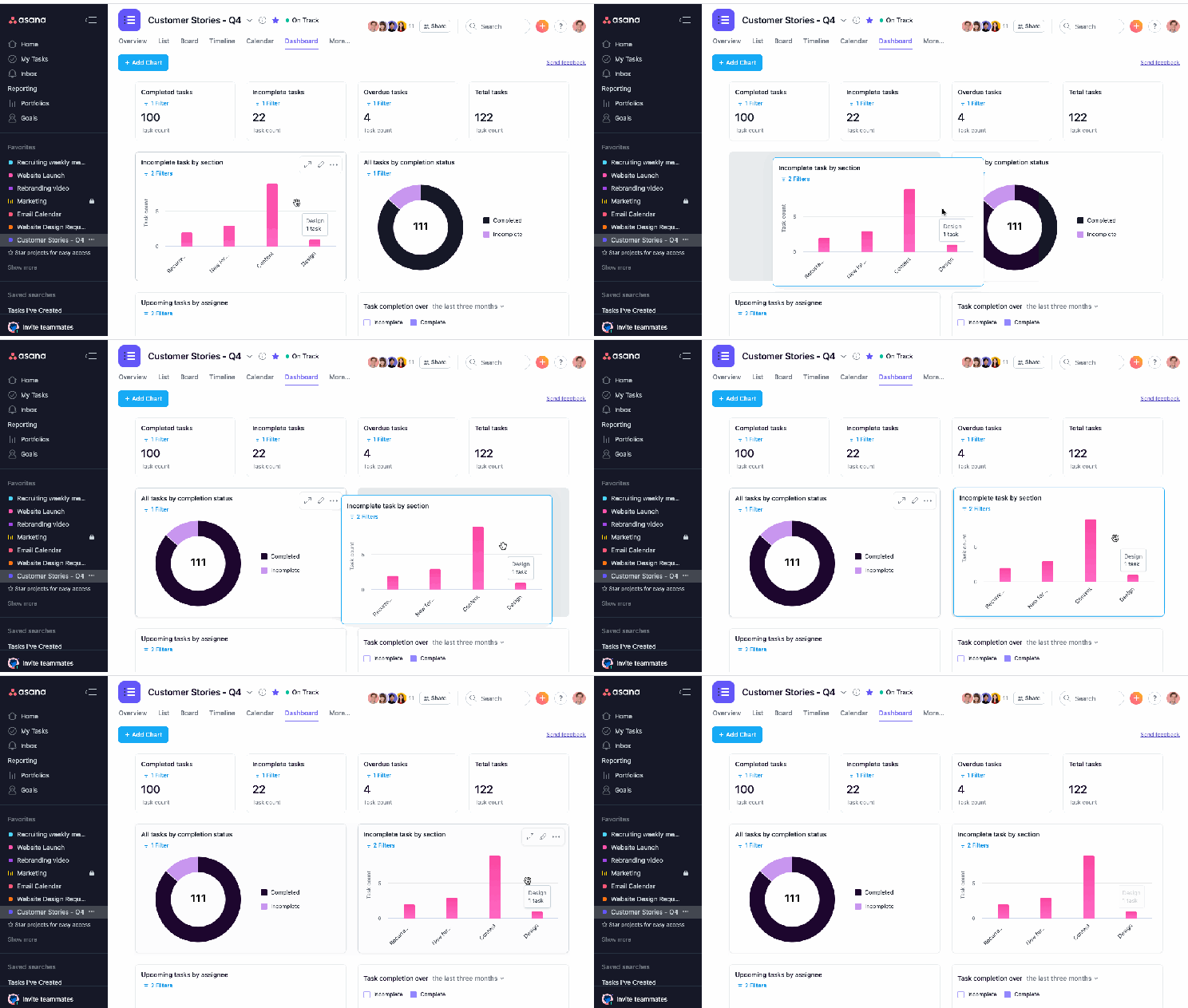
An example of Asana’s dashboard-building capabilities. The clear layout and signposting add up to an easy experience. Source: Asana
However, monday work management’s dashboards are just a little bit more customizable and powerful. On its first paid plan, you’ll be able to create a dashboard with data extracted from up to five boards. By the time you get to the Enterprise plan, you’ll be able to build dashboards that pull in data from all the projects being completed by monday work management across your business.
Asana doesn’t offer this kind of business-level dashboard feature, restricting the function to the project level. It’s not quite as capable in this way, so unless you’re going to be combining data across multiple projects, you may find monday work management’s data tools a little overkill.
Data display options
There are six widget options available on all of monday work management’s paid plans, but it’s monday work management’s Pro plan that you’ll really appreciate if you want detailed data relating to how your project is progressing. There are six preset chart types available and you’ll be able to make custom charts by pulling through data from custom fields.
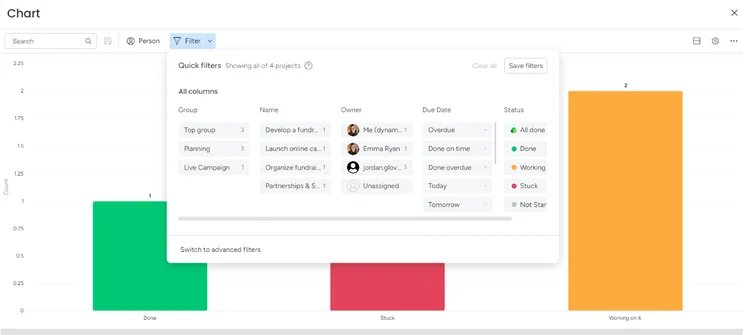
Creating a chart in monday work management in simplified view. Advanced filters are optional. Source: Tech.co testing
On the whole, monday work management’s custom chart builder is a lot more functional than Asana’s. monday work management lets you “stack” charts with three tracking parameters, and export the data directly from them if you need it elsewhere.
Like Asana, monday work management’s data visualization tools are also limited on the free plan, but they’re super-easy to use and the provider is updating them all the time. Last year, for instance, monday work management introduced widget docking, which removes clutter around vital pieces of data stored and displayed on dashboards.
Best for Collaboration: monday work management
Neither of these providers actually excel in this area, but again, monday work management comes out on top due to its project message board, task commenting (pictured below), and document editing, as well as an online whiteboard.
Importantly, on monday work management’s project message board, you can send files, which you can’t do on Asana’s. You can also create documents from scratch, which means you’ll have even less of a reason to leave the app.
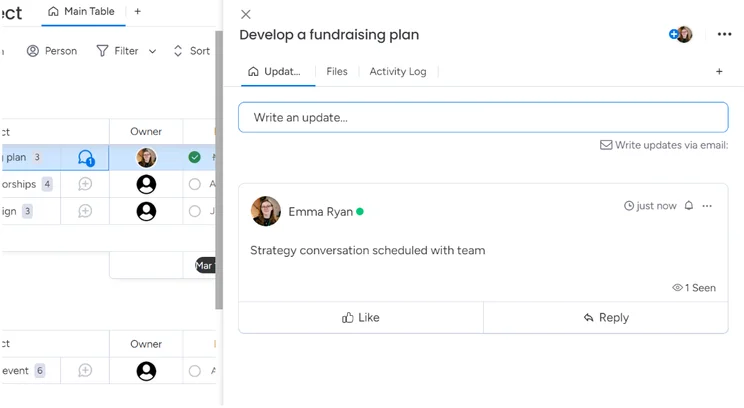
Commenting on tasks in monday work management. Source: Tech.co testing
Instead, Asana provides a project message board, which can serve as a kind of hub for project-related discussions — something I found very useful for collating need-to-know information when I tested the product.
However, beyond this, there really isn’t that much offered by Asana when it comes to collaboration, and if your team is big on communication, we’d definitely recommend monday work management.
Best for Integrations: Asana
While monday work management has a solid range of integrations, this is a real strong point for Asana — it has a huge library of over 200 apps, programs, and tools, and even permits integrations on its free plan.
Finance, HR, and reporting integrations
Asana integrates with 19 financial apps, including TriNet, KosmoTime, Timely, Lumos, and Time Doctor, as well as 78 reporting apps, including Tableau and Looker.
monday work management, meanwhile, integrates with 24 finance apps (including QuickBooks), and up to over 130 data reporting platforms, including a Google and Microsoft forms embedder, giving the platform the upper hand in this subcategory.
Marketing, email, and CRM integrations
monday work management offers seamless connections to a variety of marketing apps, such as Canva and Miro integrations. Of course, monday work management also offers its own, dedicated CRM platform, which you can download and use.
Asana, on the other hand, integrates with Adobe Creative Cloud, Wistia, Canva, Freshdesk, email provider Mailchimp, and Intercom. Both providers integrate with widely-used email programs like Gmail and Outlook.
Communications integrations
Almost all businesses use software that connects them to remote members of their team, so it’s no surprise that Asana and monday work management both integrate with a range of popular communications platforms, most notably Slack and Microsoft Teams.
Both providers also offer a Zoom integration, but monday work management’s is still only available to US users after its launch in September 2023. However, if you are based in the US, you’ll be able to use it to sync meeting information with items in your monday work management boards. Asana performs pretty much the same function.
Best for Security: monday work management
Account-level security options
Asana and monday work management both offer two-factor authentication on all of their plans — which not all project management software tools I’ve tested do. For example, Smartsheet and Wrike both only offer this feature on their Enterprise plans, but in an ideal world you should be implementing this wherever you can regardless of whether you’re a large enterprise or a small business.
Security options for enterprises
monday work management’s Enterprise plan includes IP restriction capabilities, something that Asana’s Enterprise plan doesn’t offer — and this can be a useful feature for IT teams wanting total control over the devices accessing monday work management’s software.
Both monday work management and Asana offer Security Assertion Markup Language (SAML) for single sign-on, plus user provisioning/de-provisioning, which lets an operation’s IT team dictate when and how users gain access to the service. Also included: a 99.9% uptime promise, although monday work management also provides this in its Service-Level Agreement.
Is monday work management Easier to Use Than Asana?
Both services are relatively easy to use, although I found monday work management slightly more usable than Asana. In our usability tests, I found both Asana and monday work management among the easiest providers to use, but monday work management, in particular, seemed like it would suit teams that don’t necessarily have a high level of technical ability.
Both services offer a dashboard that lets users access each tool they’ll need within a few clicks, which I found pretty simple to navigate around when I used them both during testing.
However, as we’ve mentioned already in this article, monday work management takes a minimalistic approach that’s somewhat unique in the project management space — it just feels a lot less noisy than the other competitors the Tech.co team regularly reviews.
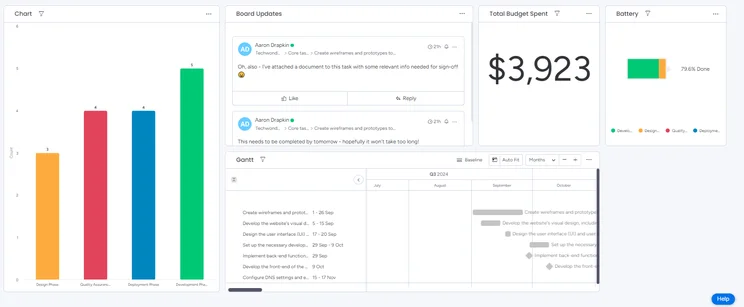
A mock dashboard I made with monday work management, featuring a variety of data visualizations. Source: Tech.co testing
“monday [work management] felt more like it had been tested and troubleshooted more times than other software,” said Alice Martin, a business software writer who participated in our most recent ease-of-use tests.
She continued: “Everything was placed very intuitively. It felt kind of like an Apple product in the sense that you just instinctively knew how to work it, which was good.”
Asana, while simple enough, can be quite difficult to use when there’s not a dedicated feature available to perform some specific tasks, whereas there are slightly more workarounds in monday work management to deal with this circumstance.
Its interface, especially when you try to edit a task, can also feel a bit cramped. But it’s far, far easier to use than Jira, Zoho Projects, and Smartsheet.
Overall, however, both Asana and monday work management are very easy for newcomers and veterans alike because they both avoid unnecessary submenus and make more complex project details into a customizable option, rather than a necessity.
Is monday work management a Better Value Than Asana?
monday work management offers a better value for money than Asana does. While both plans offer three paid plans and a free plan, monday work management beats it due to the cheaper cost of its second paid plan ($19 per user, per month) when compared with the Asana equivalent ($24.99 per user, pre month).
In fairness, Asana’s free plan is superior to monday work management’s, with up to 10 users on offer compared with monday work management’s two user cap. However, the pricing of monday work management’s paid tiers, and what you get for those outlays, means that work management wins this one.
Asana pricing plans
Asana’s three paid plans are the Starter plan ($10.99 per user, per month), the Advanced plan ($24.99 per user, per month), and the Enterprise plan (custom pricing). There’s also a free plan available and an Enterprise+ plan with a few extra features.
|
Price (annually)
The amount you'll pay per month, when billed annually
|
Users
|
Projects/boards
|
Automations
|
Gantt chart
|
Resource management
|
Time tracking
|
||
|---|---|---|---|---|---|---|---|---|
|
TRY IT FOR FREE
 |
|
|
|
|
||||
|
Asana Personal |
Asana Starter |
Asana Advanced |
Asana Enterprise |
Asana Enterprise+ |
||||
|
Free |
$10.99/user/month |
$24.99/user/month |
Custom |
Custom |
||||
|
2 |
Unlimited |
Unlimited |
Unlimited |
Unlimited |
||||
|
Unlimited |
Unlimited |
Unlimited |
Unlimited |
Unlimited |
||||
|
N/A |
Unlimited |
Unlimited |
Unlimited |
Unlimited |
||||
|
|
|
|
|
|
||||
|
|
|
|
|
|
||||
|
|
|
|
|
|
As you would expect from a free plan, Asana’s (Asana Personal) is nowhere near as useful as its paid tiers.
Asana Starter ($10.99 per user, per month) adds features including a timeline, task dependencies, milestones, custom fields, custom templates, advanced search, and training materials. Plus, it has a custom field limit of 100, so you’ll be able to customize even more aspects of your project.
Asana Business ($24.99 per user, per month) comes with everything in the Starter plan, plus team project portfolios and a Workload view to see each user’s tasks at a glance, among other features. Notably, this is the first Asana plan with custom automation via Asana’s intuitive automation builder.
See our complete guide to Asana pricing for more details, or just read on for an overview of each plan.
monday work management pricing plans
monday work management has a free plan, plus three paid plans — Standard ($12 per seat, per month), Pro ($19 per seat, per month), and Enterprise (custom pricing).
|
Price (annually)
The amount you'll pay per month, when billed annually
|
Users
|
Projects/boards
|
Storage
|
Key Features
|
Kanban board
|
Gantt chart
|
Team View
|
Calendar
|
Time tracking
|
AI features
|
||
|---|---|---|---|---|---|---|---|---|---|---|---|---|
|
|
|
|
|
|
||||||||
|
Free |
Basic |
Standard |
Pro |
Enterprise |
||||||||
|
Free |
$9/user/month |
$12/user/month |
$19/user/month |
Custom |
||||||||
|
2 |
Unlimited |
Unlimited |
Unlimited |
Unlimited |
||||||||
|
3 |
Unlimited |
Unlimited |
Unlimited |
Unlimited |
||||||||
|
500MB |
5GB |
20GB |
100GB |
1,000GB |
||||||||
|
|
|
|
|
|
||||||||
|
|
|
|
|
|
||||||||
|
|
|
|
|
|
||||||||
|
|
|
|
|
|
||||||||
|
N/A |
|
|
|
|
The Standard tier ($12 per user, per month) includes Gantt charts and timeline views, which are both omitted from the free plan, plus automations (250 per month), a calendar view, and guest access. Storage is increased to 20GB too.
The Pro tier costs $19 per user, per month, and includes a formula column, private boards, time tracking, and a chart view, as well as more automations and integrations (25,000 per month for each, up from 250).
The custom-priced Enterprise tier adds a higher API rate limit, higher-level support, audit logs, and a whopping 250,000 actions per month for both automations and integrations.
Check out our full guide to monday work management pricing plans for more detail.
Is it Easy to Switch Between Asana and monday work management?
If you’re already using Asana or monday work management and thinking of switching over to the other one, of course, there’s quite a lot to consider.
The first is your bottom line — will swapping providers actually make things cheaper? monday work management is better value for money, with Asana’s Advanced plan ($24.99 per user, per month) costing more than almost all other competing plans on the market.
For small teams, a plan like monday work management’s Standard plan ($12 per user, per month) will be more than enough — and the savings will make the downtime worth it.
That being said, migrating large amounts of project data takes time, and planning this around your business’ inevitably hectic schedule to avoid as much downtime as possible isn’t the easiest thing in the world to navigate.
Switching from Asana over to monday work management is much easier than the other way around, as monday work management has a native Asana integration that allows you to consolidate all of your projects and tasks in monday work management.
You can go on using Asana if you’d like to — which some teams do if their department is simply using monday work management as a central hub to coordinate a variety of different teams — but both apps achieve similar purposes.
If you’d like to migrate your data from monday work management to Asana, on the other hand, you’ll have to use a third-party integration tool like Zapier. This takes a little bit longer, but it’s still a relatively simple process.
What’s New in Asana?
Asana recently unveiled its Fall 2025 Release, a suite of new features and updates to bolster its core functionality. This includes a series of new AI enhancements under the “Asana AI” umbrella, such as the ability to collaborate with “AI teammates” (currently in beta). These agents will adapt to your team’s workflows to enable you to tackle complex tasks with minimal effort.
Additionally, Asana is also rolling out a new “multilingual semantic AI search.” In other words, a search tool that understands intent and context across languages, meaning that users can perform deeper and more accurate search across a range of tasks, teams, and countries.
AI risk reports are another tool that are coming to Asana soon. With these, users can identify potential project risks before they become actual blockers. This will enable you to plan and execute projects in a timely and effective way.
What’s New in monday work management?
The monday work management work management platform regularly rolls out new updates and tweaks to keep its offering fresh and fix any bugs that might arise.
In November 2025, for instance, the provider introduced a new “Autopilot Hub” to give users a centralized overview of all of their different automations, integrations, and workflows. With this information at their fingertips, users can enjoy increased visibility and productivity.
Prior to that, the provider unveiled a new “Capacity Manager” in August, which consolidates multiple resource planners into a single dashboard so you can see how your staff are being deployed across multiple projects, and who might have the capacity to take on more work (or who needs a helping hand).
It’s a great way of keeping your projects on track and boosting team morale.
Also in August, monday work management released a “Resource Planner.” With this, users can create high-level resource plans and make informed assignments for each project. They can also map out resource needs before they start work on their project.
This will cut out the risk of running into blockers later down the line, which can bring your project to a standstill.
How Do Asana and monday work management Compare With Other Providers?
Asana and monday work management aren’t the only project management tools worth checking out before you part ways with your money.
If pricing is your priority, we’d recommend ClickUp. Owing to its extensive project view options and collaboration features — including an online whiteboard and native team chat function — ClickUp is one of the better project management tools on the market, and you can get started for just $7 per user, per month.
If data security and customer support are among your top priorities, then we’d recommend Smartsheet. It’s got a wide range of options if you get stuck, and security features that large businesses managing sensitive data will appreciate, like customizable password rules.
We particularly appreciated how Smartsheet handled the user onboarding process, with an extensive selection of materials at your disposal. It now offers a free plan to compete with the likes of Asana and monday work management, but the Smartsheet Pro plan costs just $9 per user, per month, meaning that it’s the same price as monday work management’s first paid plan and cheaper than Asana’s.
Check out the table below for a rundown of monday work management and Asana’s closest competitors:
|
Price from
All prices listed as per user, per month (billed annually)
|
Best for
|
Pros
|
Cons
|
|||
|---|---|---|---|---|---|---|
|
BEST OVERALL
|
 |
|
 |
 |
 |
 |
|
monday work management |
Teamwork |
Asana |
ClickUp |
Wrike |
Trello |
Smartsheet |
|
$9/user/month |
$9.99/user/month |
$10.99/user/month |
$7/user/month |
$10/user/month |
$5/user/month |
$9/user/month |
|
Ease of use |
Small teams |
Building automation |
Complex projects |
Integrations |
Basic project management |
Great security and customer support options |
|
|
|
|
|
|
|
|
|
|
|
|
|
|
| Visit monday | Compare Deals | Compare Deals | Visit ClickUp | Visit Wrike | Compare Deals | Visit Smartsheet |
About Our Research
Here at Tech.co, we perform our own research on all the tools, software, and services we write articles about. We create research frameworks that take into account the key pain points experienced by businesses, perform extensive user testing on all the products we review, and then discuss our findings together before publishing them in articles like this one.
We’re open about the fact we have commercial partnerships with some of the software and service providers we talk about. However, this never affects our editorial independence or opinions on products, which are solely driven by conclusions drawn from our product-led research.
When testing the top 14 project management software solutions on the market, we focused on ease of use, pricing, integrations, functionality, customer support, and security. Sub-categories of “functionality” assessed include data visualization tools, collaborative functions, as well as task management, and workflow creation features.
While both monday work management and Asana are solid choices, monday work management offers a better service for businesses of all sizes. monday work management has a clearer interface than Asana, making it easier to use. It’s also better for displaying data and has collaborative features, like an online whiteboard and document editing tools that Asana doesn’t offer, as well as a live chat feature.
Still, Asana offers a similarly great range of features, templates, and one of the best automation builders on the market. However, Asana’s plans are more expensive, with the $24.99 per user, per month, Advanced plan offering similar features to monday work management’s $19 per user, per month, Pro plan.
If it sounds like the right provider for you, check out monday work management’s free trial right now, or compare other project management solutions.
If you click on, sign up to a service through, or make a purchase through the links on our site, or use our quotes tool to receive custom pricing for your business needs, we may earn a referral fee from the supplier(s) of the technology you’re interested in. This helps Tech.co to provide free information and reviews, and carries no additional cost to you. Most importantly, it doesn’t affect our editorial impartiality. Ratings and rankings on Tech.co cannot be bought. Our reviews are based on objective research analysis. Rare exceptions to this will be marked clearly as a ‘sponsored’ table column, or explained by a full advertising disclosure on the page, in place of this one. Click to return to top of page


