

We may receive a commission from our partners if you click on a link to review or purchase a product or service. Click to Learn More
While Smartsheet and Airtable can both be used to successfully manage projects and streamline your workflows, Smartsheet is the better choice for managing projects and is available for just $9 per user, per month. It has more dedicated project and task-tracking tools available, and is much easier to use, scoring 4.2/5 overall during our most recent project management software testing series.
Airtable is not project management software – it’s a collaborative, spreadsheet-database hybrid tool that will allow you to build custom applications that help with your day-to-day work. This is quite different from Smartsheet’s spreadsheet-style project management software that’s designed to help you boost team productivity. Airtable vs Smartsheet is definitely not a straightforward matchup.
Compared to other project management software, Smarthsheet stacks up pretty well. It’s got great security and customer support options, while its spreadsheet-style interface will ensure a smooth transition if you’re currently using Google Sheets or Microsoft Excel for projects. Airtable is great for database management but if you’re looking for a central hub to manage projects, Smartsheet is worth the money. In this guide, you’ll find:

Is Smartsheet right for your business?
Our test results suggest monday work management is quicker to set up, easier to use as better for task management.
|
Price from
All prices listed as per user, per month (billed annually)
|
Free plan
|
User limit
|
Storage Limit
|
Best defined as:
|
||
|---|---|---|---|---|---|---|
 |
 |
|||||
|
Smartsheet |
||||||
|
$9/user/month |
||||||
|
|
|
|||||
|
|
|||||
|
|
|||||
|
A spreadsheet-database hybrid that allows your to create custom applications |
A classic project management app that uses a spreadsheet-based approach |
Airtable vs Smartsheet: Head-to-Head
Smartsheet is a spreadsheet-style project management program, whereas Airtable isn’t project management software. Smartsheet is one of the best project management software we’ve tested, achieving an overall score of 4.2/5. Smartsheet scores highly for customer support (4.5/5) and comes with 24/7 live, phone support, and also got one of the higher security scores (4.4/5) thanks to its wide variety of compliance certifications. As traditional project management applications (apps) go, Smartsheet is one of the best.
Airtable, conversely, lets you build custom apps for your workspace that will have positive effects on your workflows without any coding. All you have to provide is the data – for example, if you are a sales team with lots of client or customer data, you could build a lightweight CRM application with Airtable, which you can’t do with Smartsheet.
Both Airtable and Smartsheet can be used to manage a project – although Smartsheet will be better suited to businesses that want to set up and get going quickly, and want dedicated project management software. It’ll be less intimidating and more useful than Airtable, unless you’re managing massive databases.
Airtable vs Smartsheet similarities
Although they’re different kinds of software and are designed to do different things, Airtable and Smartsheet still share some features. These include:
- Airtable and Smartsheet have multiple ways to view and manage processes/projects
- Airtable and Smartsheet can integrate with tools to make their programs more powerful
- Airtable and Smartsheet will let you create data dashboards
- Both Airtable and Smartsheet have the capacity to automate workflows
It’s also worth saying that both Airtable and Smartsheet are pretty easy to use, although if your team is very tech-savvy and you need a super simple project management platform, we’d opt for monday work management or Teamwork because they scored higher on our ease of use tests.
Although Airtable’s interface is a bit more cluttered than Smartsheet’s, it’s still pretty intuitive – the way it nudges you to input data in certain places and set yourself up is useful. We also found it easy to flick between different views, like Kanban and Gallery, to get a different perspective on your workflows.
Airtable vs Smartsheet differences
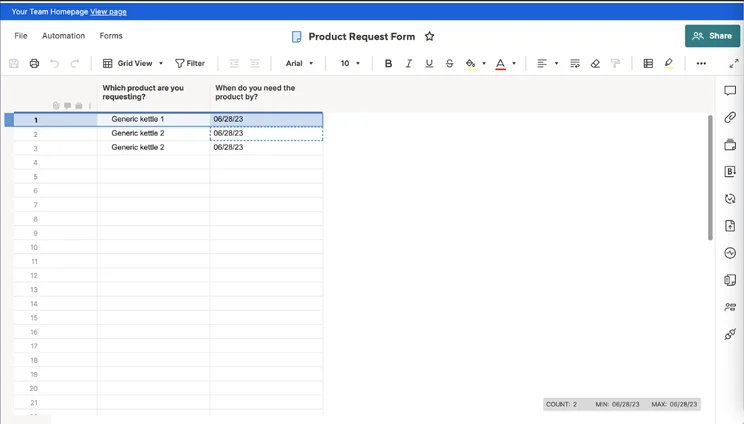
Although you’ll have access to both a Gantt chart and Kanban board view, Smartsheet’s spreadsheet style (pictured below) facilitates a smooth transition from spreadsheets, whereas Airtable is more complicated.
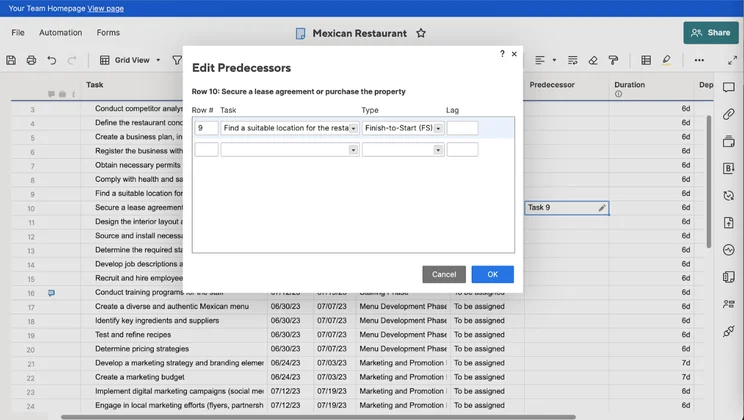
Editing in Smartsheet’s default spreadsheet-style view. Image: Tech.co’s testing process
Airtable also utilizes spreadsheets like Smartsheet, but the endless customization possibilities mean the transition isn’t as easy. With Airtable, you’ll be designing your own apps that serve specific purposes relating to the data you hold, but this means it isn’t as straightforward.
Smartsheet is a supercharged spreadsheet with all the tools you could ever need to manage a project, whereas Airtable is a spreadsheet-database hybrid that can be used to power custom apps.
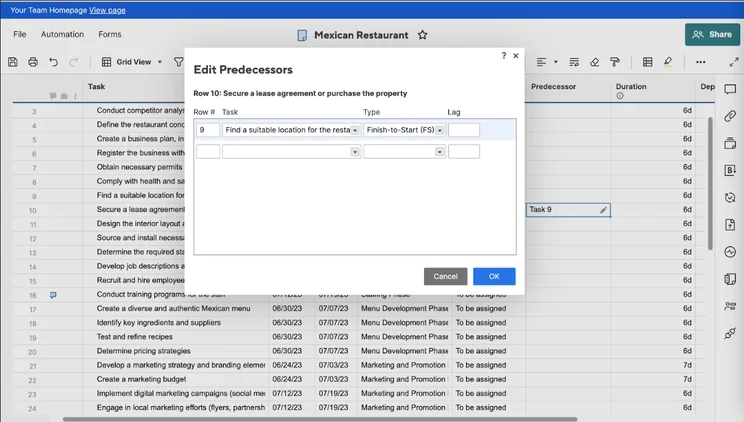
Smartsheet is a straightforward project management app, so it has features such as project templates, a team instant messenger, automations for streamlining workflows, as well as task management features including milestones and task dependencies. Airtable, on the other hand, has a strong database management system that will hold the information that matters to whatever work you’re doing. This makes Airtable a lot more customizable than Smartsheet.
Other differences include the fact that Smartsheet has a rule-based automation builder, which is more intuitive to use than Airtable’s data-focused formulas and filters.
The final big difference is the price. In 2022, Airtable had a plan available for $10 per user, per month, but now, Airtable’s cheapest paid plan is $20 per user, per month – $13 more than Smartsheet’s Pro plan. Smartsheet’s Business plan ($19 per user, per month) is a lot cheaper than Airtable’s Business plan ($45 per user, per month).
Who are Airtable and Smartsheet for?
- If you want a ‘classic’ project management system, go for Smartsheet over Airtable
- If you want customization above all else, go for Airtable over Smartsheet
- If you already use Google Sheets/Excel, and you want a smooth transition, go for Smartsheet
- If you want to build your apps around your workspace needs, go for Airtable
- If your priority is tracking project progress and managing tasks, go for Smartsheet
Airtable pricing and features
Airtable has four pricing plans. The three with public pricing available are:
- Free plan: this plan has room for up to five creators or editors, and you can create unlimited databases of information to use in your custom apps. You’ll get one extension (a single-function add-on, such as a search feature for looking through data) per base, which can have up to 1,200 records in it. There are also 2GB of attachments per base available.
- The Team Plan ($20 per user, per month): Airtable’s first paid plan allows three extensions per base, each of which can have 5,000 records contained within and holds 5GB of attachments. This plan, as Airtable says, is for teams who “want a single source of truth” for managing their workflows.
- The Business Plan ($45 per user, per month): This plan ups the extensions per database to 10, you can sync with a variety of different apps, like Jira Cloud, and you’ll have Gantt and Timeline views. There’s also a one-year revision and snapshot history, as well as field and tableediting permissions. The records allowed per base is capped at 50,000, and there’s 20GB of storage available.
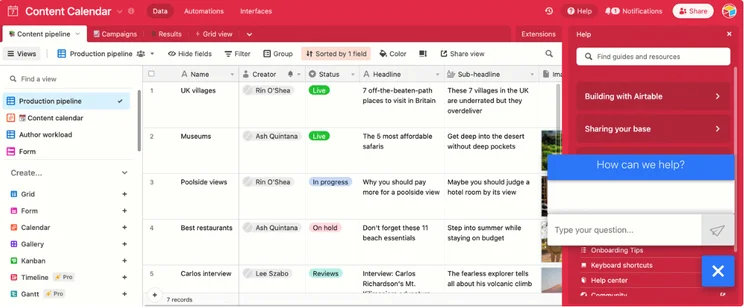
The production pipeline view in Airtable. Image: Tech.co.
Airtable also offers an Enterprise (custom pricing) plan for organizations that have advanced “customization, scale, security, control, and support needs” and will let you create bases with 250,000 records in them, and the extensions per base are unlimited.
You can create an unlimited amount of workspaces for your organization, too, so different departments can be wired into the same mainframe without a hassle, and there’s 1,000 GB of memory to play with. That might sound like a lot of storage, and it is, but you’ll have 1TB of storage on Smartsheet’s Business plan.

Different businesses have different needs
That's why we've tested a range of top project management providers
Airtable

In Short
-
Pros
- Highly customizable
- Great for data insights
- 100+ pre-built templates
-
Cons
- Not the best option for managing projects
- Key features like Gantt charts on pricier plans
- Very expensive compared to Smartsheet, monday.com etc.
Images
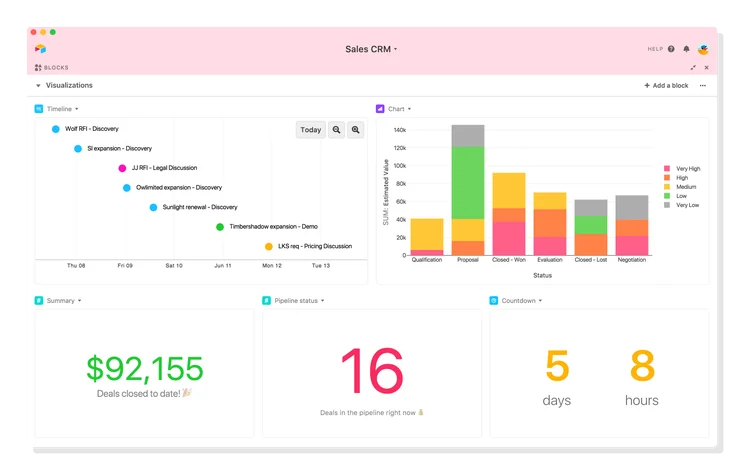
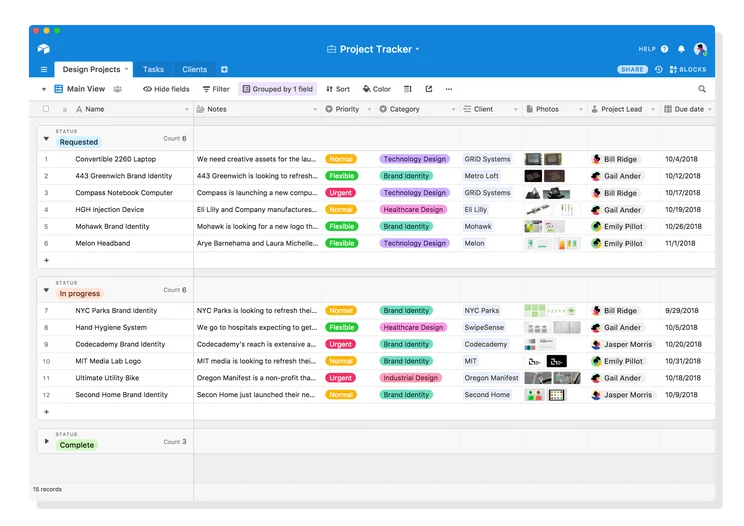
Smartsheet pricing and features
Smartsheet has four pricing plans, two of which have public pricing. They are:
- Free ($0): Smarthseet’s free plan is designed for just a single user, plus two additional “editors” that can make project changes. There’s 500MB of storage available and a couple of different ways to view projects, but aside from that, it’s pretty limited.
- Pro ($9 per user, per month): This plan includes unlimited sheets, a 10-person limit, 250 automations per month, useful integrations, like Microsoft 365 and Slack, a calendar, and various task management features, like a Gantt chart, a Kanban board, task dependencies, milestones, and more.
- Business ($19 per user, per month): This plan is pricey, but it’s one of the best project management plans money can buy. There are unlimited data dashboards, custom charts and widgets, custom automation, document editing, and resource management tools, and, for an additional fee, you’ll get phone support.
Like Airtable, Smartsheet offers one plan geared to Enterprises, but you’ll have to contact support to get a custom pricing quote for your business. If you’d like more information about Smartsheet’s plans, visit our Smartsheet pricing page.
Smartsheet

In Short
-
Pros
- Free Trial available
- Familiar, spreadsheet-like interface
- Great for any sized company
- High scores for security and customer support
-
Cons
- Some features have limited functionality
- Not the easiest tool to use at first
- Competitors like ClickUp have better collaboration features, such as an online whiteboard
Pricing
-
 Free plan available
-
Pro: $9/user/month
-
Business: $19/user/month
-
Enterprise: Contact sales
-
Advanced Work Management: Contact sales
Images
Best for Value: Smartsheet
Unless you’re happy with Airtable’s limited free version, which has a lot fewer project management features than Smartsheet’s plans, then Smartsheet is better value for money.
Smartsheet’s Pro plan ($9 per user, per month) is a lot cheaper than Airtable’s Pro plan ($20 per user per month) and it has a larger range of useful project management features. If you’re looking for a tool to primarily manage projects, then it’s definitely the one to go for. Otherwise, you’ll end up paying more for Airtable, and not getting as much out of it.
However, it must be said that Smartsheet didn’t score particularly well in terms of value for money when compared with project management software like Teamwork, which is both better and cheaper.
Teamwork’s Starter plan is $5.99 per user, per month and achieves a better task management score than Smartsheet (4.9/5 vs Smartsheet’s 4.4/5), is better for data visualization (5/5 vs Smartsheet’s 3.5/5), and has a better customer score (4.3/5 vs Smartsheet’s 3.8/5).
Best Free plan: Smartsheet
Airtable used to win this battle by default because Airtable has a free plan, whereas Smartsheet doesn’t. However, Smartsheet does offer a free plan now, along with a 30-day free trial of its software, so you can see if it’s the right fit for you and your business. All in all, Smartsheet’s free plan is better for basic project management.
Smartsheet’s free plan is very simplistic, and there are no advanced features – but considering you’re not paying anything to use it, that’s to be expected. There’s a Gantt view, Grid view, and Card view, but not much else to write home about.
Airtable also has a free plan, and offers free trials for the Team plan ($20 per user, per month) as well as the Business Plan ($45 per user, per month).
Airtable’s free plan is limited, and you can only really build in a limited way off of your databases (with only one extension available per database). You’ll also need the Pro plan, at the very least, to unlock things like a Gantt chart view. This is included on Smartsheet’s paid plan, but as we’ve discussed, not much else is.
If you don’t have any budget for software and want to ensure you’re using the information and data your company holds effectively, then Smartsheet’s free plan definitely worth a look.
Best for Business Features: Smartsheet
Because Smartsheet is considered traditional project management software, it’s going to have a larger range of robust project management features that a wide variety of businesses will find useful.
Smartsheet has a wealth of useful features for managing tasks, tracking the progress of your projects, including milestones and custom fields.
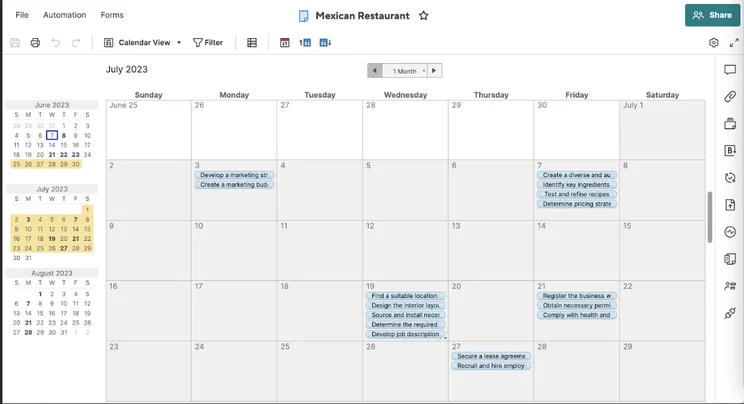
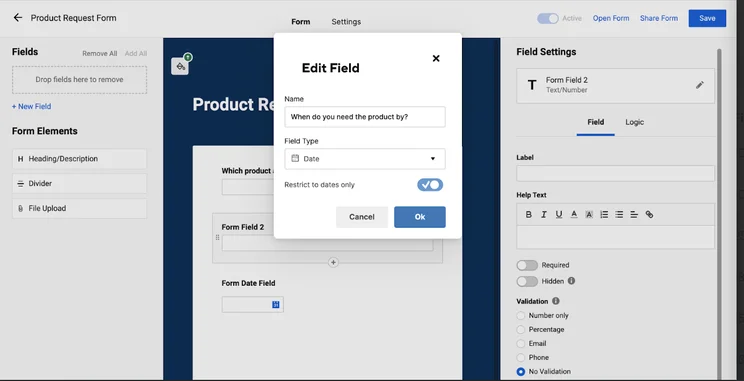
Of course, there’s the famous spreadsheet-style view that many users opt for, but there’s also a calendar view (pictured below) if you prefer to view project progress that way. There are also workflow creation features, like automation tools to help you manage budgets and a form builder, which is useful when compiling post-project feedback.
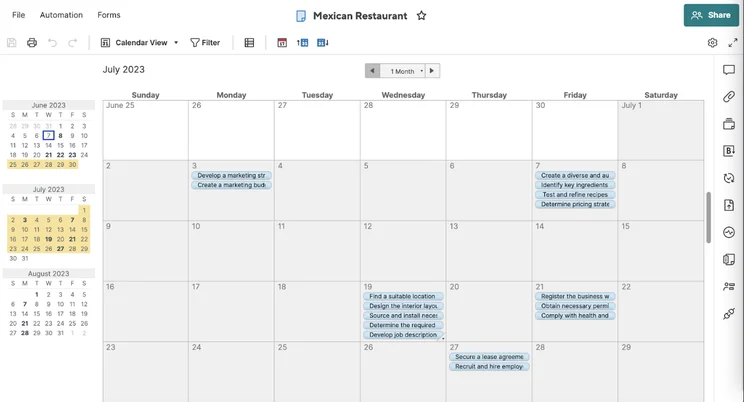
Calendar view interface in Smartsheet. Image: Tech.co’s testing process
Smartsheet also has several features in common with Airtable, like a Kanban board, and Gantt Chart for tracking task progress. However, some of the robust project management features seem to only be available on Airtable’s $20 per user, per month Pro plan, whereas Smartsheet’s Pro plan, which also includes these features, is just $9 per user, per month.
Both Airtable and Smartsheet have a lot of tools for visualizing data. However, this manifests in a slightly different way in both programs. For instance, in Smartsheet, you can create a chart by adding data and then place it onto your dashboard, in Airtable, this is an extension that summarises a table of records and turns it into a chart or another visual display.
Airtable and Smartsheet both have automation, although, Smartsheet’s is rule-based and Airtable’s is not. In Smartsheet, automation is about taking away those small, mundane, or manual tasks that end up filling up your day with a simple rule-based automation approach. Airtable’s automation is complex and intimidating.
Best for Customer Support: Smartsheet
Airtable does have a knowledge base with a lot of useful articles to refer to if you get stuck with something, and it’s pretty easy to navigate. There’s also a chatbot (see image below) that you can access within the app, and email support if you need it. However, Airtable does not currently offer phone-based support and can take one to two business days to reply to queries.
One thing that’s clear from Airtable’s reviews on sites, like Trustpilot, is that customers are often left unsatisfied with the customer support experience with Airtable. Some complain that it takes too long for support to get back to them, while others say their queries were never followed up on.
Smartsheet only scores 4.5/5 for customer support on our last round of testing, putting it at joint-second place out of 10 project management providers we took out for a spin – it’s one of the best, essentially. Smartsheet offers a community forum, knowledge base, and email support on all of its plans, as well as phone support on the Business and Enterprise plans for an additional fee.
The phone support available on Smartsheet’s Business plan costs $4 per user, per month for Standard support, $8 per user, per month for Pro support) and this priority phone support is included on any enterprise plan purchased from Smartsheet.
Best for Integrations: Smarthseet
Smartsheet scores a respectable 3.7/5 for integrations. There are plenty of communication integrations available, such as Teams, Slack, Google Chat, and Webex, but Smartsheet lacks marketing integrations and has a limited number of CRM platforms (effectively just HubSpot and Salesforce) that it connects to. In total, there are over 80 native integrations available in Smartsheet.
Airtable, on the other hand, has around 30-40 integrations available. Many of them are with recognizable, widely-used applications and brands like Gmail and Slack, and you can create automation triggers that go off in Airtable when things happen on the third-party apps you’ve integrated with. However, it’s just not got the same range that Smartsheet does.
Best for Security: Airtable
Considering it’s a tool primarily for creating databases, it’s no surprise that Airtable has a wide range of security features and options. Although Smartsheet scores 4.5/5 for security and includes a huge range of data compliance certifications, it doesn’t provide two-factor authentication on all of its plans as Airtable does (only Enterprise plan users have this option).
Like Smartsheet, Airtable also offers Google authentication and single sign-on capabilities, and in both applications, users can be assigned specific permissions that dictate what they can and can’t access within the software. They’re pretty close, but Airtable takes the win here.
About Our Research
Here at Tech.co, we carry out our own, independent product research. This means that we always take the products that we write about out for a spin, before we write about them. This includes the top 10 project management tools on the market.
However, as Airtable is not technically project management software, this was not included in our testing processes. So, for this article, we downloaded Airtable and took it out for a spin to compare it to Smartsheet accurately and fairly.
When we test project management software, the six core research areas we use to assess them are ease of use, customer support, pricing, security, integrations, and functionality. These were decided upon based on the pain points raised during conversations with our audience. There are also four sub-categories assessed within the overarching “functionality” criterion, which are workflow creation, task management, data visualization, and collaboration.
We’re open about the fact we have commercial partnerships with providers that feature on our site but, importantly, this doesn’t affect our editorial independence, research scores, rankings or the opinions of our writers.
Smartsheet and Airtable Alternatives
Airtable vs Smartsheet isn’t the only comparison we’re going to make today. Here’s how they stack up against other project management software platforms:
monday work management: Highly customizable and good for project management
If you like to mold an app around your workspace, then monday work management is certainly worth a look. In our latest round of testing, it scored an impressive 4.7/5. Just like Airtable, it’s super customizable and offers various ways to view your records and, as a whole, is similarly configurable.
However, much like Smartsheet, monday work management is, first and foremost, a project-tracking application that doesn’t have the database focus offered by Airtable. When compared to Smartsheet, monday work management is easier to use (4.5/5 to Smartsheet’s 3.7/5). monday work management is also better than Smartsheet when it comes to visualizing data (5/5 vs Smartsheet’s 3.8/5). It also has better task management features (4.5/5 vs Smartsheet’s 4.1/5).
Check out our monday work management pricing page for more information.
ClickUp: The complete work OS
ClickUp really is the complete Work OS and it isa brilliant option if you find yourself bogged down in tens (or even hundreds) of workplace applications that are gradually doing more harm than good. It provides a centralized platform with all the tools you’ll need to manage projects and is the joint-third best project management software we’ve tested, scoring 4.5/5 overall.
ClickUp comes first for overall functionality (4.6/5) and task management (4.7/5), as well as joint first for project and workflow creation tools and data visualization options. Impressively, ClickUp is also much cheaper than Smartsheet and Airtable, with a feature-rich free plan, and an Unlimited plan for just $5 per user, per month.
Check out our ClickUp pricing page for more information.
Teamwork: Automation made easy
One thing Smartsheet and Airtable do well is use automation features to automate workflows and subsequently streamline processes. However, when testing project management software, we found that Teamwork has the best and simplest automation builder and, if you’re looking to boost your team’s efficiency, it’s definitely worth a look.
Teamwork is actually our second-best-rated provider overall, scoring 4.6/5 during our most recent tests. Teamwork performed better than Smartsheet in almost every category, sporting a good range of task management tools and security options, plus one of our favorite interfaces (it’s super clean and uncluttered, and a joy to use overall). What’s more, it’s an excellent value for money with a feature-rich free plan and a Starter plan available for just $5.99 per user, per month.
Check out our Asana pricing page for more information.
Smartsheet is the project management software app here, not Airtable, and it has robust project management features that will suit a wider range of businesses. Smartsheet’s Pro Plan ($9 per user, per month), makes it quick and easy to set up a project, create automations, and manage tasks.
That’s not to say that Airtable isn’t a good database management system. Airtable will be the ideal fit for businesses that need to share relational databases and want to make the most of the information they hold. However, it lacks the project management focus of Smartsheet and, ultimately, serves a different purpose.
Even if Airtable was a great program for managing general projects, it would be one of the most expensive software tools on the market. For the vast majority of projects teams within businesses are carrying out, Airtable’s features will be too database-focused, and ultimately, monday work management, Teamwork, and Smartsheet all offer much better bang for your buck.
FAQs
If you’re looking for project management software, Smartsheet will be a much better fit than Airtable. Smartsheet is a classic, robust project management program that is easy to use and makes the transition from using spreadsheets a breeze. Airtable, on the other hand, is a collaborative spreadsheet-database hybrid that will let you build applications to streamline your workday powered by your data.
No, not really. Even though both Smartsheet and Airtable utilize the spreadsheet view, Smartsheet is better described as a supercharged spreadsheet that has a host of useful, accessible tools that aid with project management (it’s a fully-fledged project management program), whereas Airtable iscloser to a Spreadsheet-database hybrid program that allows you to build custom apps.
Smartsheet is infinitely better for managing projects than Microsoft Excel, which many businesses still seem to use for this purpose, despite there being better options out there. Smartsheet is a dedicated project management software program, whereas Excel isn’t. This means Smartsheet has way more features to manage tasks, create streamlined workflows, automate mundane tasks, and work collaboratively. Excel is great for number crunching and visualizing data, but not much else – and it wasn’t designed to be.
Yes! You can create and manage online databases with Smartsheet, but the software is more than just a database. It’s full of useful project management tools for managing tasks, creating workflows, and bringing clarity to whatever you’re working on.
They’re not particularly comparable. Slack is a business communications platform that functions sort of like a huge WhatsApp for your company – it’s largely about messaging individuals and groups. Asana, on the other hand, is a project management tool for tracking tasks, creating workflows for team members, managing resources, and monitoring project progress, as well as deadlines.
The two top project management software services are monday work management and ClickUp and they are fairly neck and neck. They’re both highly recommended, due to features, ease of use, fair pricing, and depth of integrations.
If you click on, sign up to a service through, or make a purchase through the links on our site, or use our quotes tool to receive custom pricing for your business needs, we may earn a referral fee from the supplier(s) of the technology you’re interested in. This helps Tech.co to provide free information and reviews, and carries no additional cost to you. Most importantly, it doesn’t affect our editorial impartiality. Ratings and rankings on Tech.co cannot be bought. Our reviews are based on objective research analysis. Rare exceptions to this will be marked clearly as a ‘sponsored’ table column, or explained by a full advertising disclosure on the page, in place of this one. Click to return to top of page


