






We may receive a commission from our partners if you click on a link to review or purchase a product or service. Click to Learn More
Jira pricing starts at $7.91 per user, per month for the Standard plan and $14.54 per user, per month for the Premium version, for up to 300 users. Jira operates a per-user pricing model, meaning that those starting prices drop dramatically if you add more users.
There’s also an Enterprise plan with custom pricing, and a free plan that we ranked as one of the best free project management software plans available.
In this guide, I’ll take you through everything you need to know about Jira pricing, including plans, hidden fees, and potential competitors.
-
Jira’s Standard plan starts at $7.91 per user, per month, while its Premium plan goes up to $14.54 per user, per month, for up to 300 users.
-
Choose annual billing to reduce the cost of the Standard plan to $6.52 per user, per month for a team of 300.
-
Large enterprises that favor a self-hosting option should go for Jira Data Center, which starts at $51,000 per year and supports teams of 500 or more.
-
Alternatives include Trello, which is great for budget-conscious teams, and monday work management, which is much easier to use.
-
Jira has hidden costs in the form of paid add-ons from the Atlassian marketplace.
How Much Does Jira Cost?
Jira has four pricing plans — a free plan, Standard, Premium, and Enterprise.
- Free – Free (up to 10 users)
- Standard – $7.91 per user, per month (300 users)
- Premium – $14.54 per user, per month (300 users)
- Enterprise – Custom pricing
Jira is favored by tech and IT teams for its deep level of customizability, scrum and kanban boards, and integration with developer tools, such as GitHub.
As a result of this, some of the terminology used in the app might be unfamiliar, and it’s not very easy to use.
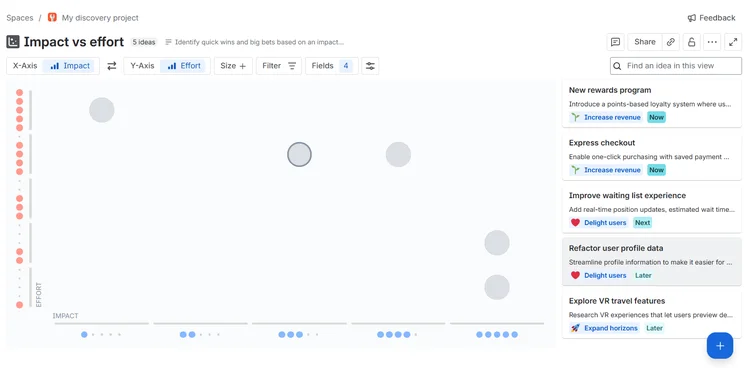
The “impact vs effort” graph is a great way of measuring ROI. Source: Tech.co testing
|
Price (monthly)
The amount you'll pay per month, when paying on a rolling monthly basis with no 12-month commitment
|
Users
|
||
|---|---|---|---|
 |
|
|
|
|
Jira Free |
Jira Standard |
Jira Premium |
Jira Enterprise |
|
Free |
$7.91/user/month (300 users) |
$14.54/user/month (300 users) |
On request (and only billed annually) |
|
10 maximum |
50,000 maximum |
50,000 maximum |
50,000 maximum |
How Much Does Jira Cost if You Pay Annually?
If you opt to annually, the price of your Standard and Premium plans will drop considerably.
For instance, the Standard plan will cost you $23,500 for a one-year term for 300 users, which equates to $6.52 per user, per month. If you opted to pay monthly, the cost would be $7.91 per user, per month.
You can also opt for the self-hosted Data Center option, which is designed for enterprises with teams of 500 or more. Jira Data Center starts from $51,000 per year and can only be paid for on an annual basis.
Jira’s Data Center includes key enterprise-level features, including SAML 2.0, and recovery options to limit the damage inflicted by a technical crash or cyberattack.
Jira Free
- Price: Free
- Best for: Small teams with modest needs
The Jira free tier provides 2GB of storage, scrum and kanban boards, agile reporting, and custom workflows for up to 10 users.
You’ll be able to view project progress in multiple different ways, including boards, calendars, timelines, lists, and more.
You’ll only be able to send a maximum of 100 emails per day, however, which can become restrictive very quickly.
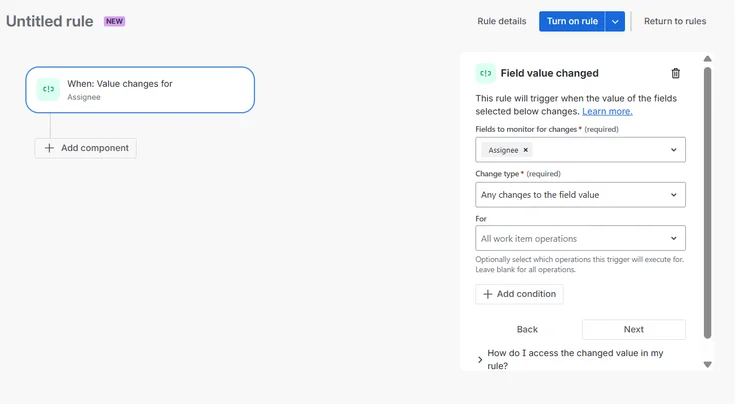
Building a custom automation with the Jira Automation Builder can be complicated, but there is a walkthrough to simplify the process. Source: Tech.co testing
Jira Standard
- Price: $7.91 per user, per month (300 users)
- Best for: Larger teams with complex admin controls
The Standard plan includes everything on the free tier, as well as project roles and advanced permissions. You can send an unlimited number of emails and complete 1,700 rule runs per month for your automations.
You can pay for as many as 50,000 users, storage is capped at 250GB, and customer support is available during local business hours.
Overall, it’s great value for a first paid tier. By contrast, Asana’s first paid plan starts at $10.99 per user, per month.
Jira Premium
- Price: $14.54 per user, per month (300 users)
- Best for: Large teams with extensive automation needs
Premium will give you everything in the Standard plan, as well as project archiving, admin insights, a sandbox, and unlimited storage.
With Premium, automation limits are set on a per-user basis, rather than the entire plan, and each user will get 1,000 rule runs per month.
You’ll also get 24/7 premium support lines and a 99.9% uptime guarantee.
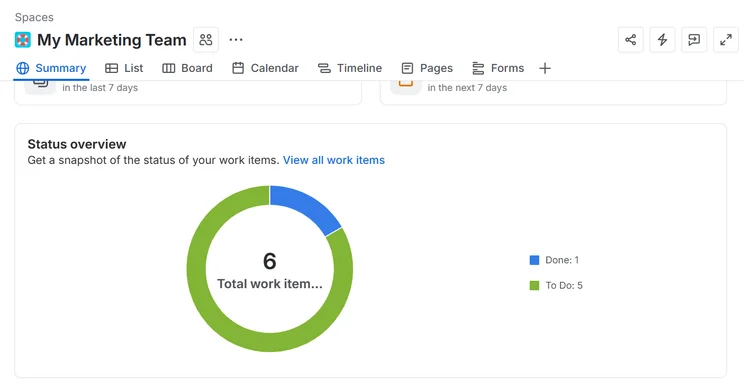
The “Summary” view provides a clear, visual overview of your main projects. Source: Tech.co testing
Jira Enterprise
- Price: Custom pricing
- Best for: Enterprise teams with bespoke needs
Enterprise users can create an unlimited number of “instances” (sites within sites), so they can have multiple teams all working within the same software. Additional security protocols include advanced encryption and Shadow IT controls for more comprehensive governance of all users.
The Enterprise plan also offers Atlassian analytics and other insights tools, unlimited automation runs, and a 99.95% uptime guarantee.
Jira Data Center
- Price: Custom pricing
- Best for: Large enterprises seeking a self-hosting solution
Unlike the other plans on this list, Data Center is self-hosted, so an enterprise can integrate Jira into its own cloud. Other features include AWS optimization, support for SAML 2.0, and disaster recovery.
Does Jira Have Any Hidden Costs?
Yes, Jira has hidden costs beyond its core software pricing.
Specifically, the Atlassian marketplace features several add-ons that you will have to pay extra for, including CRM, helpdesk, and reporting tools.
For more information, check out our guide to project management costs to give you a better idea of potential added costs.
What Are the Best Jira Alternatives?
Jira is one of the best-priced project management platforms on the market, but there are several viable alternatives out there.
For instance, Trello is even cheaper, with paid plans starting at just $5 per user, per month. It’s also one of the most streamlined platforms on the market, so it is much easier to use than Jira.
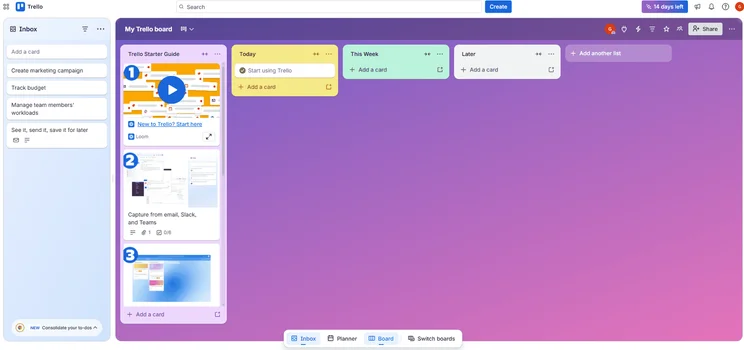
Trello’s Board view is clearly laid-out, with color coding so that you can differentiate between different tasks and deadlines. Source: Tech.co testing
Other Jira alternatives include monday work management, which is our overall favorite project management tool. Starting at $9 per user, per month, monday has a fantastic range of project views and other data visualizations, and is very easy to use.
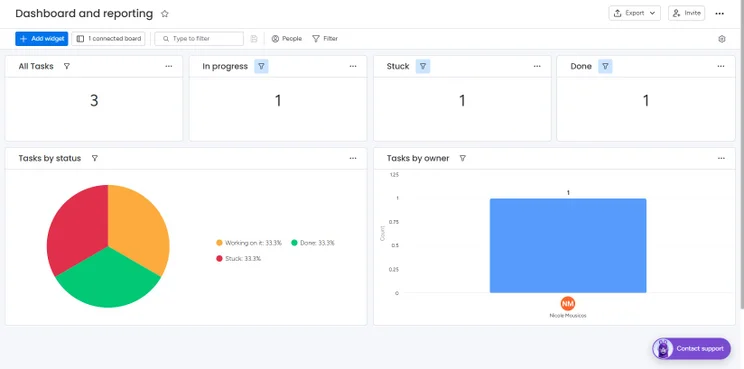
monday work management offers an advanced reporting dashboard. Source: Tech.co testing
Check out our Jira alternatives page for more info, or view our comparison table of the best project management software deals below.
|
Price from
All prices listed as per user, per month (billed annually)
|
Free plan
|
Verdict
|
|||||||
|---|---|---|---|---|---|---|---|---|---|
|
|
Best Jira Alternative
 |
Best for Budget Tracking
 |
Best Task Management Features
 |
 |
 |
 |
 |
 |
 |
|
Jira |
monday work management |
Teamwork |
ClickUp |
Asana |
Wrike |
Trello |
Smartsheet |
Zoho Projects |
Basecamp |
|
$7.91/user/month (300 users) |
$9/user/month |
$9.99/user/month |
$7/user/month |
$10.99/user/month |
$10/user/month |
$5/user/month |
$9/user/month |
$4/user/month |
$15/user/month |
|
|
|
|
|
|
|
10 users |
|
|
|
|
A great value piece of software that’s ideal for tech, software development, and engineering teams |
Incredibly easy to use, great for small businesses, and our top-performing provider on test — and there’s a generous free trial period |
A great user experience all round, with an easy-to-use automation builder and great budget tracking capabilities |
Powerful, feature-rich software suitable for teams of all sizes, with an impressive free tier for individuals and a great value plans for teams |
A simple task-list-based project management platform with an acceptable free tier |
A very capable yet pricey service with a huge number of useful integrations, plus a free tier option to try |
A fairly-priced, stripped-down option, best for small teams who need a central location for basic task management |
A great tool for spreadsheet-natives, which can take your Excel-based task planning to the next level |
A solid project management solution with an attractive free tier for small teams and a very affordable premium plan |
A very basic, relatively limited software that’s a lot simpler than its competitors |
| Compare Deals | Try the platform | Compare Deals | Visit ClickUp | Compare Deals | Try Wrike | Compare Deals | Visit Smartsheet | Visit Zoho | Compare Deals |
Yes, Jira is a highly affordable and efficient project management solution that will particularly suit tech and IT teams, due to its high level of customizability. The platform includes everything you need to successfully manage tasks and streamline your team’s workflows, all for a very reasonable price.
However, Jira is a complex program and requires a steep learning curve, so it’s not a good option for less technical teams or users who are unfamiliar with project management software.
As an alternative, we recommend monday work management, which is easy to use, powerful, and starts at just $9 per user, per month, only slightly more than Jira’s first paid plan.
Frequently Asked Questions
Yes, Jira has a free version, which has a 10-user limit and a 2GB storage limit. On this plan, you’ll only get “community support”, rather than the more comprehensive customer support available on other Jira plans, and there are fewer security and admin controls.
Yes, Jira offers native time tracking on all of its plans, including the free plan.
Yes, there is a Jira desktop app available via the Microsoft Store, but it is not officially licensed. Rather, it has been developed by Infosysta DWC-LLC.
Yes, you can use markdown on larger text fields across all Jira plans, including the free plan.
Jira software is best-suited for tech teams, such as website maintenance teams or software engineers, due to is support for scrum and kanban frameworks, and customizability.
Jira is a highly affordable, powerful project management tool that has received praise for its sprint-style ticketing. This allows teams to work in a sequential fashion, which is perfect for large projects with multiple moving parts.
Jira offers limited onboarding content within its free online resource center, but dedicated custom onboarding is reserved for Premium and Enterprise plan members.
If you click on, sign up to a service through, or make a purchase through the links on our site, or use our quotes tool to receive custom pricing for your business needs, we may earn a referral fee from the supplier(s) of the technology you’re interested in. This helps Tech.co to provide free information and reviews, and carries no additional cost to you. Most importantly, it doesn’t affect our editorial impartiality. Ratings and rankings on Tech.co cannot be bought. Our reviews are based on objective research analysis. Rare exceptions to this will be marked clearly as a ‘sponsored’ table column, or explained by a full advertising disclosure on the page, in place of this one. Click to return to top of page


