We may receive a commission from our partners if you click on a link to review or purchase a product or service. Click to Learn More
Typical Point of Sale (POS) system costs are between $15 to $100 per month for software, and between $30 to over $1,000 for any hardware, depending on your needs. A good system will host a range of features, including inventory tracking and taxes, which means prices can vary significantly.
For cost-conscious businesses, the best free POS software for small businesses can offer a practical solution without breaking the bank. And while pay-monthly systems are upfront on cost, businesses should still be aware of hidden charges and extra processing fees.
Here, we break down the typical POS software and hardware costs and how much value you can expect from the top POS brands available today.

Looking for a new POS system?
Toast is tech.co's top-rated option for hospitality businesses. It delivers powerful tools to boost restaurant efficiency and profits.
Get a free quote
- Software Costs Vary Widely ($15 to $100+/month): Expect to pay between $15 and $100 per month for entry-level plans, though some providers charge lump-sum upfront fees instead (e.g., Epos Now starts around $349 upfront). Advanced plans or extra features increase this recurring cost.
- Hardware Adds Significant Upfront Expenses ($30 to $1,000+): Physical components range from basic $30 credit card readers to full-featured terminal setups exceeding $1,000 per station. Adding accessories like barcode scanners ($30–$70), cash drawers ($50–$200), or Kitchen Display Systems ($30–$100) will further inflate startup costs.
- Transaction & Credit Card Processing Fees Are a Major Ongoing Cost: Payment processing rates typically range from 1.5% to 3.5% plus a small fixed fee per transaction (e.g., 10¢ to 20¢). Flat-rate models, swipe vs. keyed-in rates, and high sales volume mean processing fees often end up exceeding the monthly software subscription cost.
- Watch Out for “Hidden” & Add-On Fees: The base sticker price rarely covers full operational needs. Expenses quickly scale due to fees for additional terminals (e.g., $29–$49/month per extra register), extra location licenses (e.g., Shopify charges up to $89/month per additional location), employee management add-ons, or third-party software integrations.
On This Page, We Cover:
How Much Does a POS System Cost?
The price of a POS system can be broken down into two main components: POS software and hardware.
- POS software typically costs between $15 and $100 per month for small businesses, depending on your needs. However, some companies will instead charge you a hefty one-time fee upon purchase, like EPOS Now, which charges $349 upfront at its lowest, rather than charging you for the continued usage of the software.
- POS Hardware will cost anywhere from $30 to over $1,000 extra, depending on your chosen package, and larger businesses and franchises will likely have to multiply that figure by the number of additional registers needed. The average terminal costs $120 to $1,000, and accessories like cash drawers and barcode scanners can cost $50 to $300 each.
For businesses with smaller margins, a free POS may be the most economical option, such as Square’s free plan, which includes a complimentary Square Reader chip and PIN reader to take payments on. However, businesses on free tiers will typically end up paying higher transaction fees each time they make a sale.
Many providers, like Clover, offer hardware and software packages, which are good for businesses starting from scratch. Software and hardware can be bought separately, too, so you won’t have to buy them again if you’ve already got a lot of the gear. Every POS provider operates slightly differently, though, so it’s best to do your research before committing.https://www.youtube.com/watch?v=cMVuw1R70xE

Want to know exactly how much a new POS will cost your business?
Our custom quotes tool will find you the perfect POS for less in a matter of minutes
POS Costs by Provider
We’ve created a side-by-side comparison of some industry-leading POS providers to give you an idea of how much these systems cost. (All prices are correct as of November 2025).
|
Price
The typical lowest starting price. The lowest price available for your business will depend on your needs
|
Free plan
|
Free trial
|
Best for
Tech.co's verdict to help you identify the most suitable choice for your small business
|
Additional costs
Any additional costs you'll need to pay to get started
|
Lowest transaction fee
The lowest possible fee that will be incurred with each transaction
|
Highest transaction fee
The highest possible fee that will be incurred with each transaction
|
User limit
|
24/7 support
|
Get started
|
||
|---|---|---|---|---|---|---|---|---|---|---|---|
|
BEST OVERALL
 |
 |
 |
 |
 |
 |
||||||
|
Square |
Shopify POS |
Toast |
Clover |
SpotOn |
SumUp |
||||||
|
From $0/month |
From $0/month |
$0/month |
From $16/month for 36 months (depending on plan) |
$0/month |
$0/month |
||||||
|
|
|
|
|
|
|
||||||
|
30 days |
3 days |
14 days |
90 days |
No |
Demo only |
||||||
|
Scaling and growing your business |
Managing in-store and online sales |
Restaurants with complex operations |
Professional hardware |
Simplifying staff scheduling and communication |
Speed, efficiency and data-driven sales insights |
||||||
|
Marketing, customer loyalty, and employee management features cost extra |
Shopify POS Pro is available for $89/location/month |
Digital ordering, third party delivery, email marketing, and catering/events cost extra |
Accounting integrations cost extra |
Loyalty programs cost extra |
Customer loyalty programs cost extra |
||||||
|
2.5% + 15¢ |
2.4% + 10¢ |
2.49% + 15¢ |
2.3% +10¢ |
2.79% + $0.20 |
1.5% + 10¢ |
||||||
|
3.5% + 15¢ |
2.6% + 10¢ |
3.50% + 15¢ |
3.5% +10¢ |
3.79% + $0.20 |
3.25% + $0.15 |
||||||
|
Unlimited (each till requires a new license) |
Single user/license across all plans |
Unlimited |
Unlimited (each till requires a new license) |
Unlimited |
Unlimited |
||||||
|
|
|
|
|
|
|
||||||
| Visit Square | Try Shopify | Visit Toast | Compare Prices | Compare Quotes | Try SumUp |
Here’s a quick breakdown of the subscription, per-sale fee, and register costs that common POS systems offer, for a yardstick of what to expect for total costs:
- Square: Free subscription, 2.6% + 15 cents for card sales, $899 register
- Shopify POS: $5 or $89/mo subscription, 5% or 2.6% + 10¢ for card sales depending on plan, $219-$359 for register (requires smartphone or tablet).
- Clover POS: $16/month subscription, 2.6% + 10 cents for card sales, $2,160 register (billed $60/mo for 36 months).
- Lavu POS: $69/mo subscription, card sale, and register fee on request
Find out more about Lavu’s pricing in our Lavu POS review.
How Much Are POS Credit Card Processing Fees?
Card processing fees cost anywhere between 1.5% and 3.5% per transaction, depending on several factors, including your payment plan, POS provider, and the credit card used to make the payment.
POS Credit Card Processing Fees By Pricing Model
- An interchange plus model means you’ll pay the interchange rate (which is set by the card company, and so impacted by the card your customer uses) plus an additional fee set by the payment processor
- A subscription model means you’ll pay a processing fee on a monthly or yearly basis, but this isn’t a common offer
- A flat-rate model charges a set fee for each different payment method your customers use, which means your credit card processing fees will be impacted by how your customer chooses to pay. Generally, you can expect to pay around:
- 1.99% + 20¢ to 2.99% + 15¢ for card present payments
- 2.6% + 30¢ to 3.5% + 15¢ for keyed in sales
- 2.99% + 20¢ to 3.5% + 15¢ for online sales
If you’re interested in learning more about how these rates vary, read our guide to credit card processing fees to learn more.
POS Hardware Costs
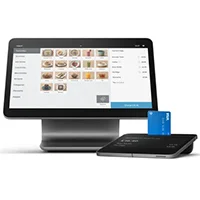
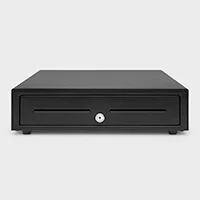
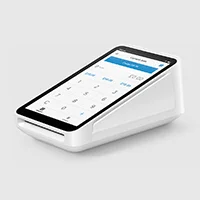
POS hardware refers to any physical device needed to complete a sale. Hardware requirements will vary from business to business, but a typical POS setup will include a cash register, tablet stand, cash drawer, and card reader.
Some suppliers will sell you the hardware in a bundle, while others will lease or sell you each item separately. If a supplier doesn’t sell hardware, however, you’ll have to source it yourself. See how hardware costs compare in our table below:
|
Price range
|
Essential?
|
Good to know
|
|||
|---|---|---|---|---|---|
 |
 |
 |
 |
 |
 |
|
Terminal |
Cash Drawer |
Card Reader |
Barcode Scanner |
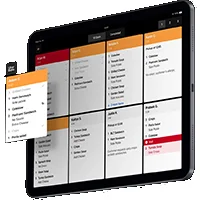
Kitchen Display System |
Customer-Facing Display |
|
$120-1,000 |
$50-200 |
$30-299 |
$30-70 |
$30-100 |
$200-600 |
|
|
|
|
For certain businesses |
|
|
|
Terminals are the hub of your on-site POS system and can become hugely expensive depending on the accessories built-in |
Features such as automatic opening and integrated receipt printers can make cash drawers more expensive |
Contactless card readers come cheap but if you need to enter prices, PIN numbers, or swipe cards, you’ll need to pay more |
Essential for retail businesses but can also be handy for some restaurants |
They can bring huge efficiencies for restaurants but paper tickets still work well |
Can be really helpful for fast-service restaurants and cafes but it’s more of a nice-to-have |
You’d be forgiven for thinking that modern businesses don’t need to bother with cash drawers — everyone has cards. However, while cash drawers can seem an expensive outlay, 76% of US customers still carry cash, and you need only make a few transactions before they start to recoup their costs.
Moreover, lots of POS systems also rely on iPads, rather than monitors. These start at $449 and go over $1,000, depending on the model. Businesses should also note that not all POS systems require an iPad; some are also compatible with other tablet devices.
Read our guide to the best iPad POS apps to find out which options are at the top of their game.
Hardware Costs By Provider
Below, we’ve outlined hardware costs for a selection of POS providers.
Square POS
- You can get Square’s most basic card reader for free (for the first item, with additional readers costing $10)
- At the other end of the spectrum, the Square Register Retail Kit will set you back by $1,899.
Lavu POS
- Lavu is a tablet-based POS system, so its range of hardware solutions is much less comprehensive than its competitors. Unfortunately, it does not disclose its pricing publicly.
Clover POS
- Clover’s hardware prices start at $199 for its most basic card reader.
- Prices can go up to $3,499 and $34.95 per month, per device, for its all-in-one Kiosk solution.
SpotOn
- SpotOn sells software and hardware bundles. Its cheapest bundle is free and includes hardware, but you’ll be charged 2.79% + 20 cents per transaction.
- Its most expensive bundle is $135 per month, + $3 per employee, per month.
- It also offers customized bundles with custom pricing.
Lightspeed
- Another tablet-based solution, Lightspeed, also doesn’t list its pricing publicly for its hardware kits.
Shopify POS
- You can get a Shopify Tap & Chip Card Reader for $49 and a countertop bundle for $999.
Epos Now
- A POS system can range from $249 to $649.
The cost ranges outlined here are realistic, but the bigger issue is how businesses interpret them. The monthly subscription is often the smallest part of the total cost. Processing fees, hardware, and add-ons usually have a larger financial impact, especially as transaction volume increases.
A business processing $500,000 annually can see a difference of several thousand dollars based on fee structure alone. On top of that, systems with more complexity often require more training and ongoing maintenance, which increases labor cost.
I advise clients to evaluate cost as a full operating expense, not just a line item. Look at total monthly fees, expected transaction volume, and the time required to manage the system. A slightly higher upfront cost can make sense if it reduces errors, improves reporting, and keeps transactions moving efficiently during peak periods.

Sergio Corona is a retail industry advisor and manager with multi-market leadership experience across the U.S. and Mexico. His background spans global brands, including Levi Strauss & Co., Ralph Lauren, Adidas Group, Invicta, and Lovisa. He has overseen regional and country-level performance for various retail and outlet environments, including new store openings and market expansion.
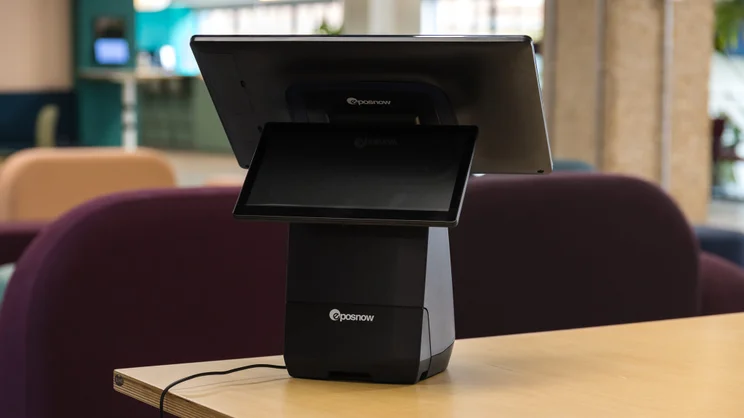
The Epos Now terminal connects to a wide range of POS accessories. Source: Tech.co testing
Hidden POS Fees To Be Aware Of
While most POS costs are clearly advertised, there are also less obvious expenses to look out for. We’ve rounded up some frequently overlooked costs below to save you some pain.
- Extra register fees – If your business requires more than one register, you may have to pay for each additional device. For example, Lightspeed charges $59 per month for each extra register. Square charges more at $49 per month for each countertop checkout, while extra mobile handheld terminals are free of charge.
- Extra location fees – Businesses may also have to pay more if they’re using a POS across multiple locations. For example, Shopify charges up to $89 per month per extra POS location.
- Software add-ons – As we’ve mentioned, if you’re looking to expand your package with extra features, you’ll have to pay more for POS add-ons. The price of add-ons can vary tremendously but tends to be in the range of $10 to $100.
- SMS service – If you opt-in for an SMS service – a POS feature where your system sends SMS messages to customers to remind them of appointments, table bookings, and more – you may be subject to third-party fees from mobile providers. It’s always best to make yourself aware of charges before signing up for the service.
When purchasing a POS system, remember that some providers charge additional fees for access to specific integrations or add-ons, while others don’t. If you need your system to integrate with a specific program you’re already using, this could end up making one of the options you’re considering significantly more expensive than another, despite similar base-level costs. So, I feel it’s always a good idea to check any potential provider’s integration library before buying!

Free vs Paid POS Systems
Not sure whether you should be considering free or paid POS systems? We explore their differences below.
Paid POS systems
Paid POS systems can cost anywhere from $15 to $100+ a month, depending on your software and hardware needs. However, for businesses looking for a more stripped solution, cheaper plans are available for as little as $15 per month. What’s more, lots of plans don’t feature user caps, meaning licensed tills can often be used by an unlimited number of workers.
The average cost of a POS system is about $69 per month (Toast’s popular POS plan retails at this price). However, the exact cost of a POS system will depend on the size of your business, the industry you’re in, the hardware features you need, and more. While paid monthly plans vary from provider to provider, they are often available at escalating price points, from basic through to custom.
Read our full Toast POS review to learn more about the provider, or see how it matches up to its rivals in our guide to Toast vs Square vs Clover.
Free POS systems
The pricing structure of free POS software works slightly differently. There are loads of great low-cost solutions out there (our favorites that we’ve tested are Square and PayPal POS), but free options exist too.
Free point-of-sale software is typically free to install. You won’t have to pay any monthly subscription fees, but as with paid plans, you will still be charged a fee per transaction. Transaction rates tend to be steeper with free plans than with paid tiers, which can bump up their costs in the long run.
To understand how a typical free plan works, we’ll take another look at Square. Square is an all-around point-of-sale system with an excellent free plan. Our research also suggests that it holds the largest market share year-to-date (YTD) at 65%, followed by Shopify at 13%.
Users of Square’s free plan are subjected to the following transaction fees:
- 2.6% + 15¢ for all card-based transactions
- 3.5% + 15¢ for manually keyed-in sales
For smaller and growing businesses, free plans can be a very cost-effective option. Yet, for businesses that manage a large number of sales, the costs of these transaction fees can accumulate fast.
Also, while POS software can be free, providers often expect businesses to cover the cost of hardware. Depending on your provider and the size of your business, these costs can considerably hike up the overall cost of the POS. Large businesses running over multiple venues may need to pay up to $10,000 upfront for hardware devices, whereas smaller businesses can often set themselves up for under $500.

The mobile Square POS is an easy-to-use platform — we were able to test it out ourselves. Source: Tech.co testing
In Square’s case, you can get your first mobile card reader for free. But prices escalate after this – for example, an iPad stand (first gen) with a card reader is $149, while a full Square terminal and Restaurant station costs $1,339.
Businesses are also commonly tripped up by setup and training fees. These are the costs associated with setting up your POS and training you and your staff, and they vary from provider to provider. Free and paid point-of-sale systems are both known to request these fees, so it’s always advised to read the fine print before moving forward with a solution.
POS System Costs by Industry
A low-cost POS system can serve many industries simply because it has few features to offer beyond basic purchase support, which any store needs. However, larger operations will benefit from the economic value of a feature-heavy POS, and they’ll need an industry-specific POS to get the most bang for their buck.
Restaurant POS Costs
The restaurant industry has a ton of unique POS needs: The inventory tracking system must handle converting ingredients into dishes, the kitchen must be able to quickly process orders from the front of the restaurant, and servers must be able to accept tableside orders and track which tables should receive which order.
These complex tools might cost around $80-$90 per user, per month for a full-service restaurant POS. We’ve rounded up the best restaurant POS systems, as well as the best bar POS systems.
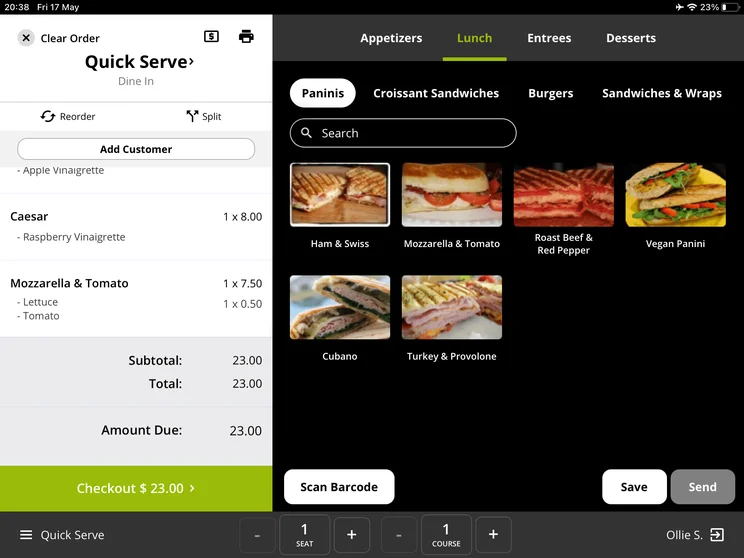
Lavu POS’s quick-serve mode lets restaurants log orders faster by only presenting their top sellers. Source: Tech.co testing
Retail POS Costs
Retail-specific POS features include the ability to handle returns, refunds, and exchanges, support for loyalty programs, and multi-channel support, in addition to standard POS functions like inventory and employee management.
Retail POS costs can vary, with some services available for no monthly charge, just per-transaction fees, while others may charge $15, $30, or $70 per user, per month. Read our guide to the best retail POS systems for more.
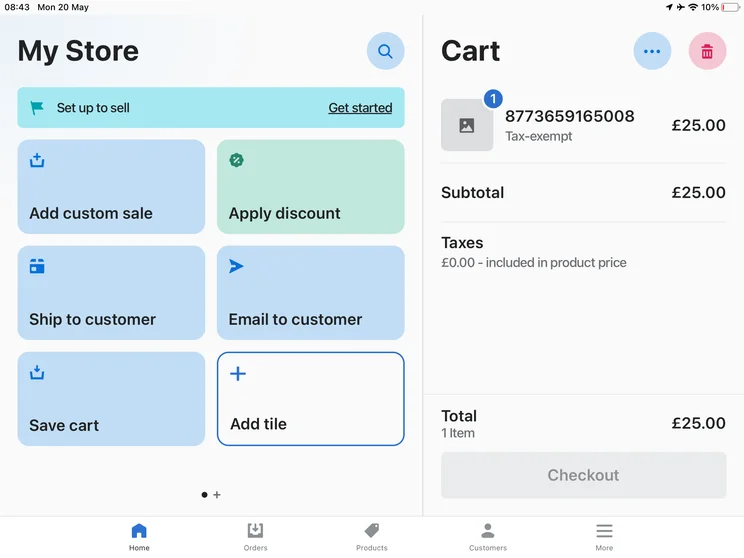
Shopify POS lets me add a custom sale to individual products in a couple of taps. Tech.co user testing
POS Costs Example: Coffee Shop
Let’s take a look at a potential cost breakdown for using a POS system at Small Beans, a single-location coffee shop in the greater Seattle area with two checkout terminals and two employees working each shift.
This shop likely won’t want a free or barebones POS plan. Instead, they’ll opt for a $50 per month mid-tier plan for the software, so they have access to complex marketing and ordering tools.
Each terminal will be about $60 per month to rent or about a $800 one-time cost to buy outright with a $150 installation fee.
The transaction fees will increase along with revenues, but assuming a typical 2.5% + 10¢ per transaction, a busy location will likely pay around $600-$700 per month in these fees.
All togther, Small Beans will pay around $770-$870 per month in ongoing costs, assuming they rent their terminals to reduce upfront costs.
Retail businesses can get started with a new POS system, including software and hardware for as little as $579, with most of that cost being the one-off hardware expenses.
Restaurant businesses, meanwhile, can get a fully-featured POS system with new hardware from just $559 — again, with most of the cost being hardware.
Of course, you could shrink those costs significantly by eschewing the monthly software fees with free POS software such as Square POS. With its transaction fee-only model, you’ll only start paying for the service when you start making money. What’s more, Square is perfect for almost all businesses, regardless of whether they’re in the retail or hospitality sectors.
However, you could save a not-inconsiderable sum of money by getting custom quotes from the leading POS providers on the market, regardless of which industry you’re in. Our quick and easy quotes comparison tool will provide you with obligation-free quotes from all the providers on this page (and a few more) in just a couple of minutes. All you need to do is answer a handful of questions about your business’s needs.
If you click on, sign up to a service through, or make a purchase through the links on our site, or use our quotes tool to receive custom pricing for your business needs, we may earn a referral fee from the supplier(s) of the technology you’re interested in. This helps Tech.co to provide free information and reviews, and carries no additional cost to you. Most importantly, it doesn’t affect our editorial impartiality. Ratings and rankings on Tech.co cannot be bought. Our reviews are based on objective research analysis. Rare exceptions to this will be marked clearly as a ‘sponsored’ table column, or explained by a full advertising disclosure on the page, in place of this one. Click to return to top of page


