
We may receive a commission from our partners if you click on a link to review or purchase a product or service. Click to Learn More
A point of sale (POS) system is the combination of software and hardware that allows a retail store to manage all business operations, including inventory, sales, employees, and more.
The term “point of sale” refers to the checkout counter, since ringing up a customer’s sales is the primary way most employees will access the system. However, the best POS systems for small businesses take many forms, from mobile or desktop to a terminal or a self-serve kiosk.
Here, I’ll define all the types of POS systems you should know, to help you establish which option will be best for your business.In this guide:
- POS systems span nine main variations, including terminal, mobile, tablet, online, self-service kiosk, open-source, multichannel, cloud-based, and desktop options.
- Terminal POS systems are the most common type and are used at checkout counters by retail stores and hospitality businesses of any size.
- Mobile POS systems offer greater mobility and low upfront costs with little-to-no upfront investment, but feature limited functionality and no offline mode.
- Tablet POS systems suit restaurants and coffee shops requiring tableside ordering, relying on internet connectivity and maintaining portable hardware.
What Are the Different Types of POS System?
A POS system manages all of a retailer’s operations, so it needs to be versatile. There are nine main versions of this system:
These types of systems aren’t exclusive. POS tablets can be part of a mobile POS system, for example, and they may be part of a cloud-based system that also includes a terminal POS. All these terms will be useful to know so that you can choose a system that encompasses your needs.
Here’s a quick look at what each of these terms refers to and why they may be relevant to your business.
1. Terminal
Best for: everyday retail stores or hospitality businesses
Terminal POS systems are the most common type of POS, and are designed to allow business employees to record the revenue earned and the products sold. The terminal refers to the display that an employee uses to enter information into the POS software. Additional hardware components might include a barcode scanner, cash drawer, receipt printer, and customer-facing display with a card reader.
Terminals are used at the checkout counter by any size of retail store (grocery, antiques, electronics, books, salons, and spas), as well as behind the counter at a fast casual restaurant. You’ll find a quick breakdown of pros and cons below.
Pros
- Easy employee restrictions
- Ability to integrate with additional POS hardware, including tablets
- Ability to integrate with different software, such as an online ordering plug-in
Cons
- Lack of mobility
- Require employee attention at all times
- Can incur additional costs
Top provider examples for terminals are Toast, Square, and Clover.
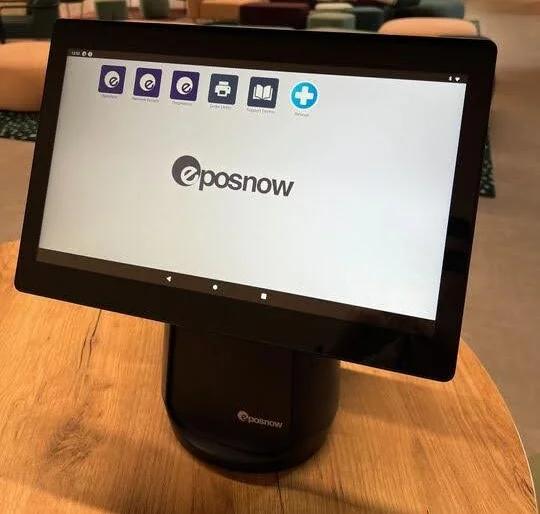
Epos Now terminal connects to a wide range of POS accessories. Source: Tech.co
2. Mobile
Best for: microbusinesses, such as ice cream vendors, food trucks, and more.
A mobile POS system refers to software that can be accessed through a smartphone, typically with a small hardware credit card reader that plugs into the headphone jack. It’s mainly for processing payments, with some limited inventory or timeclock functions.
While value-add features are in short supply, mobile POS offers little-to-no upfront investment, and, of course, mobility. Top providers for mobile POS are Square, Clover, and Toast. You can compare them at once with our Toast vs Square vs Clover guide.
Pros
- Greater mobility
- Low upfront cost
- Doesn’t overwhelm user
Cons
- Limited functionality
- No offline mode
- More susceptible to security breaches
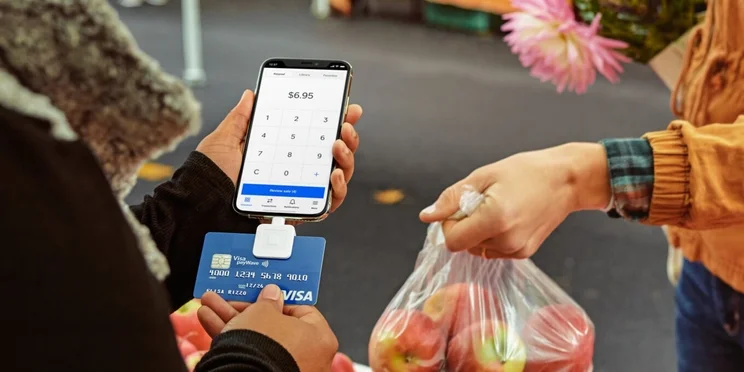
Mobile POS with Square’s Magstripe card reader. Source: SquareUp
3. Tablet
Best for: restaurants, coffee shops, and other hospitality businesses
POS software can run on tablets just as easily as mobile, and some systems are designed for the roomier space of a tablet. A tablet POS might include a swivel stand, so an employee can flip the tablet to allow a customer to sign for their purchase – this lets the tablet POS function as a stripped-down version of both a terminal POS and a customer-facing display.
Another big reason a POS would use a tablet? Restaurants. Any sit-down establishment requires orders be made at the customer’s table, which means the POS system that tracks sales must have a mobile component. This could be a smartphone or a pad of notepaper (that’s then entered into a terminal POS), but a tablet is the right size for quickly taking tableside orders.
Top provider examples for tablet POS systems are Square, Epos Now, and TouchBistro.

Ready to compare all the top tablet-friendly POS systems?
Find a POS system for your business today!
Pros
- Multi-functional
- Portable
- Easy to use
Cons
- Reliant on internet connectivity
- Durability can be an issue
- Limited hardware compatibility
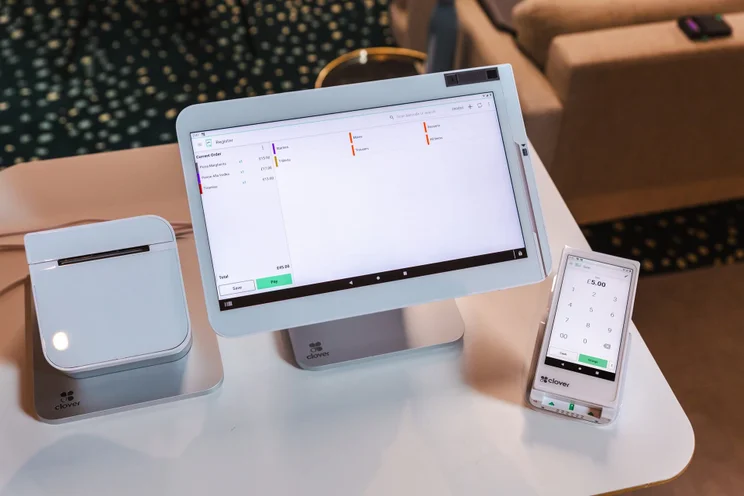
This suite of Clover POS products includes a tablet, card scanner, and mobile device. Source: Tech.co testing
4. Online
Best for: small stores with low volumes of sale
An online POS is a software-focused POS system that can be accessed through the internet, designed to require minimal hardware. This web-based service typically comes for a monthly fee that allows a store manager to run it from their pre-owned desktop or laptop computer.
As online POS systems don’t rely on purpose-built hardware, they’re a great option for small retail stores and coffee shops, art galleries, veterinarians, or consignment stores. Top providers for online POS software are Vend, Square, and Talech.
Pros
- No need to invest in dedicated hardware
- Access to data in real-time
- Easy to integrate software add-ons
Cons
- Vulnerable to a cybersecurity breach
- Dependent on internet connection
- Less control over your data
5. Self-service kiosk
Best for: large stores with many customers
A POS might use a self-service kiosk, which allows the customer to scan and pay for their own products. Like the terminal, a kiosk’s components will usually include a display, card reader, receipt printer, and barcode scanner to help the customer check out.
These types of POS systems are frequently specialized: The kiosk you’d use to buy a movie ticket looks different from the type you’d use for buying groceries. That said, common use cases include movie theaters, grocery stores, bus passes, and parking tickets. Some POS vendors offer self-serve kiosks for retailers and eateries, like Square, TouchBistro, and Lavu.
Learn more about Lavu’s features and pricing in our Lavu POS review.
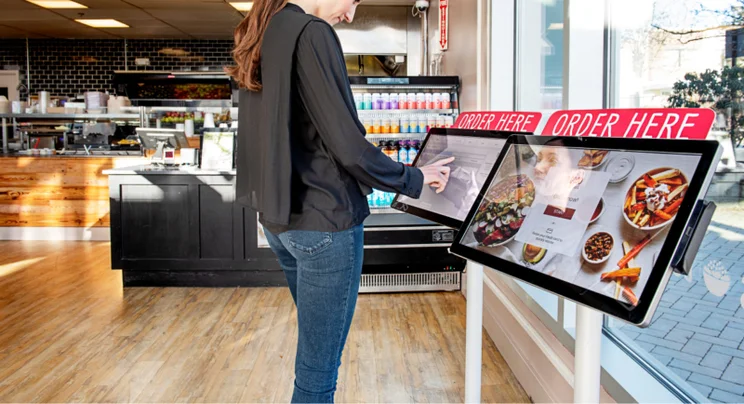
Customer ordering at a self-service kiosk POS
Pros
- Reduced waiting times
- Lower cost of labor
- Better customer experience
Cons
- Expensive investment
- Exclusionary to some demographics
- Potential for theft
6. Open-source
Best for: sole traders
Software is open-source when the source code is publicly available and can be used and modified by anyone. An open-source POS refers to POS software that can be used and tweaked, typically for free. This software is often more limited than paid software, and since it must be maintained by a community of volunteers, may have bugs that haven’t been fixed.
Some open-source POS options will support hardware including printers, barcode scanners, and more, while others are designed to work from your smartphone. But a free POS software certainly has a place, and open-source can be a great fit if you know how to code yourself. Examples of open-source POS software include UniCenta, Odoo, and WallacePOS.
Pros
- Very low operating cost
- Customizability
- Greater transparency and security
Cons
- Requires high level of technical expertise
- Limited functionality
- Prone to bugs
7. Multichannel
Best for: ecommerce stores with physical locations
A multichannel POS is a system that allows a business to interact with customers across multiple channels, most frequently a website, a brick-and-mortar location, and third-party marketplaces like Amazon, eBay, and Walmart Marketplace. Not every POS software can track sales across all these channels at the same time.
They allow businesses to reach a larger audience, but the downside is that a business runs the risk of overstretching itself. The top multichannel POS systems are Vend, Square, and Lightspeed.
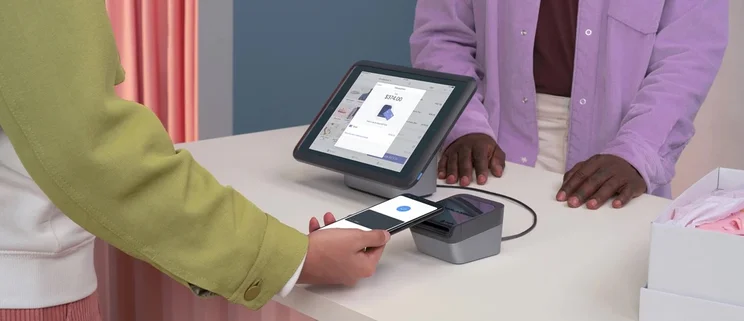
Shopify POS lets you manage online and in-person sales through one platform. Source: Shopify

Need a multichannel POS solution for your operation?
Try our quick quotes form to compare the best POS systems
Pros
- Advanced functionality
- Caters to large customer bases
- Boost brand awareness
Cons
- High maintenance costs
- Management is complex
- High upfront costs
8. Cloud-based
Best for: smaller stores looking to cut costs
A cloud-based POS system is hosted entirely online, with no need to download software in order to operate it. It’s similar to and often equated with an online POS, although the latter option might be installed and have an offline mode.
It’s suitable for smaller businesses that want to keep costs low, but hospitality businesses should steer clear – if your internet goes down, you can’t take orders.
One big pro to this POS is that a store manager can review the latest sales data or inventory reports from their own phone or laptop. Good examples of cloud-based POS systems include Vend, Lightspeed, and Square.
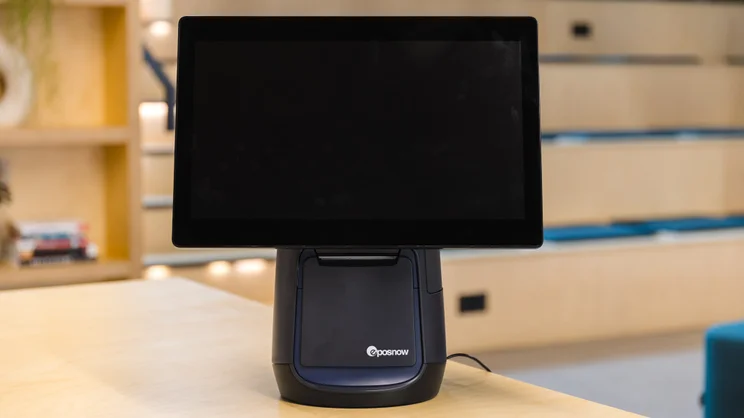
Epos Now’s cloud-based POS terminal comes with a receipt printer. Source: Tech.co
Pros
- Low upfront cost
- Can be scaled easily
- Access to data in real-time
Cons
- Dependent on internet connectivity
- Potential for cybersecurity breaches
- Downtime and lost sales
9. Desktop
Best for: businesses with low volume of sales
A desktop POS refers to POS software designed to be operated from a desktop or laptop. This could refer to a browser-based online POS, an open-source option, or a system installed on-premise. The lack of mobile functionality means that desktop POS systems are better suited towards quieter businesses.
Good options include Lightspeed, Vend, and Talech.
Pros
- Can operate offline
- Low operating costs
- Ease of use
Cons
- No portability
- High upfront costs
- Dependent on specific hardware
How Much Does a POS System Cost?
Some POS providers are free to set up, with no monthly fee, but charge transaction fees on purchases, like Square. However, most POS systems require you to pay monthly for a software plan. This can cost anywhere from $15 to $100 per month, depending on what’s included in the package, with software add-ons bumping this base price up further.
If you haven’t already got hardware, this will cost around $30 to $1000+ extra, depending on what kind of devices your business needs. For instance, if you want a tablet-based system and already have an iPad, all you’ll need is a tablet stand to get started which costs around $150 up-front from providers like Square POS.
More sophisticated hardware kits will cost a lot more. For instance, Toast’s Countertop Starter Kit, which includes its Toast Flex POS terminal, Toast Tap payment device, and a data security package costs $1,024.10 up-front, while larger hardware bundles cost even more.
Hardware and a year’s worth of a POS software subscription will likely cost the average small business between $1200 and $3500, dropping to between $500 to $1000 for each year afterward.
Learn more about how much a system could cost your business.
How to Choose the Best POS System for Your Business
Every business is different and must consider its individual needs – a liquor store POS will have different features, for instance, than one for a restaurant. When it comes to the type of POS system you’re getting, five different factors can help you choose from the nine types of POS systems I’ve outlined above.
- Type of business – small or large, restaurant or retail, low or high volume sales
- Budget
- Hardware needs
- Business size (and future growth)
- Specialized functions – tableside ordering, self-serve checkout, extra mobility, employee management tools
Once you’ve settled on the type of POS system for your business, the next step is to find quotes from the top POS vendors who offer that specific service. New to point of sales? You can also view our guide on how to use your POS system.
Need a Quote?
Most small or medium retailers and restaurants will likely want a similar POS. One that offers a software subscription over the internet, with a range of supported hardware and the ability to use terminals, tablets, or other mobile devices to accept payment and record sales.
And that’s exactly the type of vendor you can find through Tech.co’s comparison tool — just take a minute to answer a couple of questions, and you’ll get custom quotes from all the best POS services that suit your needs.
If you click on, sign up to a service through, or make a purchase through the links on our site, or use our quotes tool to receive custom pricing for your business needs, we may earn a referral fee from the supplier(s) of the technology you’re interested in. This helps Tech.co to provide free information and reviews, and carries no additional cost to you. Most importantly, it doesn’t affect our editorial impartiality. Ratings and rankings on Tech.co cannot be bought. Our reviews are based on objective research analysis. Rare exceptions to this will be marked clearly as a ‘sponsored’ table column, or explained by a full advertising disclosure on the page, in place of this one. Click to return to top of page


