
We may receive a commission from our partners if you click on a link to review or purchase a product or service. Click to Learn More
Talech is an iPad-based point-of-sale (POS) system designed for both restaurants and retail stores, offering users a free forever plan with competitive processing fees. This makes it perfect for smaller startups that need a low-risk POS solution, although there are some notable pitfalls that kept it out of our top POS systems for small business rankings.
Between the lack of hardware solutions, the limited software functionality, and the notably difficult to use interface, it’s hard to recommend Talech for any business that isn’t exclusively focused on saving money. Even as far as free plans go, there are other POS solutions out there with more functionality and equally competitive pricing, like Square.
In this guide, we’ll help you decide whether Talech POS is a good option for your business, covering everything from features and pricing to customer support and POS alternatives.
Talech POS

In Short
-
Pros
- Free forever plan with low processing fees
- Robust analytics and reporting tools
- Built-in customer engagement features
-
Cons
- No hardware offered
- No direct support for ecommerce functionality
- Lowest usability score across our research
Pricing
- Free plan available
- Processing fee: 2.6% + 10¢
- Unlimited users
- Basic: $29 per month
- Standard: $69 per month
- Premium: $99 per month
Images
Talech POS: Quick Fact File
Before we dig into the specifics about why Talech may or may not be a good fit for your business, let’s get the basics out of the way. Here are some of the key deciding factors about Talech POS that can help you make a decision:
- Talech is an iPad-based POS system, offering no hardware solutions for users.
- Talech offers a free forever plan, as well as three competitively priced paid plans.
- Talech provides solid analytics tools, although no team member sales reports are available.
- Talech offers built-in customer engagement functionality as a free add-on.
- Talech netted the lowest usability across our research, pointing to a less-than-intuitive interface for beginners.
Overall, Talech is a competent POS, but the reality is that there are plenty of other options out there that are likely a better fit. The low price is obviously enticing, but that shouldn’t be your only deciding factor when it comes to POS systems.
Talech POS Core Features
Sales management
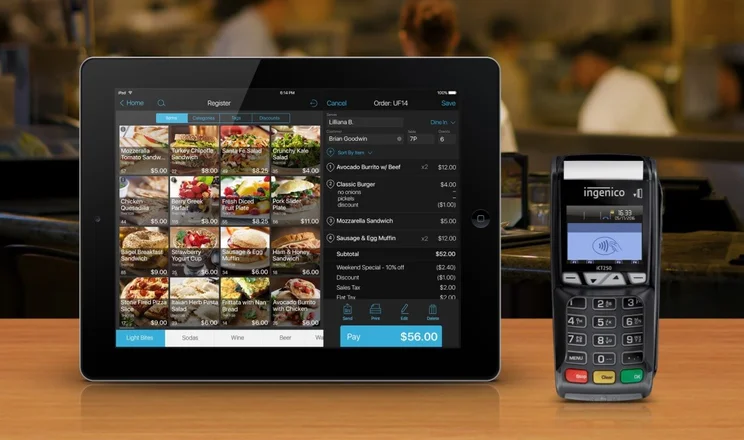
The core element of any POS system is sales and inventory tracking, a feature which lets employees easily search for or scan a product. The service automatically tallies up the cost, factoring in taxes and special offers, so the customer can instantly receive their bill, either printed on the spot or via email.
Employees can add modifiers to each order as well, allowing them to specify which sandwich toppings a customer wants, or how rare they like their burger cooked.
Inventory management
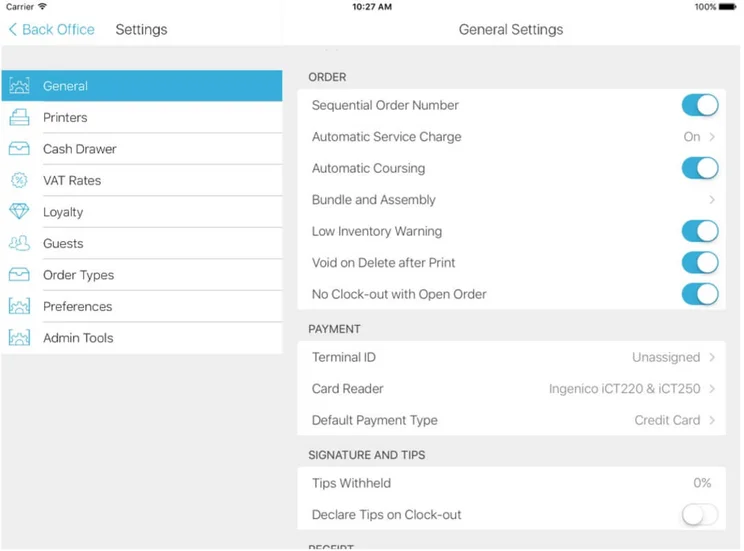
At the same time, the POS will track any inventory that has just been sold, noting which products may be running low and will need to be restocked, and sending low inventory alerts to managers. At the end of the day, the store manager can review the data, seeing how much has been sold on a daily, weekly, monthly, or annual basis.
Products can be uploaded and edited in batches if needed, and products can be synced across multiple locations. Talech will also track inventory based on weight sold, which could be helpful if you’re selling materials wholesale.
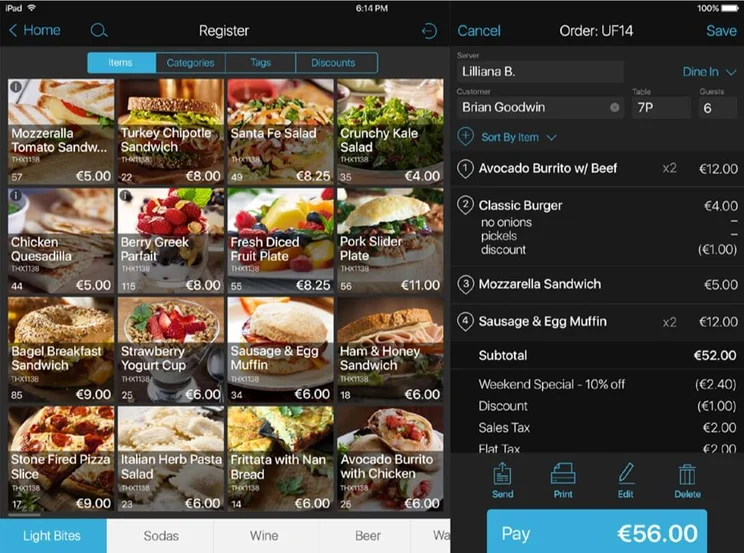
Talech POS software register view. Source: Talech

Is Talech the best choice for your business?
Our free, no-obligation questionnaire will match you in minutes with the best POS for your business.
Hardware
Talech is cloud-based POS that’s primarily designed to run on iPads. You’ll need one of the following models to run the POS:
- iPad Air
- iPad Air 2
- iPad (2017 or later)
- iPad Pro
- iPad Mini 2
- iPad Mini 3
- iPad Mini 4
However, it also works on some more POS-focused devices too, including:
- Ingenico MOBY M70
- Ingenico MOBY M100
- Ingenico MOBY M120
- Ingenico MOBY C150
- Poynt 5
- Poynt Smart Terminal (Poynt 6)
In our view, choosing an iPad is probably the way to go, for a couple of reasons. To begin with, it will be easier to onboard staff – the touchscreens are very responsive and the software is typically user-friendly – something that certainly can’t be said for all POS systems.
The other advantage of opting for an iPad is that if you want to change your POS at any point, there are far more systems that run on iPads for you to choose from – so you won’t have to invest in new hardware.
Talech also works with a range of third-party payment devices, receipt printers, kitchen printers, and barcode scanners. You can also order the devices directly from Talech, which will keep everything nice and simple.
Customer management
While checking out each customer, the POS tracks that customer’s data, creating a profile that can help managers better understand their customer base. This data includes stats on the average amount spent with each visit, the total number of visits, how many days have passed since their last visit, and which products the customer prefers.
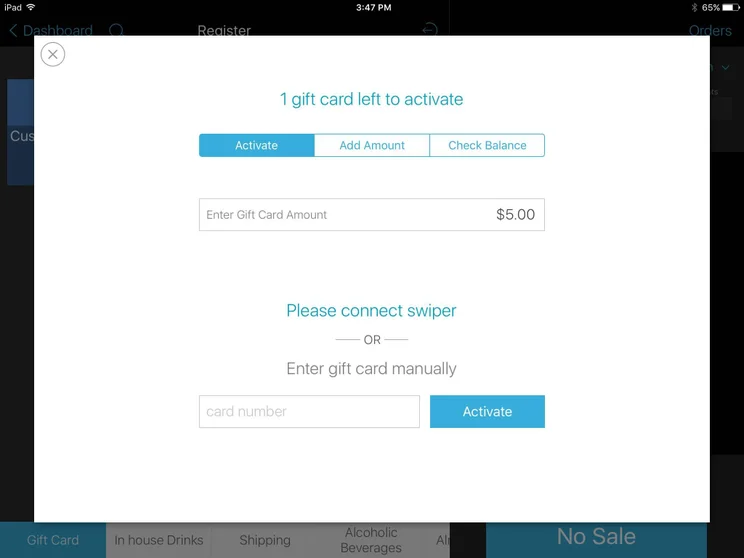
The POS also lets users set up loyalty programs for customers, offering them discounts or other rewards based on how often they visit or how much they spend. Support for a gift card program is also offered, although this is a paid add-on that costs $49 per month beyond the basic plan.
Returns and exchanges
Employees can issue full or partial returns, as long as their manager has given them the permissions needed to do so. You won’t necessarily need a receipt to accept the return, which can be helpful when transitioning away from your old POS system.
The POS’s support for exchanges also offers plenty of options: If the customer’s exchanged item costs less than the initial one, the difference can be refunded to the customer’s card, issued back as cash, or converted into store credit.
If they choose, managers can set up a PIN code for each employee to enter in order to access the ability to issue a refund. This allows managers to better track when refunds are offered, and which employees can process them.
Employee management
A “clock-in” feature lets employees sign in and out, helping them track their hours and generating a manager report with insights into the hours each employee has worked. Through the Talech POS software, managers can set overtime rules and track individual employee performance, noting sales or tips per employee.
Managers can also set granular rules surrounding register access, choosing which employees can access features such as discounts, the cash drawer, and data reports. Managers can also review the history of actions such as refunds or voided sales.
Discounts and deals
Depending on the price plan (we cover these in our pricing section), managers can set up a wide variety of discounts. Examples include happy hour discounts which are triggered at a pre-set time and day of the week, buy-one-get-one-type deals on specific products, or store-wide discounts for specific qualifying customers under a loyalty program.
Table management
While this feature is for restaurants only, it’s a crucial one for any full-service eatery. Waiters can use it to quickly pair each order with the table that ordered it, knowing instantly where to deliver each prepared dish.
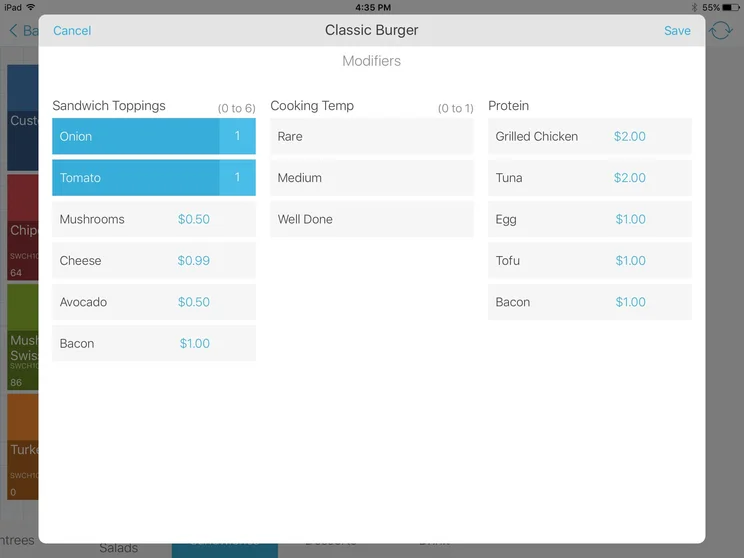
Viewing optional order modifiers on Talech POS. Source: Talech
Setup and Customer Support
Across all plans, Talech offers a customer support team that’s available 24/7 through both email and phone and has a live chat option available on its website as well.
Talech also has a frequently updated searchable online Help Center, with categories of articles that include “Getting Started,” “Register Application,” “Hardware,” and “Register Back Office.” Customers with issues setting up printers or troubleshooting their card readers may find the fastest solution available through the Help Center, rather than a live support team member.
Training is only offered at installation, meaning you’ll need to train up any subsequent staff – which might be necessary given that Talech scored very low in our usability tests.
Support & training

Support options
- Phone support: 1.888.995.1998
- Phone hours: 24/7
- Email support: support@talech.com
- Email hours: 24/7
- Live chat

Training options
- Help portal
- User guides
- Online videos
- Live training
Talech Pricing and Plans
Talech POS is available through three main price plans. A fourth plan, Enterprise, is available for larger businesses. No free trial is available, because the free forever plan give you a good idea of how the software works without a financial commitment.
Here, we’ve listed the features and pricing to expect from the three main Talech plans, as well as our recommendation for which types of business each plan is best suited to.
|
Plan
|
Price
Monthly cost of the software.
|
Best for
|
Transaction fees
|
Users
|
Product limit
|
Online ordering
|
Analytics
|
24/7 live support
|
|
|---|---|---|---|---|---|---|---|---|---|
 |
|
|
|
||||||
|
Mobile |
Starter |
Standard |
Premium |
||||||
|
Free |
$29 per month |
$69 per month |
$99 per month |
||||||
|
Smartphone transactions |
Cafe or basic retail |
Quick service restaurants and mid-tier retail |
Full-service restaurant and salons/spas |
||||||
|
Unlimited |
Unlimited |
Unlimited |
Unlimited |
||||||
|
100 |
500 |
Unlimited |
Unlimited |
||||||
|
None |
None |
$49/month |
Included |
||||||
|
|
|
|
|
||||||
|
|
|
|
|
Talech Starter plan
The Starter plan costs $29 per month for the first device and another $29 per month for each additional device. Notably, the plan is limited to five employees and 100 products, and this product limit, in particular, is likely to make this plan unattractive to any businesses larger than a café or bodega.
However, users will still have access to a suite of features that includes product and inventory tracking, employee permissions, basic order management, refunds (full and partial), customer history tracking, and basic reporting functions.
Talech Standard plan
The Standard plan costs $69 per month for the first device, then $29 per month for each additional device. Employees and products are unlimited, so this is likely the best plan tier for businesses that want the essential features of a retail or restaurant POS, but don’t need any advanced abilities. Quick-service retail or fast-casual establishments would find this tier ideal.
Features include everything in the previous tier, plus barcode label printing, clock-in and timesheets, kitchen printing, automatic discounts, exchanges, store credit, and more advanced reporting. Gift card support is available, but only for an extra $49 per month.
Talech Premium plan
The Starter plan costs $99 per month for the first device, then $29 per month for each additional device. As with Standard, the numbers of employees and products are unlimited under this plan, and gift card support is a $49 per month add-on.
The plan is set apart by its additional features. One big new feature is table management, making this plan essential if your business is a full-service restaurant. It’s also a good deal for multi-location franchises, given that each additional device beyond the first is just $29 per month.
Other features include everything from the Standard plan, plus appointment booking, online ordering, inventory alerts and log, purchase orders, pay by position, the ability to split and merge orders, and automatic gratuity.
Does Talech have a free plan?
Yes, Talech does have a free forever plan, which helped it secure one of the highest pricing scores across our research. It gives you access to the Talech software, allowing you to accept payments on your smartphone, although you will need a Bluetooth card reader to work.
This free plan is obviously quite limited compared to the paid options. It allows for only 100 products to be sold, provides virtually no reporting tools, and offers no employee management functionality. Still, you get access to basic order management, customer tracking, and email support, so it really is an affordable way to get started with POS.
Talech POS Alternatives
There are plenty of superior options on the market for businesses looking for their next POS solution.
The top brands in POS offer a few perks that Talech can’t match. The Shopify POS offers a great ecommerce integration, complete with an online ordering option for in-store pickup. Square POS comes with flexible pricing, including an option for no upfront payments that will appeal to tiny businesses. Popular restaurant POS systems like Toast and SpotOn both offer more granular menu settings but come with their own caveats: Toast is Android-only, while Upserve starts at a pricey $119 per month.
In our view, Talech is simply outclassed when compared against heavy hitters like Square, which also offers a free plan. It offers less functionality in a less easy to use interface, all while offering no hardware solutions to go along with it. Suffice to say, there are better POS options out there.
Here’s a quick table comparing Talech against its most attractive competitors:

Talech is a good POS, but there are better options out there.
Our questionnaire will pair you and your business with the right POS quickly and easily. Plus, it has no obligations, and is completely free!
|
Price
The typical lowest starting price. The lowest price available for your business will depend on your needs
|
Best for
Tech.co's verdict to help you identify the most suitable choice for your small business
|
Hardware
|
iPad app
Is there a version of the software made specifically for iPad use?
|
Android app
Is there a version of the software made specifically for Android tablet use?
|
24/7 support
|
Key benefits
|
Drawbacks
|
|||
|---|---|---|---|---|---|---|---|---|---|---|
|
|
BEST OVERALL
 |
 |
 |
 |
 |
 |

|
 |
 |
 |
|
Square |
PayPal POS |
Lightspeed |
Clover |
Epos Now |
Shopify POS |
Revel POS |
Toast |
TouchBistro POS |
Cake POS |
|
|
$29/user/month |
From $0/month |
Free |
From $89/month |
From $16/month for 36 months (depending on plan) |
Around $39-$79/month |
From $0/month |
$0/month |
From $69/month |
$69 per month |
|
|
Best small business growth features |
Scaling and growing your business |
Great value for money |
Driving repeat business and loyalty |
Professional hardware |
Optimizing guest experiences |
Managing in-store and online sales |
Best for CRM tools |
Restaurants with complex operations |
Best for hospitality staff |
Best register features |
|
Available through third-party vendors. |
Sold by Square, separately or packaged with software. First card reader free. Compatible with most leading brands |
Retails a range of hardware solutions, including card readers and cash registers |
Specialized hardware available. Not compatible with weighing scales |
Sells a broad range of hardware, including full cash stations and mobile card readers |
Works with a range of third-party peripherals |
Sold by Shopify, but also works with iPads and Android tablets |
Offers a preconfigured POS terminal with an iPad and tablet stand, a router, a printer, and a cash drawer. |
Sells an impressive line of its own products. All splash-proof and durable to suit high-intensity food truck environment |
Built for iPad. Offers Kitchen Display System & Customer-Facing Display. Works with most leading brands’ for other peripherals. |
Leases you a printer, terminal, card reader, and cash drawer on two or three-year contract. |
|
|
|
|
|
|
|
|
|
|
|
|
|
|
|
|
|
|
|
|
|
|
|
|
|
|
|
|
|
|
|
|
|
|
|
|
|
|
|
|
|
|
|
|
|
|
|
|
|
|
|
|
|
|
|
|
|
|
Talech is a pretty average POS system, and especially when compared to other options, it’s hard to recommend for anyone. While it certainly wouldn’t be a hindrance to your business, we think that options such as Square or Zettle offer better features, better prices, and more intuitive user experiences. Quite simply, that’s why we’d avoid Talech in favor of its stronger rivals – it’s an inferior option considering what else you can get on the market.
Of course, to find the best deal for your business, you should try out our free price comparison form. In just a few minutes, you’ll receive bespoke quotes from the leading POS providers on the market.
If you click on, sign up to a service through, or make a purchase through the links on our site, or use our quotes tool to receive custom pricing for your business needs, we may earn a referral fee from the supplier(s) of the technology you’re interested in. This helps Tech.co to provide free information and reviews, and carries no additional cost to you. Most importantly, it doesn’t affect our editorial impartiality. Ratings and rankings on Tech.co cannot be bought. Our reviews are based on objective research analysis. Rare exceptions to this will be marked clearly as a ‘sponsored’ table column, or explained by a full advertising disclosure on the page, in place of this one. Click to return to top of page


