
We may receive a commission from our partners if you click on a link to review or purchase a product or service. Click to Learn More
TouchBistro is a reliable POS system designed specifically for restaurants. It offers just about every feature a hospitality business would need, including advanced cost management capabilities streamlined table management, and tableside ordering features. Its flexible iPad and Mac-based hardware setup and intuitive software make it a solid option for first-time POS users too.
TouchBistro won’t be a perfect match for every venue, however. Unlike our leading POS system for restaurants, Toast, it lacks some sophisticated features like tip management and QR code ordering. Since the provider is iPad-based, it won’t be suitable for businesses looking for a physical terminal, either.
Lots of important TouchBistro features are only available with paid add-ons too. But we’ll explain all of this and more throughout this guide, to help you determine if it’s a good fit for your business.
TouchBistro POS

In Short
-
Pros
- Supports in-person and online ordering
- Strong table and order management
- In-depth inventory and cost calculation
- Automatic daily backups
-
Cons
- Pricing based on the number of users, which could add up
- Only works with Apple iPads and computers
- No training mode (but 24/7 support and videos available)
Pricing
- $69 per month for one license
- Prices based on monthly user limit
- Better value for large businesses than SMBs
Images
Of course, TouchBistro isn’t the only POS provider on the market, and it can be difficult to find the best system for your restaurant. That’s why we’ve created a tailored questionnaire that can find you the perfect POS system for your business in a matter of minutes.
TouchBistro POS: At a Glance
Here’s a quick overview of TouchBistro’s highlights, lowlights, and price points, to help you determine its suitability off the bat:
- TouchBistro’s entry price is $69 per month, and the POS doesn’t offer a free version or a free trial.
- TouchBistro’s software is exclusively iPad-based, which makes the system highly portable, but means that it’s unsuitable for businesses needing a physical POS terminal.
- Thanks to the provider’s intuitive software and low learning curve, Touch Bistro is one of the most user-friendly POS systems we’ve tested.
- TouchBistro’s Unlimited plan doesn’t have license limits, making the POS a good value for large restaurants with 5+ terminals.
- While TouchBistro offers 24/7 support via phone, email, and live chat, its chat response times are longer than competitors like Square and Lightspeed.
- A lot of useful features are only available as paid add-ons, which bumps up the overall price of TouchBistro and makes it less suitable for small businesses compared to solutions like Square and Toast.
How Much Does TouchBistro Cost?
When it comes to pricing, TouchBistro POS keeps its cards pretty close to its chest. It displays its entry price of $69 per month on its website, but doesn’t list the features included in its main paid packages. If you want this information, you’ll have to get in touch with a member of the provider’s sales team.
Aside from its core packages, TouchBistro also has a range of paid add-ons that bring extra features to your POS system. You can take a look at these options, and their price, below:
- Kitchen Display System – From $19 per month
- Profit Management platform – From $330 per month
- Online Ordering – From $50 per month
- Reservations – From $229 per month
- Loyalty – From $99 per month
- Marketing – From $99 per month
- Gift Cards – From $25 per month
While TouchBistro’s add-on model prevents businesses from paying for features they don’t need, if you’re in need of a lot of extra capabilities monthly prices can esculate quite quickly.
Prices are correct as of November 2024
Does TouchBistro have a free plan?
No, TouchBistro does not currently offer a free plan like providers Square and SumUp. Unfortunately, the provider doesn’t offer a free trial for users who want to test out the system before committing either. TouchBistro doesn’t currently offer a month-to-month contract option, so if you’ll have to be prepared to sign onto a multi-year contract if you’re interested in using the POS.
Looking to sell without any monthly overheads? Check out our guide to the best free POS software to learn about the best complementary options out there.
Is TouchBistro good value?
While TouchBistro’s entry price isn’t too steep compared to systems like Square and Clover, the average price of its plans is higher than similar POS systems of its kind. What’s more, businesses are required to pay extra for lots of features which bumps up their price tag even more. Because of this, we believe that TouchBistro is less suited to smaller or budget-conscious food vendors.
However, since the provider’s Unlimited plan offers unlimited licenses, it’s actually quite an economical option for large businesses with over five terminals, even if they need to to augment the package with paid extras.
TouchBistro POS Review: Core Features
While this review focuses on TouchBistro’s full-service restaurant POS app, the vendor offers four more POS apps aimed at more specific niches within the food industry. The Quick Service, Bars and Clubs, Food Truck, and Brewery POS apps all offer their own venue-specific features and benefits.
All things considered, TouchBistro’s toolkit is reasonably strong, especially compared to free systems such as SumUp and PayPal POS. Read on to learn more about TouchBistro’s general and restaurant-focused features:
Menu management
You can create, edit, and upload customized menus to TouchBistro’s app, adding and subtracting menu items as needed.
Low inventory alerts can help you know which items to remove before a customer orders something that isn’t available. In addition, data reports help you know which menus and items sell the best, allowing them to create even better menus in the future.
Your servers can route orders to different kitchen printers or displays – useful if you need to send different orders to the bar or the kitchen. You can also add modifiers on-the-spot so that servers can react to customer needs.
Customer loyalty
TouchBistro’s customer relationship management (CRM) features allow you to reward repeat visitors.
Once an account is set up for a regular customer, favorite items can be suggested to your servers whose memories might not supply “the usual” quite as quickly as TouchBistro’s software can. These customers’ favorite orders can also help guide you as they build new menus or consider special promotions.
TouchBistro’s CRM software can also help your restaurant communicate with customers about loyalty programs and discounts through SMS, push notifications, or email.
Floor plan & table management
TouchBistro also offers table management options, a staple feature of restaurant POS services. A customizable floor plan allows you to layout your entire operation, even down to the table size. Servers can then move parties around as needed. The result? Portable maps that update in real-time, putting everyone on the same page and speeding up service.
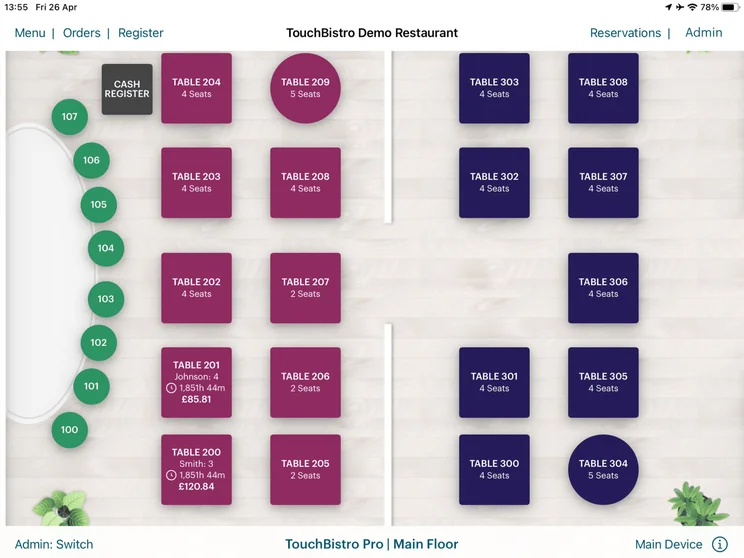
It was easy for me to create my floor plan with TouchBistro, I could even color-code the tables and edit their size and shape. Source: Tech.co user testing
TouchBistro also makes tableside ordering simple. A server can place an order and send it directly to the kitchen, while still standing in front of the table they’re serving. You can create a bespoke table plan for your restaurant and use it to identify slow-turning or high-value tables, as well as add or remove seats, change parties, and more. Servers can access the table plans on their iPads and carry them around the restaurant as they’re serving.
Staff management
With TouchBistro POS, staff can clock in and out, and managers can easily track their hours. Each employee can get an individual account, allowing managers to keep staff-specific details in mind, as well as ensure everyone gets paid.
Comprehensive security controls and access rights keep everything safe, while in-app messaging allows staff members to contact each other throughout a shift. These tools can have a tangible impact on a business’s bottom line too, with TouchBistros’ management helping restauranteurs to save up to 4% on labor costs according to a survey by the provider.
Payments
TouchBistro supports a host of mobile payment processors, including Square, Chase Paymentech, Moneris, Worldpay, and PayPal. Servers will be able to take cash, card, and debit.
The POS also offers a range of useful payment options. For example, its Bar Tabs feature lets you take a diner’s payment details at the start of their meal by swiping, dipping, or tapping the card. Whichever way you decide to bill your customer, TouchBistro also provides you with a replica of the customer receipt on the screen, helping you to view important order information at a glance.
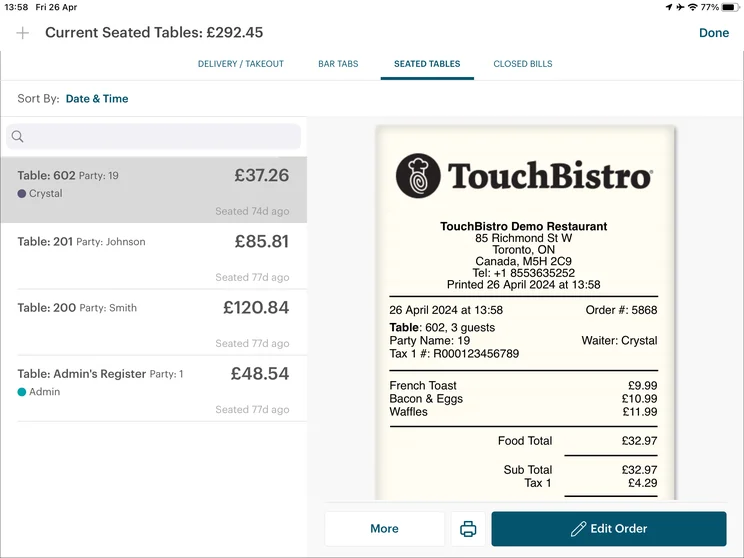
TouchBistro presented me with a mock-up customer receipt so I could view payment info at a glance. Source: Tech.co user testing
Inventory management
TouchBistro has fantastic inventory management. The systems allows restaurateurs to track items sold, and the ingredients which make up each dish. Alerts let you and your staff know when an item needs to be restocked.
Its real-time reporting on stock levels helps you know when to order food from vendors too. This helps businesses to ensure their stocks never run dry, and it’s also a powerful tool for reducing food waste. TouchBistro’s profit management software also lets users track food costs, pinpoint ingredient and product waste, and identify saving opportunities, making it easier for them to reduce unnecessary waste and and improve profits in the long term.
Reporting & analytics
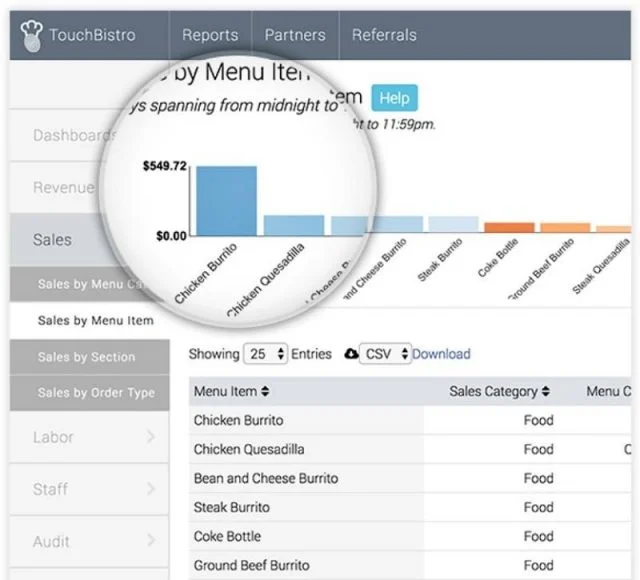
TouchBistro can deliver daily reports to senior staff members. In fact, with over 50 reports available to users, the POS system has the most reporting features of any other provider we’ve researched.
You can use the data collected from each of the platform’s features in order to determine future plans. Which tables are most popular? Which menu items should be promoted? Which of your servers work the fastest, and at which times? Since inventory and sales are tracked to the last detail, theft can also be noted and deterred.
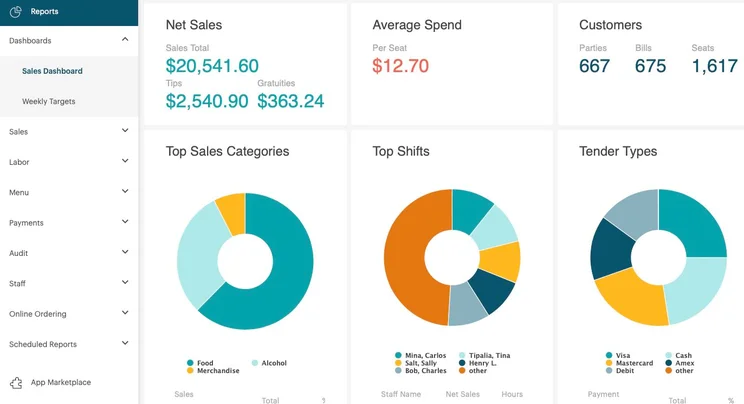
TouchBistro’s Sales Dashboard gives users an overview of sales data for a particular reporting range. Source: TouchBistro

Compare TouchBistro with leading POS providers
Your restaurant deserves a great POS for less. That's why we developed our bespoke quotes questionnaire.
TouchBistro Hardware
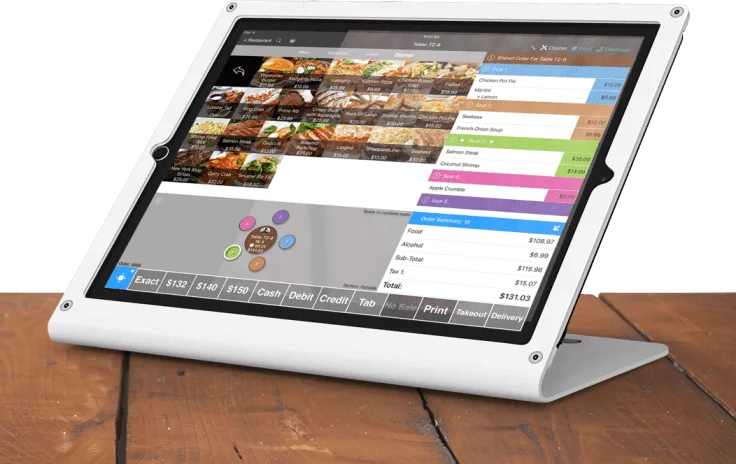
TouchBistro’s hardware setup is 100% iPad or Mac-based, and the POS runs on all iPads after the first four generations. You’re also able to customize your setup based on the size and needs of your venue. For example, you can purchase POS equipment like iPad stands, card terminals, receipt printers, cash draws, and more separately.
While TouchBistro doesn’t make its own POS terminals, its iPad-based setup is simple and flexible, making it ideal for smaller businesses just looking for a streamlined iPad POS. However, TouchBistro’s hardware can also meet the needs of larger food businesses like full-service restaurants as larger systems can be custom built and a Mac computer can be used to handle the central operations.
Unfortunately, TouchBistro isn’t transparent about the cost of its hardware, so for pricing details, businesses will need to get in touch with a member of the providers sales team.
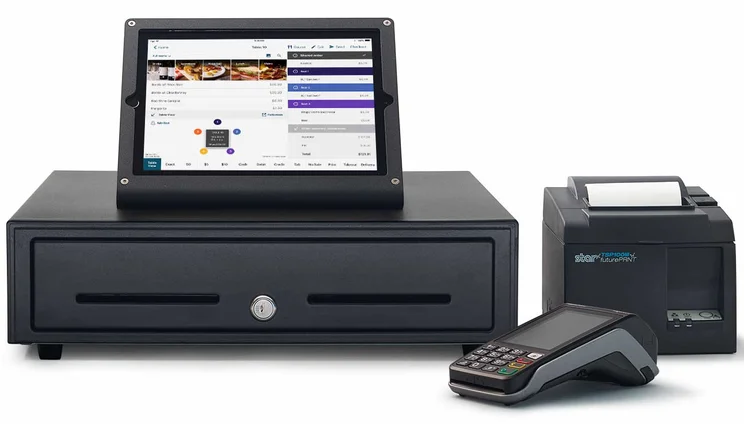
Businesses can customize TouchBistro’s Apple based hardware set-up to meet their venues need. Source: TouchBistro
Setup and Customer Support
TouchBistro’s help and support options are up there with the best POS providers. Users signed up to any of the four service plans will have access to 24/7 phone and email app support. The provider also offers help via a live chat, but when we tested it out for ourselves we found its response times were slightly longer than with Square and Lightspeed.
All restaurant data is backed up on the cloud daily, so if the app crashes, you won’t lose your sales and inventory history. Hardware installation and troubleshooting are also available, for an additional fee.

Support options
- Phone: 888-342-0131 (U.S.)
- Phone support 24/7
- Email: support@touchbistro.com
- Email support 24/7
- Live AI chatbot 24/7

Training options
- Help portal
- User guides
- Online videos
- Knowledge guide
TouchBistro POS Mobile App
As TouchBistro is a tablet-based POS, its POS app is the heart of its offering. Aside from offering a wide range of features, including dedicated tableside ordering, inventory management, and menu management capabilities, the app also works as an integrated payment tool, helping to facilitate a wide range of payment forms including digital wallet payments and gift cards.
However, while the app is stacked with useful features, its App Store rating of 2.5/5 suggests it’s not very popular among users, especially compared to other POS apps like Square, which received a much more favorable rating of 4.8/5.
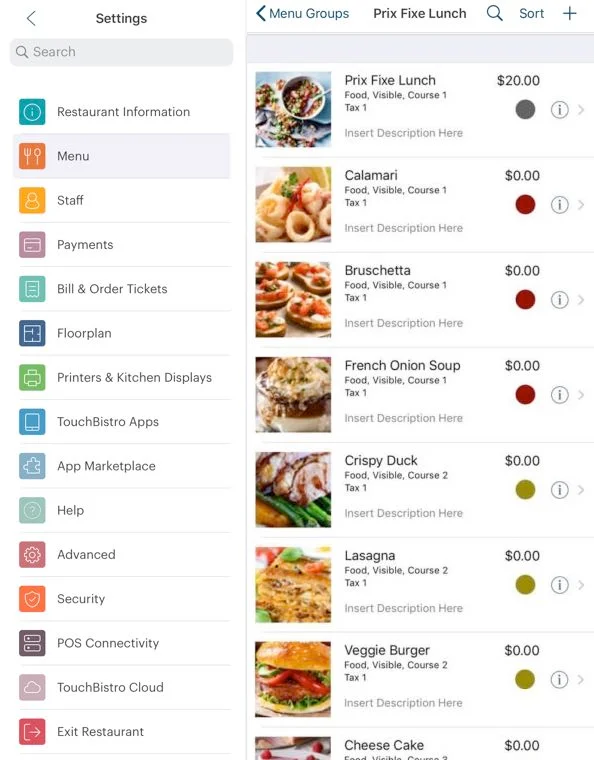
Aside from its main POS app, TouchBistro offers a number of other applications, all of which are capable of integrating seamlessly with its main service. These apps include:
- TouchBistro Online Ordering – An online ordering system that lets you accept orders directly through your restaurants website.
- TouchBistro Reservations – A complete reservation and guest management platform that helps restauranturs tailor their guests’ experience and manage operations.
- PeachWorks Mobile – An inventory and labor management platform that lets you enter restaurant stock counts and enter waste, update employee schedules, track labor performance, and more.
- VIP – An online customer community that gives fellow restaurants a space to connect.
- Customer Facing Display – Customer Facing Display (CFD) is TouchBistro’s order confirmation system for over-the-counter and quick-serve style restaurants. These apps support businesses using customer-facing display hardware.
- Reports to Go – This platform gives you access to over 50 performance reports, and lets you access your real-time data anywhere with a stable internet connection.
- Kitchen Display System – TouchBistro’s Kitchen Display System (KDS) software, powered by Fresh, helps you seamlessly integrate the front and back-of-house by allowing you to view tickets from multiple ordering channels.
- TouchBistro Loyalty – This CRM platform helps you deliver a better guest experience, collect customer information, and turn one-off customers into regulars.
- TouchBistro Gift Cards – This app lets you create and sell gift cards directly through your restaurant POS, or through your unique Customer Web App.
- eCard Physical Gift Cards – This app lets you create and sell physical gift cards to help boost brand awareness and give customers more reasons to return.
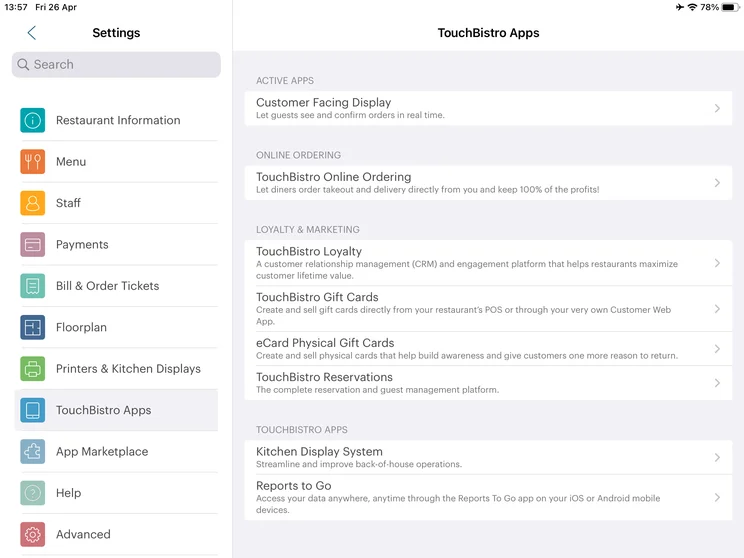
TouchBistro let me integrate my POS with a range of other in-house apps through its Settings menu. Source: Tech.co user testing
Unfortunately, it’s a bit tricky to gauge what users think of these apps on a large scale. Square’s various apps typically score very well, but it’s harder to get a grip on TouchBistro, as most of its apps haven’t been reviewed enough to generate a conglomerate score on either the Apple or Android store.
Planning on using a POS on your tablet? Check out our guide to the best iPad POS systems.
How Does TouchBistro Compare to Other POS Alternatives?
TouchBistro is a reliable POS system, but this isn’t to say it’s guaranteed to be the best fit for your business.
According to our research, Toast is currently the best restaurant POS for small businesses because its hospitality features remain unmatched. The Android POS system boasts a number of stand-out capabilities TouchBistro lacks, including a dedicated QR ordering system, and also offers hardware for businesses looking to move beyond a simple tablet setup.
With more hardware options and a quality free plan, our research suggests Square is stronger than TouchBistro in most respects – especially if you’re managing a small or remote location like a market stall or food truck. However, after testing both of the systems out for ourselves, we found Square’s software slightly less intuitive TouchBistro’s, suggesting that it may take longer for beginners to get to grips with the platform.
Take a look at how TouchBistro weighs up to the wider competition in our comparison table below.
|
Price
The typical lowest starting price. The lowest price available for your business will depend on your needs
|
Tech.co hospitality rating
Score out of 5 for general restaurant suitability, based on Tech.co's independent market research
|
Best for
Tech.co's verdict to help you identify the most suitable choice for your restaurant
|
Lowest transaction fee
The lowest possible fee that will be incurred with each transaction
|
iPad app
Is there a version of the software made specifically for iPad use?
|
Android app
Is there a version of the software made specifically for Android tablet use?
|
24/7 support
|
Hardware packages
|
|||
|---|---|---|---|---|---|---|---|---|---|---|
|
BEST OVERALL
 |
 |
 |
 |
 |
 |
 |
 |
|||
|
Toast |
Square POS |
Clover POS |
SpotOn |
Lightspeed |
Epos Now |
SumUp |
TouchBistro POS |
|||
|
$0/month |
$0/month |
$135/month |
$0/month |
From $89/month |
Around $39-$79/month |
$0/month |
From $69/month |
|||
|
4.7
|
4.8
|
4.5
|
4.3
|
4.4
|
3.9
|
4.2
|
4.2
|
|||
|
Complex restaurant operations |
Scaling and growing your business |
Professional restaurant hardware |
Simplifying staff communications |
Driving repeat business & loyalty |
Complex inventories |
Providing a quick and efficient service |
Full-service restaurants |
|||
|
2.49% + 15¢ |
2.4% + 15¢ |
2.3% + 10¢ |
2.79% + $0.20 |
2.6% + 10¢ |
2.6% + 10¢ |
1.5% + 10¢ |
N/A (quote-based) |
|||
|
|
|
|
|
|
|
|
|
|||
|
|
|
|
|
|
|
|
|
|||
|
|
|
|
|
|
|
|
|
|||
|
Offers a full hardware suite for $1,024 but custom pricing is available on more expensive software tiers |
Options include: Square Stand Kit for $689 and Square Stand Kit for Restaurants at $1,199 |
Sells a range of proprietary hardware devices, from handheld tableside tablets to full POS terminals |
Offers several hardware options for businesses, including touchscreen monitors and payment terminals |
Offers kits for iPads, MacOS devices, Windows PCs but all are $POA. |
Restaurant POS package costs $1,099. Also works with a variety of third-party peripherals |
Sells a range of in-house hardware, including iPad stands, card readers, and kitchen display systems |
Sold separately but works with lots of third-party devices |
|||
| Visit Toast | Visit Square | Compare Quotes | Compare Quotes | Compare Quotes | Compare Quotes | Try SumUp | Compare Quotes |
Research and Methodology
We know how hard it is to settle on the perfect POS solution. This is why we pour hours of our time into product research — so you don’t have to.
After shortlisting the most competitive restaurant-specific solutions, we analyze them against the following metrics:
- Software – We analyze what general and industry-specific features are being offered. For example, when reviewing restaurant POS systems we check for the presence of tools like tip management, mobile ordering table management, and more.
- Hardware – We check for the presence of general and industry-specific hardware options, like kitchen display systems, receipt printers, POS terminals, and more. We also consider how portable and well-designed the hardware is.
- Price – To understand how affordable a system is, we calculate the average price of the POS plans, consider its entry price and the price of transaction fees, and check for the presence of free plans.
- Help and support options – We research which customer support channels are available and if they’re open 24/7. We also measure metrics like live chat support times and check for the presence of extra support resources like knowledge centers.
- Customer satisfaction – To ascertain what customers think of the product, we take an aggregate score from customer review sites like Trustpilot and TrustRadius.
- User experience – When possible, we conduct first-hard testing on the products and measure their error rates, learning curve, intuitiveness, and more.
After this phase of the research process was over, we awarded the providers a score out of five in each of these categories, as well as a general score. These scores then help us compare POS systems against each other and determine which solutions are stronger overall.
TouchBistro is a feature-rich restaurant POS system with a solid user experience. It offers many tools to streamline restaurant operations, as well as a few bells and whistles – and they’re highly configurable to boot. While its price points are slightly higher than its competitors, its hardware options are flexible, and its customer support center is reliable if you were to incur any bumps down the road.
If TouchBistro’s’ iPad and Mac setup, or lack of a free plan or trial are deal breakers for you, there are loads more quality restaurant POSs to choose from. For example, Toast will be a great option for businesses after dedicated tip-management features, while Square will be a safe bet for smaller vendors looking for a generous free plan.
The easiest way to compare the different providers is by filling in our quick and easy form. You’ll get tailor-made quotes for your business in minutes, with no obligations.

Want to find the best deal for your restaurant?
Frequently Asked Questions
TouchBistro is based in Toronto and was founded in 2010. It has offices in Toronto, Vancouver, Los Angeles, New York, Chicago, Mexico City, and London.
It sure does. TouchBistro lets you take orders directly on your website and sends them straight to your POS for inventory checking, production, and sales management. Thanks to a new update, businesses can personalize the process too by adding their venue’s logo and branding on their online ordering page.
Toast is the best POS system for restaurants. The solution offers excellent hospitality features, reliable help, and support options, and it’s more affordable than other software of its kind. Square is another great restaurant POS system with a generous free plan that lends itself well to smaller food vendors like food trucks and stalls.
If you click on, sign up to a service through, or make a purchase through the links on our site, or use our quotes tool to receive custom pricing for your business needs, we may earn a referral fee from the supplier(s) of the technology you’re interested in. This helps Tech.co to provide free information and reviews, and carries no additional cost to you. Most importantly, it doesn’t affect our editorial impartiality. Ratings and rankings on Tech.co cannot be bought. Our reviews are based on objective research analysis. Rare exceptions to this will be marked clearly as a ‘sponsored’ table column, or explained by a full advertising disclosure on the page, in place of this one. Click to return to top of page


