
We may receive a commission from our partners if you click on a link to review or purchase a product or service. Click to Learn More
Shopify POS is an industry-leading point-of-sale solution with the best ecommerce features and integrations on the market, according to our in-depth research. It’s built-in web builder and powerful sales tools, combined with its surprisingly low learning curve, make it one of the best POS systems for retail businesses we tested, making it an asset to omnichannel and in-person sellers.
While Shopify POS doesn’t let users get started for free like Square, the low starting price of only $5 per month is quite accessible, and it allows you to set up an online store and take in-person payments. However, Shopify is exclusively for retail businesses, so business owners should use our free POS comparison tool to find a more suitable POS that caters to your industry.
This Shopify POS review covers everything you need to know about the solution, including its pricing plans, features, pros, cons, and how it weighs up to other systems on the market.
Shopify POS

In Short
-
Pros
- Strong ecommerce integration
- Highly adaptable
- Compatible with most POS hardware
- 14-day Free trial
- 24/7 support via phone, live chat, and email
-
Cons
- Slightly more expensive than some rivals
- Not great for quickly-scaling businesses
- Charges transaction fees unless you’re using Shopify’s own Payments processing system
Pricing
-
 14-day free trial
-
Starter: $5 per month
-
Retail: $79 per month
Images
The Tech.co team pours hundreds of hours into researching the best POS systems because it’s the only way to ensure we’re providing our readers with the most accurate, up-to-date information possible.
We’ve spoken to daily POS users working in restaurants, retail and more, and have tested out more than 20 point-of-sale platforms ourselves, paying close attention to everything from the quality and feel of the hardware to how easy the software is to use, to help you make a clear decision for your business needs.
Head over to our methodology section to learn more about our product review process, which is one of the reasons more than one million users consult our articles every month.

Ready to get selling online?
Shopify POS is best for ecommerce. It's highly adaptable, compatible with most POS hardware and is one of the most popular providers in the game.
Shopify POS Review: The Basics
There’s a lot to know about Shopify as a whole, let alone its popular POS system. In an effort to help you understand the basics about this provider, here are some quick facts to get you started:
- Shopify is ideal for businesses that want to both sell online and in-person.
- Shopify has excellent 24/7 customer support for all users.
- Shopify POS syncs directly with the Shopify ecommerce platform, so you will need a Shopify Ecommerce account.
- Shopify POS is easy to use, with a particularly intuitive front-end experience.
- The Shopify app offers robust functionality, including accepting payments.
- Shopify can get expensive, with high transaction fees for cheaper plans.
Those are the basics about Shopify POS. If you think it could be a good fit for your business, keep scrolling to learn more about the features, pricing, hardware, and support options.
Shopify POS Features
Shopify POS is available in two plans: Starter and Retail. Both plans require a Shopify ecommerce account. The features you get will depend on the package you choose, but both Starter and Retail include unlimited products, staff discounts, free SSL certificate, abandoned cart recovery and 24/7 support. To investigate, we tested many features available to see how Shopify POS could benefit your business. Here’s what we found.
Ecommerce
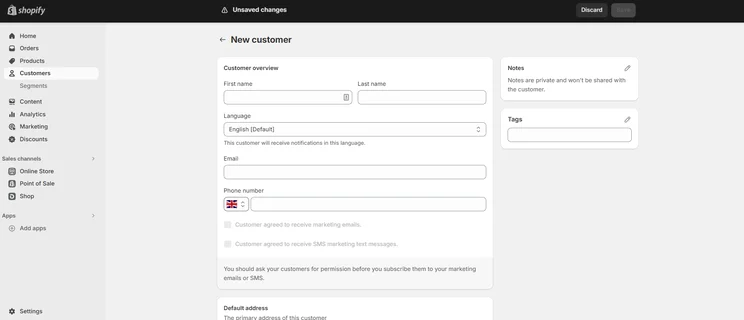
Adding customers is as simple as filling out a form, and you can even use tags to organize them. Image: Tech.co testing
Whether you pick Starter or Retail, you’ll need a Shopify ecommerce account to get started. Because of that, you’ll also have the advantage of getting your own online Shopify store, which is great news: Shopify just happens to be the best ecommerce website builder on the market! Whether you choose to sell online, or stick with a store you already have, you can still use your ecommerce account to streamline your processes and manage your inventory — which is a big advantage.
Still, given its seamless ecommerce integrations and the ability to sync customer transactions across channels, it just makes sense to use Shopify POS with its ecommerce platform. With an account, you’ll be able to set up and customize your own ecommerce website and blog, which will ultimately help you broaden your customer reach. Shopify’s website builder also comes with a useful drag-and-drop store editor, which makes building a professional website as quick as it gets.
You’ll also be able to integrate your store accounts on Amazon and eBay, as well as social media channels. A mobile app syncs instantly with the main POS dashboard, too, letting managers view and make changes while on the go.
Sales and payments
Like most POS packages, Shopify POS software and hardware do come at a cost, but at least the Shopify POS card reader is free, allowing you to accept Visa, Mastercard, American Express, and Discover. Something we’d have liked to see from Shopify POS is more payment options — Square and TouchBistro both feature contactless payments, and Apple Pay, Google Pay, and Samsung Pay would be a great free addition to Shopify’s POS offering, but at least the option is available with the Shopify Tap & Chip Card Reader.
“Shopify gives you the option to sell in over 20 languages, and offers a plethora of handy multilingual apps, and 70 payment gateway integrations. In comparison, other leading POS systems like Square and Clover only let you sell in around 10 languages, making Shopify easily one of the best POS systems out there for international sellers.”

Bill-splitting, cash, partial payments, and store credit are all supported features with Shopify though, which is great. Custom payment options aren’t included but can be added — which we found especially useful for store owners who want to accept checks or IOUs.

Is Shopify POS right for your business?
If your business is retail-focused it just might be. Learn more, or sign up today and get a free 14-day trial.
What payment methods can customers use?

We found the ordering interface for the Shopify POS simple and straightforward. Image: Tech.co testing
All Shopify plans come with Shopify Payments — a fully integrated merchant services processor for card payments, compatible with Shopify POS. Processing rates vary, depending on your plan, but in-person rates are between 2.4 and 2.7%. The Shopify POS Lite plan will lock you into the Shopify Payments processor, but with Shopify POS Pro, you’ll have a choice of over 100 payment providers. Users can choose from Worldpay, 2Checkout, Amazon Pay, DigiPay, Braintree, CyberSource, Paypal Express Checkout, and more.
When it comes to online orders, a customer’s shipping address can be logged in their account for the future, and receipts can be emailed as well as printed. Shopify’s payment options are expansive, compared to other POS systems we’ve tested out. However, our POS frontrunner Square offers just as many flexible payment options, including QR payment options and buy now, pay later (BNPL) services.
Inventory
The best thing about Shopify is that it is constantly updating and improving its system. Since our first Shopify POS review, its inventory has massively improved, and now includes multi-location management, plus QR code shopping and online ordering for curbside pickup on Shopify Pro.
We’ll explain how it works in more detail below.

When adding products, we could easily decide if it was available in the online store, in-person shop, or both. Image: Tech.co testing
The inventory management feature allows you to view your inventory, adjust your inventory counts and create transfers. Products can be listed by category, type, season, sale or more, and barcodes can be quickly assigned as new products are added. Variations on products can also be added, if a change in size, color or material needs to be noted, and every product variation can be given a new price, SKU, and weight as well. You can also view the inventory history of inventory adjustments for products and variants whose inventory is being tracked on Shopify.
For ease of use, products can be added or restocked straight from the mobile app, which is perfect for businesses with more than one location, or for staff on the move.
In comparison to other providers, our research team felt Shopify performed especially well in this category, scoring it 5/5 for its stock management capabilities alone – placing it on equal footing with providers like Square and Clover.
However, large businesses or those with complex inventories may be better off going for Lightspeed instead of Shopify, as the POS offers a number of stand-out capabilities from Excel and CVS data imports to its own Supplier Network.
Analytics and reporting
Shopify POS comes equipped with multiple analytical tools, including a sales dashboard. The POS dashboard tracks and displays the latest sales, orders, and traffic, letting managers know how their business is growing.
Analytics reports can be created both for products (telling managers which items are selling best and when) and for retail (telling managers which staffers sell the most, which customers return the most, and which location does the best overall).
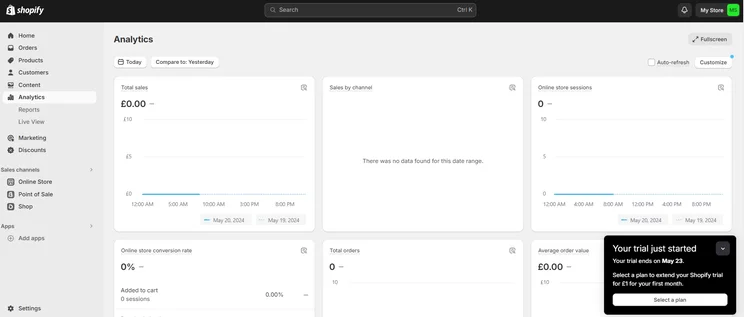
Shopify POS lets you track your performance by total sales, sales by channel, online store sessions, and more. Source: Tech.co testing
Loyalty and marketing
Customer profiles are automatically created with each new order, and can follow a customer across their online and physical purchase histories, allowing you to learn more about your audience. This is especially important for businesses who are interested in growth — with more insights about your customer behaviour, you’ll be able to select, create and sell more products based on their activity.
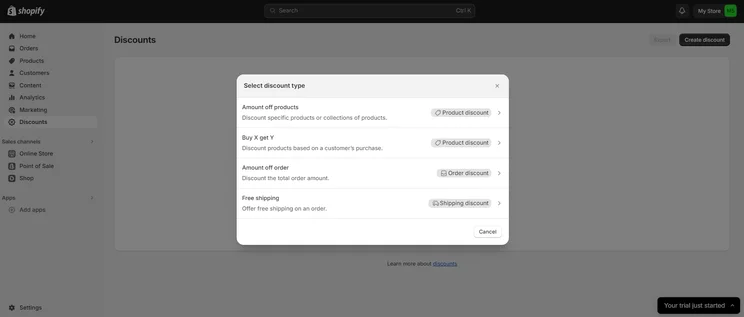
Email addresses can be also collected with each new account. Thse can then be used in email marketing campaigns to bolster return visits and increase your potential earnings. In addition to the above, discount codes can be created and applied via the Shopify POS.
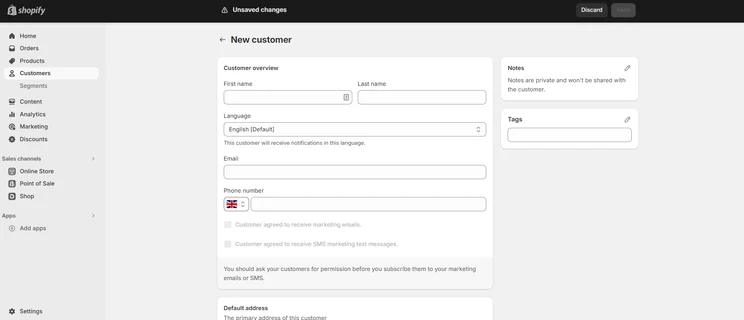
In the Shopify POS, users can add customer profiles for better tracking and engagement. Source: Tech.co testing
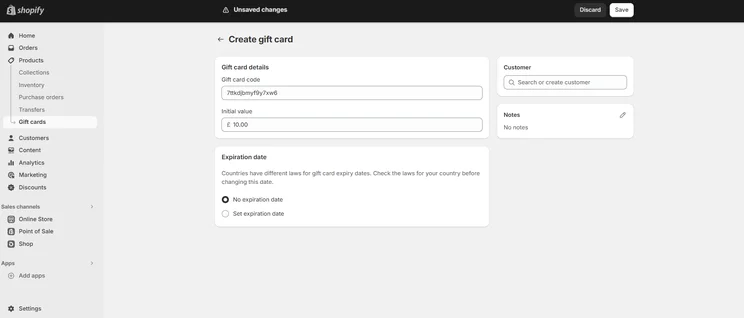
You can also create physical or digital gift cards directly through your Shopify admin. These gift cards can be set at any limit and redeemed by the recipient either in-store or online, making them a useful way to expand your customer base. You don’t have to fork out to use the feature either, as the perk is available in all of Shopify’s pricing plans.
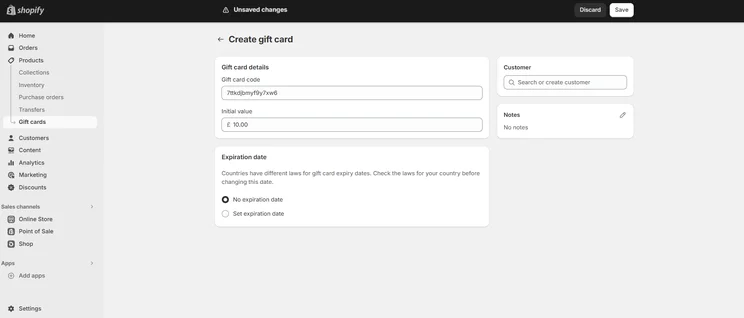
We found that generating a gift card was easy with Shopify. Source: Tech.co testing
Shopify POS Hardware
Like most POS software, Shopify hardware does come at an extra cost but you’ll only need a card reader to get started, so it’s great that the Shopify card reader is completely free. With a card reader you’ll be able to take payments from your smartphone or tablet on the Shopify POS app — but you can choose to boost your POS game with connecting hardware accessories like barcode scanners, printers and cash drawers.
To help you understand how much a Shopify hardware setup could cost you, we’ve outlined the prices of some devices below:
- Shopify Tap & Chip Card Reader – $49
- Shopify Tap & Chip Card Reader with Receipt Printer – $89
- Shopify POS USB-C Tablet Stand – $149
- Shopify Touchscreen POS Terminal – $349
- Shopify POS Terminal Countertop Kit – $459
All Shopify hardware comes with a 1-year warranty, 24/7 support, plus free shipping and returns, which makes its more worthwhile in the long run. If you’re using an Android device, you’ll need a Swipe card reader, but if you’re on Apple iOS you’ll just need the Shopify POS app.
Shopify POS Chip and Swipe Reader
Shopify’s Chip and Swipe Reader comes free with a payment plan. Together with the mobile app, Shopify POS users will be ready to take payments and sell from just about anywhere — farmer’s markets, kiosks, storefront — you name it. The pocket-sized device takes chip cards or swipeable mag stripes.
Here’s a quick video to give you a feel for what this hardware option looks like.
Set Up and Customer Support
Shopify’s support team is available to users of any payment plan by email, live chat and phone, for 24 hours a day, seven days a week. That’s about as comprehensive a support team as any POS user can hope for.
Online resources include guides, a help center, a community discussion forum, and — in what is, to my knowledge, a first for POS services — multiple podcasts aimed at educating and entertaining Shopify users.
Another online resource accessible via Shopify’s website is the Shopify Academy, a free online training program that lets users learn both how to use the service itself, and how to expand their business more broadly. The on-demand courses include lessons like how to grow a business with Instagram or how to “build a print-on-demand empire.”
Support and training

Support options
-
Email: 24/7
-
Live chat: 24/7
-
Phone: 24/7

Training options
-
Community forum
-
Online guides
-
Shopify Academy
-
Help center
Shopify Add-Ons
One of the things we liked most about Shopify is that its app store is filled with thousands of add-on apps for accounting, marketing, and reporting, which are constantly being updated — allowing you to stay ahead of the competition. Apps our team found to be most useful included the no-contact delivery option, free loyalty program, and the newly added Shopify Balance add-on — a small business banking solution than can integrate directly with your Shopify account.
Some of the apps do cost extra though, so it’s worth prioritizing the features you need most. Still, you’ll have plenty of options to choose from, which is something we look for when reviewing a product.
Shopify POS Plans and Pricing
We’ll be the first to admit that Shopify POS pricing can get a bit confusing. Considering you need a Shopify ecommerce account to get started with POS at all, you’ll need to pay for a combination of the two for proper functionality. We’ll do our best to explain below.
For starters, there are three Shopify ecommerce plans to choose from: Basic ($29 per month), Shopify ($79 per month), and Advanced ($299 per month). Each of them offers an increasing number of ecommerce website building and online store features, and a subscription to one of them is required for POS functionality.
Like with other POS systems, credit card transaction fees are charged on top of monthly rates. The fees will depend on your chosen package.
- Shopify Basic users are expected to pay 2.6% + 10¢ for in-person sales and 2.9% + 30¢ for online transactions
- Shopify users will pay 2.5% + 10¢ for in-person payments, and 2.7% + 30¢ per online transaction
- Advanced users will pay 2.4% + 10¢ for in-person sales, and 2.5% + 30¢ for online transactions
- Shopify Plus transaction fees are determined on a case-by-case basis but are priced more competitively than with other plans
Check out our Shopify ecommerce pricing guide to learn more

Not sure which POS is best for your business?
If you're looking to take your in-store and online business to the next level but don't know where to start, you can't go wrong with Shopify POS. It's highly adaptable, compatible with most POS hardware and is the best POS for ecommerce.
|
Plan
|
Price (1-year contract)
The price per month you'll pay if you choose to be billed annually
|
Staff accounts
|
Reporting
|
Transaction fee if not using Shopify Payments
|
Shipping labels
Print shipping labels for orders using a standard printer—no special equipment required.
|
Shipping discount
Competitive shipping rates from DHL Express, UPS, or USPS.
|
Inventory locations
Assign inventory to retail stores, warehouses, pop-ups, or wherever you store products.
|
Hardware peripheral support
|
Verdict
|
|
|---|---|---|---|---|---|---|---|---|---|---|
 |
|
|
|
|||||||
|
Basic |
Grow |
Advanced |
Plus |
|||||||
|
$29/month |
$79/month |
$299/month |
$2,300/month ($399 for your first month) |
|||||||
|
1 |
5 |
15 |
Unlimited |
|||||||
|
Basic |
Standard |
Advanced |
Bespoke |
|||||||
|
2% |
1% |
0.6% |
Bespoke |
|||||||
|
|
|
|
|
|||||||
|
Up to 77% |
Up to 88% |
Up to 88% |
Bespoke |
|||||||
|
Up to four |
Up to five |
Up to eight |
Bespoke |
|||||||
|
|
|
|
|
|||||||
Once you’re set up with an ecommerce account, you’ll have to decide between two POS plans: Starter ($5 per month) and Retail ($79 per month). The Starter plan is pretty basic, allowing for only one POS user and higher transaction fees, while the Retail plan allows for unlimited access, as well as advanced customer, product, and reporting features.
This is because the Retail plan includes the POS Pro system, which allows for this advanced functionality. POS Pro will cost you $89 per location, per month, while POS Lite, the basic version included with the Starter plan, is included across all plans.
So, how does this compare to other POS plans? To be honest, it’s not the best price that we’ve seen. In comparison to PayPal POS and Square, Shopify doesn’t offer the most competitive pricing package. While there are benefits for ecommerce and retail stores, if you’re not already using Shopify’s ecommerce website builder or looking to integrate or expand your retail business online, you might be better off with other POS software.
|
Plan
|
Price
Monthly cost of the software.
|
Transaction fees
|
Users
|
24/7 live support
|
|
|---|---|---|---|---|---|
 |
|
||||
|
Shopify Lite |
Shopify POS Pro |
||||
|
$0/month (free with every base plan) |
$89/month |
||||
|
Basic: 2.6% + 10¢ |
Basic: 2.6% + 10¢ |
||||
|
1 |
Unlimited |
||||
|
|
|
Shopify POS Pros and Cons
One of the biggest benefits of Shopify POS is its flexibility and multichannel integration. With more businesses moving online, it’s the perfect tool for businesses that are looking for a way to integrate their online and in-store sales more seamlessly.
Shopify POS Pro now offers online ordering for curbside pickup, QR code shopping and multi-location management, which allows businesses to be more mobile and competitive in a post-pandemic world.
Another thing Shopify does really well is deliver great customer help and support. After testing the POS out, our team awarded Shopify POS a perfect score for its customer support offering, due to its 24/7 customer support line, online help center, useful video tutorials, FAQs and extensive community forums — which we found especially helpful when we were testing out its features. It’s also really use-friendly, simple to use, and quick to set up, making the onboarding process for businesses even smoother.
Areas where Shopify falls short include is in its offline offering. Without an internet connection, you won’t be able to create or important products, sync orders, manage your existing inventory, or accept credit card payments. You can still accept custom and cash payments if you’re logged in on iOS already, but you won’t be able to do much more than that without a backup connection.
See our summary of Shopify POS pros and cons below.Pros
- Strong ecommerce integration – Shopify POS links up seamlessly to the provider’s website builder platform
- Compatible with most POS hardware – Mix and match your hardware options, and connect your iOS or Android devices
- 14-day free trial – Shopify offers a short trial on all of its plans, letting you test out its software before you invest
- Strong support options – With Shopify you can reach out 24/7 via phone, live chat, and email support channels
Cons
- Steep prices – The average price of Shopify’s POS plans is a lot steeper than other alternatives on the market, making it less suitable for smaller sellers
- No physical terminal – Due to the provider’s iPad set-up you aren’t able to get started on a physical Shopify terminal
- Transaction fees – Shopify charges transaction fees unless you’re using Shopify’s own payments processing system
Alternatives to Shopify POS
While Shopify is one of the best POS systems on the market, and its ecommerce functions give it a unique twist, it isn’t the only good POS option out there.
If you’re not interested in multichannel selling or integrated payment processing, Lightspeed might be a better fit for your business. Lightspeed works with loads of different third-party services to expand the number of features on offer. Lightspeed’s granular stock management tools give Shopify a run for its money too, making it a great alternative for businesses with large or complex inventories. Learn more about how the providers compare in our Lightspeed vs Shopify POS guide.
Square, on the other hand, has significant brand recognition and a large community of users — they can help you find solutions for any problems you might encounter. However, Clover is the best retail POS system we researched and tested, offering an extremely low learning curve, and useful hardware and software packages that allow businesses to hit the ground running.
Find out more in our Clover POS review, or take a look at the main Shopify rivals below.
|
Price
The typical lowest starting price. The lowest price available for your business will depend on your needs
|
Tech.co retail rating
Score out of 5 for general retail suitability based on Tech.co's independent market research
|
Best for
Tech.co's verdict to help you identify the most suitable choice for your retail business
|
Hardware
|
iPad app
Is there a version of the software made specifically for iPad use?
|
Android app
Is there a version of the software made specifically for Android tablet use?
|
24/7 support
|
Get started
|
||
|---|---|---|---|---|---|---|---|---|---|
|
BEST ECOMMERCE POS
|
 |
 |

|
 |
 |

|
 |
 |
|
|
Shopify POS |
Square POS |
Clover |
Vend POS |
PayPal POS |
SpotOn |
Epos Now |
Lightspeed |
||
|
From $0/month |
Free |
From $16/month for 36 months (depending on plan) |
Free |
$0/month |
$29/user/month |
Around $39-$79/month |
From $89/month |
||
|
4.3
|
4.8
|
4.5
|
4.4
|
4.2
|
4.2
|
4.2
|
4.0
|
4.1
|
|
|
Managing in-store and online sales in one platform |
Ease of use |
Managing rapid retail expansion |
Best to track and train employees |
Best for a managing sales on-the-go free option |
Great customization options |
Best small business growth features |
Convenience stores with large inventories |
Managing multiple stores |
|
|
Sold by Shopify, but also works with iPads and Android tablets |
Sold by Square, separately or bundled. Works with most leading brands and has a great free trial. |
Sells a broad range of hardware, including full cash stations and mobile card readers |
Works with a range of of third-party periperals. |
Retails a range of hardware solutions, including card readers and cash registers |
Broad range, packaged with software for a one-time fee |
Available through third-party vendors. |
Works with a range of third-party peripherals |
Specialized hardware available. Not compatible with weighing scales |
|
|
|
|
|
|
|
|
|
|
|
|
|
|
|
|
|
|
|
|
|
|
|
|
|
|
|
|
|
|
|
|
|
|
| Try Shopify | Try Square | Compare Prices | Compare prices | Compare Prices | Compare Quotes | Compare prices | Compare Quotes | Compare Quotes |
How Did We Research Shopify and Other POS Systems?
We take our impartial research and analysis seriously, so you can have complete confidence that we’re giving you the clearest, most useful recommendations. After identifying the most relevant, popular POS platforms on the market, we put them through their paces with hands-on testing to better understand their strengths and weaknesses.
In total, we put 16 POS systems to the test, with a vigorous research and testing methodology. We carried out 40 user testing sessions, which amounted to 720 hours of testing in total.
In these sessions, participants were asked to carry out tasks on POS software and describe their user journey, to help us understand what it’s like to use the systems first-hand. In addition to first-hand testing, we developed a detailed methodology that focuses on six categories of investigation, including criteria like software features and help and support centers.
These categories were broken down into a further 41 subcategories, so we were able to drill down further into certain topics, to make our insights as granular and useful as possible. Here’s an overview of our main testing categories for POS systems:
- Software features: The capabilities provided by the POS product. Includes general features like ordering and payment functionality, as well as industry-specific tools like KSU uploads, inventory-level stock tracking, and kitchen display system (KDS) software.
- Hardware: The quality of a POS system’s hardware selection. The presence of an own-brand terminal, as well as hardware accessories like KDS, receipt printers, and barcode scanners.
- Pricing: The cost associated with acquiring and using the POS system, such as the initial purchase cost, transaction fees, licensing fees, subscription plans, and any additional charges or ongoing costs.
- Ease of use: We test out the software to gauge how intuitive and easy to use it is. We also consider how easy the software is to navigate, and whether any errors took place during testing.
- Help and support: The assistance and resources available to users when they encounter issues or need guidance while using the POS system, including documentation, tutorials, or knowledge bases.
- Customer satisfaction: The aggregate score from customer review sites like Trustpilot and TrustRadius, to understand how POS providers are viewed by their own customer bases.
When it comes to calculating a product’s final score, not all testing areas are weighted evenly, as we know some aspects matter more to our readers than others.
For example, we’ll prioritize certain industry-specific features for specific reviews, like an offline mode when reviewing POS systems for food trucks, or KDS when reviewing restaurant POS systems.
At Tech.co, we have a number of full-time in-house researchers who re-run this testing process regularly to ensure our results remain reflective of the present day.
If you’re a fan of Shopify’s ecommerce platform, there’s no better POS system for business than Shopify POS. In our opinion, it’s a pretty solid POS system across the board. It’s easy to use, offers a brilliant, intuitive interface, and includes great multichannel features, integrations and 24/7 support — making it the perfect POS for businesses interested in selling online and in-person.
If you’re not interested in ecommerce though, the pricing could be a challenge to get your head around, particularly with so many other POS options that aren’t geared towards ecommerce. Still, with thousands of apps, add-ons and useful business tools included in every package, Shopify POS might just be the point-of-sale system that you need.
Frequently Asked Questions
The Shopify app is really simple to use. Once you’ve signed up of a Shopify ecommerce account, and selected either the POS Lite or POS Pro plan, you simply need to download the POS app. To get started, you’ll just need your free Shopify POS card reader — which is included with every Shopify POS package — but we would recommend investing in some hardware like an iPad stand or barcode scanner to get the most out of the software.
Shopify POS hardware costs vary, but all include a 1-year warranty, free shipping, returns and 24/7 support. Retail stands range from $99-$185, Card readers start at $39, barcode scanners range from $229-$329, label printers start from $149 and you can pick up a packet of labels for just $19. Bundles are available, but it may be easier to pick the hardware you need individually. Find out more about Shopify pricing.
Shopify POS Lite is free with every Shopify ecommerce plan, but if you’re interested in more than managing your catalog and accepting customer payments, it might be worth updating to Shopify POS Retail for $79 per month as it comes with lots of useful business benefits.
Yes, Square POS can integrate with Shopify, but if you’re interested in effectively managing your business all in one place, you won’t find a better system than Shopify POS.
Unfortunately Shopify POS isn’t yet available on desktop, but the app does feature lots of supportive POS software that is compatible with your PC. ConnectPOS, for example, is a great app that is suitable for multiple devices, and will work on both Windows and iOS, plus mobile devices.
If you click on, sign up to a service through, or make a purchase through the links on our site, or use our quotes tool to receive custom pricing for your business needs, we may earn a referral fee from the supplier(s) of the technology you’re interested in. This helps Tech.co to provide free information and reviews, and carries no additional cost to you. Most importantly, it doesn’t affect our editorial impartiality. Ratings and rankings on Tech.co cannot be bought. Our reviews are based on objective research analysis. Rare exceptions to this will be marked clearly as a ‘sponsored’ table column, or explained by a full advertising disclosure on the page, in place of this one. Click to return to top of page


