
We may receive a commission from our partners if you click on a link to review or purchase a product or service. Click to Learn More
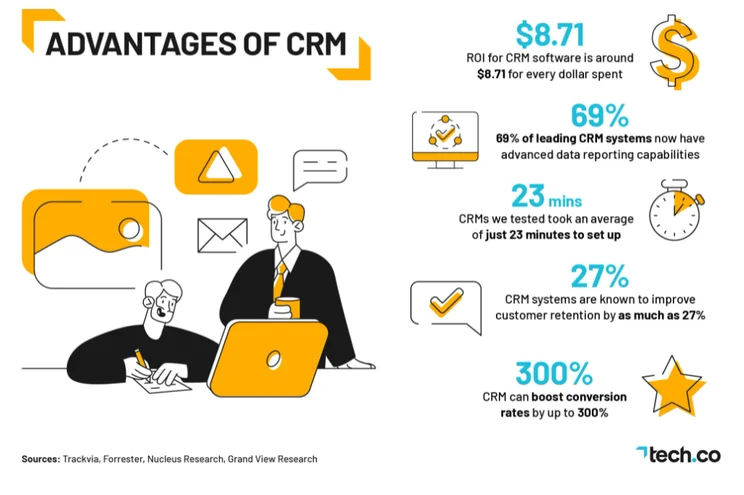
Customer Relationship Management (CRM) software is a vital piece of tech that over 91% of businesses with 11 or more employees are already benefiting from. But, with such a wide range of sectors and industries making the most of CRM technology, how do you know if, or which, CRM system is right for your business? Does every business really need a CRM?
In this guide, we explain why yes, every business needs a CRM, with the research that backs it up. Plus, we’ll explain how the CRM you choose should be tailored to your business needs.On the fence about CRM? Download our FREE Tech.co PDF Guide to CRM Costs
Why Your Business Needs CRM
There are many things that contribute to the success of a business, but none more so than business efficiency. It’s one of the reasons why our research suggests that every business needs CRM software.
Reporting Functionality and Efficiency
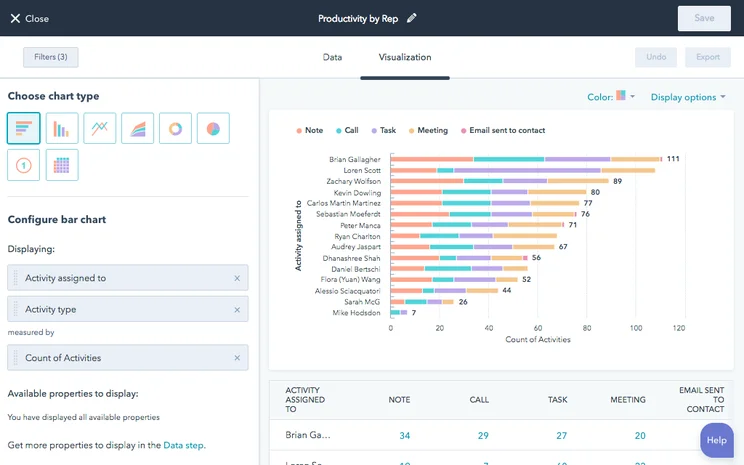
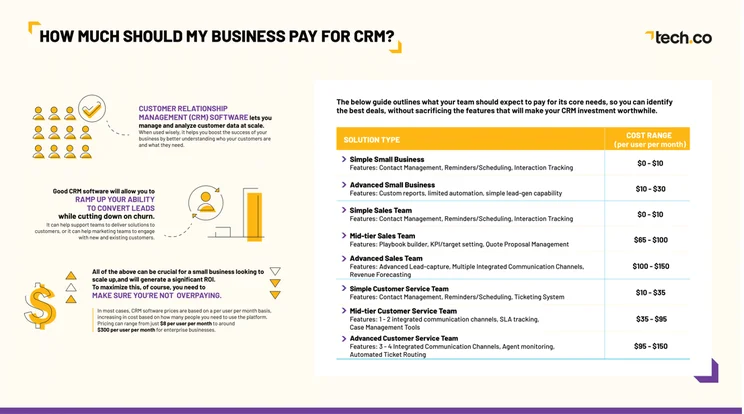
CRM’s are designed to make your business more efficient by offering a place to store, manage and visualize data. Businesses with tight budgets often lack the capital to invest in costly data reporting systems, but with CRM software you’ll be able to see all your data in one. Prices will vary, but even the cheapest software will offer basic data reporting functionality, with some as little as $10 a month able to create customized reports and customizable dashboards.
According to our research, 77% of leading CRM platforms now provide a competent level of data reporting capability. As well as customer information, a lot of CRM systems have the capacity to hold data relating to:
- Stock and products
- Revenue
- Sales leads
- Marketing information
- Operations data
Our research also shows that 69% of leading CRM’s now offer advanced data reporting capabilities.
Whether you’re looking for customer service, marketing, or sales-focused CRM, a system with advanced – or even competent – data reporting capabilities is going to help you understand your business in much finer detail, while saving you both time and money.
Flexible Pricing
If you already know your business needs a CRM, you’ll also know that It’s unlikely that you’ll need every single feature on offer. Most vendors will pack as many features into their software as possible, all in the name of outdoing their competition. However, this often means businesses pay more for CRM systems with features they don’t actually utilize.
The good news is that CRMs all vary in price, so before you invest, make sure you know what features would be most impactful for your business, then shortlist your favorite CRM on offer.
You can use our free CRM comparison tool to filter the main feature you’ll need, or use our research below to help guide you.
Strong ROI
Nucleus Research estimates that CRM software has helped thousands of businesses grow, with a return-on-investment of around $8.71 for every dollar spent. Of course, CRM software, like most systems, is only a tool – but if you use it efficiently, you’ll also be able to reap the benefits.
If you’d like to know exactly how much return on investment a CRM system would provide, simply calculate how much time you spend on monotonous administrative tasks that a CRM system could automate, and consider what you could do with that time instead.
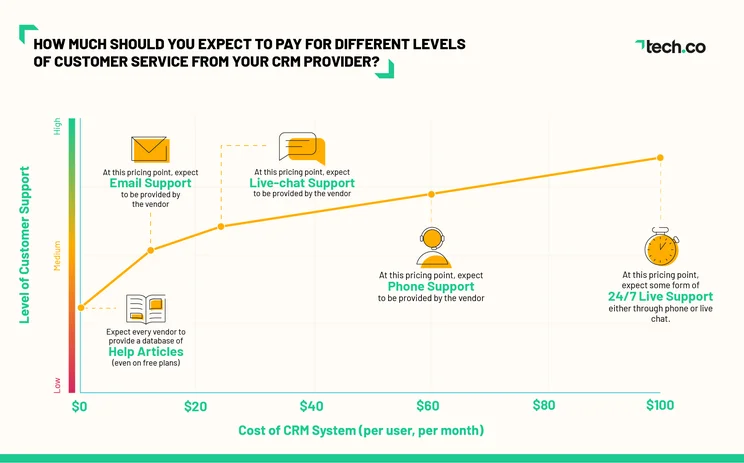
Live support can be costly, depending on your individual business needs, but our research suggests that even the most basic package will offer support.
Tech.co has analyzed over 20 CRM products and created an aggregated score based on the levels of customer support offered by each provider. The graph below charts CRM prices against the level of customer support provided:
CRM is Customizable (If You Can Afford It)
Customization is available with CRM software, but strong customization options are typically tied to higher priced tiers.
With customization you can
- Create ‘Custom Dashboards’ to visualize data of your choosing
- Create ‘Custom Task Types’ that are relevant to your business
- Create data points using ‘Custom Objects’
- Edit the different forms within the CRM system to store relevant info
In our research we analyzed over 20 CRM products and created an aggregated score based on the levels of customization offered by each provider. The graph below charts CRM prices against the level of customization provided:
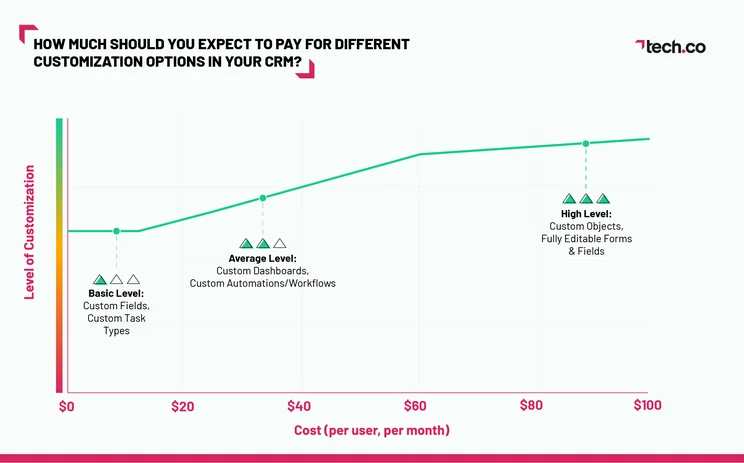
Key takeaways from our research:
- For as low as $0-$10 per month, buyers can expect to be able to create their own custom fields for their CRM system’s in-built forms – for instance, a field for each customer’s unique ID.
- Paying around $20 per month, in most instances, will mean you’ll be able to create custom dashboards and automations up to a set limit.
- Paying $60 per user per month or upwards will allow you to get your hands on a CRM system with fewer limitations on the number of custom dashboards and automations you can create.
- Paying $100 per user per month is when you’ll start to see the very best customization options on the CRM market. This includes the ability to create custom objects and store custom data.
What CRM is Best for Your Business?
No business is the same, and every business will have its own goals, but there are a few things that can help when deciding which CRM is right for your business.
CRM Software for Small Businesses
CRM software is beneficial to virtually any business, but small businesses in particular will reap the best rewards. Due to the scaling nature of smaller companies, these platforms can make a big impact on your ability to attract new customers, as well as retaining current customers.
If you’re a small business owner struggling to manage your customer data, sales pipeline or workflow, the following CRM software can help. Our top pick is Zoho CRM. Zoho compared to Salesforce is less expensive and also offers a free plan to try before you buy, while still having strong features, making it a great fit for small companies.
Check out our best CRM for small business guide for more info.
|
Plan
|
Price
Billed annually
|
Free trial
|
Users
|
Storage
|
Generative AI features
|
Try it
|
||
|---|---|---|---|---|---|---|---|---|
|
SPONSORED
 |
BEST OVERALL
 |
BEST VALUE
 |
 |
 |
||||
|
Salesforce Sales Cloud |
Zoho CRM |
HubSpot |
Freshsales Suite |
monday CRM |
||||
|
Starter Suite |
Professional |
Free |
Growth |
Pro |
||||
|
$25/user/month |
$23/user/month |
Free |
$9/user/month |
$28/user/month |
||||
|
30 days |
15 days |
|
21 days |
14 days |
||||
|
Unlimited |
Unlimited |
2 |
Unlimited |
Unlimited |
||||
|
File storage: 1GB |
User: 20MB |
Unlimited |
2GB |
100GB |
||||
|
|
|
|
|
|
||||
| Try Salesforce | Try Zoho | Try HubSpot | See CRM Deals | Try monday CRM |
CRM Software for Sales
One of the most popular uses for CRM software is to organize your sales funnel. It allows you to manage leads — from capture to conversion — as well as track contacts, analyze data, and automate business practices to save your team time and money.
This kind of CRM was made popular by Salesforce, but there are plenty of other options out there if you’re looking to get started. Take a look at the list below and check out our guide to the best Sales CRM software for more information on which one is best for your business.
|
Free plan
|
Free trial
|
Starting price
|
Verdict
|
Data cap in basic plan
|
Lead capture
|
Accept payments
|
Onboarding
|
Get started
Click to get started and compare prices for your business
|
||
|---|---|---|---|---|---|---|---|---|---|---|
|
SPONSORED
 |
 |
|
 |
 |
 |
 |
||||
|
Salesforce Sales Cloud |
Zoho CRM |
Sales Hub |
Sugar Sell |
Freshsales |
Microsoft Dynamics 365 Sales |
Keap |
||||
|
|
|
|
|
|
|
|
||||
|
30 days |
15 days |
|
7 days |
21 days |
30 days |
14 days |
||||
|
$25/user/month |
$14/user/month |
$9/user/month |
$19/user/month |
$9/user/month |
$65/user/month |
$249/month |
||||
|
A scalable, highly customizable platform that’s great for managing teams |
An attractive option, with lots of features for a low price |
A scalable tool that’s perfect for managing contracts and payments |
A reasonably priced platform offering solid customization options |
A low-cost option that’s great for engaging potential customers online |
An expensive, robust tool for analytics that’s better suited to current Microsoft users |
A suitable all-in-one platform for sales and marketing but a bit expensive |
||||
|
File storage: 1GB |
200MB |
5 documents |
60GB |
2GB per user |
Database: 10GB |
Unlimited |
||||
|
Web forms only |
|
|
Web forms only |
|
|
Web forms only |
||||
|
|
|
Stripe integration |
|
|
|
|
||||
|
|
|
|
|
|
|
|
||||
| Try Salesforce | Try Zoho CRM | Try HubSpot | Get Quotes | Compare Quotes | Get Quotes | Try Keap |
CRM Software for Marketing
CRM software is a bit different for marketing than for other industries. For one, it’s often much more expensive, with prices getting as high as $1,500 per month for some providers. The reason, though, is that CRM for marketing is often laden with automation features that can fully take over your marketing efforts without any need for intervention from your team.
CRM for marketing can allow you to reach new customers and retain loyal customers through email, content, social media, and other mediums, so you are truly everywhere at once. Plus, with plenty of automations, you can take the time to focus on more important, big picture decisions. Take a look at some of our top options here!
Check out our best CRM for marketing guide for more info.
|
Free plan
|
Free trial
|
Starting price
|
Verdict
|
Email marketing
|
Social marketing
|
Content marketing
|
Paid marketing
|
Omnichannel features
|
Get started
Click to get started and compare prices for your business
|
||
|---|---|---|---|---|---|---|---|---|---|---|---|
|
SPONSORED
|
|
 |
 |
|
|||||||
|
Salesforce Marketing Cloud |
Marketing Hub |
Freshmarketer |
Sugar Market |
Keap |
|||||||
|
|
|
|
|
|
|||||||
|
|
|
21 days |
|
14 days |
|||||||
|
$25/user/month |
$9/user/month |
$15/month |
Custom |
$249/month |
|||||||
|
A very expensive option that provides robust email and omnichannel features |
The best option for businesses looking to scale |
A good option for email, but not great for scalability |
A good budget option for covering multiple marketing channels |
A suitable all-in-one platform for sales and marketing but a bit expensive |
|||||||
|
|
|
|
|
|
|||||||
|
|
|
|
|
|
|||||||
|
|
|
|
|
|
|||||||
|
|
|
|
|
|
|||||||
|
|
|
|
|
|
|||||||
| Try Salesforce | Try Hubspot | Get Quotes | Get Quotes | Try Keap |
CRM Software for Customer Service
CRM for customer service is similar to CRM for sales, particularly when it comes to price. These two are so similar, in fact, that many providers will offer them in tandem, like Salesforce’s Essentials plan, which combines the Sales Cloud and Service Cloud into one.
Still, if you’re a customer service team looking for a bit of help, a CRM for sales isn’t going to do the trick. These CRM options we’ve provided below are specifically aimed at helping you take care of your customers easier than ever. Take a look at them to get a better idea of what might be a good fit for your business.
|
Free plan
|
Free trial
|
Starting price
|
Verdict
|
Email Comms Channel
|
Phone Comms Channel
|
Website Live Chat Comms Channel
|
Get started
Click to get started and compare prices for your business
|
||
|---|---|---|---|---|---|---|---|---|---|
|
BEST OVERALL
 |
 |
 |
 |
|
 |
 |
|||
|
Zendesk |
Freshdesk |
Zoho Desk |
Microsoft Dynamics 365 Customer Service |
Salesforce Service Cloud |
ManageEngine |
Sugar Serve |
|||
|
|
|
|
|
|
|
|
|||
|
30 days |
21 days |
15 days |
30 days |
30 days |
30 days |
|
|||
|
$19/user/month |
$19/user/month |
$14/user/month |
$50/user/month |
$25/user/month |
$13/user/month |
$80/user/month |
|||
|
A robust platform aimed at businesses looking to scale |
A practical option with lots of channels but no survey functionality |
An affordable option with plenty of features for smaller businesses |
A great, customizable platform aimed at larger businesses |
An fully-featured yet pricey CRM solution with excellent team management tools. |
A solid budget option with low costs and few features |
A weak offering with few native service channels available |
|||
|
|
|
|
|
|
|
|
|||
|
Requires Telephony integration on Support plans, available on Suite plans |
Available with Omnichannel plans |
|
Available with Enterprise plan |
Requires Telephony integration/Voice add-on on all plans |
|
|
|||
|
|
Available with Omnichannel plans |
Available with Enterprise plan |
|
Limited to 1 license (Essentials), unavailable (Pro), additional cost (Enterprise) |
|
|
|||
| Try Zendesk | Try Freshdesk | Try Zoho Desk | Get Quotes | Try Salesforce | Try ManageEngine | Get Quotes |
Does My Business Need a CRM system?
According to our research, yes. Investing in CRM may seem costly, but in the long run it’ll allow you to spend hard-earned cash on other business priorities.
That’s obviously not to say there are no disadvantages to setting up and using CRM software, but if you can avoid the major pitfalls, like investing in features that you know you won’t use, then the benefits will certainly outweigh the costs.
How to find the right CRM for your business
Understanding your business and knowing your goals is the first step in finding the right CRM for your business.
No two businesses are the same, which is why we designed a free CRM comparison tool to allow you to choose the most important features and functionality relevant to your sector, to compare the different types of CRM available so you can choose the right CRM for your business needs.
- Learn more about CRM software
- Unpack the top 12 benefits of CRM
- Find the right CRM for your business
Frequently Asked Questions
Customer Relationship Management (CRM) software is a tool or resource aimed at helping businesses to organize and automate company operations and processes.
The best CRM software depends on the industry you need it for. Our research shows that the best CRM for marketing is HubSpot, the best CRM for sales is Salesforce, the best CRM for customer service is Zendesk, and the best CRM for small business is Zoho CRM.
The ultimate aim of CRM software is to improve efficiency, streamline productivity, and generally improve the business processes of any company that uses it.
CRM software is incredibly useful for a wide range of reason for any number of businesses. Sales, customer service, and marketing options can streamline customer interactions and data in an easy way, to save time and money. Conversely, CRM software can get a bit expensive, particularly for larger companies. That’s because it’s often charged on a per user per month basis, so make sure you have the budget to handle the added cost.
If you click on, sign up to a service through, or make a purchase through the links on our site, or use our quotes tool to receive custom pricing for your business needs, we may earn a referral fee from the supplier(s) of the technology you’re interested in. This helps Tech.co to provide free information and reviews, and carries no additional cost to you. Most importantly, it doesn’t affect our editorial impartiality. Ratings and rankings on Tech.co cannot be bought. Our reviews are based on objective research analysis. Rare exceptions to this will be marked clearly as a ‘sponsored’ table column, or explained by a full advertising disclosure on the page, in place of this one. Click to return to top of page


