
We may receive a commission from our partners if you click on a link to review or purchase a product or service. Click to Learn More
GoTo Meeting is one of the best video conferencing apps available. It helps businesses schedule, host, and manage both internal and external video conferences.
Attendees can join with video or just over the phone, from desktop or mobile, and using a selection of integrations including Microsoft, Google, and Salesforce. Advanced plans support automatic transcriptions and unlimited recording.
While you may occasionally experience hiccups in audio or video quality, these aren’t unique to any video conferencing service.
Overall, GoTo Meeting delivers a reasonably streamlined, simple service with the features, security and support you need.
|
Price
|
Licenses
|
Participants
|
Time limit
|
Whiteboard
|
Breakout rooms
|
||
|---|---|---|---|---|---|---|---|
|
|
|
|
||||
|
Free |
Professional |
Business |
Enterprise |
||||
|
Free |
$12/host/month |
$19/host/month |
N/A |
||||
|
1 |
Unlimited |
Unlimited |
Unlimited |
||||
|
3 |
150 |
250 |
3,000 |
||||
|
40 minutes |
None |
None |
None |
||||
|
|
|
|
|
||||
|
|
|
|
|
GoTo Meeting Pricing
Users can pick from three different online meeting plans: Professional, Business, and Enterprise. There’s no free plan tier, but a 14-day free trial is available with no payment information required. This free trial is currently extended for businesses helping to fight the pandemic.
Professional Plan
The Professional plan costs $12 per organizer, per month and allows for a maximum of 150 participants — the organizer is the person with the power to host a meeting, while participants don’t even need a GoTo Meeting account to join a meeting, which is why there’s no extra charge for them.
An additional function, GoTo Webinar Lite, is available as a $20 per month add-on.
Business Plan
The Business plan boosts the maximum number of participants to 250 for a charge of $16 per organizer, per month, and includes some features that the Professional tier does not, including unlimited cloud recording, auto-transcriptions, and the ability to include co-organizers are the big ones.
Enterprise Plan
Finally, the Enterprise plan is GoTo Meeting’s custom solution for larger businesses. You’ll need to contact GoTo Meeting’s sales team to figure out what features your custom plan will offer and how much the custom quote will run your company.
Read our GoTo Meeting pricing guide to learn more about the provider’s different software packages.
GoTo Meeting Core Features
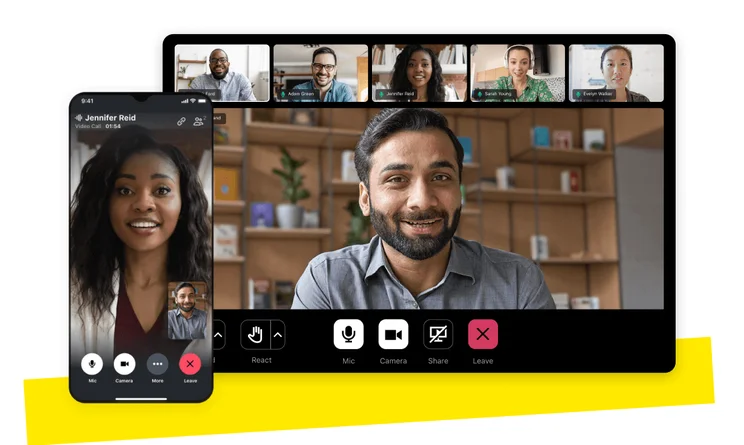
Video and Phone Meetings
GoTo Meeting’s main functionality: Letting organizations run virtual video meetings. Participants can join with video or just with audio, from desktop or mobile devices alike.
Each meeting requires one organizer, who is responsible for running the event, though the Business plan allows for multiple co-organizers as well. It’s an ideal solution for a distributed workforce.
Recording & Transcription
Most businesses will want to keep a record of what was said during a meeting. It keeps everyone accountable and maintains a trustworthy written timeline of business decisions. But keeping notes during a fast-paced video conference can be a pain, making GoTo Meeting’s auto-transcription functionality one of its best features.
When you need to document a meeting, hit the record button to save the video and audio from that meeting. You can pick the file location of the saved video from your preferences page. GoTo Meeting’s AI program, Smart Meeting Assistant, will create an easily searchable transcription of the meeting as well.
The downside here is that you’ll only access these abilities with the Business plan, not the Professional one.
Screen Sharing
If you’ve ever tried to describe a flowchart to anyone, you’ll likely appreciate the screen sharing feature. With it, the organizer can share their own screen, letting participants see their charts and illustrations.
The organizer can choose whether to share their main screen or a second one, and can pick a specific application to share (like PowerPoint or a web browser) rather than just the entire screen.
Mobile Conferencing
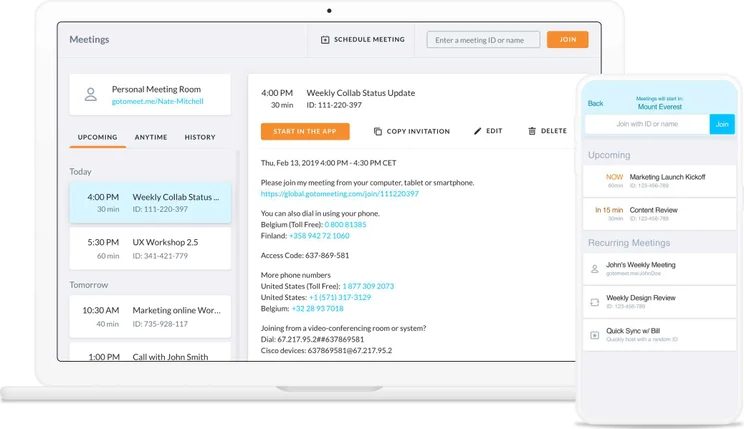
The need for a video meeting doesn’t mean all participants need to sit at their desktop for the entire conference. The free GoTo Meeting app can be downloaded for iOS, Android and Windows Phone, and lets any participants join with full functionality from their mobile device.
Security Compliance
All of GoTo Meeting’s HIPAA-compliant software packages come with the same built-in security features. Every interaction is protected with government-grade AES-256 Bit encryption.
They’ve also ad0pted risk-based authentication, so any suspicious or unusual login attempts will be duly flagged, and offer single sign-on functionality.
Workflow Integration
All of GoTo Meeting’s plans include a variety of integrations to further streamline a business’s operations by making a video meeting feel as effortless as an in-person face-to-face.
The Office 365 plugin is a popular option, letting operations that run on Microsoft’s wares quickly schedule, manage, and join video meetings without leaving their calendar. A Google Calendar plugin does the same for businesses that have opted for G-Suite rather than Office 365, and a Salesforce integration lets organizers and participants jump into meetings from their Salesforce interface.
Finally, a recent addition is the Slack meetings integration, which opens a video conference from within a business Slack account.
GoTo Meeting vs GoTo Webinar
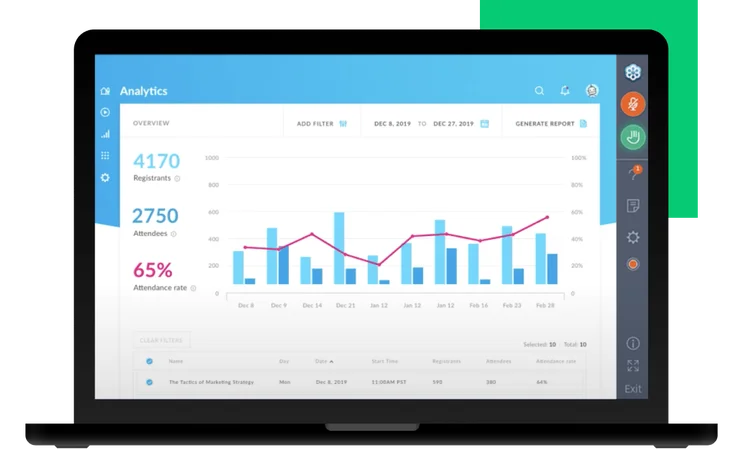
GoTo Meeting and GoTo Webinar offer different features intended for different purposes. If you’re training your employees or offering a presentation to potential clients, you’ll want GoTo Webinar. But if you’re hosting a general meeting in which everyone has the chance to talk, you’ll want GoTo Meeting.
So what’s the difference in functionality between hosting an online meeting and hosting a webinar? GoTo Meeting lets everyone share documents or share their screen, allowing for interactive participation from all. In contrast, GoTo Webinar has one screen, shared by the presenter, while all participants can communicate just through audio or by answering poll questions. This makes GoTo Webinar best suited for marketing, training, or internal one-way briefings.
GoTo Room Video Conferencing Equipment
GoTo Room is GoTo’s all-in-one hardware and software bundle, designed for companies with a need for a conference room dedicated to video calls. Dedicated rooms for businesses’ conferencing services are an increasingly common requirement in today’s global economy, and the GoTo Room bundles are available in a few different varieties.
One GoTo Room kit includes a computer, an audio input like a headset or microphone, a webcam, and the GoTo Meeting conferencing software. You’ll get different bundles for different sizes of conference room, or through two different hardware provider brands, Poly and Dolby Voice.
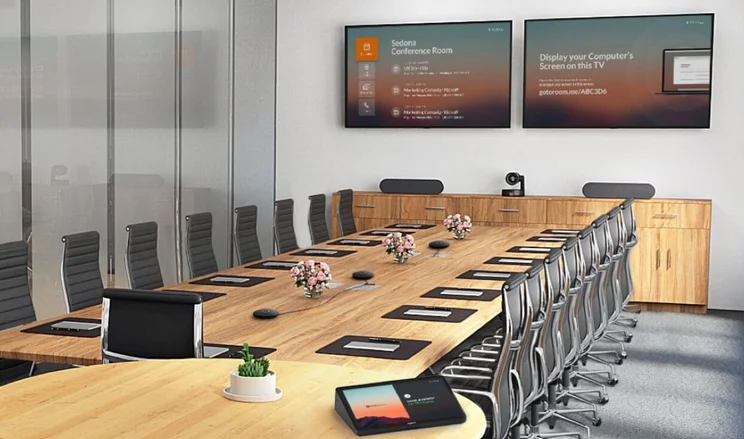
Do I Need GoTo Room?
If you already have all the conferencing room hardware you need, then there’s no need for a GoTo Room bundle. Instead, check out the “InRoom Link” add-on for a GoTo Meeting plan — it’ll let you join a normal GoTo Meeting online meeting with most pre-existing conferencing equipment.
GoTo Room Cost
Costs for GoTo Room bundles are determined on a case-by-case basis, so you’ll need to get a quote to determine how much your specific hardware costs and subscription fee will add up to.
Set Up and Customer Support
Customers across all plans will receive 24/7 phone and email support from live representatives, as well as live and on-demand training.
In addition, qualified accounts on the Enterprise plan will be assigned a dedicated customer success manager to ensure the adaptation process goes smoothly, in addition to any custom onboarding and training needed.
GoTo Meeting Alternatives
You’ve learned a lot about GoTo Meeting so far, and we’ll be the first to admit that it isn’t for everyone. We believe it’s the best option available, but there are plenty of other options when it comes to your video conferencing needs.
From popular platforms like Zoom and Google Meet to business options like Webex and Lifesize, you’ll be able to find exactly what you’re looking for, given the massive size of the industry. Take a look at the table below to get a better idea of what these platforms offer to businesses like yours.
|
Starting price
The lowest starting price for a paid plan. The lowest price available for your business will depend on your needs
|
Free plan
|
Maximum participants
|
||
|---|---|---|---|---|
 |
 |
 |
 |
 |
|
Zoom |
RingCentral |
Google Meet |
Microsoft Teams |
Slack |
|
$14.16/user/month |
$10/user/month |
$7/user/month |
$4/user/month |
$7.25/user/month |
|
|
|
|
|
|
|
300 |
200 |
1,000 |
300 |
50 |
GoTo Meeting vs Google Meet
GoTo Meeting is a strong business option, but Google Meet has some serious capabilities behind its platform as well. For one, the Google Meet free plan is decidedly robust, allowing for 100 participants for up to 60 minutes, compared to GoTo Meeting allowing only 3 participants for 40 minutes.
Still, GoTo Meeting has a number of business features that are little more useful, but the paid version of Google Meet, dubbed Google Workspace, allows for a lot more, including access to the massive family of Google apps, like Gmail and Google Calendar.
|
Price
|
Licenses
|
Participants
|
Time limit
|
Whiteboard
|
Breakout rooms
|
||
|---|---|---|---|---|---|---|---|
|
|
|
|
|
|
|||
|
Free |
Starter |
Standard |
Plus |
Enterprise |
|||
|
Free |
On request |
||||||
|
1 |
up to 300 |
up to 300 |
up to 300 |
Unlimited |
|||
|
100 |
100 |
150 |
500 |
1,000 |
|||
|
60 minutes |
24 hours |
24 hours |
24 hours |
24 hours |
|||
|
|
|
|
|
|
|||
|
|
|
|
|
|
GoTo Meeting vs Zoom
Zoom is obviously another great alternative for video conferencing, although it’s not particularly aimed at businesses, unlike GoTo Meeting. It’s easy to use and offers strong security after struggling at the beginning of the pandemic. Its end-to-end encryption is something even the best platforms don’t offer.
Still, we’d largely recommend GoTo Meeting over Zoom for your business, as it offers more features on that end and is very slightly more affordable when it comes to paid plans. The cheapest GoTo Meeting plan is only $12 per user, per month, whereas Zoom’s cheapest plan is $13.33 per user, per month (Pro plan, billed annually).
|
Price
|
Licenses
|
Participants
|
Storage
|
Time limit
|
||
|---|---|---|---|---|---|---|
|
|
|
|
|
|||
|
Basic |
Pro |
Business |
Enterprise |
|||
|
Free |
$14.16/user/month |
$15.58/user/month for the first year, then $18.33/user/month |
Custom pricing |
|||
|
1 |
1-99 |
1-250 |
Minimum 250 |
|||
|
100 |
100 |
300 |
500+ |
|||
|
Local only |
Local + 10GB cloud |
Local + 10GB cloud |
Local + unlimited cloud |
|||
|
40 minutes |
30 hours |
30 hours |
30 hours |
GoTo Meeting is a strong product for any business that needs a dependable, easy-to-use video conferencing solution. The Business plan is likely the best option, given the useful auto-transcription feature and support for co-organizers. However, a smaller operation may find the inexpensive Professional plan best suits their needs. Either way, the solution’s features and support team can go toe-to-toe with any other video meeting software on the market.
Frequently Asked Questions
GoTo Meeting does not offer a free plan. It does offer a 14-day free trial, but that’s as close as it comes. However, participants can attend a meeting for free: they only need to download the app. In order to host a meeting, you’ll need to buy a plan and join the meeting as its organizer rather than as a participant.
Yes, you’ll need to have the GoTo Meeting app for desktop or mobile in order to login to a meeting. The app is free to download for participants, since only the organizer of each meeting needs to have a paid account.
An organizer with a paid GoTo Meeting subscription can start a meeting by logging in, clicking the “Schedule a Meeting” button on their homepage, entering a meeting title, selecting a date and time, and picking which audio options to allow (such as VoIP, long-distance numbers, and/or toll-free numbers), then deciding whether or not to require a password.
Alternatively, they can immediately start a meeting with the click of a button, and then share the direct link to those you’d like to join.
To join, participants can click a directly-shared link, or click their calendar invitation link at the desired time to be directly sent to the video meeting.
Yes, GoTo Meeting is about as safe as video conferencing software gets. While your data will still be sent across the internet, it will be encrypted first, and it’ll be saved in GoTo Meeting’s SOC2-certified data centers.
Cybersecurity is constantly evolving, so it’s difficult for anything to be entirely safe, but GoTo Meeting offers a secure software solution.
If you click on, sign up to a service through, or make a purchase through the links on our site, or use our quotes tool to receive custom pricing for your business needs, we may earn a referral fee from the supplier(s) of the technology you’re interested in. This helps Tech.co to provide free information and reviews, and carries no additional cost to you. Most importantly, it doesn’t affect our editorial impartiality. Ratings and rankings on Tech.co cannot be bought. Our reviews are based on objective research analysis. Rare exceptions to this will be marked clearly as a ‘sponsored’ table column, or explained by a full advertising disclosure on the page, in place of this one. Click to return to top of page


