

We may receive a commission from our partners if you click on a link to review or purchase a product or service. Click to Learn More
Webinars have become an increasingly popular tool for B2B businesses to reach new customers in 2026. If you’re not already reaching out to your audience in this way, then you could be missing out.
Simply scheduling a webinar won’t get the job done, though. You need to follow webinar best practices if you want to ensure that your attendees trust what you’re saying and are willing to buy what you’re selling.
In this guide, you’ll learn about what you need to do to host a successful webinar with platforms like Riverside, and we’ll give you some tips and tricks to make sure you get it right on the first try.
- Set clear goals — It’s important to understand why you are hosting a webinar before you get started, as your motivation will drive a lot of other decisions.
- Choose your topic and format — Webinars come in all kinds of shapes and sizes, so make sure you know what direction you’re going from the get-go.
- Select a webinar platform — The right platform will provide an all-in-one hub for livestreaming, recording, editing, and promoting.
- Schedule your webinar — Picking the right day and time for your webinar is more important than you think, so do a bit of research about your specific topic and industry.
- Produce pre-webinar materials — From landing pages and poll questions to calls-to-action and branding materials, make sure everything you need is ready before the day of your webinar.
- Rehearse — Even if you have a script, it helps to do a bit of rehearsal, especially if you’re planning to livestream to a larger audience.
- Collect feedback — When the webinar is done, your job is not over. Make sure to grab some feedback and analyze your results, so you know what worked and what didn’t.

Studio-level quality. No studio required.
Record, edit, repurpose, and distribute content as easily as if you had a crew behind you.
AI-Powered
Webinar Best Practices and Tips
To ensure that you have the best webinar experience, it’s important to follow some webinar best practices. Our suggestions include:
- Eliminate technical failures: Getting disconnected can ruin the trust of your webinar, which is why taking measures like recording locally can save you a lot of trouble.
- Prioritize promotion: A webinar without any attendees is hard to watch, which is why you need to make sure you are properly promoting it to drive attendance, lead generation, and brand authority.
- Brand the audience journey: From registration to post-event engagement, make sure that your webinar is consistently branded to build trust amongst potential customers.
- Utilize interactive elements: The best way to be engaging is to use interactive elements, like breakout rooms, polls, and gamification tools, to reach your audience.
- Repurpose content: Your job isn’t over when the webinar is done. To adequately promote your webinar, you need to be repurposing content to drive viewership even higher.
Keep reading to learn more about these tips and tricks, and to see how Riverside can help you implement these webinar best practices instantly.
1. Eliminate Technical Failures
Technical failures can stop a webinar in its tracks. A dropped connection can erode viewer trust almost instantly, but the reality of livestreaming is that anything can happen and you have to roll with the punches.
If you want to ensure that your viewers have the utmost faith in your business, you need to find a way to eliminate technical failures, either through robust backup plans or by locally pre-recorded webinars that can be uploaded.
Solution
Riverside allows users to pre-record and locally save webinar recordings. You can then edit them, add specific elements, and schedule them to be launched during your given time. This takes the stress out of livestreaming and allows you to get it right without all the pressure.
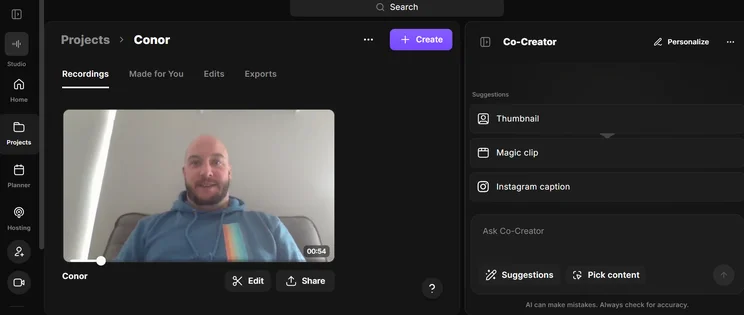
Riverside allows you to record locally, so you don’t have to rely on a livestream to get your message out there. Source: Tech.co testing
2. Prioritize Promotion
One of the hardest things about webinars is getting people to attend. After all, your webinar can’t be successful if no one is there to see what you’ve put together.
That’s why promotion is so important. You want to be sure to announce your webinar early, around four to six weeks before the event, build a landing page, and leverage email marketing to get attention.
Solution
Another important way to promote your event is to publish it on different platforms. With Riverside, you can easily livestream your event on Facebook, X, YouTube, LinkedIn, or Discord, to find your customers where they view videos.
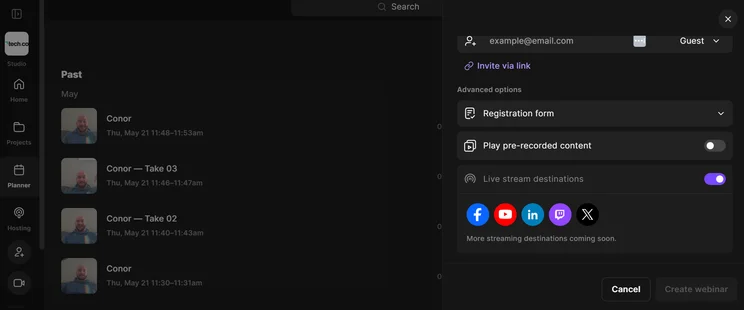
Riverside allows you to host livestreams on different platforms, to improve promotion opportunities. Source: Tech.co testing
3. Brand the Audience Journey
A first impression is a lasting one, and with webinars, professionalism should be your number one priority. The best way to achieve that out of the gate is with company branding throughout the webinar process.
The invite, the landing page, the email marketing, and everything in between should be consistently branded with your company colors and logo, so that your customers know that you mean business.
Solution
Riverside provides simple branding tools directly in its studio interface, allowing users to add branding colors, logos, backgrounds, and anything else that might contribute to the branding of your webinar for potential customers.
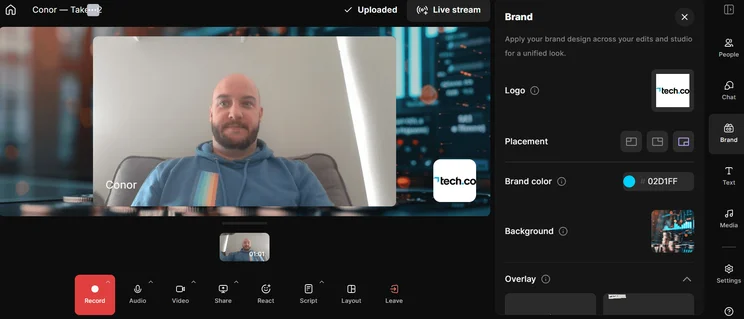
Riverside makes it easy to add your business branding to your webinar. Source: Tech.co testing
4. Utilize Interactive Elements
An engaged audience is a warm audience, but they aren’t going to be at full attention with long speeches and boring slide decks.
If you want to really involve your audience, you need to make sure they are fully engaged with specific elements that draw their attention to the webinar. Be sure to utilize tools like polls and live chat, so you can keep your audience glued to the screen.
Solution
Riverside allows you to easily add these interactive elements during webinars, but you can also pre-record some elements to make it easier in the long run. Call-to-action buttons, for example, can be added on a timer, so you can pick the right moment to convert.
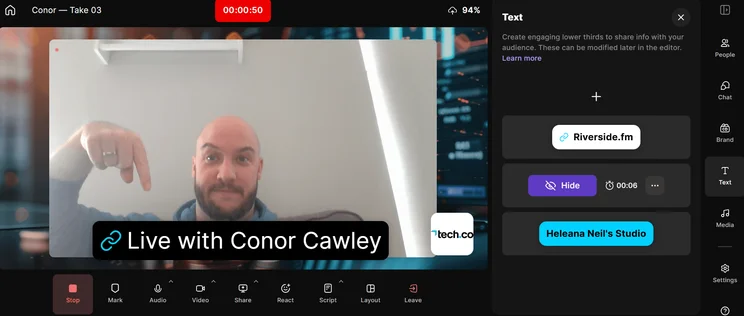
Riverside allows users to add engaging elements like buttons to webinars to capture audience attention. Source: Tech.co testing
5. Repurpose Content
Your job isn’t over when the webinar timer runs out. In fact, if you want to make sure your webinar stays successful in the long run, you need to consider repurposing your content on different channels.
Social media is the best for this. By creating clips and graphics, you can have a virtually endless stream of content to publish that can drive more conversions and further establish your business.
Solution
If you don’t have the time or energy to create and edit all those social media clips, Riverside provides a tool called Magic Clips, which automatically generates and edits clips for you to use right away.
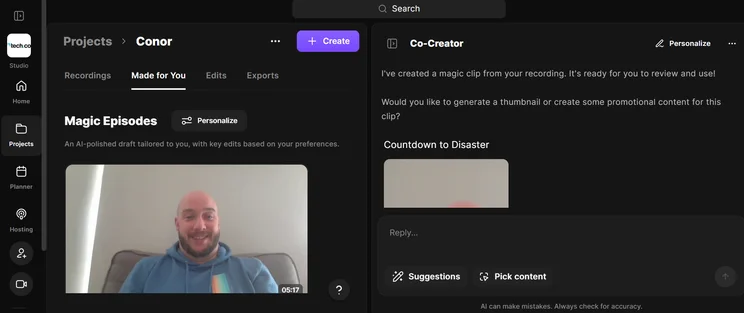
Riverside can generate social media clips for you, so you can promote your webinar, even when it’s over. Source: Tech.co testing
There’s a lot of effort that goes into hosting a successful webinar. Technical failures and a lack of promotion can kill all your momentum, and failure to repurpose content or brand your audience journey is enough to guarantee a poor return-on-investment.
With the webinar best practices listed above, though, you can be confident that your investment in webinar platforms like Riverside are a worthy endeavor for the success of your business, in the long term.
Frequently Asked Questions
B2B webinars should be approximately 45 to 60 minutes. In this range, viewer engagement remains high, with an average conversion rate of 26%-29%, according to a study from Focus Digital.
To ensure that your webinar doesn’t fail due to technical issues, you need a backup plan. That backup plan should include an internet outage alternative, like a mobile hotspot, a co-host or moderator that can take over the broadcast if the original host is disconnected, and a pre-loaded local copy of the slide deck to share immediately.
The best day and time to host a live webinar depends on your audience, the industry you’re in, and the time zone that your business is in. Generally, though, Tuesday at 11am are considered the best times to host webinars, according to various studies.
If you click on, sign up to a service through, or make a purchase through the links on our site, or use our quotes tool to receive custom pricing for your business needs, we may earn a referral fee from the supplier(s) of the technology you’re interested in. This helps Tech.co to provide free information and reviews, and carries no additional cost to you. Most importantly, it doesn’t affect our editorial impartiality. Ratings and rankings on Tech.co cannot be bought. Our reviews are based on objective research analysis. Rare exceptions to this will be marked clearly as a ‘sponsored’ table column, or explained by a full advertising disclosure on the page, in place of this one. Click to return to top of page


