
We may receive a commission from our partners if you click on a link to review or purchase a product or service. Click to Learn More
Microsoft Teams is a robust team collaboration platform that includes an excellent conference call tool to help coworkers stay in touch, whether they’re in the office or working from home. With a starting price that undercuts a lot of similar software platforms and a vast selection of both native and third-party integrations, it’s easy to see why Microsoft Teams has become the go-to easy solution for millions of businesses over the past few years.
It’s worth noting that Microsoft Teams offers a lot more overall functionality than the average video conferencing tool. Like rival Slack, it offers a full-on suite for team communication, equipped with team messaging, file sharing, audio and video calling, and a massive app store to expand functionality even more. It truly is an all-in-one collaboration tool.
In our Microsoft Teams review, I’ll explain all the ins and outs of the platform’s features and pricing, and share with you some of my experiences from using the platform. I’ll also go through some alternatives worth considering.
- All-in-One Collaboration: Beyond standard video calling, Microsoft Teams functions as an all-in-one hub combining team messaging, file sharing, co-authoring, and hundreds of app integrations.
- Seamless Microsoft Integration: The platform integrates directly with Microsoft 365 services like Outlook and OneDrive, offering robust calendar and file-syncing features despite a slightly steeper learning curve than simpler alternatives.
- Exceptional Value & Pricing: Starting with a surprisingly generous free plan and paid tiers from just $4/user/month, Teams significantly undercuts competitors like Zoom, RingCentral, and Google Workspace.
- Ideal for Ecosystem Users: With support for up to 300 participants and frequent feature updates, Teams is one of the best choices available for businesses looking to centralize remote and hybrid workflows.
Tech.co has been around longer than the iPhone, and we’ve been advising businesses on the must-have tech for just as long. We have spent hundreds of hours researching web conferencing products over the years, using them ourselves and assessing the highs, and lows, of each platform, so your company doesn’t make a costly mistake.
When it comes to the cost of web conferencing tools, we take a deep dive into not just the displayed price, but also what you’ll get for it, as well as the hidden costs the providers might not shout about. We can also tell you if the final price really offers great value, or whether you’re better taking your business elsewhere.
(Pricing updated 23rd July 2026)
Microsoft Teams

In Short
-
Pros:
- Lots of team collaboration features, including the ability to coauthor content
- Robust free forever version
- Seamless integration with Microsoft platforms like Outlook, OneDrive, and Office
-
Cons:
- A bit more complicated than other options, given the vast functionality
- Forced to download the app on mobile and desktop to operate
Pricing
- Essentials: $4/user/month
- Basic: $6/user/month
- Standard: $14/user/month
- Free plan available
- One month free trial
- Copilot add-on: $30.00/user/month
Images

Microsoft Teams Review and Key Features
In this section, we’ll go over the top things you need to know about Microsoft Teams, highlight some of the platform’s key features and discuss some experiences from a recent test of the platform.
Microsoft Teams: Quick Fact File
Now, before we really dive deep into what makes Microsoft Teams tick, let’s take a quick look at some of the basics about the platform, to get you acclimated with the popular collaboration platform. Here are a few quick facts about Microsoft Teams:
- Microsoft Teams is comparatively affordable to other video conferencing tools (from $4/month).
- Microsoft Teams integrates seamlessly with other Microsoft services like Outlook and Office.
- Microsoft Teams offers hundreds of collaborative apps that can integrate with the platform.
- Microsoft Teams is a little harder to use than other video conferencing platforms.
- Microsoft Teams is frequently updated based on customer feedback
Get the picture? Well, now that you know a bit about Microsoft Teams, let’s check out some of the specifics about the platform.
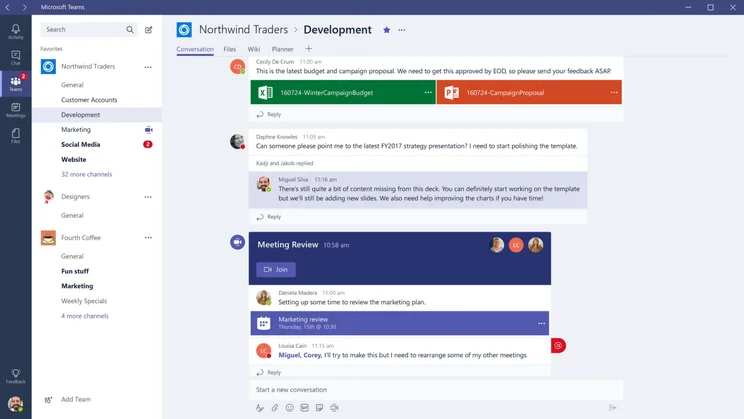
In Microsoft Teams, it’s easy to share documents, spreadsheets, meeting links in a central space, so you don’t lose track of anything. Image: Microsoft Teams
Microsoft Teams Key Features
As is often the case with video conferencing tools, Microsoft Teams offers a free forever plan that you can use at no cost. However, it’s understandably a bit limited, which is why we’ve outlined below which features you can expect to utilize on the free plan, and which ones you’ll have to pay a little extra for.
Available in free plan:
- Unlimited 1-on-1 meetings up to 30 hours
- 60-minute time limit for group meetings
- Up to 100 participants
- 5GB of cloud storage
- File and document sharing
- Meeting polls
- Screen sharing
- Team messaging
Available in paid plans:
- Unlimited group meetings up to 30 hours
- Up to 300 participants
- Between 10 GB and 1 TB of storage
- Live captions
- Breakout rooms
- Noise suppression
- Whiteboarding
- Collaborative annotations
I recently tried Microsoft Teams to get a feel for how the platform works. As a company that uses Slack for its team communication needs, we found that Microsoft Teams is remarkably similar in form and functionality.
The interface is certainly plainer than Slack’s, but Teams still provides everything you need at your fingertips, including private messages, channels, and “Activity” tab to keep track of mentions, replies, and threads. Both platforms have a “Files” tab, which houses all the documents, images, videos, and other content shared with you throughout the platform, which makes it easy to revisit important data.
One of the major differences, however, is that Microsoft Teams has a dedicated Calendar tab that allows me to more effectively check my own schedule, as well as my coworkers. I also liked that the Teams Files tab is connected to OneDrive, so you could potentially access files across your devices, rather than just in Teams on one device.
All in all, I found Microsoft Teams to be a comprehensive communication platform that offers all the functionality of Slack with a bit more Microsoft flair, making it an ideal fit for those already using other Microsoft services like Outlook and OneDrive.

Microsoft Teams Pricing
Microsoft Teams pricing makes it quite an attractive option for businesses looking for a video conferencing solution. The starting price, at only $4 per month, undercuts the majority of competitors by a lot, including Zoom at $13.33 per month and RingCentral at $11.99 per month. It even undercuts Google Meet, with its paid plans starting at $7 per month for Google Workspace.
Microsoft offers three different pricing plans on top of its free forever plan. The Essentials plan is a significant upgrade from the Microsoft Teams free plan, whereas the Business Basic and Business Standard plans unlock a wide range of other Microsoft services, like OneDrive, Outlook, and Office.
Check out the pricing table below to see how they match up against each other and keep scrolling for a more in-depth look at these pricing plans and what they offer.
|
Price
|
Licenses
|
Participants
|
Time limit
|
Whiteboard
|
Breakout rooms
|
||
|---|---|---|---|---|---|---|---|

|
|
|
|
||||
|
Microsoft Teams |
Microsoft Teams Essentials |
Microsoft 365 Business Basic |
Microsoft 365 Business Standard |
||||
|
Free |
$4/user/month |
$6/user/month |
$14/user/month |
||||
|
Unlimited |
Unlimited |
Unlimited |
Unlimited |
||||
|
300 |
300 |
300 |
300 |
||||
|
60 minutes |
30 Hours |
30 hours |
30 hours |
||||
|
|
|
|
|
||||
|
|
|
|
|
Microsoft Teams Free – $0 per month
The Microsoft Teams free plan is surprisingly good value compared to other free plans on the market. In addition to standard features like screen sharing and team messaging, you also get access to meeting polls and 5 GB of cloud storage, features that are typically locked behind a paywall for other providers like RingCentral. On top of that, you get hour-long meetings for up to 100 participants, which is also better than a lot of competitors, like Zoom and GoTo Meeting, which only allow for 40 minutes.
Perhaps more importantly, though, is that this Microsoft Teams free plan allows for collaborative tasks, a project management feature rarely found in video conferencing software at all, no matter how much you pay. This makes Microsoft Teams a bit more versatile than most other tools, and why it became so popular during the pandemic.
This plan is geared more towards individuals than businesses looking for more control, though. Beyond those basic task assignments, the free plan is pretty limited for businesses, allowing for only one user, which means businesses will likely have to upgrade to get more admin control. Plus, with meetings limited to only 60 minutes, you can’t really get on a roll with your colleagues like you might need to.
Microsoft Teams Essentials – $4 per month
The Microsoft Teams Essentials plan is more geared towards businesses, allowing for a bit more collaboration and control by admins. For starters, it unlocks a bunch of business-facing features, like document sharing, whiteboarding, and cloud recordings. On top of that, you’ll get access to Microsoft and third-party integrations, including ClickUp, Salesforce, monday.com and hundreds of others in their dedicated app store.
When it comes to basics, you also get more allotments with this plan, with unlimited 30-hour-long meetings for up to 300 participants. Plus, you’ll get additional cloud storage, ramping it up from 5GB in the free plan to 10 GB with the Essentials plan.
All in all, you’re going to have a hard time finding a better deal for a premium video conferencing solution than the Microsoft Team Essentials. At only $4 per user per month, you get access to features typically found in paid plans in the $10-$15 range, along with the Microsoft library of apps for unlimited customizability.
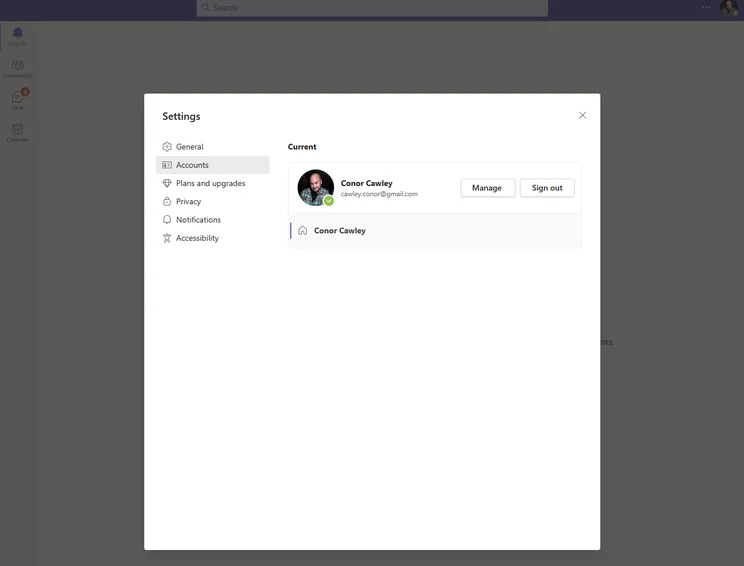
We found profile creation in Microsoft Teams really straightforward. Image: Tech.co Testing
Microsoft 365 Business Basic – $6 per month
Now, if you’re after more than just a video conferencing tool, you can also opt to purchase the Microsoft 365 all-in-one hub, which includes Microsoft Teams, as well as a suite of other Microsoft services, like Outlook, OneDrive, Office, and Exchange. This will act as a full-on business hub for your company, as well as a communication tool.
As far as actual features are concerned, the Microsoft 365 Business Basic plan ups the ante to 1 TB of cloud storage and unlocks live captions and meeting recordings with transcription for your team.
The Microsoft 365 Business Basic plan is more comparable to the Google Workspace Business Starter plan, which also costs $6 per user, per month, and unlocks similar business hub features, as well as access to Google Meet. Which one is better? It really depends on your preference for Google versus Microsoft platforms, but our research found Google Workspace is a better overall experience.
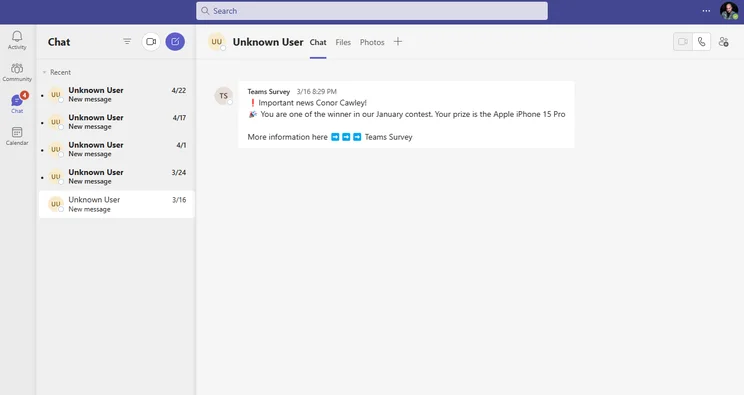
Microsoft Teams interface is clean and simple to use. Image: Tech.co testing
Check out our Google Meet vs Microsoft Team guide for more information
Microsoft 365 Business Standard – $14 per month
If you’re an enterprise-level business that needs even more features for your all-in-one business hub, the Microsoft 365 Business Standard plan adds a myriad of premium features, like advanced reporting and webinar hosting to the mix.
On top of that, you get access to customer appointment management through Microsoft Booking, which could be good for businesses that need to book customers for meetings and events. Most importantly, this plan gives users access to the desktop versions of Microsoft 365 apps, like Outlook, OneDrive, and Office, as well as Microsoft Publisher and Microsoft Access, although they are only available on PC.
This plan probably isn’t exactly necessary for the majority of smaller businesses, as it costs more than twice as much as the Basic plan and doesn’t add too much in terms of functionality. Still, if anything mentioned above feels worth the added cost, we aren’t going to stand in your way.
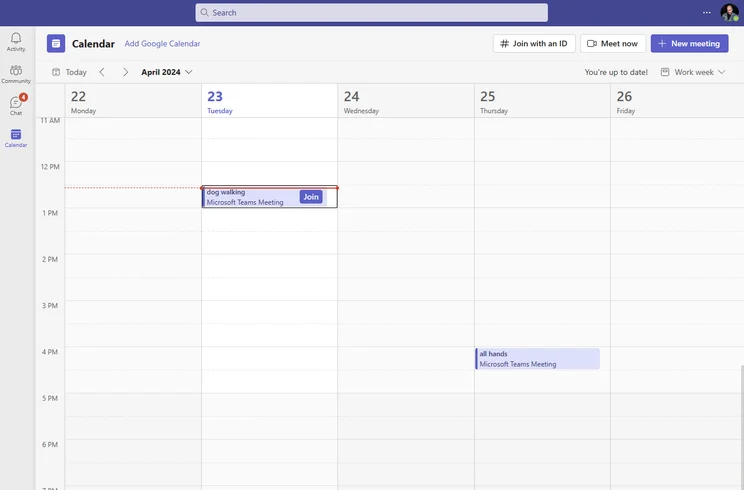
Microsoft Teams includes calendar functionality for easy scheduling. Image: Tech.co testing
Microsoft Teams Alternatives
Microsoft Teams is a great choice for any business that might want to make life easier for remote employees, particularly if you’re already set up with the rest of the Microsoft 365 business suite.
Still, it’s not perfect for everyone, which is why we’ve put together some of the best Microsoft alternatives for you to take a look at. They all do slightly different things, so it’s worth remembering that it’s only really Slack that can go like-for-like with Teams in a true match-up.
|
Starting price
The lowest starting price for a paid plan. The lowest price available for your business will depend on your needs
|
Free plan
|
Best for
|
Pros
|
Cons
|
||
|---|---|---|---|---|---|---|
|
|
BEST ALTERNATIVE
 |
 |
 |
 |
 |
|
|
Microsoft Teams |
Zoho Meeting |
Zoom |
RingCentral |
GoTo Meeting |
Google Meet |
|
|
$4/user/month |
$1/month |
$14.16/user/month |
$10/user/month |
$14/month |
$7/user/month |
|
|
|
|
|
|
|
|
|
|
Microsoft 365 users |
Value |
Beginners |
Security |
Sound and video quality |
Google Workspace users |
|
|
|
|
|
|
|
|
|
|
|
|
|
|
Microsoft Teams vs. Zoho Meeting
Zoho Meeting is our top pick as the best Microsoft Teams alternative, mostly because of the low, flexible pricing that can help small businesses get started. Plus, Zoho offers a wide range of other tools, which makes integration easier in the long run.
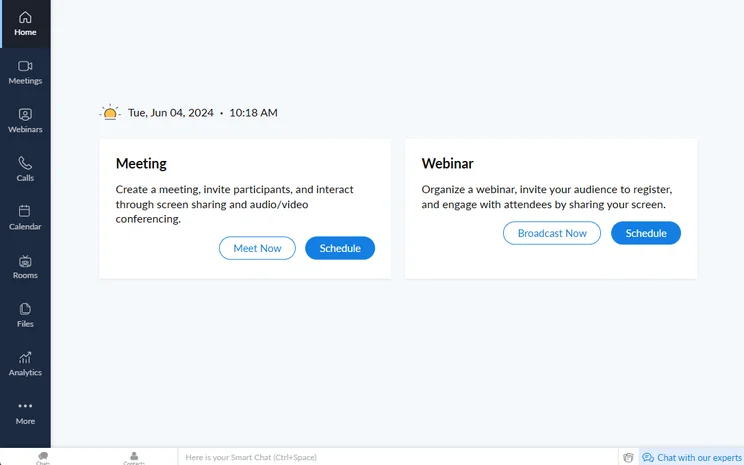
You can easily start a meeting in Zoho Meetings with the click of a button. Image: Tech.co testing
Microsoft Teams vs. Google Meet
Google Meet is another excellent choice, as it also offers a business suite of tools rather than just the video conferencing functionality. It obviously works better with Google services like Gmail and Drive, rather than Microsoft services, so be sure to clarify which one your team uses more.
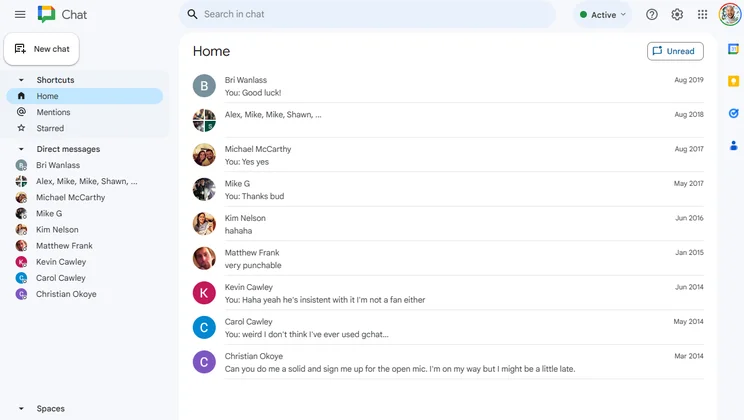
Google Chat’s “home” menu, with direct message threads. Image: Tech.co testing
Microsoft Teams vs. Slack
Slack is another solid alternative to Microsoft Teams, focusing more on team messaging than video conferencing, but still allowing lots of collaboration. In fact, we use Slack at Tech.co, and we like it a lot, so it’s got that going for it.
Check out our Slack pricing guide for more information.
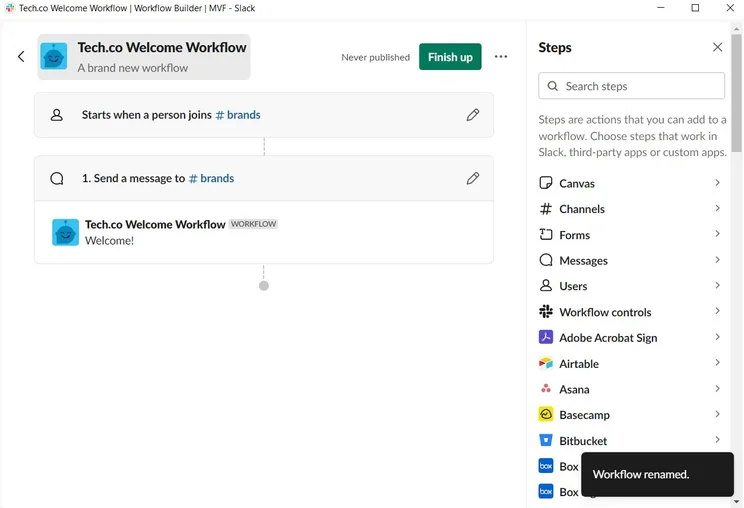
Building a workflow automation in Slack doesn’t take much time at all. Source: Tech.co testing
Microsoft Teams Hardware & Equipment
If you’re using Microsoft Teams on your laptop, you probably don’t need to worry about finding hardware and equipment that is compatible with the platform. However, if you’re a larger business that wants to outfit your conference rooms with some devices that work with Microsoft Teams, you’re in luck!
Microsoft offers a wide range of compatible hardware and equipment, including web cameras, headsets, speakerphones, and monitors that work seamlessly with Microsoft Teams. Devices from brands like Logitech, Yealink, Poly, Jabra, Lenovo, and many more are all available.
Additionally, make sure to check out our guide to the top video conferencing equipment, so you can find out which devices are the best of the best for getting your office set up.
How We Rate Video Conferencing Platforms
If you’re on the hunt for a video conferencing or collaboration tool like Microsoft Teams, you’re likely a bit stressed out. After all, there are dozens of choices out there, and finding the right one for your particular needs isn’t easy. Fortunately, Tech.co is committed to providing insightful information backed by in-depth research to give you exactly what you need.
For video conferencing software like Microsoft Teams, we tested based on a number of important metrics that will effectively measure its effectiveness at keeping your team in touch. Those metrics include features, pricing, third party integrations, customizability, and help and support options.
To learn more about our process, make sure to check out the Tech.co research guide, which gives you a peek at how we rate and rank business software.
If you like the Microsoft family apps, Microsoft Teams is an absolute no-brainer for your business. It provides a robust set of team collaboration features on top of its video conferencing solution; it integrates seamlessly with other Microsoft apps like Outlook and OneDrive and offers a low starting price for more advanced features.
If you aren’t a big Microsoft user, Microsoft Teams can be a bit complicated to use, particularly if you’re just using it for video conferencing. There are plenty of other dedicated video conferencing tools that might fit your needs a bit better and won’t have as steep of a learning curve. Still, if you need more of an all-in-one solution that can scale with your business, Microsoft Teams is an excellent choice.
Don’t forget, if you want to get started with business communication tools today, check out our quick quote tool for a helpful guide to getting set up with a platform that’s right for you.
Frequently Asked Questions
Yes, Microsoft Teams does offer a free forever plan that gives you access to the video conferencing platform. You’ll be able to host hour-long meetings for up to 100 participants, but won’t have access to features like meeting recordings, whiteboarding, or breakout rooms.
It depends on your needs. Microsoft Teams offers a more collaborative platform for coworkers to work together, whereas Zoom is a dedicated video conferencing tool that is best for video chats and that’s about it.
Microsoft Teams has a free forever plan, as well as three paid plans, which will cost you either $4 per month, $6 per month, or $14 per month.
Microsoft Teams is fairly easy to use, although compared to other video conferencing solutions, is definitely a bit more complicated. That is because it offers more collaborative features than most, as well as integration with the wider Microsoft 365 ecosystem, which can get a bit confusing for beginners.
If you click on, sign up to a service through, or make a purchase through the links on our site, or use our quotes tool to receive custom pricing for your business needs, we may earn a referral fee from the supplier(s) of the technology you’re interested in. This helps Tech.co to provide free information and reviews, and carries no additional cost to you. Most importantly, it doesn’t affect our editorial impartiality. Ratings and rankings on Tech.co cannot be bought. Our reviews are based on objective research analysis. Rare exceptions to this will be marked clearly as a ‘sponsored’ table column, or explained by a full advertising disclosure on the page, in place of this one. Click to return to top of page


