
We may receive a commission from our partners if you click on a link to review or purchase a product or service. Click to Learn More
Slack pricing starts at $8.75 per user, per month, offering three different pricing plans all based on the per-user model. The service also offers a free forever plan that can get you started, albeit with limited features and some significant video conferencing software restrictions.
Slack is one of the most popular business communication platforms on the planet, with more than 12 million daily active users – including the entire Tech.co team. With a vibrant, intuitive interface, a helpful bot, and an easy-to-use workflow rules builder, you can see why we haven’t swapped platforms for over seven years.
But the question is, can you stick with the free plan, or would a paid plan be better for your business? In this guide, you’ll learn about all the Slack pricing plan options, add-on costs, competitor pricing, and whether or not Slack is a good investment for its price.
|
Plan
|
Price
|
Workplaces
|
Message/file history
|
Support
|
Automated workflows
|
Custom sections
|
SSO
|
|
|---|---|---|---|---|---|---|---|---|
 |
|
|
|
|||||
|
Free |
Pro |
Business+ |
Enterprise Grid |
|||||
|
Free |
$7.25/user/month |
$12.50/user/month |
Contact sales |
|||||
|
1 |
1 |
1 |
Unlimited |
|||||
|
90 days |
Unlimited |
Unlimited |
Unlimited |
|||||
|
Standard |
24/7 |
Priority 24/7 |
Priority 24/7 |
|||||
|
|
1000/month |
2000/month |
5000/month |
|||||
|
|
|
|
|
|||||
|
|
|
|
|
Slack Pricing Plans
Slack offers three different pricing plans that offer an increasing number of features and functionality for your team – and if you’d like to find out more, check out our Slack review. However, if you’re just here for pricing, here’s how much each one costs:
Slack is currently offering a special deal that can get you 50% for the first three months.
Click the links above or keep scrolling to get an in-depth look at each pricing plan to help you decide which one is right for your business.
Pro – $7.25 per user, per month
- Best for most small-to-medium-sized businesses
As the first paid plan after Slack’s free plan, the Pro plan really takes it up a notch. It unlocks all the customizability and functionality of the platform, allowing you to customize channels, set user permissions, and generally make the platform work for you and your team.
You’ll also get unlimited access to apps and integrations, which allows users to turn Slack into more of an all-in-one hub than a simple messaging app. Here are some other features you get with the Pro plan:
- Analytics dashboard
- Automated workflow builder
- OAuth with Google
- Custom retention policies
- 24/7 support
The Pro plan costs $7.25 per user, per month when billed annually, and $8.75 per user, per month when billed monthly.
Business+ – $12.50 per user, per month
- Best for larger businesses that need communication analytics
If you’re looking for a bit of an upgrade to your Slack experience, the Business+ plan might be your best bet. It unlocks a variety of advanced analytics, like message analytics, that can give you an in-depth, granular look at how your team stays in touch. Here are some of the other features available with the Business+ plan:
- 99.99% uptime guarantee
- Single sign-on (SSO)
- Data exports for messages
- Priority support
- User provisioning
The Business+ plan costs $12.50 per user, per month when billed annually, and $15 per user, per month when billed monthly.
Enterprise Grid – Not publicly available
- Best for multi-business organizations
The Enterprise Grid plan, as you can imagine, is specifically geared toward larger businesses that need access to multiple workspaces. This is the only plan that allows you to have more than one workspace, which can help you keep different brands and businesses separate. Here are some other features available with the Enterprise Grid plan:
- Custom templates
- Domain claiming
- Support for HIPAA compliance
- Custom terms of services
- Slack Atlas included
Pricing is not publicly available for the Enterprise Grid plan, so you will have to reach out to the Slack sales team to learn more about your specific business.
Does Slack Have a Free Plan?
If you’re looking to save a bit of money on software by signing up for a free service, you’re in luck. Slack does have a free forever plan with unlimited users that will allow you to stay in touch with your team at no cost. However, there are some limitations common to free plans that could get in the way of effective communication in the long run. Here are some of the limitations of the Slack free plan.
- Only 90 days of message and file history are saved.
- External guests can only participate in one-on-one discussions.
- Only 3 integrations and apps can be added to the platform.
- Access to standard support that is not 24/7.
- Virtually no access to any advanced features.
The advanced features you’re missing out on aren’t even that advanced. For example, you won’t be able to customize channel access among team members, you’ll have no automated workflow functionality, and you’ll have no analytics dashboard to view. Video calling, on the other hand, is restricted to just two participants.
Still, as a basic communication tool, the free plan from Slack is a great jumping-off point. You’ll be able to create channels, direct message team members, and access photo and video posting right out of the gate. It’s a great starting point, but any serious business is going to need a paid plan in the long run.
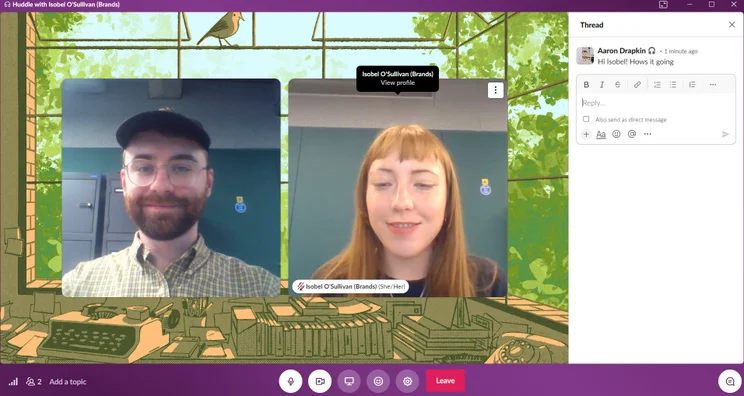
On Slack’s free plan, you’re only allowed a maximum of two people in a “Huddle”, which is what Slack calls its video calling feature. Image: Tech.co
Slack Add-On Costs
In addition to the monthly cost of the platform, Slack also offers an array of add-ons that will cost you a bit extra. Still, these tools can be incredibly useful for some businesses, as long as you can afford the added expense. Here are some of the Slack add-ons you can expect, and how much they cost.
Slack AI
Every platform has some AI in it now, and Slack is no different. Slack AI is a set of generative tools that can help you improve productivity on the platform. You can summarize messages, search for messages faster, and even recap your day to stay on top of your schedule.
Slack AI is available as an add-on for all paid plans, and it costs $15 per user, per month as part of the Business+ plan. The standalone add-on is no longer available as of August 2025).
Slack Atlas
Slack Atlas is a great way to get to know your team a bit better. It uses everything from profile pictures and user data to fun facts and status updates to create an organizational chart that users can use to learn about the individuals on your team.
Slack Atlas is available as an add-on for the Business+ plan and is included in the Enterprise Grid plan. Pricing is not publicly available, although some Reddit users have noted that it costs an additional $20 per user, per year, although that was years ago.
Slack Enterprise Key Management
If your business is big and deals with sensitive information, this add-on can help you. The Slack Enterprise Key Management add-on will allow you to more effectively meet security requirements for the sharing of sensitive information. It helps to store encryption keys and manage their use throughout your business.
The Slack Enterprise Key Management add-on is only available for Enterprise Grid users, and pricing is not publicly available, so you’ll have to reach out to the sales team for more information.
Does Slack Offer Discounts?
Yes! The Slack for Nonprofits program offers substantial discounts for companies that qualify as such. For example, Slack offers workspaces with 250 members or less a completely free upgrade if they’re already using the Pro subscription. For workspaces larger than that, there’s an 85% discount.
There’s also a flat 85% nonprofit discount for Business+ subscribers, regardless of how many people work at the company. Slack runs a similar program for educational institutions, which are eligible for an 85% discount on either of the paid plans mentioned above.
How Does Slack Pricing Compare to Other Providers?
Slack is competitively priced, but what about its competitors? Take a look at some of the top Slack alternatives below to see how the cost matches up against the rest of the industry.
Check out our Slack alternatives guide for more information
Microsoft Teams pricing vs Slack pricing
Microsoft Teams is one of the more robust team communication platforms available, and it’s competitively priced. At only $4 per user, per month for the advanced Teams plan and only $7 per user, per month for the full-on Microsoft 365 experience, the platform undercuts Slack and almost provides a little more functionality for team-focused workplaces.
What’s more, Microsoft Teams has better video conferencing capabilities, which is why many will choose Slack over Teams when it comes to keeping the team in touch beyond email. However, Slack has a better range of integrations and will better suit tech companies that are working on dynamic projects and sprint-based work.
Check out our Microsoft Teams review for more information
Rocket.Chat pricing vs Slack pricing
Rocket.Chat is a good Slack alternative, although there is no publicly available pricing, so you’ll have to contact sales to see how much it costs.
The biggest caveat, however, is that Rocket.Chat puts a limit on users depending on which plan you go with, unlike Slack. The free plan will get you only 50 users and the starting paid plan gets you only 100 users. After that, you’ll have to take your chances with the Enterprise plan.
Google Workspace pricing vs Slack pricing
As a paid option, it’s hard to beat Google Workspace pricing. Starting at only $7 per user, per month and offering an undeniably robust platform for workplace collaboration, many businesses simply default to this platform for the majority of business operations, like email, document sharing, and slide presentations.
Still, Google Chat – which Workspace users can utilize for instant messaging – doesn’t have as many features as Slack, and you can’t build workflow rules in channels and chats in quite the same way. This is why many businesses opt for Slack, even if it is a tad more expensive.
Check out our Google Meet review for more information
Whether you’re deciding to give Slack a try or just want to know if the paid plans are worth it, we have good news. Slack is absolutely worth it when it comes to business communication, offering an intuitive platform that has proven to keep teams connected in a myriad of ways. Additionally, the paid plans unlock so many valuable customizability and automation features that any serious business would pay to upgrade.
It really depends on what you need, though. If you’re looking for more of a full-on project management/team collaboration platform that can handle everything and then some, options like Microsoft Teams and Google Workspace could be what you’re looking for instead. Still, when it comes to team messaging apps, there is a reason Slack has become the go-to solution for a lot of businesses.
If you click on, sign up to a service through, or make a purchase through the links on our site, or use our quotes tool to receive custom pricing for your business needs, we may earn a referral fee from the supplier(s) of the technology you’re interested in. This helps Tech.co to provide free information and reviews, and carries no additional cost to you. Most importantly, it doesn’t affect our editorial impartiality. Ratings and rankings on Tech.co cannot be bought. Our reviews are based on objective research analysis. Rare exceptions to this will be marked clearly as a ‘sponsored’ table column, or explained by a full advertising disclosure on the page, in place of this one. Click to return to top of page


