

We may receive a commission from our partners if you click on a link to review or purchase a product or service. Click to Learn More
Xero Invoice offers three pricing tiers: the Early tier ($25 per month), the Growing tier ($55 per month), and the Established tier ($00 per month). With Xero’s current promotional offer, you can get 90% off your first six months, bringing its entry price down to $2.50 per month. While Xero doesn’t currently offer a free tier, it does let you test out the software with a 30-day free trial.
We specifically recommend the Growing plan, as it offers unlimited monthly invoices, as opposed to the Early tier’s tight limit of 20 invoices per month. However, if you want to unlock advanced capabilities like multi-currency support and cash flow prediction, you’d have to opt for Xero’s priciest tier, Established.
This guide covers everything you need to know about Xero’s pricing, including its different plans, hidden costs, and how its costs compare to the best invoice software for small businesses. Read on to learn how much Xero invoices could cost your business.
|
Price
|
Users
|
||
|---|---|---|---|
|
|
|
|
|
|
|
|
|
|
Unlimited |
Unlimited |
Unlimited |
Xero Invoice Pricing Plans
Xero Invoice has three plans, each intended for businesses of different sizes. The differences between the three plans are quite marginal, so you won’t find yourself too torn on which one you should opt for. The jump from Early to Growing removes the limit on monthly invoices, while the jump from Growing to Established allows for multi-currency transactions.
Xero pricing plans all charge a monthly rate, and unlike some software providers, you won’t be able to opt for a yearly payment to save money.
Xero Early
- Best for businesses just starting out
- Price: $25 per month ($2.50 per month with current deal)
Key features:
- 20 invoices a month
- 5 bills a month
- Bank transactions reconciliation
- Bill capturing with Hubdoc
- Sales tax support
- Short-term cashflow snapshot
- W-9 + 1099 management
The Xero Early plan costs $25 a month. However, with Xero’s current deal, the plan costs just $2.50 per month for the first six months, before returning to its original price.
While clients, users, and estimates are unlimited, invoices are capped at 20, and bills at five, which is quite low. However, similar entry-level plans by other providers – like QuickBooks Sole Trader and Simple Start – don’t let you manage bills at all, making Xero Early a good choice for companies sending off a few bills per month.
Who would we recommend Xero Early for?
As the name suggests, this tier is for businesses in their infancy. It’s a good fit for businesses that are just starting and looking to grow, or even small side projects run out of a garage.
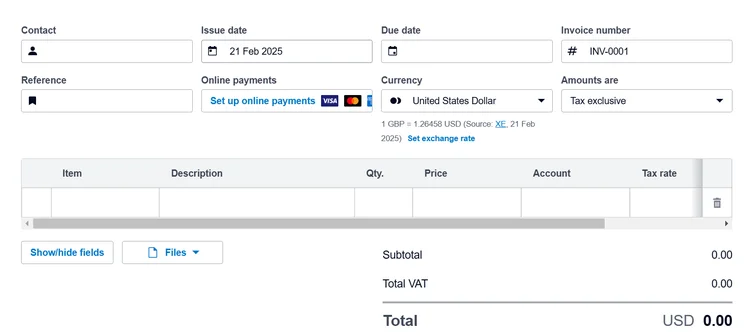
Creating invoices with the Xero really straightforward, but its Early plan only lets you send off 20 a month. Source: Tech.co user testing
Xero Growing
- Best for businesses on the rise
- Price from: $55 per month ($5.50 per month with current deal)
Key features:
You’ll have access to everything in the Early package, plus:
- Unlimited invoices and quotes
- Unlimited bills
- Optional access to advanced inventory features
The Xero Growing tier costs $55 per month, or $5.50 for the first three months, with Xero’s current promotional deal. The main (and only) difference between the Growing tier and the Early tier is that there is no limit on invoices, meaning you can send more than 20 invoices a month.
This tier is our favorite, as it carries all the features of the Early tier, while entirely removing the limit on monthly invoices. Most businesses would find themselves brushing up against the 20-a-month limit, if not breaking it entirely, so to have this removed is hugely beneficial.
Who would we recommend Xero Growing for?
If you find yourself running a business that is approaching 20 invoices a month, it’s a good idea to just opt for this tier – you might find yourself breaking that ceiling pretty soon, and it’s nice to not have to keep tabs on how many you’ve sent in a month.
Xero Established
- Best for international Businesses
- Price: $90 per month ($9 per month with current deal)
Features:
You’ll have access to everything in the Growing package, plus:
- Multi-currency support
- Project tracking
- Expense claiming
- Advanced cash flow predictions
Xero’s final tier, the Established tier, costs $90 per month, or $9 per month for the first six months with the provider’s current deal.
This price increase is almost double the previous tier, making it a big investment for businesses that won’t utilize the extra capabilities. However, if you’re serious about expanding your business bottom line with cash flow analytics, or if you manage multiple currencies, Xero Established is likely to pay for itself over time.
Who would we recommend Xero Established for?
It’s for this reason that the Established tier is best for businesses that are, well… established. Any businesses that ship or sell internationally and need to charge in Euros, Canadian dollars, or anything else, will benefit from this tier. Otherwise, stick to the Growing tier.
Does Xero Invoice Offer a Free Plan?
Unfortunately, Xero does not offer a permanently free plan. The provider does offer a 30-day free trial though, giving businesses a way to sample the software without committing to any lengthy subscriptions. You’re able to trial out any plan too, from Xero Early to Xero Established.
If you’re looking to manage your finances with a forever-free plan, there are a number of free accounting platforms that could meet the needs of self-employed individuals and small businesses with basic requirements. Lots of free plans miss out basic features like payroll and tax management, however, so in most cases it’s worth opting for a paid plan.
Xero Invoice Hidden Costs & Fees
Xero aims to be very up-front with its pricing structure to avoid its users getting caught out by surprise fees. However, there are some factors you should look out for if you’re new to accounting software in general.
While Xero doesn’t charge fees itself, if you use a third-party payment processor like Stripe or PayPal to collect payments through Xero Invoices, you’ll be subject to transaction fees associated with that service.
Unlike other popular invoicing platforms like FreshBooks, Xero doesn’t charge early termination fees, either. You will need to keep paying subscription fees until the end of your notice period, however, which will typically be one month.
Xero Invoicing Add-Ons & Integrations
Xero Invoicing comes with a ton of optional add-ons that can make operating the software a more streamlined process for your business.
Firstly, you can attach three email marketing platforms to your Xero account:
- Oncord (starting at $39 a month)
- Constant Contact (starting at $12 a month)
- Mailchimp (starting at $13 a month)
These can help you connect your client list to a list of existing customers, which can be helpful if you want to keep all your messaging in one place.
However, the integrations really ramp up when it comes to ecommerce and CRM. With 39 ecommerce integrations and 82 CRM integrations, there’s a lot you can add and change with your Xero account.
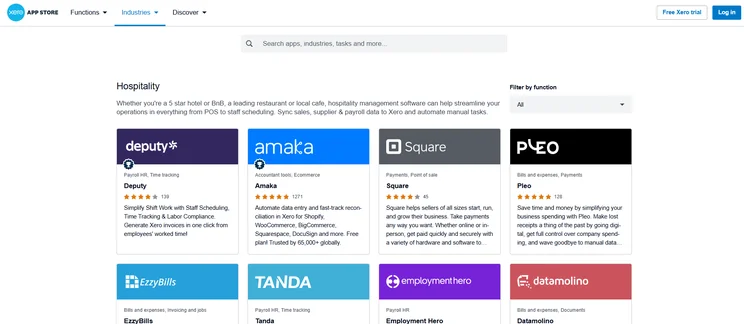
Xero’s app store lets you connect with tons of sector-specific apps like Square POS and Fresho Inventory. Source: Tech.co user testing
Some ecommerce highlights include A2X, which automates ecommerce accounting for Shopify, Amazon, Etsy, Walmart, and eBay sellers for $29 per month, and Link My Books, which creates invoices for anything sold on eBay and Amazon from $24 per month.
Some CRM recommendations are HubSpot and Constant Contact, which both allow you to stay on top of your customers’ behavior and relationship to your business.
Xero Invoicing Features
Xero has a solid array of features that allow it to stand among the greats. There aren’t any massive weaknesses, with the main one being its somewhat lackluster support resources. However, it makes up for this with very substantial invoice delivery tools, as well as analytics and reporting.
Creating Invoices
When creating invoices for your customers, you’ll be able to calculate taxes, attach files, and display discounts and tracked hours. And it’s not just invoices – you’ll also be able to create and send estimates, which can help land customers if they find your prices appealing.
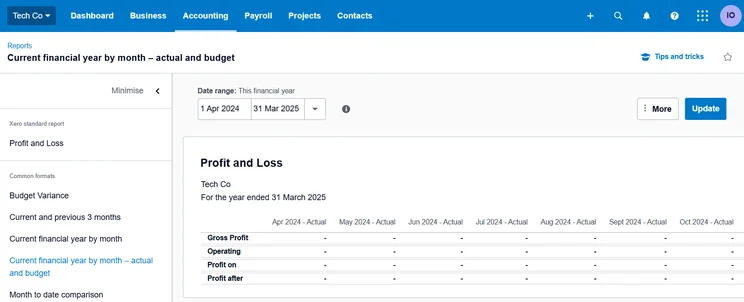
When we tried our Xero, we found creating invoices with the platform really straightforward. Source: Tech.co user testing
When we tested Xero firsthand, we were impressed with how clearly signposted its invoice features were, however, we did find there was a lack of visual feedback when tasks were completed.
Sending Invoices
Once you’ve made your invoices, sending them out is the next step, and Xero has a lot of tools to help you out here. You’ll be able to set up recurring invoices for repeat customers, and payment reminders for clients who need a push in order to pay your invoices. You can also track the invoices’ progress and even send them from a mobile device.
Receiving Payment
When it comes time for your customers to pay their invoices, they can use a chosen third-party payment processor, such as PayPal or Stripe. If your business is connected to one of these processors already, it’ll be very easy to connect the pre-existing account. This is the opposite of paying directly through the software itself.
These payment processors will charge additional fees, however, so you should be aware of these hidden costs before choosing which one to integrate with the software.
Reporting and Analytics
As mentioned, Xero has everything you’d want when it comes to reporting and analytics, which can help if you want to show off to customers or investors. This includes customizable reports that can include sales tax and receivables, both by customers and by time.
Xero also offers cash flow projection capabilities on all its paid. The feature lets you see a visualization of your business cash flow for the next 30, 60, or 180 days (depending on the plan) – making Xero a particularly good piece of software for businesses with complex revenue streams, like restaurants or hotels.
Learn more about the best accounting platforms for hotels.
Xero’s profit and loss features give you a detailed overview of your business’s financial health. Source: Tech.co user testing
Multi-currency support
For businesses handling international payments, Xero does offer multi-currency support. The platform instantly converts international business transactions and records them in your accounting software, lets you view how exchange rate fluctuations and foreign currency markets affect your cash flow, and even produces reports in local and foreign currencies to help you see how your business is performing.
These features aren’t available in Xero’s Early and Growing plans, however, so you’ll have to invest a little extra if you require them.
Help center
Finally, if anything goes wrong, you might be interested in Xero’s support resources. The only way you can contact Xero is through email, but there are knowledge centers and community forums that can also help you out.
However, unlike alternatives like QuickBooks and Zoho Books, there are no phone lines or live chat options, which could be a roadblock if you prefer speaking to someone directly to resolve queries.
Alternatives to Xero Invoicing
No invoice software platform is perfect, so you might be on the lookout for other platforms that can pick up Xero’s slack.
Xero vs QuickBooks
If you’re looking for an alternative similar to Xero, QuickBooks will be your best bet. The platforms performed similarly in our research, due to their wealth of accounting and growth projection tools and their relatively steep learning curves, which took our testers a bit of time to get accustomed to.
That said, QuickBooks’s interface is slightly more intuitive than Xero’s, however, and the platform offers a better help and support center to help smooth out any potential bumps along the way. This makes QuickBooks the better choice for businesses that require advanced accounting features, but don’t want to get overwhelmed by cluttered software.
What’s more, unlike Xero, QuickBooks offers invoicing templates and color customization options, making it a good option for businesses wanting to personalize their invoices with their branding.
Learn more about how the providers compare in our QuickBooks vs Xero guide.
Xero vs Zoho Books
Zoho Books is our best-rated accounting platform and will be a great alternative to Xero due to its shallower learning curve, and superior core accounting features. The provider offers just as many useful invoicing features as Xero – including multi-currency support, payment reminders, and automated invoice sending – so businesses churning out high volumes of invoices won’t be short-changed.
Zoho Books also offers a permanently free plan that’s catered towards solopreneurs and micro businesses. This, combined with Zoho Book’s slick, modern interface, makes the software a better choice than Xero for users with relatively simple accounting and invoicing needs.
Xero vs FreshBooks
FreshBooks is another solid accounting platform that gives Xero invoices a run for its money. While FreshBooks’ reporting and financial projection tools aren’t as advanced as those offered by Xero, the platform’s help and support helpdesk is unmatched, and its average monthly price is a lot lower than competitors too.
First-party payment processing vs third-party payment processing is very much a matter of personal preference, but if you’d rather be paid through the software rather than through PayPal or Stripe, FreshBooks offers first-party payment. For larger businesses that ship overseas, the ability to charge in multiple currencies can be crucial. Xero doesn’t offer this unless you opt for the highest tier, so if you’re looking for a cheaper way to charge multiple currencies, then FreshBooks, all offer it on their lowest tiers.
Learn about FreshBooks’ pricing plans here.
|
Price from
Each software platform charges an additional 2.9% of every invoice processed, as well as a 25-30 cent fee
|
Minimum clients
The client limit on the lowest tier
|
Minimum invoices
The monthly invoice limit on the lowest tier
|
Minimum estimates
The monthly estimate limit on the lowest tier
|
|||||
|---|---|---|---|---|---|---|---|---|
 |

|
 |
 |
 |
 |
 |
 |

|
|
Square Invoices |
Wave |
Invoice2Go |
Zoho Invoice |
FreshBooks Invoice |
Xero Invoicing |
QuickBooks Invoice |
Sage Invoice |
OneUp |
|
No monthly fee |
Free (with transaction fees) |
$5.99 per month |
Free |
$23 per month |
$25 per month |
$20 per month |
$12 per month |
$9 a month |
|
Unlimited clients |
Unlimited clients |
5 clients |
5 clients |
5 clients |
Unlimited clients |
Unlimited clients |
Unlimited clients |
Unlimited clients |
|
Unlimited invoices |
Unlimited invoices |
50 invoices |
1,000 invoices |
Unlimited invoices |
20 invoices |
Unlimited invoices |
Unlimited invoices |
Unlimited invoices |
|
Unlimited invoices |
Unlimited estimates |
No estimates on lowest tier |
Unlimited estimates |
Unlimited estimates |
Unlimited estimates |
Unlimited estimates |
Unlimited estimates |
Unlimited estimates |
Xero is very much worth the price. The wide range of features and lack of limits on its middle tier means that any reasonably sized company won’t find themselves restricted, or looking for an important missing tool.
The best Xero Invoice plan is the Growing tier. While all the features on the Early tier are great, the 20-invoice limit is too small for any substantial business to use.
The best competitor to Xero is FreshBooks’ Plus tier. While you’ll be capped at 50 clients, there are no other limits, and its cost of $43 per month ($4.30 for the first three months) is reasonable for what you get. It also packs all of the features that Xero includes, so it may be a better overall choice. And of course, you can’t go wrong with QuickBooks, our top-rated accounting software provider.
If you click on, sign up to a service through, or make a purchase through the links on our site, or use our quotes tool to receive custom pricing for your business needs, we may earn a referral fee from the supplier(s) of the technology you’re interested in. This helps Tech.co to provide free information and reviews, and carries no additional cost to you. Most importantly, it doesn’t affect our editorial impartiality. Ratings and rankings on Tech.co cannot be bought. Our reviews are based on objective research analysis. Rare exceptions to this will be marked clearly as a ‘sponsored’ table column, or explained by a full advertising disclosure on the page, in place of this one. Click to return to top of page


