
We may receive a commission from our partners if you click on a link to review or purchase a product or service. Click to Learn More
QuickBooks is a better accounting software option than Sage, according to our latest round of research. Not only is QuickBooks a more affordable choice for small businesses, but its wealth of core accounting features – such as invoicing capabilities that would suit the self-employed, and a well-organized user interface – make it stand out ahead of Sage in this roundup.
Sage, however, isn’t without its merits. For businesses that will make use of many customer support options, Sage is a great place to start. What’s more, despite not being as big as the app marketplace available at QuickBooks, Sage still boasts an impressive number of integrations, so it won’t be difficult to work it into your existing software suite.
Below, we outline what users can expect and compare these two leading accounting software providers. We’ll also outline how we test accounting software, including our rigorous user testing process.
- QuickBooks and Sage are both solid options for small businesses. However, in our latest round of accounting research, QuickBooks came out on top due to its advanced accounting features and lower price point
- Entrepreneurs can get started with QuickBooks for as little as $20 per month on its Solopreneur plan, and small businesses can start on the Simple Start plan for $38 per month. For Sage, prices start at $1,413 per year for the Sage 50 Pro Accounting plan, or $128.67 per month.
- QuickBooks has plenty of core accounting features that make it stand out, including automatic tax updates and invoicing capabilities, and the platform’s cash flow projection tools make it perfect for businesses wanting to keep an eye on their finances
- In terms of usability, QuickBooks’ customizable and well-organized dashboard impressed our users during testing, and we found that core functions could be easily streamlined within the platform
- Sage, on the other hand, has better customer support options than QuickBooks, so could be a better choice for businesses who need to contact providers for assistance
- We based our results on hours of hands-on time with the top accounting providers out there, and tested each one on specific categories and subcategories
|
Starting price
|
Free trial
|
Max users
|
Best for
|
Pros
|
Cons
|
Email hours
|
||
|---|---|---|---|---|---|---|---|---|
 |
 |
|||||||
|
QuickBooks |
Sage 50 |
|||||||
|
|
$128.67/month |
|||||||
|
30 days |
30 days (demo only) |
|||||||
|
25 |
1-40 |
|||||||
|
Businesses needing advanced financial insights and customization |
Businesses seeking tailored financial solutions and strong brand reputation |
|||||||
|
|
|||||||
|
|
|||||||
|
6am to 6pm, PT, Mon-Fri |
7:30am to 5pm, CST, Mon-Fri |
QuickBooks vs Sage: Pros & Cons
Here’s what you can expect from QuickBooks at a glance:
QuickBooks

In Short
-
Pros
- Extensive analytics template customization
- Automatic alerts for mismatched balances
- Built-in cash flow projection tools
-
Cons
- Steep learning curve for advanced functionality
- Limited customer support resources for self-help
- No time tracking features
Pricing
-
 Solopreneur: $20/month
-
Simple Start: $38/month
-
Essentials: $85/month
-
Plus: $140/month
-
Advanced: $340/month
-
50% off for first 3 months on all plans
Images
Here’s what you can expect from Sage at a glance:
Sage
In Short
-
Pros
- Simple and easy-to-use, with a user-friendly interface
- Vast array of customer support options, including phone and email
- 30-day free trial available
-
Cons
- App selection is limited
- Additional users cost extra
Pricing
-
 Pro Accounting: $1,413/year
-
Premium Accounting: $1,947/year
-
Quantum Accounting: $2,841/year
-
30-day free trial available
Images
Is Sage or QuickBooks better value for money?
Overall, QuickBooks is better value for money, compared with Sage. This is because of its more affordably priced plans, which don’t compromise on available features.
QuickBooks offers five plans, with monthly costs ranging from $20 to $340 per month. Each plan has a fixed number of users, including access for your accountant. Sage, on the other hand, has three plans that range from $128.66 per month to $271.17 per month. If you opt to pay annually, you’ll end up paying slightly less, between $1,413 and $2,841 per year, which equates to $117.75 and $236.75 per month, respectively.

Sage and QuickBooks are both worth considering
Take a trial run of the best accounting solutions today
QuickBooks plans:
- Solopreneur, $20/month: 1 user, receipt scanning, estimate creation, custom reports
- Simple Start, $38/month: 1 user, automated bookkeeping, 5 free ACH bank transfers/month
- Essentials, $85/month: 3 users, recurring invoices, accounting and payments agent
- Plus, $140/month: 5 users, AI-powered reconciliation and profit and loss insights, customer agent, anomaly detection and resolution
- Advanced, $340/month: 25 users, finance agent, project management agent, forecasting, customer user management and permissions, revenue recognition
Read our full guide on QuickBooks pricing.
Sage 50 plans:
- Pro Accounting, $1,413/year: 1 user, invoice and bill tracking, expense management, automated bank reconciliation, reporting, expense management
- Premium Accounting, $1,947 to $5,358/year: 1-5 users, purchase and change orders, advanced budgeting tools, advanced reporting, audit trails
- Quantum Accounting, $2,841 to $10,095: 1-11+* users, role-based user permissions, workflow management.
*Contact sales for pricing if 11+ users are needed.Below is a comparison table covering all of the Sage and QuickBooks plans. QuickBooks has a 50% off deal for the first three months for those who skip the free trial, which is reflected in our table.
|
Price
|
Users
|
Bookkeeping
Does it include bookkeeping functions?
|
Accounts payable
Does it include a range of accounts payable functions?
|
Accounts receivable
Does it include a range of accounts receivable functions?
|
Project accounting
Does it offer tools to track different projects?
|
Financial reporting
Does it offer financial reporting tools?
|
|||
|---|---|---|---|---|---|---|---|---|---|
|
|

|
|
|
|
|
|
|
||
|
Sage 50 |
Sage 50 |
Sage 50 |
|||||||
|
Pro |
Premium |
Quantum |
|||||||
|
$20/month |
$128.67/month |
|
$182.50/month |
|
|
$271.17/month |
|
||
|
1 |
1 |
1 |
1-5 |
3 |
5 |
1-40 |
25 |
||
|
|
|
|
|
|
|
|
|
||
|
|
|
|
|
|
|
|
|
||
|
|
|
|
|
|
|
|
|
||
|
|
|
|
|
|
|
|
|
||
|
|
|
|
|
|
|
|
|
Does Sage or QuickBooks have the better free plan?
Sage does not offer a permanent free plan, but QuickBooks now offers QuickBooks Free – a $0/month plan you can use for as long as you like. However, both services offer a 30-day trial of their software for free, for any plan tier and the number of users typically allowed for that plan.
In addition, QuickBooks offers 50% off the first three months, even if users are paying monthly. It’s worth noting that it won’t offer a 30-day free trial to users who sign up for this offer.
If you are looking specifically for free accounting software, you can check out our guide.
Is QuickBooks or Sage Better for Core Accounting?
QuickBooks has plenty of core accounting features to ensure your business is equipped with the right tools to manage its accounting operations.
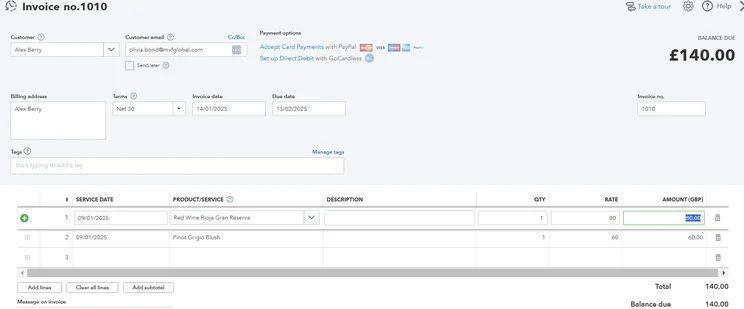
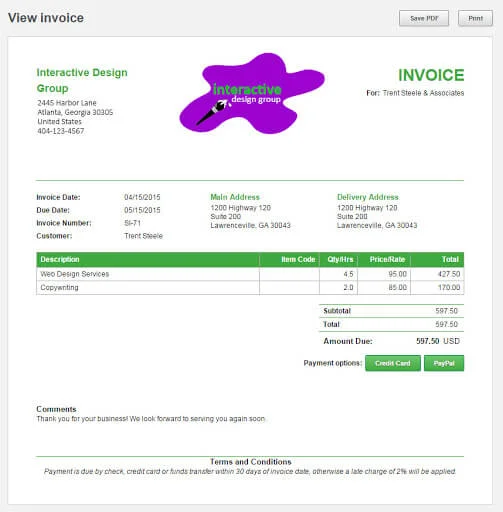
In particular, it scored highly in our testing for its invoicing and quoting capabilities, where users can enable automated invoice and quote sending and set up recurring invoices. Likewise, unlike FreshBooks, another top accounting software we’ve tested, QuickBooks supports multi-currency invoicing and quoting, perfect for businesses with international reach.
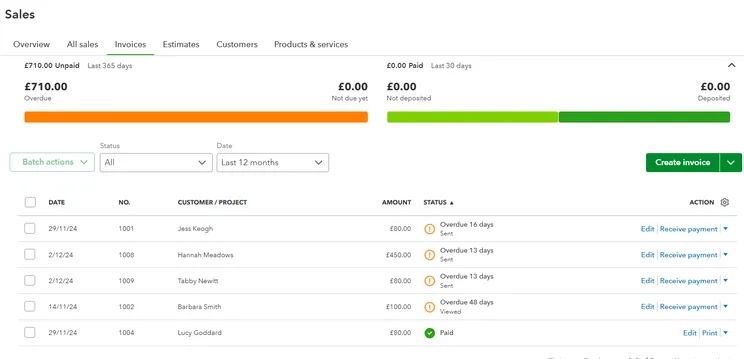
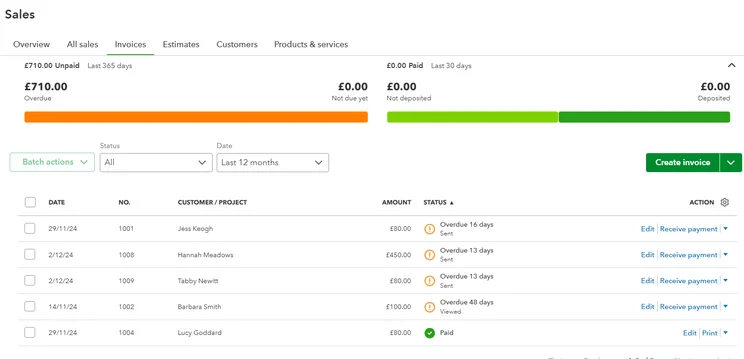
We found it easy to access invoices within QuickBooks. Source: Tech.co testing
In terms of tax preparation, through QuickBooks users will be able to successfully calculate and add/deduct tax, although our researchers found it required quite an extensive set-up process.
QuickBooks will also provide automatic tax updates, provide tools for tax forecasting and planning, and will support a range of tax types, such as income tax and VAT.
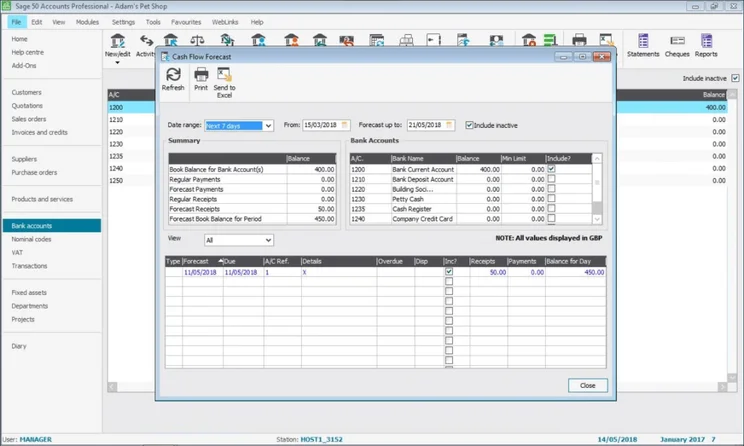
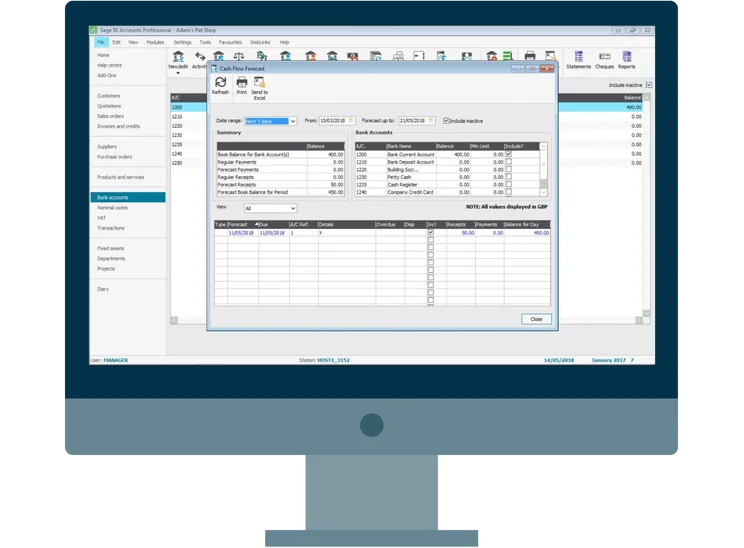
Sage 50 accounting forecast. Source: Tech.co testing
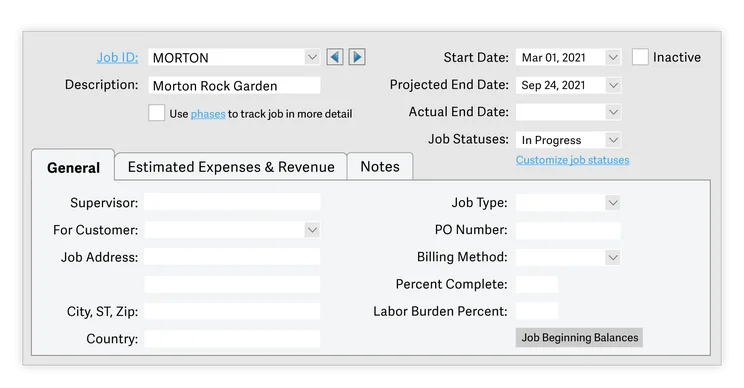
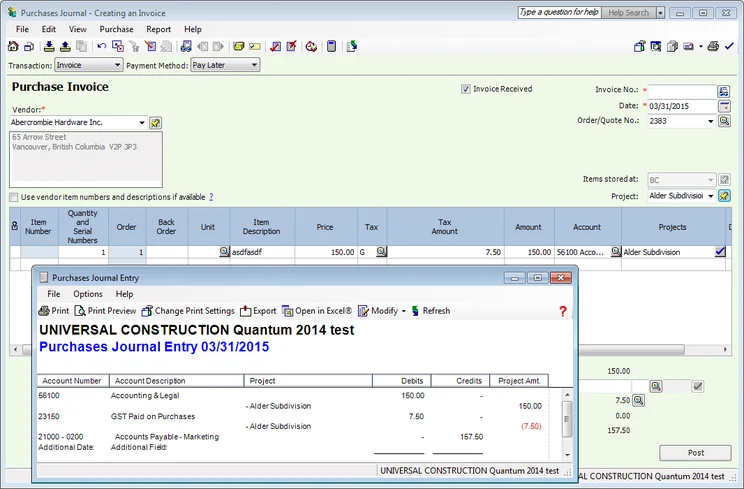
Sage offers time tracking features in its Premium and Quantum plans, while QuickBooks offers it in its Essentials and higher plans. However, if you want these features with a more affordable provider, we’d recommend our choice for the best small business accounting software, Zoho Books, as you can get time tracking on its Professional plan for just $40 per month.
Is QuickBooks or Sage Better for Financial Planning and Visibility?
QuickBooks supports various cash flow projection tools, that allows users to track both cash coming in and cash coming out. Similarly, the Cash Flow Planner add-on offers system alerts about potential cash shortfalls or surpluses, making it a great addition for businesses looking to be kept in the loop on their finances.
Our researchers also pointed out the LivePlan add-on, in which the software is able to create “what-if” scenarios and evaluate future outcomes. This was certainly a standout feature, with other top choices – such as Xero – not including it.
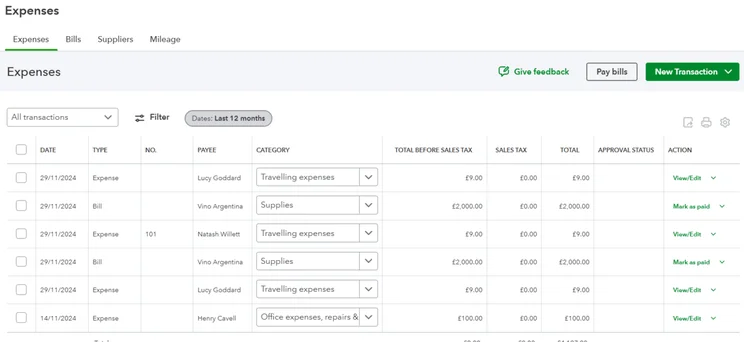
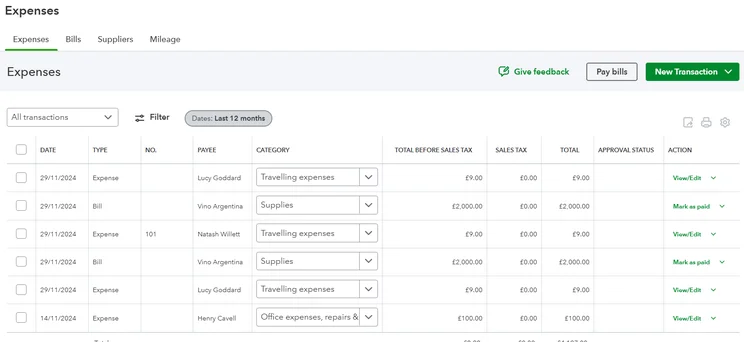
QuickBooks let us easily track our expenses, including by type, category, total value, and more. Source: Tech.co testing
Likewise, Sage offers similar cash flow tools. Users can view where expenses and revenue are coming from, and use projections to predict future cash flow. One standout feature includes Sage’s Cash Flow Manager, which gives an instant overview of cash coming in, going out, and all of your business’s cash accounts.
On the other hand, QuickBooks had some of the best reporting features out of all the software we tested. Users can create custom reports or modify existing templates, making it a great choice for those who want complete control over their financial documents.
Similarly, we were impressed with the option to use built-in templates for key financial statements and generate reports based on specific categories. Sage offers these features, too, as well as the option to generate reports in batches.
Is QuickBooks or Sage Better for Operational Efficiency?
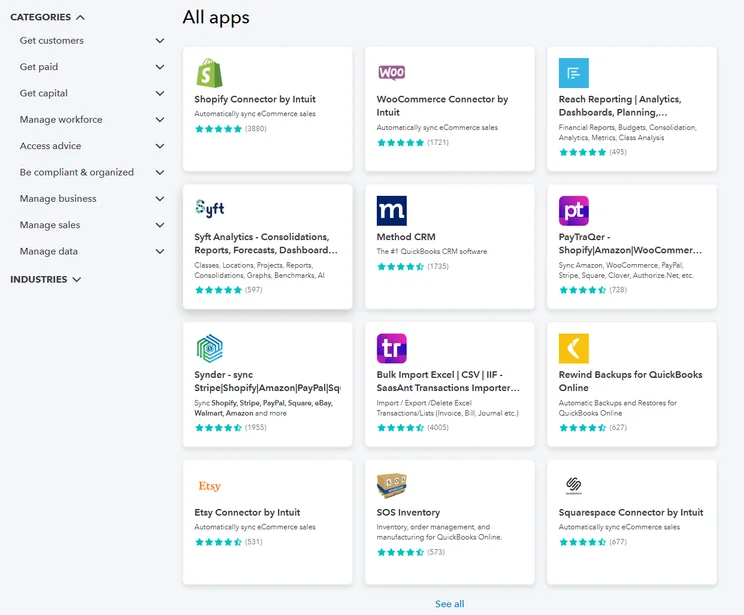
For businesses wanting a holistic approach to managing their operations, both QuickBooks and Sage offer an extensive app library. QuickBooks offers over 800 integrations, including options for inventory management, ecommerce, and marketing. The only other software that offered more integrations during our tests was Xero, which has over 1,000.
Sage, likewise, offers a wide range of apps as part of its marketplace. This includes ecommerce, invoices and expenses, and POS systems. Sage’s marketplace even divides up based on industry, so your business won’t have to dig through trying to find the products most suited to you.
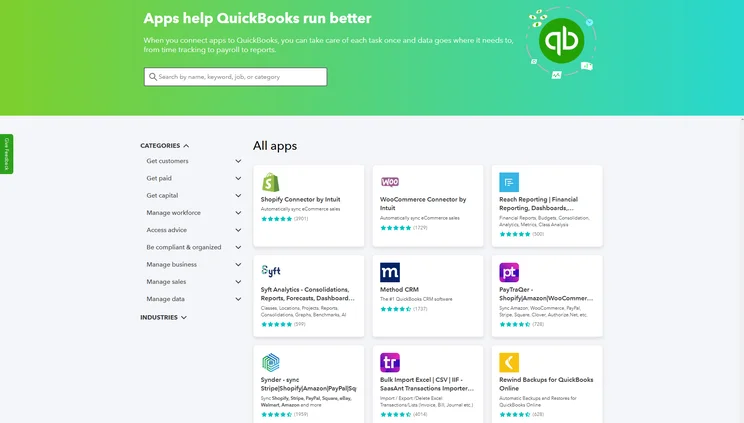
QuickBooks offers a range of third-party integrations, so you can keep all of your business needs in one place. Source: Tech.co testing
Furthermore, both platforms make it easy to customize their interfaces based on the needs of your business. For example, QuickBooks allows invoice templates to be tailored with business logos, branding, terms, and details.
Opting for QuickBooks will also allow you to make the most of the platform’s AI assistant, Intuit Assist. This will give you access to AI-powered insights, such as identifying trends or potential anomalies in financial data. Sage too offers its own AI assistant, Sage Copilot.
Likewise, both Sage and QuickBooks offer a mobile app for their accounting platform, allowing you to manage your finances on the go.
Is QuickBooks or Sage Easier to Use?
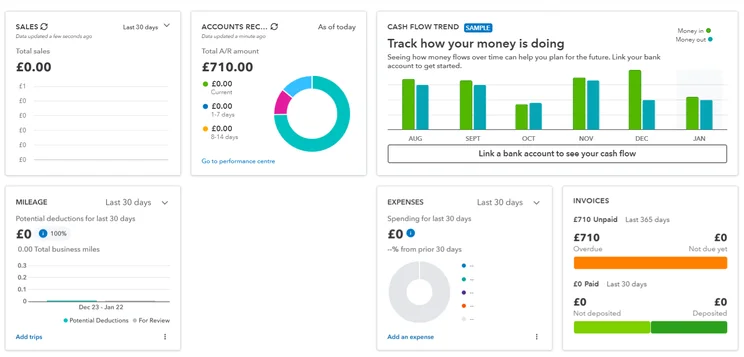
QuickBooks was a big hit during our latest round of research. Users enjoyed using its well-organized layout and dashboard, and appreciated that essential features were logically categorized, such as placing bills directly under expenses.
Many users pointed out that the QuickBooks layout reduced manual effort, and with features such as email previews, we found a lot of tasks could be easily streamlined for maximum efficiency. However, while most of our users got to grips quickly with the platform, some noted that there was an initial learning curve.
Sage, too, is generally considered user-friendly and efficient to use. The software can automate tasks such as invoicing, bank reconciliation, and VAT calculations, which could help maximize efficiency for businesses.
Does QuickBooks or Sage Have Better Help and Support Options?
QuickBooks offers a wide range of help and support options, including live chat, a forum, and a knowledge center. It doesn’t offer email support, however, and if you want to speak to someone on the phone, you’ll have to wait for them to call you or find the number separately in the support center.
When we tested QuickBooks, our users found the effectiveness of each resource inconsistent. For example, some users said that certain articles were unhelpful, and there were issues with some resources failing to load altogether. If you’re looking for a platform that will give you more immediate support, we would recommend Zoho Books.
Sage, on the other hand, offers more help and support options compared with QuickBooks. These include phone support, email support, knowledge center, and live chat.
Alternatives to QuickBooks and Sage
Our top choice for the best accounting software for small businesses is Zoho Books. Compared with QuickBooks and Sage, Zoho Books offers time-tracking features, allowing users to see how much time they spend on specific tasks.
Another top contender to emerge from our latest round of accounting software research is Xero. Unlike QuickBooks, Xero allows you to track fixed assets and will automatically calculate and update asset values, while accounting for depreciation or amortization over time.
To see how QuickBooks and Sage compare against the rest of the competition, you can view the table below:
|
Starting price
|
Free trial
|
Best for
|
Pros
|
Cons
|
Try now
|
||
|---|---|---|---|---|---|---|---|
 |
 |
 |
 |
|
|||
|
FreshBooks |
Xero |
Zoho Books |
FreeAgent |
QuickBooks |
|||
|
|
|
Free |
|
|
|||
|
30 days |
30 days |
14 days |
30 days |
30 days |
|||
|
New businesses |
Experienced accountants and established businesses with complex financial needs |
Integrations |
Budget-conscious businesses |
Businesses needing advanced financial insights and customization |
|||
|
|
|
|
|
|||
|
|
|
|
|
|||
| Try FreshBooks | Try Xero now | Try Zoho Books | Get Quotes | Try QuickBooks |
Our Methodology
At Tech.co, we take our impartial research and analysis seriously, so you can have complete confidence that we’re giving you the clearest, most useful recommendations.
After conducting an initial investigation to identify the most relevant, popular, and established accounting tools in the market, we conducted further research, including testing six major accounting software platforms.
Based on years of market and user needs research, we’ve established an accounting software testing methodology that scores these platforms against six main categories, and 25 subcategories — with a total of 1,512 areas of investigation being considered overall.
We also put the platforms through their paces with hands-on testing to gain a deeper grasp of their average user experience. We dedicated 57 hours to carrying out 37 user tests, with a total of 555 tasks being completed in total.
Our main testing categories for accounting software are:
- Core accounting features: We check how adept a platform will be at managing accounting tasks, focusing on key bookkeeping features like invoicing, tax preparation, journal entry, time tracking, financial transactions, and payment support.
- Operational efficiency: We determine how capable a system is at ensuring day-to-day processes run seamlessly, paying close attention to third-party integrations, collaboration tools, AI automation, and customization options.
- Financial planning: We assess how capable a system will be at measuring income, profits, and losses. Specifically, we check for the presence and quality of forecasting and budgeting, inventory management, reporting, and compliance tools.
- Help and support: We assess how useful and reliable a platform’s support system is, focusing on support options, whether it’s 24/7 support or knowledge center accuracy, as well as cloud backup, and security safeguards.
- Pricing: We compare the overall cost of each platform, taking factors like monthly costs, set-up fees, hidden fees, and free plans into account. We also measure how strict contracts are, and how much it would cost for a business to terminate them early.
- User experience: An overall judgment of how easily users can interact with the platform. We tested each accounting platform and got our team to report how easy they were to use, how they felt when they were using them, and how likely they were to recommend the platform to another business.
When it comes to calculating a product’s final score, not all testing areas are weighted evenly, with factors like “core accounting features” and “operational efficiency” being prioritized for small businesses, while sector-specific features are valued more highly for businesses across different industries.
We understand that accounting software is always evolving. That’s why at Tech.co, we have full-time product researchers to re-run this testing process regularly. It’s the only way to ensure our results remain reflective of the present day.
Learn more about our research.
We recommend QuickBooks over Sage, due to better features and lower monthly costs, especially considering the latest deals. QuickBooks is a great pick for small businesses, due to its customization options and sturdy accounting features, including strong invoicing capabilities, which are a core need for any business.
However, Sage does offer all the features most small businesses will need, and a broader range of help and support options in comparison with QuickBooks. However, some small businesses may find the pricing for Sage somewhat too expensive.
In the end, though, either software might be the right accounting solution for your business. To figure out which choice is best, take the next step and fill out our quick quotes form.
If you click on, sign up to a service through, or make a purchase through the links on our site, or use our quotes tool to receive custom pricing for your business needs, we may earn a referral fee from the supplier(s) of the technology you’re interested in. This helps Tech.co to provide free information and reviews, and carries no additional cost to you. Most importantly, it doesn’t affect our editorial impartiality. Ratings and rankings on Tech.co cannot be bought. Our reviews are based on objective research analysis. Rare exceptions to this will be marked clearly as a ‘sponsored’ table column, or explained by a full advertising disclosure on the page, in place of this one. Click to return to top of page


