
We may receive a commission from our partners if you click on a link to review or purchase a product or service. Click to Learn More
FreshBooks pricing plans start at $23 per month and go as high as $70 per month when billed monthly, though you can save 10% by opting for an annual bill. The platform is among the best accounting software for your business, so it’s worth seeing how its value compares to other options.
Every user added after the first will cost an additional $11 per month, with other services like payroll and advancement payments also costing extra. There is a 30-day money-back guarantee, as well as a 30-day free trial for all plans.
Below, we outline the price, value, and features of all the FreshBooks plans, as well as highlight the other add-on costs you may incur as a small business.
|
Price
|
Users
|
||
|---|---|---|---|
|
CHEAPEST PLAN

|
|
|
|
|
|
|
|
|
|
1 |
1 |
1 |
3 |
FreshBooks Pricing Plans Explained
We’ll take a look at each of the software’s three main pricing plans, as well as a fourth, custom-priced option aimed at enterprise-level operations:
A 30-day money-back guarantee is available for all plans, though there’s no permanent free version of any FreshBooks plan. Fortunately, there are plenty of other free accounting software options out there, so you can try them before you make a big financial commitment.
Lite: $23 per month
The cheapest FreshBooks plan, Lite, starts at $23 per month when billed monthly, and $276 per year when billed annually — a lump sum that comes out to exactly 10% off.
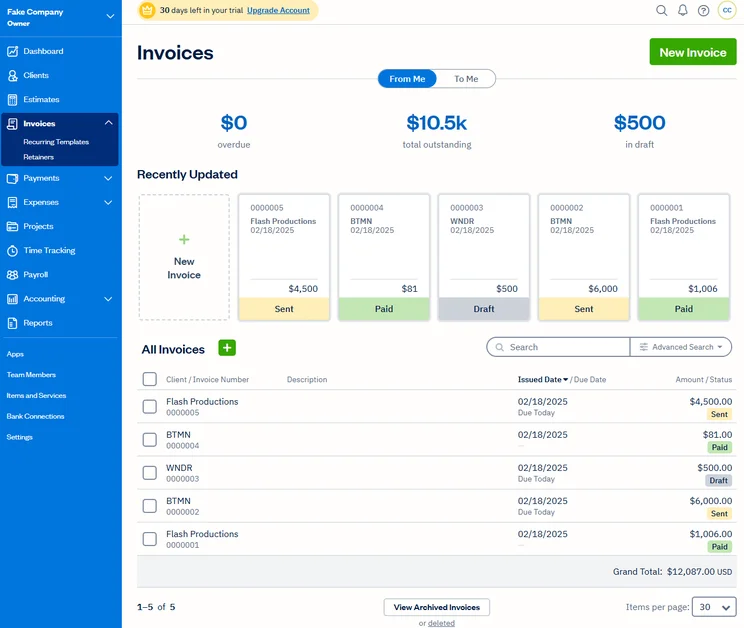
FreshBooks Lite supports custom invoicing. Source: Tech.co user testing
For the price, you’ll get:
- Custom invoicing
- Unlimited expense entries
- Unlimited time tracking
- Unlimited estimates
- Billing with credit card and ACH payments
- Expense importing
- 150 integrations
- 5 billable clients maximum
This lightweight plan is designed for freelancers and the self-employed: It’ll help one person keep their invoices, bills, and tax information in order. The primary features include unlimited customizable invoices, as well as unlimited expense entries, time tracking, and estimates. It’ll let users accept their clients’ payments online through credit card and ACH payments and will automatically import expenses from users’ bank accounts. Users will also have access to 150 integrations, though many of these third-party services will come with their own monthly charge.
One big restriction under this plan? Users are capped at just five billable clients. Our tests found the interface was simple and easy to use, however, with the consistent placement of editing tools in particular helping to streamline the experience for us.
Read our guide to the best accounting software for the self-employed
Plus: $43 per month
The Plus plan costs $43 per month when billed monthly, and $516 per year when billed annually, again a 10% discount from the original price.
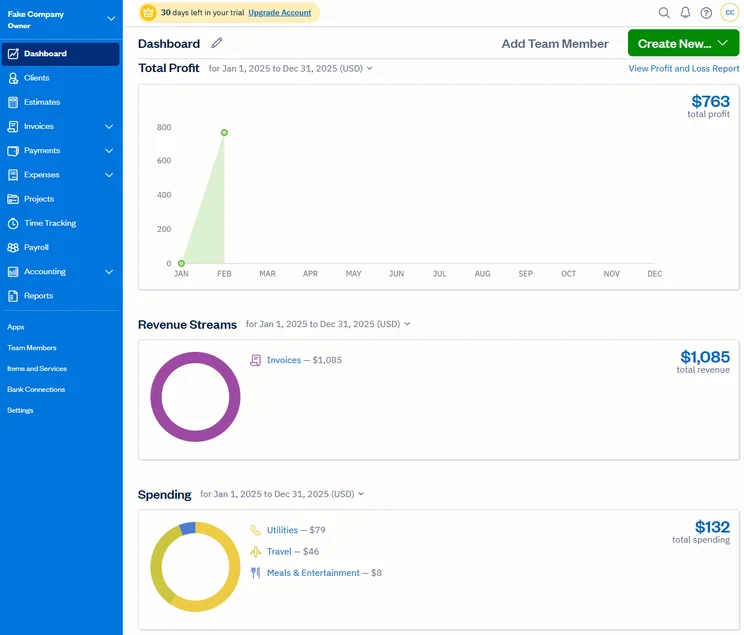
The Freshbooks home dashboard gives users key charts and graphs. Source: Tech.co testing
On this plan you’ll get:
- Automated invoices
- Automated late fees
- Automated late payment reminders
- Client retainers
- Unlimited proposals
- 50 billable clients maximum
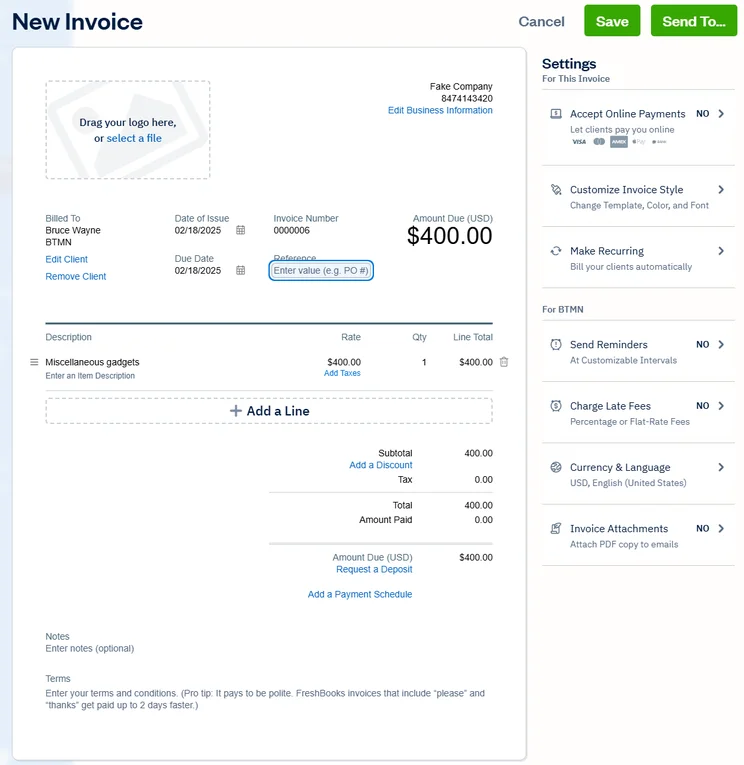
Under this plan, which is FreshBooks’ most popular offering, users will get all the features found in Lite, with the cap on billable clients raised to a healthy 50. Quite a few additional, very useful features kick in as well: For starters, Plus users will be able to set up invoices. Our tests found FreshBooks to also be one of the best invoicing software options for small businesses.
On top of that, you can also automate late fees and late payment reminders. We found that this feature saved a lot of hassle on a day-to-day basis and is a big benefit of this accounting software in general. Plus also includes client retainers, as well as an unlimited number of proposals.
Premium: $70 per month
FreshBooks’ Premium plan will cost you $70 per month billed monthly, and $756 per year when billed annually, saving you 10% when you opt for the long contract.
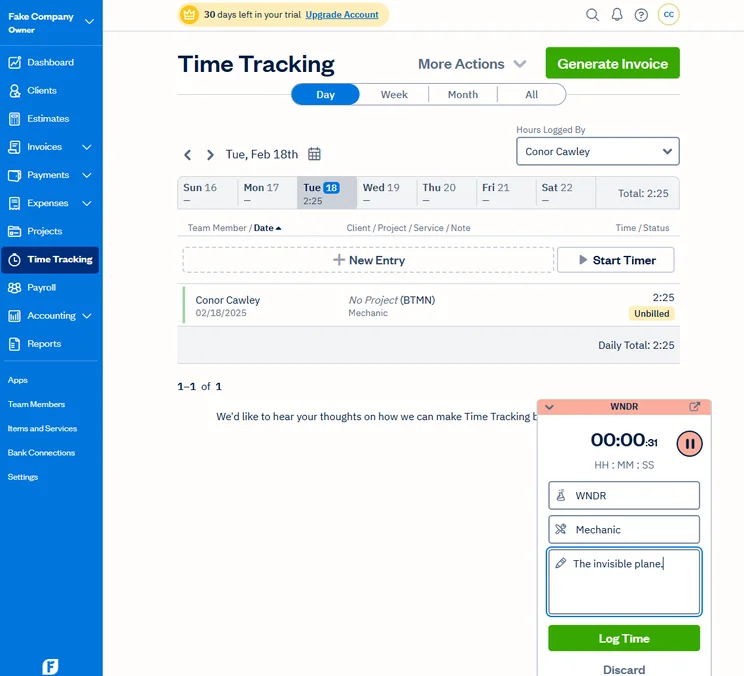
Time tracking is a helpful tool offered by FreshBooks. Source: Tech.co user testing
This price hike won’t get you many additional features. However, it does expand functionality for some tools available in the Premium plan, including project profitability tracking. It also removes the billable client cap to allow for unlimited clients.
In the end, Premium isn’t as cost-effective as the Plus plan, which is available at half the cost. Still, by the time a business is large enough to field more than 50 clients, they likely won’t notice the monthly cost of using this plan.
FreshBooks Select
Finally, there’s the FreshBooks Select plan. You’ll get:
- Exclusive access to Select Support
- Customized training for a business’s entire team
- “Super low” credit card transaction rates to help larger operations save even more
The cost is customized, meaning you’ll need to get in touch with FreshBooks directly in order to find out how much it might cost your business. This plan is only for enterprise operations, so most businesses should opt for a lower plan tier.
Extra Freshbooks Costs and Fees
All the prices listed above are the base prices you can expect to pay, but additional costs might pile up for three reasons: If you’re adding team members, need faster payments, or are accepting payments through your invoices.
Add-Ons: Team Members, Advanced Payments, and Payroll
Each starting price gives a business one user account. The cost to add more team members to the Lite, Plus, or Premium plans is $11 per person per month. This charge can add up fast, so make sure you know how many people will need to regularly access your accounting software before you commit to FreshBooks.
If you have a lot of users, you may want to consider a rival accounting platform that does not include this extra per-user price hike. In comparison, Zoho Books includes three users for its cheapest paid plan, while Xero has no user cap at all.
FreshBooks has another popular add-on, Advanced Payments, which can be added to the Lite, Plus, and Premium plans for an additional $20 per month (it’s already included with Select).
Advanced Payments lets users operate a virtual terminal for faster payment acceptance. It’s secure and PCI-compliant, though it comes with a 3.5% + $0.30 fee per transaction, in addition to the monthly charge. While this is around the average fee, you can find lower fees: Square Payments are 3.3% + 30¢ per online transaction on the free plan. Without it, users will still have a recourse for payments, since all the plans will let users accept credit cards and ACH bank transfers.
Finally, you can add payroll support to any FreshBooks accounting plan for another $40 per month, plus $6 per user, per month. In addition to running and recording all payroll transactions, it will automatically file and submit your state and federal payroll taxes.
FreshBooks Invoice Fees
Using the invoice features of FreshBooks can incur small additional fees. FreshBooks is one of the only invoice services that facilitates payment through both first and third-party payment processors, which can come with different fees.
If you use FreshBooks’ payment system, debit and credit cards will cost you 2.9% of the total invoice cost, plus 30 cents. If you operate through bank transfers, this charge will only be 1%.
If you use a third-party service, like PayPal or Stripe, you’ll pay a similar fee of 2.9% plus 30 cents.
While the ability to use first and third-party payments is great, there are some other key features included in FreshBooks’ invoice service, like the ability to incorporate multiple currencies into your invoices or add tracked hours into the invoice’s expenses.
FreshBooks Pros and Cons
FreshBooks

In Short
-
Pros
- Intuitive, easy-to-use interface for beginners
- Time tracking features with invoice compatibility
- 24/7 customer support options for platform help
- Automated reminders are included on all plans
-
Cons
- Limited functionality in mobile app
- No forecasting or budgeting features for future analysis
- Few custom reporting options
- Lower-tier plans restrict the number of active clients you can bill
Pricing
-
 Lite: $23/month
-
Plus: $43/month
-
Premium: $70/month
-
90% off all plans for the first 3 months
Images
How Does FreshBooks Pricing Compare With Other Solutions?
FreshBooks isn’t the only software name in the accounting game. Here’s a quick overview of some of the other quality small business accounting software options available today — like Xero, Zoho Books, and FreeAgent — and how much they cost compared to FreshBooks’ plans.
|
Starting price
|
Free trial
|
Best for
|
Pros
|
Cons
|
Try now
|
||
|---|---|---|---|---|---|---|---|
|
|
 |
 |
 |
 |
|||
|
FreshBooks |
Xero |
Zoho Books |
FreeAgent |
QuickBooks |
|||
|
|
|
Free |
|
|
|||
|
30 days |
30 days |
14 days |
30 days |
30 days |
|||
|
New businesses |
Experienced accountants and established businesses with complex financial needs |
Integrations |
Budget-conscious businesses |
Businesses needing advanced financial insights and customization |
|||
|
|
|
|
|
|||
|
|
|
|
|
|||
| Try FreshBooks | Try Xero now | Try Zoho Books | Get Quotes | Try QuickBooks |
Xero
Available from $25 per month, Xero has three plans: Early, Growing, and Established. Early is the $25 per month plan; Growing costs $55 per month, while Established costs $90 per month. Currently, you can get started with an impressive “90% off” deal for the first six months, dropping Early’s cost to just $2.50 per month.
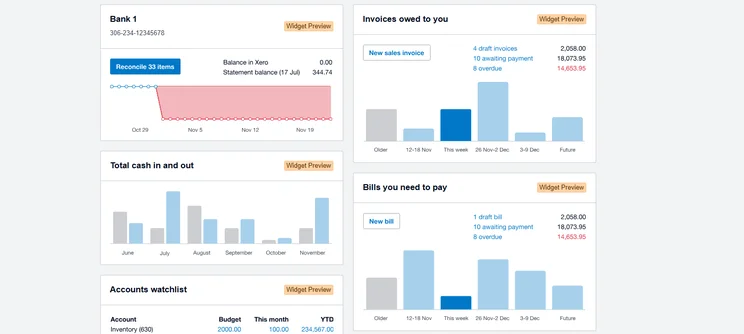
Xero has a reporting dashboard for the latest data on business operations. Source: Tech.co user testing
The Early plan has more restrictions than FreshBooks’ comparable Lite plan, allowing just 20 invoices and quotes, and five bills, although the plan did remove its reconciliation cap of 20 bank transactions last year, so users can now reconcile as often as they need.
The Growing plan offers more functionality, including unlimited invoicing, billing, and bank transactions, but it’s still not as much as FreshBooks Plus has to offer. Xero’s pricing is higher for most plans, so FreshBooks will be a better choice for businesses with a close eye on their bottom line.
Zoho Books
The Zoho Books accounting app starts with a Free plan, then the $15 per month Standard plan, followed by the $40 per month Professional plan, the $60 per month Premium plan, the $120 per month Elite plan, and the $240 per month Ultimate plan.
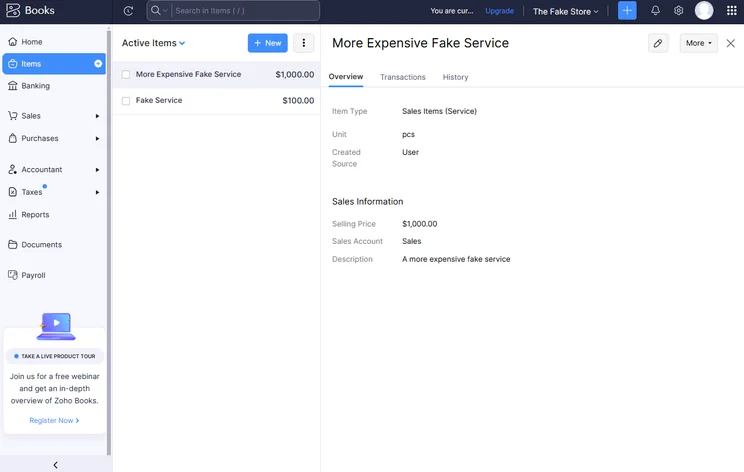
Zoho Books allowed us to track inventory directly in the platform. Source: Tech.co testing
It’s an attractive option, particularly with the Free plan offering a wide range of abilities with no strong limitations, aside from a cap of 1,000 invoices per year. There’s one catch for Free, however: to access it, you’ll need to prove your business is small enough that its revenue is under $50,000 a year.
All the other plan prices are pretty similar to FreshBooks, with the $15 Zoho Standard plan costing less than FreshBooks Lite and the $40 Zoho Professional plan a little more expensive than the $43 FreshBooks Plus plan. For more, read our full Zoho Books review.
If your business needs multiple team members to access its accounting software, Zoho Books’ pricing isn’t bad: The Standard plan supports three users at no extra cost, while the Professional plan supports five.
FreeAgent
Refreshingly, FreeAgent just has one plan. It’ll cost you $13.50 per month for the first six months, and then $27 per month after that. You can save even more if you opt for an annual bill: It’s $135 per year for the first year, and $270 per year after that.

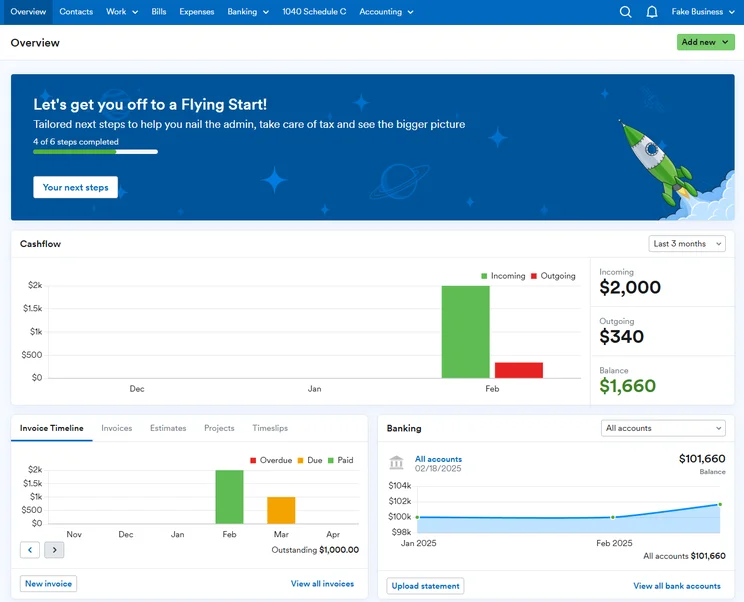
The FreeAgent dashboard offers the charts and stats that accountants are looking for. Source: Tech.co testing
Users, clients and projects are all unlimited with FreeAgent, and there’s a 30-day free trial as well. $27 a month isn’t quite as good as $23 per month for FreshBooks’ Lite plan, but it is cheaper than FreshBooks Plus, FreshBooks’ main plan.
The service is based in the UK, and that’s when their support hours are, which may pose a barrier to US-based businesses. London, for example, is a full eight hours ahead of the West Coast. Otherwise, it’s a solid service, handling estimates, invoices, expenses, time tracking, banking, and projects.
QuickBooks Online
QuickBooks Online’s pricing comes in four plans: The Simple Start plan costs $38 per month; Essentials costs $85 per month; Plus costs $140 per month; and Advanced costs $340 per month. QuickBooks offers 50% off for the first three months on all of these plans.
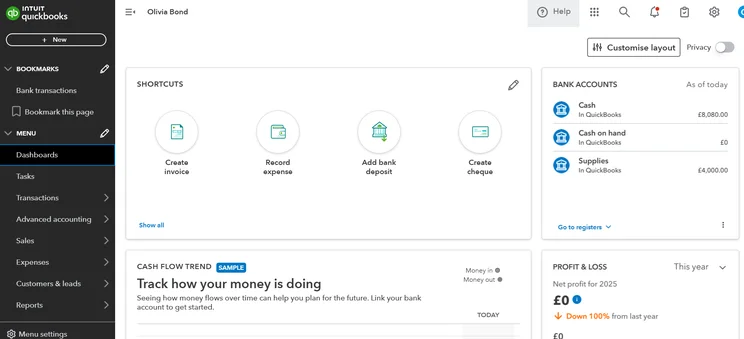
The QuickBooks dashboard offers many of the same functions as the FreshBooks software. Source: Tech.co testing
In general, QuickBooks offers even more features than FreshBooks, although it has fewer third-party integrations. In terms of functionality, QuickBooks’ Plus plan is comparable to the Plus plan from FreshBooks.
The plans each support a different number of users. Simple Start has just one, Essentials has up to three, Plus supports up to five users, and Advanced supports up to 25 users. As a result, the number of employees any given business needs to access its accounting software might make QuickBooks a cheaper alternative to FreshBooks: If just two or three users need it, FreshBooks is cheaper, but any more, and QuickBooks is the better deal.
Get the full lowdown in our FreshBooks vs QuickBooks head-to-head guide
While there are a few other good accounting software options available, we’d say FreshBooks offers a strong value overall that makes it worth the purchase.
FreshBooks pricing is low, starting at only $23 per month, provided your business doesn’t need to add more team members at $11 per month a pop. At the same time, the range of features offered is great; the interface is easy to use, and the support team is good as well.
Frequently Asked Questions
FreshBooks is an accounting software best for small businesses or individual freelancers, offering a great range of features and integrations for a fair price.
No, FreshBooks does not offer a permanent free plan. However, you can try a 30-day free trial to get a feel for the paid plans.
FreshBooks pricing offers three main paid plans: $23/month, $43/month, and $70/month. We would recommend the FreshBooks Plus plan, as it offers a much larger range of features and higher usage caps than the Lite plan, without the price hike of the Premium plan. For all three plans, adding additional users beyond the first one will cost $11/person/month.
Both accounting software solutions are top-tier, but we would narrowly recommend QuickBooks over FreshBooks. They have slightly different strengths: QuickBooks offers inventory management, making it best for companies with a product inventory, while FreshBooks’ per-user pricing makes it a more cost-effective solution for a small business with five or fewer users. They both offer simple interfaces and good support teams.
If you click on, sign up to a service through, or make a purchase through the links on our site, or use our quotes tool to receive custom pricing for your business needs, we may earn a referral fee from the supplier(s) of the technology you’re interested in. This helps Tech.co to provide free information and reviews, and carries no additional cost to you. Most importantly, it doesn’t affect our editorial impartiality. Ratings and rankings on Tech.co cannot be bought. Our reviews are based on objective research analysis. Rare exceptions to this will be marked clearly as a ‘sponsored’ table column, or explained by a full advertising disclosure on the page, in place of this one. Click to return to top of page


