
We may receive a commission from our partners if you click on a link to review or purchase a product or service. Click to Learn More
QuickBooks Online is a feature-rich accounting software that will handle your business needs, from customizable invoices and reports to over 800 third-party integrations.
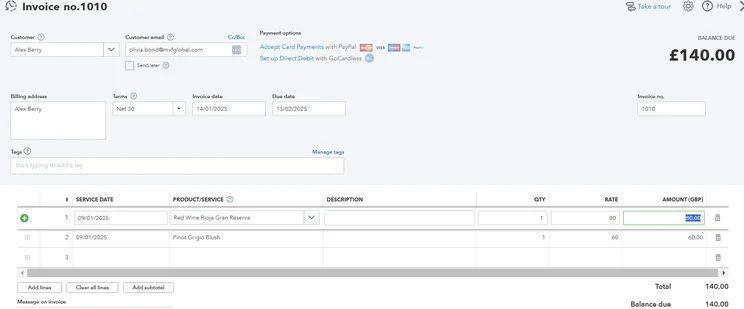
The platform includes plenty of functionality for streamlining accounting tasks that might otherwise be missed or forgotten. It pre-populates fields, previews emails, automatically flags mismatched balances, and lets users set up their own alerts for anything from tax deadlines to payment reminders.
However, some processes are more difficult than others, and establishing the right workflow may require some effort. Does QuickBooks offer the tools you need at a price that’s right? See for yourself, with our well-researched and tested review of the features, costs, and live support that the platform has to offer. Once you’re ready, check our comparison page for the best accounting software deals.
QuickBooks: At a Glance
- Broad range of reports and templates for nearly any business needs
- Automatically flags mismatched balances
- Clear, understandable set-up guide for the main dashboard
- Cash flow projection tools to help long-term financial viability
- Designed for high efficiency thanks to tools like pre-populated fields and email previews
- Steep learning curve due to the complexity of tools like tax setup and expense creation
QuickBooks

In Short
-
Pros
- Extensive analytics template customization
- Automatic alerts for mismatched balances
- Built-in cash flow projection tools
-
Cons
- Steep learning curve for advanced functionality
- Limited customer support resources for self-help
- No time tracking features
Pricing
-
 Solopreneur: $20/month
-
Simple Start: $38/month
-
Essentials: $85/month
-
Plus: $140/month
-
Advanced: $340/month
-
50% off for first 3 months on all plans
Images
Who is QuickBooks best for?
QuickBooks stands out for its complex reporting tools and customizable report templates, which allow a business to fine-tune its operations in order to earn the highest profit on the lowest budget. In addition, it offers cash flow projection tools that will further help with creating and maintaining the best budget.
As a result of this complexity, we recommend the platform for experienced business owners: You’ll get the most out of the software if you already understand how to use accounting software and how to set up workflows. Less experienced business managers may want to consider it as well, provided they don’t mind a difficult learning curve.
Our experience with QuickBooks
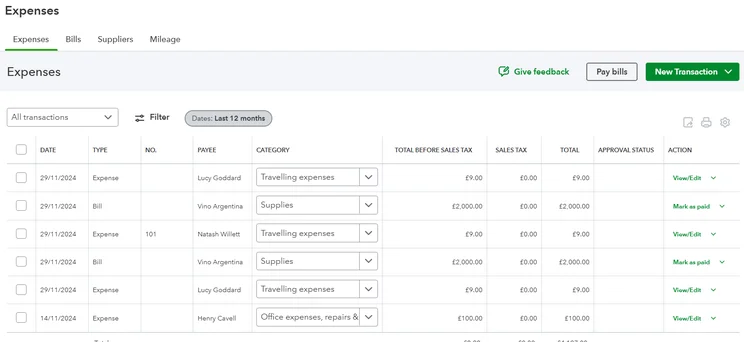
“The platform is laid out in a way that makes sense, e.g., finding Bills under Expenses. […] The learning curve is quite steep. Compared to FreshBooks, where you could go in and get started straight away, it takes more time to understand where to do things.” -Tech.co tester, about QuickBooks
After a session of practical, hands-on testing, our team was split on the pros and cons of the QuickBooks interface.
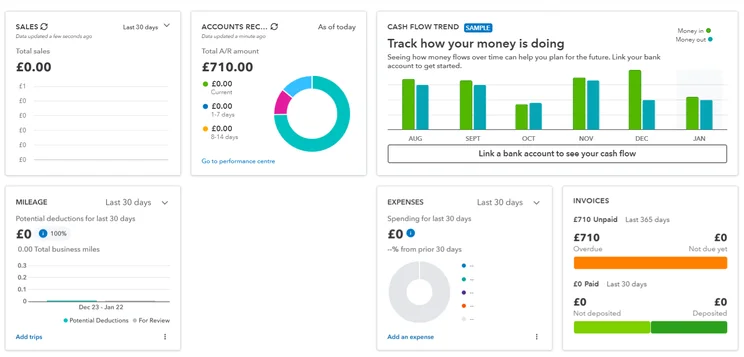
The positive feedback and experiences largely focused on the easy-to-use layout, robust features, and advanced business tools. Many of the support resources and interface design elements were high-quality. The setup guide was helpful for beginners, the tooltips popped up automatically when needed, and the well-organized dashboard made the process of locating tasks painless.
Some tasks were more efficient than others. We loved the way estimates could be converted into invoices in a flash, and how payment reminder notifications help ensure your clients don’t forget to settle up. Other tasks were unclear or time-consuming, however, such as the overly complex creation process for tax workflows and expenses. Some help articles from the online knowledge base wouldn’t load, further challenging us.
On the whole, QuickBooks is well worth considering, but you’ll need to plan on taking some time to figure it out and truly get the ball rolling. Once you do, the customizable report templates and data-crunching tools like cash flow projection can give you far more business insights than most other accounting software options on the market.
QuickBooks Review: Key Features
QuickBooks offers strong functionality overall. How does that break down across all the tasks that a modern accounting platform should handle? We’re glad you asked.
Core accounting tools
QuickBooks delivers all the key accounting features, with one big exception: It doesn’t offer any time-tracking functionality, a common tool that helps ensure invoices include accurate billable hours automatically.
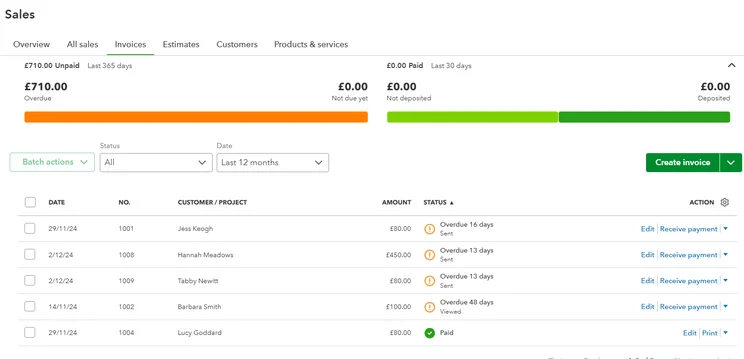
What do you get? Great invoicing tools that support automatic and recurring invoicing, tax calculations, the ability to tell when clients have viewed an invoice, and multi-currency support (a perk that rival FreshBooks doesn’t offer). It has great transaction documentation, import/export capabilities, and auto-logs everything in the general ledger.
Financial planning tools
Financial planning is another area in which QuickBooks excels: It lets users track upcoming bills and expenses on a monthly basis, and project incoming and outgoing cash flow. On the Plus and Advanced plans, you’ll be able to set budgets for specific customers as well.
Users will be able to create their own custom reports (a feature that competitors like FreshBooks and Clear Books don’t support), although the software includes plenty of templates for common accounting needs such as income statements, cash flow statements, balance sheets, and much more.
Inventory management is more limited, however, with no automatic calculations for asset value depreciation or amortization. Try Zoho Books if complex inventory or stock management is a priority for your operation.
Operational efficiency tools
QuickBooks includes plenty of customization options, from the previously mentioned reports to invoice templates that can include your own business logos, branding, terms, and details. You’ll be able to set permissions to give departments different approvals, and the platform’s mobile app adds extra flexibility to business managers who aren’t always near a desktop.
Integrations
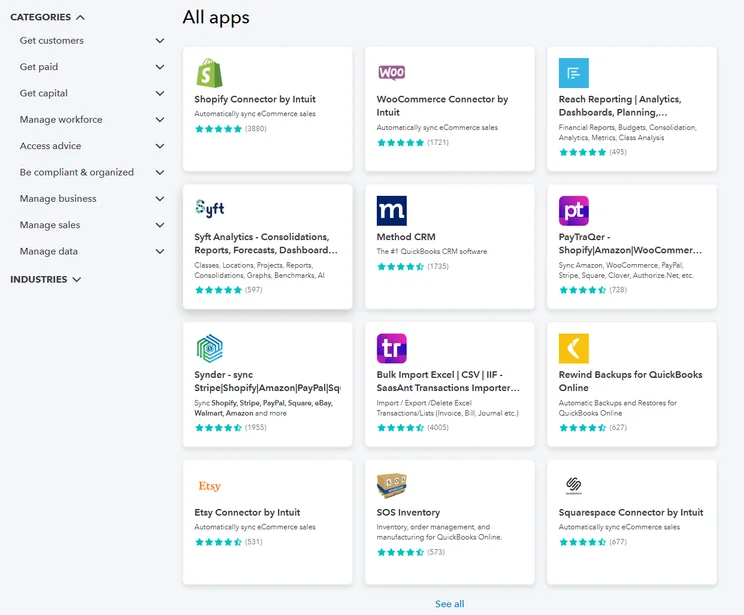
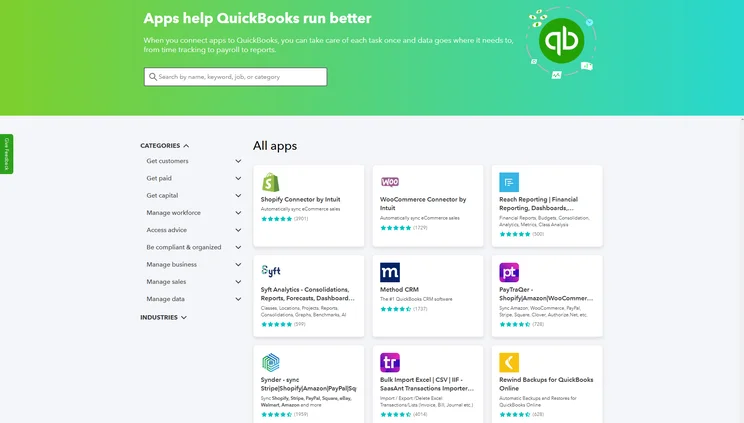
QuickBooks supports a wide range of third-party applications and integrations: Users will have access to more than 800 of them through the platform’s app marketplace. This trails behind Xero’s library of more than 1,000 apps, but it beats most accounting software options, and it should provide plenty of options for your business needs.
An open API is also available, although you’ll need to create an Intuit Developer account in order to get access.
QuickBooks Pricing Plans Explained
QuickBooks offers five different plans. The cheapest is a stripped-down option, Solopreneur, which is specifically for solo independent workers like freelancers or contractors. The others are Simple Start, Essentials, and Plus, followed by the costly Advanced plan, aimed at large operations.
Prices start at $20 per month and rise as high as $340 per month for Advanced (told you it was costly!) — you can check out the table below for a quick look at the plans, or see our full QuickBooks Pricing guide for even more detail.
For comparison, the cheapest starting cost for our favorite accounting solutions is Clear Books, at £16 per month (roughly $21.63), although you’ll get the most features with Zoho Books, starting at $15 per month. Either option will be less costly than QuickBooks.
|
Price
|
Users
|
Bookkeeping
Does it include bookkeeping functions?
|
Accounts payable
Does it include a range of accounts payable functions?
|
Accounts receivable
Does it include a range of accounts receivable functions?
|
Project accounting
Does it offer tools to track different projects?
|
Financial reporting
Does it offer financial reporting tools?
|
Budget and forecasting
Does it offer budgeting and forecasting tools?
|
Best for
|
||
|---|---|---|---|---|---|---|---|---|---|---|
|
|
|
|
|
||||||
|
$20/month |
|
|
|
|
||||||
|
1 |
1 |
3 |
5 |
25 |
||||||
|
|
|
|
|
|
||||||
|
|
|
|
|
|
||||||
|
|
|
|
|
|
||||||
|
|
|
|
|
|
||||||
|
|
|
|
|
|
||||||
|
|
|
|
|
|
||||||
QuickBooks Help & Support
QuickBooks offers several online resources, which are designed to be the first port of call when users need help. These include a knowledge center and a user forum.
In our tests, we found these were decently helpful resources, although not the absolute best. Tasks such as setting up recurring invoices and creating transaction fees were unclear. As one of our testers put it: “The help and support for taxes doesn’t answer queries but just tells you how to use the feature.” These challenges are one reason why we think small business owners should be wary of the learning curve that QuickBooks requires, even if the impressive features ultimately make the platform worth getting.
For most plans, phone support is available from 6 am to 6 pm PT on weekdays, or from 6 am to 3 pm on Saturday. For QuickBooks Advanced, support hours are 6am to 7pm PT on weekdays and 6am to 3pm PT on weekends. Live chat and a chatbot are also available as forms of support that can guide users towards answers that can’t be addressed through online resources. Email support is not offered at all, however.
QuickBooks Alternatives
QuickBooks is a great accounting solution, but it doesn’t offer everything.
Zoho Books might be best for retailers that need comprehensive support for order deliveries, while Xero offers the best ecommerce tools, and FreeAgent will send you automated tax deadline reminders to ensure a forgetful small business owner still wraps up their taxes without paying a single fine.
Whatever you’re interested in, we recommend you check out the competition with a glance at our quick comparison table here.
|
Starting price
|
Free trial
|
Best for
|
Pros
|
Cons
|
Try now
|
||
|---|---|---|---|---|---|---|---|
|
|
BEST ALTERNATIVE
 |
 |
 |
 |
 |
||
|
QuickBooks |
Zoho Books |
Xero |
FreeAgent |
FreshBooks |
Clear Books |
||
|
|
Free |
|
|
|
Free |
||
|
30 days |
14 days |
30 days |
30 days |
30 days |
30 days |
||
|
Businesses needing advanced financial insights and customization |
Integrations |
Experienced accountants and established businesses with complex financial needs |
Budget-conscious businesses |
New businesses |
Professionals requiring comprehensive tax preparation tools |
||
|
|
|
|
|
|
||
|
|
|
|
|
|
||
| Try QuickBooks | Try Zoho Books | Try Xero now | Get Quotes | Try FreshBooks | Get Quotes |
Zoho Books: Best for small businesses
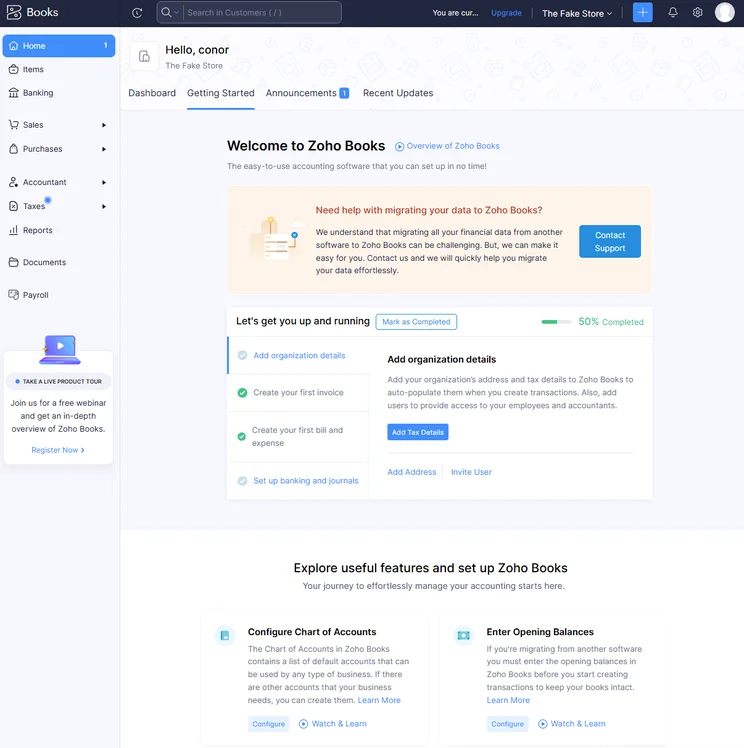
The setup process for Zoho Books was simple, providing us with a step-by-step guide to tackle the basics. Source: Tech.co testing
Zoho Books is our favorite accounting software, as of our most recent round of research. It delivers the best balance of core accounting tools, ease of use, and decent support, all wrapped in a fair price tag. Retailers are particularly well-supported, with delivery functions for order fulfillment, as well as great inventory and stock management. See if you agree by taking a look at our full Zoho Books pricing guide.
Xero: Best for online businesses
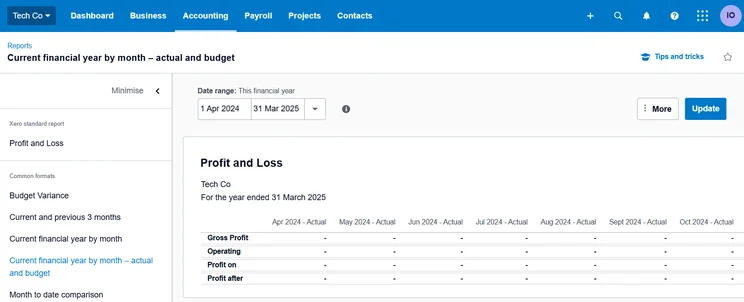
Xero’s profit and loss features help users see their financial outlook at a glance. Source: Tech.co user testing
Xero offers integrations that many ecommerce businesses need, from third-party apps for sellers, including Amazon, Shopify, and Etsy, to website builder integrations for top brands like Squarespace and Square Online. Another standout benefit? Xero has no user limits on any of its plans, so you’ll be able to scale up your employees without paying a cent extra.
FreeAgent: Best forecasting and prediction tools
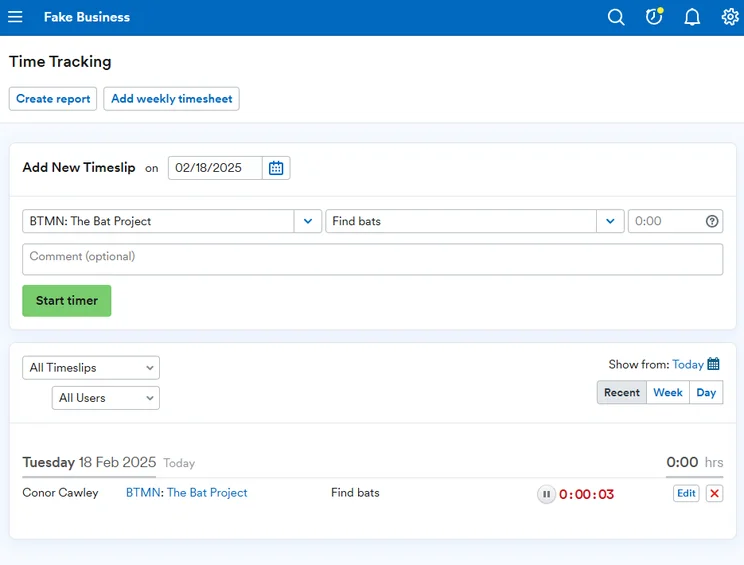
FreeAgent offers time tracking features that we found easy to use directly in the platform. Source: Tech.co testing
FreeAgent stands out for its tax prep tools, which include a tax timeline, deadline alerts, and forecasting and scenario prediction functions. It also offers automatic time tracking for accurate invoicing — one of the few core accounting tools that QuickBooks lacks entirely. During our latest round of testing, we concluded that FreeAgent pricing was the best on the market.
Still looking for more alternatives? Check out our guide to the best free accounting software.
What’s New for QuickBooks?
QuickBooks Online rolls out new updates every month. As of our most recent check-in, the platform’s latest additions include a simplified Bill Pay subscription process for users who bill their clients.
Now, those users can accept sales receipts and invoice payments through the QuickBooks mobile app with a 2.5% processing fee, which matches what they’d pay for the same transaction through a card reader. Clients can use Tap to Pay if they have iPhones, too, making this another example of why QuickBooks is among our top picks for the best accounting software for Mac users.
Other recent QuickBooks Online updates include better functionality for the Payroll add-on, which can now download multiple payroll reports bundled into a single Excel file across payroll runs, at any time after the run that you decide you need it.
Finally, the most exciting recent Payroll update is the ability to reverse a direct deposit payment within five days, all from the platform itself and at no extra cost. Now, any payroll mistakes can be fixed quickly and painlessly.
Methodology: How We Tested Accounting Software
At Tech.co, we take our impartial research and analysis seriously, so you can have complete confidence that we’re giving you the clearest, most useful recommendations.
After conducting an initial investigation to identify the most relevant, popular, and established accounting tools in the market, we conducted further research, including testing six major accounting software platforms.
Based on years of market and user needs research, we’ve established an accounting software testing methodology that scores these platforms against six main categories, and 25 subcategories — with a total of 1,512 areas of investigation being considered overall.
We also put the platforms through their paces with hands-on testing to gain a deeper grasp of their average user experience. We dedicated 57 hours to carrying out 37 user tests, with a total of 555 tasks being completed in total.
Our main testing categories for accounting software are:
- Core accounting features: We check how adept a platform will be at managing accounting tasks, focusing on key bookkeeping features like invoicing, tax preparation, journal entry, time tracking, financial transactions, and payment support.
- Operational efficiency: We determine how capable a system is at ensuring day-to-day processes run seamlessly, paying close attention to third-party integrations, collaboration tools, AI automation, and customization options.
- Financial planning: We assess how capable a system will be at measuring income, profits, and losses. Specifically, we check for the presence and quality of forecasting and budgeting, inventory management, reporting, and compliance tools.
- Help and support: We assess how useful and reliable a platform’s support system is, focusing on support options, whether it’s 24/7 support or knowledge center accuracy, as well as cloud backup, and security safeguards.
- Pricing: We compare the overall cost of each platform, taking factors like monthly costs, set-up fees, hidden fees, and free plans into account. We also measure how strict contracts are, and how much it would cost for a business to terminate them early.
- User experience: An overall judgment of how easily users can interact with the platform. We tested each accounting platform and got our team to report how easy they were to use, how they felt when they were using them, and how likely they were to recommend the platform to another business.
When it comes to calculating a product’s final score, not all testing areas are weighted evenly, with factors like “core accounting features” and “operational efficiency” being prioritized for small businesses, while sector-specific features are valued more highly for businesses across different industries.
We understand that accounting software is always evolving. That’s why at Tech.co, we have full-time product researchers to re-run this testing process regularly. It’s the only way to ensure our results remain reflective of the present day.
Learn more about our research.
We recommend QuickBooks for any business that will make good use of advanced and customizable reports and invoice templates, a logical interface layout, and the cash flow projection functions needed to look ahead.
Granted, the software can be tough to configure, so you should expect a bit of a learning curve, and it won’t include a few helpful tools, like time tracking. It’s a great pick for businesses that need a lot of accounting tools and can put in the work to set up the perfect workflow for their operational needs.
If you’re ready to commit — or if you need to check out competing software first — visit our accounting software comparison page to take your next step.
If you click on, sign up to a service through, or make a purchase through the links on our site, or use our quotes tool to receive custom pricing for your business needs, we may earn a referral fee from the supplier(s) of the technology you’re interested in. This helps Tech.co to provide free information and reviews, and carries no additional cost to you. Most importantly, it doesn’t affect our editorial impartiality. Ratings and rankings on Tech.co cannot be bought. Our reviews are based on objective research analysis. Rare exceptions to this will be marked clearly as a ‘sponsored’ table column, or explained by a full advertising disclosure on the page, in place of this one. Click to return to top of page


