
We may receive a commission from our partners if you click on a link to review or purchase a product or service. Click to Learn More
The best HubSpot alternative is Freshsales, an affordable one-size-fits-all CRM platform that combines marketing and sales tools for businesses, and it offers solid free plan for three users or fewer that can compete with the one from HubSpot.
Another great HubSpot alternative is monday CRM, offering unlimited users and 5GB of storage for just $12 per user, per month. Plus, it’s one of the most user-friendly platforms we tested in our research, making it one of the simplest CRM systems available.
In this guide, we’ll cover all the best HubSpot alternatives, both free and paid, and help you decide which CRM is the right fit for your business.
|
Free plan
|
Free trial
|
Starting price
|
Most expensive plan
|
Best HubSpot Alternative
|
Verdict
|
Get started
Click to get started and compare prices for your business
|
||
|---|---|---|---|---|---|---|---|---|
 |
FEATURED PROVIDER
 |
BEST ALTERNATIVE
 |
 |
 |

|
|||
|
HubSpot |
Pipedrive |
Freshsales CRM |
monday CRM |
Salesforce |
||||
|
|
|
|
|
|
|
|||
|
14 days |
14 days |
21 days |
14 days |
30 days |
30 days |
|||
|
$9/user/month |
$14/user/month |
$9/user/month |
$12/user/month |
$25/user/month |
||||
|
$3,600/user/month |
$99/user/month |
$59/user/month |
$28/user/month |
$550/user/month |
||||
|
N/A |
For sales teams |
For sales and marketing |
For small businesses |
For customer service teams |
For beginners |
|||
|
An easy-to-use and highly scalable platform ideal for growing businesses, with an excellent free plan |
Core CRM features in flexible pricing plans make this one of the best value CRM options for any small business |
A highly intuitive CRM that is packed with plenty of features and even has a free plan option |
Popular option with a modern, easily customizable interface and a great Free Trial |
An incredibly popular and customizable CRM for all businesses, with excellent communication tools |
Solid feature set and team management infrastructure |
|||
| Try HubSpot | Try Pipedrive | Try Freshsales | Try monday CRM | Try Salesforce | Try Zendesk Sell |
HubSpot Alternatives: At a Glance
As businesses look for smarter ways to manage customer relations, the use of CRM tools is projected to increase 12% every year from now until 2028. Use the links below to jump to our full reviews.
The best HubSpot alternatives are:
- Freshsales – Best HubSpot alternative for sales and marketing combined, recommended for its many features, low price, and high overall value.
- monday CRM – Best HubSpot alternative for small businesses, recommended for its ease of use and price.
- Pipedrive Sell – Great HubSpot alternative for sales, recommended for its useful lead generation features and integrations.
- Salesforce Service Cloud – Best HubSpot alternative for customer service, recommended for its complex features.
- Zendesk Sell – Best HubSpot alternative for beginners, recommended for its overall features and great team management tools.
At Tech.co, we do more than just write about CRM software, we actually test it. When it comes to HubSpot, for example, the software feels decidedly robust compared to other options on the market, offering different services, or “hubs,” for marketing, customer service, sales, content, and operations. You can mix and match these hubs to create a platform that works for you, and depending on how much you’re willing to pay, can do pretty much anything you need for your business.
Subsequently, we understand why smaller businesses that don’t need all that functionality might be looking for a HubSpot alternative. In our research, we found that Freshsales is the most suitable option, because it also offers a free plan while dialing back some of the overall functionality, providing just marketing and sales features.
One of our most recommended CRM providers is monday CRM, largely because it’s very easy to use and it’s extremely customizable, with custom fields across the board. This makes it less rigged than HubSpot, which doesn’t offer the same flexibility in setting up the interface.
The other HubSpot alternatives that caught our eyes were Pipedrive, thanks to its lead generation features, Salesforce, with its complex features for larger teams, and Zendesk Sell for its more affordable access to advanced features.
Freshsales CRM – Best HubSpot Alternative Overall
Freshsales Suite

In Short
-
Pros
- Free forever plan available
- Sales, customer service, and marketing options all available
- Highly intuitive user interface, easy for beginners
-
Cons
- Reporting tools have limited customizability
- Some key features exclusive to expensive plans
Images
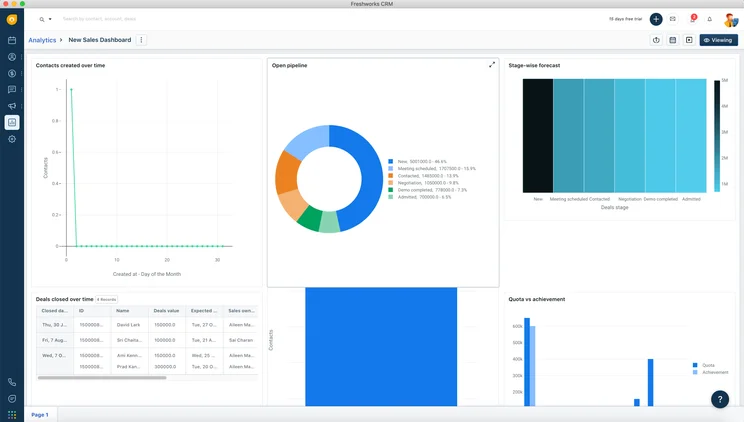
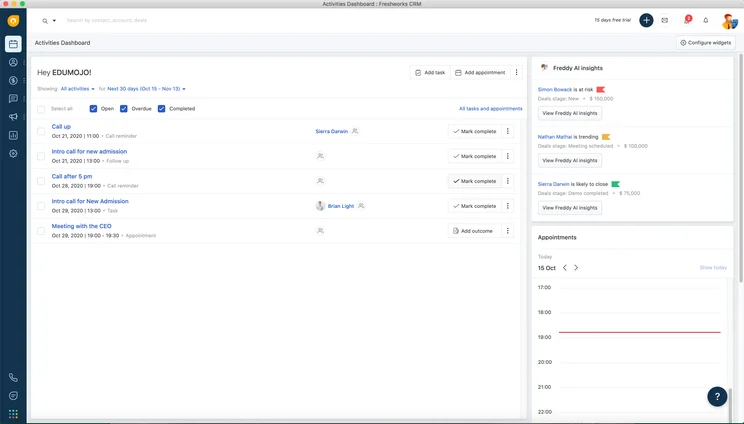
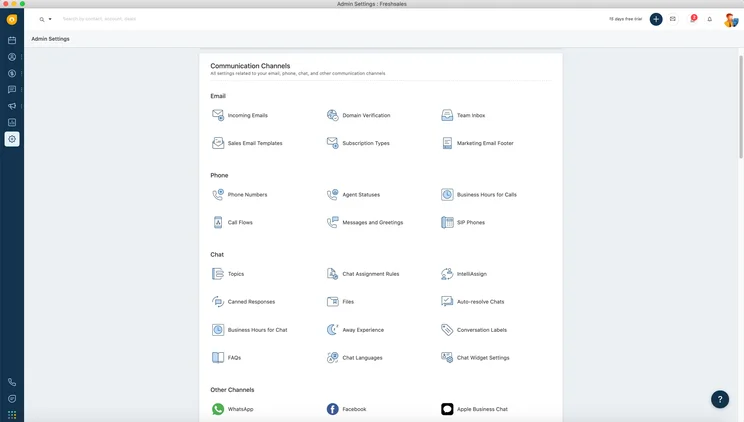
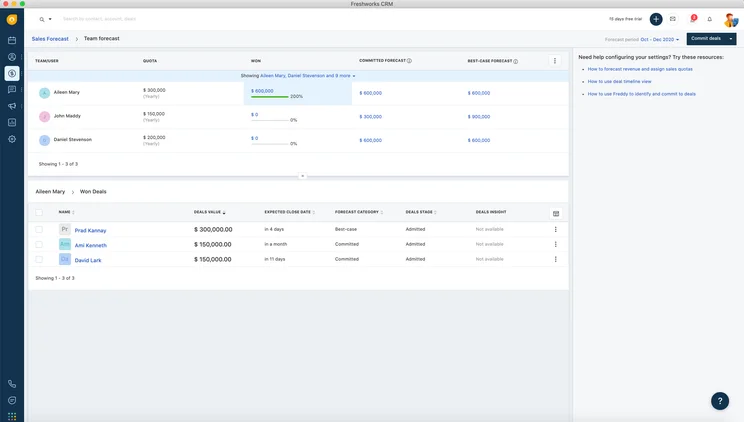
Freshsales CRM features and overview
We found that Freshsales is the best HubSpot alternative overall, because it offers a competitive feature set for both sales and marketing, while remaining more affordable.
In fact, we found HubSpot and Freshsales to have an eerily similar feature set, with both offering everything from customizable sales pipelines and contact database functionality to custom reports and lead scoring. All of these features can help you get a better idea of how your sales team functions and improve your process.
Perhaps one of the starkest contrasts, however, is their respective free plans. While both Freshsales and HubSpot offer free forever options, HubSpot’s is far more functional, offering lead conversion features, analytic tools, and third-party integrations, which Freshsales does not.
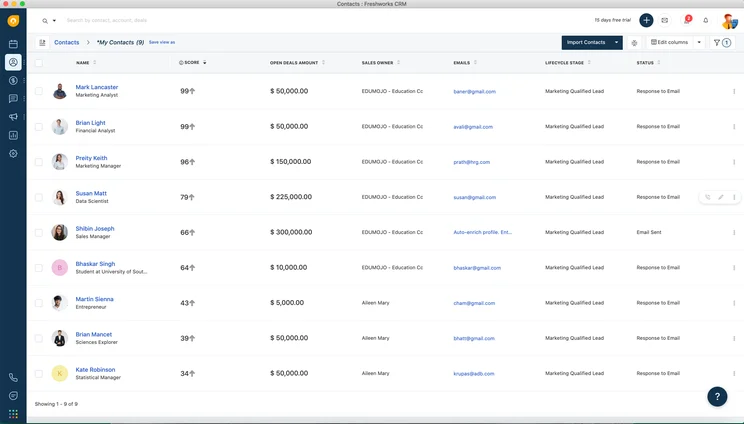
One unique offering from Freshsales is its AI-powered Contact Scoring tool “Freddy,” which gives your contacts an automated lead score based on the data you’ve collected. For example, we found in our testing that mock leads who behave similarly to existing customers are awarded a good score, to indicate their strong potential to join your customer base. Freshsales is also home to a range of data visualization tools for displaying sales data.
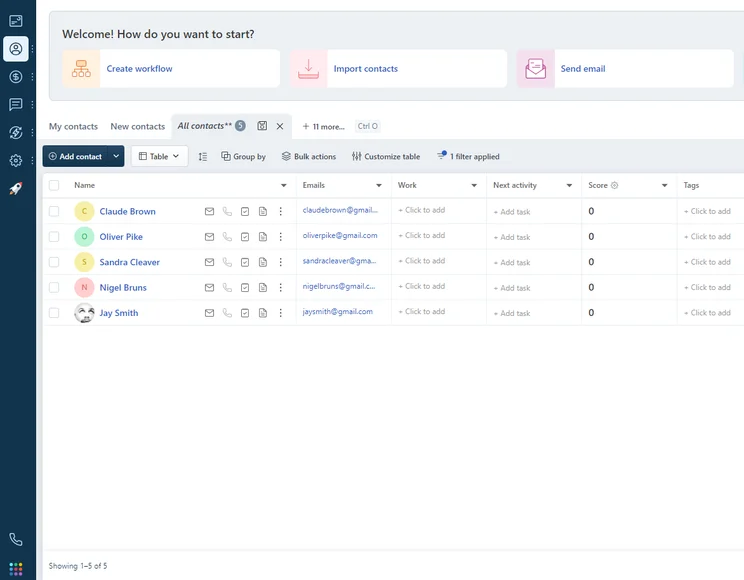
We were able to easily manage client data on the contacts dashboard in Freshsales.
Image: Tech.co testing
Freshsales offers a number of features useful for marketing, such as multichannel engagement emails and SMS & WhatsApp support, web forms, and website visitor tracking. It really is a comprehensive 2-in-1 CRM, and has one up on HubSpot in this way, since HubSpot will make you purchase different packages for different focuses.
Freshsales CRM pricing vs HubSpot pricing
As we mentioned, both Freshsales and HubSpot offer free plans, but HubSpot offers a lot more features with its free plan. Beyond that, though, Freshsales CRM offers three other paid plans that are notably more affordable than HubSpot.
Freshsales’ first paid plan, Growth for $9 per user, per month, expands Freshsales to a fully featured marketing and sales CRM rolled into one, with a large offering of lead conversion and communication features. The Freshsales Pro plan ($39 per user, per month) has AI-powered deal insights and insights and a product catalog — and is much cheaper than HubSpot’s Professional plan ($90 per user, per month + $750 joining fee). Finally, the Freshsales Enterprise plan is $59 per user, per month, and adds audit logs and a dedicated account manager.
|
Plan
|
Price
Billed annually
|
Users
|
Storage
|
Lead scoring
|
API
|
Custom reports
|
Custom automation builder
|
|
|---|---|---|---|---|---|---|---|---|

|
BEST FOR SMB
|
|
|
|||||
|
$9/user/month |
$39/user/month |
$59/user/month |
||||||
|
3 |
Unlimited |
Unlimited |
Unlimited |
|||||
|
None |
2 GB |
5 GB per user |
100 GB per user |
|||||
|
|
|
|
|
|||||
|
|
|
|
|
|||||
|
|
|
|
|
|||||
|
|
20 |
50 |
100 |
monday CRM (formerly monday.com) – Best HubSpot Alternative for Small Businesses
monday CRM

In Short
-
Pros
- 14-day free trial
- Simple and modern layout with basic color-coded system
- Custom fields across platform, including customizable dashboards
- Many reports: deals, activity, recurring revenue, and more
-
Cons
- Workflow automations are capped monthly
- No centralized inbox to improve team management
- No phone support on any plan, but live chat is available
Pricing
-
 Basic: $12/user/month
-
Standard: $17/user/month
-
Pro: $28/user/month
Images
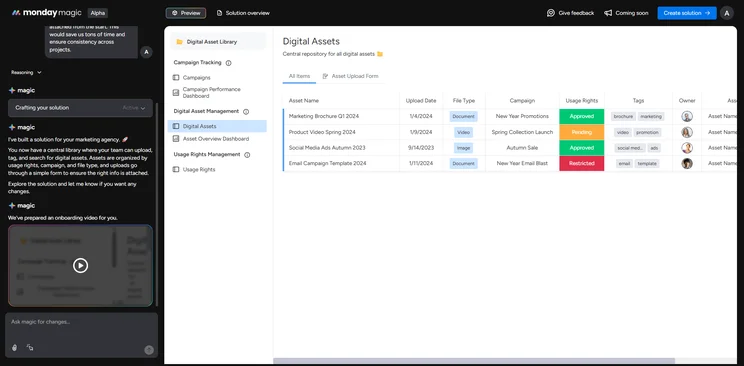
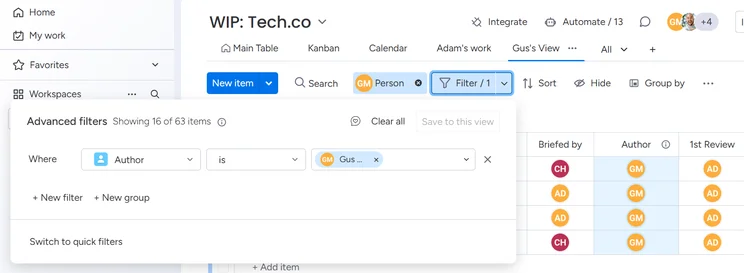
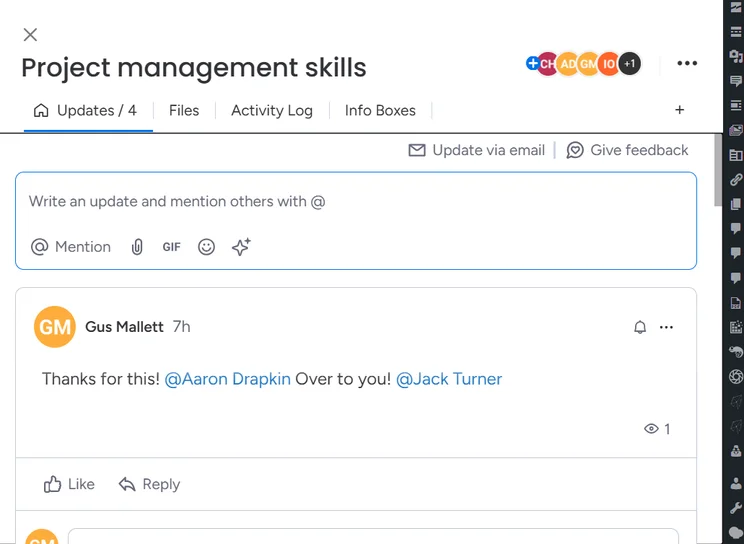
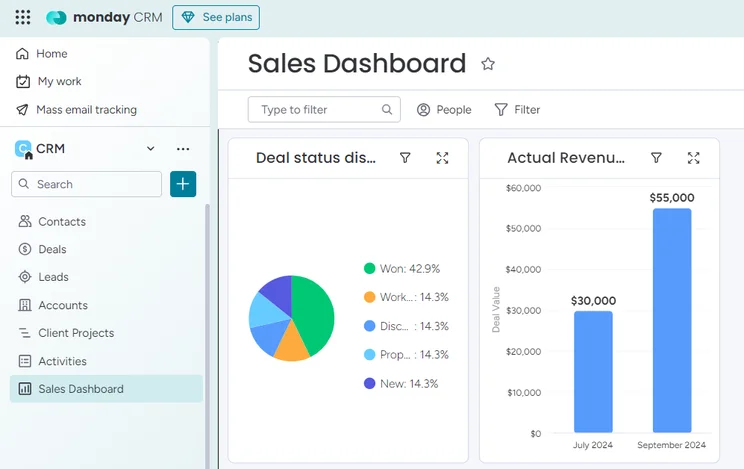
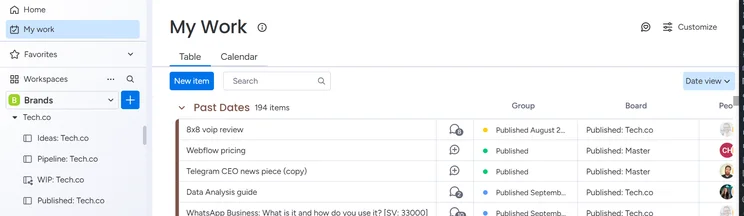
monday CRM features and overview
monday CRM is the best low-cost solution — particularly compared to HubSpot’s more pricey options — and an excellent choice for small businesses who just want something cheap, customizable, and easy to use.
We found that the most distinguishing characteristic of monday CRM was its customizability, allowing more flexibility when it comes to custom dashboards, custom objects, custom task types, and custom reports. HubSpot does offer these features, but only in its most expensive plans, while monday CRM offers them across the board.
As you can imagine, though, HubSpot dwarfs monday CRM on scalability, providing a lot more functionality for growing teams. For example, monday CRM does have some team communication features for organizational purposes, like the ability to “@” team members on tasks and emails.
However, monday CRM has relatively few management features on its initial plans, with no individual target-setting function or internal knowledge base functionality unless you pay for the Enterprise plan. Conversely, HubSpot offers that in all but its free plans.
Learn more about the smart software in our monday CRM review
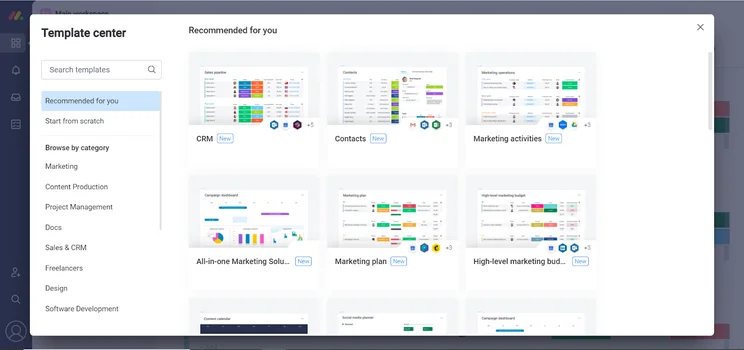
We found monday CRM very customizable, with plenty of templates to choose from. Source: Tech.co testing
However, monday CRM’s lacks customer support options and only really offers direct support via email, which will be a turn-off for teams who want to position their CRM at the center of their business operations. HubSpot, on the other hand, offers direct support via email, live chat, and phone on all its plans except HubSpot Free.
monday CRM pricing vs HubSpot pricing
All in all, monday CRM has four plans that are less expensive than HubSpot but also less comprehensive. For starters, monday CRM no longer has a free plan, while HubSpot’s free offering is one of the best available.
monday CRM’s Basic CRM plan is $12 per user, per month and adds a suite of data and reporting features for general CRM purposes. However, monday CRM Basic offers significantly fewer useful sales functions than HubSpot’s starting plan ($9 per user, per month), with effectively no lead capture and communication features. Similarly, monday CRM’s Standard ($17 per user, per month) and Pro plans ($28 per user, per month) are significantly cheaper than HubSpot’s Pro plan ($90 per user, per month + $750 joining fee). HubSpot offers a lot more team infrastructure and sales tools – but small teams might not need the extra features and will benefit from lower outgoing costs.
|
Plan
|
Price
Billed annually
|
Users
|
Storage
|
Lead scoring
|
Custom automation builder
|
Activity timeline
|
|
|---|---|---|---|---|---|---|---|
 |
|
|
|
||||
|
Basic |
Standard |
Pro |
Ultimate |
||||
|
$12/user/month |
$17/user/month |
$28/user/month |
Custom |
||||
|
Unlimited |
Unlimited |
Unlimited |
Unlimited |
||||
|
5GB |
20GB |
100GB |
1000GB |
||||
|
|
|
|
|
||||
|
|
250 actions/month |
25,000 actions/month |
25,000 actions/month |
||||
|
1 week |
6 months |
1 year |
5 years |
Pipedrive Sell – Great HubSpot Alternative for Sales Teams
Pipedrive

In Short
-
Pros
- Unlimited contact database for larger businesses with lots of clients
- Great security tools include user permissions and multi-factor authentication
- 24/7 live support via chat and phone
-
Cons
- 24/7 support only available in more expensive plans
- Can’t create custom task types within the platform
- Web form creation is a paid add-on
Pricing
-
14-day free trial
-
 Lite: $14/seat/month
-
Growth: $39/seat/month
-
Premium: $59/seat/month
-
Ultimate: $79/user/month
Images
Pipedrive features and overview
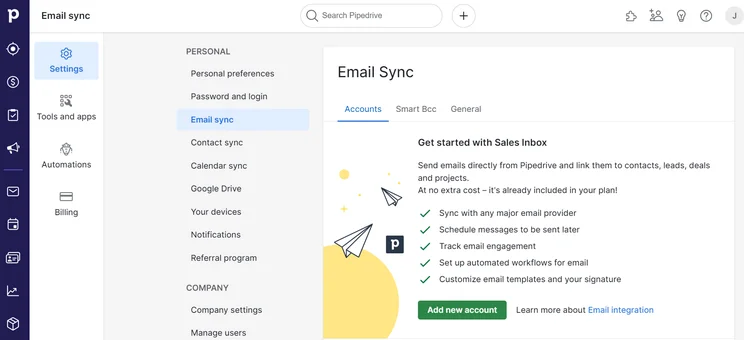
Pipedrive CRM is a great HubSpot alternative for sales teams. Like Freshsales, we found it offers a surprisingly similar sales feature offering to HubSpot, with both offering website live chat functionality for lead capture and communication, as well as website visitor tracking to see how potential customers interact with your platform.
The biggest difference, however, is that HubSpot includes these features in the platform at no extra charge, while Pipedrive does require an add-on for this kind of functionality. Pipedrive is notably more affordable than HubSpot on most plans, but still, these additional costs can definitely add up.
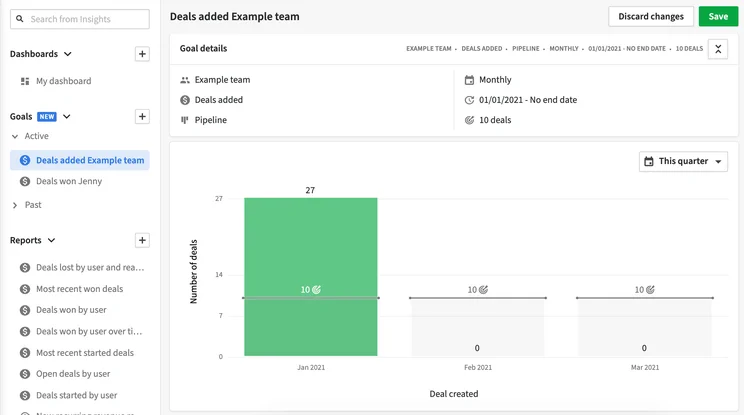
Adding a deal on Pipedrive was easy for us, and the platform offers plenty data to help improve reporting. Image: Tech.co
Pipedrive’s reporting tools are easy to use, particularly for businesses that want to track analytics for revenue forecasts, deals won over time, and lead conversions. In our research, we found that creating and adding contacts easy, and super speedy.
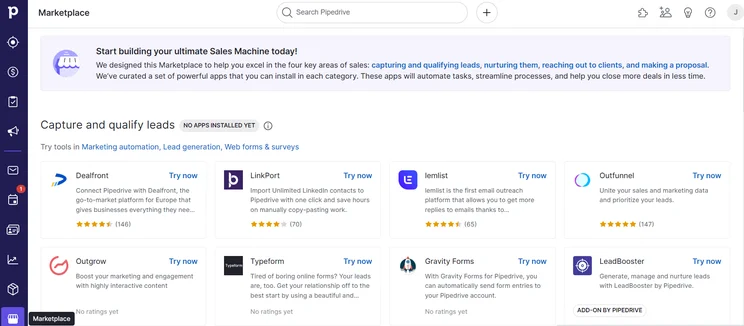
If you’re thinking of switching from HubSpot to Pipedrive, you’ll be pleased to know that Pipedrive has multiple integrations we were able to use to expand the software offering. There are 83 lead generation integrative apps, for example – which is more than some providers offer for all of their different categories.
Pipedrive pricing vs HubSpot pricing
Pipedrive has no free plan, starting instead with the Essentials plan ($14 per user, per month), followed by the Advanced plan ($39 per user, per month).
Next is Pipedrive’s Professional plan ($49 per user, per month), approximately half the price of HubSpot’s comparable Professional plan ($90 per user, per month + an onboarding fee of $750). Pipedrive has five plans in total, including the pricier Power ($64 per user, per month) and Enterprise ($99 per user, per month) plans.
Check out our Pipedrive pricing guide for a more detailed cost breakdown
|
Plan
|
Price
Billed annually
|
Users
|
API
|
Custom reports
|
Custom automation builder
|
|
|---|---|---|---|---|---|---|
|
|
BEST FOR SMB
|
|
|
|||
|
Lite |
Growth |
Premium |
Ultimate |
|||
|
$14/user/month |
$39/user/month |
$49/user/month |
$79/user/month |
|||
|
Unlimited |
Unlimited |
Unlimited |
Unlimited |
|||
|
|
|
|
|
|||
|
|
|
|
|
|||
|
|
30 |
60 |
90 |
Salesforce Service Cloud – Best HubSpot Alternative for Customer Service
Salesforce Service Cloud
In Short
-
Pros
- Great infrastructure for managing larger teams
- Lots of customization opportunities to make it work for your business
- Plenty of communication channels to stay in touch with customers
-
Cons
- No built-in customer feedback options
- Comparatively quite expensive
- Robust customization can make it a bit intimidating
Images

Salesforce Service Cloud features and overview
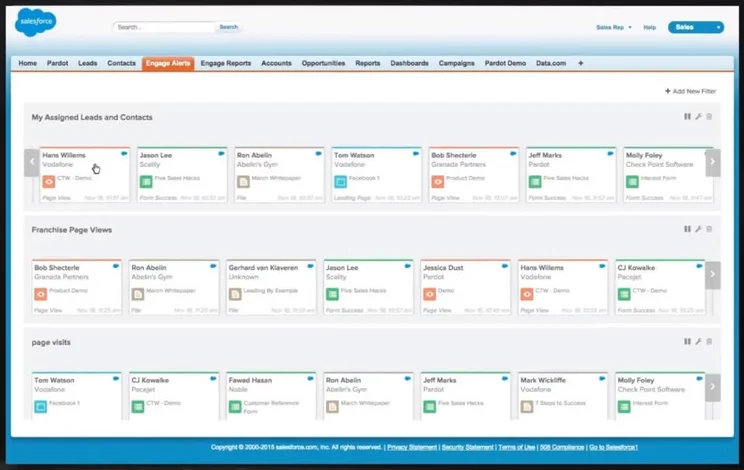
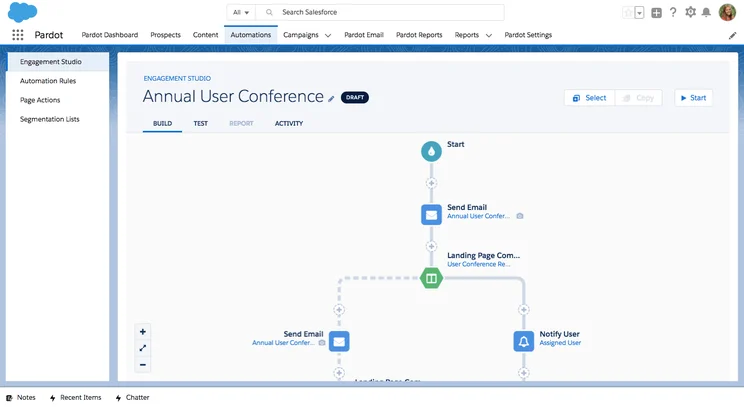
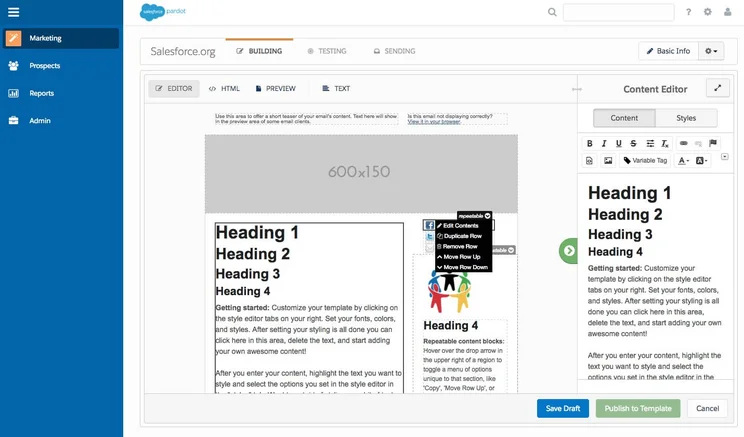
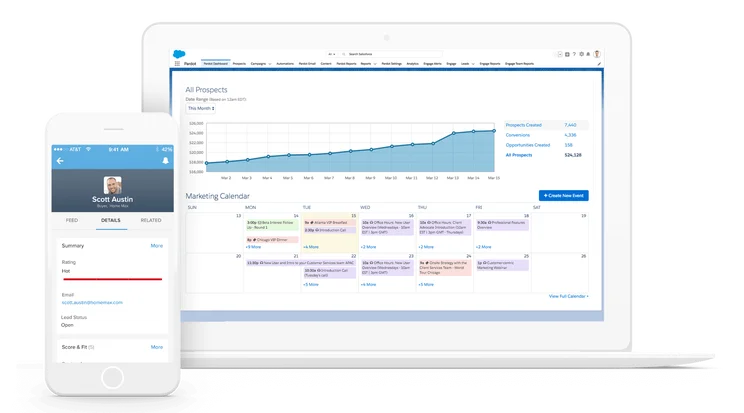
Salesforce Service Cloud is a good customer service alternative to HubSpot, particularly when it comes to data and analytics. In fact, we found Salesforce to be arguably the best CRM for reporting tools, offering robust yet easy-to-use tools for creating custom dashboards that track everything from customer interactions to contacts. We were blown away at how simple it was to drag-and-drop components into a report, making it look professional and insightful for your team.
One sticking point in the Salesforce and HubSpot comparison is that HubSpot is more affordable than Salesforce, a rarity for comparisons on this list. Salesforce starting price of $25 per user, per month is definitely high, especially considering it doesn’t have a free plan, unlike HubSpot.
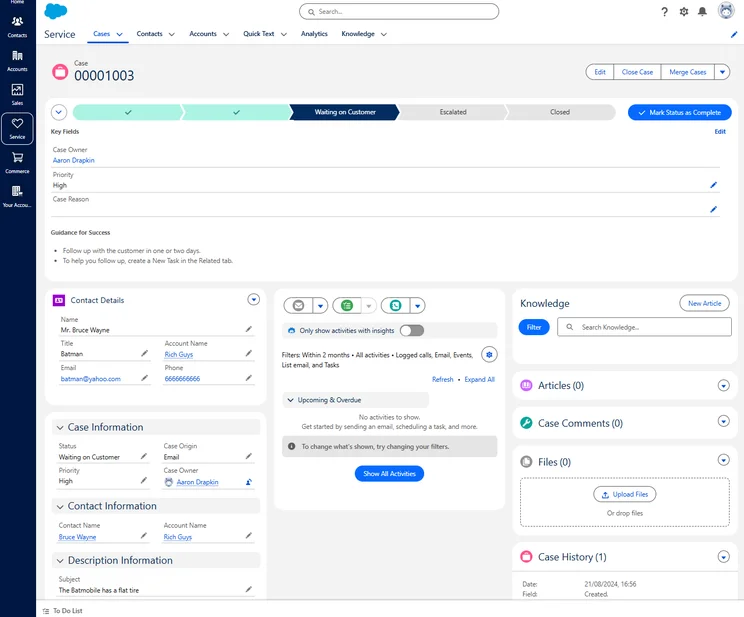
We were able to access both sales and customer service functionality seamlessly, with each case providing plenty of information to help a customer. Source: Tech.co testing
Salesforce Service Cloud is a bit better than HubSpot when it comes to team management features on all of its plans, with user hierarchies and internal knowledge base functionality built into all its plans, rather than just the most expensive one, like with HubSpot.
Salesforce also excels when it comes to security, with single sign-on and IP restriction across all plans, which will come in particularly handy if you’re handling sensitive customer information. All these complex features might come with a downside, though, as we found all the terminology and longer onboarding process could create a learning curve that makes Salesforce difficult to use for beginners.
Salesforce pricing vs HubSpot pricing
HubSpot’s free version stacks up fairly well next to Salesforce’s Starter Suite plan ($25 per user, per month), but Salesforce offers more customer service-specific tools, a calendar and custom reporting. Salesforce’s Service Cloud Professional plan ($80 per user per month) is more expensive than HubSpot’s Service Hub Starter plan ($15 per user, per month).
Salesforce’s most expensive tier is the Unlimited plan ($330 per user, per month). Compared to HubSpot’s top tier, HubSpot will let you create a customer portal, forecasting tools, and helpdesk automation, but Salesforce has superior team infrastructure features for organizations and a huge library of integrations.
Check out our detailed Salesforce pricing guide to learn more
|
Plan
|
Price
Billed annually
|
Omnichannel features
|
Customer feedback
|
API
|
Agentforce AI
|
|
|---|---|---|---|---|---|---|
 |
|
|
|
|
||
|
Starter Suite |
Pro Suite |
Enterprise |
Unlimited |
Agentforce 1 Service |
||
|
$25/user/month |
$100/user/month |
$175/user/month |
$350/user/month |
$550/user/month |
||
|
|
|
|
|
|
||
|
|
|
Paid add-on |
Paid-add on |
|
||
|
|
Paid add on ($25/user/month) |
|
|
|
||
|
|
|
Paid add-on |
Paid add-on |
|
Zendesk Sell – Best HubSpot Alternative for Beginners
Zendesk Sell

In Short
-
Pros
- 14-day free trial
- Provides great security options to secure data
- Offers good customizability including custom fields
- Lots of infrastructure to manage teams long term
-
Cons
- Very few digital selling tools for ecommerce businesses
- No quotes or proposal features
- No onboarding support for team members
Pricing
-
Team: $19/user/month
-
Growth: $49/user/month
-
Professional: $99/user/month
Images
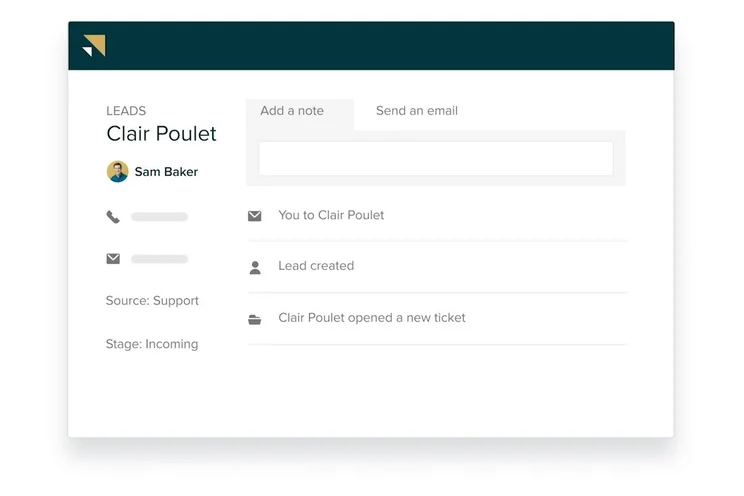

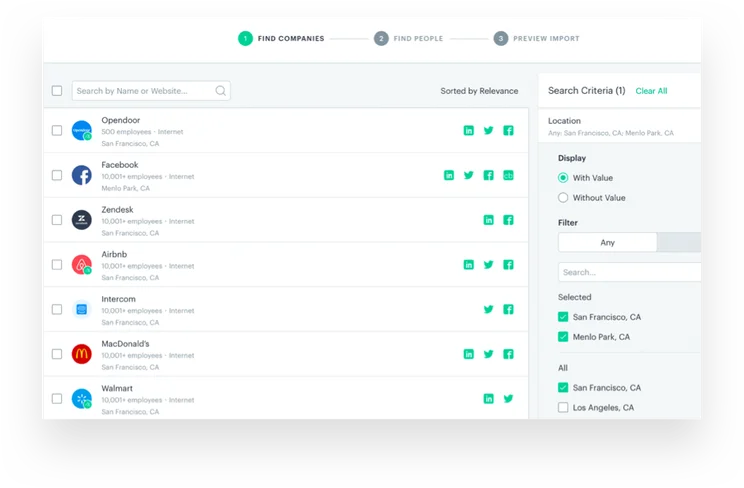
Zendesk Sell features and overview
Zendesk Sell — the provider’s sales CRM — is a good HubSpot alternative as it offers a platform that is similarly scalable, although it has a few more affordable plans that can get you started with advanced features.
The name of the game for Zendesk Sell is ease of use compared to HubSpot. While Zendesk Sell undeniably has fewer features than HubSpot, lacking on lead capture and lead communication features most notably, this lack of functionality translates into some serious ease of use. All that to say, Zendesk caters very well as an alternative to HubSpot for those looking for a simple CRM solution for beginners.
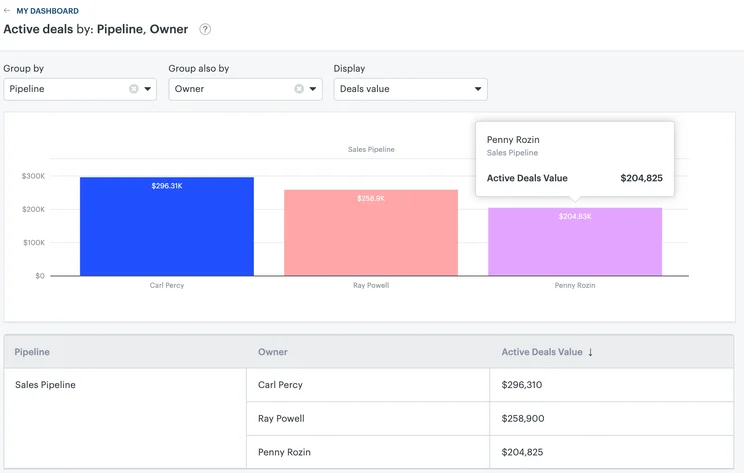
We were able to easily use the Active Deals widget in Zendesk Sell to track deals and their value. Image: Tech.co testing
For scalability, though, HubSpot again trumps the competition in a big way, and Zendesk Sell is no different. You’ll get no team management features whatsoever with Zendesk Sell until the $99 per month Enterprise plan, while HubSpot offers them across all paid plans, so tracking KPIs and individual projects will be more expensive.
There are good security options on all Zendesk plans, including single-sign on and IP restrictions, which either aren’t available on HubSpot or are reserved for the very expensive paid plans.
Zendesk pricing vs HubSpot pricing
HubSpot offers a free plan, whereas Zendesk’s lowest priced option, the Zendesk Team plan is available from $19 per user, per month.
HubSpot’s first paid plan is $15 per user, per month, which is cheaper than both of Zendesk’s paid plans (including Growth at $55 per user, per month) by quite a bit.
HubSpot’s Professional plan is actually cheaper than Zendesk’s third plan (also called the Professional plan), with HubSpot’s coming in at $90 per user, per month, while Zendesk’s is $115 per user, per month. However, HubSpot requires you to pay a $750 joining fee, and Zendesk does not.
HubSpot and Zendesk both offer enterprise-level plans, with Zendesk’s starting from $169 per user, per month. HubSpot is cheaper at $150 per user, per month but commands a $3,000 joining fee and a 10-user minimum.
|
Plan
|
Price
Billed annually
|
Users
|
Storage
|
Lead scoring
|
Custom automation builder
|
|
|---|---|---|---|---|---|---|
|
BEST FOR SMB
|
|
|
|
|||
|
Sell Team |
Sell Growth |
Sell Professional |
Sell Enterprise |
|||
|
$19/user/month |
||||||
|
Unlimited |
Unlimited |
Unlimited |
Unlimited |
|||
|
2GB per user |
5GB per user |
10GB per user |
25GB per user |
|||
|
|
|
|
|
|||
|
|
|
|
|
Should You Choose HubSpot Anyway?
HubSpot is a respected name in the world of CRM, so opting for it remains a very valid choice.
For starters, HubSpot offers some of the best customer support across our research scores out of any provider we tested, with 24/7 options across live chat, email, and phone. On top of that, its team infrastructure features are substantial, which is good for businesses that want to scale, as it provides tools like team communication and calendars to keep track of everything.
Once you get past the free tier, HubSpot is definitely one of the pricier providers out there, though, but you get what you pay for. The free version is certainly a HubSpot advantage — a free tier isn’t offered by any HubSpot alternatives other than Freshsales CRM. If your business has slimmer profit margins and doesn’t want to throw capital around, a free plan might be just what you need.
|
Free plan
|
Starting price
|
Most expensive plan
|
Verdict
|
||
|---|---|---|---|---|---|
|
|
|
|
|||
|
Sales Hub |
Marketing Hub |
Service Hub |
|||
|
|
|
|
|||
|
$9/user/month |
$9/user/month |
$9/user/month |
|||
|
$150/user/month |
$3,600/month |
$150/user/month |
|||
|
A scalable tool that’s perfect for managing contracts and payments |
The best option for businesses looking to scale |
A solid option with good functionality, but others do it cheaper |
Free HubSpot Alternatives
Maybe you just aren’t willing to drop money every month for software that you might be able to get for free. Because of the difference CRM software makes in improving your customer retention, contact management, and lead-capturing rates (among other things), free CRM software is not common.
While there’s no shortage of paid HubSpot alternatives, outside of free trials which expire quickly, there’s only one complimentary software worth mentioning: Freshsales.
However, as you can see in the table below, HubSpot offers a lot more at the same price point (free), which makes it hard to recommend any free plan other than HubSpot’s. Still, if you think the paid options for Freshsales fit your needs better, it will act as a sufficient extended free trial while you get your sea legs. Here’s how they compare.
|
Plan
|
Price
Billed annually
|
Best for
|
Users
|
Support
|
Contact management
|
Reporting
|
List segmentation
|
Custom fields
|
Products
|
||
|---|---|---|---|---|---|---|---|---|---|---|---|
|
|
|
||||||||||
|
HubSpot |
|||||||||||
|
Free |
|||||||||||
|
Free |
|||||||||||
|
Growing businesses |
Sales and marketing combined |
||||||||||
|
2 |
3 |
||||||||||
|
Knowledge center |
24/5 |
||||||||||
|
|
|
||||||||||
|
|
|
||||||||||
|
|
|
||||||||||
|
10 |
|
||||||||||
|
100 |
|
Methodology: How We Test HubSpot Alternatives
We take our impartial research and analysis seriously, so you can have complete confidence that we’re giving you the clearest, most useful recommendations.
After conducting an initial exploration to identify the most relevant, popular, and established CRM tools in the market, we put them through their paces to find out more about their strengths and weaknesses. In total, we analyzed 13 CRM systems, grading them across 84 areas of investigation.
Based on years of market research and CRM product testing, we’ve established a CRM research methodology to score products, which consists of six main assessment categories and 13 subcategories. This covers everything, from the available features and scalability capacity to the product’s value for money, and much more.
Our main testing categories for CRM systems are:
- Features: The functionalities and capabilities provided by the CRM software, such as contact management, lead and opportunity tracking, and task and activity management.
- Help and support: The resources and assistance available to users when they encounter issues or require guidance while using the CRM software.
- Customization: The ability to tailor the CRM software to suit the specific needs and processes of the organization, e.g. customizing fields, layouts, and workflows.
- Scalability: The ability of the CRM software to accommodate the growth and changing needs of the organization, such as the capacity to handle a growing customer database.
- Price: The cost associated with using the CRM software. It includes factors such as licensing fees, subscription plans, and additional charges for add-on modules or features.
- Team structure — sales CRM: Determining if a platform makes it easier to manage large sales teams, including team dashboards, team hierarchies, and team inboxes.
- Usability — small business CRM: Assessing the simplicity of the interface, the ease of navigating through menus and options, and the overall user experience.
When it comes to calculating a product’s final score, not all testing areas are weighted evenly, as we know some aspects matter more to our readers than others, which are merely “nice to have.” After hundreds of hours, our process is complete, and the results should ensure you can find the best solution for your needs.
At Tech.co, we have a number of full-time in-house researchers, who re-run this testing process regularly, to ensure our results remain reflective of the present day.
The best HubSpot alternative overall is Freshsales — it offers a comparable free plan that makes it a good option for small businesses, and its lead communication and lead capture features are actually more robust thanks to chat functionality. Yes, the free plan is decidedly more limited and overall HubSpot offers more long-term functionality for businesses that need to scale, but for smaller businesses that want to save a bit of money in the low run, Freshsales has lower priced plans that can still get you by.
For those looking for something that’s not necessarily more functional than HubSpot but is perhaps a bit easier to use instead, monday CRM is our top pick. It offers a more intuitive interface with more customizability, so you can create a platform that fits your exact needs.
If you click on, sign up to a service through, or make a purchase through the links on our site, or use our quotes tool to receive custom pricing for your business needs, we may earn a referral fee from the supplier(s) of the technology you’re interested in. This helps Tech.co to provide free information and reviews, and carries no additional cost to you. Most importantly, it doesn’t affect our editorial impartiality. Ratings and rankings on Tech.co cannot be bought. Our reviews are based on objective research analysis. Rare exceptions to this will be marked clearly as a ‘sponsored’ table column, or explained by a full advertising disclosure on the page, in place of this one. Click to return to top of page


