

We may receive a commission from our partners if you click on a link to review or purchase a product or service. Click to Learn More
Wix is a better website builder than Weebly, thanks to a better app store, strong customer support, impressive templates, and a superior mobile experience. In fact, Wix is our top recommendation out of all the website builders for small businesses we’ve tested.
Weebly does beat Wix when it comes to price; however, Weebly starts at just $10 per month, down from Wix’s $17 per month fee.
In this guide, we’ll explain why we think Wix is the better website builder overall, and point out the scenarios in which Weebly would be a better choice.
Wix vs Weebly Overview
Wix is a better choice than Weebly for almost everyone. We’ve spent more than 80 hours testing website builders, and Wix actually proved itself to be better than all the other providers we tested in our last round of research.
However, that’s not to say that Weebly isn’t a good website builder. In a head-to-head against Wix, though, Wix takes the victory across a number of categories, as you’ll see in the table below.

Build a website in minutes today
You can build a brilliant-looking website in a matter of minutes. Give it a go today!
|
Overall score
All Tech.co research categories, condensed into one score
|
Cheapest price
|
Special deal
|
Free plan
|
Free trial
|
Pros
|
Cons
|
Templates
How many templates are available?
|
Portfolio sites
|
Business sites
|
Ecommerce sites
|
||
|---|---|---|---|---|---|---|---|---|---|---|---|---|
 |
 |
|||||||||||
|
Wix |
Weebly |
|||||||||||
|
4.8
|
3.7
|
|||||||||||
|
$15.30/month with code TAKE10 |
||||||||||||
|
|
|
|||||||||||
|
14-day free trial |
|
|||||||||||
|
|
|||||||||||
|
|
|||||||||||
|
2,000+ |
56 |
|||||||||||
|
|
|
|||||||||||
|
|
|
|||||||||||
|
|
|
Who are Wix and Weebly Best for?
Wix is a better choice than Weebly in almost all instances, but that doesn’t mean businesses won’t get a lot out of the latter provider. Here are some use cases and what provider would suit them best:
- You require creative freedom when building your website
- You want to build an online store
- You’ll need features, apps, and add-ons
- Your budget is your main constraint
- You’re looking to build a portfolio on the cheap
- You like to get to grips with the coding on a website’s backend
Wix Review
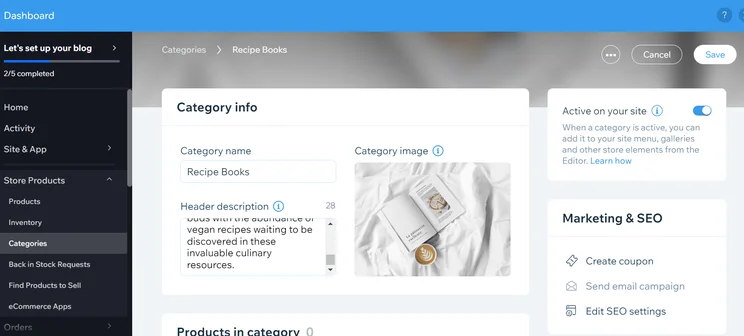
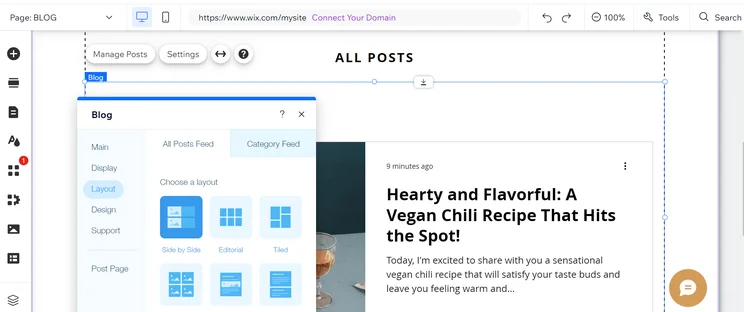
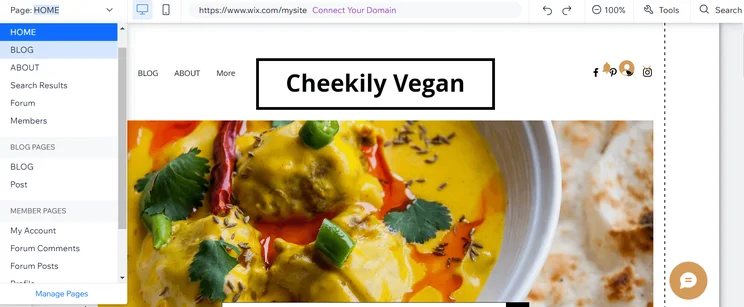
Wix’s reputation as one of the world’s best website builders is well deserved. Not only is it one of the most feature-rich website builders available, but it’s also got one of the biggest app stores on the market. Whatever you need to build your website, Wix certainly has it.
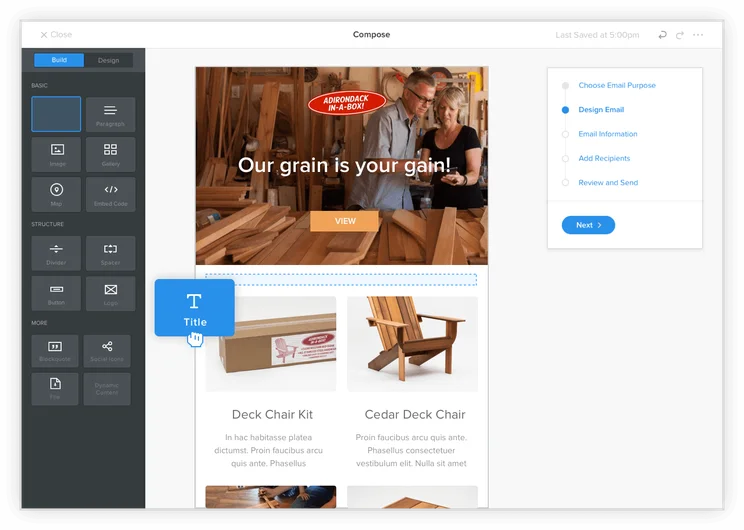
On the app store, you’ll find apps to cover everything from appointment bookings to live chat functions and everything in between. They’re all incredibly easy to implement – simply drag and drop them onto your site. You won’t need to add a single line of code to get them working, either.
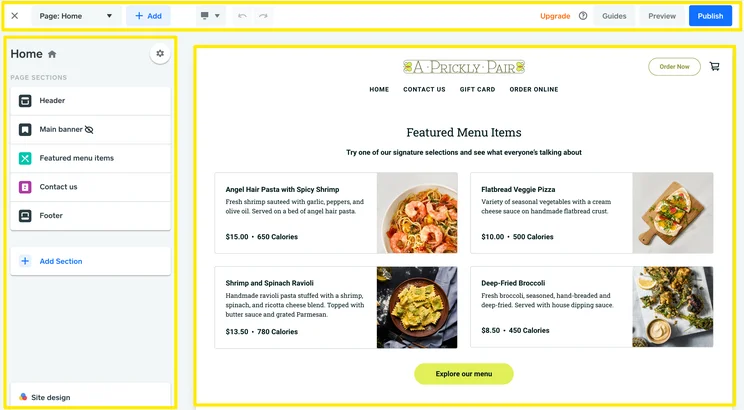
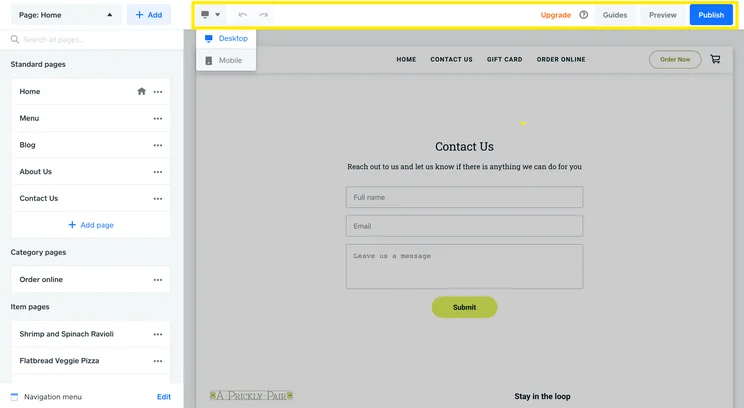
Wix users often remark on how easy it is to make the website look exactly how you want it to – something you can check with the super useful ‘preview’ feature.
Wix used to have a special design tool called Artificial Design Intelligence (ADI), which would ask you some questions about the type of website you want to make, and then present you with a website template created specifically for you.
Now, in 2026, Wix has AI tools like Wix Harmony, which combines elements and features commonly found in vibe coding platforms with its drag-and-drop, DIY editor. For instance, you can ask Wix’s AI agent, Aria, which can make wide-reaching design changes across your site while ensuring it remains stable and secure (which is often a challenge when making changes of this nature).

Wix offers an AI text creator to rapidly generate text to include on your website. Source: Tech.co testing
If you want to edit any template in Wix, it’s pretty simple – you’re not confined to grids and blocks, and Wix users often remark on how easy it is to make the website look exactly how you want it to – something you can check with the useful ‘preview’ feature.
Starting an online store is relatively inexpensive using Wix. Pricing plans start from just $17/month, making it one of the most affordable website builders on the market. What’s more, you’ll get a lot of bang for your buck, including generous storage allowances.
The only drawback is that when you’re building a site with Wix, after you publish, you won’t be able to change your site’s template. This might not be a problem if you love your template. However, if you need to change a feature or the layout down the line, you might be stuck.
Wix

In Short
-
According to our extensive research, Wix continues to be the best website builder available. Between the extensive feature list, the reasonable prices, and the great templates, you’ll be able to get a well-designed, functional website live easily and effectively. Plus, it offers advanced business features like CRM, making Wix an incredible value on top of a powerful website building platform.
Don’t miss out – Wix offers regular deals and discounts
Pricing
- Starts at $17/month
- Ecommerce plans start at $29/month
- Free version available
Images
Weebly Review
Despite not scoring quite as well as Wix, Weebly is still a great website builder. Most importantly, it’s excellent value for money (more on this below) and one of the cheapest website builders you can buy. All of Weebly’s plans are cheaper than comparable plans provided by Wix, and their first paid plan won’t set you back as much as Shopify, Squarespace, and Square Online’s least pricey plans.
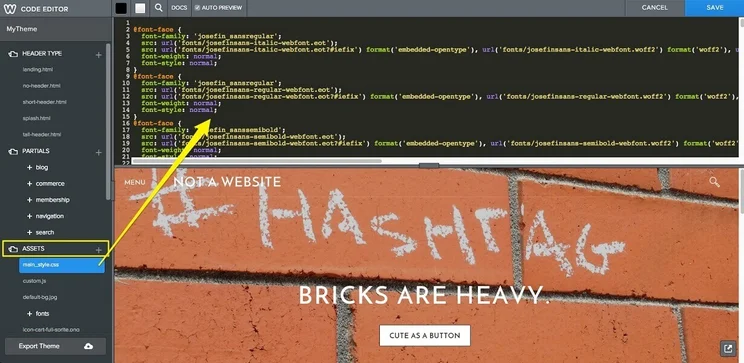
Weebly allows you to go deeper into the customization of your website than the average website builder. You get full access to the code that powers your website, meaning that you can fine-tune any elements or functionality. You’ll need to be a bit handy with CSS or HTML coding languages, but you can pick these up pretty easily. However, if you’re looking to avoid coding altogether, Wix is a much better choice.
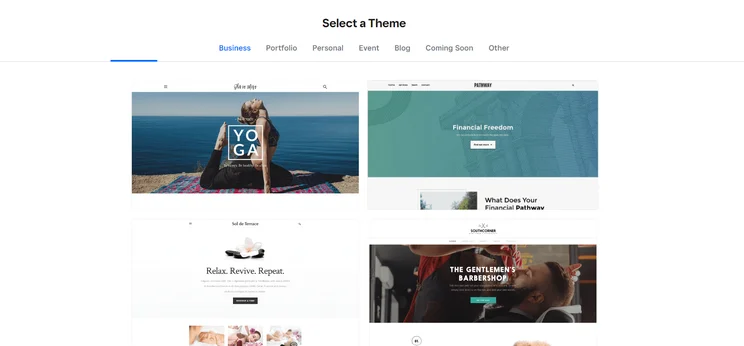
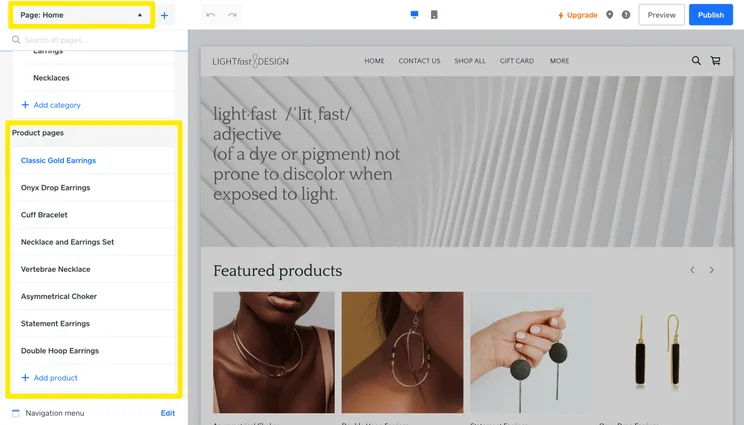
The Weebly website builder offers a range of different themes, but the selection is a little limited. Source: Tech.co user testing
Weebly has a decent selection of templates. This means you won’t find it a struggle to create a professional-looking website, regardless of whether you want to run a blog, a business, or a portfolio. Secondly, the templates are flexible – so you’re able to chop and change the base design to your liking – and you can switch templates after you’ve published your site. However, there aren’t as many as Wix.
The Weebly app center has several useful website add-ons for you to choose from, including plenty of free ones, but it isn’t quite a match for Wix’s.
Weebly Review

In Short
-
Weebly is a decent website builder, but it’s no match for Wix. That being said, it’s pretty simple to start building a Weebly website and it’s got a great range of SEO tools for you to use to optimize your site. However, it must be said that Weebly’s test scores from our last round of analysis dropped significantly. The user experience is far behind competitors, and it has much, much fewer designs than website builders like Wix. Weebly’s saving grace is that it delivers a great value for its cost, and is among the cheapest website builders we tested.
Pricing
- Personal: $10/month
- Professional: $12/month
- Performance: $26/month
- Includes limited free plan
Images
Weebly vs Wix: Head-to-Head Comparison
Now, it’s time to dig a little deeper. We’ve made it clear that our research found Wix to be the better website builder, but now we’re going to look at some more granular details, specifically value for money, business features, design features, ease of use, and customer support.
Best Value: Weebly
Weebly is cheaper than Wix. Only Weebly offers a free plan, but Wix’s cheapest pricing plan is Light, which starts at $17 per month if you pay annually. Weebly, on the other hand, has a personal plan that starts at $10 per month – that’s far from the cheapest website builder out there, with options like Hostinger, Pixpa, Web.com, and IONOS all starting lower, but it certainly beats Wix.
Our research team concluded that Weebly is better value for money despite the fact that it’s nowhere near as good as Wix for building a website. Wix is easier to use, has better support options, a much bigger range of design templates, is generally a speedier builder, and has lots of other advantages – but it’s a bit expensive. Weebly isn’t nearly as impressive; conversely, it’s among the most affordable providers on the market.
Best Ecommerce Features: Wix
Wix’s business plans really set the standard for ecommerce capabilities. On some of Wix’s plans (Core, Business, and Business Elite), you’ll have the ability to secure online payments, collect recurring payments, sell subscriptions and allow customers to create accounts. You’ll also be able to recover abandoned carts, offer subscriptions and sell unlimited products.
With Wix, you’ll be able to sell on all social channels with ease, which makes Wix the best website builder for small businesses that want to sell products through sites like Facebook and Instagram.
Wix’s most expensive packages, the Business and Business Elite plans, will allow you to collect and post user reviews.
These Wix plans will also grant you access to features included in apps such as Wix Stores, Wix Bookings, Wix Restaurants, Wix Hotels, Wix Videos, and Wix Events – basically everything you need to run a successful online store. Wix Stores, for instance, will let you fully customize the design of your ecommerce site, create shipping rules, manage your store using the Wix Owner app and secure your site with SSL encryption.
Other useful tools Wix will provide for your business include a logo maker, as well as access to Wix Payments, Wix Ascend (CRM), and a POS system. You can even hire an expert to help you out.
Weebly’s ecommerce features are largely confined to the Performance plan, the most expensive plan Weebly offers at $26 per month. With this plan, you can send abandoned cart emails and accept PayPal payments, the ability to collect product reviews, and tools to gather ecommerce insights. However, if you’re willing to drop this much cash on a website builder, Wix’s Core plan costs just $2 less and has enough ecommerce features to build a highly functional, basic online store. What’s more, you’ll have more space to grow and upgrade.
To summarize, Wix is better than Weebly if you’re building an online store, whatever that store may be. The gulf between the two providers can partly be explained by the fact that Weebly was bought by payment services company Square several years ago. Since then, Square has been redirecting people who are looking to build a business website with Weebly to Square. Our testers even ranked Wix second only to Shopify for the best ecommerce website builder overall, due to its enterprise-level functionality and robust inventory features.
Learn more in our Shopify pricing guide
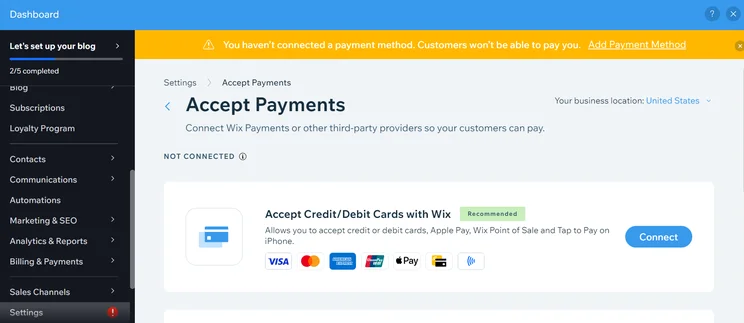
A range of payment methods can be set up, allowing your customers to pay through a Wix website. Source: Tech.co testing
Best for Design Features: Wix
Overall, we think Wix offers users a much better template experience, since it has more templates to choose from than Weebly (more than 2,000 versus less than 100). Plus, Wix’s templates often look nicer as well.
On the Wix platform, there are professional-grade templates for everything from personal travel blogs to sophisticated ecommerce retail stores. Wix provides a number of site-specific templates that Weebly doesn’t, including for electronics stores, education & book sites, fashion & beauty pages, medical/healthcare resources, and real estate businesses. Weebly’s are a lot broader and are, unfortunately, a bit blander than Wix’s.
Our testers’ favorite Wix template feature was mobile optimization. With the Wix mobile editor, you can make tailored changes to the mobile-view version of your site, or trust Wix to automatically put the best mobile-optimized settings in place. Weebly is pretty poor when it comes to mobile formatting, and even features included in set themes are not properly formatted on phones.
The only downside to Wix is that you can’t change your Wix template after you’ve published your site. Weebly is much more flexible – you can switch templates after your site goes live. However, Wix does compensate for its “no going back” philosophy by having a much broader selection of templates than Weebly, so you’re much more likely to find the right template the first time around with Wix.
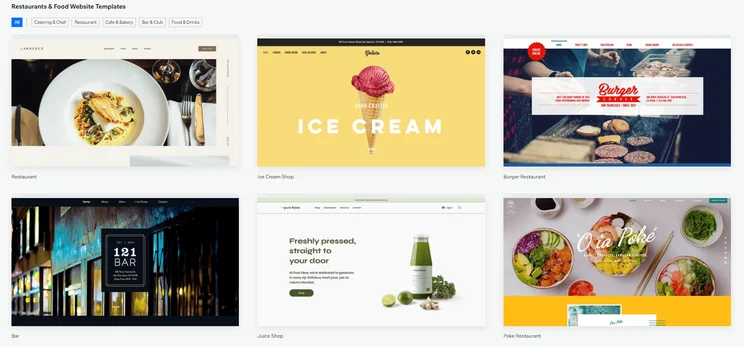
Wix offers a small selection of templates, which it calls “themes.” Source: Tech.co testing
Best Marketing and SEO: Wix
Wix also leads the way when it comes to marketing and SEO – although this is one of Weebly’s strong points too. Both Wix and Weebly provide the ability to create meta descriptions, custom URLs, header code, 301 redirects, and Google Analytics integration. Both sites also offer social media integration and have SEO-specific apps.
Despite Weebly’s very commendable selection of SEO tools – and having mobile-responsive templates – the provider won’t change how your website looks on mobile devices.
However, Wix wins due to how mobile-friendly it is, which is key in SEO terms because so many people use mobile phones as their primary device for Googling. Surprisingly, despite Weebly’s very commendable selection of SEO tools – and having mobile-responsive templates – the provider won’t change how your website looks on mobile devices, leading to a diminished experience for mobile users.
It would be nice to see Wix add keyword support in the future, but this isn’t a feature that Weebly offers either. Squarespace, on the other hand, is a provider that does offer this. Wix, however, will give you SEO best practice prompts when you’re building your site – as does Weebly – while this isn’t provided by Squarespace.
Weebly also has some additional marketing functionalities that your business will find useful, including a photo studio and email marketing support via Promote, which will let you create and send announcements, promotions, newsletters, and events. Wix also has email marketing support available.
Best for Ease of Use: Wix
Wix is an easier site to use than Weebly. Both sites keep their technical jargon to a minimum, so things are easy to understand, but it’s a lot easier to correct errors in Wix than it is in Weebly, and there are more visual clues, too. In our user-experience testing, we found users were more likely to recommend Wix to a friend than Weebly.
If you’re already an experienced coder, or fancy stretching your legs with your new website, Weebly might be the website builder for you. You’re able to edit your site’s code, even on the free package. Weebly also allows you to access the raw code at the heart of the site. Wix, on the other hand, offers what it calls developer tools, which allow you to edit certain parts of the code, rather than all of it.
A big part of how easy a website is to use is how quickly it loads pages. Unfortunately for Weebly, it performed extremely poorly in our speed tests and was one of the slowest website builders we tested. Wix, on the other hand, was one of the quickest.
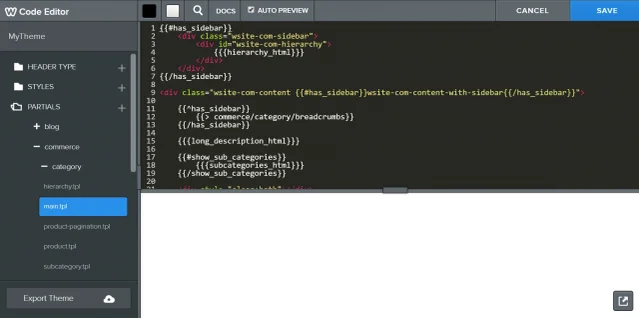
Weebly offers a classic code editor, best for experienced users. Source: Tech.co testing
Best for Customer Support: Wix
Wix beats Weebly when it comes to customer support, scoring much higher on our testing. Although you cannot email Wix for support (although there is a contact center) Wix has pretty much every other base covered. You can contact them on live chat, social media, and the phone, and there are on-site GIF/Video/Image tutorials.
Unlike Wix, Weebly does not provide these tutorials, nor can you contact the provider via social media – and phone support is only available on the more expensive ecommerce plans.
However, both website builders have pretty responsive knowledge centers. We searched for a number of common website building queries (e.g. “how to redirect visitors to the right page,” “changing meta tags,” etc) to see what information Wix and Weebly would return to us, and subsequently scored each provider on how relevant the information was. Wix scored 11 out of a possible 15, while Weebly scored 10, so there really wasn’t much in it at all. However, as we’ve covered, Wix beats Weebly on other support fronts.
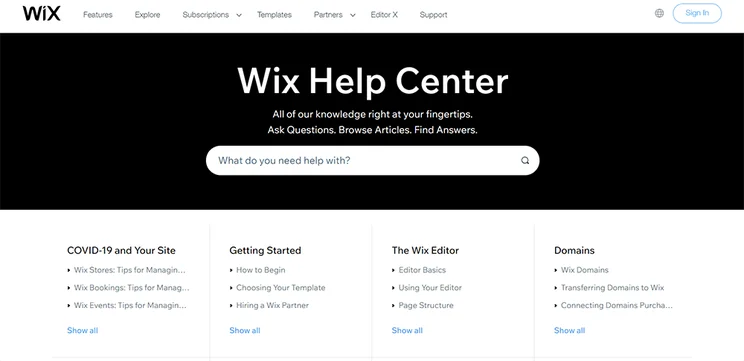
The Wix help center offers a searchable knowledge base. Source: Tech.co testing
Wix launched a new tool in July, the AI Visibility Overview. It’s not actually an AI-powered tool: It’s a dashboard that tracks GEO – Generative Engine Optimization – in order to help website owners grow audiences in the AI age. It lets users track citations, traffic, visibility, and brand sentiment across popular LLMs, including performance benchmarks so they can see if their competition is doing better.
In July, Wix also debuted a strategic partnership with Monotype that will expand its font library with a lot of new typefaces.
Weebly, on the other hand, hasn’t issued many updates in the years since Square bought it in 2018, and its website doesn’t list any new recent additions.
Weebly and Wix Alternatives
Wix is the top website builder, but it’s not the only website builder worth checking out. Shopify is an excellent tool for ecommerce, Squarespace has some of the most beautifully designed templates in the industry, and Hostinger has some of the lowest prices you can find.
|
Overall score
All Tech.co research categories, condensed into one score
|
Cheapest price
|
Special deal
|
Cheapest ecommerce plan
The cost for a plan that allows users to build and operate an online store
|
Free plan
|
Free trial
|
Templates
How many templates are available?
|
||
|---|---|---|---|---|---|---|---|---|
|
|
 |
 |
 |
 |
||||
|
Wix |
Squarespace |
Shopify |
GoDaddy |
Hostinger |
||||
|
4.8
|
4.5
|
4.2
|
4.2
|
4.1
|
||||
|
$17/month |
$19/month |
$29/month |
$9.99/month |
$2.99/month |
||||
|
$15.30/month with code TAKE10 |
$17.10/month with code TC10 |
$1/month for first 3 months |
Save 54% with annual contract |
$2.69/month with code TECH |
||||
|
$29/month |
$19/month |
$29/month |
$20.99/month |
$3.99/month |
||||
|
|
|
|
|
|
||||
|
14-day free trial |
14-day free trial |
3-day free trial |
7-day free trial |
14-day free trial |
||||
|
2,000+ |
180+ |
900+ |
200+ |
400+ |
About Our Research
We take our impartial research and analysis seriously, so you can have complete confidence that we’re giving you the clearest, most useful product recommendations.
After conducting an initial exploration to identify the most relevant, popular, and established tools in the market, we put them through their paces with hands-on testing to see their real strengths and weaknesses. In this case, we put 16 website builder products to the test across 398 areas of investigation.
Based on years of market and user needs research, we’ve established a website builder testing methodology that scores each product in six core categories of investigation and 33 subcategories. This covers everything, from customer feedback to design, ease of use, and more.
Our main testing categories for website builders are:
- Website features: The capabilities and functionalities offered by a website builder, e.g. blog functionality, SEO capability, and marketing capacity.
- Design functionality: The aesthetic appeal and visual layout of a website created using a website builder. It encompasses aspects such as page templates and customizable themes.
- Customer satisfaction: External customer opinion. This is the feedback and ratings given by customers who have used a particular website builder — the market position and reputation a website builder holds.
- User experience: How user-friendly and intuitive a website builder is for people with varying levels of technical expertise.
- Value for money: The balance between the cost of a website builder and the benefits it provides. It considers factors such as pricing plans, subscription models, and available features.
- Help and support: The assistance and resources available to users when they encounter issues or need guidance while using a website builder.
When it comes to calculating a product’s final score, not all testing areas are weighted evenly, as we know some aspects matter more to our readers than others, which are simply “nice to have”. After hundreds of hours, our process is complete, and the results should ensure you can find the best solution for your needs.
At Tech.co, we have a number of full-time in-house researchers, who re-run this testing process regularly, to ensure our results remain reflective of the present day.
Wix is a much better website builder than Weebly and, all things considered, is the best website builder on the market. It really is a one-stop-shop for website building, with everything you need to create a stunning webpage for your business, from a huge range of impressive, customizable designs to SEO features.
In contrast, Weebly is a little outdated, costs more than it used to, and isn’t as easy to customize unless you have a level of coding experience.
Wix vs Weebly FAQs
The short answer is no. But, Weebly makes clear that it does not claim ownership of your content but that it does need some permissions in order to host your content on its service: “You give us your permission worldwide to host your Content on the Service and to perform all acts necessary to host your Content on the Service (such as making copies, reformatting, and distributing your Content).” Nor does Wix own your content. As stipulated on its website: “You own all the materials created in your Wix account.”
Wix offers a free plan but while you can build a website for free and publish it online for people to see, there are severe limitations to free website builders that make it almost not worth your time trying to create one for free.
Weebly offers custom email addresses in partnership with Google, at no extra cost. Meanwhile, Wix doesn’t include a custom email address, business or otherwise, with any of its plans. Users can purchase a custom email address separately.
If you click on, sign up to a service through, or make a purchase through the links on our site, or use our quotes tool to receive custom pricing for your business needs, we may earn a referral fee from the supplier(s) of the technology you’re interested in. This helps Tech.co to provide free information and reviews, and carries no additional cost to you. Most importantly, it doesn’t affect our editorial impartiality. Ratings and rankings on Tech.co cannot be bought. Our reviews are based on objective research analysis. Rare exceptions to this will be marked clearly as a ‘sponsored’ table column, or explained by a full advertising disclosure on the page, in place of this one. Click to return to top of page


