

We may receive a commission from our partners if you click on a link to review or purchase a product or service. Click to Learn More
Wix is the best website builder for most users, with an intuitive interface for beginners, unmatched creative control for advanced users, and hundreds of native apps available for online stores, blogs, portfolios, and customer support.
On top of that, the Wix Harmony tool can help you get a website live quickly using just natural language prompts. We created, designed, and launched a website with the AI website builder Harmony in under five minutes.
For Wix pricing, the website builder costs between $17 per month to $159 per month, depending on the size and feature requirements of your site. There’s also a free forever plan that can get a site live at no cost, as well as a 14-day money back guarantee on all paid plans.
- Best: Our research found Wix to the best website builder for most users, because it is easy to use while providing vast functionality for all types of businesses.
- Pricing: Wix offers four different pricing plans, ranging in cost from $17 per month to $159 per month.
- Free plan: Wix provides a free forever plan for users to get a site live, but it comes with limitations like Wix ads on your site and no custom URL.
- AI features: Wix Harmony is the AI website builder from Wix, which allows users to generate and edit your site with natural language prompts, while still maintaining drag-and-drop editing access.
- Competitors: Wix is a good all-around solution, but Shopify is better for larger, ecommerce-focused businesses, while Squarespace is a bit easier to use and provides more visually-appealing templates.
After conducting an initial exploration to identify the most relevant, popular, and established tools in the market, we put website builders like Wix through their paces with hands-on testing to see their real strengths and weaknesses. In this case, we put 16 website builder products to the test across 398 areas of investigation.
Based on years of market and user needs research, we’ve established a website builder testing methodology that scores each product in six core categories of investigation and 33 subcategories. This covers everything from customer feedback to design, ease of use, and more.
Who Should Use Wix in 2026?
Wix is the best website builder for most users, but not all users. There are some clear use cases for Wix for the majority of businesses, but it has some limitations that make it a better fit for some than others.You should use Wix if…
- You’re a service-based business that needs native scheduling and booking
- You need to build an online store with fewer than 50,000 products
- You want to use AI to build your site, but still want some creative control.
You shouldn’t use Wix if…
- You’re on a strict budget and need to save a bit of money (use Hostinger instead)
- Your online store has more than 50,000 products (use Shopify instead)
- You want as much design flexibility as possible, even after you launch your site (use Squarespace instead)
Wix

In Short
-
Pros
- Unrivaled selection of website features across design, sales, and support
- AI features can create a site in 60 seconds
- Quality free forever plan available
-
Cons
- No template switching once published
- Number of features can be overwhelming for some beginners
- Steep price increase for scaling businesses
Pricing
-
 Light: $17/month
-
Core: $29/month
-
Business: $39/month
-
Business Elite: $159/month
-
10% off any plan with code TAKE10
-
Free plan
Images
How Much Does Wix Cost?
Wix pricing starts at $17 per month for the Light plan, with the Core ($29 per month), Business ($39 per month), and Business Elite ($159 per month) costing more to add functionality for your site.
Every paid plan from Wix includes a custom domain, AI creation tools, web hosting, and access to 24/7 customer service. Each plan also has a 14-day money-back guarantee, so you can test out the features before you’re committed to a yearly or monthly contract.
Wix has a more expensive starting price than budget website builders like Hostinger ($1.99 per month) and slightly more expensive than Squarespace ($16 per month). Wix seems like it’s more affordable than Shopify, but both website builders offer online store functionality for $29 per month, so it depends on your specific ecommerce needs.
Check out our Wix pricing guide to learn more
|
Plan
|
Cheapest price
|
Special deal
|
Price (1-month contract)
The price per month you'll pay if you choose to be billed monthly
|
Best for
|
Bandwidth
|
Storage
|
Ecommerce
|
|
|---|---|---|---|---|---|---|---|---|
 |
|
|
|
|
||||
|
Free |
Light |
Core |
Business |
Business Elite |
||||
|
$0 |
$15.30/month with code TAKE10 |
$26.10/month with code TAKE10 |
$35.10/month with code TAKE10 |
$143.10/month with code TAKE10 |
||||
|
$0 |
$24/month |
$36/month |
$46/month |
$172/month |
||||
|
Getting started |
Blog and portfolio sites |
Small online stores |
Large online stores |
Unlimited access |
||||
|
1GB |
3GB |
Unlimited |
Unlimited |
Unlimited |
||||
|
500MB |
2GB |
50GB |
100GB |
Unlimited |
||||
|
|
|
|
|
|
Does Wix have a free plan?
Yes, Wix has a free forever plan that allows you to create a website and get it online at no cost to you or your business. You can customize your site, update it as you see fit, and get live it live for visitors to access.
However, the site comes with some serious caveats. For one, your site will be covered in Wix ads, making it decidedly less professional than the average site online. Additionally, you won’t have a custom URL, and a Wix-branded link will make it harder to get discovered on search engines.
What Are Wix’s Key Features?
Wix is one of the most functional website builders across our research, providing access to a wide range of design tools, website apps, and automated features to create, edit, and launch your site with ease.
- True drag-and-drop editor – Wix offers users an untethered drag-and-drop editor, so you can add and place elements anywhere on your site that you see fit.
- Native apps – Through its massive library of integrations, Wix offers hundreds of native apps for blogs, schedules, restaurants, chats, and ecommerce, all of which are free to add to your site.
- AI website building – With Aria and Wix Harmony, you can build your site with natural language prompts instead of the drag-and-drop editor. Just tell it what you want in plain English and it generates the changes for you.
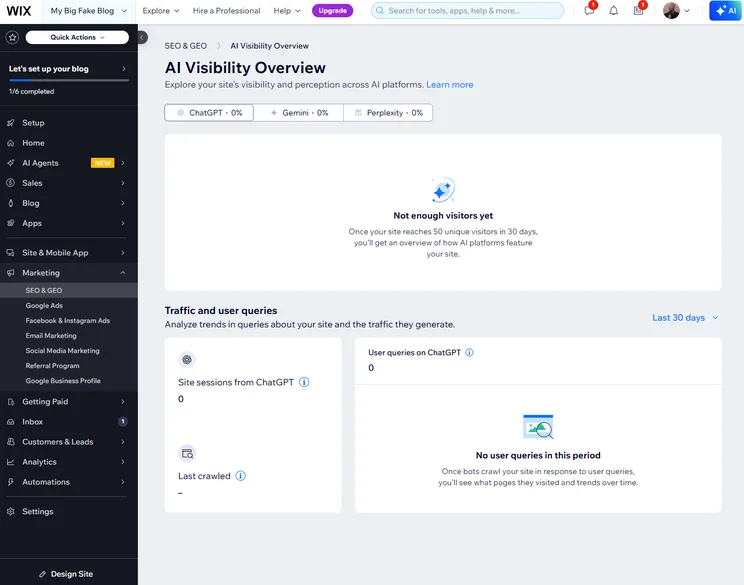
- Advanced SEO tools – Wix offers an SEO Setup Checklist to guide you through the process, as well as an AI Visibility Overview to show you how often your pages are cited in AI responses on ChatGPT and Gemini.
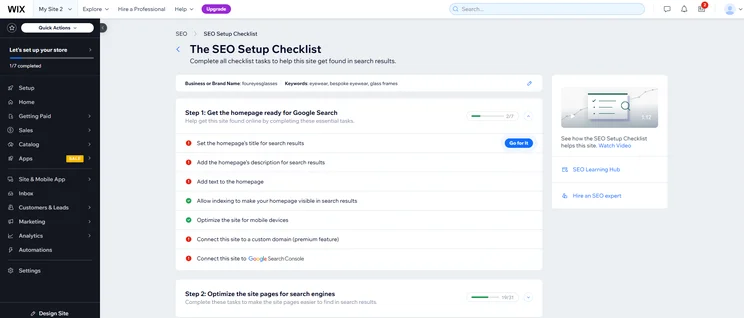
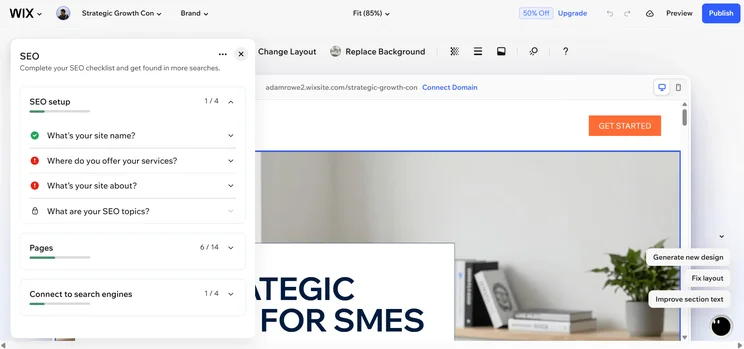
We were able to improve your website’s search ranking by working through Wix’s SEO checklist. Source: Tech.co testing
How secure is Wix?
Wix offers some key security features that set it apart from competitors. It provides users with a dedicated Security Operations Center (SOC) that monitors 24/7 through machine learning, so you get notified of potential breaches very quickly.
For security, Wix has SOC 2 Type 2 (data security), ISO 27001 (information security), ISO 27017 (cloud security), and ISO 27701 (privacy information management) certifications. Wix also has PCI DSS Level 1 certification for ecommerce, the same as Shopify.
In a March 2026 update, Wix announced that sites would now be able to integrate with Zapier, allowing users to “automate tasks involving a Wix site without writing code, connecting Wix to thousands of other apps available in the Zapier ecosystem.”
Can Wix Build a Website with AI?
Yes, Wix does offer an AI website builder — dubbed Wix Harmony — features that can help you build a website quick and efficiently.
In fact, we created a website with Wix Harmony to see exactly how fast it could get a site live. We input a single prompt (“create a blog that focuses on how cute cats are”), and after about three minutes, the platform had generated a functionality, multi-page website with buttons, article links, images, and forms.
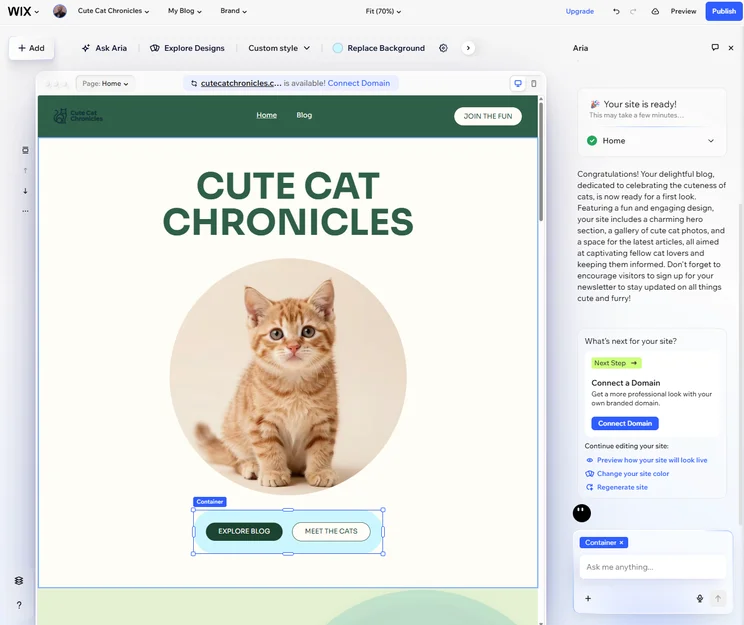
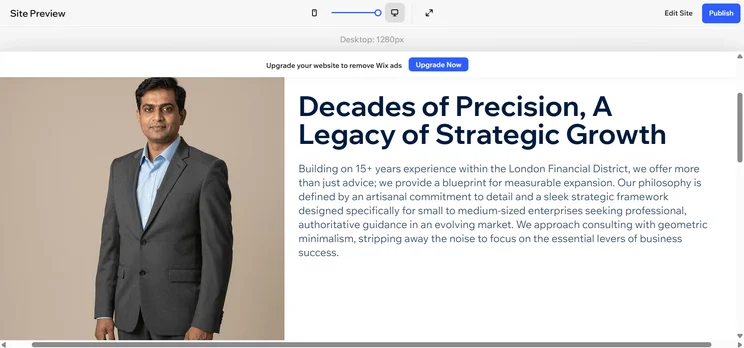
Wix Harmony makes it easy to edit elements manually after generating your site with natural language prompts. Source: Tech.co testing
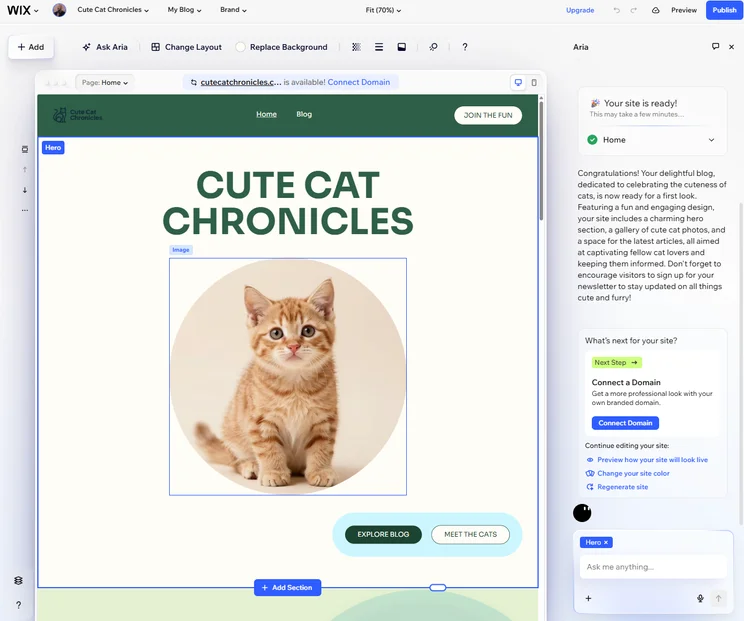
Wix Harmony generated an entire site for us based on a simple prompt. Source: Tech.co testing
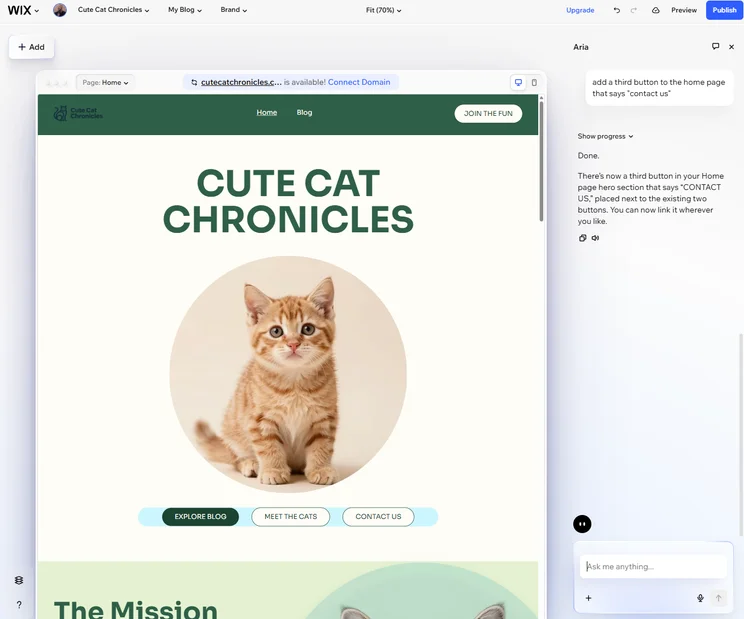
Wix Harmony allowed us to make edits to our site, like adding a button, with natural language prompts. Source: Tech.co testing
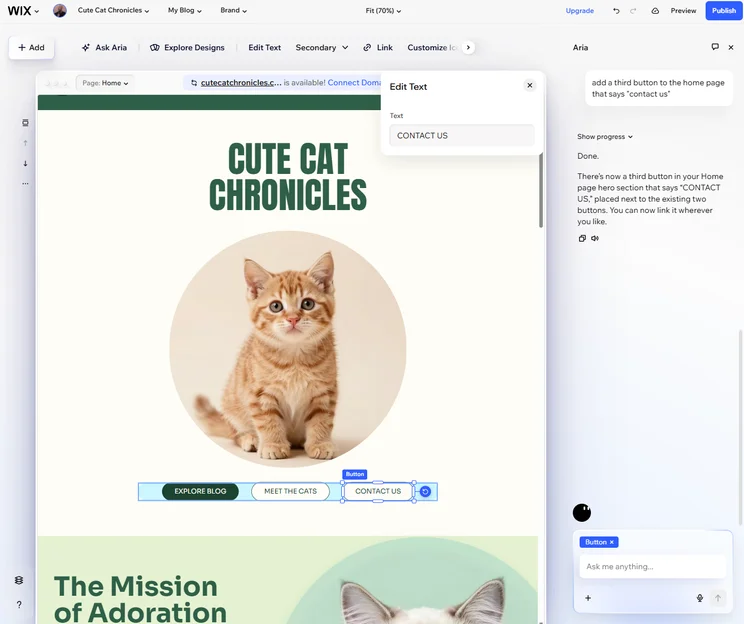
Wix Harmony allowed us to manual edit the generated copy from natural language prompts. Source: Tech.co testing
Even better, we were able to easily edit our site with natural language prompts. For example, we asked Aria — the AI chatbot from Wix that powers the platform — to add an additional button to the home page, and it did so without issue.
Wix Harmony allows for more creative control than your standard AI website builder too. We were able to easily drag and drop elements wherever we wanted without the natural language prompts, and we changed the color and font of a few headers.
We were also able to easily add elements from the sidebar menu, and make granular edits to them with the Wix Dashboard.
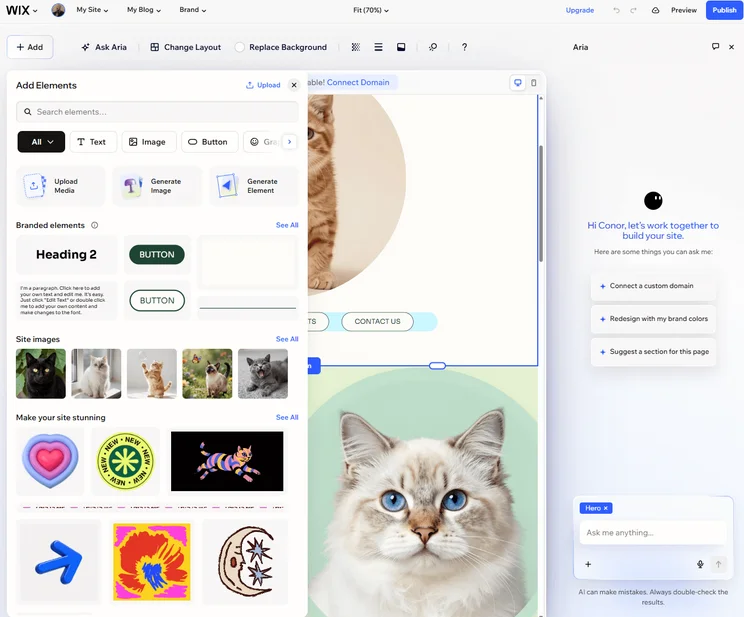
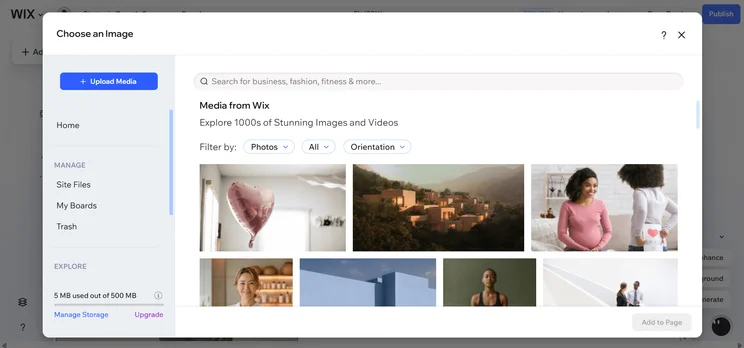
Wix allowed us to easily add elements to our AI-generated site. Source: Tech.co testing
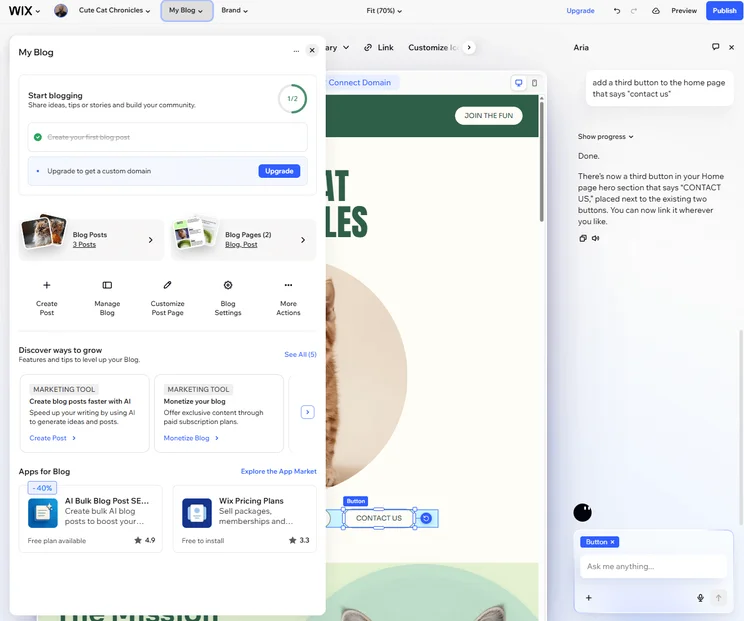
We were able to easily add blog posts directly to our AI-generated site on Wix Harmony. Source: Tech.co testing

We had a lot of creative control with Wix Harmony, changing the color palate of the site with a single click. Source: Tech.co testing
Wix Harmony also made it easy to change the overall design of your site. You could change color branding, font choices, and the look of other elements that would impact the entire site.
Basically, Wix Harmony combines the natural language prompt editing of vibe coding platforms with the design flexibility of high-powered website builders, all housed on the highly functional Wix infrastructure.
Learn more about the best AI website builders in our dedicated guide
Is Wix Good for Selling Online?
Yes, Wix is a good website builder for creating an online store, because it offers a range of ecommerce features aimed at streamlining operations and maximizing revenue.
- Unified checkout — Wix makes it possible to purchase different types of products and services, like physical items, online classes, and subscriptions, with a single checkout system.
- AI-powered inventory management — Wix uses Aria to provide users with smart alerts on available stock, projecting shortages based on seasonal trends.
- Multi-channel sales — Wix integrates seamlessly with Amazon, eBay, and TikTok Shop for selling, as well as Apple Pay, Google Pay, and Affirm for multi-currency payments.
- Native loyalty program – Wix offers a native loyalty program built in to its system, so you can access the perk at no extra charge. It is only available with the Business and Business Elite plans, though.
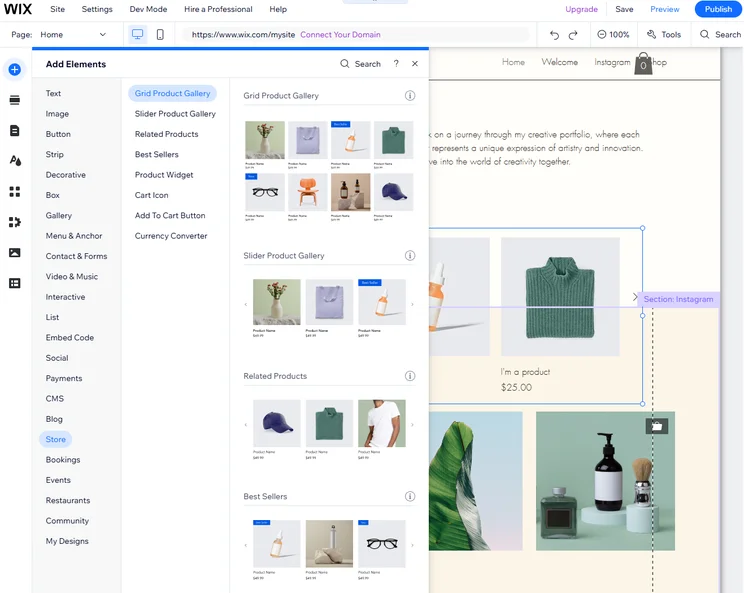
Wix provided us with lots of options when it came to displaying products on our site. Source: Tech.co testing
What are the limitations of Wix for ecommerce?
The most important limitations of Wix for ecommerce is the fact that users are limited to selling fewer than 50,000 products across all plans, while platforms like Shopify offer unlimited products across all plans.
Additionally, Wix does not offer the same level of checkout customization as Shopify and it doesn’t offer market-specific pricing, which can be helpful for multi-national online stores.
Basically, Wix isn’t a good ecommerce website builder for much larger online stores, because higher product counts aren’t possible and it doesn’t offer the customizability that you need to make that many sales.
Check out our Shopify review to learn more
How Does Wix Compare With Other Website Builders?
Wix may be the best overall website builder in our research, but that doesn’t mean it’s the best website builder for your business. In fact, there are lots of excellent website builders out there that might be a better fit, depending on your specific needs.
Check out our Wix alternatives guide to learn more
|
Overall score
All Tech.co research categories, condensed into one score
|
Cheapest price
|
Special deal
|
Cheapest ecommerce plan
The cost for a plan that allows users to build and operate an online store
|
Free plan
|
Free trial
|
Templates
How many templates are available?
|
||
|---|---|---|---|---|---|---|---|---|
|
|
 |
 |
 |
 |
||||
|
Wix |
Squarespace |
Shopify |
GoDaddy |
Hostinger |
||||
|
4.8
|
4.5
|
4.2
|
4.2
|
4.1
|
||||
|
$17/month |
$19/month |
$29/month |
$9.99/month |
$2.99/month |
||||
|
$15.30/month with code TAKE10 |
$17.10/month with code TC10 |
$1/month for first 3 months |
Save 54% with annual contract |
$2.69/month with code TECH |
||||
|
$29/month |
$19/month |
$29/month |
$20.99/month |
$3.99/month |
||||
|
|
|
|
|
|
||||
|
14-day free trial |
14-day free trial |
3-day free trial |
7-day free trial |
14-day free trial |
||||
|
2,000+ |
180+ |
900+ |
200+ |
400+ |
Which is better, Wix or Shopify?
If you’re a larger business that needs to build an online store, for example, you’ll definitely want to go with Shopify instead, if only because Wix caps the number of products you can sell at 50,000 and Shopify allows for unlimited products.
Check out our Wix vs Shopify guide to learn more
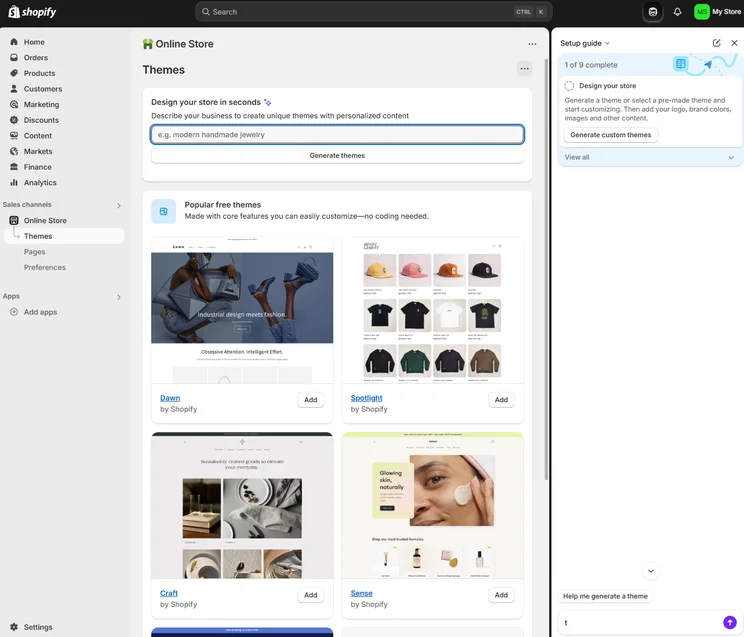
Shopify allowed us to generate themes for our online store based on a simple prompt. Source: Tech.co testing
Which is better, Wix or Hostinger?
Also, Wix (and Shopify, for that matter) can be pretty expensive, which is never ideal for smaller businesses on tighter budgets. Yes, Wix offers a free forever plan, but given its limitations, it’s not a long term solution.
Hostinger, on the other hand, provides access to robust website building tools and offers special deals that can get you started with your site for as little as $1.95 per month.
Check out our Wix vs Hostinger guide for more information

We were able to make changes to our AI website on Hostinger before it was created, including the color palette. Source: Tech.co testing
Which is better, Wix or Squarespace?
If you’re looking for ease of use in a website builder, Wix can be a bit of a turnoff. Because it offers so much functionality for users, it can be complicated to navigate, making it harder for beginners to get the hang of it.
With Squarespace, though, you don’t have to worry about that. Our research found it to be the easiest platform to navigate, with an intuitive interface, flexible drag-and-drop editors, and plenty of guidance along the way.
Check out our Wix vs Squarespace guide to learn more
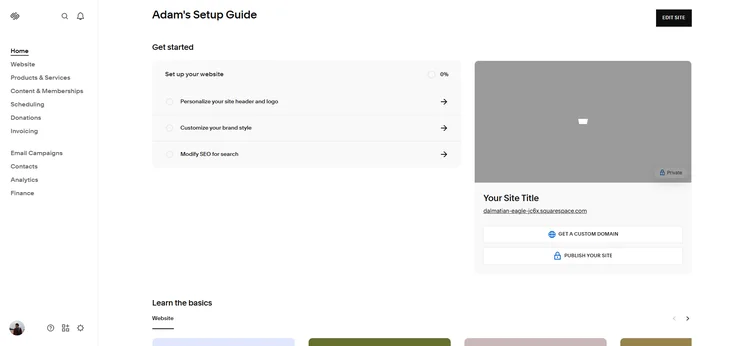
Squarespace offers a helpful setup guide to new users, making it even easier to use. Source: Tech.co testing
How We Evaluate Website Builders Like Wix
We take our impartial research and analysis seriously, so you can have complete confidence that we’re giving you the clearest, most useful product recommendations. Our main testing categories for website builders are:
- Website features: The capabilities and functionalities offered by a website builder, e.g. blog functionality, SEO capability, and marketing capacity.
- Design functionality: The aesthetic appeal and visual layout of a website created using a website builder. It encompasses aspects such as page templates and customizable themes.
- Customer satisfaction: External customer opinion. This is the feedback and ratings given by customers who have used a particular website builder — the market position and reputation a website builder holds.
- User experience: How user-friendly and intuitive a website builder is for people with varying levels of technical expertise.
- Value for money: The balance between the cost of a website builder and the benefits it provides. It considers factors such as pricing plans, subscription models, and available features.
- Help and support: The assistance and resources available to users when they encounter issues or need guidance while using a website builder.
When it comes to calculating a product’s final score, not all testing areas are weighted evenly, as we know some aspects matter more to our readers than others, which are simply “nice to have.” After hundreds of hours, our process is complete, and the results should ensure you can find the best solution for your needs.
At Tech.co, we have a number of full-time in-house researchers, who re-run this testing process regularly, to ensure our results remain reflective of the present day.
Learn more about our research.
Wix is an excellent website builder that is definitely worth the price. The platform makes updating a website easy with its drag-and-drop editor and even easier to get started, thanks to Wix Harmony, which generates the page for you with natural language prompts.
There are other options out there that are better for particular needs – like Squarespace for ease of use, Shopify for ecommerce, or Hostinger for low prices. But all in all, it’s hard to do better than Wix when it comes to doing everything excellently and at a fair price.
If you want to get started with Wix, remember to use code TAKE10 to get 10% off all premium plans.
Frequently Asked Questions
Yes, you can switch templates with Wix, but you might have to start from scratch if you have published your site. Wix doesn’t have an effective tool to bring your site design over to a new template, so you’ll likely have to create it again. Luckily, with AI tools like Harmony, you should be able to do so quickly.
The AI Visibility Overview tool in Wix does not make changes to your site, but it provides you with actionable data about your placement in answers generated by AI models like ChatGPT and Gemini. You can then use this data to make manual changes to your site in hopes of getting more attention to your pages.
No, you cannot export your Wix site to another website builder. The platform does not allow for users to download the source code or other elements, so you’ll have to manually migrate data and use third-party tools to export your product catalog if you decide to try out a new platform.
If you click on, sign up to a service through, or make a purchase through the links on our site, or use our quotes tool to receive custom pricing for your business needs, we may earn a referral fee from the supplier(s) of the technology you’re interested in. This helps Tech.co to provide free information and reviews, and carries no additional cost to you. Most importantly, it doesn’t affect our editorial impartiality. Ratings and rankings on Tech.co cannot be bought. Our reviews are based on objective research analysis. Rare exceptions to this will be marked clearly as a ‘sponsored’ table column, or explained by a full advertising disclosure on the page, in place of this one. Click to return to top of page


