

We may receive a commission from our partners if you click on a link to review or purchase a product or service. Click to Learn More
Squarespace’s website builder costs between $19 and $99 per month (billed annually), providing users with its drag-and-drop editor, AI tools, ecommerce functionality, and 24/7 support from its cheapest plan.
After researching 12 of the best website builders, we found Squarespace’s pricing to be above average for the industry, but there’s no free plan, and you need to keep upgrading to reduce some of the additional fees.
- Squarespace pricing starts at $19 per month when billed annually and $25 per month when billed monthly
- You can sell unlimited products and services on all plans, making it a cheaper builder for online stores than Wix or Shopify
- The Core, Plus, and Advanced plans ($29-$99/month) remove online store transaction fees entirely
- Beyond the main cost of a monthly or annual plan, Squarespace charges some added fees, including domain renewals (after the first year), email marketing costs, and payment processing fees
We take our impartial research and analysis seriously, so you can have complete confidence that we’re giving you the clearest, most useful product recommendations.
Here’s how our website builder research came about, by the numbers:
- More than 300 hours
- Six categories of investigation
- 36 subcategories
- 207 individual evaluations
The primary categories of investigation included website functionality (35%), design features (30%), user experience (15%), pricing (10%), help and support (5%), and reputation (5%). You can learn more about our research on our dedicated page.
How Much Does Squarespace Cost?
Squarespace’s pricing ranges from $19 per month to $99 per month (billed annually), split between four plans. Here’s a breakdown of each pricing plan available from Squarespace:
|
Plan
|
Cheapest price
|
Special deal
|
Price (1-month contract)
The price per month you'll pay if you choose to be billed monthly
|
Staff accounts
|
Online credit card rates
|
Transaction fees
|
Membership transaction fees
|
Ecommerce
|
Advanced analytics
|
Video storage
|
|
|---|---|---|---|---|---|---|---|---|---|---|---|
 |
|
|
|
||||||||
|
Basic |
Core |
Plus |
Advanced |
||||||||
|
$17.10/month with code TC10 |
$26.10/month with code TC10 |
$44.10/month with code TC10 |
$89.10/month with code TC10 |
||||||||
|
$25/month |
$39/month |
$65/month |
$139/month |
||||||||
|
2 |
Unlimited |
Unlimited |
Unlimited |
||||||||
|
2.9% + $0.30 |
2.9% + $0.30 |
2.7% + $0.30 |
2.5% + $0.30 |
||||||||
|
2% |
0% |
0% |
0% |
||||||||
|
7% |
5% |
1% |
0% |
||||||||
|
Limited |
|
|
|
||||||||
|
|
|
|
|
||||||||
|
30 minutes |
5 hours |
50 hours |
Unlimited |
Does Squarespace have a free plan?
Squarespace does not offer a free plan for users, but there is a 14-day free trial that will allow you to test the platform before you make a financial commitment. You can’t publish your site on the free trial.
Once the trial ends, you’ll need to upgrade to a paid plan to continue editing or publish your site.
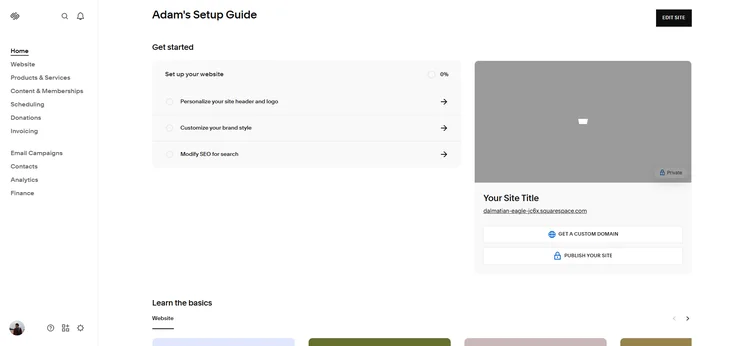
Squarespace offers a setup guide to new users. Source: Tech.co testing
What to Know About Each Squarespace Pricing Plan
The Basic, Core, Plus, and Advanced plans each offer different levels of features and functionality at different price points and there are some key takeaways that users should be aware of before they buy.
Basic plan ($19/mo): Best for portfolios and blogs
Squarespace’s Basic plan is the cheapest option, costing $19 per month for the year (or $228 upfront, per year). It includes basic ecommerce and marketing tools, making it a great starting point for new businesses.
Pros
- Sell unlimited products and services
- Access to Blueprint AI Builder and AI tools, including AIO Scanner
- Two staff accounts included
- Unlimited storage space and bandwidth
- 24/7 email support
Cons
- No access to advanced sales tools, like discounts or payment plans
- Higher transaction fees (2%)
- Only 30 minutes of video storage
- Not for bigger teams
Core plan ($29/mo): Best for small businesses
Squarespace’s Core plan costs $29 per month ($348 billed annually), and it removes all online store transaction fees, making it the most cost-effective tier for small businesses.
Pros
- One Google Workspace account (free for 1st year)
- Advanced analytics, including conversion metrics
- Access to full ecommerce suite, including social selling and shipping rates
- Improved marketing tools, including pop-up promotions
- 0% online store transaction fees
- Unlimited contributors included
Cons
- Credit card rates remain the same as Basic plan (2.9% + $0.30)
- Only five hours of video storage
Plus plan ($49/mo): Best for growing stores
Squarespace’s Plus plan will cost you $588 upfront for your first year ($49 per month). With reduced processing fees, it’s a good option for businesses seeing a steady growth in sales.
Pros
- Reduced credit card rates (2.7% + $0.30)
- Up to 50 hours of video storage
Cons
- Not many additional benefits after Core plan
- Digital content and memberships face 1% transaction fee
Advanced plan ($99/mo): Best for established brands
Squarespace’s Advanced plan is the most expensive of the four premium tiers, costing $99 per month (billed annually), translating to $1,188 upfront. While the Core, Plus, and Advanced plans share a baseline feature set, the Advanced plan offers the lowest credit card rates and unlimited video storage.
Pros
- Unlimited video storage
- No transaction fees on memberships or digital products
- Even lower credit card rates (2.5% + $0.30)
Cons
- Most expensive Squarespace plan
- Not as scalable as competitors, such as Shopify
Which Squarespace Pricing Plan Is Right for Me?
To help you understand those prices and features even further, it helps to think in terms of what type of website you’re aiming to build. Here’s a breakdown of which Squarespace pricing plan is best suited to which type of website:
- Blog: The Basic plan is best because you’ll get unlimited storage for photos and website metrics.
- Online store: All Squarespace pricing plans offer online store functionality, but the Core plan removes online store transaction fees.
- Small business: The Core plan provides a professional email and the ability to create promotional pop-ups and announcement bars to help you make sales.
- Portfolio: The Basic plan gives you access to Squarespace’s templates to showcase your art, but you only get 30 minutes of video storage.
- Subscription/membership: The Advanced plan has no transaction fees on memberships and digital products, which could save your business a lot of money.
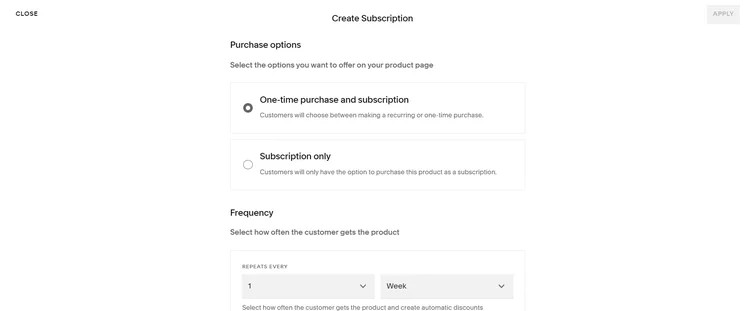
Squarespace gave me a choice between one-time purchase subscriptions and just subscriptions, and also let me choose their frequency. Source: Tech.co testing
At its core, Squarespace is aimed at creative businesses and individuals, including design agencies, artists, photography studios, and others.
The right pricing plan for you will depend on what type of site you’re trying to build and what you want to do with it. Are you a budding nature photographer trying to turn your hobby into a profession? With unlimited photo storage, the Basic plan will meet your needs — and save you a dime.
At the other end of the spectrum, an international art and print shop that also operates a subscription-based model should look at the Advanced plan. You’ll get good transaction fees, with no charges on your content and memberships sales.

Does Squarespace Charge Hidden Fees?
In addition to the monthly subscription cost, Squarespace does come with some additional, hidden fees that you’ll want to be aware of before you sign up.
- Custom domains ($10-$20 per year): Squarespace provides a free, custom URL for the first year, but you’ll have to pay for it yourself after that.
- Third-party apps ($5-$50 per month): Known as Squarespace Extensions, there are currently 49 plugins available if you want to add extra functionality to your site (for a price).
- Google Workspace ($6 per month): All Squarespace plans (except Basic) provide one year of Google Workspace for free.
- Acuity Scheduling ($16-$49 per month): Squarespace’s built-in scheduling tool has its own premium plans, but you can test it out first with a 14-day free trial.
- Email Campaigns (from $8 per month): If you need additional email marketing power, Squarespace’s Email Campaigns provides volume-based plans, from 500 to 500,000 emails per month. These plans range from $8-118 per month (billed annually).
How Does Squarespace’s Pricing Compare With Competitors?
Our in-depth research of twelve top website builders found that Squarespace is slightly more expensive than the industry average, particularly considering it doesn’t have a free plan.
- For all-in-one management – Wix ($17 per month): Wix costs slightly more than Squarespace, but offers more built-in features when it comes to overall website functionality.
- For high-volume sellers – Shopify ($29 per month): Shopify is far more expensive, but provides robust ecommerce tools like inventory management and support for agentic commerce.
- For beginners – GoDaddy ($9.99 per month): GoDaddy is more affordable, but its rudimentary web designer pales in comparison to Squarespace’s beautiful templates.
- For budget-conscious businesses – Hostinger ($2.99 per month): Hostinger is a great budget choice, because of its low introductory deal, but its features are limiting and there’s no third-party app store.
Check out our guide to the best cheap website builders to learn more.
Squarespace is a top-class website builder that provides great value to its users, with plans starting from just $16 per month (billed annually).
Whether you’re creating a simple portfolio website to showcase your arts or craft work with stunning Squarespace templates, or building an online store to sell products to customers, all of the pricing plans from Squarespace will allow you to get started and scale as your business grows.
Frequently Asked Questions
Yes, Squarespace does offer discounts for eligible students and non-profits. Specifically, the platform will give students 50% off their first year of an annual subscription, after which point it will revert to full price. To redeem the offer, eligible students will need to verify their student status via Student Beans.
Squarespace also offers a discount for non-profits. To redeem the offer, simply input “NONPROFIT” at the checkout and you’ll receive 10% off your first payment.
Squarespace offers a 14-day free trial to test out all platform features, but you’ll need to subscribe to a paid plan to actually launch your site and continue using the platform.
Squarespace provides a free custom domain for one year with all of its annual plans. When your free domain year ends, you’ll need to pay for it on a monthly or yearly basis, and it can be renewed from within your Squarespace account.
No, we would not recommend the Basic plan for Squarespace users who need to sell products online. This is because the entry-level plan has high transaction fees and a shortage of ecommerce-focused tools. Depending on the size of your business, we would definitely recommend opting for a higher plan.
Businesses can choose from four payment processors, including Squarespace Payments, Stripe, PayPal, and Square (specifically for in-person POS transactions). Depending on your chosen processor, you can accept most major payment methods, such as Visa, Mastercard, Apple Pay, and American Express.
Yes, guest checkout is available on all Squarespace plans, so your end customers can purchase items without needing to register an account.
After the cost of your website plan, you can expect to pay an extra $20–24 per year for a domain name (depending on which tier you are subscribed to) and $6–18 per user, per month for email hosting (depending on which Google Workspace tier you opt for).
If you click on, sign up to a service through, or make a purchase through the links on our site, or use our quotes tool to receive custom pricing for your business needs, we may earn a referral fee from the supplier(s) of the technology you’re interested in. This helps Tech.co to provide free information and reviews, and carries no additional cost to you. Most importantly, it doesn’t affect our editorial impartiality. Ratings and rankings on Tech.co cannot be bought. Our reviews are based on objective research analysis. Rare exceptions to this will be marked clearly as a ‘sponsored’ table column, or explained by a full advertising disclosure on the page, in place of this one. Click to return to top of page


