





We may receive a commission from our partners if you click on a link to review or purchase a product or service. Click to Learn More
Squarespace is the best website builder for beginners. The platform is easy-to-use, sleek, highly customizable, and boasts robust functionality, especially for portfolio sites and creative businesses.
To determine our rankings, we spent over 300 hours researching and hands-on testing 12 different website builders. All of the builders we recommend are beginner-friendly, with zero coding knowledge needed.
- Best: Squarespace is the best website builder for beginners due to its user-friendly interface, smooth backend, and well-designed templates that you can edit after publishing your site.
- Budget: Hostinger is the best choice for budget-conscious customers, with plans that can start at just $2.99 per month for a four-year contract.
- Ecommerce: Shopify is ideal for users building an online store, but it can be a little bit intimidating because of the sheer breadth of functionality.
- Popularity: Based on our survey of 300 SMB leaders, Shopify has the highest market share at 25%, shortly followed by GoDaddy at 21%.
After conducting an initial exploration to identify the most relevant, popular, and established tools in the market, we put them through their paces with hands-on testing to see their real strengths and weaknesses. In this case, our research consisted of:
- 12 website builder products
- 300+ hours
- 207 areas of investigation
- Six core categories of investigation
- 36 subcategories
At Tech.co, we have a number of full-time in-house researchers, who re-run this testing process regularly, to ensure our results remain reflective of the present day. We also surveyed 300 SMB leaders every month this year to gather feedback and insights from real users using these website builders.
What Are the Best Website Builders for Beginners?
|
Cheapest price
|
Special deal
|
Free plan
|
Free trial
|
Best for
|
Pros
|
Cons
|
Beginner's features
|
Design editor
|
App store
Is there an app store available to utilize third-party integrations?
|
Autosave
|
Templates
How many templates are available?
|
||
|---|---|---|---|---|---|---|---|---|---|---|---|---|---|
|
FEATURED PROVIDER
 |
 |
 |
 |
 |
|||||||||
|
Hostinger |
Squarespace |
GoDaddy |
Wix |
Shopify |
|||||||||
|
$2.69/month with code TECH |
$17.10/month with code TC10 |
Save 54% with annual contract |
$15.30/month with code TAKE10 |
$1/month for first 3 months |
|||||||||
|
|
|
|
|
|
|||||||||
|
14-day free trial |
14-day free trial |
7-day free trial |
14-day free trial |
3-day free trial |
|||||||||
|
Affordable AI features |
Creative businesses |
Setting up quickly |
All-round website management |
Large ecommerce businesses |
|||||||||
|
|
|
|
|
|||||||||
|
|
|
|
|
|||||||||
|
|
|
|
|
|||||||||
|
Drag-and-drop |
Smart grid |
Section-based |
Drag-and-drop |
Section-based |
|||||||||
|
|
|
|
|
|
|||||||||
|
|
|
|
|
|
|||||||||
|
400+ |
180+ |
200+ |
2,000+ |
900+ |
Best Website Builder for Beginners Reviews
- Squarespace — Easiest website builder for beginners
- Hostinger — Cheapest website builder for beginners
- GoDaddy — Quickest setup
- Wix — Most advanced website builder for beginners
- Shopify — Best for beginners looking to sell online
1. Squarespace: Easiest Website Builder For Beginners
- Price: $19 per month
- Free plan or trial: 14-day free trial
- 24/7 support: Email
Squarespace is the easiest website builder I’ve tested, because of its simple, easy-to-navigate interface and drag-and-drop editor. This made it straightforward for us to perform basic website builder functions, such as editing color schemes, adding text, creating new products, and more.
Why is Squarespace good for beginners?
- Simple, visual drag-and-drop editor with smart grid guidance and professionally-designed elements to choose from
- Built-in marketing and ecommerce features eliminate need for plug-ins (available from cheapest plan)
- Blueprint AI Builder, Squarespace’s flagship AI website builder
What can make Squarespace difficult?
- AI site builder has limited customization options, resulting in generic outputs (you’ll need to make further tweaks in the editor!)
- No autosave feature for the website editor
- Limited language support for international businesses
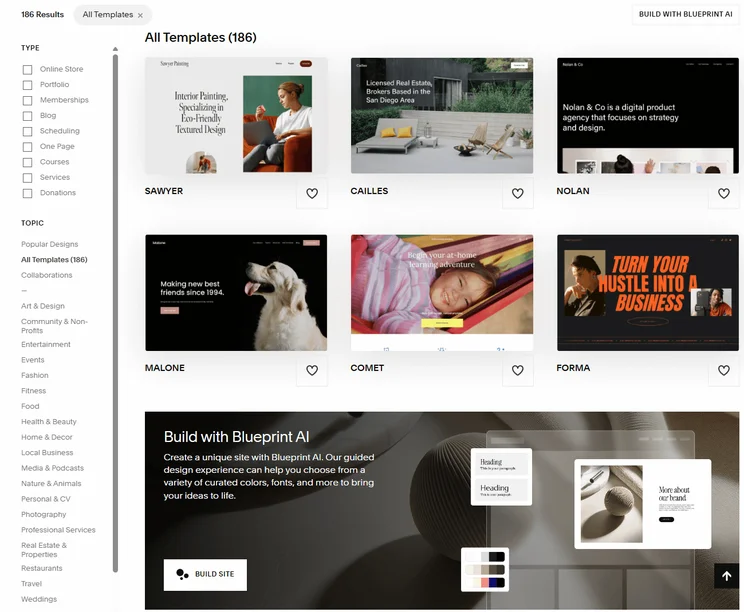
Squarespace offers some of the most professional, beautiful templates we’ve come across. Source: Tech.co testing
As someone that has done hands-on research with a wide range of website builder and a person that has created a website with Squarespace for personal use, I can confidently say that it’s a top choice for beginners.
The stunning templates make designing your site easy, the smart grid provides easy tips for how to get started, and the AI features make generating content easier than other options on the market.

Conor is the lead writer for Tech.co, as well as a Squarespace website builder user for his personal comedy website.
How much does Squarespace cost?
|
Plan
|
Special deal
|
Price (1-year contract)
The price per month you'll pay if you choose to be billed annually
|
Price (1-month contract)
The price per month you'll pay if you choose to be billed monthly
|
Ecommerce
|
|---|---|---|---|---|
|
Basic |
Core |
Plus |
Advanced |
|
|
$17.10/month with code TC10 |
$26.10/month with code TC10 |
$44.10/month with code TC10 |
$89.10/month with code TC10 |
|
|
$19/month |
$29/month |
$49/month |
$99/month |
|
|
$25/month |
$39/month |
$65/month |
$139/month |
|
|
Limited |
|
|
|
2. Hostinger: Cheapest Website Builder for Beginners
- Price: $2.99/month (48-month contract)
- Free plan or trial: 14-day free trial
- 24/7 support: Live chat, AI assistant
Hostinger is the cheapest website builder on our list, with plans starting at $2.99 per month for a 48-month contract. Plus, Hostinger offers a beginner-friendly AI builder, drag-and-drop editor, AI-powered assistant (named Kodee), and built-in tutorials for new users.
But don’t just take our word for it! After surveying 300 SMBs in the US this year, 55% of businesses would recommend Hostinger (the highest recommendation score out of all the builders).
Why is Hostinger good for beginners?
- Rock-bottom entry price, providing a fixed low cost for years
- Range of support options, including the Kodee AI assistant and video tutorials
- Describe the site you want using natural language and Hostinger will create it for you in less than 30 seconds
What could Hostinger improve?
- No app market for third-party integrations (you’re limited to what’s included in your plan)
- The bulk of Hostinger’s AI tools are only available on its Business plan (from $3.99/mo)
- You can only sell up to 1,000 products on the Business plan, making it a weaker option for online stores
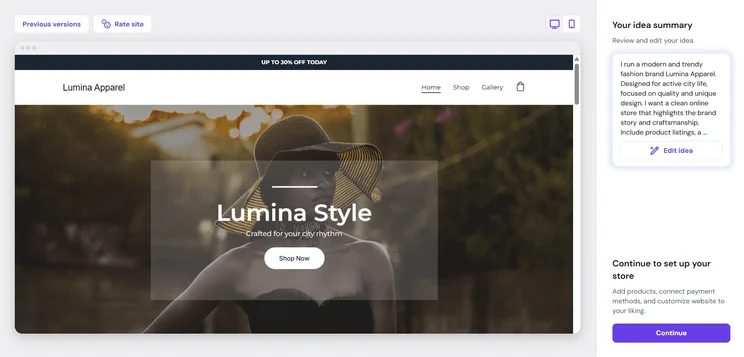
Hostinger’s AI website generator created this online store in a few minutes. Source: Tech.co testing
How much does Hostinger cost?
|
Plan
|
Special deal
|
Price (4-year contract)
The price per month you'll pay if you choose to be billed for 48 months
|
Price (1-year contract)
The price per month you'll pay if you choose to be billed annually
|
Price (1-month contract)
The price per month you'll pay if you choose to be billed monthly
|
Ecommerce
|
|---|---|---|---|---|---|
|
Premium |
Unlimited |
Cloud Startup |
|||
|
$2.69/month with code TECH |
$3.59/month with code TECH |
$7.19/month with code TECH |
|||
|
$2.99/month |
$3.99/month |
$7.99/month |
|||
|
$3.99/month |
$4.99/month |
$9.99/month |
|||
|
$11.99/month |
$18.99/month |
$27.99/month |
|||
|
|
|
|
3. GoDaddy: Quickest Setup
- Price: $9.99/month
- Free plan or trial: Free plan
- 24/7 support: Phone, WhatsApp, live chat
GoDaddy is the best website builder for beginners who want to get set up quickly, because of its simple setup process and AI website builder that will generate a site for you in 30 seconds. Its editor is very simple to use, but the designs aren’t as stylish as what Squarespace offers.
Why is GoDaddy good for beginners?
- Streamlined backend editor is very simple to use – beginners can stack pre-designed sections to create a page
- GoDaddy Airo, GoDaddy’s AI assistant, can help you create a site, generate email templates, and more
- 24/7 support is available across all plans, including GoDaddy’s free plan
What could GoDaddy improve?
- Overly generic website design options, with fewer templates than other builders and a restrictive section-based editor
- No app market means it’s difficult to improve functionality
- A single ecommerce plan limits business scalability
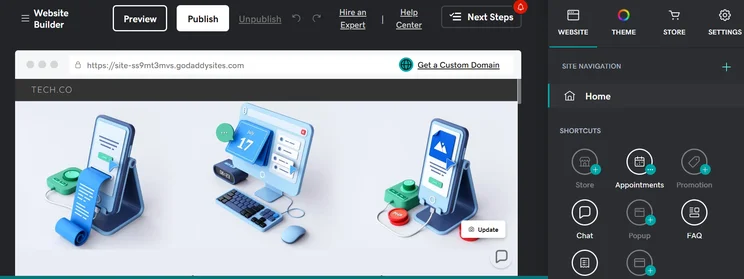
GoDaddy displays an in-situ preview next to an editing column. Source: Tech.co testing
How much does GoDaddy cost?
|
Plan
|
Price (1-year contract)
The price per month you'll pay if you choose to be billed annually
|
Price (1-month contract)
The price per month you'll pay if you choose to be billed monthly
|
|
|---|---|---|---|
|
Free |
Starter |
Professional |
Ultimate |
|
$0 |
$9.99/month |
$24.99/month |
$99.99/month |
|
$0 |
$19.99/month |
$49.99/month |
$199.99/month |
4. Wix: Most Advanced Website Builder for Beginners
- Price: $17 per month
- Free plan or trial: Free plan
- 24/7 support: Phone, AI assistant
Wix is the most advanced website builder on this list, mostly because of comprehensive set of features and top-of-the-line AI tools. The builder caters to a wide range of website types, from blogs to online stores, and its drag-and-drop editor gives you total creative freedom when designing your site.
Why is Wix good for beginners?
- Generous free plan to help you get familiar with the builder before committing to a paid plan
- Nearly 3,000 available website templates, plus an AI builder which can generate custom templates
- Comprehensive feature catalog, so you can gain exposure to different parts of website building, maintenance, and promotion
What could Wix improve?
- No template switching once your site is published
- The number of Wix features can be overwhelming for beginners
- Our testing found Wix to have slow load times
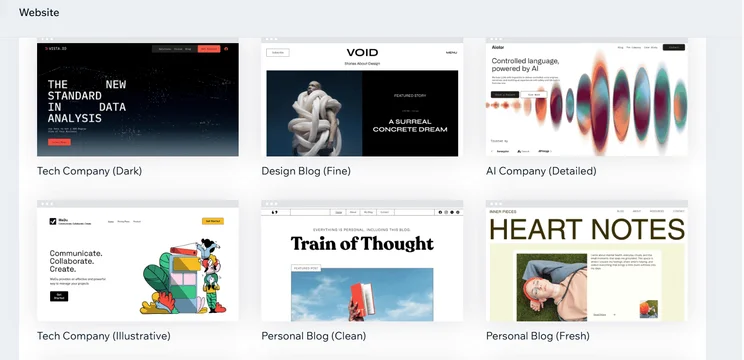
A sample of Wix’s 2,000+ available website templates. Source: Tech.co testing
I’ve been testing Wix for years, and the recent launch of Wix Harmony, the platform’s vibe coding tool, is a game-changer for website building. While it’s really straightforward to use Wix’s traditional AI builder or choose from one of the 2,000+ templates, Wix Harmony lets you use conversational language to describe your dream site. You can go back-and-forth with the AI to make tweaks and suggest changes until you’re happy with the end result.

Emma is Deputy Editor and the resident website builder expert on Tech.co.
How much does Wix cost?
|
Plan
|
Special deal
|
Price (1-year contract)
The price per month you'll pay if you choose to be billed annually
|
Price (1-month contract)
The price per month you'll pay if you choose to be billed monthly
|
Ecommerce
|
|---|---|---|---|---|
|
Free |
Light |
Core |
Business |
Business Elite |
|
$0 |
$15.30/month with code TAKE10 |
$26.10/month with code TAKE10 |
$35.10/month with code TAKE10 |
$143.10/month with code TAKE10 |
|
$0 |
$17/month |
$29/month |
$39/month |
$159/month |
|
$0 |
$24/month |
$36/month |
$46/month |
$172/month |
|
|
|
|
|
|
5. Shopify: Best for Beginners Looking to Sell Online
- Price: $29/month
- Free plan or trial: 3-day free trial
- 24/7 support: Live chat, Sidekick (AI assistant)
Shopify is the best website builder for beginners looking to sell online, due to its robust features for building an online store. Standout examples include built-in inventory management, the ability to list unlimited products, and support for selling via agentic channels, such as ChatGPT.
Why is Shopify good for beginners?
- Integrated checkout and payment processing, so you don’t need to install third-party apps
- Sell on social media for just $5 per month with the Starter plan
- AI assistant Sidekick supports beginners and experienced businesses with day-to-day tasks, such as writing product descriptions, generating performance summaries, and creating social posts
What could Shopify improve?
- Limited tutorials or onboarding during the setup process, so it’s not as beginner-friendly as Squarespace
- Pay for extras on top of your subscription, including a custom domain, paid templates, and scheduling tools
- Shopify’s plans are expensive for new businesses (starting from $29/mo)

The Shopify AI store builder takes a natural language prompt and creates an online store for you in seconds. Source: Tech.co testing
How much does Shopify cost?
|
Plan
|
Price (1-year contract)
The price per month you'll pay if you choose to be billed annually
|
Price (1-month contract)
The price per month you'll pay if you choose to be billed monthly
|
Ecommerce
|
|---|---|---|---|
|
Basic |
Grow |
Advanced |
|
|
$29/month |
$79/month |
$299/month |
|
|
$39/month |
$105/month |
$399/month |
|
|
|
|
|
How We Test and Evaluate Website Builders for Beginners
We take our impartial research and analysis seriously, so you can have complete confidence that we’re giving you the clearest, most useful product recommendations. Our main testing categories for website builders are:
- Website features (35%): The capabilities and functionalities offered by a website builder, e.g. blog functionality, SEO capability, and marketing capacity.
- Design functionality (30%): The aesthetic appeal and visual layout of a website created using a website builder. It encompasses aspects such as page templates and customizable themes.
- User experience (15%): How user-friendly and intuitive a website builder is for people with varying levels of technical expertise.
- Value for money (10%): The balance between the cost of a website builder and the benefits it provides. It considers factors such as pricing plans, subscription models, and available features.
- Customer satisfaction (5%): External customer opinion. This is the feedback and ratings given by customers who have used a particular website builder — the market position and reputation a website builder holds.
- Help and support (5%): The assistance and resources available to users when they encounter issues or need guidance while using a website builder.
When it comes to calculating a product’s final score, not all testing areas are weighted evenly, as we know some aspects matter more to our readers than others, which are simply “nice to have”. For example, beginners will care more about available tutorials, general ease of use, and built-in functionality.
If you’re building a site for the first time, we’d recommend using Squarespace. Not only does it boast the best user experience out of any platform on this list, but it also offers the best templates and design features, making it a perfect match for users building creative sites for the first time.
It also offers an AI builder that can get your site live quickly and easily, while still maintaining a lot of control over your design.
Frequently Asked Questions
Only some website builders allow you to switch providers after you’ve created your site. Hostinger and Shopify, for example, provide export tools that can do some of the work for you. Most website builders, though, are locked in a closed ecosystem, so you’ll have to go through a lot of work to get your site to another provider.
Yes, most website builders in 2026 offer AI website builders that can generate and edit entire, functional websites from just a few natural language prompts. Some even offer vibe coding tools that can create full-on apps from simple English.
Yes, some website builders, including Squarespace and Wix, will allow you to add custom code for enhanced design flexibility. However, normally, this is gated behind more expensive pricing tiers.
Website builders can get you up and running with a website in very little time, and you won’t have to worry as much about maintaining your site.
If you want more control over your site, WordPress might be a better option. But this does involve a steeper learning curve and more time managing your website in general.
If you’re a beginner looking for a new website builder, you should factor in a few key considerations, including price, features, ease of use, AI tools, and business type.
Our top website builders cost between $2.99 and $299 per month, depending on your particular business needs. The average starting price for website builders is around $10 to $20 per month, while ecommerce-enabled builders typically cost around $25 to $30 per month.
If you click on, sign up to a service through, or make a purchase through the links on our site, or use our quotes tool to receive custom pricing for your business needs, we may earn a referral fee from the supplier(s) of the technology you’re interested in. This helps Tech.co to provide free information and reviews, and carries no additional cost to you. Most importantly, it doesn’t affect our editorial impartiality. Ratings and rankings on Tech.co cannot be bought. Our reviews are based on objective research analysis. Rare exceptions to this will be marked clearly as a ‘sponsored’ table column, or explained by a full advertising disclosure on the page, in place of this one. Click to return to top of page


