
We may receive a commission from our partners if you click on a link to review or purchase a product or service. Click to Learn More
In this head-to-head of two top POS providers, it was Square that took the crown over Clover, because of its superior support options, ease of use, and affordable pricing. All in all, this meant Square enabled a better customer experience in comparison with Clover, and as a result it earned the top spot in our roundup of the best POS systems for small businesses.
Clover is not trailing far behind. It has the best hardware options on the market, both professional-looking and responsive during our tests. It also has a range of restaurant and retail-oriented POS capabilities, making it ideal for those seeking out a solution that has their specific business goals in mind. While Square is the better option, the competition was definitely tight.
Both Square and Clover are two of the best POS providers on the market, and we should know, because we’ve tested plenty of them. In particular, we have tested them for the features that small businesses need in 2026. Read on for our in-depth analysis of Square and Clover, to find out which is best for you.
- In our roundup of Square versus Clover, it was Square that came out on top because of its stronger set of support options, ease of use, and affordable pricing options and free plan
- However, it was a tight call. Clover’s hardware options are the best on the market currently for their professional look and responsiveness, and its user-oriented software features such as a cost/profit management tool were better than Square’s
- On the other hand, Square has more comprehensive help and support options compared with Clover, and where our users had issues with Clover’s usability, Square was described as easy-to-use and a great choice for POS beginners.
- Price-wise, users can get started with Square completely for free. Clover’s cheapest plan for restaurants is $135 per month, and for retailers $16 per month, both for a 36-month period. What’s more, prices can rack up quickly with this provider when hardware is factored in.
- We’ve tested plenty of POS systems over the past few years, and Square and Clover are the best of the bunch. We test specifically with small businesses in mind, with targeted subcategories and user testing sessions that ensure we can assess systems as thoroughly as possible.
|
Price
The typical lowest starting price. The lowest price available for your business will depend on your needs
|
Tech.co retail rating
Score out of 5 for general retail suitability based on Tech.co's independent market research
|
Tech.co hospitality rating
Score out of 5 for general restaurant suitability, based on Tech.co's independent market research
|
Best for
Tech.co's verdict to help you identify the most suitable choice for your small business
|
Lowest transaction fee
The lowest possible fee that will be incurred with each transaction
|
Hardware
|
Key benefits
|
Drawbacks
|
Get started
|
||
|---|---|---|---|---|---|---|---|---|---|---|
 |
 |
|||||||||
|
Square |
Clover |
|||||||||
|
From $0/month |
From $16/month for 36 months (depending on plan) |
|||||||||
|
4.8
|
4.5
|
|||||||||
|
4.8
|
4.1
|
|||||||||
|
Scaling and growing your business |
Professional hardware |
|||||||||
|
2.5% + 15¢ |
2.3% +10¢ |
|||||||||
|
Sold by Square, separately or packaged with software. First card reader free. Compatible with most leading brands |
Sells a broad range of hardware, including full cash stations and mobile card readers |
|||||||||
|
|
|||||||||
|
|
|||||||||
| Visit Square | Compare Prices |
Square Overview
- Best POS system for scaling and growing your business
- Price from: Free
Here’s a quick overview of what Square offers:
Square POS

In Short
-
Pros
- Free to get started
- Serves businesses of all sizes and in all sectors
- Strong analytics, inventory, and third-party integrations
-
Cons
- Some necessary features for mid-sized businesses cost more
- 3.5% + 15¢ charge for keyed-in transactions on free plan
- Support options vary by plan
Pricing
-
 Square Free plan at $0/month
-
 Square Plus plan at $49/month
-
Square Premium at $149/month
Images
Clover Overview
- Best POS system for professional hardware
- Price from: $16 per month for 36 months
Here’s a quick overview of what Clover offers:
Clover POS

In Short
-
Pros
- Solid range of hardware options
- 90-day free trial (software-only)
- Low transaction fees
-
Cons
- Need pre-existing website, unlike, for example, Shopify
- Additional features cost extra and can become expensive
- No inter-store transactions
Pricing
-
Cheapest Retail plan: $16/month
-
Transaction rates from 2.3% + 10¢ (Standard and Advanced)
Images
What You Need To Know About Square and Clover
Having tested plenty of POS systems, Square and Clover are some of the best out there. In fact, both systems made it onto our roundup of the best small business POS systems, with Square just edging out Clover to take the top spot. So, we have a strong match-up on our hands.
Square is the more affordable option due to a robust free plan that includes a Square magnetic card stripe reader. Comparatively, Clover’s cheapest plan for retailers is $16 per month, for 36 months, and for restaurants it is $135 per month, for 36 months.
You’ll also need to consider transaction fees. For Square, these can be as low as 2.4% + 15¢. For Clover, these can be as low as 2.3% + 10¢. These are on par with the industry standard. Toast, another leading provider, has a lowest fee of 2.49% +15¢, and SumUp’s is 2.6% + 10¢.
Both Square and Clover have excellent feature sets. Standout elements for both include an extensive app market and advanced reporting and analytics.
On a more granular level, Clover has a stronger inventory management offering, making it better suited for larger businesses. Square, on the other hand, excels in customer engagement tools, so it would be perfect for managers looking to maximize repeat business.
In terms of hardware, Clover’s is outstanding. Professional, responsive, and simple to use, it sets a very high bar for other systems. Square isn’t too far behind, though, and its iPad-based system is both intuitive and attractive.
While our users enjoyed Clover’s hardware more, it is on the more expensive side, and you wouldn’t be sacrificing much in terms of quality if you chose Square instead.
In short, while Square is the better choice, it didn’t sweep the competition by any means. Both systems have their strengths. To consider a more in-depth analysis of each provider, scroll down further.
Who should choose Square?
- New businesses with smaller budgets
- Businesses that want a platform they can grow with
- Businesses that want an online presence
Read our full review of Square POS.
Who should choose Clover?
- Users who want in-depth analytics
- Businesses that want professional hardware options
- Established retail stores and medium-to-large restaurants
Read our full review of Clover POS.
Is Square or Clover Better Value for Money?
Square is better value for money, because businesses can get started completely for free, without sacrificing high-quality hardware, usability, help and support options, and capable POS functionality.
Considering Clover’s entry-level price point — $16 per month for small retail businesses, and then $180 per month for more established ones and $135 per month for hospitality businesses — Square is hard to beat here.
Check out the tables below for a more detailed view of what Square and Clover offer price-wise:
Square’s pricing plans
For a full overview of Square’s pricing plans, take a look at our comparison table below:
|
Plan
|
Price
Monthly cost of the software.
|
Transaction fees
|
|
|---|---|---|---|
 |
|
|
|
|
Free |
Plus |
Premium |
|
|
Free |
$49/month |
$149/month |
|
|
Card: 2.6% + 15¢ |
Card: 2.5% + 15¢ |
Card: 2.4% + 15¢ |
Clover’s pricing plans
Check out how Clover’s pricing packages compare, side-by-side, below in our comparison table.
|
Plan
|
Price
Monthly cost of the software.
|
Transaction fees
|
|
|---|---|---|---|
 |
|
|
|
|
Retail Basic |
Retail Standard |
Retail Advanced |
|
|
$16/month for 36 months |
$180/month for 36 months |
$240/month for 36 months |
|
|
|
|
Do Square and Clover offer free plans?
Clover doesn’t have a free plan, so Square automatically has the best free plan of the two.
Square’s free plan offers plenty for businesses wanting to get started straight away, and there’s a reason we’ve rated it one of the best free POS software options available to small businesses.
If you’re looking specifically for a free POS, you can check out our roundup here.
Square vs Clover: Head-to-Head
Below, we’ll compare Square and Clover on features, hardware, usability, and help and support, so you can make the right call for your business.
Best POS Hardware: Clover
We’ll admit, it was hard for any POS provider to come close to Clover in terms of hardware in our latest round of testing. However, Square still impressed us, and the competition was tighter than we thought.
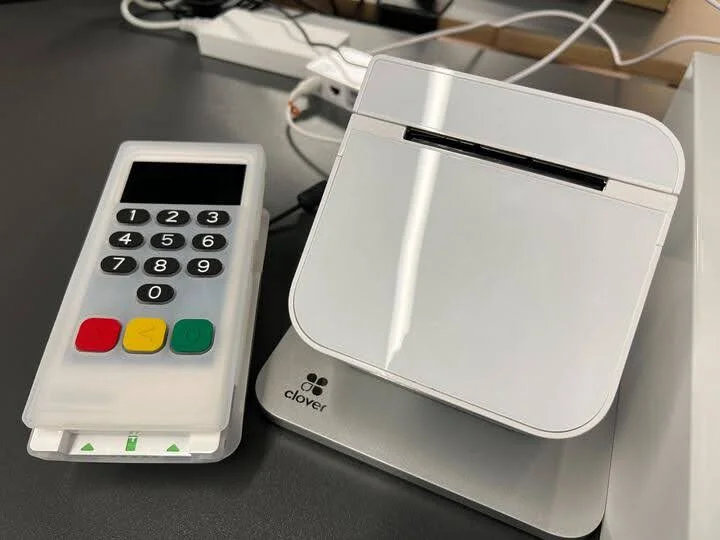
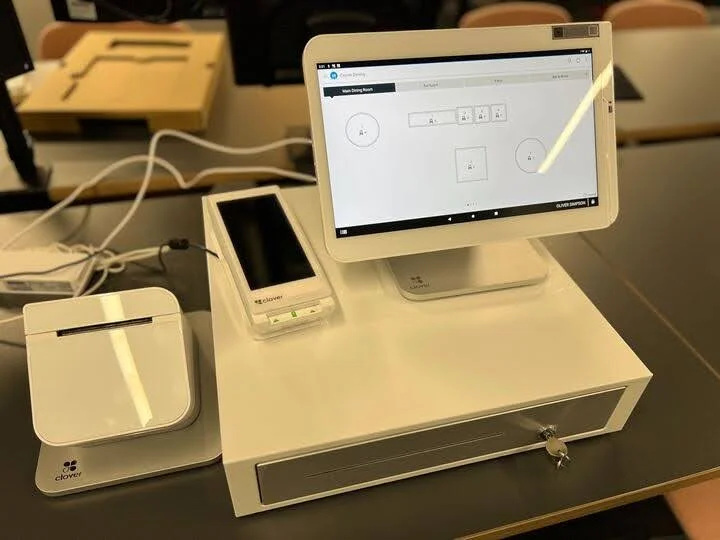
Clover has the most complete hardware offering out of all the providers we researched. It offers a kitchen display system, receipt printer, and terminal, and accessories, including a cash drawer, scanner, printer, and scales.
These are all of its own brand, too, so you can be certain all of your hardware will seamlessly connect. For fast-paced businesses, such as fast food restaurants, this could be beneficial for ensuring efficiency and speed.
Our users consistently praised Clover’s front-end experience, highlighting how easy it was to use the touchscreen interface. In particular, many users mentioned the terminal/register interface, which was described as “intuitive,” “slick,” and “responsive”.
Another standout feature for us was the fingerprint scanner, which we thought was a nice design touch.
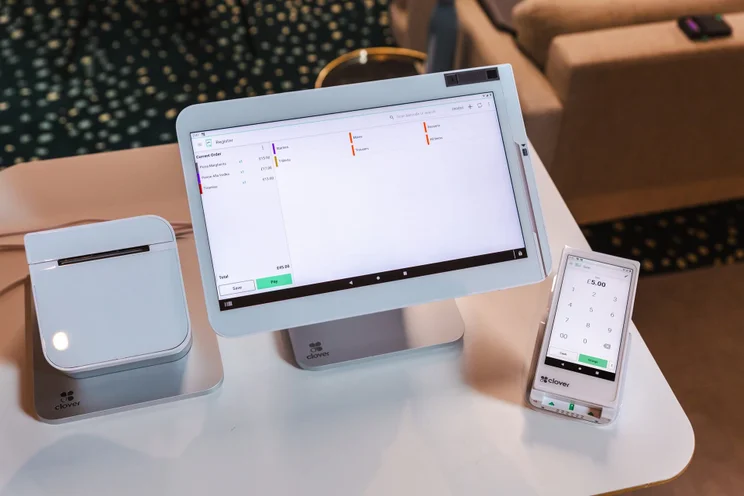
Clover’s hardware offering was responsive, intuitive, and professional-looking, perfect for businesses looking to impress. Source: Tech.co testing
While it doesn’t offer the same extensive package as Clover (it doesn’t offer an own-brand receipt printer), Square still has many options for users to choose from. It offers its own terminal, printer, cash drawers, scanner, and scales.
Pairing Square with an iPad and using it as an iPad POS is the best way to use the platform, and Square offers stands, docks, and cases for you to be able to do so.
In testing, our users described Square as “intuitive” and “user-friendly”, and pointed out that it would be perfect for businesses that have just started using POS systems. The system’s simplicity was highlighted when carrying out functions such as seating guests and sending orders to the kitchen.
“Again, the notably speedy and responsive interface made this effortless. Easy to click on tables and change their shape, seat number, and position”
– A member of Tech.co’s user testing team, when creating a new table plan on Square
However, one thing to note with Square is that it does not have a dedicated training mode, whereas Clover does. While Square’s easy-to-navigate interface may prevent any huge problems for users, if your team is new to these systems, it’s definitely something to bear in mind.
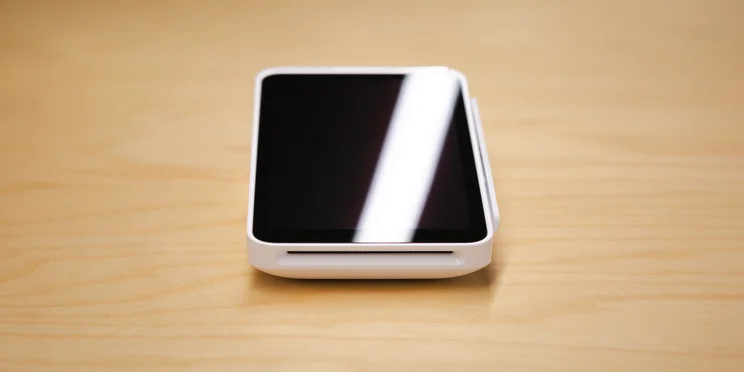
We loved the portability of Square’s hardware options. For businesses that enjoy an efficient and fast-paced atmosphere, Square’s card reader is a perfect choice. Source: Tech.co testing
Why does Clover win on hardware?
Ultimately, we deemed Clover stronger in the hardware department because of the sheer quality of its offerings and the expansive amount of products that are on offer. Although, we wouldn’t want to strike Square entirely from your minds.
While its offering is not as impressive, it still scored highly in our tests, and Clover’s hardware is on the more expensive side. So, you certainly wouldn’t be sacrificing quality if you opted for Square, instead.
Best Software Features: Clover
For both hospitality and retail-based businesses, Clover has a stronger set of software features compared with Square. Although, the race was certainly tight. Here’s how each provider compares on specific POS functions.
Sales
Both Clover and Square allow you to accept the same payment methods, including Visa, Mastercard, and American Express cards, all at the same rates — and even Apple and Google Pay contactless transactions.
The two systems also allow you to process refunds and returns easily, and accept online orders and digital gift cards. Businesses are able to customize the design of their gift cards too, to match their branding, and unlike with POS systems like Epos Now, the process isn’t outsourced to an external app.Both Square and Clover have Buy Now Pay Later (BNPL) integrations, letting qualified retailers split up payments into smaller, more affordable installments.
Both providers offer strong hospitality-focused payment features, too. For example, Square and Clover let vendors accept QR payments, allowing their customers to pay at their own convenience.
For fast-paced businesses that enjoy providing an efficient service to customers, such as fast-food restaurants, this kind of feature would be great to allow customers to pay quickly.
In August 2023, Clover added HIPAA support for ecommerce payments, too, providing greater opportunities for healthcare merchants by letting them set up recurring charges, store card-on-file info securely, and use Clover’s APIs for payment solutions.
Ultimately, this, combined with Clover’s slightly more affordable transaction fees, gives it the leg up over Square in this category, but it’s a very close call.
Analytics and reporting
Both POS providers excel in performance monitoring, with Square and Clover scoring impressively in this category during our independent research.
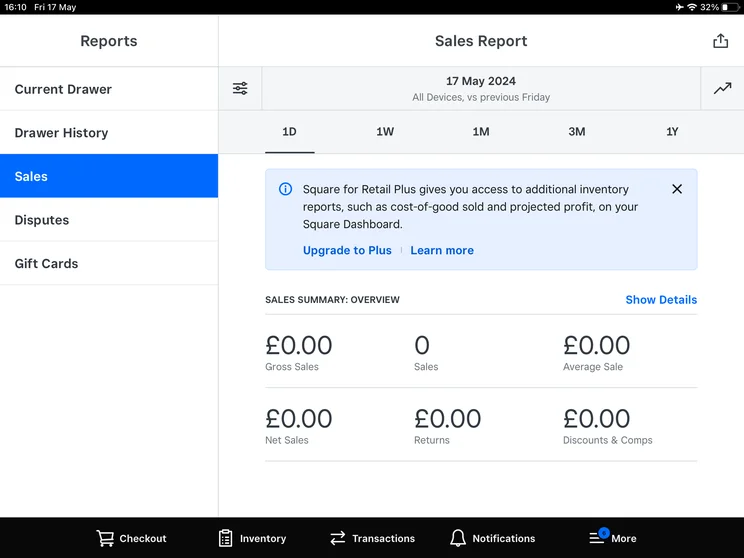
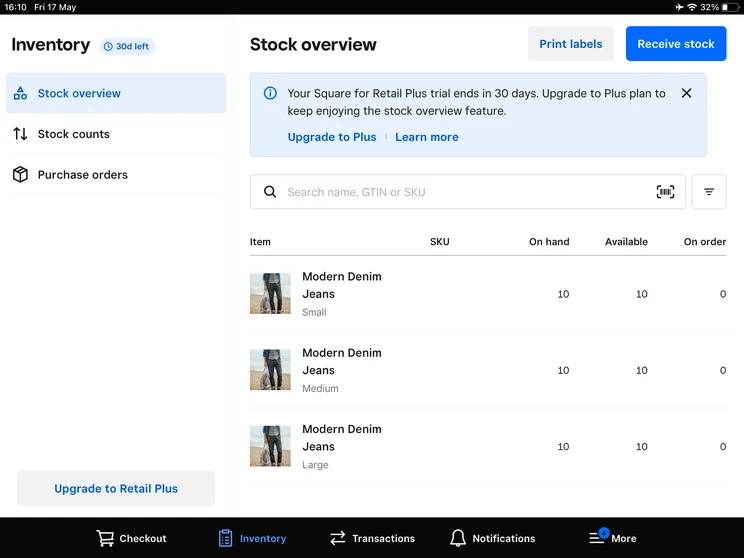
Square’s handy dashboard lets you track various important metrics, from your sales and profit margins to your inventory levels.
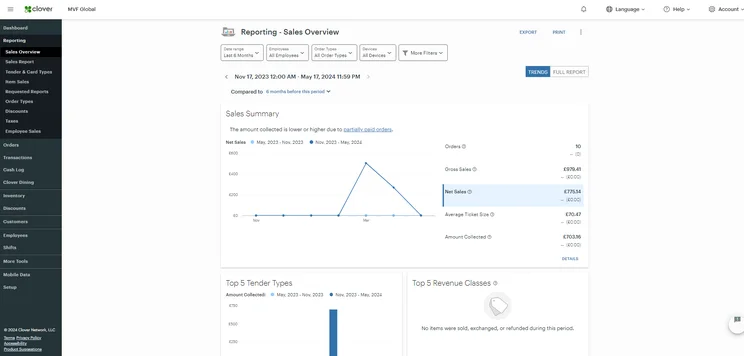
Similar to Square, Clover’s analytics tools allow you to analyze sales data in real-time, while also letting you track sales across locations and check tips.
You can use both of the systems to analyze performance by team members too, helping managers to boost success by identifying and rewarding good behavior.
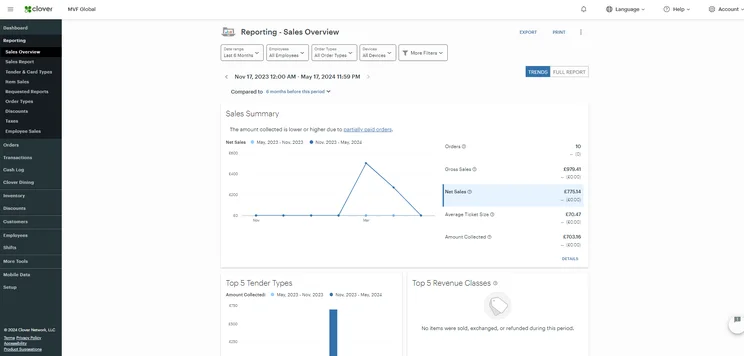
Clover’s reporting tools helped us track everything from sales to average ticket size. Source: Tech.co testing
Customer loyalty
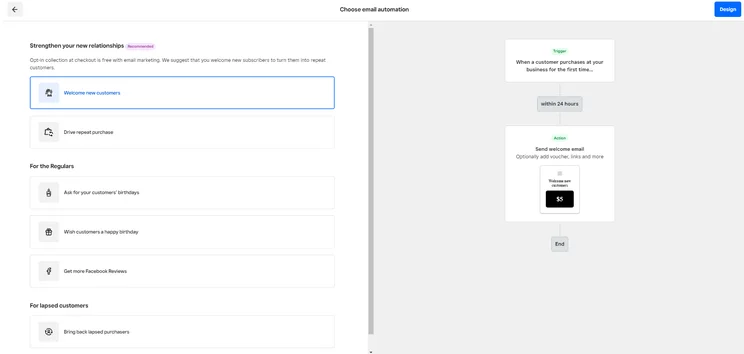
Both Clover and Square let businesses reward customers through their customer loyalty programs. Specifically, the providers let you launch email campaigns, customize customer awards, and encourage repeat buying with automated text.
Clover goes one step further by giving customers access to Clover Rewards, a unique app that tallies points automatically and lets buyers earn perks in multiple ways. For small retail businesses looking to encourage repeat buying amongst their customer base, this kind of feature would be a great addition to your POS arsenal.
Where Square trumps Clover is with a built-in email/SMS marketing feature, which Clover lacks. However, Square only offers customer loyalty features as a paid add-on, whereas these privileges are free within Clover’s basic package, so we have to give the credit to Clover overall.
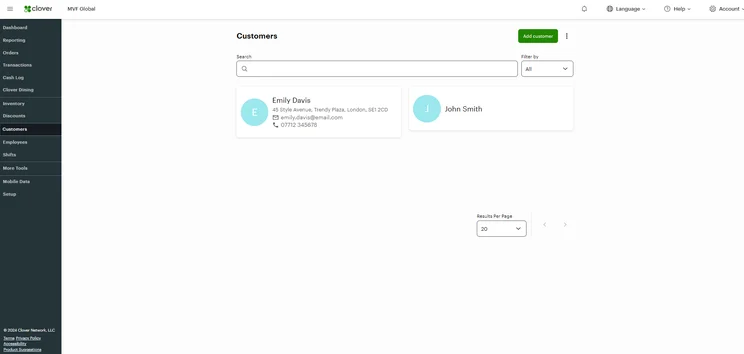
The Clover Customers page offers options to customize data. Source: Tech.co testing
Third-party integrations
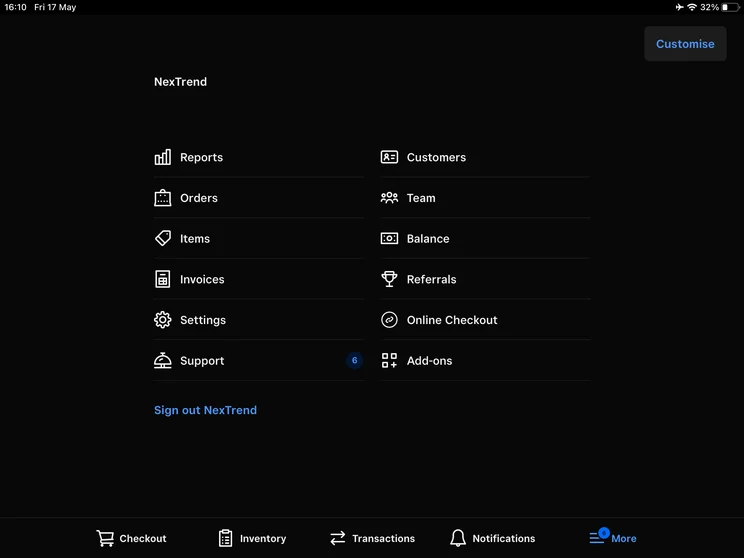
Both Square and Clover have some of the best app marketplaces in the industry. Square’s App Marketplace has a seemingly limitless range of apps that you can connect to your POS, including from Wix, BigCommerce, Mailchimp, and Ecwid.
Clover’s app store also covers everything from payroll apps, such as Gusto, to recruitment apps, like JazzHR, but restricts access depending on the pricing plan, making its potential more limited than Square’s.
Options for third-party add-ons are a significant influence when choosing software, with 69% of restaurants considering integrations to be the most important factor when buying a POS. They can be essential for businesses looking to create a seamless experience by localizing operations through one system.
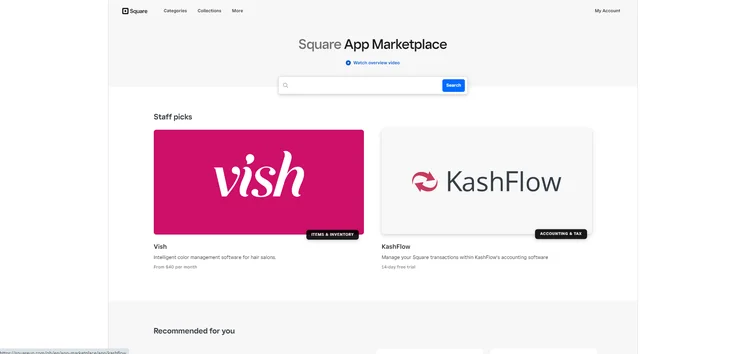
I could browse hundreds of third-party integrations through the Square App Marketplace. Source: Tech.co testing
Why does Clover win on software?
It was Clover’s restaurant and retail-specific feature set that allowed it to get the one-up on Square in this element of our testing.
Although, as we said earlier with hardware, you certainly wouldn’t be sacrificing much if you opted for Square instead of Clover in the instance of software. Square is just as feature-rich and Clover only marginally took the lead in this round.
Best for Usability: Square
When we put Square vs Clover head-to-head for usability, we thought Square’s system was slightly more user-friendly.
Square’s iPad and iPhone-based setup makes it a breeze for most people to get their heads around. Like its hardware, Square’s software is also incredibly minimalist and sleek. You won’t find yourself confronted with loads of options on every screen – instead, things are pared back and digestible.
However, this meant that some of our users highlighted a need to navigate through multiple options screens when completing tasks that should have been simple. Certain processes were also identified as “overly complex or repetitive” by our users, such as canceling items or adding users, which shouldn’t have needed multiple clicks.
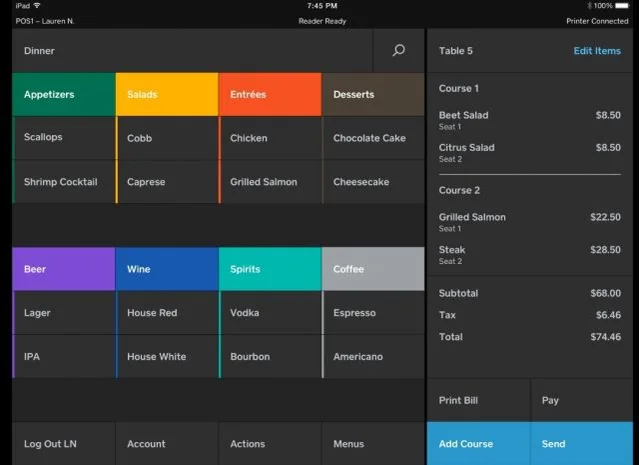
Square POS Restaurant order dashboard. Source: squareup.com
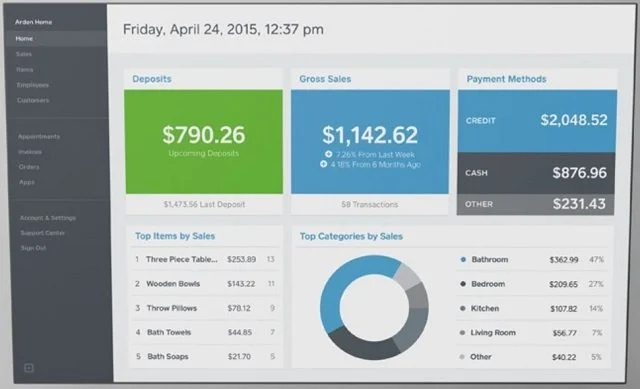
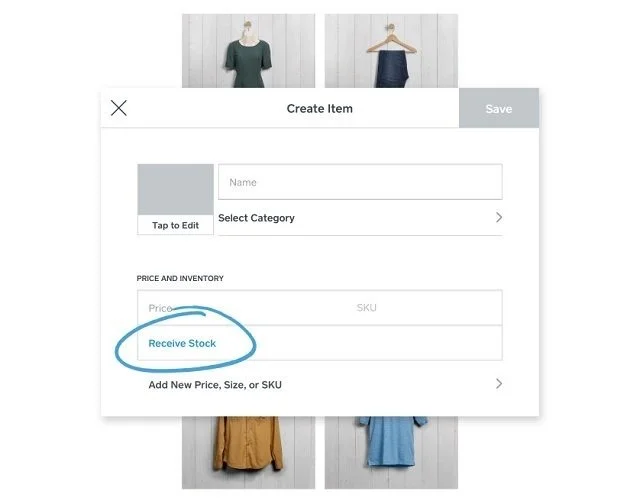
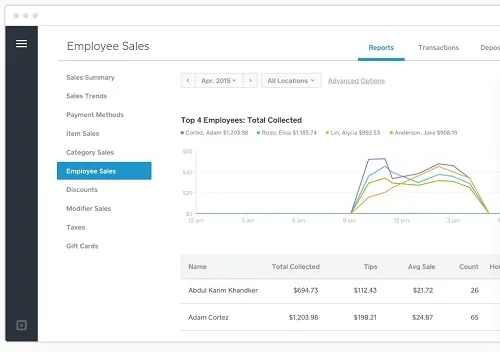
Square’s iPad setup has a simple and clear interface that made it easy for us to navigate. Source: Square
Comparatively, usability of Clover’s interface was mixed amongst our researchers. While some backend features, such as the bulk import feature, received positive mentions, overall, we deemed the backend to have a steeper learning curve compared to other providers.
Applying discounts, promotions, and loyalty features felt disjointed, leading to users describing that part of the system as “clunky” and “less streamlined”. Overall, this made it much harder to use than Square, and could be a potential roadblock for businesses new to using POS systems, who want to avoid a more complicated system.
Why does Square win on usability?
As a new POS user, Square is a much more attractive option, due to its low learning curve and intuitive interface, all identified by our users during our latest round of POS testing. While users genuinely enjoyed using Square, our users encountered more difficulties with Clover. The backend was described as clunky and unintuitive in places, leading to a more frustrating experience.
Therefore, it was our users’ better experience using Square that led it to victory this round.
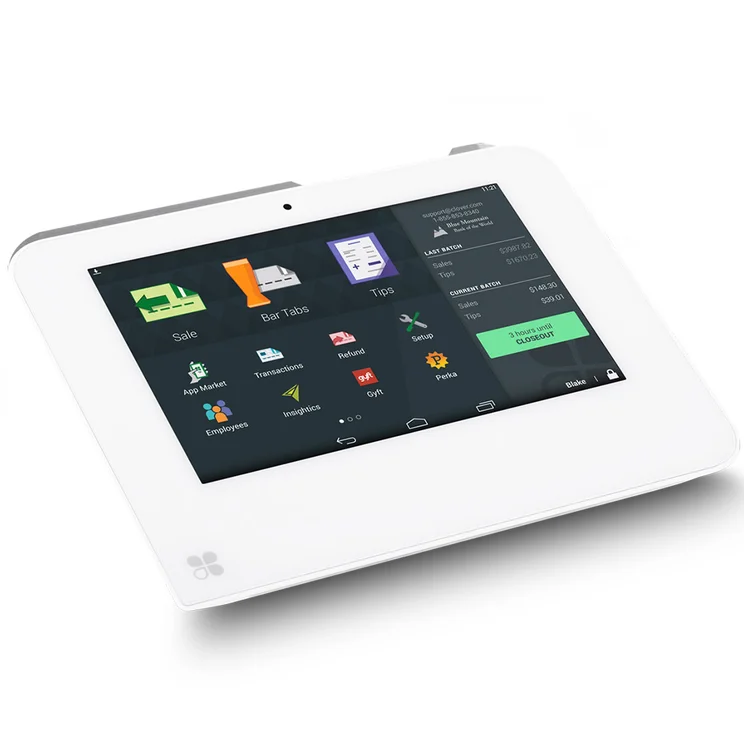
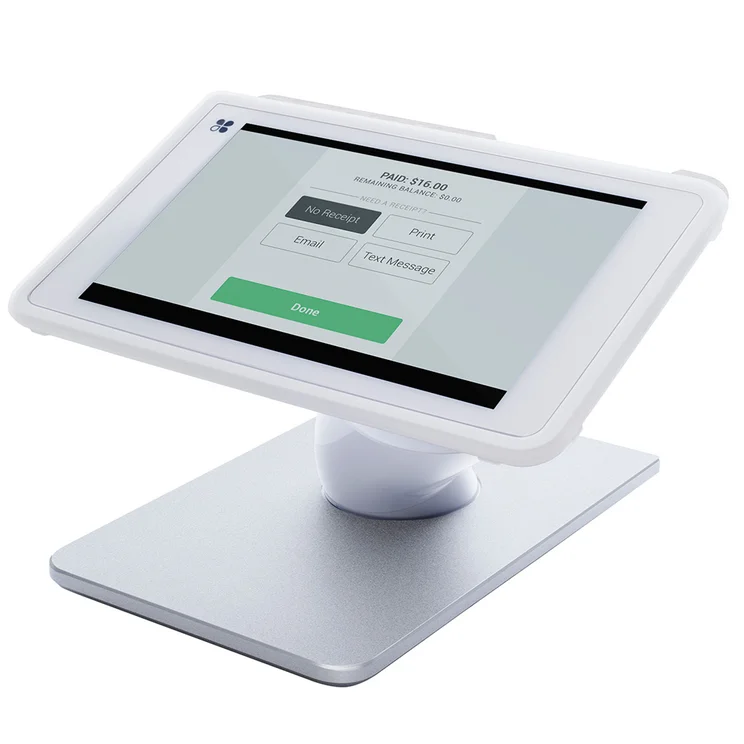
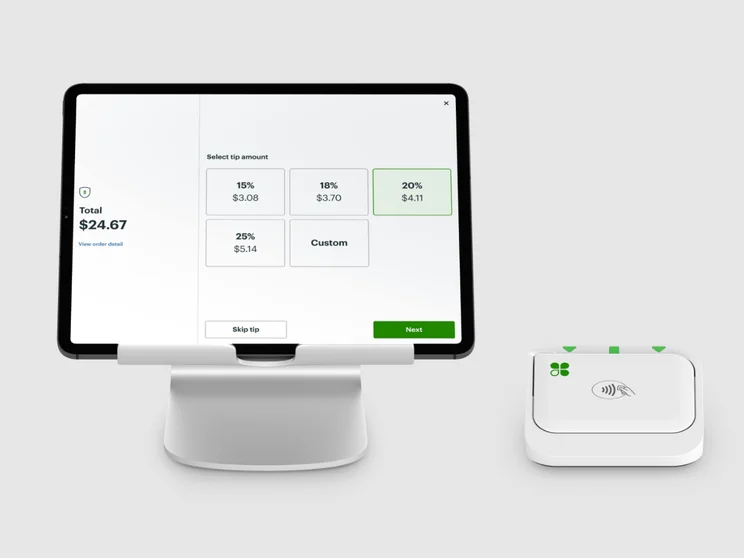
How Clover works on two of its terminals. Source: Clover
Best Help and Support: Square
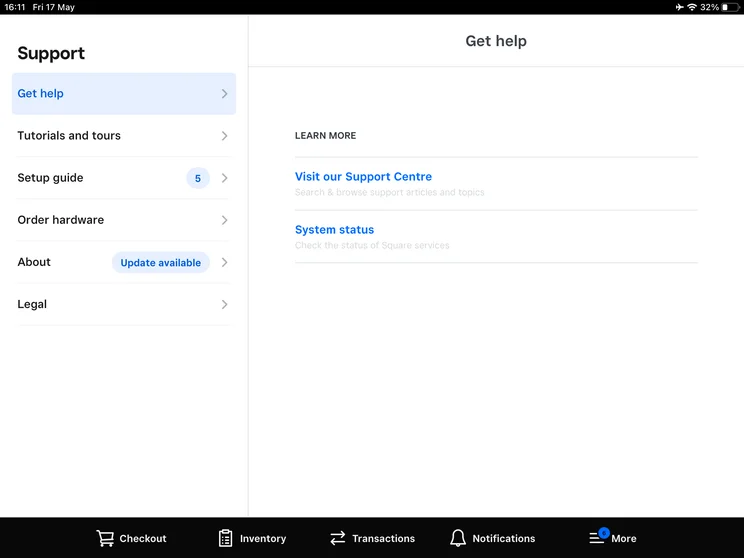
If your business relies heavily on customer support options, our research found that Square is definitely better than Clover – especially if you operate outside of traditional business hours. Here’s what each provider offers in terms of support options:
|
Knowledge Centre?
|
Email Options?
|
Live Chat?
|
24/7 Support?
|
Social Media Support?
|
Forum?
|
||
|---|---|---|---|---|---|---|---|
|
|
|
||||||
|
Square |
Clover |
||||||
|
|
|
||||||
|
|
|
||||||
|
|
|
||||||
|
|
|
||||||
|
|
|
||||||
|
|
|
Why does Square win on help and support?
In short, Square offers more comprehensive help and support options, in comparison to Clover – earning it a perfect score in our research. It not only offers phone, email, live chat, and social media assistance but also has 24/7 support and a robust knowledge center to help with customer queries.
While Clover is no slack – offering both 24/7 support and live chat options, its options aren’t as varied as Square’s, as it is lacking social media and a dedicated user forum. It’s because of its range of options that Square was able to overtake Clover in this category.
How Do Square and Clover Compare With the Competition?
Clover and Square aren’t the only POS providers on the market. In fact, there are more POS options for growing businesses than you should consider before making a final decision.
For Restaurants
If you’re a smaller vendor looking to dodge monthly payments, PayPal POS is another user-friendly POS that only charges businesses as they earn.
Alternatively, for large hospitality businesses with advanced needs, Toast will be a great fit. The POS provider performed the best in our hospitality-focused research due to its excellent array of Android hardware, seamless user experience, and generous free plan.
Read our full summary of the best restaurant POS systems, or see how they compare at a glance in our table below:
|
Price
The typical lowest starting price. The lowest price available for your business will depend on your needs
|
Tech.co hospitality rating
Score out of 5 for general restaurant suitability, based on Tech.co's independent market research
|
Best for
Tech.co's verdict to help you identify the most suitable choice for your restaurant
|
|||
|---|---|---|---|---|---|
|
Best for Restaurants
|
 |
|
 |
 |
 |
|
Square |
Toast |
Clover |
SpotOn |
SumUp |
Epos Now |
|
From $0/month |
$0/month |
From $16/month for 36 months (depending on plan) |
$0/month |
$0/month |
Around $39-$79/month |
|
4.8
|
4.7
|
4.1
|
4.3
|
4.2
|
3.9
|
|
Best overall for restaurants |
Complex restaurant operations |
Professional hardware |
Simplifying staff communications |
Providing a quick and efficient service |
Complex inventories |
| Try Square | Visit Toast | Compare Quotes | Compare Quotes | Try SumUp | Compare Quotes |
For Retail
While Clover and Square are among the best retail POS systems we’ve reviewed, Shopify is a solid alternative – especially if you’re also selling online. The POS offers industry-leading inventory management tools, and its user experience also gives Clover a run for its money, making it a great contender for POS beginners.
SpotOn is another worthy contender. The POS offers tons of packages for businesses in different sectors, making it a great option for niche retailers like jewelers or apparel outlets, and it lets you get started with a hardware package for completely free, too.
Visit our guide to the best retail POS systems for a thorough comparison, or check out the table below to quickly see how they compare:
|
Price
The typical lowest starting price. The lowest price available for your business will depend on your needs
|
Tech.co retail rating
Score out of 5 for general retail suitability based on Tech.co's independent market research
|
Best for
Tech.co's verdict to help you identify the most suitable choice for your retail business
|
|||
|---|---|---|---|---|---|
|
Best for Retail
|
|
|
 |
|
|
|
Square |
Clover |
SumUp |
Shopify POS |
Epos Now |
|
|
From $0/month |
From $16/month for 36 months (depending on plan) |
$0/month |
From $0/month |
Around $39-$79/month |
|
|
4.8
|
4.5
|
4.5
|
4.3
|
4.0
|
|
|
Best overall for small business |
Managing rapid retail expansion |
Data-driven sales insights |
Managing in-store and online sales in one platform |
Convenience stores with large inventories |
|
| Try Square | Compare Quotes | Try SumUp | Try Shopify | Compare Quotes |
How Did We Test Square and Clover?
We take our impartial research and analysis seriously, so you can have complete confidence that we’re giving you the clearest, most useful recommendations. After identifying the most relevant, popular POS platforms on the market, we put them through their paces with hands-on testing to better understand their strengths and weaknesses.
In total, we put 16 POS systems to the test, with a vigorous research and testing methodology. In our testing sessions, participants were asked to carry out tasks on POS software and describe their user journey, to help us understand what it’s like to use the systems first-hand. In addition to first-hand testing, we developed a detailed methodology that focuses on six categories of investigation, including criteria like software features and support centers.
These categories were broken down into further subcategories, so we were able to drill down further into certain topics to make our insights as granular and useful as possible. Here’s an overview of our main testing categories for POS systems:
- Software: The capabilities provided by the POS product. Includes general features like ordering and payment functionality, as well as industry-specific tools like KSU uploads, and inventory-level stock tracking kitchen display system software.
- Hardware: The quality of a POS’s hardware selection. The presence of an own-brand terminal, as well as hardware accessories like kitchen display systems, receipt printers, and barcode scanners.
- Pricing: The cost associated with acquiring and using the POS system, such as the initial purchase cost, transaction fees, licensing fees, subscription plans, and any additional charges or ongoing costs.
- Usability: We test out the software to gauge how intuitive and easy to use it is. We also consider how easy the software is to navigate and whether any errors took place during testing.
- Help and support: The assistance and resources available to users when they encounter issues or need guidance while using the POS system, including documentation, tutorials, and knowledge bases.
- Reputation: The aggregate score from customer review sites like Trustpilot and TrustRadius, to understand how POS providers are viewed by their own customer bases.
When it comes to calculating a product’s final score, not all testing areas are weighted evenly, as we know some aspects matter more to our readers than others.
For example, we’ll prioritize certain industry-specific features for specific reviews, like an offline mode when reviewing POS systems for food trucks, or kitchen display systems when reviewing restaurant POS systems.
At Tech.co, we have several full-time in-house researchers who re-run this testing process regularly, to ensure our results remain reflective of the present day.
Learn more about our research.
In the tight battle between Square and Clover, it was Square that came out on top in our latest round of POS testing.
Square is the ultimate POS all-rounder. It has modern hardware options and a robust software offering that will grow with your business. Likewise, our users rated it one of the easiest POS systems to use, thanks to its intuitive and simple interface. And, best of all, businesses can get started completely for free.
However, it was a close call, and Clover’s impressive and professional hardware options were some of the best we’ve seen on the market. Similarly, Clover’s restaurant and retail-specific functions make it perfect for businesses of those kinds.
Both Square and Clover are POS powerhouses, and businesses would be in safe hands with either. If you’d like to review options for yourself, you can take our quick and easy questionnaire and receive obligation-free quotes from top POS providers.
If you click on, sign up to a service through, or make a purchase through the links on our site, or use our quotes tool to receive custom pricing for your business needs, we may earn a referral fee from the supplier(s) of the technology you’re interested in. This helps Tech.co to provide free information and reviews, and carries no additional cost to you. Most importantly, it doesn’t affect our editorial impartiality. Ratings and rankings on Tech.co cannot be bought. Our reviews are based on objective research analysis. Rare exceptions to this will be marked clearly as a ‘sponsored’ table column, or explained by a full advertising disclosure on the page, in place of this one. Click to return to top of page


