
We may receive a commission from our partners if you click on a link to review or purchase a product or service. Click to Learn More
Point-of-sale (POS) integrations can open lucrative opportunities for your businesses by extending the use of the existing digital payments system. The right integrations for you depend on the existing capabilities of your POS, the scope of its app store, and the unique needs of your business.
We’ve poured hundreds of hours into researching POS systems and curated a list of the best overall and sector-specific integrations, based on the top priorities of US businesses.
We also cover how add-ons work, how much you should expect to pay for them, and how you can integrate them into your current system. Scroll down to learn more about POS integrations, or use our free quotes tool to receive tailored quotes from the best point-of-sale systems on the market.
- POS integrations give businesses the opportunity to expand their existing systems and control operations from a single place
- General POS integrations that would benefit most small businesses including accounting, payroll, and staff management
- Retail businesses should focus on ecommerce, warehouse management, and advanced inventory management integrations
- Hospitality businesses should focus on kitchen display systems, booking & reservation, and tip management integrations
- Businesses should research a POS provider’s app marketplace to see what integrations are available before making a decision, to ensure these integrations meet their specific needs
- Our findings are based on our latest round of POS research, where we pit the top providers against each other on a range of elements
What Is a POS Integration?
A POS integration is a software application that connects seamlessly with your point-of-sale software. Also known as ‘add-ons’ or ‘apps,’ integrations allow the flow of real-time data across systems and can be provided by your POS provider or a third party.
If your POS package lacks a specific functionality, add-ons are great ways to broaden your toolkit. You can find integrations in app stores, or use an application programming interface (API) to build your own.
There really is no standard when it comes to the price of POS integrations. Lots of add-ons are available for free, but typical costs vary from $0.99 to $249 per month. It also depends on the type of software your business opts for.
POS integrations work by seamlessly connecting your point-of-sale system to other business software. After you’ve installed your integration, data can be communicated between the systems in real-time, helping facilitate a wide range of purposes, from stock control to menu management.
Installing a POS integration is straightforward. You download your chosen add-on from your POS’s app store, enter payment information (if necessary), and then sync data across the systems.
Best General POS Integrations
Some POS add-ons aren’t industry specific. Here are some common integrations that most small businesses would be able to benefit from:
1. Accounting
Integrating your POS system with accounting software should be a no-brainer for businesses looking to gain greater control over their cash flow.
Accounting integrations will sync financial data across platforms and also offer handy capabilities, including bookkeeping features and tax compliance. For example, integrating the accounting software Xero will automatically import and summarize your business’s daily transactions, perfect for businesses looking for regular updates on their numbers.
2. Payroll
Payroll integrations let you track hours worked, manage expenses, and ensure workers are paid on time. Some apps, for example, let you view real-time attendance data and receive alerts for overtime – all from your POS dashboard.
Also, by using an add-on rather than a separate system, it’s easier to easier sync payroll data to other platforms you utilize for accounting, staff management, and reporting.
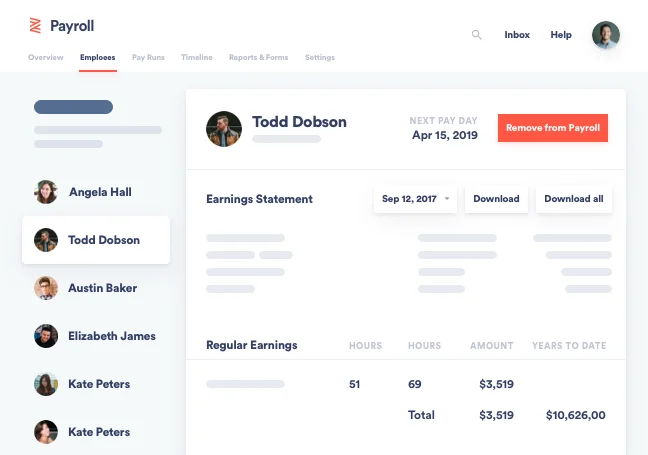
The Zenefits payroll dashboard makes it easy to view or download earnings statements for every individual on payroll. Source: Zenefits
3. Staff management
Most POS systems offer basic employee management tools, but they tend to have limitations. Unless you’re running a one-man show, staff management software makes it easier to schedule shift patterns, track hours worked, and keep tabs on staff performance.
This could be particularly valuable for businesses with many employees working different shifts, for example, allowing you to keep track of availability, staff vacations, and payroll costs.
4. Customer loyalty
If you’re committed to attracting loyal customers, customer loyalty integrations give buyers an extra reason to return. The software helps you issue perks and privileges to repeat buyers as well as follow up post-purchase.
Some integrations even let you create unique customer profiles, helping you gain a richer overview of their purchase history. You may want to join the club: 47% of foodservice operators plan to add new discounts or deals, one report found.
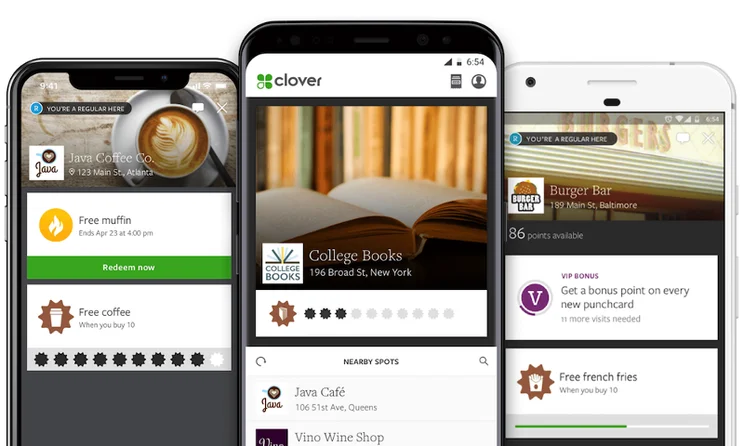
The Clover Rewards app supports a customer loyalty program. Source: Clover POS
5. Security
Whether you’re a retail or hospitality business, it’s never a bad idea to think about securing your POS system, particularly when trying to ensure the safety of assets, employees, and customers.
For example, some apps offer the option for businesses to view CCTV footage of a specific transaction, providing physical evidence should any losses be identified.
POS security integrations allow you to monitor video security and analytics, to prevent loss and increase the visibility of your data. For example, some give you the option of following cash as it moves throughout your business.
6. AI
Plenty of the integrations available on POS app stores offer AI tools that will help streamline your business’s operations. For example, ProfitRover offers the option for businesses to view AI-driven daily and hourly product-level sales forecasts and tip projections, allowing them to plan effectively.
On top of this, you can also integrate AI tools directly to help automate and speed up certain functions in real-time. In these cases, it’s best to opt for a cloud-based POS system.
Best POS Integrations for Retail Businesses
Retail-focused POS systems let you track orders, take payments, manage stock, and more. If you’re looking to stretch the use of your retail POS further, try these integrations.
7. Ecommerce
Ecommerce integrations let you unify your commerce strategy by linking your online platform to your POS. It will combine sales data on one centralized platform and allow business owners to manage and track in-person and online sales side by side.
This will massively improve efficiency and give you greater visibility over your store’s data, enabling you to make smarter business decisions. For instance, integrating your POS with Wix will allow you to track transactions and boost your online sales.
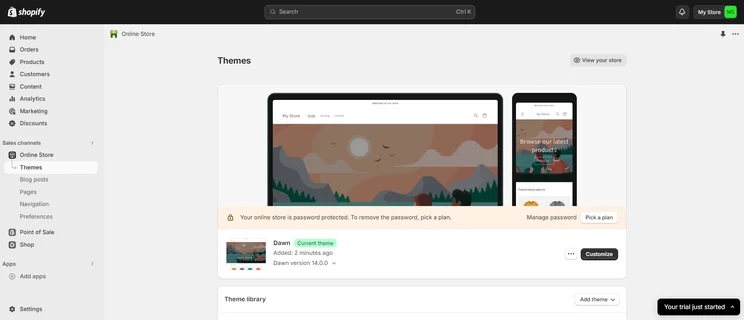
Shopify’s POS platform integrates with the brand’s online store software. Source: Tech.co user testing
8. Flexible payments
Payment integrations offer customers a flexible and convenient way to pay for goods, making them more likely to spend at your store. Integrations include ‘buy now pay later’ payments (BNPL), which let customers delay payments or split a cost into manageable installments.
For example, some POS systems allow you to integrate with Klarna, a BNPL provider, which is perfect for a business that wants to offer their customer base a more flexible payment option.
9. Advanced inventory
If your business houses a large or complex inventory, your bog-standard stock management feature may not cut the mustard. Advanced inventory features can unlock useful capabilities like label printing, cycle counting, seasonal stock management, and low stock alerts.
For example, certain inventory management apps will enable you to project and predict the state of your stock, allowing businesses to plan effectively for the future.
10. Rental management
If your retail business rents out products, you’ll need extra software to keep tabs on payments, reservations, and item deliveries. Lots of rental management software also offers stock management features, making it easier for store owners to track their whole inventory catalog on one centralized platform.
11. Warehouse management
If you handle large amounts of inventory, warehouse inventory software lets you track products from warehouse to shelf. These integrations are normally able to manage perishable and non-perishable goods, making them suitable for a wide range of retailers.
12. Gift cards
Gift cards are a simple and effective way to drive up profits and attract new customers. If your system doesn’t let you issue gift cards, you can use a POS add-on to hand out physical and virtual gift cards that are tailored with the branding of your business.
You’ll also be able to track the performance of these gift cards, for example, enabling you to understand how effective they are for your customers.
13. Age verification
Age verification systems don’t tend to be included in standard POS packages. If you sell age-sensitive products like alcohol, marijuana, tobacco, blades, or even aerosols, you’ll need some kind of age verification system in order to stay compliant with current laws.
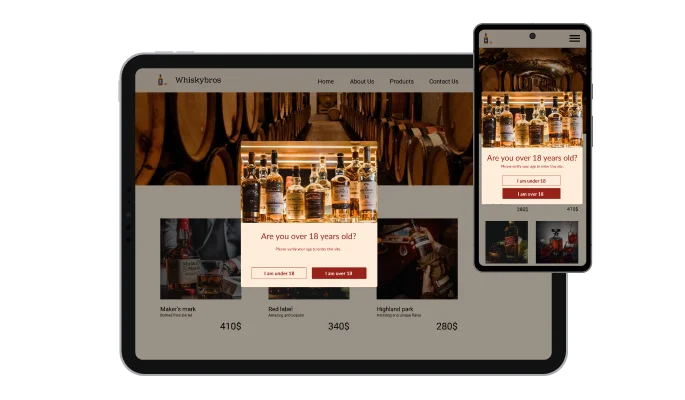
The app company Common Ninja offers this age verification POS integration. Source: Common Ninja
Best POS Integrations for Restaurants & Hospitality
Every food and hospitality business needs something slightly different from a POS system. If your requirements aren’t fulfilled by your current system, here are some sector-specific integrations to watch out for:
14. Ordering & delivery
Ever since the Covid-19 pandemic upended the service industry, more customers are choosing takeout and delivery over dining out. Your POS system may already facilitate online ordering and delivery. If not, third-party apps like DoorDash or sauce can handle these processes for you.
15. Menu management
Menu management integrations let you create, edit, and update personalized menus as your offerings evolve. The software can also account for specials and seasonal menu changes, differentiate between online and dine-in options, and color-code products for upselling purposes.
Some platforms also offer features to enhance your menu’s appearance, such as SmarterSign, making your products more appealing and attracting more customers.
16. Kitchen display systems
Kitchen display systems (KDS) streamline communication between front and back-of-house by letting staff track and manage orders digitally, eliminating the need for physical tickets.
They display restaurant data in real time and can be customized to the needs of your business. Many link up to delivery systems like Grubhub and UberEats as well, offering a full overview of the process from prep to delivery.
17. Booking & reservation
Manual reservations take up staff time and lack efficiency. If you’re looking to move to an online system, booking & reservation add-ons are a must. Reservation systems allow customers to make bookings from anywhere, and give businesses a way to manage them from one centralized platform. Some notable options include Square Appointments, EatApp, and TouchBistro Reservations.
Learn more about Square’s offering in our Square POS review.
18. Restaurant discovery
Discovery apps are a great way to draw customers to your location. These integrations make it easier for new customers to find your business, and it also allows them to leave reviews and add images so other users can see how compare with similar restaurants.
19. Tip management
If your food or hospitality business takes gratuities, a tip management system automates the process for you and delivers payouts directly into the bank accounts of your workers.
The add-on helps with tip pooling, accounts for varied shift patterns, and provides automated tip reports to help wait staff keep track of changes over given time periods. Some apps will also provide additional services for employees that want to keep track of their tips, for example, which would definitely improve staff communication and transparency.
Standard vs. Advanced POS Features
POS systems offer a range of basic features as part of their in-house package. Here, we look at POS features you should expect as standard, alongside advanced capabilities that can be unlocked through pricier subscriptions or third-party integrations.
Standard integrations
- Basic reporting and analytics
- Basic marketing tools
- Payment options
- Loyalty programs
- Mobile apps
- Basic inventory management
- Customer management
- User accounts and permissions
- Employee management
- Security
Advanced integrations
- Payroll & accounting
- Marketing
- Customer loyalty
- Ecommerce
- Flexible payments
- Advanced inventory
- Rental management
- Warehouse management
- Age verification
- Ordering & delivery
- Menu management
- Kitchen display systems
- Booking & reservation
- Discovery apps
- Tip management
- AI

We have years of experience helping businesses with POS
Grab a tailored quote for your business to get a better idea of how much it will cost
How to Choose the Right POS System
If you haven’t started with a POS system yet, or you’re looking to upgrade your previous model, the number of options out there might seem overwhelming.
There are a number of important considerations to make before you commit to a solution. We’d recommend opting for a system tailored to your specific industry that offers in-house features that meet the top priorities of your business.
To help you find a system that is equipped to meet your needs, we’ve compiled a table of our highest-rated POS providers below, including their price points and best fors.
|
Price
The typical lowest starting price. The lowest price available for your business will depend on your needs
|
Best for
Tech.co's verdict to help you identify the most suitable choice for your small business
|
Hardware
|
iPad app
Is there a version of the software made specifically for iPad use?
|
Android app
Is there a version of the software made specifically for Android tablet use?
|
24/7 support
|
Key benefits
|
Drawbacks
|
||
|---|---|---|---|---|---|---|---|---|---|
|
BEST OVERALL
 |
 |
 |
 |
 |
 |
 |
 |
||
|
Square |
Clover |
Toast |
SumUp |
Shopify POS |
Epos Now |
Lightspeed |
PayPal POS |
||
|
From $0/month |
From $16/month for 36 months (depending on plan) |
$0/month |
$0/month |
From $0/month |
Around $39-$79/month |
From $89/month |
Free |
||
|
Scaling and growing your business |
Professional hardware |
Restaurants with complex operations |
Speed, efficiency and data-driven sales insights |
Managing in-store and online sales |
Optimizing guest experiences |
Driving repeat business and loyalty |
Great value for money |
||
|
Sold by Square, separately or packaged with software. First card reader free. Compatible with most leading brands |
Sells a broad range of hardware, including full cash stations and mobile card readers |
Sells an impressive line of its own products. All splash-proof and durable to suit high-intensity food truck environment |
Sells a range of in-house hardware, including iPad stands, card readers, and KDS |
Sold by Shopify, but also works with iPads and Android tablets |
Works with a range of third-party peripherals |
Specialized hardware available. Not compatible with weighing scales |
Retails a range of hardware solutions, including card readers and cash registers |
||
|
|
|
|
|
|
|
|
|
||
|
|
|
|
|
|
|
|
|
||
|
|
|
|
|
|
|
|
|
||
|
|
|
|
|
|
|
|
||
|
|
|
|
|
|
|
|
How Did We Research POS Systems?
We take our impartial research and analysis seriously, so you can have complete confidence that we’re giving you the clearest, most useful recommendations. After identifying the most relevant, popular POS platforms on the market, we put them through their paces with hands-on testing to better understand their strengths and weaknesses.
In total, we put 16 POS systems to the test, with a vigorous research and testing methodology. In our testing sessions, participants were asked to carry out tasks on POS software and describe their user journey, to help us understand what it’s like to use the systems first-hand. In addition to first-hand testing, we developed a detailed methodology that focuses on six categories of investigation, including criteria like software features and help and support centers.
These categories were broken down into further subcategories, so we were able to drill down further into certain topics, to make our insights as granular and useful as possible. Here’s an overview of our main testing categories for POS systems:
- Software: The capabilities provided by the POS product. Includes general features like ordering and payment functionality, as well as industry-specific tools like KSU uploads, and inventory-level stock tracking KDS software.
- Hardware: The quality of a POS’s hardware selection. The presence of an own-brand terminal, as well as hardware accessories like kitchen display systems, receipt printers, and barcode scanners.
- Pricing: The cost associated with acquiring and using the POS system, such as the initial purchase cost, transaction fees, licensing fees, subscription plans, and any additional charges or ongoing costs.
- Usability: We test out the software to gauge how intuitive and easy to navigate it is. We also consider how easy the software is to navigate, and whether any errors took place during testing.
- Help & Support: The assistance and resources available to users when they encounter issues or need guidance while using the POS system, including documentation, tutorials, or knowledge bases.
- Reputation: The aggregate score from customer review sites like Trustpilot and TrustRadius, to understand how POS providers are viewed by their own customer bases.
When it comes to calculating a product’s final score, not all testing areas are weighted evenly, as we know some aspects matter more to our readers than others, For example, we’ll prioritize certain industry-specific features for specific reviews, like an offline mode when reviewing POS systems for food trucks, or kitchen display systems (KDS) when reviewing restaurant POS systems.
At Tech.co, we have a number of full-time in-house researchers who re-run this testing process regularly to ensure our results remain reflective of the present day.
Learn more about our research.
POS integrations help you get the most out of your point-of-sale system. They let you sync business data across platforms, and help you manage a wide range of business processes from one centralized system.
Retail businesses are likely to benefit from more focused integrations, like ecommerce warehouse management, while food and hospitality businesses would make better use of industry-specific kitchen display systems and menu management.
If you’re still comparing options, our free POS comparison tool will provide you with tailored quotes in minutes, making it easier than ever to move forward with a solution.
Frequently Asked Questions
An application programming interface (API) is a software intermediary that connects two applications together. Aside from choosing standard POS integrations, APIs can be used to integrate a wide range of custom software options into your system.
An ecommerce POS integration is a third-party application that connects your POS system to your online store. Ecommerce add-ons let you sell across multiple channels with ease while syncing data across multiple platforms, eliminating the need to enter data manually.
If you have an existing online store with Shopify, or if you’re looking to build one from scratch, businesses can integrate their existing POS with a wide range of Shopify integrations — including Shopify Plus and Shopify Flow.
POS integrations can improve business efficiency by syncing data across platforms, automating key processes, reducing manual errors, and help managers keep tabs on the performance of their business.
If you click on, sign up to a service through, or make a purchase through the links on our site, or use our quotes tool to receive custom pricing for your business needs, we may earn a referral fee from the supplier(s) of the technology you’re interested in. This helps Tech.co to provide free information and reviews, and carries no additional cost to you. Most importantly, it doesn’t affect our editorial impartiality. Ratings and rankings on Tech.co cannot be bought. Our reviews are based on objective research analysis. Rare exceptions to this will be marked clearly as a ‘sponsored’ table column, or explained by a full advertising disclosure on the page, in place of this one. Click to return to top of page


