
We may receive a commission from our partners if you click on a link to review or purchase a product or service. Click to Learn More
Salesforce is better than Microsoft Dynamics, thanks to its abundance of features, robust team infrastructure functionality, and better customer support. In fact, Microsoft Dynamics is only better on pricing, and it’s not by much, with both options representing some of the most expensive CRMs on the market.
That said, both CRMs are respectable choices, particularly for larger businesses. Our expert testers found Salesforce to be one of the best CRM systems for small businesses, too.
When it comes to customer relationship management (CRM) software, there are many services out there, but these two providers are giants among the rest.Salesforce is certainly the popular CRM software option, used by thousands of businesses worldwide, thanks largely to its massive features catalog. Microsoft Dynamics, meanwhile, is a great choice for those whose businesses are already integrated with other Microsoft services, such as Outlook and Office.
For a thorough look at the benefits and features of Salesforce and Microsoft Dynamics CRM, take a look at our head-to-head comparison table, below:
|
Free trial
|
Starting price
|
Most expensive plan
|
Verdict
|
Data cap in basic plan
|
Email marketing
|
Social marketing
|
Content marketing
|
Paid marketing
|
Omnichannel features
|
Marketing campaigns
|
API
|
Email Comms Channel
|
Phone Comms Channel
|
Website Live Chat Comms Channel
|
Social media Comms Channels
|
Lead capture
|
Accept payments
|
Onboarding
|
||
|---|---|---|---|---|---|---|---|---|---|---|---|---|---|---|---|---|---|---|---|---|
 |
 |
|||||||||||||||||||
|
Salesforce |
Microsoft Dynamics 365 |
|||||||||||||||||||
|
30 days |
30 days |
|||||||||||||||||||
|
$25/user/month |
$65/user/month |
|||||||||||||||||||
|
$550/user/month |
$150/user/month |
|||||||||||||||||||
|
An incredibly popular and customizable CRM for all businesses, with excellent communication tools |
A robust CRM platform that embeds brilliantly with Microsoft products |
|||||||||||||||||||
|
612MB/user |
10GB + 5GB/20 users |
|||||||||||||||||||
|
|
|
|||||||||||||||||||
|
|
|
|||||||||||||||||||
|
|
|
|||||||||||||||||||
|
Google Ads integration |
|
|||||||||||||||||||
|
|
|
|||||||||||||||||||
|
|
|
|||||||||||||||||||
|
Open |
Yes |
|||||||||||||||||||
|
|
|
|||||||||||||||||||
|
|
Add-on required |
|||||||||||||||||||
|
|
Add-on required |
|||||||||||||||||||
|
|
|
|||||||||||||||||||
|
|
|
|||||||||||||||||||
|
Additional cost |
|
A good way to discover a CRM that can be customized for your needs is to use our handy CRM Quotes Tool to receive tailor-made, zero-obligation CRM cost quotes that take into account your company’s individual needs and scale.
Microsoft Dynamics vs Salesforce: Head-to-Head
Before we dig into the nitty gritty details of the Salesforce vs Microsoft Dynamics matchup, let’s take a quick look at some basic differences between the two platforms.
- Salesforce has more features than Microsoft Dynamics.
- Microsoft Dynamics is more affordable than Salesforce.
- Salesforce has better customer support than Microsoft Dynamics.
- Microsoft Dynamics integrates better with other Microsoft services than Salesforce.
- Salesforce has more team infrastructure features than Microsoft Dynamics.
- Microsoft Dynamics and Salesforce are both very customizable platforms.
As we mentioned above, Salesforce beats Microsoft Dynamics in all of the major categories of our research. Salesforce has more features, better customer support, more team infrastructure functionality, and overall better scalability for businesses that want to grow with the platform.
The only metric by which Microsoft Dynamics is better than Salesforce is price, and both CRMs are definitely on the more expensive side, netting two of the lowest scores across our research.
Likewise, Microsoft Dynamics and Salesforce both netted the same score for customizability, as both offer a wide range of integrations and robust analytics, allowing for users to utilize the platforms however they see fit.
Microsoft Dynamics still has its place, though, as it integrates seamlessly with the rest of the Microsoft 365 platform, like Outlook and Teams, so even if it has a bit less functionality, the ease of use is there if you already use those tools. Still, Salesforce clearly has the edge of everything else, which is why we recommend it so highly.
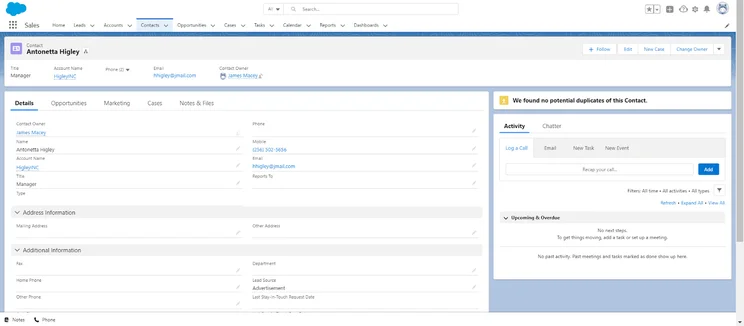
Salesforce contact database
Image: Tech.co testing

Microsoft Dynamics Overview
The first thing to know about Microsoft Dynamics is that it is heavily integrated into other Microsoft applications. Microsoft’s integration doesn’t just extend to its desktop software, either.
Even LinkedIn, which Microsoft acquired in 2016, integrates with Dynamics CRM. The platform uses design language similar to other Microsoft software, making it easier for anyone who’s already familiar with the look and feel of modern Microsoft applications to feel right at home.
Microsoft Dynamics

In Short
-
Pros
- Integrates with other Microsoft products
- Features on par with Salesforce catalog
- Robust 24/5 support options
-
Cons
- Decidedly expensive compared to other options
- Limited API access
- No free plan available for users
Pricing
- Professional: $65/user/month
- Enterprise: $105/user/month
- Premium: $150/user/month
Images
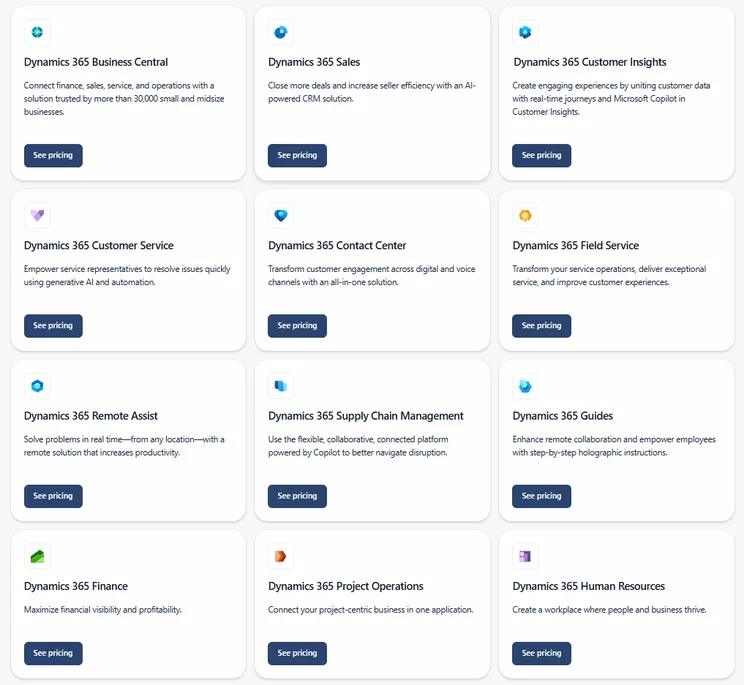
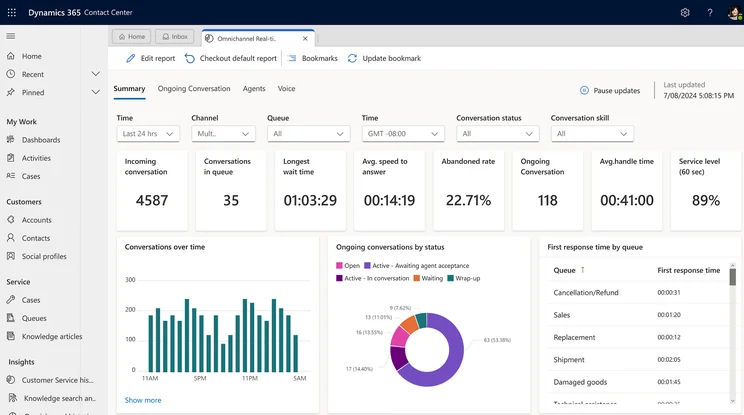
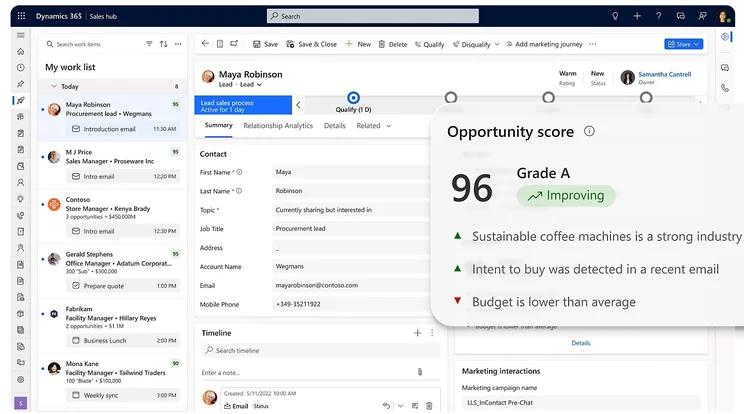
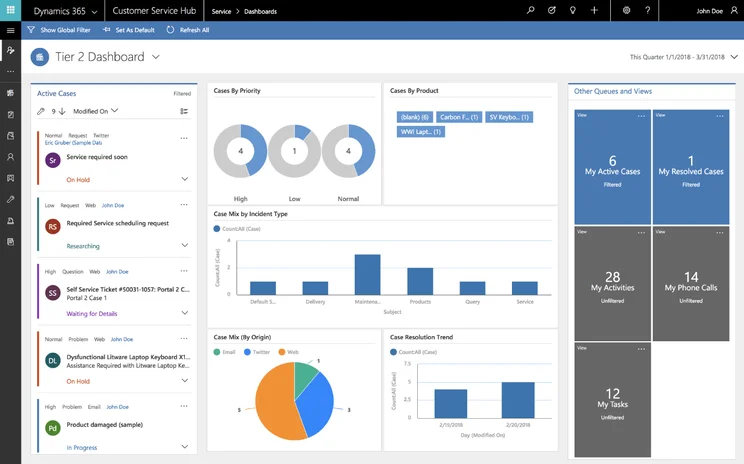
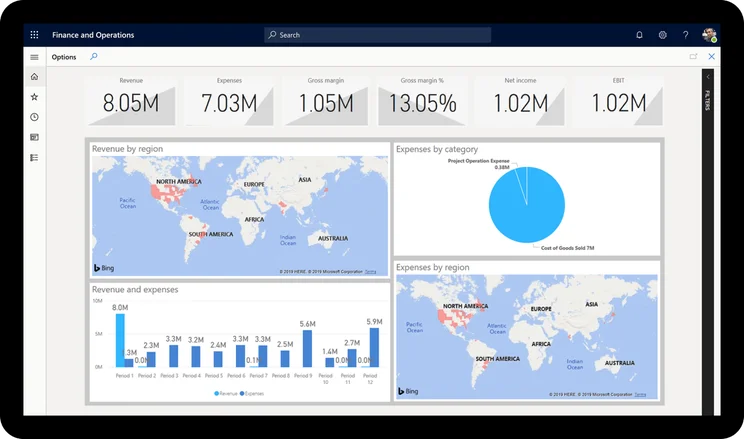
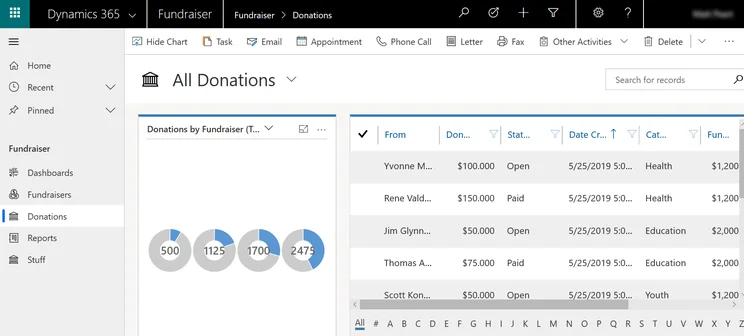
Most of the various Microsoft Dynamics services use a dashboard as their starting point similar to Salesforce. Here, you get at-a-glance information about the current state of your business. In Dynamics CRM for Sales, for example, the dashboard supplies current sales revenue, the average deal size, and your sales force’s lead conversion rate.
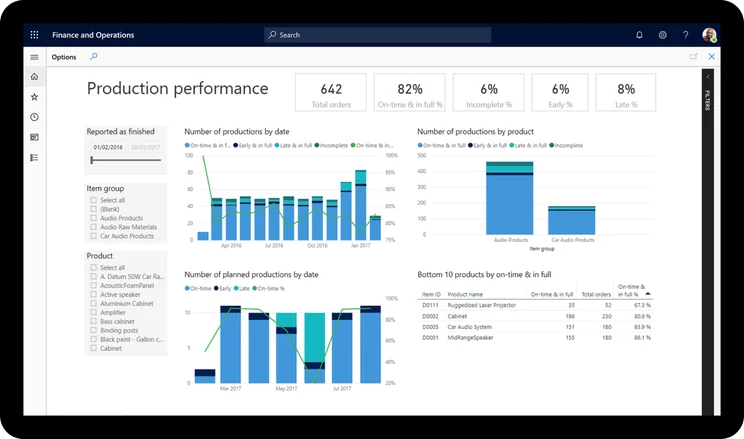
Dashboards are completely customizable and usually take the form of a tiled interface with large lettering for key numerical data, as well as large charts and graphs. Our researchers found the database functionaltiy to be extremely robust, tracking a lot of information, including in-depth timeline options that can show you everything you might need in chronological order.
Let’s take a look at three platforms offered by Microsoft Dynamics 365: Sales, Marketing, and Service.
Microsoft Dynamics 365 Sales
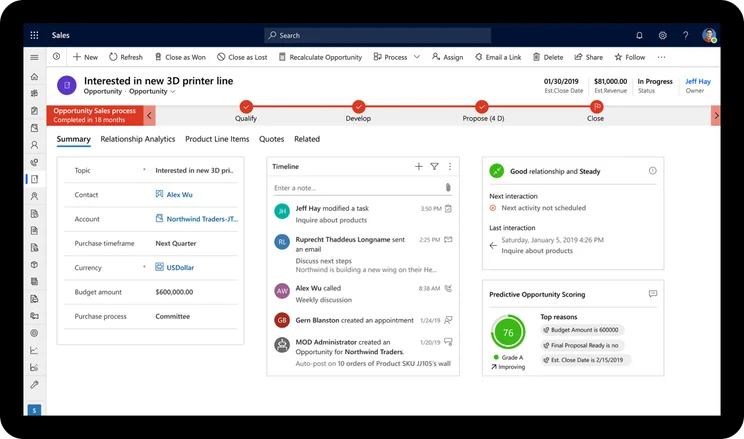
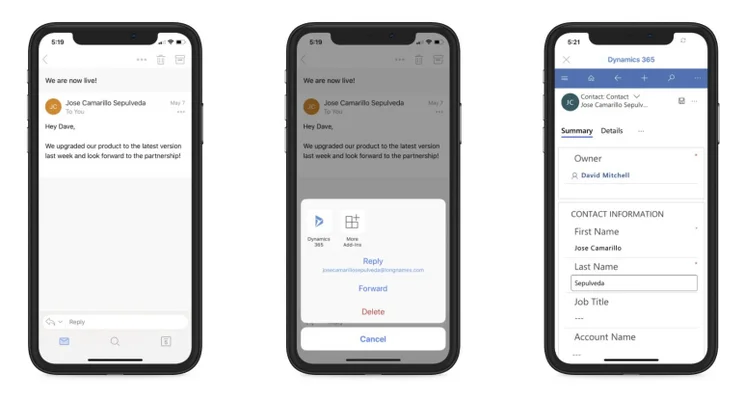
The primary starting point for many is Microsoft Dynamics 365 Sales. This core CRM app uses predictive analytics to better enhance the sales team’s snapshot data and help make better decisions. This is also where Microsoft’s LinkedIn integration comes into play; the LinkedIn Sales Navigator (available at higher pricing tiers) leverages your professional network to get introductions to potential leads through a mutual connection.
Beyond sales there’s a customer service module that can present key data such as open cases and email history as a dashboard or you can drill deeper with a timeline of interactions. Dynamics also uses a guided three-step process (identify-research-resolve) for dealing with customer services issues. Harnessing Microsoft’s server power, Dynamics offers intelligent chatbots that can help customer service agents surface important data about their customers.
The biggest gap for Microsoft Dynamics 365 Sales is that if offers zero lead capture features at all. Granted, Salesforce doesn’t offer much in comparison, providing on web form functionality for lead capture, but at least it’s something compared to complete lack of features from Microsoft.
Microsoft Dynamics 365 Sales
In Short
-
Pros
- Lots of data visualization functionality
- Robust support and help options
- Top tier business integrations and business processes
-
Cons
- A bit on the expensive side
- No lead capture functionality
- Limited lead communication features
Images
Microsoft Dynamics 365 Marketing
When it comes to CRM for marketing, the range of products and prices is substantial. The Microsoft Dynamics 365 Marketing platform is one the higher end of that spectrum, offering robust automation functionality that can save your team a lot of time.
Still, in the realm of CRM for marketing, Microsoft Dynamics 365 Marketing can be a bit limited, largely because it can only be used for email. The platform offers no features for social, paid, or content marketing, which can be a bit limiting when it comes the scalability, you’d want with a CRM that’s this expensive.
Compared to Salesforce, Microsoft Dynamics does have a few notably missing features, like keyword monitoring and competitor analysis for content marketing. On top of that, Salesforce provides metric reports for paid marketing, which Microsoft Dynamics does not.
It does integrate excellently with other Microsoft products, though, and you’ll get top notch customer support, training, security, and onboarding, so it’s up to you!
Microsoft Dynamics 365 Marketing
In Short
-
Pros
- Great email marketing features for reaching new customers
- Robust support and help options
- Plenty of team organization and coordination tools
-
Cons
- No paid or content marketing
- Very limited social media features
- Lacks business training for new employees
Images
Microsoft Dynamics 365 Service
Microsoft Dynamics 365 is probably the best option out of the three, offering a good option for the price. It only offers email support built in, but thanks to the myriad of Microsoft add-ons, you can integrate phone, website live chat, social media, and instant messaging app communications. They’ll cost a bit extra, but it could be worth it to have a more complete customer service process.
Even better, Microsoft Dynamics 365 Service comes with a bunch of team infrastructure features that can make managing your team that much easier. Pair with software like Outlook and Teams, you’ll be able to manage a remote team flawlessly.
It’s worth noting that most of these additional features are in the more expensive Enterprise plan, but the overall pricing of Microsoft Dynamics 365 Marketing is at least competitive in the market, unlike the previously mentioned CRMs.
The problem is that Microsoft Dynamics 365 Service has a lot of its features behind paywalls, requiring add-ons that cost more to get added functionality. In fact, with any channel other than email, you’ll be paying extra, including social and chatbot ticketing, both of which are included with Salesforce.
Microsoft Dynamics 365 Customer Service
In Short
-
Pros
- Lots of potential add-ons make for customizable platform
- Robust support and help options
- Most security features of CRM on the list
-
Cons
- A bit on the expensive side
- No built-in customer feedback options
- Many features reserved for Enterprise plan
Images
Salesforce Overview
Widely known as one of the best CRM systems around, Salesforce has much cause for confidence. The company insists, for example, that Salesforce can outdo its main competitors. In truth, the functions of Salesforce and Microsoft Dynamics are broadly similar.
Salesforce CRM
In Short
-
Pros
- Free forever plan
- Vast data collection combined with customizable reporting tools
- Helpful customer support pop-ups throughout the platform with 24/7 live support
- Varied pricing plans and industry-specific “Clouds” make it very scalable
-
Cons
- More expensive than industry average of $15/user/month
- 24/7 support will cost extra, adding to price
- Robust analytics probably aren’t necessary for smaller businesses
Pricing
-
 Starter Suite: $25/user/month
-
Pro Suite: $100/user/month
-
Enterprise: $175/user/month
-
Unlimited: $350/user/month
-
Agentforce 1 Sales: $550/user/month
-
30-day free trial
Images
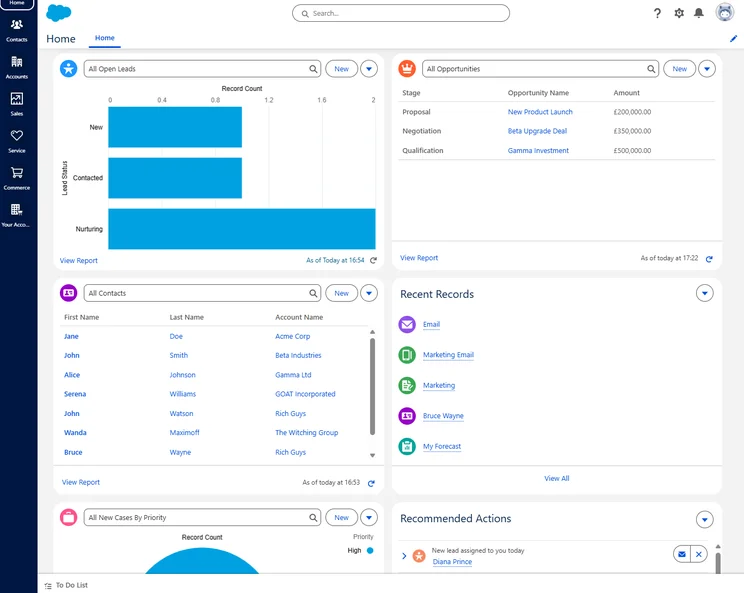
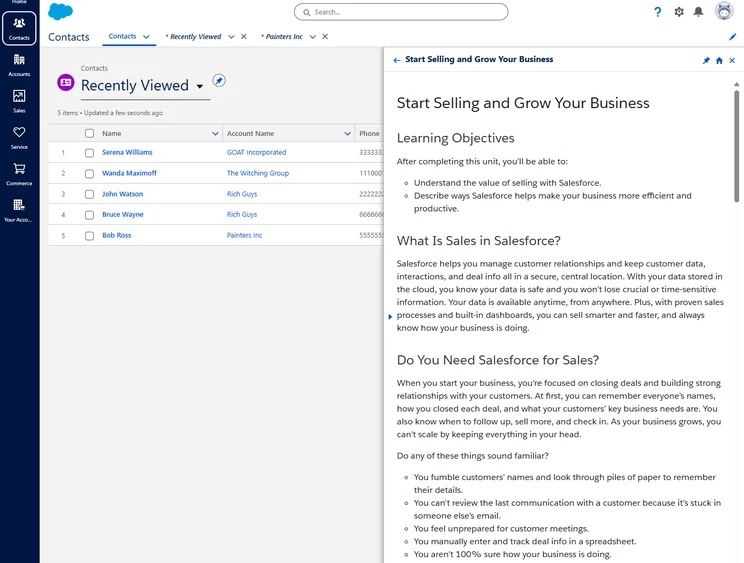
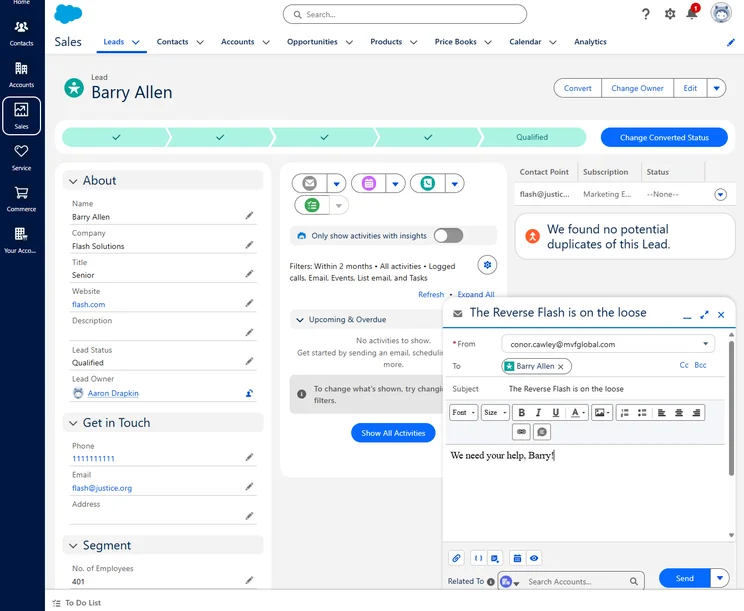
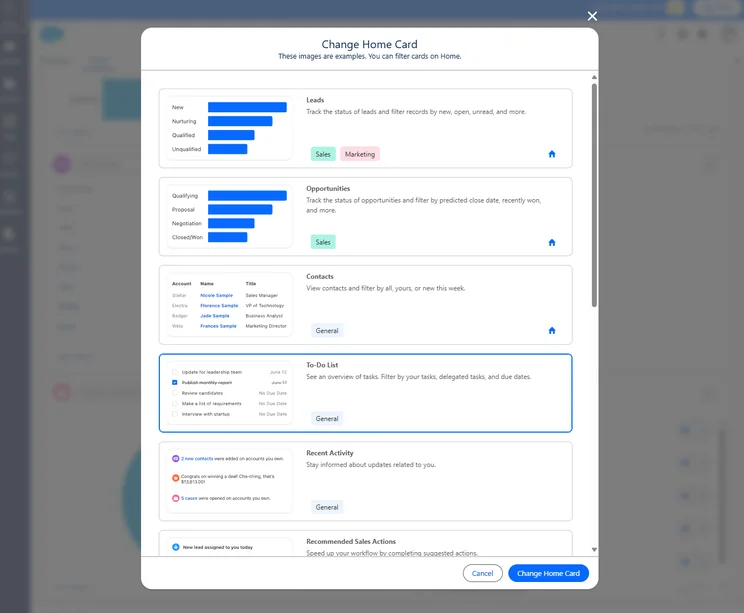
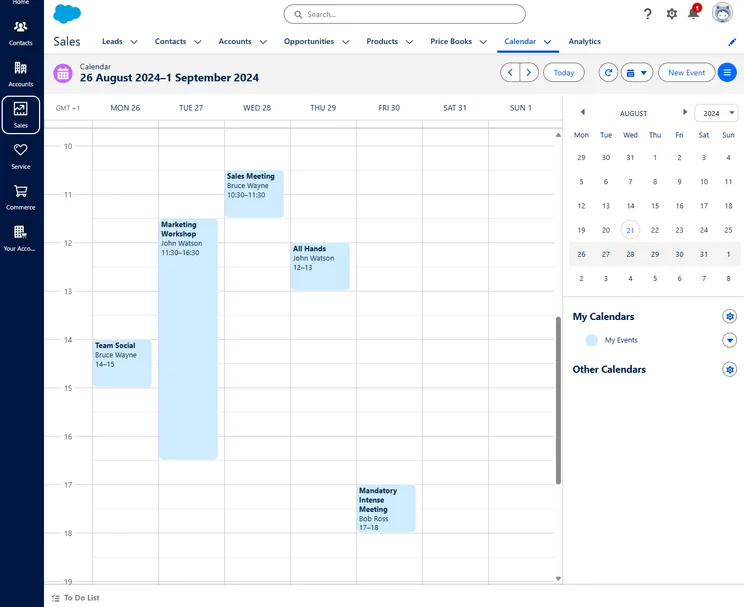
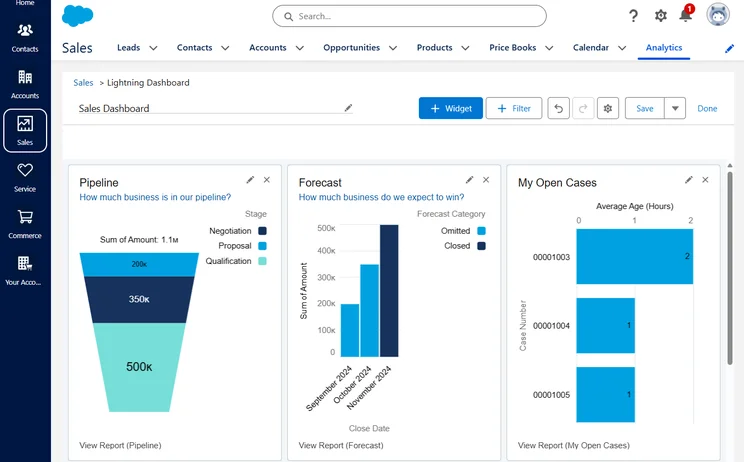
The similarities are quite apparent when it comes to the kind of data you can track. Both Dynamics and Salesforce have robust dashboard and analytic options, with our researchers finding that Salesforce offers in-depth chart and visualization builders that can link up different data points, generating powerful insights for your team.
Where Dynamics has its modules, Salesforce has its various “clouds,” such as Sales Cloud and Service Cloud. These two form the major components of its CRM solution. There’s also Salesforce Marketing Cloud, the company’s marketing platform, which is a great option for streamlining your process for reaching and retaining customers.
Like the rest of the tech industry, Salesforce has jumped on the AI bandwagon by rolling out a ChatGPT-like assistant that can help users on the platform. Dubbed Einstein GPT, the new AI assistant will make life much easier for those on your team looking for a bit of help.
“Think about all of the emails and chats that come into service agents today. They get inundated. With Einstein GPT for Service, we can auto-generate draft replies so that the agents can respond to customers much faster, and they get final say. They can make any edits before they hit send.” – Clara Shih, GM at Salesforce
Even better, Salesforce is fully partnered with OpenAI to bring ChatGPT integration to the platform, so you can ensure you’re getting top quality content generation from one of the best available today.
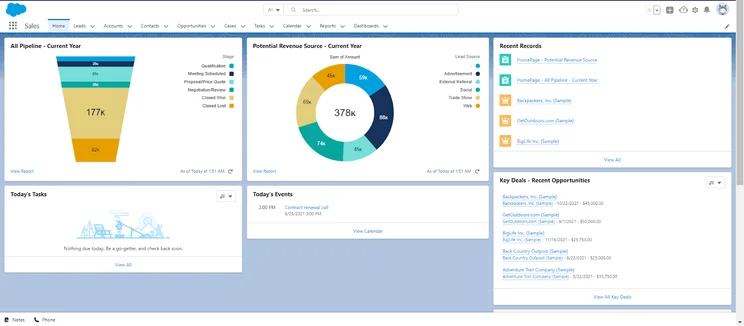
Salesforce home dashboard
Image: Tech.co testing
Salesforce Sales Cloud
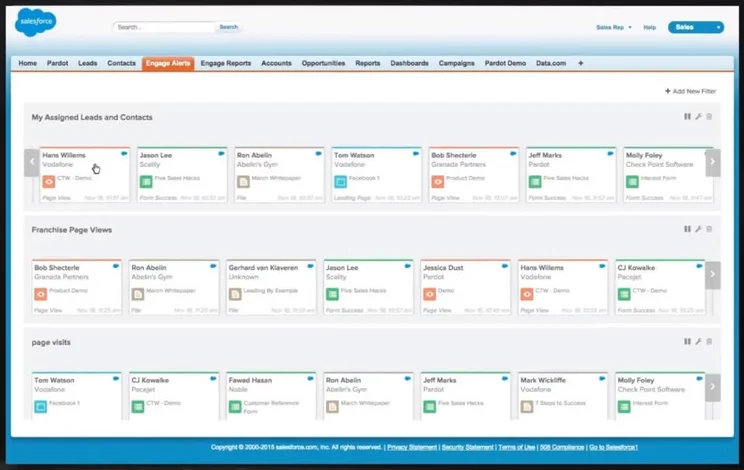
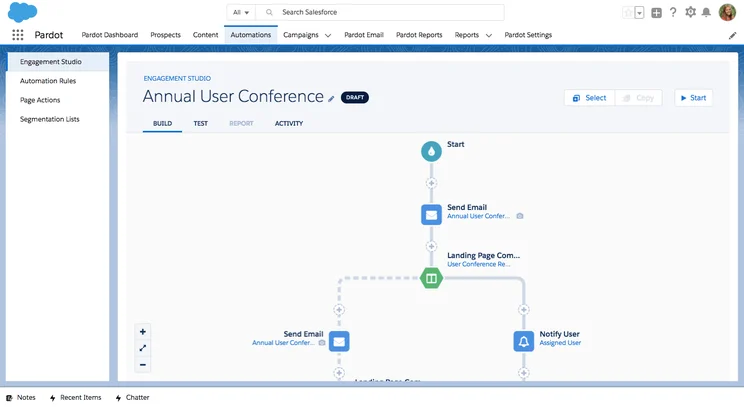
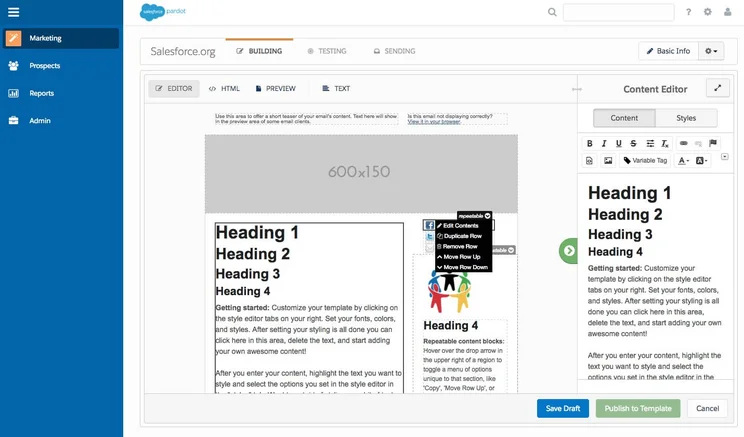
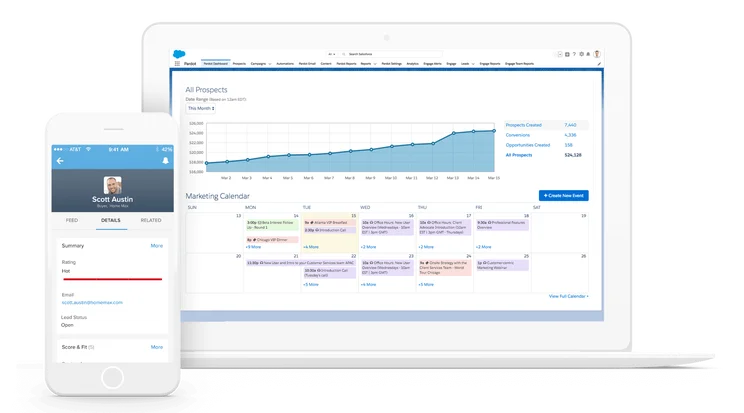
Sales Cloud offers all the essential features you need for CRM, such as managing opportunities, leads, contacts, accounts, and email integration (Gmail and Outlook). Alternatively, users can access Salesforce data from within Gmail. This is similar to Microsoft’s Relationship with Sales feature we discussed earlier.
Both Salesforce Sales Cloud and Microsoft Dynamics 365 Sales offer lead scoring functionality. However, Salesforce Sales Cloud includes it as part of the platform for all plans except the Essentials plan, while Microsoft Dynamics 365 Sales requires an add-on that costs extra.
Salesforce Sales Cloud
In Short
-
Pros
- Wide range of help & support options
- Lots of customization opportunities
- Provides a good infrastructure for supporting multiple sales teams
-
Cons
- Lack of digital selling tools on all plans
- Definitely expensive compared to competitors
Images

Salesforce Service Cloud
Service Cloud also offers a number of essential features such as the ability to chat with customers across multiple platforms including IM, social media, and SMS. There’s also an integrated field service option and the ability to see all communication with particular customers.
Most notably, Salesforce Service Cloud allows for the creation of a user forum, where customers can help each other solve problems with the platform, a feature that is not available with Microsoft Dynamics 365 Service, no matter how much you pay.
Salesforce Service Cloud
In Short
-
Pros
- Great infrastructure for managing larger teams
- Lots of customization opportunities to make it work for your business
- Plenty of communication channels to stay in touch with customers
-
Cons
- No built-in customer feedback options
- Comparatively quite expensive
- Robust customization can make it a bit intimidating
Images
Salesforce Marketing Cloud
Salesforce and Microsoft Dynamics 365 offer similar options when it comes to their marketing automation platforms and the price reflects that. You’ll be able to automate your marketing efforts to make a bigger impact on your potential customers. The primary focus for both is email, but Salesforce also offers limited features for social, content, and paid, while Microsoft Dynamics 365 Marketing does not.
Salesforce is a bit expensive, though, particularly when you consider the limited features it offers compared to others in the industry. Even worse, it doesn’t offer great help and support, which can be vital to the success of a good CRM.
Salesforce Marketing Cloud
In Short
-
Pros
- Very strong email marketing features
- Good data visualization options
- Allows for omnichannel automation on all plans
-
Cons
- Extremely expensive compared to competitors
- Limited social, paid, and content marketing options
- Few team organization and coordination tools
Pricing
- Starter Suite: $25/user/month
- Growth: $1,500/month
- Advanced: $3,250/month
Images
Microsoft Dynamics Pricing vs Salesforce Pricing
While business software pricing is typically pretty cut and dry, Microsoft Dynamics and Salesforce represent, arguably, two of the most thorough and confusing pricing systems you can find. They both offer a seemingly endless array of add-ons, optional packages, and core functionalities that can make the process a bit intimidating.
In hopes of making it a bit less daunting, we’ve covered each providers pricing plans and options to give you a better idea of what you’re signing up for and how much it’s going to cost you.
Microsoft Dynamics Pricing
Microsoft offers its CRM platform under the Dynamics 365 app, which caters to a wide range of business types. As such, pricing for the platform depends on what kind of business area your company falls under.
Below, we’ll breakdown the pricing for Microsoft Dynamics 365 Sales, Microsoft Dynamics 365 Marketing, and Microsoft Dynamics 365 Service.
|
Free plan
|
Free trial
|
Starting price
|
Most expensive plan
|
Verdict
|
||
|---|---|---|---|---|---|---|
 |

|
 |
||||
|
Microsoft Dynamics 365 Sales |
Microsoft Dynamics 365 Marketing |
Microsoft Dynamics 365 Customer Service |
||||
|
|
|
|
||||
|
30 days |
30 days |
30 days |
||||
|
$65/user/month |
$50/user/month |
|||||
|
$162/user/month |
$1,500 per month |
$95/user/month |
||||
|
An expensive, robust tool for analytics that’s better suited to current Microsoft users |
A bit too expensive for most, but great for managing teams closely |
A great, customizable platform aimed at larger businesses |
Microsoft Dynamics 365 Sales
The Microsoft Dynamics 365 Sales platforms offers the most plans in the bunch, with a total of four. The prices start a bit high compared to Salesforce, but have a smaller range, topping out at barely more than half of Salesforce’s most expensive plan.
Here’s a breakdown of the four pricing plans for Microsoft Dynamics 365 Sales:
|
Plan
|
Price
Billed annually
|
Users
|
Storage
|
Lead scoring
|
API
|
Custom reports
|
Custom automation builder
|
|
|---|---|---|---|---|---|---|---|---|
|
|
|
|
|
|||||
|
Professional |
Enterprise |
Premium |
Relationship Sales |
|||||
|
$65 per user per month |
$95 per user per month |
$135 per user per month |
$162 per user per month |
|||||
|
Unlimited |
Unlimited |
Unlimited |
Unlimited |
|||||
|
Database: 10GB |
Database: 10GB |
Database: 10GB |
Database: 10GB |
|||||
|
|
Add-on |
Predictive scoring |
Add-on |
|||||
|
|
|
|
|
|||||
|
|
|
|
|
|||||
|
|
|
|
|
Microsoft Dynamics 365 Service
With only two plans, the Microsoft Dynamics 365 Service platform might seem a bit limited. But as long as you’re a bigger company in need of some robust features, these are competitively priced. Still, it’s worth considering the expense you could incur if you need additional channels other than email, as they will cost you extra.
Here’s a breakdown of the two pricing plans for Microsoft Dynamics 365 Service:
|
Plan
|
Price
Billed annually
|
Email Comms Channel
|
Phone Comms Channel
|
Website Live Chat Comms Channel
|
Social Media Channels
|
|
|---|---|---|---|---|---|---|
|
|
|
|||||
|
Professional |
Enterprise |
|||||
|
$50/user/month |
$95/user/month |
|||||
|
|
|
|||||
|
|
|
|||||
|
|
Add-on required |
|||||
|
|
Add-on required |
Microsoft Dynamics 365 Marketing
No need for a table on this one! Microsoft Dynamics 365 Marketing only offers one pricing plan — compared to Salesforce Marketing Cloud’s four — which costs $1,500 per month, allows for unlimited users, and has a contact limit of 10,000 contacts. It can notably only help with email marketing, which can be a deal breaker, especially for the price. Still, if you’re already set up with Microsoft, it can be a valuable addition to the business.
Salesforce Pricing
Salesforce is definitely a more affordable option than Microsoft Dynamics, although it’s only slightly less complex as far as how it works. Check out the table below to see how much each Cloud will cost and keep scrolling for a more in-depth look at pricing plans for each option.
Check out our Salesforce pricing guide for more information
|
Free plan
|
Free trial
|
Starting price
|
Most expensive plan
|
Verdict
|
||
|---|---|---|---|---|---|---|
|
|
|
|
|
|||
|
Salesforce Sales Cloud |
Salesforce Service Cloud |
Salesforce Marketing Cloud |
||||
|
|
|
|
|
|||
|
30 days |
30 days |
30 days |
|
|||
|
$25/user/month |
$25/user/month |
$25/user/month |
||||
|
$330/user/month |
$330/user/month |
$15,000/month |
||||
|
A multi-purpose starter plan for small businesses new to the CRM world. |
A scalable, highly customizable platform that’s great for managing teams |
An fully-featured yet pricey CRM solution with excellent team management tools. |
A very expensive option that provides robust email and omnichannel features |
Salesforce Sales & Service Cloud Pricing
The most common options for CRM are the Sales Cloud and Service Cloud, which give you all the CRM functionality you need for your sales or customer service business.
Each platform offers four different pricing plans, which conveniently line up in price and functionality: Essentials, Professional, Enterprise, and Unlimited.
Sales and Service can also be bought as a bundle, with the Essentials plan still costing just $25 per user per month, but different pricing for the remaining plans: The Professional plan for a Sales/Service bundle costs $105 per user per month, the Enterprise plan costs $190 per month, and the Unlimited plan costs $355 per user per month.
|
Plan
|
Price
Billed annually
|
Users
|
Lead scoring
|
API
|
Advanced forecasting
|
Mobile app
|
Offline mobile access
|
Agentforce AI
|
Key features
|
|
|---|---|---|---|---|---|---|---|---|---|---|
 |
|
|
|
|
|
|||||
|
Free Suite |
Starter Suite |
Pro Suite |
Enterprise |
Unlimited |
Agentforce 1 Sales |
|||||
|
Free |
$25/user/month |
$100/user/month |
$175/user/month |
$350/user/month |
$550/user/month |
|||||
|
2 |
Unlimited |
Unlimited |
Unlimited |
Unlimited |
Unlimited |
|||||
|
|
|
|
Paid add-on |
|
|
|||||
|
|
|
$25/user/month |
|
|
|
|||||
|
|
|
|
|
|
|
|||||
|
|
|
|
|
|
|
|||||
|
|
|
|
|
|
|
|||||
|
|
|
|
$125/user/month |
$125/user/month |
|
|||||
|
|
|
|
|
|
Salesforce Marketing Cloud Pricing
In addition to the Sales Cloud and Service Cloud options, Salesforce Marketing is a popular option for those in those looking for a CRM for marketing. It offers a robust platform that can help you automate a wide range of processes to save your business time. It is a bit expensive, especially considering its limited features in some areas, but it could still be the right fit for your company.
Here’s how the pricing breaks down for the different Salesforce Marketing Cloud plans:
|
Plan
|
Price
Billed annually
|
Best for
|
Email marketing
|
Social marketing
|
Content marketing
|
Paid marketing
|
Omnichannel features
|
|
|---|---|---|---|---|---|---|---|---|
|
|
|
|
|
|||||
|
Starter Suite |
Pro Suite |
Growth |
Advanced |
|||||
|
$25/user/month |
$100/user/month |
|||||||
|
Small businesses |
Customization |
Email automation |
AI-powered features |
|||||
|
|
|
|
|
|||||
|
|
|
|
|
|||||
|
|
|
|
|
|||||
|
|
|
|
|
|||||
|
|
|
|
|
Other CRM Alternatives
Yes, Salesforce and HubSpot are two of the best CRM platforms on the market today. Still, they’re very much geared towards larger businesses, which means that small businesses might be looking for an alternative that fits their needs.
Fortunately, we’ve done a lot of research on the best CRMs for small business, so you can find the right platform for your business. Take a look at the table below to see what kind of options are available today.
|
Free trial
|
Starting price
|
Most expensive plan
|
Verdict
|
Email marketing
|
Social marketing
|
Marketing campaigns
|
API
|
Email Comms Channel
|
Phone Comms Channel
|
Website Live Chat Comms Channel
|
||
|---|---|---|---|---|---|---|---|---|---|---|---|---|
|
BEST FOR SALES
|
BEST FOR MARKETING
 |
FEATURED
 |
 |
 |
 |
|
 |
 |
 |

|
||
|
Salesforce |
HubSpot |
monday CRM |
Zendesk |
Freshsales CRM |
Pipedrive |
Microsoft Dynamics 365 |
Zoho CRM |
SugarAI |
Keap |
Sendinblue |
||
|
30 days |
14 days |
14 days |
30 days |
21 days |
14 days |
30 days |
15 days |
7 days |
14 days |
|
||
|
$25/user/month |
$9/user/month |
$12/user/month |
$19/user/month |
$9/user/month |
$14/user/month |
$65/user/month |
$14/user/month |
Custom |
$249/month |
$25 per month |
||
|
$550/user/month |
$3,600/user/month |
$28/user/month |
$169/user/month |
$59/user/month |
$99/user/month |
$150/user/month |
$52/user/month |
Custom |
$249/month |
$POA |
||
|
An incredibly popular and customizable CRM for all businesses, with excellent communication tools |
An easy-to-use and highly scalable platform ideal for growing businesses, with an excellent free plan |
Popular option with a modern, easily customizable interface and a great Free Trial |
A robust platform aimed at businesses looking to scale |
A highly intuitive CRM that is packed with plenty of features and even has a free plan option |
Core CRM features in flexible pricing plans make this one of the best value CRM options for any small business |
A robust CRM platform that embeds brilliantly with Microsoft products |
An attractive option, with lots of features for a low price |
A great all-round CRM with a great, easy to understand dashboard |
A suitable all-in-one platform for sales and marketing but a bit expensive |
A decent choice for email marketing that falls behind in some other areas |
||
|
|
|
|
|
|
|
|
|
|
|
|
||
|
|
|
|
|
|
|
|
|
|
|
|
||
|
|
|
|
|
|
|
|
|
|
|
|
||
|
Open |
Limited |
Open |
Open |
Open |
Open |
Yes |
Limited |
Open |
Limited |
Open |
||
|
|
|
|
|
|
|
|
|
|
|
|
||
|
|
|
|
Requires Telephony integration on Support plans, available on Suite plans |
|
Add-on required |
|
|
|
|
|||
|
|
|
|
|
|
|
Add-on required |
|
|
|
|
How Did We Research Salesforce and Microsoft Dynamics?
We take our impartial research and analysis seriously, so you can have complete confidence that we’re giving you the clearest, most useful recommendations.
After conducting an initial exploration to identify the most relevant, popular, and established CRM tools in the market, we put them through their paces to find out more about their strengths and weaknesses. In total, we analyzed 13 CRM systems, grading them across 84 areas of investigation.
Based on years of market research and CRM product testing, we’ve established a CRM research methodology to score products, which consists of six main assessment categories and 13 subcategories. This covers everything, from the available features and scalability capacity to the product’s value for money, and much more.
Our main testing categories for CRM systems are:
- Features: The functionalities and capabilities provided by the CRM software, such as contact management, lead and opportunity tracking, and task and activity management.
- Help and support: The resources and assistance available to users when they encounter issues or require guidance while using the CRM software.
- Customization: The ability to tailor the CRM software to suit the specific needs and processes of the organization, e.g. customizing fields, layouts, and workflows.
- Scalability: The ability of the CRM software to accommodate the growth and changing needs of the organization, such as the capacity to handle a growing customer database.
- Price: The cost associated with using the CRM software. It includes factors such as licensing fees, subscription plans, and additional charges for add-on modules or features.
- Team structure — sales CRM: Determining if a platform makes it easier to manage large sales teams, including team dashboards, team hierarchies, and team inboxes.
- Usability — small business CRM: Assessing the simplicity of the interface, the ease of navigating through menus and options, and the overall user experience.
When it comes to calculating a product’s final score, not all testing areas are weighted evenly, as we know some aspects matter more to our readers than others, which are merely “nice to have.” After hundreds of hours, our process is complete, and the results should ensure you can find the best solution for your needs.
At Tech.co, we have a number of full-time in-house researchers, who re-run this testing process regularly, to ensure our results remain reflective of the present day.
Our research found that Salesforce is better than Microsoft Dynamics, offering more features, more team infrastructure functionality, and better customer support across the platform. Microsoft Dynamics is still a great choice, though, offering lower prices and seamless integration with other Microsoft services like Outlook and Teams.
Let’s be clear – neither Salesforce nor Microsoft Dynamics would be a bad choice for your business, and both are market leading CRM suppliers. The difference really comes down to what your particular needs are, and what your existing setup looks like.
As we said earlier the key to deciding on a CRM is finding a service that fits your needs in terms of functionality, price, and customizability. For that you really need a bespoke quote that takes all of those factors into account.
Frequently Asked Questions
According to our research, Salesforce is slightly better than Microsoft Dynamics. It offers an unrivaled feature catalogue and offers a wide range of integrations that can really help your business. To be fair though, Microsoft Dynamics is also extremely robust and offers great integrations with Outlook and Microsoft 365, but it’s a bit more pricey, which can turn some businesses off.
One of the benefits of Microsoft Dynamics is that is offers a wide range of integrations, and yes, it even integrates with Salesforce. This can streamline a number of processes in your business, although it seems unnecessary unless you have other Microsoft business resources in your business.
No, the Microsoft Dynamics CRM costs more than the Salesforce CRM. Salesforce’s Sales and Service clouds start at $25 per user per month, compared to Microsoft Dynamics, which starts at between $50 and $180 per user per month for the first app, depending on the industry and business needs of the company purchasing it.
Both Dynamics 365 and Salesforce are CRMs designed to help businesses manage their accounts, leads, and customer journeys. While they share many features, they use different interfaces and come with different pricing plans. Dynamics 365 may work best for companies that use Microsoft software already, as it’s designed to integrate with other Microsoft products. Plus, while Salesforce is designed for cloud-based use, Dynamics 365 is available on-premise as well as on the cloud.
Salesforce is one of the best CRM software on the market, with Microsoft Dynamics close behind. However, unless you’re a larger business with hefty CRM needs, there are plenty of less complex, more affordable options out there that might be a better fit, depending on what you require.
Check out our Best CRM for Small Business guide for more information
If you click on, sign up to a service through, or make a purchase through the links on our site, or use our quotes tool to receive custom pricing for your business needs, we may earn a referral fee from the supplier(s) of the technology you’re interested in. This helps Tech.co to provide free information and reviews, and carries no additional cost to you. Most importantly, it doesn’t affect our editorial impartiality. Ratings and rankings on Tech.co cannot be bought. Our reviews are based on objective research analysis. Rare exceptions to this will be marked clearly as a ‘sponsored’ table column, or explained by a full advertising disclosure on the page, in place of this one. Click to return to top of page


