
We may receive a commission from our partners if you click on a link to review or purchase a product or service. Click to Learn More
Our most recent round of user testing reveals that Xero is a better accounting software platform than FreshBooks. This is because Xero has superior features across the board, including core accounting functionality and tools for financial planning and visibility, as well as being the more efficient platform in general.
With its excellent expense management and billing features, Xero can handle the needs of businesses with high turnovers, who may find Freshbooks a little limiting. Additionally, Xero boasts a massive library of available third-party integrations, which means you can add new capabilities whenever you see fit.
It’s not a total clean sweep, though. During testing, we much preferred the experience of using FreshBooks, which has a considerably slicker and cleaner interface than its Xero. FreshBooks also deserves some credit for its excellent support options, including 24/7 support through an online chatbot. Read on for a full breakdown of Xero vs FreshBooks and find out which one is best suited for your business.
Xero vs FreshBooks: At a Glance
Xero and FreshBooks are two accounting platforms geared towards fundamentally different audiences. The former is built for experienced accounting pros, while the latter is oriented more towards small businesses and sole traders. Below, you’ll find a breakdown of some key differences between the two platforms.
- Xero paid plans start at $20 per month (currently discounted to $2 for the first three months), while FreshBooks plans start at $23 per month.
- Xero offers a 30-day free trial, while FreshBooks offers a 30-day money back guarantee. Neither provider offers a free forever plan.
- Xero allows unlimited users on all plans, while FreshBooks is limited to one. You can purchase Team Members on all plans, but it’ll cost you $11 per month, per team member.
- Xero has superior core accounting features, with all the tools you need for bookkeeping, accounts payable, accounts receivable, and financial reporting.
- FreshBooks has some nifty built-in features that will suit customer-serving businesses, including stock control, advanced invoicing, and time-tracking tools.
- Xero offers over 1,000 potential integrations, while FreshBooks only offers around 100.

Get the Best Accounting Software for Your Business
Get started with a free trial today
|
Tech.co review score
|
Starting price
|
Free trial
|
Pros
|
Cons
|
||
|---|---|---|---|---|---|---|
 |
 |
|||||
|
Xero |
FreshBooks |
|||||
|
4.6
|
4.1
|
|||||
|
|
|
|||||
|
30 days |
30 days |
|||||
|
|
|||||
|
|
Who is Xero better for?
- Experienced accounting pros adept at managing complex workflows.
- Businesses with high turnover and billing needs.
- Users willing to invest in a steep learning curve to access heavy-duty features.
Xero
In a nutshell
-
Xero is a robust accounting platform with excellent expenses and billing tools, accounts receivable and accounts payable functionality, and a huge selection of third-party integrations. With its outdated interface, it is geared towards experienced accounting pros. There are three paid plans available, starting at $25 per month and going up to $90 per month.
-
- Add tracked hours
- Customisable reports
- Attach files to invoices
Pricing tiers
- Early plan – $25 per month
- Growing plan – $55 per month
- Established plan – $90 per month
Images
Who is FreshBooks better for?
- Sole traders or small business owners who only require basic accounting functionality.
- New businesses that are likely to require help and support.
- Professionals who need time tracking to invoice clients.
FreshBooks

In a nutshell
-
FreshBooks is an accounting platform for small businesses. With great help and support options, and an intuitive interface that won’t deter first-time users, it’s a great solution for sole traders or companies with very few staff, who can’t afford to invest too much time becoming acquainted with a new platform. It has four pricing plans, ranging from $23 per month to $70 per month, with one plan that has no public pricing.
-
- 2 templates
- Multi-currency support
- Both third and first party payment processors
Pricing tiers
- Lite plan – $23 per month
- Plus plan – $43 per month
- Premium plan – $70 per month
Images
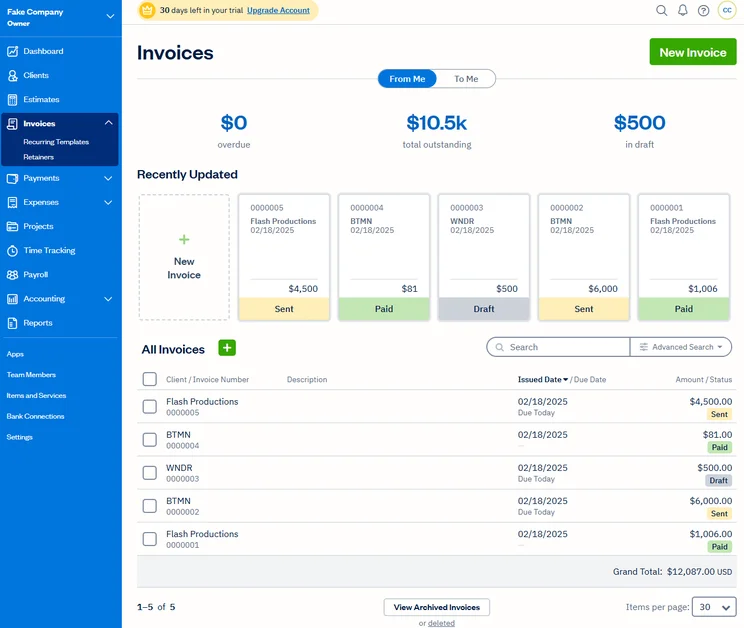
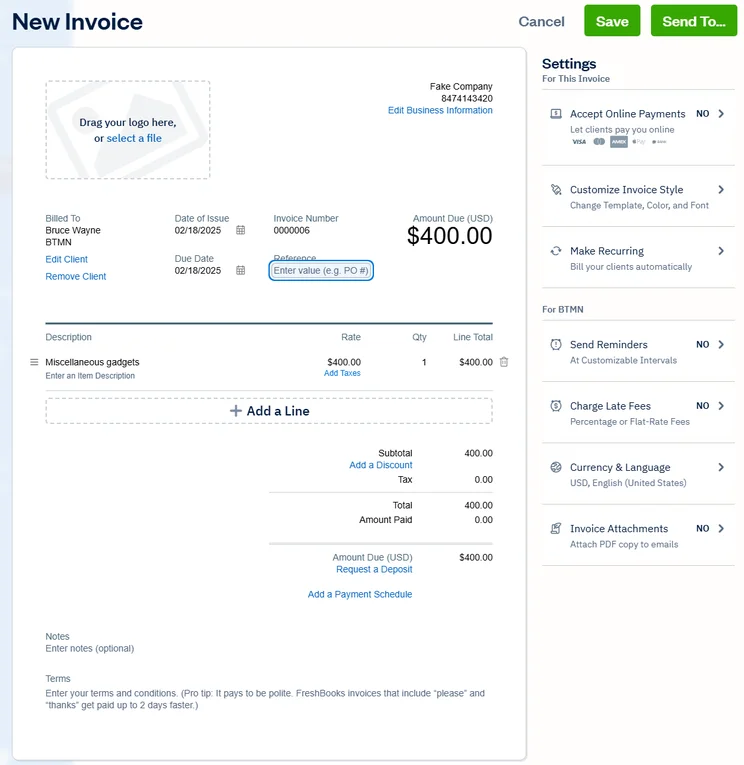
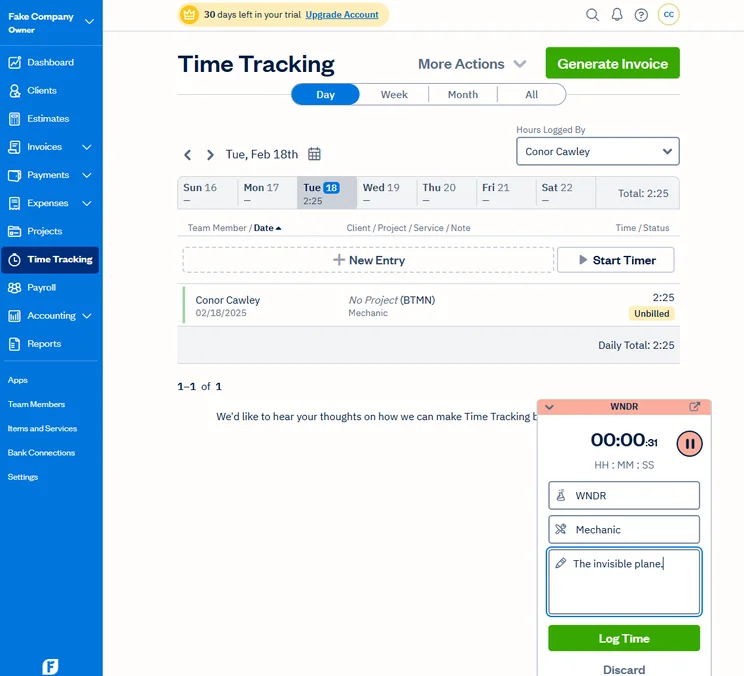
Xero vs FreshBooks: Features Comparison
In this section, I’ll take you through a head-to-head look at how Xero and FreshBooks compare on features. You can use the links below to navigate to the section that you’re interested in.
Best for core accounting: Xero
Xero edges this one. Its core feature set is excellent, with an abundance of tools for invoicing and quoting, tax preparation, time tracking, reconciliation, and payment processing. Our researchers were particularly fond of the expenses feature, which provides clear options for uploading receipts, inputting mileage, and linking to specific clients.
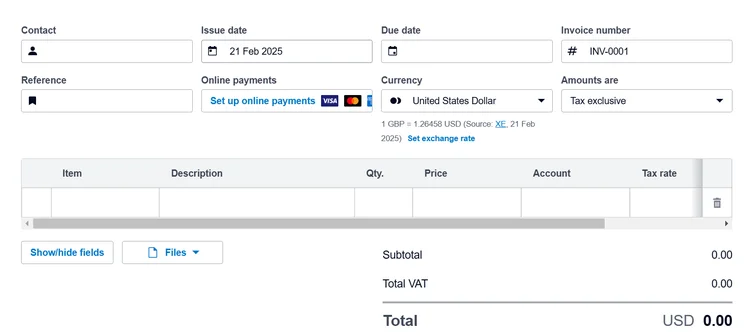
When we tried our Xero, we found creating invoices with the platform really straightforward. Source: Tech.co user testing
What we did find disappointing, however, is the fact that you can only use multiple currencies on Xero’s most expensive plan, the Established plan, which normally costs a very steep $80 per month. This will not be welcomed by medium-sized businesses with customers in multiple countries, as they will end up paying for functionality that they don’t need.
To its credit, FreshBooks does allow you to track time and mileage on all plans. In fact, our researchers found this feature to be among the most user-friendly of tasks on FreshBooks. What’s more, once you’ve added team members, you can allow them to track their own time. Time tracking on Xero is only available on the Established plan (normally $80 per month).
Best for financial planning: Xero
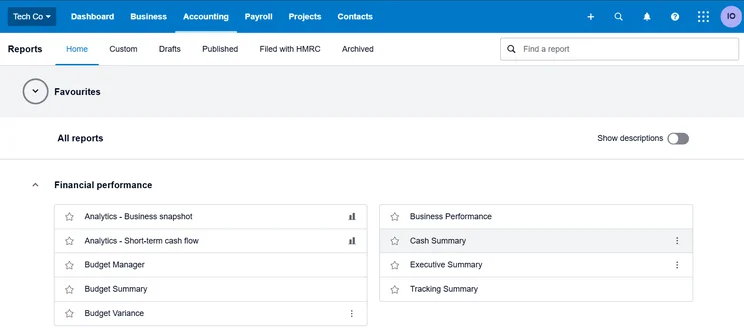
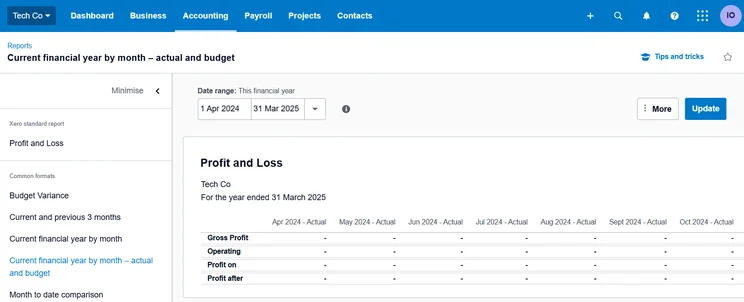
This one is much more clearcut – Xero has some outstanding financial planning and visibility features. Highlights include expense tracking, cashflow projection, and budget setting. The platform also has Xero analytics, a dedicated set of tools for making sense of all the information that you’ll accrue over time.
With analytics, you’ll get detailed cashflow predictions up to 90 days ahead, with the help of AI. You’ll also be able to customize your dashboard to your specifications, ensuring that the information that matters to you is front and center.
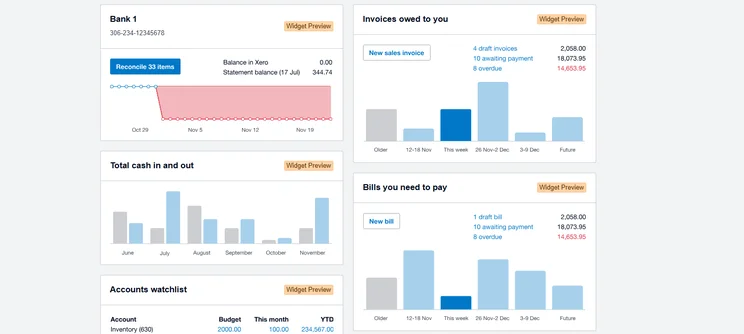
Xero’s reporting dashboard gives you an instant overview of how your business is tracking. Source: Tech.co user testing
FreshBooks, meanwhile, has a slick dashboard that our researchers found preferable to the Xero interface. However, it lacks the same depth of reporting functionality.
Best for operational efficiency: Xero
Again, there’s no competition in this area. Xero will undoubtedly give your everyday operations a shot in the arm. To begin with, it integrates with over 1,000 third-party apps, with payment processors such as Square, Stripe, and PayPal, as well as CRM platforms including HubSpot, Capsule, and Insightly. FreshBooks, by contrast, offers far fewer integration options, meaning that it’s ultimately a lot less scalable than Xero.
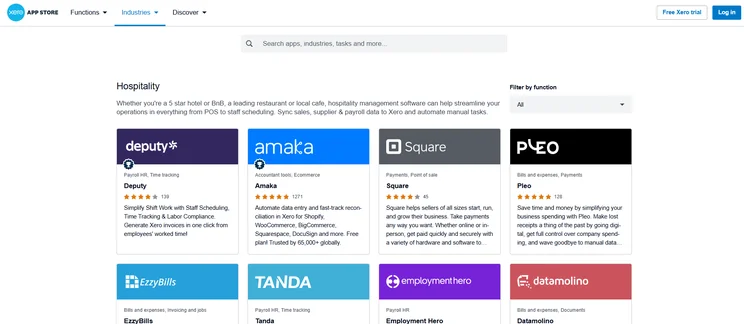
Xero’s app store lets you connect with tons of restaurant-focused apps like Square POS and Fresho Inventory. Source: Tech.co user testing
As alluded to above, Xero uses AI to bolster its offering and make its users’ lives easier. From forecasting to invoice reconciliation, the technology is built right into the platform’s product suite. It’s also worth pointing that while Xero has no user limit on any of its plans, FreshBooks will limit you to one user per plan. You’ll be able to pay for additional users at a cost of $11 per Team Member, per month.
FreshBooks also offers automatic payment reminders, but you can only customize these reminders with dynamic fields on its Premium plan ($70 per month).
Best for help and support: FreshBooks
FreshBooks makes it onto the podium, thanks to its excellent help and support options. Users on all plans will get 24/7 support courtesy of an online chatbot. Elsewhere, you can contact a customer service representative over the phone from 8am to 7pm ET, Monday to Friday. You can email, too, with most emails typically addressed within 90 minutes, which is pretty impressive.
Xero, on the other hand, won’t allow you to call a rep. To request assistance, you’ll have to raise a ticket on the Xero website, which is quite an unintuitive experience. You will be able to provide your number for Xero to contact you, but it’s frustrating that this doesn’t happen on your terms.
Best for usability: FreshBooks
While neither platform particularly excels in this area, FreshBooks stands head and shoulders above its compatriot. During testing, our researchers agreed that it was intuitive and easy to navigate, with a clear and visually appealing interface that wasn’t too crowded.
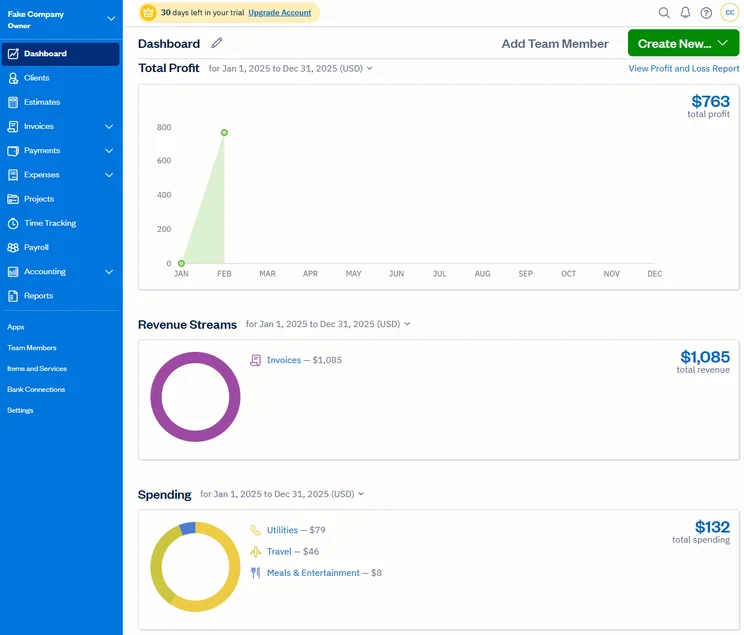
The FreshBooks dashboard is bright, colorful, and uncluttered. Source: Tech.co testing
The vertical navigation bar made it simple to find what our users were looking for, as well as helping to build confidence with the platform with each use. However, our testers did take issue with some of FreshBooks’s terminology – the substitution of “quote” with “estimate,” for instance, could be confusing to first-time users.
Usability is one of the main areas in which Xero falls down. The platform is notoriously outdated and convoluted, with a steep learning curve that marks it out as unsuitable for novices. Our researchers found the dashboard to be overwhelming and poorly designed, with generic headers that fail to effectively route users. Relatively straightforward functions, such as invoice building, are hindered by unnecessary fields and poor visual feedback.
“I didn’t like the dashboard. It was hard to keep track of where everything was. It was quite overwhelming. The headings are generic and this made it difficult to find things.” – Isobel O’Sullivan, Senior Writer at Tech.co and Xero researcher
Xero vs FreshBooks: Pricing Plans
While Xero is currently running a generous promotional offer (new customers will get 90% off all plans for the first 3 months), there’s still only one winner here. FreshBooks’s cheapest plan goes for $23 per month. Next up, the Plus plan starts at $43 per month, followed by the Premium for $70 per month. The Select plan has no public pricing, so you’ll have to get in touch with them directly.
Xero’s plans start at $20 per month, which is marginally cheaper than FreshBooks’s first plan. But after that, its Growing plan starts at $47 per month, and its Established plan will cost you a very expensive $80 per month. Neither of these providers offers a free plan, but you will be able to get a free trial for each one.
To see how each plan compares head-to-head, check out the table below.
|
Price
|
Users
|
Bookkeeping
Does it include bookkeeping functions?
|
Accounts payable
Does it include a range of accounts payable functions?
|
Accounts receivable
Does it include a range of accounts receivable functions?
|
Project accounting
Does it offer tools to track different projects?
|
Financial reporting
Does it offer financial reporting tools?
|
Budget and forecasting
Does it offer budgeting and forecasting tools?
|
|||
|---|---|---|---|---|---|---|---|---|---|---|
|
|
|
|
|
|
|
|
||||
|
Xero |
||||||||||
|
|
|
|
|
|
|
|||||
|
1 |
Unlimited |
1 |
Unlimited |
1 |
Unlimited |
3 |
||||
|
|
|
|
|
|
|
|
||||
|
Expenses tracking only |
|
|
|
|
|
|
||||
|
|
|
|
|
|
|
|
||||
|
Time-tracking only |
|
|
|
|
|
|
||||
|
|
|
|
|
|
|
|
||||
|
|
|
|
|
|
|
|
Do Xero and FreshBooks have free plans?
No, neither Xero nor FreshBooks offers a free plan, although you will be able to get a free 30-day trial with each platform. If you’re interested in free accounting software, we would recommend looking into Wave Financial, but check out our full guide to find the best fit for your business.
Xero and FreshBooks vs Alternatives
Of course, Xero and FreshBooks are far from the only accounting platforms on the market. Depending on your business priorities, there are solutions out there to suit sole traders, large enterprises, and everything in between.
In the table below, you’ll find a quick at-a-glance overview of how Xero and FreshBooks compare to several other accounting platforms.
|
Starting price
|
Free trial
|
Best for
|
Pros
|
Cons
|
Try now
|
||
|---|---|---|---|---|---|---|---|
|
|
|
 |
 |
 |
|||
|
FreshBooks |
Xero |
Zoho Books |
FreeAgent |
QuickBooks |
|||
|
|
|
Free |
|
|
|||
|
30 days |
30 days |
14 days |
30 days |
30 days |
|||
|
New businesses |
Experienced accountants and established businesses with complex financial needs |
Integrations |
Budget-conscious businesses |
Businesses needing advanced financial insights and customization |
|||
|
|
|
|
|
|||
|
|
|
|
|
|||
| Try FreshBooks | Try Xero now | Try Zoho Books | Get Quotes | Try QuickBooks |
How Did We Compare Xero and FreshBooks?
At Tech.co, we take our impartial research and analysis seriously, so you can have complete confidence that we’re giving you the clearest, most useful recommendations.
After conducting an initial investigation to identify the most relevant, popular, and established accounting tools in the market, we conducted further research, including testing six major accounting software platforms.
Based on years of market and user needs research, we’ve established an accounting software testing methodology that scores these platforms against six main categories, and 25 subcategories — with a total of 1,512 areas of investigation being considered overall.
We also put the platforms through their paces with hands-on testing to gain a deeper grasp of their average user experience. We dedicated 57 hours to carrying out 37 user tests, with a total of 555 tasks being completed in total.
Our main testing categories for accounting software are:
- Core accounting features: We check how adept a platform will be at managing accounting tasks, focusing on key bookkeeping features like invoicing, tax preparation, journal entry, time tracking, financial transactions, and payment support.
- Operational efficiency: We determine how capable a system is at ensuring day-to-day processes run seamlessly, paying close attention to third-party integrations, collaboration tools, AI automation, and customization options.
- Financial planning: We assess how capable a system will be at measuring income, profits, and losses. Specifically, we check for the presence and quality of forecasting and budgeting, inventory management, reporting, and compliance tools.
- Help and support: We assess how useful and reliable a platform’s support system is, focusing on support options, whether it’s 24/7 support or knowledge center accuracy, as well as cloud backup, and security safeguards.
- Pricing: We compare the overall cost of each platform, taking factors like monthly costs, set-up fees, hidden fees, and free plans into account. We also measure how strict contracts are, and how much it would cost for a business to terminate them early.
- User experience: An overall judgment of how easily users can interact with the platform. We tested each accounting platform and got our team to report how easy they were to use, how they felt when they were using them, and how likely they were to recommend the platform to another business.
When it comes to calculating a product’s final score, not all testing areas are weighted evenly, with factors like “core accounting features” and “operational efficiency” being prioritized for small businesses, while sector-specific features are valued more highly for businesses across different industries.
We understand that accounting software is always evolving. That’s why at Tech.co, we have full-time product researchers to re-run this testing process regularly. It’s the only way to ensure our results remain reflective of the present day.
Learn more about our research.
Our research ultimately points to Xero as the superior accounting solution. This is because it offers a much more robust feature set, a massive library of third-party integrations, and some particularly excellent expense and billing tools.
But FreshBooks does deserve some credit. In terms of user experience, our researchers much preferred it to Xero. Added to this, it has cheaper paid plans, and an overall shallower learning curve. Because of this, it’s a great solution for accounting beginners.
Ultimately, while Xero and FreshBooks are both very good platforms, there are better options on the market. Our personal pick is Zoho Books, which excels in terms of core accounting features and usability, making it a great pick for experienced pros and amateurs alike.
If you click on, sign up to a service through, or make a purchase through the links on our site, or use our quotes tool to receive custom pricing for your business needs, we may earn a referral fee from the supplier(s) of the technology you’re interested in. This helps Tech.co to provide free information and reviews, and carries no additional cost to you. Most importantly, it doesn’t affect our editorial impartiality. Ratings and rankings on Tech.co cannot be bought. Our reviews are based on objective research analysis. Rare exceptions to this will be marked clearly as a ‘sponsored’ table column, or explained by a full advertising disclosure on the page, in place of this one. Click to return to top of page


