

We may receive a commission from our partners if you click on a link to review or purchase a product or service. Click to Learn More
We’ll cut to the chase: QuickBooks will be much better than Quicken for small businesses looking for accounting software. This is because Quicken is a simple personal finance management solution, which may work for some micro-businesses, whereas QuickBooks is a fully-fledged accounting software platform built to simplify invoicing and bookkeeping.
While Quicken is considerably cheaper than QuickBooks, it has major shortcomings in terms of accounting features, because it’s geared toward managing personal finances. If you’re a sole proprietor, you might also want to check out our rundown of the best accounting software for the self-employed to find out if one of Quicken’s rivals will suit you better.
Alternatively, simply stay tuned to see how QuickBooks stacks up against Quicken when it comes to core accounting features, integrations, and pricing.
QuickBooks vs Quicken: At a Glance
Both QuickBooks and Quicken are aimed at giving users an easy central location to manage their balances, budgets, bank or credit card accounts, and transactions. Users will be able to see their past history and predict future spending or investment trends.
Fundamentally, however, the two services are built for different purposes. While QuickBooks is an accounting software platform for small businesses, Quicken is made for personal financial management, with a few bonus business features.
If that’s the case, then why compare them at all? Well, in addition to being a handy tool for looking after yours or your family’s finances, Quicken is actually well-suited to microbusinesses that run on an invoice basis, or property owners that want to manage leases and collect rent.
What’s more, Quicken is an order of magnitude less expensive than QuickBooks. Because of this, it can appeal to individuals looking for cheap software with basic accounting functionality. That said, Quicken offers fewer features, less customizability, and less functionality overall.
|
Starting price
|
Free trial
|
Core Benefit
|
Payroll processing
|
Email integration
|
Office 365 integration
|
Email support
|
Phone support
|
Try now
|
||
|---|---|---|---|---|---|---|---|---|---|---|
 |

|
|||||||||
|
QuickBooks |
||||||||||
|
|
|
|||||||||
|
30 days |
|
|||||||||
|
Excellent help and support features, including dedicated on all plans and 24/7 support and training on Advanced plan |
A pared-down, inexpensive accounting solution |
|||||||||
|
|
|
|||||||||
|
|
|
|||||||||
|
|
|
|||||||||
|
|
|
|||||||||
|
|
|
|||||||||
| Try QuickBooks | Try Quicken |

Get the Best Accounting Software for Your Business
Get started with a free trial today
QuickBooks vs Quicken: Pricing Plans
The QuickBooks vs Quicken pricing gap is wide, with QuickBooks costing significantly more, with its plans starting at $20 per month, compared to Quicken’s $5.99 per month. However, given QuickBooks’s robust feature set, it offers much better value for money than Quicken.
QuickBooks offers five plans, while Quicken has four. QuickBooks’s plans support a set number of users, but all Quicken plans are designed for a single-user experience, either for personal accounting or for a small business with a single manager.
QuickBooks price: how much does QuickBooks cost?
QuickBooks offers five plans – Solopreneur, Simple Start, Essentials, Plus, and Advanced. You’ll find a breakdown of each plan in the table below. Please note – QuickBooks is currently running a promotional offer, so you can get 50% off for the first three months of a year-long plan. This means that Simple Start would cost $17.50 for the first three months, and so on.
|
Price
|
Users
|
Bookkeeping
Does it include bookkeeping functions?
|
Accounts payable
Does it include a range of accounts payable functions?
|
Accounts receivable
Does it include a range of accounts receivable functions?
|
Project accounting
Does it offer tools to track different projects?
|
Financial reporting
Does it offer financial reporting tools?
|
Budget and forecasting
Does it offer budgeting and forecasting tools?
|
Best for
|
||
|---|---|---|---|---|---|---|---|---|---|---|
|
|
|
|
|
|
||||||
|
$20/month |
|
|
|
|
||||||
|
1 |
1 |
3 |
5 |
25 |
||||||
|
|
|
|
|
|
||||||
|
|
|
|
|
|
||||||
|
|
|
|
|
|
||||||
|
|
|
|
|
|
||||||
|
|
|
|
|
|
||||||
|
|
|
|
|
|
||||||
QuickBooks Solopreneur
The Solopreneur plan costs just $20 per month (currently discounted to $10 for the first 3 months, as well as 20% off Federal Tax Filing). As the name suggests, it’s made for sole traders. For this outlay, you’ll be able to create customized invoices and estimates, accept payments from a few different vendors, track profitability, and more.
QuickBooks Simple Start
QuickBooks’ Simple Start plan costs $38 per month, and supports one user. This plan supports unlimited invoicing and estimating, expense tracking, contact management, limited reporting features, and a mobile app. A range of third-party integrations offer further functionality, though some are paid add-ons rather than free extensions.
QuickBooks Essentials
The Essentials plan costs $85 per month, which covers up to three users. Features include everything in Simple Start, plus bill management, time tracking, and the ability to connect three sales channels (up from one channel for Simple Start).
QuickBooks Plus
Next is the QuickBooks Plus plan, which costs $140 per month and supports five users. It has all the features of Essentials, plus project profitability tracking, inventory management, and a project hub, which lets users tie specific labor costs, payroll data, and expenses to the project to which they belong.
QuickBooks Advanced
QuickBooks Advanced costs $340 per month and supports 25 users. It offers all the features of Plus, and throws in priority customer support, advanced reporting, online training courses, batch importing abilities, and role-based user permissions for better security.
QuickBooks Payroll
That’s it for the core plans, but there’s also QuickBooks Payroll, an add-on available in three plans: Workforce Payroll for $50 per month plus $7 per employee per month; Workforce Payroll and Simple Start for $88 per month plus $7 per employee per month; and Workforce Payroll and Plus for $190 per month plus $7 per employee per month.
As with the QuickBooks plans outlined above, the Payroll plans are currently available at half price for the first 3 months of a year-long contract. In other words, Payroll Core would cost $25 per month for the first 3 months, and so on.
You can check out our QuickBooks Online pricing guide for more details.
Quicken price: how much does Quicken cost?
Quicken has four main plans – Simplifi, Business & Personal, Classic Premier, and Classic Deluxe.
|
Price
|
Users
|
Bookkeeping
Does it include bookkeeping functions?
|
Accounts payable
Does it include a range of accounts payable functions?
|
Accounts receivable
Does it include a range of accounts receivable functions?
|
Project accounting
Does it offer tools to track different projects?
|
Financial reporting
Does it offer financial reporting tools?
|
Budget and forecasting
Does it offer budgeting and forecasting tools?
|
||
|---|---|---|---|---|---|---|---|---|---|

|
|
|
|
||||||
|
|
|
|
|||||||
|
1 |
1 |
1 |
1 |
||||||
|
|
|
|
|
||||||
|
|
|
|
|
||||||
|
|
|
|
|
||||||
|
|
|
|
|
||||||
|
|
|
|
|
||||||
|
|
|
|
|
Quicken Simplifi
Quicken’s first paid plan is Simplifi, which is geared towards personal financial management. For a very reasonable sum ($6.99 per month, currently discounted to $3.99 per month), you’ll get a raft of handy budgeting features. Among them, projected cash flows, a credit score tracker, onboarding support, and spending, incoming, savings, and net worth reports.
Quicken Business & Personal
Next up is the Business & Personal plan ($8.99 per month, but currently available for just $4.99 per month). This includes everything on the Simplifi plan, in addition to – like the name suggests – a handful of business tools. For example, you’ll get built-in Schedules C & E and receipt storage to take the sting out of tax management. You’ll also be able to auto-fill and send invoices to make it easier to get paid.
Quicken Classic Deluxe
The Quicken Classic plans are oriented towards Windows and Mac usage, whereas the previous plans are designed to be used on mobile. With Deluxe ($6.99 per month), you’ll get access to tools to create comprehensive 12-month budgets, track spending, and the Lifetime Planner for getting ready for your retirement.
Quicken Classic Premier
For $8.99 per month (currently discounted to $7.99), you can get your hands on Quicken Classic Premier. With this plan, you’ll unlock investing tools, built-in tax reports, automatic bill tracking and paying, and automatic reconciliation.
QuickBooks vs Quicken: Core Features
The QuickBooks vs Quicken comparison shows both services offer a range of core features across all plans, though the specifics vary by plan: Tax reports may differ, for instance, or extra benefits such as easy invoicing may not be widely available. Both systems are also designed to sync up whether they’re viewed on desktop, web, or mobile.
QuickBooks at a glance
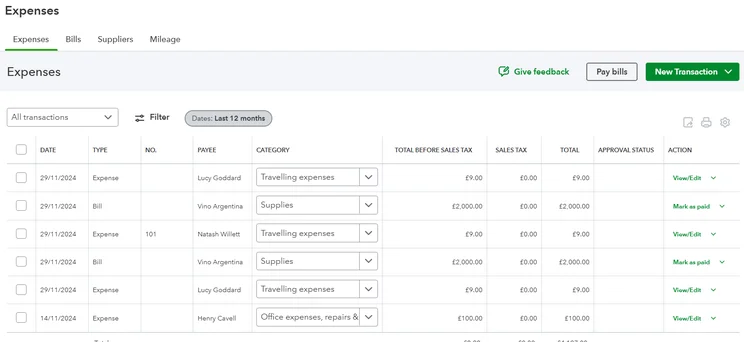
As mentioned, QuickBooks is a more complete accounting software platform aimed at small businesses. It has a robust feature set, including invoicing and payments, mileage tracking, cash flow management, customizable estimates, and more, as well as round-the-clock support on its later plans.
QuickBooks

In Short
-
Pros
- Extensive analytics template customization
- Automatic alerts for mismatched balances
- Built-in cash flow projection tools
-
Cons
- Steep learning curve for advanced functionality
- Limited customer support resources for self-help
- No time tracking features
Pricing
-
 Solopreneur: $20/month
-
Simple Start: $38/month
-
Essentials: $85/month
-
Plus: $140/month
-
Advanced: $340/month
-
50% off for first 3 months on all plans
Images
Quicken at a glance
Quicken, meanwhile, is a personal financial management platform with some basic business functionality. If you’re looking for a cheap budgeting tool, Quicken is well worth your time. On top of this, it offers some fairly rudimentary accounting features, which might be worth looking into if you’re a property owner or a microbusiness owner.
Quicken

In Short
-
Pros
- Inexpensive
- Easy to use
-
Cons
- Few integrations
- No free trial
- No inventory management
Images
Budgeting – winner: Quicken
QuickBooks lets each user create a budget based on their accounting data, letting them review, edit, and run financial reports using their own custom budget. Users can also match projected sales and expenses against the actual ones, gaining insights into how to tweak their budget in the future.
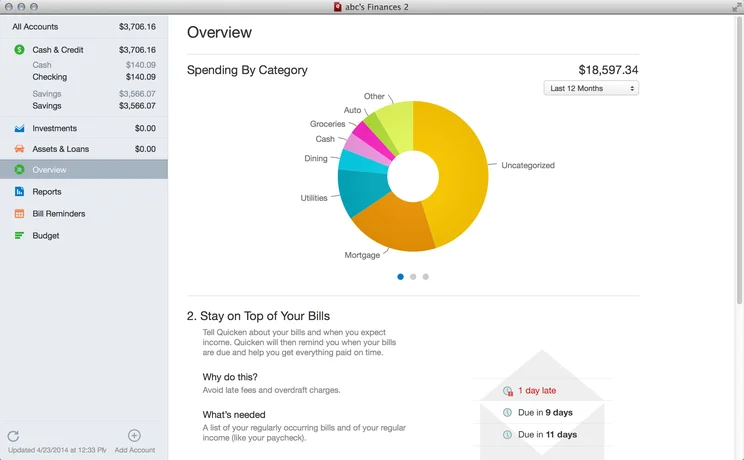
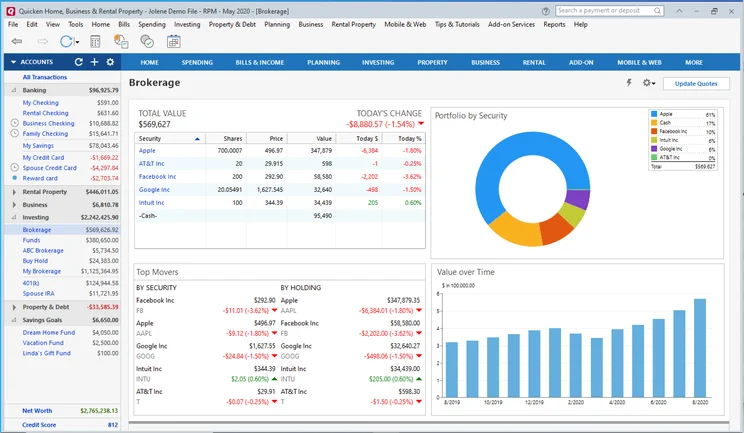
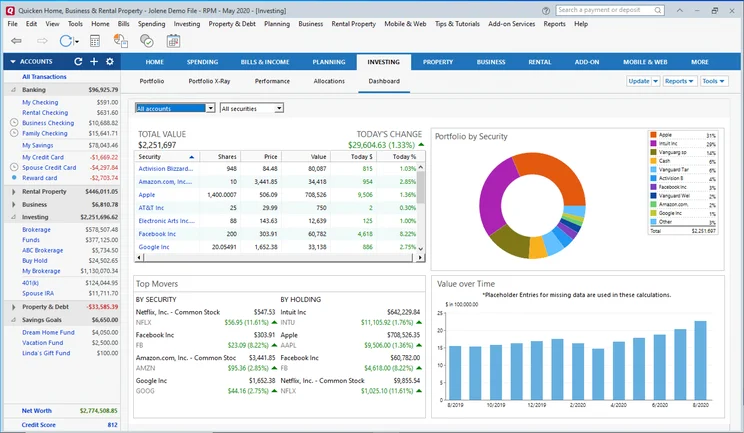
Quicken’s dashboard lets you view all your accounts at once, and helps you to create and visualize your budget. Budget management tools are available on all plans, and with the Deluxe or higher plans, you’ll also get greater budget customization options, debt tracking features, and savings goals.
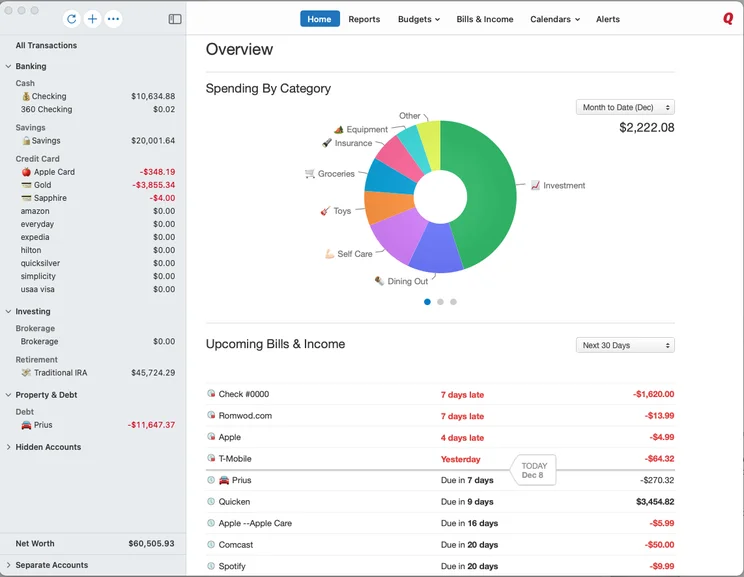
We really like the expenses pie chart here, which provides a quick overview of your spend. Source: Quicken
You’ll be able to separate your spending into categories, and then see how much you’ve spent in each category (e.g. Food and Dining, Shopping, Auto and Transport, Kids) across the past 30 days, allowing for a better understanding of your recent expenditures at a glance.
As a fully-fledged accounting platform, meanwhile, QuickBooks isn’t really designed for personal budgeting. As it aggregates all of your data in one place, it’s a much better solution for businesses that want to keep track of spend, expenses, and what they’re owed.
Invoicing – winner: QuickBooks
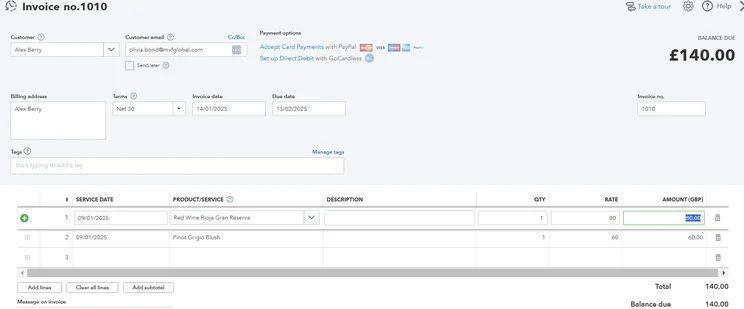
QuickBooks is the clear winner here. It offers customizable invoice templates, including recurring invoices that will be automatically issued at set intervals. Once set up, a project’s billable hours can be automatically folded into the correct invoice. From a design perspective, the level of customizability that QuickBooks offers is far superior to the likes of Wave.
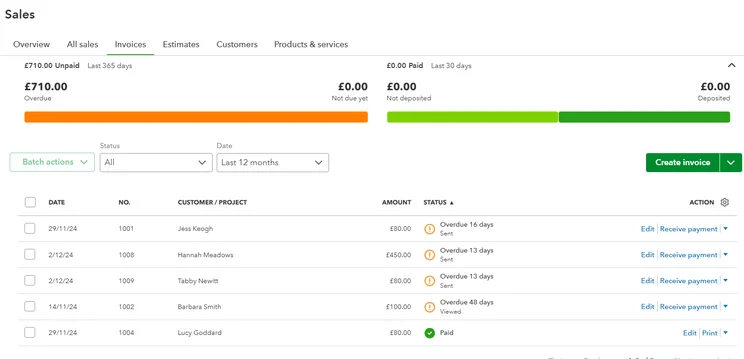
Once the invoice payment rolls in, QuickBooks’ automatic matching function will then find and pair the payments to its invoice, letting users know which invoices are done and which are outstanding. Automated alerts can also let users know when their invoices have been viewed by a client, even if they haven’t paid.
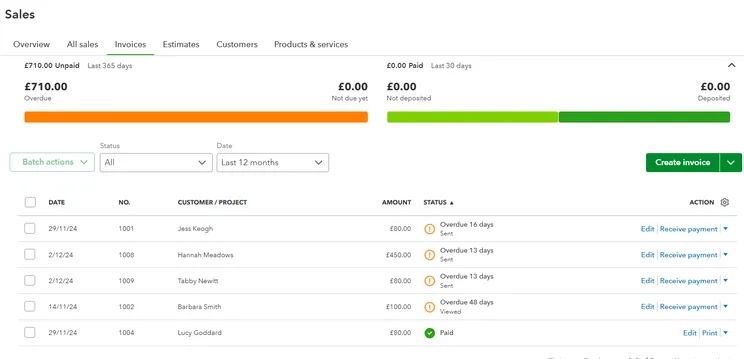
Invoice records can be accessed under the Sales section of QuickBooks Online. Source: Tech.co testing
Quicken also has robust invoicing abilities, even if they are not as good as other top invoicing software on the market. Users can create and email custom invoices from available templates within the software, adding their own logo and color scheme. Invoices can also be sent as PDFs that include a clickable PayPal payment link.
Automatic payments – winner: tie!
QuickBooks lets users set up an automatic payment for their clients (with permission, of course). With this feature, a recurring invoice can be set for a daily, weekly, monthly, bi-monthly, or yearly withdrawal. It can be set to end after a certain number of occurrences, for any installment plan you might need.
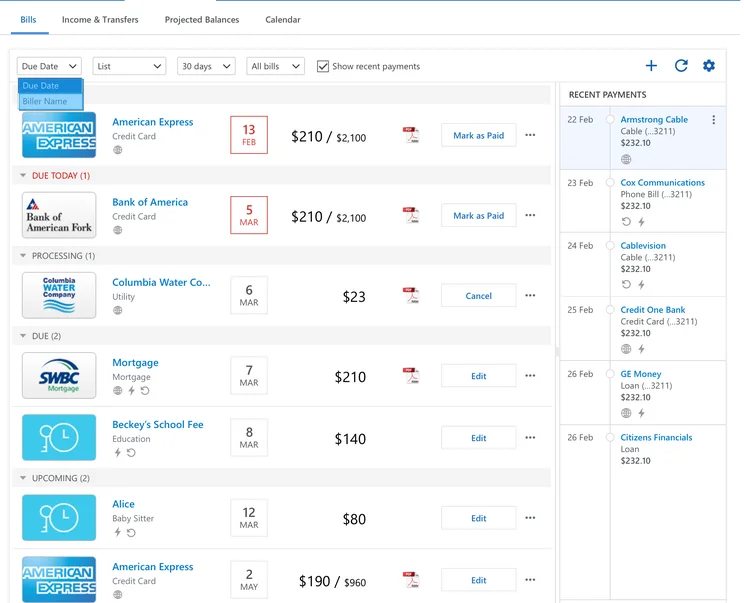
Quicken offers a similar function, called Recurring Payments, to let customers pay automatically. It can be accessed from the “Bills” section.
Payroll – winner: QuickBooks
QuickBooks does not offer payroll services in its core plan, but instead includes a paid add-on to handle it. QuickBooks Payroll is available in three plans, starting between $50 and $190 per month as a base price, with another $7 to $11 per employee per month. It lets employers create paychecks, supports direct deposits and 1099 contractor payments, and offers state and federal tax forms (on certain plans only).
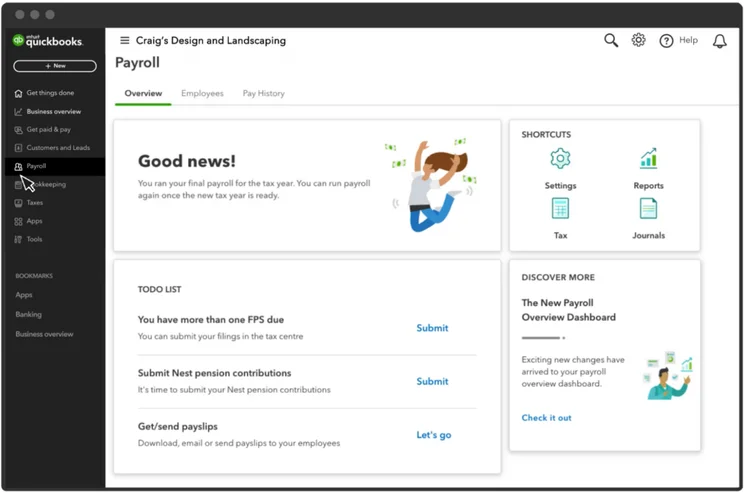
QuickBooks Payroll automatically calculates compensation for your employees, with all relevant pension and tax deductions taken care of. Source: People Managing People
Quicken doesn’t support payroll features. It does have paycheck features, but these are aimed at your own paycheck, not at supplying someone else’s. The service integrates with Intuit Online Payroll.
Tax capabilities – winner: QuickBooks
With QuickBooks, you’ll be able to organically track tax details on all projects and expenses. Notably, tax deduction maximization tools are available across all plans, ensuring an accountant can be easily brought into the software as a guest.
Users can also group their income or expenses according to the right tax category, and can export documents when needed. Sales tax reports are also included in the reporting dashboard.
QuickBooks also sells its Payroll service, which includes payroll tax prep tools, in all its plans and even sells tax forms and envelopes as well.
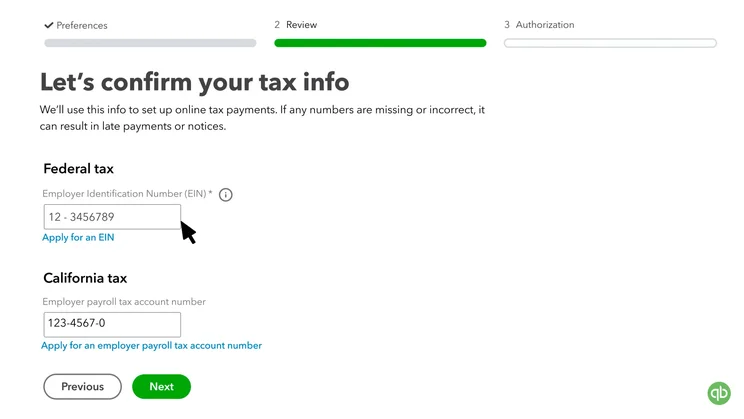
QuickBooks Payroll handles taxes. Source: QuickBooks
Quicken’s tax tools also allow for sales tax tracking within the software. Users can create reports covering Schedules A to E, as well as Tax Summaries, Capital Gains, and custom reports for any tax schedule. Business deductions can be managed as well, and tax data can be exported to TurboTax with ease.
Inventory tracking – winner: QuickBooks
QuickBooks’ inventory management tools are available on its Plus and Advanced plans. Auto-alerts can be triggered when inventory is running low, so reordering is simple. Product data can be imported with Excel, and thanks to third-party integrations, can be sent to other platforms including Amazon, Shopify, and Etsy. The total value of your inventory can be monitored easily throughout the day.
Quicken doesn’t support core inventory tracking abilities. Users can track their inventory total, as long as they keep it manually updated, but they won’t be able to catalog individual items, track items sales, or track how much is in stock and whether it’s running out. If you sell inventory, Quicken is not for you.
Expense tracking – winner: Quicken
All of QuickBooks’ plans include expense tracking, but the best abilities kick in with the Plus and Advanced plans, which include a project management function that collects all projects in a single location and lists all expenses associated with each one. This lets users quickly sort through their expenses when they need to find something specific. Photos of receipts can be linked to specific expenses for an extra papertrail.
Quicken scans its users’ transactions, noting all regularly recurring expenses for easy budgeting. You can choose whether to do this automatically or manually, and can separate expenses into categories as well.
The expense overview in Quicken Deluxe. Source: Quicken
Reporting and dashboards – winner: Tie!
QuickBooks offers detailed, flexible reporting abilities, with a long list of preset templates that can be modified to fit each user’s specific needs. Report templates include audit logs, balance sheets, statements of cash flow, open invoices, customer reports, sales tax reports, budget overviews, and profit-and-loss reports ranked by month, class, customer, or year-to-date. All of this is available from the Reports Center on the navigation menu.
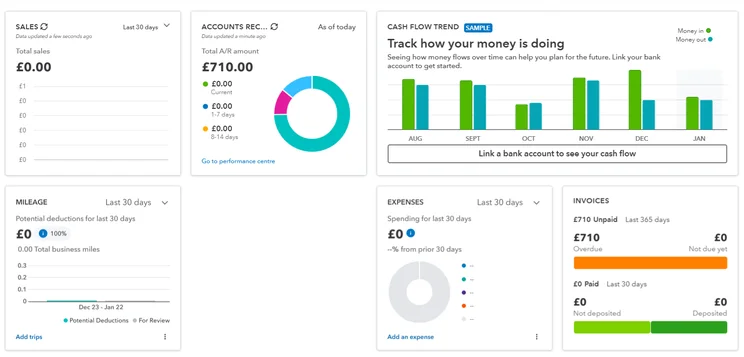
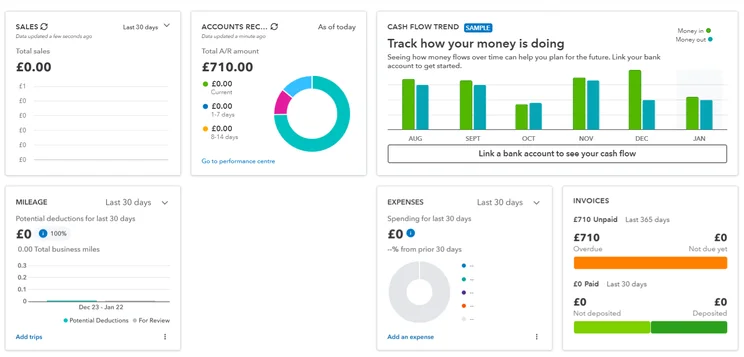
QuickBooks’ dashboard has a lot of information it, but it’s cleverly segmented so that it doesn’t appear too crowded. Source: Tech.co testing
Quicken’s comparable dashboard, the Reports & Graphs Center, also lets users run a variety of reports: Spending by Category and by Payee, Transactions, Banking Summary, Cash Flow, Current vs. Average Spending by Category and by Payee, Missing Checks, Current Budget Spending, Account Balances, and Cash Flow Comparison Reports.
Security features – winner: Tie!
QuickBooks offers 128-bit SSL encryption across all plans. QuickBooks Advanced has role-based user permissions, which means that each user will have access only to the information they need to know, thus limiting the possibility of an information leak.
Quicken offers even stronger 256-bit encryption, and allows additional password protection on Quicken data files. It doesn’t include role-based permissions, but it only supports one user, so there’s no need.
On the whole, both services offer strong security protocols.
QuickBooks vs Quicken: Integrations
This isn’t much of a match-up at all, with QuickBooks offering many more integration options than Quicken.
QuickBooks integrations
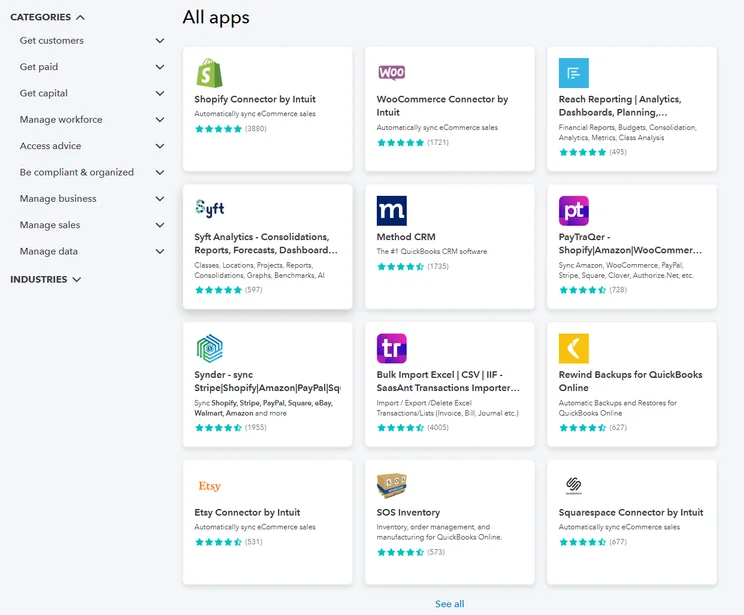
QuickBooks has a library of more than 800 integrations, letting users easily tie in their data from major business platforms like Microsoft 365 and Google’s G Suite. Other third-party services cover tasks in a range of categories, including marketing, file storage, CRM, ecommerce, and payments.
Some of the most popular integrations available for QuickBooks users include:
- PayPal
- Shopify
- Square
- Fathom
- QuickBooks Time
- Housecall Pro
- MailChimp
- Gusto
Check the price before you commit: Some services are paid and some are free, so the monthly subscription costs might add up if you need a large number of integrations.
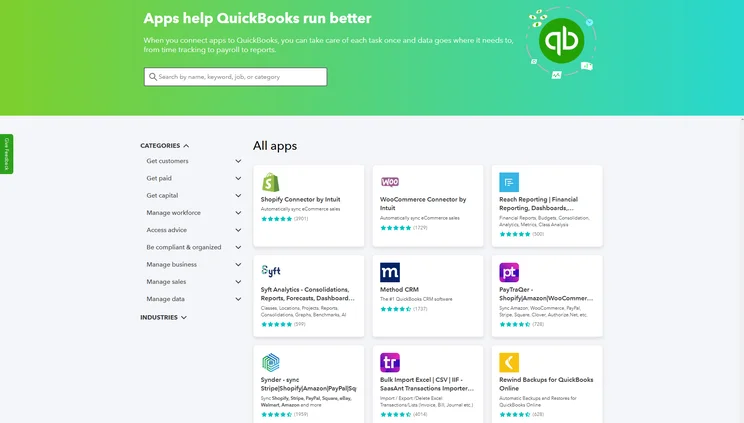
These are just some of the integration options that QuickBooks offers. Source: Tech.co testing
Quicken integrations
Compared to QuickBooks, Quicken offers a very limited selection of integrations. These include integrations with PayPal, the home valuation tool Zillow, and Intuit Online Payroll. Square is not included, and Quicken doesn’t make a full list of integrations available.
QuickBooks vs Quicken: Usability
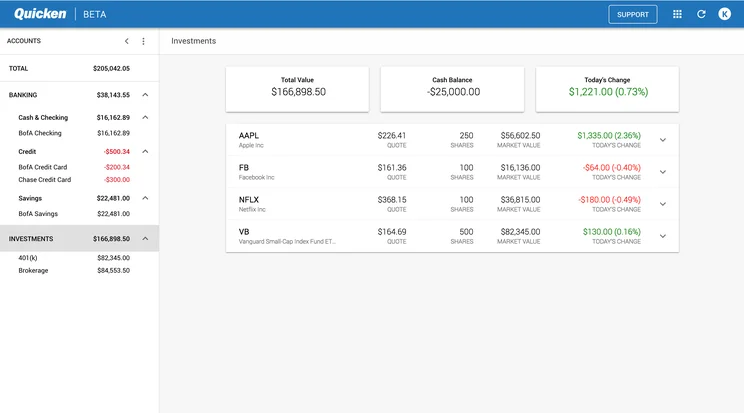
Both QuickBooks and Quicken offer a similar visual experience. Their software gives users a main dashboard composed of customizable graphs and charts (e.g. listing recent transactions, categories of spending in the past 30 days, spending over time, or an investment summary), with a sidebar that links to the main categories of usable features, like Bills, Invoicing, and Reporting.
One big differentiator is that QuickBooks’ range of plans supports between one and 25 users, while Quicken’s plans all support a single user. QuickBooks offers role-based permissions and allows third-party accountants to join as guests, and while Quicken lets you export data to show to accountants, it doesn’t have any multi-user functionality. QuickBooks is also more customizable overall, and allows for greater scalability due to the depth of features in its more advanced plans.
During our most recent round of testing, our users weren’t that enamored with QuickBooks’ usability. One commented: “If I was a business with little knowledge, I would be quite confused. This would be hard for a small business owner that has to do everything by themselves.”
Quicken’s layout is fairly clear, but it does have one issue worth noting when it comes to User Experience: It’s a little slow, and will frequently take a few seconds to load when a user is entering information or switching from one screen to another within the software. While not a dealbreaker, those lost seconds can add up to an annoying experience if you’re spending a lot of time with the service.
Supported devices
QuickBooks is supported on all common devices and browsers, while Quicken requires Windows 10 and higher, Android OS 4.4 and higher, the latest macOS versions, iOS 11 and higher, or the latest versions of Google Chrome, Microsoft Edge, Safari, and Firefox.
It’s also worth noting that Quicken’s Classic tiers can only be used on Mac or Windows.
QuickBooks vs Quicken: Customer Service & Support
Both services offer similar customer support options, with an emphasis on online resources that walk users through their accounting solution’s features and abilities.
Training
The first stop for QuickBooks users will be its online help portal, which offers articles and video tutorials split into categories such as Reports, Payroll and Workers, and Advanced Accounting, among others. QuickBooks has another, separate resource center, as well as training courses, a blog, and a community forum.
Quicken also has a help portal, with a video university and an FAQ section categorized by topics including Order Questions, Product Registration, Online Banking, Install and Update, Planning Tools, and more. There’s also a community forum that lets users ask each other additional questions.
Online and phone support
QuickBooks users will need to log in to access the live chat (6am to 6pm, PT Monday through Friday) or phone support.
Quicken also makes staff support accessible through the website’s live chat or by phone, from 5am-5pm PT on Monday-Friday. Please note, the live chat is also open at the weekends.
One other thing sets it apart from QuickBooks: Quicken does not require an initial login in order to access the live chat and phone support team.
Alternatives to QuickBooks
QuickBooks is far from the only accounting software solution for small businesses. As per our most recent round of research, our recommendation is Zoho Books, which boasts excellent core accounting and financial planning functionality, alongside impressive general usability. For more information on how the provider stacks up against QuickBooks, check out our guide to Zoho Books vs QuickBooks.
Other great solutions are Xero, which offers great tools for online businesses in particular, and FreeAgent, which is currently running a promotional offer for new customers – get 50% off the first six months of a year-long contract! Also, if money is tight, make sure to check out our list of the best free accounting software.
Check out the table below for a quick glance at the best accounting solutions, and visit our complete guide to the best QuickBooks alternatives for an in-depth look.
|
Starting price
|
Free trial
|
Best for
|
Pros
|
Cons
|
Try now
|
||
|---|---|---|---|---|---|---|---|
 |
 |
 |
 |
|
|||
|
FreshBooks |
Xero |
Zoho Books |
FreeAgent |
QuickBooks |
|||
|
|
|
Free |
|
|
|||
|
30 days |
30 days |
14 days |
30 days |
30 days |
|||
|
New businesses |
Experienced accountants and established businesses with complex financial needs |
Integrations |
Budget-conscious businesses |
Businesses needing advanced financial insights and customization |
|||
|
|
|
|
|
|||
|
|
|
|
|
|||
| Try FreshBooks | Try Xero now | Try Zoho Books | Get Quotes | Try QuickBooks |
Alternatives to Quicken
Quicken is great for managing your personal finances, but there are other options worth considering out there. Among them, you might want to look into Rocket Money. The fintech offers budgeting functionality, investment tracking, and subscription management at a reasonable price.
If you’re looking for something a little more robust that can match Quicken feature-for-feature, then Empower is worth considering. It can handle budgeting, net worth, cash flow management, retirement planning, and investment tracking.
Verdict: Should You Choose QuickBooks or Quicken?
We’d recommend QuickBooks for most small businesses, given its depth of features, integrations, and customizability. Quicken isn’t designed for many small business needs, given its lack of inventory management features. That said, Quicken is the far less expensive solution, and it fits the needs of rental property managers in particular as well as individuals planning their personal finance management who should consider it first.
If you know which solution is best for you, there’s a clear next step: Take a minute to review our page on all the best accounting software. This gives you a full look at the top accounting software solutions, including the best alternatives to QuickBooks and Quicken.
You can also check out our head-to-head breakdowns such as QuickBooks vs Xero, QuickBooks vs Sage, or Zoho vs QuickBooks.
If you click on, sign up to a service through, or make a purchase through the links on our site, or use our quotes tool to receive custom pricing for your business needs, we may earn a referral fee from the supplier(s) of the technology you’re interested in. This helps Tech.co to provide free information and reviews, and carries no additional cost to you. Most importantly, it doesn’t affect our editorial impartiality. Ratings and rankings on Tech.co cannot be bought. Our reviews are based on objective research analysis. Rare exceptions to this will be marked clearly as a ‘sponsored’ table column, or explained by a full advertising disclosure on the page, in place of this one. Click to return to top of page


