

We may receive a commission from our partners if you click on a link to review or purchase a product or service. Click to Learn More
Running a full project management life cycle can seem counterintuitive at first glance. When your business or team is working hard on a project, especially one that’s time-sensitive, you might not be inclined to take the time out to, say, make a visual representation of your project’s progress, or take stock in what you’ve achieved so far.
A thorough understanding of the project management process and each of its phases could be the difference between a successful business launch and a memory of what could have been. In this guide, you’ll learn about the five main steps to any good project management process and how to use project management software during your project cycle.
What Is Project Management?
Project management is the process of leading, directing, and ultimately managing a team of people as they complete a series of tasks that culminate in the achievement of pre-defined goals – in other words, a project.
Project management involves utilizing relevant skills, knowledge, and organizational strategies in a way that is conducive to success within a specific timeframe. There are different methodologies, such as MOCHA, that can be used as a framework to make managing projects easier and the overall process more efficient.
The Project Management Life Cycle
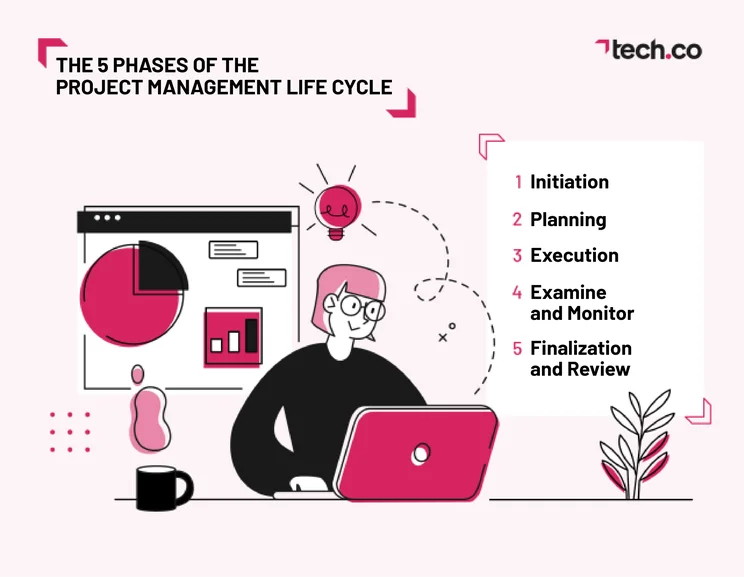
Understanding the project management life cycle and implementing a full project management system will reduce the possibility of failure. One commonly cited statistic states that 70% of IT projects fail somewhere down the line. However, similar projects that use a project management process are found to have their failure rate reduced to around 20%. A typical life cycle of project management will include:
- Initiation – defining aims, goals, and stakeholders
- Planning – identifying all the smaller steps
- Execution – delivery of the project itself
- Examine and Monitor – maintaining oversight during the execution
- Review – reflect on the experience and gather feedback
1. Initiation
The first phase of the project management life cycle is initiation. No plan can commence unless you know exactly what end goal you’re trying to achieve. In fact, in a report by the Project Management Institute, 29% of organizations said that their projects fell apart due to an inadequate goal or vision. In the same report, 39% of organizations said that a shift in priorities was responsible for the failure – priorities that could and should have been ironed out in the planning stage.
This is the easiest and shortest stage of the entire process but by no means the least important. Setting up your goal is crucial, and leaving it to be done later, or keeping the goal vague, could be a death sentence for your entire project.
Using our house metaphor, this is the stage where you’d envision the house’s shape, color, windows, size, etc. Some specifics would definitely be nailed down later, like the budget and the location, but this is the time for broader strokes, not blueprints. During this phase, you may want to:
- Creating a project proposal
- Identify the scope of your work to avoid Scope Creep
- Identify/recruit team members and pinpoint stakeholders
- Define the core goal of the project & create a project charter
- Identify resources required/needed to complete the project
2. Planning
If conceptualizing is the forest, then planning is the trees. Once you’ve got the big picture fully set up, you’ll need to sort out the smaller steps that will get you to the finish line.
Depending on your project and your methodology, this could be quite easy to lay out, or could be an entire task in itself. For example, if you wanted to use project management to write a book, you’d simply map out the chapters you needed to write, and estimate the time it would take to write it.
When it comes to our house, however, the planning stage becomes a lot more complicated. Now is when we whip out the blueprints. We’ll need to piece together the various steps and lay out a concrete plan before we take a single tangible step. We need to know which materials to buy, the exact zoning permits we need, the exact blueprint layout of the house – anything that will help us lay down firm guidelines. At this stage, many project managers use PERT or Gantt charts to visualize their project steps.
This plan will help set expectations for the project’s timeline, cost, and necessary manpower. This means that, at any time during the project’s progression, these figures can be checked and compared in order to see how well the project is going. This is especially important, as budget is almost always an issue when it comes to projects – only 43% of organizations claim to complete projects within their budgets.
3. Execution
Showtime! This is the stage where the project gets underway. Whatever project your business is handling, this is when you’ll actually start working on it. This is likely going to be the longest step, since it encompasses all the actual work you’ll be doing.
In terms of our metaphor, we’re now building the house. Setting up the foundation, tiling the floors, painting the rooms, and installing the pipes (maybe not in that order) – these are all done in this step.
Depending on your methodology (which will be tailored to the type of project you’re working on) the project management process itself will vary significantly during this stage. For example, the Waterfall method will mean that you’re taking things step by step, whereas the Agile method will mean that your team is bouncing between various tasks.
While this step is the most involved, there’s actually the least amount to say about it. Since there’s such a wide range of approaches, we couldn’t feasibly cover what this step looks like for everyone, so all we can really tell you is that this is the meat and potatoes of any project.
Efficient execution hinges on good communication. Find out some tried and tested ways to improve your team’s communication.
4. Examine and Monitor
While this is labelled as phase four in the project management life cycle, it would really happen in conjunction with phase three. One of the main benefits of project management systems is the ability to track your project’s progress down to the smallest detail.
Take a Kanban board, for example (shown below through Jira.) This board tracks the progress of each individual task, showing if something is overdue, how much of the project is finished, and who is in charge of which area.
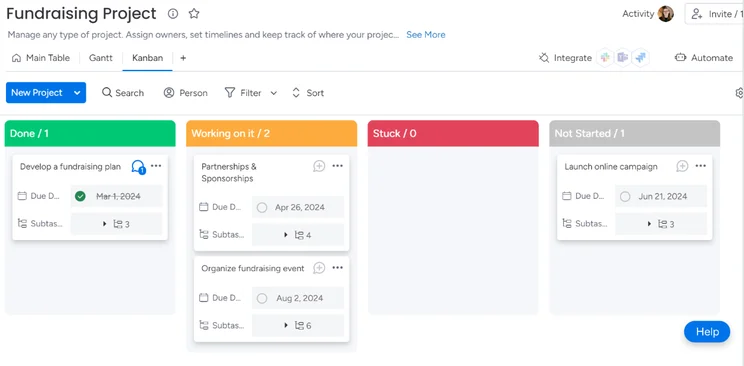
This is the easiest part of the process to let slide, especially if you’re not using project management software. In a team of 10 people, it can be easy for one or two of them to forget to mark their progress down, but this can be disastrous if something goes wrong and steps need to be retraced.
We don’t even really need to reflect on our house-building comparison, as this would be pretty much the same for every project under the sun. Keep tabs on what’s in progress, what’s under review, and what’s finished, and your project will be much easier to navigate.
5. Finalization and Review
Pop the bubbly! We’re finally done with our project. The only things left to do are turn it in to the client, in whatever form that would take, and look back at the experience.
The first part is easy: show the client the final product. Whether that’s a logo, a building, a robot – all that’s left to do is walk the client through the end result and confirm that they’re happy with it.
Once that’s done, it’s time for a bit of reflection. Compare the time and money spent to the original projections formulated in phase two. If you went over budget or past the deadline, look through your data gathered in phase four to see where exactly you went wrong. Gathering this data is crucial for the growth of your organization, as it serves to make you more efficient and will ensure that your next project runs more smoothly.
In our house example, once we’ve walked the client through and shown them their new home, we’d then have a look at our numbers. Perhaps the insulation took two more days to install than we thought, or the piping put us a couple thousand dollars over budget. Being aware of these hiccups going forward can only serve to make future projects more realistic and timely.
Why Is The Project Management Life Cycle Important?
Now you know a little more about the project management life cycle, let’s explore precisely why it’s so important to teams that manage projects.
Understanding the project management cycle is important because it contributes to clearer planning and organization. Remarkably, unnecessary multitasking can make productivity drop by 40%. Juggling multiple jobs can actually impede progress on all of them. This might be why almost all methodologies seem to favor one person doing one task until it’s complete, rather than stretching themselves too thin.
Familiarity with different stages of the project management life cycle will mean you’re less likely to get caught off guard by unexpected happenings during your project, and that you spend appropriate time in the planning phase before you move on to execution. These sorts of obstacles can often cost money – 55% of project managers cite budget overruns as a reason for failure. Budget has always been a constraint on businesses, and pushing it can cause a project to crumble.
Since the COVID-19 pandemic, there has been an increased need for structured, framework-led project management. At a time when many people were away from the office, and perhaps feeling unmotivated, the structure provided by project management methodologies was a huge help in keeping some organizations on track.
Remote and hybrid working arrangements have remained, even though a lot of companies have called their workers back into offices across the world. Having team members working in different parts of the world that might several hours in front or behind you requires more structure – important details can’t be left to off-the-cuff water cooler chats that, in the modern world, just don’t happen.
Using Project Management During the Project Management Life Cycle
While project management can be done with as little as sticky notes and a pen, it’s best handled through project management software. This software will allow you to stay on top of your projects using various tools and services that can help expedite your workflow. In fact, 77% of high-performing projects use project management software.
The initiation phase of a project doesn’t necessarily require project management software – but your initial discussions will likely include references to tasks you’ll soon need to complete. If you’re setting broad goals for different points of the project, however, you might find the “Milestones” function, which is included in lots of modern project management software programs, helpful for this.
During the planning phase, you can use collaboration tools like an online whiteboard to support brainstorming sessions, which are provided by platforms like ClickUp. You could also peruse your project management software tool’s templates as if there’s one specific to your industry, which might give you some inspiration or direction with regard to how you should structure your project.
During the execution phase, on the other hand, you can use automation features to take some of the workload off your team by automating basic tasks, like administrative housekeeping. 54% of workers spend more than 5 hours a week on tasks that could be easily automated, like data entry, so automation can save businesses loads of time. Some project management software programs, like monday work management, now offer AI assistants, which can help with similar tasks as well as much more.
While you’re in the monitoring phase, your project management software’s reporting tools will come in handy. They’ll let you create brief summaries of your team’s progress that you can use to report back to your clients. Data visualization tools like a chart builder will help you see how your team is handling the workload. Task management features like time-tracking, provided by the likes of Teamwork, will also help with this.
Project management software like Smartsheet provide form builders that are good for compiling post-project feedback, which can feed into your review phase. You’ll also be able to use the guest access feature provided by these sorts of platforms so that external stakeholders can view different aspects of the project.
As far as the best project management software, there are a lot on the market. According to our project management software research, the top four are:
- monday – a very easy-to-use platform with excellent security options
- Teamwork – a great value tool that’s great for tracking budgets
- ClickUp – excellent collaboration and task management tools
- Wrike – a feature-rich app that’s excellent for task management and collaboration
|
Price from
All prices listed as per user, per month (billed annually)
|
Score
The overall score obtained from our most recent round of project management software user testing
|
Verdict
|
|||||||
|---|---|---|---|---|---|---|---|---|---|
|
Best All Round
 |
Great Value and Excellent Automation Builder
 |
Best For Task Management & Collaborating
 |
 |
 |
 |
 |
 |
 |
 |
|
monday work management |
Teamwork |
ClickUp |
Asana |
Wrike |
Trello |
Smartsheet |
Jira |
Zoho Projects |
Basecamp |
|
$9/user/month |
$9.99/user/month |
$7/user/month |
$10.99/user/month |
$10/user/month |
$5/user/month |
$9/user/month |
$7.91/user/month (300 users) |
$4/user/month |
$15/user/month |
|
4.7
|
4.6
|
4.5
|
4.5
|
4.4
|
4.3
|
4.2
|
4.1
|
4.0
|
2.9
|
|
A great task management system due to strong customizability and support team, with a generous free trial |
A great user experience all round, with an easy-to-use automation builder and great budget tracking capabilities |
Slick software with a highly powerful core and an AI assistant, plus a genuinely usable free tier for individuals |
A simple task-list-based project management platform with an acceptable free tier |
A feature-rich service with two plans for enterprises, and a free tier for new users to try |
A fairly-priced, stripped-down option, best for small teams who need a central location for basic task management |
A great tool for spreadsheet-natives, which can take your Excel-based task planning to the next level |
A great value piece of software that’s ideal for tech, software development, and engineering teams |
A solid project management solution with an attractive free tier for small teams and a very affordable premium plan |
A very basic, relatively limited software that’s a lot simpler than its competitors |
To recap, the five stages of project management are:
- Initiation: Thinking up and nailing down what you want your project to be
- Planning: Laying out each step of the project in a specific plan
- Execution: Beginning the plan, in whatever form that may take for your business
- Monitoring: Tracking the progress of the project, updating time logs and progress reports
- Finalize and Review: Turning in the project, and looking over the entire experience to see what learnings can make for a better experience in the future
By combining a structure like this, a methodology that suits your business, and project management software that is well-equipped to handle your needs, you’ll be able to optimize your workflow and deliver projects smoothly and efficiently.
Frequently Asked Questions
Also known as whole-life costing, life cycle costing is the estimate of the total cost of an asset over the course of its life. For example, a car’s life cycle costing would include any maintenance, refuelling, and initial purchase costs.
Change control is the process of making sure that any changes introduced to a system are done so in a way that won’t damage established systems. By implementing change control, organizations can make sure that even in a worst-case scenario, the project will survive without a massive negative impact.
Any business that creates projects that take place over extended time periods (anything more than a couple of days) should consider a project management process. This is doubly true if these projects are being run by a team of multiple people instead of just one person, as it will allow members to keep tabs on what others are doing.
While various platforms shine in various ways, the overall best project management software is monday work management. It hits a sweet spot between customizable and sleek, with an easy-to-navigate interface that allows for speedy use. We found monday work management easier to use than providers like Asana, but we also like Smartsheet, which is easy to adapt to for those who love spreadsheets, and Wrike, which is a great introduction to project management overall.
Each project management method will suit a different type of team. For example, the Scrum method is very popular among software development teams. However, if your team is more scattered and dynamic, then the Agile workflow would be a good idea, as it allows for different sections of a project to be tackled at the same time. For other examples, check out the 6 Best Project Management Methodologies.
If you’re not too sure about what you want, the best way to decide is simply to try them all out until you find one that works for your business. Most project management tools offer free trials or plans, like ClickUp’s free plan, which is particularly robust. monday work management’s free plan will also allow you to experiment with various methodologies.
The project management life cycle is the steps that an organization takes in order to begin and finish a given project. This cycle is made up of five steps: concept, planning, action, tracking, and review.
If you click on, sign up to a service through, or make a purchase through the links on our site, or use our quotes tool to receive custom pricing for your business needs, we may earn a referral fee from the supplier(s) of the technology you’re interested in. This helps Tech.co to provide free information and reviews, and carries no additional cost to you. Most importantly, it doesn’t affect our editorial impartiality. Ratings and rankings on Tech.co cannot be bought. Our reviews are based on objective research analysis. Rare exceptions to this will be marked clearly as a ‘sponsored’ table column, or explained by a full advertising disclosure on the page, in place of this one. Click to return to top of page


