

We may receive a commission from our partners if you click on a link to review or purchase a product or service. Click to Learn More
SpotOn is a top-rated small business POS solution, standing out for its useful free plan that even includes hardware. It also comes with offline functionality, a great customer display screen, and prices lower than nearly all other POS systems we tested.
In other words, it’s durable and inexpensive, making it one of the best POS picks for a smaller hospitality operation that needs to deliver the basics on a budget. Our research team found it performed moderately well in many categories, below some top hospitality POS systems including Square and Toast, but above many more.
This review covers all the pros and cons behind the features, fees, and support that SpotOn has to offer.
SpotOn

In Short
-
Pros
- Top tier free plan for small businesses
- Affordable hardware add-ons for in-person selling
- Automatic offline functionality without internet connection
-
Cons
- Few hardware options
- Expensive paid plans for restaurants
- Limited retail functionality only suited for small shops
Pricing
-
 Free plan includes hardware
-
Restaurant plan (POS Essentials): From $55/month
-
Transaction fees from: 2.45% + 15¢
Images
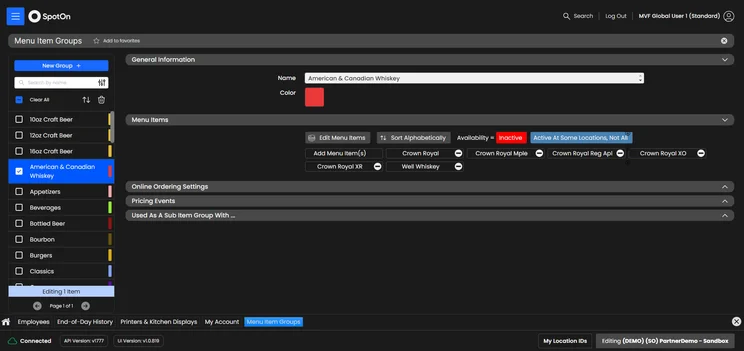
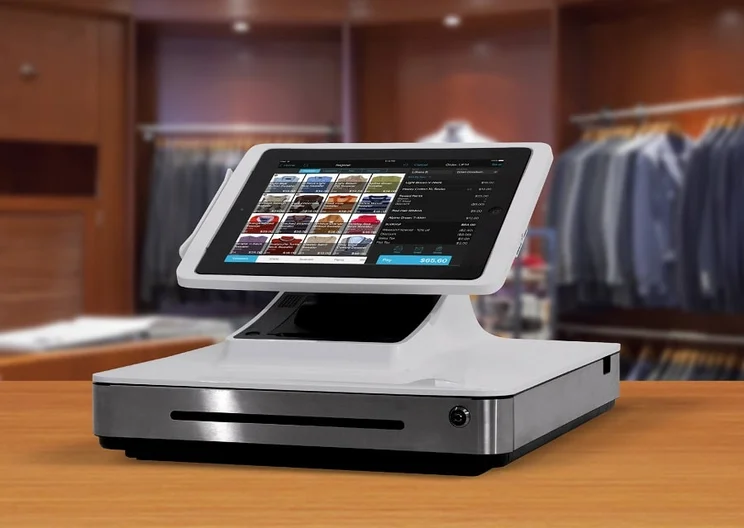
Key Takeaways
- SpotOn POS offers a great free plan that provides hardware, but you will have to pay transaction fees.
- SpotOn POS caters mostly to restaurants but does offer some limited options for retail businesses.
- SpotOn POS pricing for retail businesses starts at $25 per month but goes up to $99 per month for restaurants.
- SpotOn POS has limited hardware options and no accessories available for purchase.
- SpotOn POS offers no tablet payment functionality for its POS system.
The Tech.co team sinks hundreds of hours into researching the best POS systems because it’s the only way to ensure we’re providing our readers with the most accurate, up-to-date information possible.
We’ve spoken to daily POS users working in restaurants, retail and more, and have tested out more than 20 point-of-sale platforms ourselves, paying close attention to everything from the quality and feel of the hardware to how easy the software is to use, to help you make a clear decision for your business needs.
Head over to our methodology section to learn more about our product review process, which is one of the reasons more than one million users consult our articles every month.
SpotOn POS: Pricing & Plans
SpotOn POS pricing is quite competitive, offering a range of affordable plans for both restaurants and retail businesses. Here’s a breakdown of SpotOn pricing across all plans:
- Terminal ($25 per month) – The only retail option for small businesses, the Terminal plan from SpotOn allows you to take payments, print receipts, and view sales reports. For a total of $90 per month, you can add an integrated website.
- Counter-service ($99 per month) – This option is for counter-service restaurants, adding some guest and employee management features, like online ordering, tip management, and access to the Teamwork mobile app.
- Full-service ($135 per month) – This plan is for full-service restaurants, adding a kitchen display system, as well as digital and tableside ordering features, like QR ordering and digital menus.
- Customize your own (Custom) – Customizable plan that allows you to pick and choose what kind of hardware and software tools you need for your restaurant.
Check out how these pricing plans match up in the table below:
|
Plan
|
Price
Monthly cost of the software.
|
Transaction fees
|
|
|---|---|---|---|
 |
 |
|
|
|
All-In Plan |
POS Essentials |
Customize Your Own |
|
|
Free |
$55/month |
Custom pricing |
|
|
2.79% + 20¢ (card present) 3.79 + 20¢ (keyed-in) |
2.45% + $0.15 card present (excluding Amex) 3.45% + $0.15 keyed-in |
Custom rates |
Does SpotOn have a free plan?
Yes, SpotOn has a free plan, called Quick Start, and it’s one of the best free POS software, according to our research. It allows for all the basic functionality, like POS ordering, payments, and menu and floor plan management, as well as reporting and analytics tools. You’ll also still get access to the 24/7 support, which is available in the paid plans.
Perhaps the biggest pro of the SpotOn POS free plan, however, is that it offers a hardware solution at no cost to the business. That’s right, you’ll be able to get set up with a terminal without incurring any additional monthly charges.
You will have to pay for the terminal with transaction fees that are noticeably higher than the paid plans, at 2.89% + 25¢ per transaction. Still, this is slightly below the transaction fee of 2.6% + 15¢ that you’ll pay for rival Square’s free plan.
SpotOn transaction fees
If you choose to use SpotOn’s in-built payment processor, the POS charges two different rates depending on the payment type. On top of the monthly fees, businesses can expect to pay:
- 1.99% + 25¢ for most card transactions
- 2.99% + 25¢ for rewards, international, corporate, AMEX, or keyed card transactions
Software add-ons and extra fees
SpotOn is one of our top picks for price, but it does have some hidden fees and add-on costs.
Both paid restaurant plans (Counter-service and Full-service) come with an additional $3 per month per employee cost, and there’s a hefty $75 per month minimum. You’ll want to factor that into your monthly charge before moving forward: If you opt for one of these restaurant plans, you’ll need 15 employees in order to justify the minimum cost.
SpotOn offers a $90 per month Terminal + Website plan. It’s useful for those who need to launch a website alongside their POS system. You’ll get access to the Terminal plan software and a professional website, search engine optimization (SEO), hosting, and online dashboard.

This is a sample of a website that SpotOn can create for your business. Source: Tech.co testing
It’s important to remember that none of the charges listed above include hardware, except for the free plan. This means you’ll have to pay a bit more to get a terminal that works with SpotOn. There are a few options that range in price from $200 to $1,350, and financing is available to keep the upfront charges to a minimum.
Does SpotOn offer a good value?
Our research found that SpotOn offers one of the best values when it comes to POS. This is largely because it offers such a stellar free plan that includes hardware, albeit with more expensive transaction fees.
SpotOn’s retail pricing is competitive at $25 per month, especially compared to Square Plus, which starts at $49 per month, or Shopify, which starts at $29 per month, which means SpotOn is a clear affordable pick for retail businesses.
For restaurants, SpotOn is not as good a deal. At $99 per month for counter-service and $135 per month for full-service, SpotOn is a bit pricy for restaurants compared to other options, like Toast ($69 per month) and Square ($49 per month). You do get a lot of functionality in these more expensive plans, though, like the Teamwork app for staff scheduling and communication.
SpotOn effectively balances ‘free-to-start’ systems with premium POS platforms, offering integrated cost management and operational analytics as its key advantage.
With many features that enhance data visibility, the main benefit is better decision-making. While it is important to consider SpotOn’s processing fees, the embedded analytics can greatly enhance margins by optimizing staffing, pricing, and cost control. At the same time, limited integrations might decrease flexibility.
Evaluate SpotOn not only on pricing but also on whether its operational insights layer delivers measurable value. If you handle labor-intensive operations and aim for tighter margins, it can offer impressive ROI.

Vatsal Bhandari is a Certified Anti-Money Laundering Specialist (CAMS) and a financial and business operations consultant. He has a Master’s of Business Administration from Imperial College London and an LLM (Master of Laws) in Banking & Finance Law from the University of Edinburgh.
SpotOn Review: Key Features
SpotOn offers tons of competitive features. Here’s a round-up of our favorites:
Staff management
SpotOn is great for staff management, our research found. It allows for helpful functions like automatic tip sharing and gratuity reports, which are not available on either Clover or Lightspeed, so you can monitor numbers across your team. We were also able to check out team member-sales reports with SpotOn POS, making it easy to see how well our team is performing over a certain period.
One particularly valuable staff scheduling benefit you’ll get with SpotOn is the ability to view schedules across multiple locations. This means you’ll be able to check the availability of staff at your other restaurants, and can mix and match when you’re in a pinch.
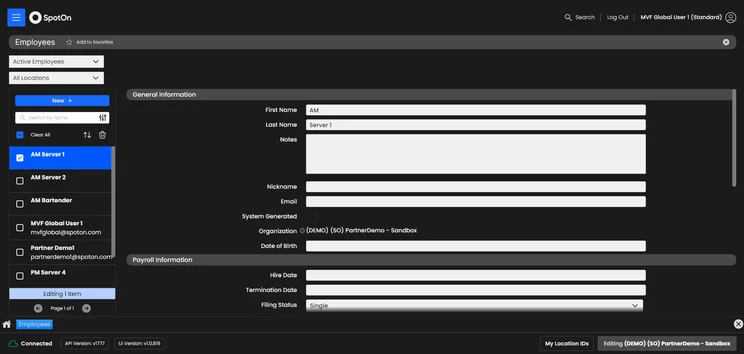
SpotOn offers a wide range of trackable staff information. Source: Tech.co testing
SpotOn Teamwork app
One main reason SpotOn is so great for staff management is the SpotOn Teamwork mobile app, which is available on both iOS and Android. This app can be used by your entire team to clock in, coordinate schedules, request time off, and even track your tips.
The SpotOn Teamwork app also has built-in two-way messaging. This can help you stay in touch with your team without having to give out your personal phone number or email.
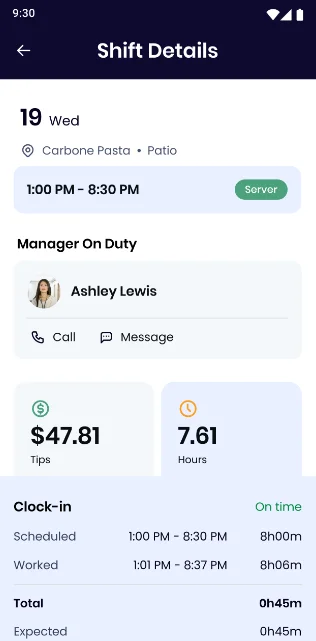
A shift details interface is included within the SpotOn Teamwork app. Source: SpotOn Teamwork
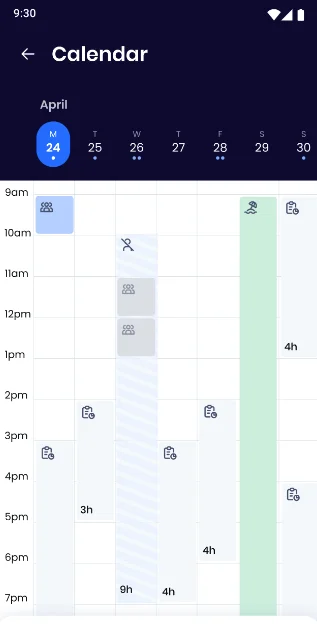
The calendar interface in the SpotOn Teamwork app. Source: SpotOn Teamwork
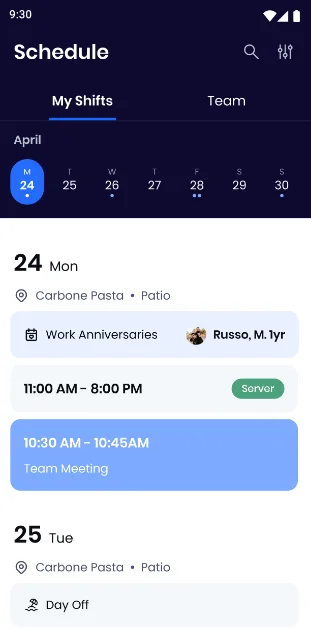
The My Shifts interface in the SpotOn Teamwork app. Source: SpotOn Teamwork
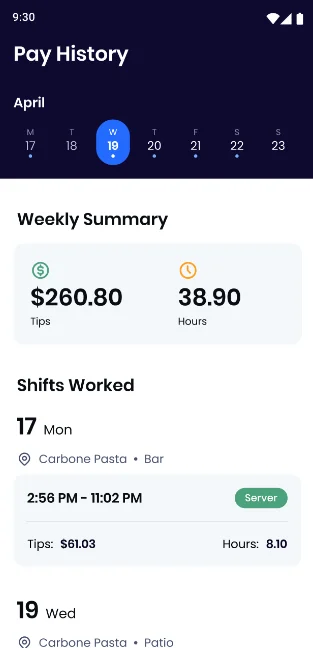
The pay history interface in the SpotOn Teamwork app. Source: SpotOn Teamwork
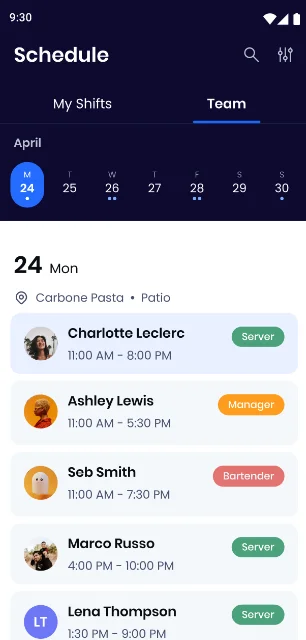
The scheduling interface in the SpotOn Teamwork app speeds up staff management. Source: SpotOn Teamwork
Offline functionality
SpotOn POS stands out for its ability to keep working even when the WiFi drops. It offers some of the best offline functionality across our research by switching automatically to offline mode when it loses connection. Some top choices, like Toast, don’t do this.
Even better, the POS allows users to take card payments offline that are automatically processed once you re-establish a connection.
Help and support
SpotOn has substantially improved its help and support options over time. Our last round of research showed it was one of the worst, offering only knowledge base functionality and virtually no means of getting in touch with a representative.
That is decidedly not true anymore, as SpotOn offers robust help and support options, allowing users to reach out via live chat, email, and phone. You can even reach out via social media, which neither Lightspeed, Clover, or Toast offer. On top of that, you’ll get in-platform assistance if you need it, and the knowledge center obviously didn’t go anywhere.
How Easy Is SpotOn to Use?
We found the SpotOn POS very easy to use. In fact, it was the most intuitive POS system to navigate, allowing for easy access to all relevant areas needed for setup. Both the front end and back end were comprehensive, with our research team experiencing a low error occurrence rate.
On top of general navigation being simple, we also found that the interface was quite customizable, allowing for basic changes like dark mode and font size changes, so you can put everything in its proper place for your team.
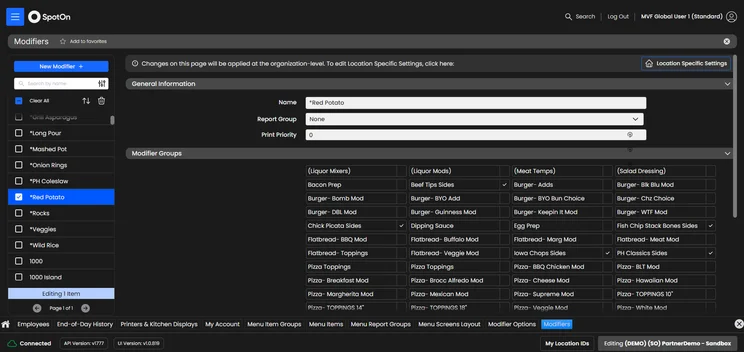
We found the SpotOn interface quite customizable with thorough modifiers for each item, even in dark mode. Source: Tech.co testing
What Is SpotOn’s Hardware Like?
As we’ve mentioned, SpotOn doesn’t offer a lot when it comes to hardware options, but that doesn’t mean you won’t be able to find exactly what you’re looking for. Here’s a breakdown of the hardware solutions available from SpotOn:
- SpotOn Station POS – This all-in-one stationary POS system offers a 15-inch display with flexible mounting options and a 7-inch customer-facing display for easy transactions.
- SpotOn Counter POS – Ideal for restaurants with limited counter space, this smaller POS offers a 10-inch display with the same 7-inch customer-facing display.
- SpotOn Handheld – This restaurant-focused handheld can accept payments and lasts a long time with all-day battery life. Plus, it’s IP54 water resistant, so no need to worry about spills.
- Small Business POS – The only retail-facing option from SpotOn, this handheld POS can accept digital payments and has a built-in printer.
In addition to offering a limited hardware selection, SpotOn offers no accessories that can be added to its devices, so if you need some extra functionality, it might be best to look elsewhere.
How Does SpotOn Compare to Other POS Systems?
SpotOn might be among the top restaurant POS systems, but other picks could be a better fit, depending on your needs. Take a look at some of the top POS systems from our research, and check out our best POS systems for restaurants guide for a more in-depth look at your choices.
|
Price
The typical lowest starting price. The lowest price available for your business will depend on your needs
|
Free trial
|
Additional costs
Any additional costs you'll need to pay to get started
|
Key benefits
|
Get started
|
||
|---|---|---|---|---|---|---|
 |
 |
 |
 |
 |
 |
|
|
SpotOn |
Toast |
Square POS |
Clover |
Lightspeed |
Epos Now |
|
|
$0/month |
$0/month |
$0/month |
From $16/month for 36 months (depending on plan) |
From $89/month |
Around $39-$79/month |
|
|
No |
14 days |
30 days |
90 days |
14 days |
30 days |
|
|
Loyalty programs cost extra |
Digital ordering, third party delivery, email marketing, and catering/events cost extra |
Loyalty program: $45 per month |
Accounting integrations cost extra |
$40 per additional register per month |
Single training costs $175 or $35 per month for unlimited sessions (as per most recently available figures) |
|
|
|
|
|
|
|
|
| Compare Quotes | Visit Toast | Try Square | Compare Prices | Compare Quotes | Compare Quotes |
If SpotOn is almost for you, but doesn’t quite make the cut, three three alternatives below may be a perfect fit:
EPOS Now
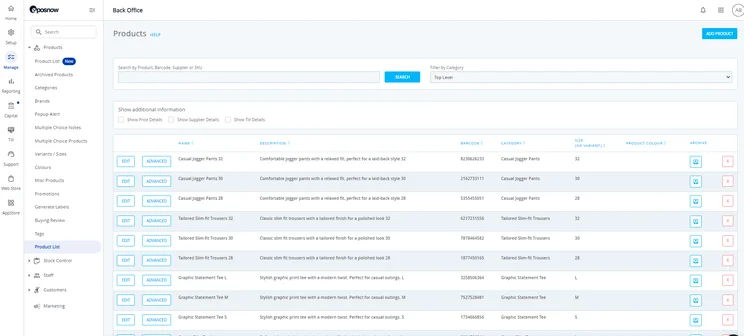
Epos Now let me sift through products via category, product name, barcode supplier, or SKU. Source: Tech.co testing
This system lets users easily update their floor plan from the front end, making it a fit for operations that frequently updating the layout of their space. The system offers inventory management tools including cost/profit reports, along with an offline mode similar to SpotOn’s. Plans start at $39 per month.
Square POS
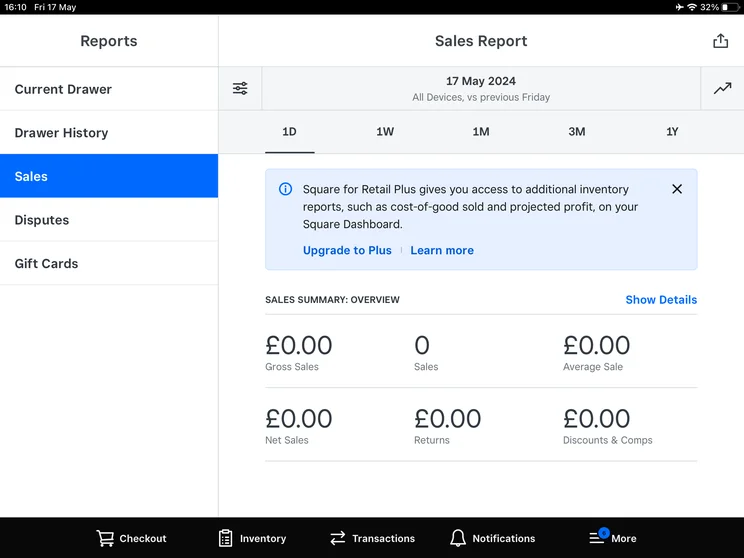
The Square POS includes reports like this sales summary. Source: Tech.co testing
Square is our highest rated POS system, thanks in part to its great dedicated hardware, scalablity, and ecosystem of software to power integrations for marketing, loyalty programs, and an online presence. If you like SpotOn but you need the option to purchase additional accessories or hardware for your POS, Square is for you.
TouchBistro
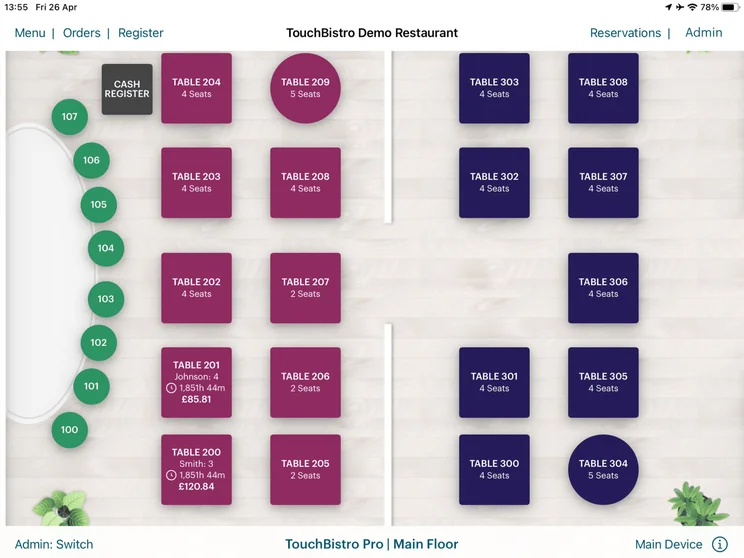
TouchBistro’s floor plan creation tools let users color-code the tables and edit their size and shape. Source: Tech.co user testing
If you want a portable, tablet-based system for your staff, TouchBistro is our recommended hospitality solution. The platform also has great floor-planning tools, integrates seamlessly with a kitchen display system, and comes with useful tools for guiding owners through cost management.
Our Methodology
We take our impartial research and analysis seriously, so you can have complete confidence that we’re giving you the clearest, most useful recommendations. After identifying the most relevant, popular POS platforms on the market, we put them through their paces with hands-on testing to better understand their strengths and weaknesses.
In total, we put 16 POS systems to the test, with a vigorous research and testing methodology. We carried out 40 user testing sessions, which amounted to 720 hours of testing in total.
In these sessions, participants were asked to carry out tasks on POS software and describe their user journey, to help us understand what it’s like to use the systems first-hand. In addition to first-hand testing, we developed a detailed methodology that focuses on six categories of investigation, including criteria like software features and help and support centers.
These categories were broken down into a further 41 subcategories, so we were able to drill down further into certain topics, to make our insights as granular and useful as possible. Here’s an overview of our main testing categories for POS systems:
- Software features: The capabilities provided by the POS product. Includes general features like ordering and payment functionality, as well as industry-specific tools like KSU uploads, inventory-level stock tracking, and kitchen display system (KDS) software.
- Hardware: The quality of a POS system’s hardware selection. The presence of an own-brand terminal, as well as hardware accessories like KDS, receipt printers, and barcode scanners.
- Pricing: The cost associated with acquiring and using the POS system, such as the initial purchase cost, transaction fees, licensing fees, subscription plans, and any additional charges or ongoing costs.
- Ease of use: We test out the software to gauge how intuitive and easy to use it is. We also consider how easy the software is to navigate, and whether any errors took place during testing.
- Help and support: The assistance and resources available to users when they encounter issues or need guidance while using the POS system, including documentation, tutorials, or knowledge bases.
- Customer satisfaction: The aggregate score from customer review sites like Trustpilot and TrustRadius, to understand how POS providers are viewed by their own customer bases.
When it comes to calculating a product’s final score, not all testing areas are weighted evenly, as we know some aspects matter more to our readers than others.
For example, we’ll prioritize certain industry-specific features for specific reviews, like an offline mode when reviewing POS systems for food trucks, or KDS when reviewing restaurant POS systems.
At Tech.co, we have a number of full-time in-house researchers who re-run this testing process regularly to ensure our results remain reflective of the present day.
SpotOn is one of our top POS systems for food and beverage services, excelling when it comes to staff management, analytics, and help and support. On top of that, it offers some of the best pricing available, largely thanks to its robust free plan that includes hardware.
SpotOn is best for hospitality businesses that are tired of paying monthly fees on top of transaction fees and want a cheaper POS option that can still handle the demands of a reasonably large restaurant.
However, SpotOn certainly isn’t perfect. While its hardware is free, the options are limited and there are few add-ons available. What’s more, SpotOn doesn’t provide much retail functionality beyond the basics. If those are important to you, there are plenty of other robust POS solutions for retail businesses out there that might be a better fit.
Frequently Asked Questions
Square and SpotOn are both capable POS systems. However, our research suggests Square performs better than SpotOn in just about every core category, including business management, business development, and customer support. Both Square and SpotOn offer a free plan that is paid for with transaction fees, making them both excellent value choices for those looking for an affordable POS.
SpotOn was founded in 2017 by Doron Friedman, Matt Hyman, and Zach Hyman, twin brothers with over 20 years of experience in payment processing.
SpotOn POS was founded in California by Doron Friedman, Matt Hyman, and Zach Hyman.
If you click on, sign up to a service through, or make a purchase through the links on our site, or use our quotes tool to receive custom pricing for your business needs, we may earn a referral fee from the supplier(s) of the technology you’re interested in. This helps Tech.co to provide free information and reviews, and carries no additional cost to you. Most importantly, it doesn’t affect our editorial impartiality. Ratings and rankings on Tech.co cannot be bought. Our reviews are based on objective research analysis. Rare exceptions to this will be marked clearly as a ‘sponsored’ table column, or explained by a full advertising disclosure on the page, in place of this one. Click to return to top of page


