
We may receive a commission from our partners if you click on a link to review or purchase a product or service. Click to Learn More
SysAid for IT asset management is a key functionality of the SysAid platform, which is an IT service desk system that can help a businesses effectively manage its IT needs. It allows you to keep track of asset data directly within the helpdesk software, offering a wealth of information when helping users with problems. In our expert roundup it earned our praise as the best free asset tracking for on-premise hosting.
While this integration can be helpful for some businesses, SysAid leaves a lot to be desired when compared with other asset tracking solutions. The lack of tag functionality and hardware options, for example, can be a deal-breaker if you need this feature.
Still, there is a case to be made for SysAid for IT Asset Management, particularly businesses that need IT helpdesk software to go along with it. We’ve outlined the features, pricing, pros, and cons in this SysAid review to help you decide if it’s right for your business.
SysAid

In Short
-
Pros
- License management tools
- Alerts are customizable
- Reporting and analytics tools
-
Cons
- No free hosting
- Requires manual updates and fixes
- No barcode support
Images
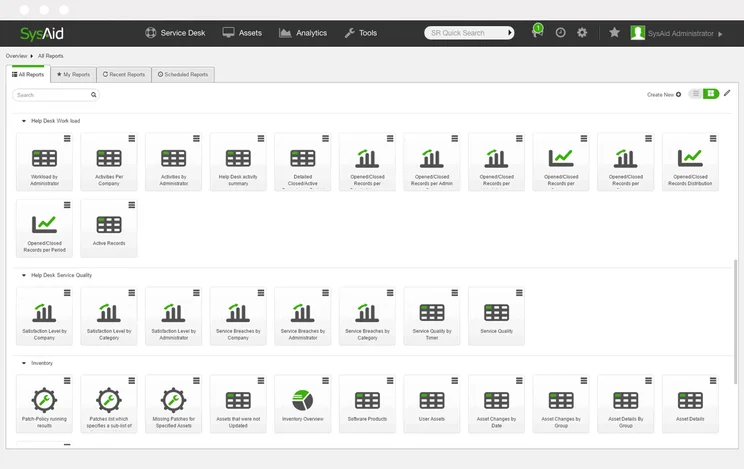
SysAid Quick Fact File
Before we dig into the specifics of SysAid for IT Asset Management, let’s lay down a few quick facts about the system to help you understand exactly what’s offered:
- SysAid is an IT service management platform, but it has asset management features built in.
- SysAid is IT-focused, so it primarily keeps track of devices and servers within your business.
- SysAid offers no tag functionality but does have custom usage and out-of-working hours alerts.
- SysAid does not have a mobile app, but the system is optimized for mobile usage.
- SysAid provides no publicly available pricing, so you’ll have to get a quote for your business.
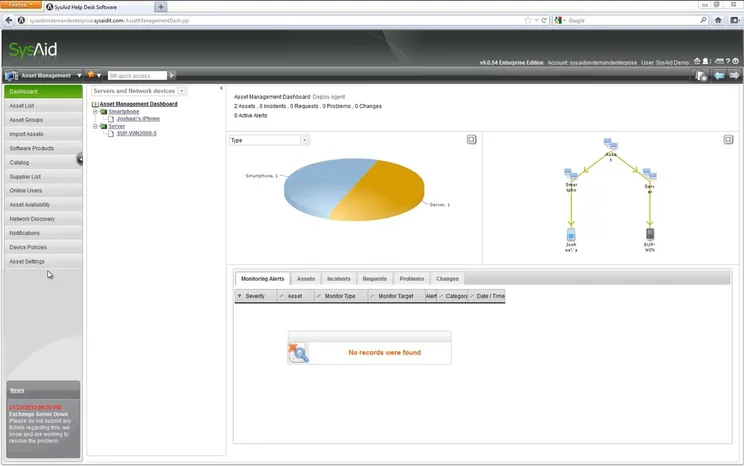
The main dashboard used for the SysAid asset tracking system.
Image source: SysAid
Is SysAid Right for Your Business?
If you’re in need of an IT service management platform that integrates with your company’s asset tracking information, SysAid could be the right fit for your business. It allows you to access all of your asset tracking information during interactions with users, so you can provide thorough, up-to-date information while resolving problems.
However, if you’re looking for comprehensive asset tracking management software, you’ll probably want to look elsewhere. SysAid is missing many of the key features for asset tracking systems, like asset tag functionality, hardware options, or location-based alerts.
SysAid pricing
SysAid does not publicly advertise information about its pricing, so you’ll have to contact the provider to get a quote. This does mean that the cost of SysAid is directly tied to the size and needs of your business, so you can get custom pricing.
If you’re on a strict budget, feel free to take a look at our free asset management software guide for more information, or check out our guide to asset management software pricing.
SysAid Review: Key Features
SysAid is less of an asset tracking software solution and more of an IT helpdesk software for businesses, helping admin manage employee device assistance, server maintenance, and other IT infrastructure needs. Subsequently, the feature set is a bit different than your standard asset tracking software, but, depending on your needs, it can be quite helpful.
When it comes to asset management, SysAid makes device, server, and IT infrastructure data readily available to help you solve problems faster and more effectively for your team. Here are some of the key features from SysAid for IT asset management:

Inventory management
Keeping track of inventory is a serious priority for IT departments, and SysAid offers a robust set of inventory management tools. You’ll be able to get a clear view of every piece of hardware within your network, including which software has been installed on each of them.
As can be seen in the image below, you can organize assets into different groups and glean valuable insights in terms of the status of each device. The interface is admittedly a tad outdated, but the data is no less usable for your business or as part of an inventory audit.
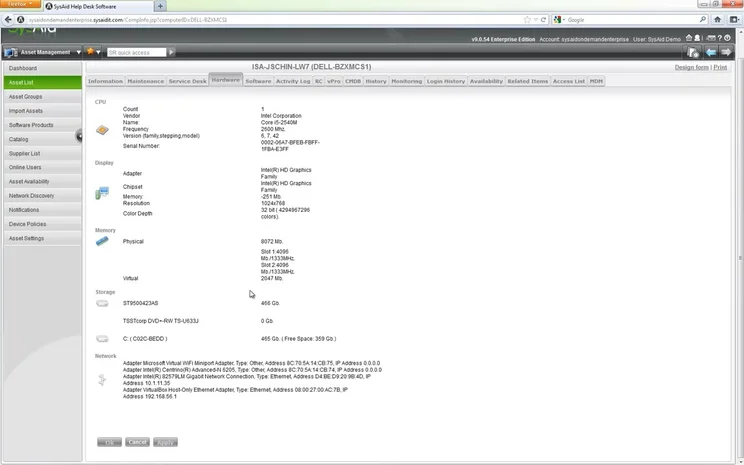
An asset list, viewed within the SysAid software.
Image source: SysAid
Asset monitoring
One of the biggest perks of SysAid is the asset monitoring feature, which provides real-time updates of your assets. You’ll have information on software and hardware updates and other IT system details.
Even better, you can automate the process to provide helpful alerts, so you’ll receive customized updates on everything from network usage, storage levels, and warnings that require your immediate attention.
Check out our guide to the best fixed asset management software for more information
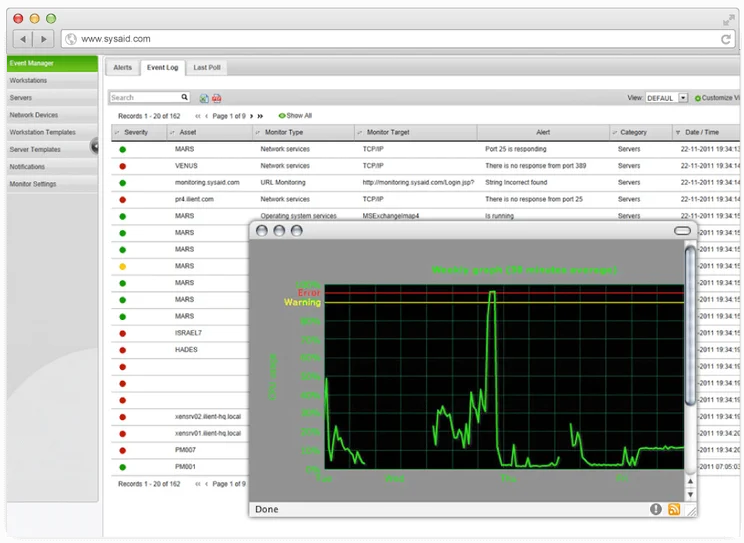
Monitoring a network in SysAid.
Image source: SysAid
Reporting tools
SysAid also allows users to create a wide range of in-depth reports of business assets. The inventory and asset tracking options are plentiful, ranging from software products and patches to asset changes and details.
You can also utilize a wide range of filters when creating reports, which will provide you with a granular look at your asset data (as can be seen in the image below).
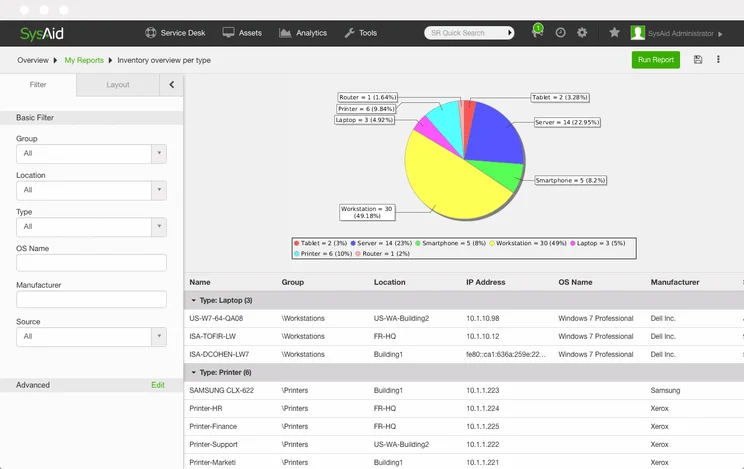
The SysAid report filter helps users generate better reports.
Image source: SysAid.
How Does SysAid Compare With Other Providers?
Honestly, SysAid for IT Asset Management doesn’t have a favourable comparison among other asset tracking platforms in our research. This is because it’s not standalone asset tracking software, but rather an add-on to IT helpdesk software.
Here’s how SysAid for IT Asset Management compares with some of our other top asset tracking companies and the options they offer:
|
Free version
|
Paid version
|
Best for
|
Pros
|
Cons
|
|||||
|---|---|---|---|---|---|---|---|---|---|
 |
SPONSORED
 |
BEST RATED
 |
 |
 |
 |
 |
 |
 |
 |
|
SysAid IT Asset Management |
Freshservice |
Samsara |
Tenna |
Verizon Connect |
AssetCloud by Wasp |
AssetTiger |
Azuga |
ATTI |
Snipe-IT |
|
Free trial |
14-day free trial |
No |
Demo |
Free demo |
Demo |
Yes |
Demo available |
Demo |
Yes |
|
Custom |
Price on request |
Starts at: $108/user/month |
$20/500 assets/month |
Price on request |
Price on request |
||||
|
On-premise hosting |
IT businesses |
Features |
Diverse operations |
Larger companies |
Small companies with fixed assets |
Best overall |
Moveable assets |
Companies with heavy equipment |
Programmers who want an open API |
|
|
|
|
|
|
|
|
|
|
|
|
|
|
|
|
|
|
|
|
Our Methodology
In order to rate asset tracking providers and enable you to make the best decision for your business, here at Tech.co we take a hands-on approach. We are confident telling you which provider is best for you, because we’ve done the research.
We compare providers across multiple criteria, including the features that the software provides, how easy it is to use, and the customer service experience.
Here are just a few areas we look at in our in-depth research:
- Price: While price isn’t everything, we know that it’s important to many businesses. We rate the pricing of each provider, as well as telling you if there is a free tier, or even a free trial, so you can try it before you commit.
- Types of asset trackers: What sort of tools does the provider offer? Different types of asset tracker tags offer various levels of trackability. Barcodes might be a cheap option, and suitable for smaller businesses, but businesses operating across multiple sites will want something that can offer real-time tracking, like GPS or RFID tags.
- Alerts: When tracking assets, you want to be sure that you know where they are at all times. Some platforms can tell you when an asset leaves a certain location, or is being used outside of work hours. We factor these features into our research when rating each provider.
- Mobile apps: A good mobile app can make or break a platform. A good one makes every process seamless, while a bad one can render the whole platform nothing more than a headache. We look at the quality of the apps on offer, take into account user reviews, and rate them accordingly.
If you want to learn more about the process by which we rate and rank business software providers, take a look at our in-depth research guide for more information.
SysAid for IT Asset Management is clearly geared towards a specific type of user, one that is interested in utilizing asset management functionality within their IT helpdesk platform. It offers a solid selection of alerts and organizational features for your business, particularly when paired with the full SysAid platform.
As a result, though, this platform is not a good fit for users that are looking for a robust asset tracking system, with the overall functionality lacking the advanced features offered by Samsara, our top choice for asset tracking. This is because it offers no tag functionality or hardware options and its pricing is not publicly available, so you’ll have to reach out to understand the cost to your business.
Check out our asset tracking quotes page to learn more about getting started with a system today.
Frequently Asked Questions
SysAid asset management is a built-in solution of the SysAid helpdesk software, helping its users integrate any asset management functionality directly into the helpdesk system. It allows users to access all asset management data while resolving customer service tickets, substantially speeding up the process.
SysAid does not offer a free forever plan, but you can take advantage of the free trial, which allows you access to all of SysAid’s features without having to input your credit card information.
SysAid is an entirely cloud-based software solution for service desk functionality with built in asset tracking functionality.
If you click on, sign up to a service through, or make a purchase through the links on our site, or use our quotes tool to receive custom pricing for your business needs, we may earn a referral fee from the supplier(s) of the technology you’re interested in. This helps Tech.co to provide free information and reviews, and carries no additional cost to you. Most importantly, it doesn’t affect our editorial impartiality. Ratings and rankings on Tech.co cannot be bought. Our reviews are based on objective research analysis. Rare exceptions to this will be marked clearly as a ‘sponsored’ table column, or explained by a full advertising disclosure on the page, in place of this one. Click to return to top of page


