
We may receive a commission from our partners if you click on a link to review or purchase a product or service. Click to Learn More
Asset tracking for educational institutions has never been so important. The average college is now loaning out thousands of dollars worth of laptops, tablets, and other tech to students every year, and most cannot afford to replace the lost or damaged items.
Fortunately, there are top asset tracking software providers that can be used to track educational assets for schools. You can opt for a mainstream asset tracking program like Asset Panda, or a school-specific asset management platform like IncidentIQ, which offers more features that academic staff will find particularly helpful.
In this guide, we’ve got the lowdown on everything you need to know about school asset tracking, how it works, and what software you can use to get a better handle on the health of your organization’s assets.
Asset Tracking for Education Explained
Almost all educational institutions in the US have assets that can be loaned to students and need to be kept track of. Many of these assets can be classed as movable hardware/devices, such as computers, keyboards, Chromebooks, and iPads, but non-physical assets like software licenses also need to be monitored and managed.
Another class of assets that educational institutions – and particularly universities – have a vested interest in tracking its digital assets. These include course resources, logos, videos, marketing material, e-books, and copyrighted imagery. Monitoring these assets is sometimes referred to as “digital asset management.”
Universities and large schools with valuable items that are used by multiple departments or faculties will need to to track their whereabouts.
As administrative staff at any educational institution know all too well, school budgets are often very tight and most organizations cannot afford to continuously replace thousands of dollars worth of laptops and other technology.
What’s more, the number of technological devices an average student needs to complete their work today is much higher than it was a few years ago, making it much tougher to keep track of everything. This means more institutions are moving away from spreadsheets and are utilizing software to track valuables.

Why Do Schools Need Asset Tracking Software?
Rather than manually updating an asset tracking spreadsheet to track equipment and software – which takes time and usually isn’t an error-free process – schools are now tracking educational assets with dedicated asset tracking software for education.
Often referred to as school asset tracking software, it ensures teachers and other school or university staff can assign tech to students quickly and efficiently, while also keeping track of it in a structured, processed-based way.
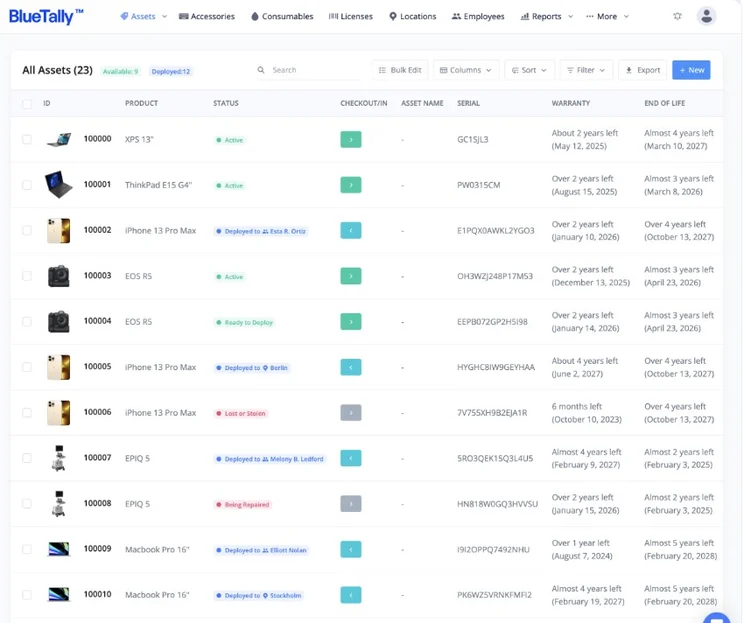
Managing assets with BlueTally’s asset inventory. Image: IncidentIQ
Unlike hospital asset tracking systems, which tend to leverage advanced tech like Real-Time Location Systems (RTLS), most school asset tracking systems also offer a ticketing system, similar to how IT asset management and platforms like Freshservice work. Most school asset tracking software tools utilize a barcoding system, which involves attaching labels to laptops and iPads.
Asset Tracking for Education: Top Providers & Companies
Asset tracking software is popular in the fleet industry, and many IT service management solutions have asset tracking capabilities.
|
Price from
|
Free demo?
|
Free trial
|
Free plan
|
Asset limit
|
||
|---|---|---|---|---|---|---|

|
 |

|
 |

|
||
|
Asset Panda |
AssetCloud by Wasp |
|||||
|
Custom. Based on student enrollment. |
No public pricing. Determined by how many assets you want to track. |
$62.50/month (Max 50 assets) |
$108/user/month |
$59/month (unlimited assets) |
||
|
|
|
|
|
|
||
|
|
|
|
|
|
||
|
N/A |
N/A |
Yes (Max 250 assets) |
N/A |
Yes (Max 50 assets) |
||
1. IncidentIQ – The Best Asset Tracker for Education Overall
IncidentIQ is a dedicated K-12 asset management and tracking solution used by schools and I the number of students enrolled, rather than per agent or asset. This pricing model means smaller schools that need to track numerous assets won’t have to pay a large amount of money as is likely with some other asset tracking solutions like Asset Panda and Reftab.
IncidentIQ

In Short
-
Pros
- School-dedicated features
- The easy loaning process with Rollout Scout
- Pricing structure saves schools money
- Detailed changelogs
-
Cons
- No free plan is available
- Asset search function needs improving
Images
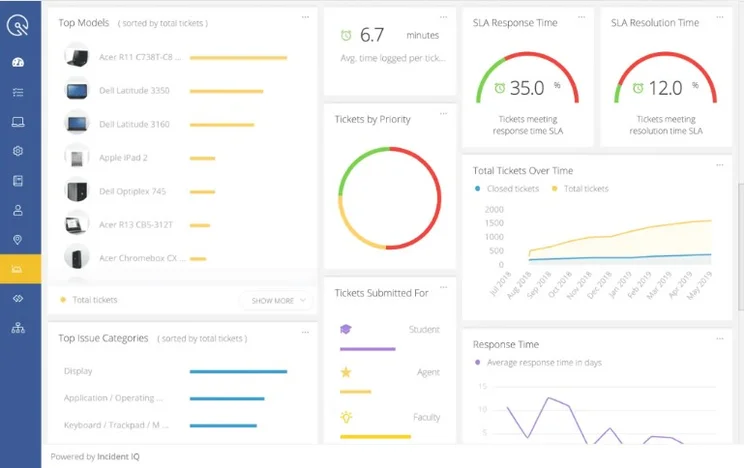
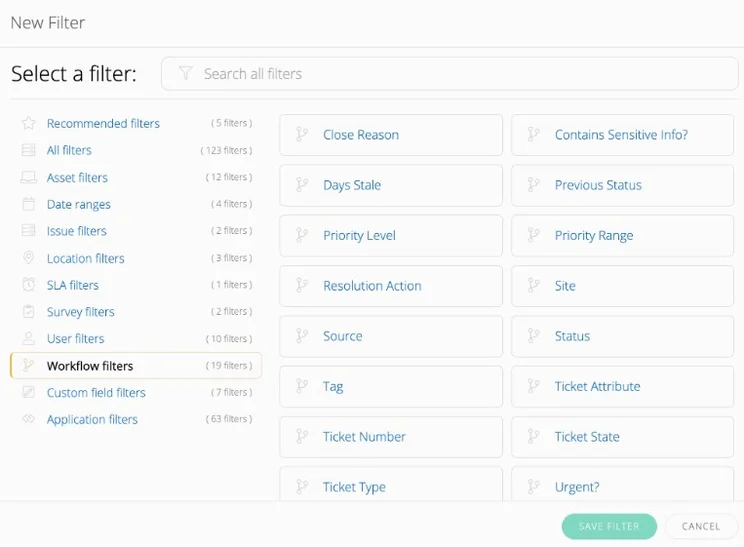
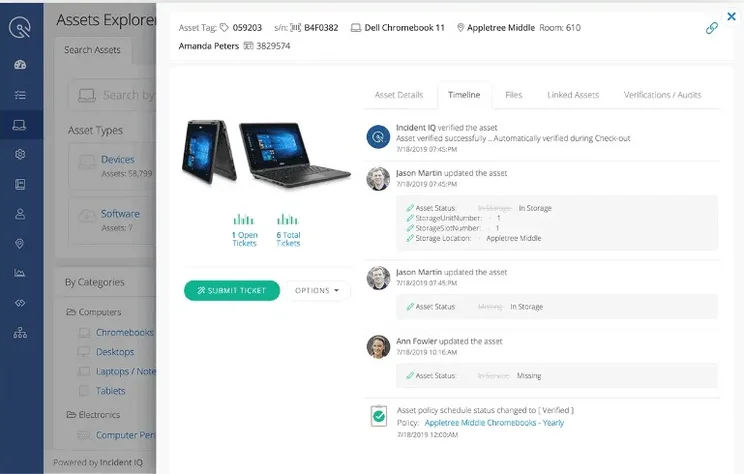
IncidentIQ overview
One standout IncidentIQ feature is Rollout Scout, which makes checking out assets a straightforward process.
All you have to do is use one of the company’s USB barcode scanners and scan both the student ID and the barcode on the laptop. The data will be automatically uploaded to IncidentIQ, which leaves little room for human error.
While it’s great for small schools and educational facilities, InicidentIQ is also suitable for tracking assets districtwide, and therefore larger organizations and institutions. The analytics dashboard can be used to generate reports that cover the important insights gleaned from tracking data across multiple schools, which is useful for understanding capacity when it comes to shared resources.
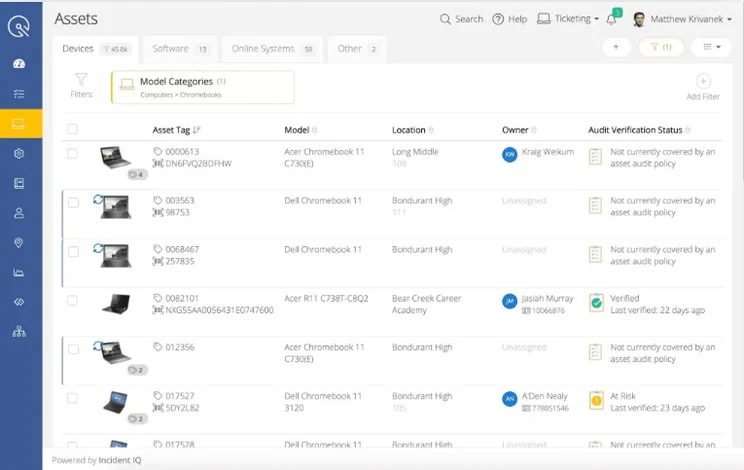
IncidentIQ’s asset inventory. Image: IncidentIQ
There’s also a spare deployment feature that will help you manage the deployment of spare devices across a district. A webcam-based scanner can also be used to quickly assign assets, while progress indicators ensure that it’s being done correctly.
IncidentIQ pricing and demo information
As with many of the other providers on this list, IncidentIQ offers all prospective users a free demo so they can see if they like the software before purchasing a subscription.
As we’ve covered, IncidentIQ prices are tailored based on enrollment, so you’ll have to contact the company for a quote that will be tailored to your organization. However, the fewer students you have on your books, the less you’re going to end up paying.
2. Asset Panda – Best Tagging System and Mobile App
Asset Panda is a general asset tracking tool that can be applied to a variety of different industries and sectors, including education, construction, healthcare, and fleet management. This means it’s used to competing with heavier-duty asset tracking software Verizon and Samsara.
Asset Panda

In Short
-
Pros
- Asset photo tagging
- Built-in mobile barcode scanner
- Insurance tracking
- Reporting and analysis
-
Cons
- Only a 14-day free trial
- No automated GPS tracking
- Can’t track powered asset use
Images
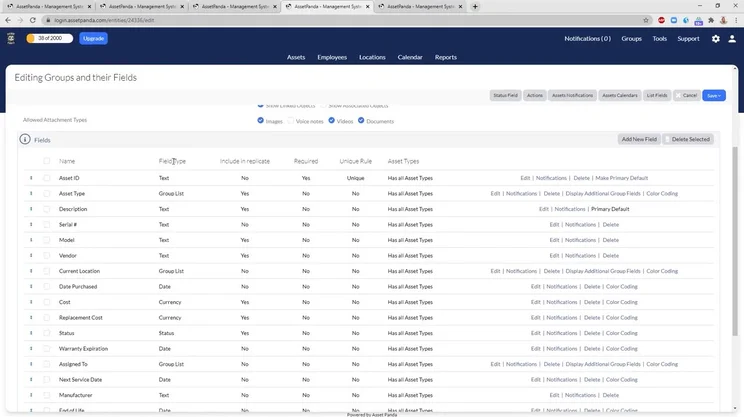
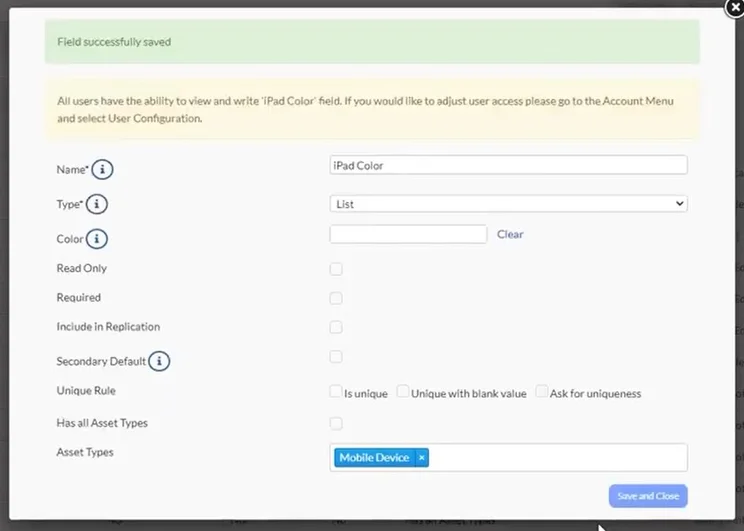
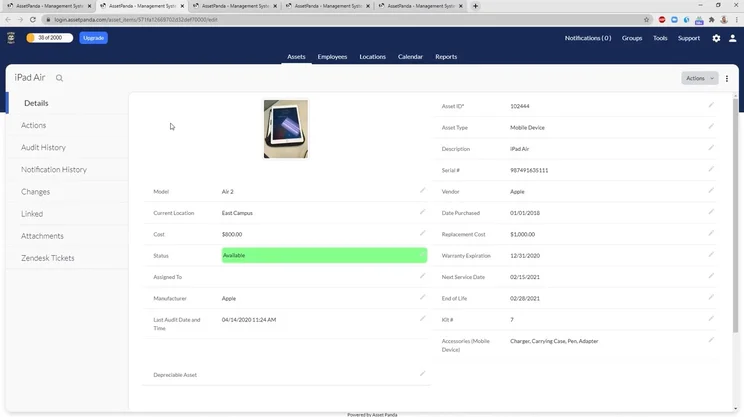
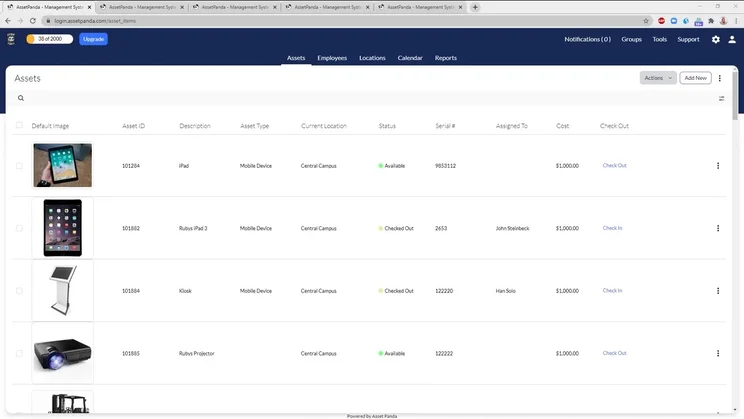
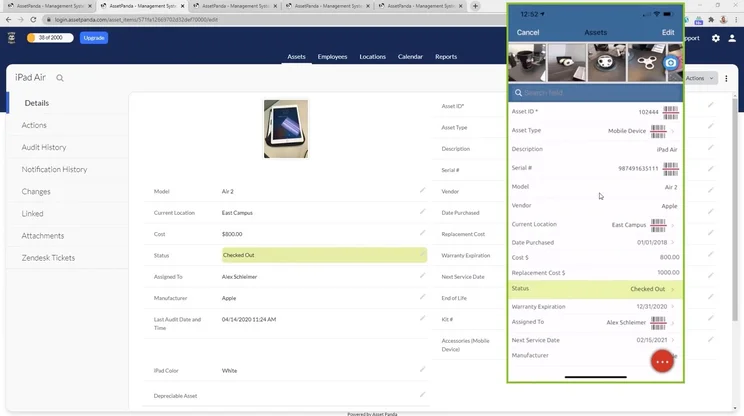
Asset Panda overview
As interfaces go, the Asset Panda UI is pretty simple – it’s not overcrowded with different features or a long, winding sidebar menu like IncidentIQ. All in all, it won’t take you long to get to grips with, even if you haven’t used asset tracking software before.
Asset Panda will let you use barcodes to tag on-site and remote school resources like computers, which can then be scanned using the app’s built-in barcode scanner. If you don’t want to spend extra on a bunch of hardware, Asset Panda is a good option. There’s also a barcode-building feature that allows you to create your own barcodes wihin the software.
Asset Panda makes it easy to track repair requests from students. You can also design custom user roles so that staff can access the software appropriately. If you need any help after you get up and running, you can contact Asset Panda by phone, email, or live chat during normal working hours (CST).
Asset Panda pricing and demo information
Asset Panda doesn’t have any public pricing, so you’ll need to use its sliding scale to determine the number of assets you want to track before applying for a direct quote.
However, you can also schedule a free demo to see how it works and if you’ll benefit from the software.
3. Reftab – the Easiest to Use Asset Tracking Software
We found that Reftab is the easiest-to-use asset tracking software, offering users a simple, self-explanatory interface. It’s evidently been built with newbies and non-tech savvy staff in mind, with clear labeling and a guided tour that you can choose to take or skip once you open the software.
Reftab

In Short
-
Pros
- Automated email alerts
- Intuitive interface
- Unlimited reports
- License management
-
Cons
- Slow to use
- No free document attachments
- Free plan capped at 50 assets
Images
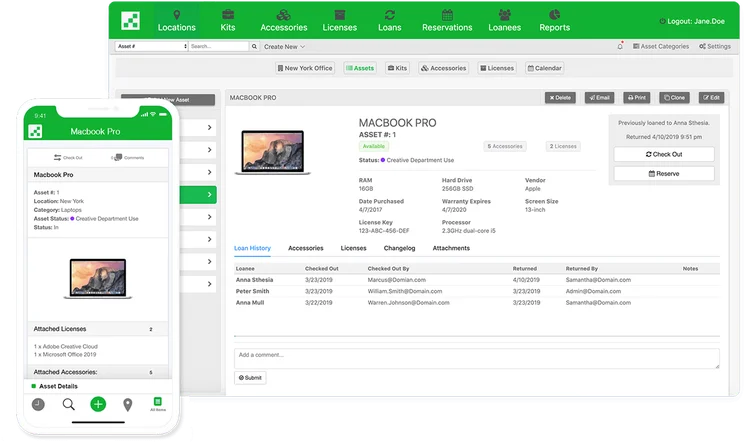
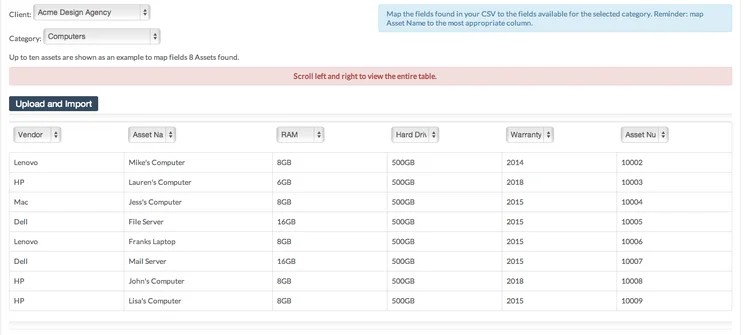
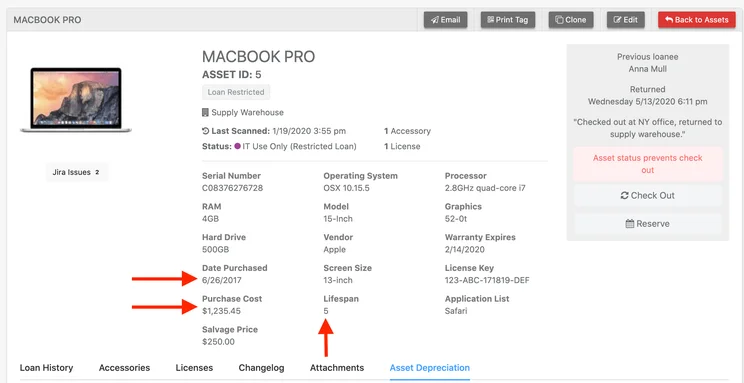

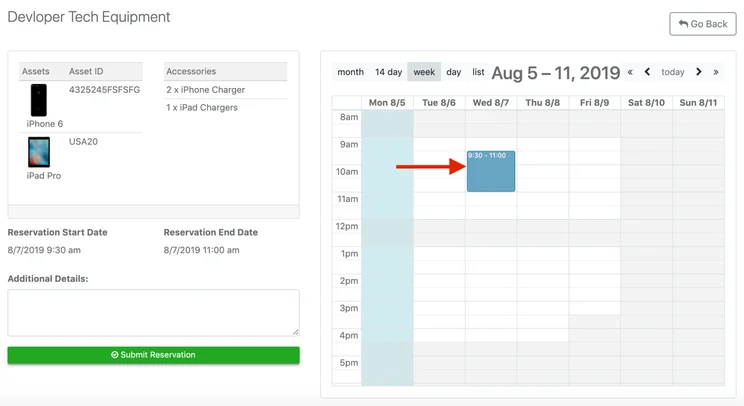
Reftab overview
Reftab will let you track computers, cameras, printers, headsets, GoPros, Chromebooks, and even conference rooms. The menu bar at the top of the interface will highlight the different areas dedicated to tracking licenses for software, loans, and reservations.
There are also useful reporting tools that will auto-generate reports on various preset topics, such as “items checked out today” and “all current loans.” You can also run these reports and schedule them to be sent automatically.
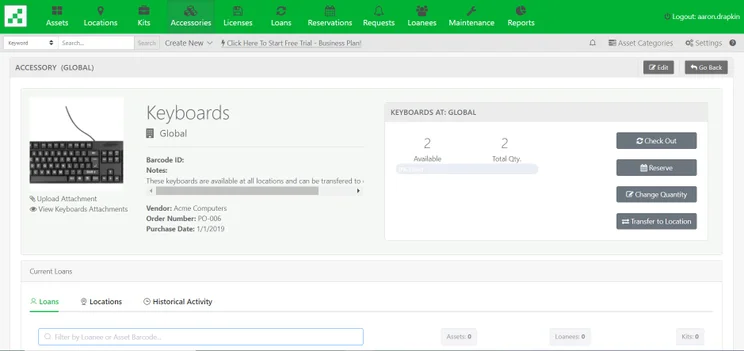
Viewing an accessory in the Reftab interface. Image: Tech.co
Reftab is one of the only providers on this list that will let you make a free account and try out the software yourself without a walkthrough demo – which is a testament to how easy it is to set up and start using.
Reftab pricing and demo information
The price of all Reftab plans will depend on the number of assets you want to track. Prices increase with every 250 assets you’d like to track. The Starter plan is available for $31.25 per month and will let you track up to 250 assets and add unlimited users. You’ll be able to track unlimited accessories, licenses, and design barcodes.
The Pro plan costs $62.50 per month to track the same number of assets but it adds management features like role-based access control andd asset auditing features.
The Business plan costs $104.17 per month for 250 assets and is catered towards larger businesses in need of integrations and secure sign-on features. There’s also an Enterprise plan with no public pricing, but Reftab does reveal you be able to track more than 3,000 assets if you opt for this plan.
4. Wasp AssetCloud
Wasp is a universal asset management tool that school districts have started to use to track assets. It’s offers some great native hardware and robust security features and is ideal for managing large numbers of complex assets across multiple schools.
Wasp AssetCloud Asset Tracking

In Short
-
Pros
- Unlimited assets and sites on all plans
- Wide range of security features
- Customizable report templates
- Fund management for compliance
-
Cons
- Only tracks fixed assets
- Much pricier than competitors
- No free plan
Images
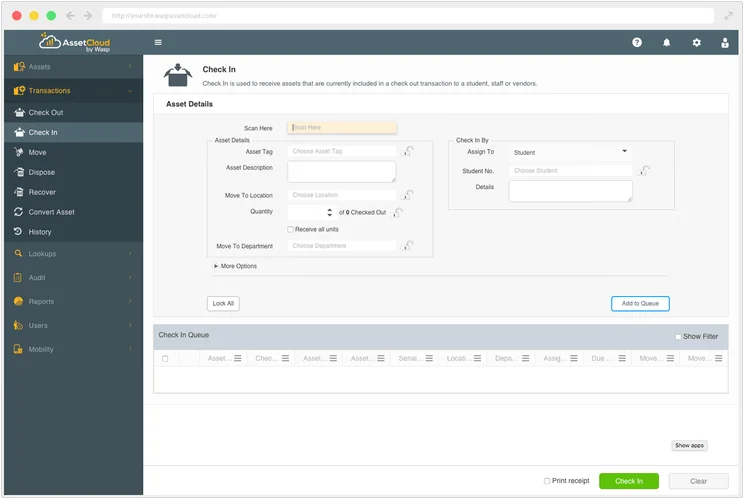
Wasp overview
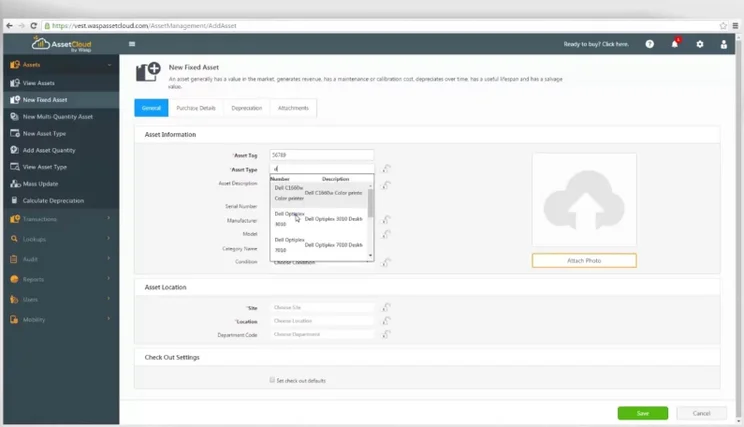
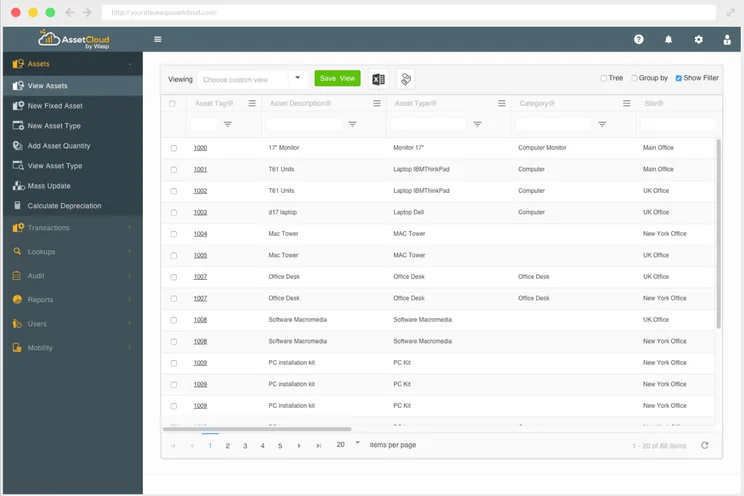
Although Wasp AssetCloud is a feature-rich asset tracking software app, and one of its core missions is to simplify the asset tracking process for users. This is why the provider offers grouping tools, which you can use to ensure your database remains a manageable size while ensuring all assets are accounted for.
While it includes many of the general asset tracking features, one that schools will find particularly useful is a fund management feature, which allows users to assign assets to different funds/expenditures and track information such as purchase date, PO number, and vendor. This also makes it easier for schools to ensure they remain compliant with tax laws and any legislation that governs the monitoring of assets in various states.
Wasp offers a secure system that can be trusted to keep your inventory data safe. The role-based security system allows you to assign permissions by user, ensuring everyone only has access to the data they need to do their jobs. This is a vital is staff from across an entire district are capturing new data.
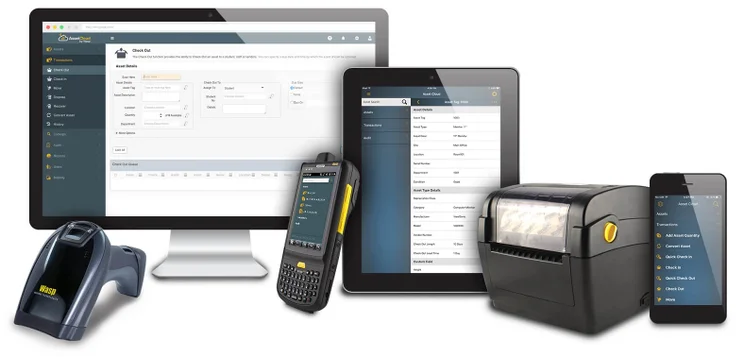
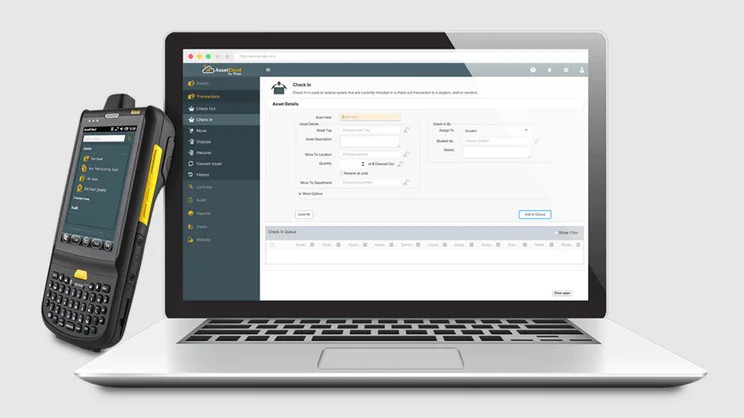
Wasp sells native hardware that is set up to work seamlessly with Wasp’s software. This is different to Asset Panda, which lets users scan bar codes through its app, or IdentityIQ, which provides a webcam scanner. You can also purchase a combined software and hardware package from the company, something other providers on this list don’t offer.
Wasp AssetCloud pricing and demo information
The catch to Wasp is that it’s a bit more expensive than the likes of BlueTally. All in all, Wasp has three plans that show how much it costs if you start with one or five users, depending on the plan.
The cheapest plan is cloud-based and costs $2,995 per user, per year, for unlimited assets. It includes customer support for free – there’s an annual 18% maintenance and support fee on Wasp’s self-hosted version ($6,995 for 5 users, paid one time). The Complete + RFID plan, on the other hand, costs $7,990 per 5 users, per year, but this won’t be suitable for educational facilities that just need barcodes.
If you want to know how much the plans will cost for more than five users, you’ll have to contact the company directly for a quote.
5. BlueTally – Best Free School Asset Tracking Software
BlueTally is an asset tracking program with a free plan – which isn’t all that common in this market. The capable free plan will let you track 50 assets for free, and you’ll be able to upgrade to a paid plan to increase the limit.
Blue Tally

In Short
-
Pros
- Free plan for up to 50 assets
- No set-up costs on any plans
- Email support on every paid plan
-
Cons
- Adding assets in bulk can be clunky
- No integrations on the starter plan
- Limited customization on cheaper plans
Images
BlueTally overview
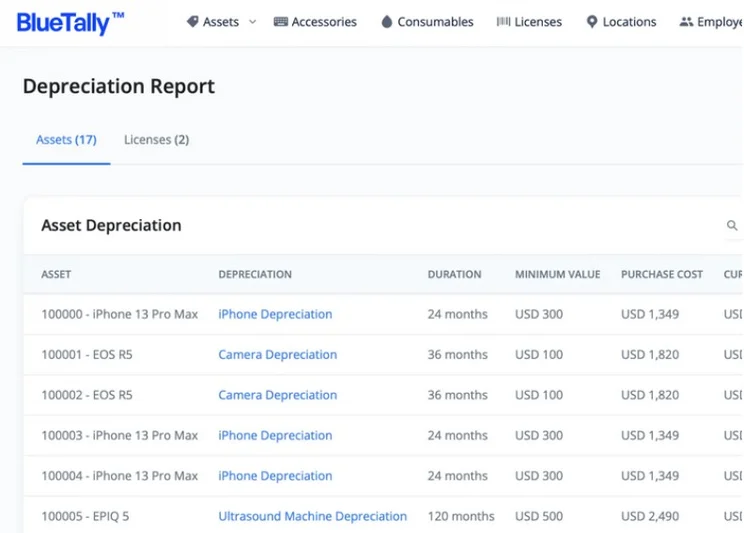
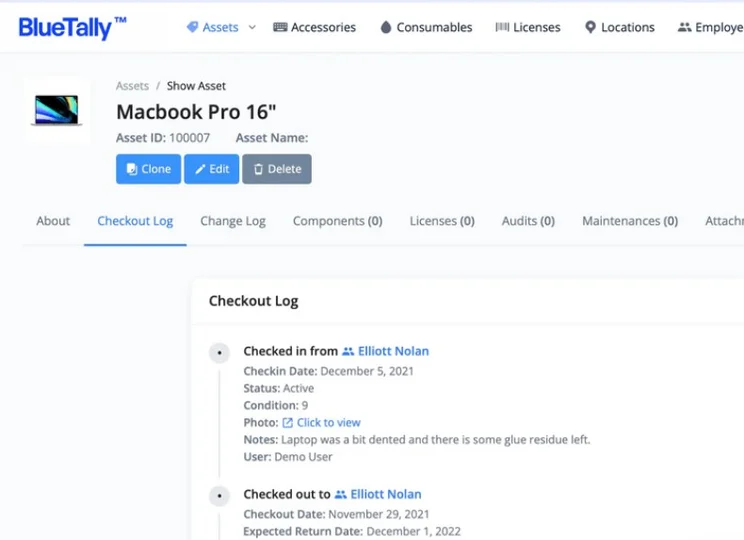
Like Reftab, BlueTally keeps it simple with a straightforward interface that makes assigning assets to employees and locations pretty simple. It’s also really easy to see the total history of an asset, including its users via the checkout log, displaying details about the condition of individual assets so that you know you’re not loaning them out if there’s an issue.
To keep track of your assets, you’ll be able to design barcodes and send them straight to your label printer from within the app. When they depreciate, on the other hand, you’ll be notified automatically, which means less manual menu diving.
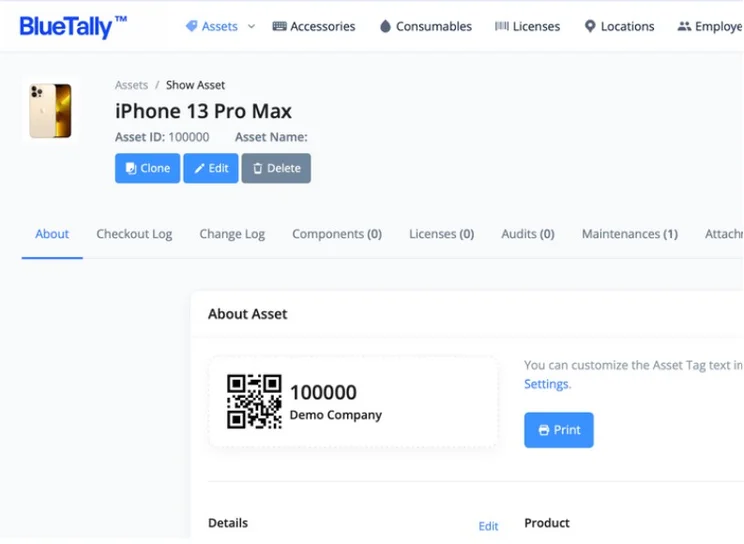
Generating a barcode in Blue Tally. Image: BlueTally
Along with providing all the asset tracking basics a school or district could need, BlueTally keeps its platform up-to-date: It’s now officially SOC2 compliant, which means you can be sure it’ll be processing your data in an efficient, safe, and legal manner.
Unlike a few other asset tracking companies, you won’t incur any additional costs or have to buy any add-ons once you choose your plan. There’s also a 20% discount for educational facilities available, so you’ll be able to knock down the price of a paid plan if the free plan is too limited for your school or facility’s needs.
BlueTally pricing and demo information
As we’ve covered, BlueTally has a free plan that will let you track up to 50 assets. However, if you want that asset cap removed, you’ll have to upgrade to the Starter plan, which costs $59 per month. The Pro plan ($179 per month), on the other hand, adds some useful integrations like Slack and Teams and more customer support options (such as live chat).
Along with these three plans, there’s a Business plan that costs $199 per month, which adds security features large businesses will appreciate, such as single sign-on and custom permission levels. For Enterprise plan pricing, you’ll have to contact the provider directly for a custom quote.
Benefits of Asset Tracking Software in Education
Tracking hardware, equipment, and even software that has to be deployed to students for educational purposes has a myriad of benefits, including:
- Reducing excess spending on duplicates
- Making it easier to monitor/stick to budgets
- Reducing paperwork and human errors
- Reduces and deters theft of devices/assets
- Easily accessible overview of all assets
- More reliable than using a spreadsheet
- Makes reporting and technical maintenance easier
- Booking systems for shared equipment
- Ensures staff members know what they’re responsible for
Schools, universities, and businesses providing educational services that aren’t using asset tracking or management software will also have to perform large-scale manual audits. This will involve contacting students to verify the locations of assets and recovering items that need maintenance.
However, with asset tracking software, you can do this incrementally and leverage the data you’re storing effectively. “In our online Spanish school, the assets we track primarily include physical resources like laptops, tablets, audiovisual equipment, and textbooks,” says Colind Ondriska, founder of SpanishVIP, which provides online Spanish classes.
“We also monitor digital assets such as software licenses, online learning platforms, and digital content,” he continued. “We must have an accurate and up-to-date record of these assets to ensure efficient resource allocation, maintenance, and inventory management.”
“To track our assets, we utilize asset-tracking software called EZOfficeInventory… allowing us to create a centralized database of our assets, track their location, assign them to instructors or staff, monitor their condition and maintenance history” Ondriska explained to Tech.co via email.
“EZOfficeInventory also offers features like barcode scanning, which simplifies the process of checking assets in and out, conducting audits, and generating reports.”
Check out our guide to asset management KPIs for more information
How Did We Research and Review The Best Asset Tracking Software?
In order to rate asset tracking providers and enable you to make the best decision for your business, here at Tech.co we take a hands-on approach. We are confident telling you which provider is best for you, because we’ve done the research.
We compare providers across multiple criteria, including the features that the software provides, how easy it is to use, and the customer service experience.
Here are just a few areas we look at in our in-depth research:
- Price: While price isn’t everything, we know that it’s important to many businesses. We rate the pricing of each provider, as well as telling you if there is a free tier, or even a free trial, so you can try it before you commit.
- Types of asset trackers: What sort of tools does the provider offer? Different types of asset tracker tags offer various levels of trackability. Barcodes might be a cheap option, and suitable for smaller businesses, but businesses operating across multiple sites will want something that can offer real-time tracking, like GPS or RFID tags.
- Alerts: When tracking assets, you want to be sure that you know where they are at all times. Some platforms can tell you when an asset leaves a certain location, or is being used outside of work hours. We factor these features into our research when rating each provider.
- Mobile apps: A good mobile app can make or break a platform. A good one makes every process seamless, while a bad one can render the whole platform nothing more than a headache. We look at the quality of the apps on offer, take into account user reviews, and rate them accordingly.
If you want to learn more about the process by which we rate and rank business software providers, take a look at our in-depth research guide for more information.
If you’re struggling to keep track of all the laptops, tablets, and other equipment you’re loaning out to students – or sharing equipment with other schools at a district level – then asset tracking software will have a transformative impact on your work day.
Providers like IncidentIQ will ensure you don’t have to spend hours trawling through spreadsheets and entering data manually. In fact, you’ll have more time to monitor important metrics relating to the health of your assets and get a better grasp of when they’ll depreciate and need to be replaced.
Built-in barcoding apps offered by the likes of Asset Panda, on the other hand, will ensure you’re never in the dark about who’s in possession of the devices in your inventory. This can make all the difference if you’re loaning out school assets that will cost hundreds – if not thousands – of dollars to replace.
If you’ve had your fill of school asset management software and want to know more about the industry at large, check out our guide to the top asset tracking companies.
Asset Tracking for Education: FAQs
An educational asset is any valuable item, object, or product that an educational institution owns and is responsible for. Two perfect examples are a laptop or a science experiment kit.
“Asset tracking” and “asset management” are interchangeable terms. They refer to the process of monitoring valuable assets owned by a business. Businesses using asset tracking software will be monitoring various other aspects of any asset, such as its age, whether it’s up to date, and who is responsible for it.
Right now, the best way to track assets is with school asset tracking software. Unlike standard or universal asset tracking software, these apps provide a platform to track the assets schools loan out regularly, such as laptops and tablets, as well as getting them assigned speedily to students.


