
We may receive a commission from our partners if you click on a link to review or purchase a product or service. Click to Learn More
Asset tracking is crucial for the majority of businesses to maintain efficiency. But not every business needs a premium solution.
Starting off with an Excel template or a free asset tracking software can significantly reduce the cost of asset tracking, giving you time to scale your systems.
Small businesses can use the two templates provided here to track assets in Excel. In addition, we highlight the best free asset tracking software for businesses that want to further eliminate manual work.
- Commonly tracked data includes asset ID, location, status, and purchase info.
- Advanced templates can be specific to IT assets, office assets, or vehicles.
- Top benefits include better efficiency, theft deterrence, insurance claim support, and data-driven insights.
Basic Asset Tracking Excel Template
This basic asset tracking spreadsheet template identifies assets by a unique ID and clearly recognizable name, categorizing equipment to streamline inventory management. Copying it can get your business started with tracking assets in minutes.

Click the image above to open a larger version or visit the link above for the spreadsheet itself. Source: Tech.co
Adding details about the model or serial number can help you re-purchase the same item if needed. Grouping assets into broad categories and sub-categories cuts down retrieval time.
The Status column is useful for keeping track of whether an item is ready for use, currently in use, or in need of repairs. Color coding isn’t required for the status column, but it helps you see what assets are currently available, particularly for equipment like phones and computers that can be signed out to employees.
The “Purchase Date,” “Purchased From,” and “Purchase Price” columns help you keep track of the total value and age of your assets. The Notes column lets users add any additional information they need to include about each asset.
Here’s a version of this template that you can replicate within Excel:
Learn how to build an asset tracking system here.
Advanced Asset Tracking Excel Template
If you have a large number of assets, it will be helpful to keep track of the different types on different sheets within an Excel file. For example, you can have one sheet for IT equipment, another sheet for office equipment, and a third sheet for fleet vehicles.
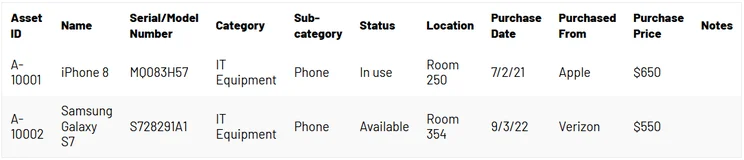
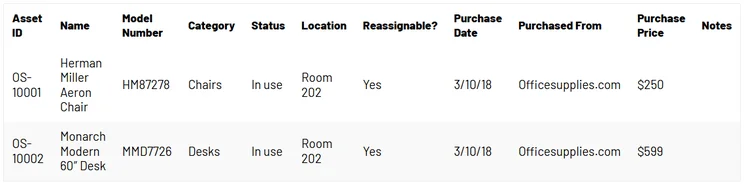
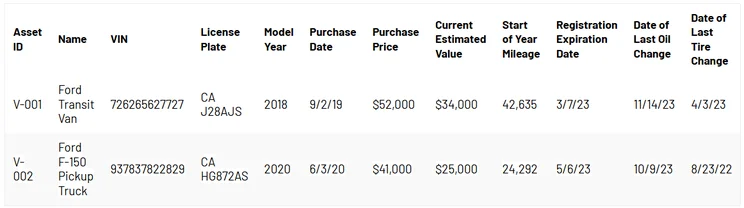
The advantage of this approach is that you can track different information for different types of assets. In the examples below, which show three sheets from a single Excel file, there are distinct columns for each type of asset.

Click the image above to open a larger version or visit the link below for the spreadsheet itself. Source: Tech.co
How to track IT equipment in Excel
This IT Equipment sheet contains information such as model numbers, serial numbers, and warranty details. This information can help if you need to re-purchase an item or make a warranty claim on an item.

How to track office equipment in Excel
This Office Equipment sheet focuses on whether a piece of equipment is available to be assigned to a different employee or office.
How to track fleet vehicles in Excel
This Fleet Vehicles sheet includes vehicle-specific information such as VINs, license plate numbers, and registration details. It also helps you to keep track of each vehicle’s maintenance history.
You’ll need to upgrade to dedicated fleet management software if you want to keep more detailed maintenance logs, or need to track fuel consumption and GPS breadcrumbs.
You wouldn’t be alone: Our survey data highlighted a winter surge in asset tracking adoption, with 48% of fleets aiming to get a new system in December 2025, up from just 27% the month before.
What Are the Benefits of an Asset Tracking Template?
Creating and updating these spreadsheets collects useful information into a central location. This helps with:
- Efficiency: The biggest reason is the increased operational efficiency. You’ll have better visibility on where your assets are at all times and if they need to be serviced, replaced, or repaired soon.
- Theft deterrence: Tracking your assets makes theft easier to spot, which can function as an internal deterrent just by itself.
- Insurance claim support: A document proving the condition and location of your assets for the past few years can come in handy when you need documents to support an insurance claim on those assets.
- Data insights: Once you’ve tracked your assets for years, you’ll have plenty of data that can surface trends you would otherwise miss. Perhaps your PCs need to be replaced faster than your Macs, on average. Perhaps the chairs you kept in direct sunlight need to be reupholstered more often. Whatever the case, these insights can save you money.
- Automations: With an Excel spreadsheet, you can make use of some basic automations to give your overall work management an efficiency boost. 63% of modern warehouses operate without any automation, highlighting a significant adoption gap in the logistics industry. Asset tracking spreadsheets represent a small step in the right direction.
Check out our guide to key logistics statistics for more information.
What Is the Best Free Asset Tracking Software?
While Excel can help with asset monitoring, it has some shortcomings. It isn’t very interactive and it can be hard for employees to access the data on the go.
Many more features are offered by the best asset tracking companies, including free platforms such as AssetTiger or Snipe-IT.
These tools make it easy to create barcodes for your assets and set up alerts for maintenance tasks. Snipe-IT supports barcode scanning with a mobile device, as well as a handheld Bluetooth or USB scanner. In contrast, spreadsheets require specialized setup before they can handle anything more complex than manual entry.
These platforms also enable employees to check equipment in and out, which can be helpful for tracking things like shared laptops, power tools, or construction equipment.
Another reason to consider using free asset tracking platforms is that they offer options to grow with your business. Excel can track a few dozen assets efficiently, but your sheets will become unmanageable once you have hundreds or even thousands of assets to monitor.
Most free software tools have paid tiers available with more features, support for managing tens of thousands of assets, and customizable permissions for employees. If you start asset tracking with one of these platforms now, you won’t have to switch asset tracking systems down the road as your business acquires more equipment.
You can begin tracking your assets in Excel for free with our easy-to-use templates. This is a great way to get started with asset tracking, if you only have a small number of assets to manage.
However, it’s worth checking out free asset tracking software as an alternative to Excel. These tools offer more features to help streamline asset management and can grow with your business as you acquire more assets.
FAQs
AI tools can help, but caution is recommended. A 2026 ICI Innovate panel concluded that human oversight remains essential for operational resilience in asset management, with or without AI tools in the mix.
Most modern barcode scanners are keyboard emulators, so they’ll automatically input a scanned barcode into the currently selected Excel spreadsheet cell. Converting that item code into the relevant data requires crafting a VLOOKUP or XLOOKUP formula, which will be more difficult.
You can add any relevant asset data points as a new column in your Excel spreadsheet. “Location” is a column in our example template. If you need more information, you can also add a “Quantity on Hand” column, so that you can quickly confirm, for example, whether conference room 201 has 10 laptops.
Yes, you can move your asset data away from an Excel or Google Sheet spreadsheet and into most asset tracking software solutions. The best approach is to export the data as a CSV file. The software is likely to have an online resource that can explain how to import a CSV file.


