
We may receive a commission from our partners if you click on a link to review or purchase a product or service. Click to Learn More
AssetTiger is an excellent free asset tracking software, offering a plan that allows users to track up to 250 assets without costing a single penny. Additionally, it offers relatively affordable pricing plans if you need more than that, making it one of the best value picks across our asset tracking research.
Still, the affordability of AssetTiger does come with restrictions. The asset tracking provider offers limited advanced features, which means larger businesses could be left wanting. Still, if you’re running a small business with a smaller budget, you can’t beat a free platform that allows you to track this many assets.
For more information, be sure to check out our asset tracking software comparison page or read on to learn about the features, pricing, pros and cons of AssetTiger.
AssetTiger

In Short
-
Pros
- Unlimited users
- Contract and license management tools
- Maintenance alerts
- Unlimited cloud storage
-
Cons
- Only tracks fixed assets
- Limited documentation
- Free plan capped at 250 asset tags
Images
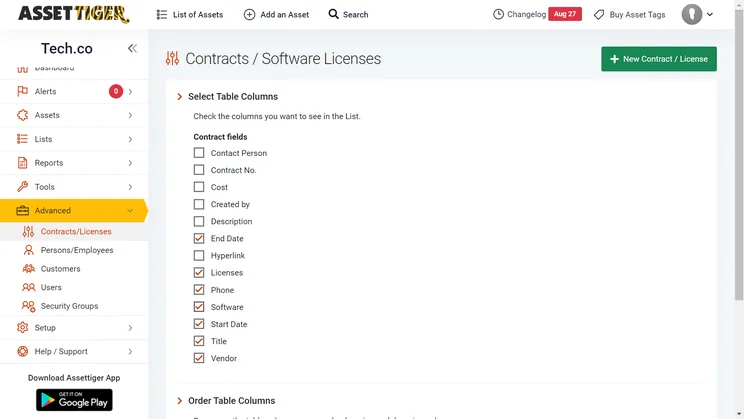
AssetTiger Quick Fact File
Before we get into all the nitty gritty details about AssetTiger, let’s go through some of the basics that make AssetTiger unique. These quick facts will start you off on the right foot to help you decide if this asset tracking provider is right for your business.
- AssetTiger has a free forever plan that allows for up to 250 assets.
- AssetTiger is more affordable but offers fewer advanced features than other providers.
- AssetTiger allows for unlimited users, even with its free plan.
- AssetTiger does not support GPS tracking for its users, but it does support QR codes and barcodes.
- AssetTiger only allows for fixed assets to be tracked, so no current assets are allowed.
- AssetTiger features customizable email alerts for your business, but no other alerts are available.
The value of AssetTiger is the most important factor to consider, as this platform netted a perfect value score of 5/5 in our research. This is largely due to the surprisingly robust free plan, but also its affordable pricing plans (which are annual fees for additional assets). It means AssetTiger also stands out as one of the best fixed asset tracking software options you have, despite this being a limitation for some types of businesses and users.

Is AssetTiger Right for Your Business?
Our research found that AssetTiger represents one of the best value options when it comes to asset tracking software largely due to its robust free plan.
On top of that, though, AssetTiger offers five different pricing plans that are also quite affordable on a yearly basis, with the most affordable being only $120 per year and the most expensive hitting $1,600 per year. This substantially undercuts competitors like Asset Panda, whose most affordable plan is $1,500 per year. Subsequently, AssetTiger is ideal for smaller businesses that want to keep costs low and don’t have too many assets to track.
Additionally, because AssetTiger only allows you to track fixed assets, businesses with physical, long-term assets are going to be best suited for this software, like IT departments, universities, transportation, and construction businesses. However, there are some IT-specific tracking programs, such as Freshservice, which have useful helpdesk features attached.
|
Plan
|
Price
|
Price w/ tags
|
Max assets
|
Users
|
|
|---|---|---|---|---|---|

|
|
|
|
|
|
|
Free |
ATS-500 |
ATS-2500 |
ATS-10K |
ATS-50K |
ATS-250K |
|
Free |
$120/year |
$230/year |
$400/year |
$800/year |
$1,600/year |
|
Free |
$180/year |
$345/year |
$600/year |
$1,200/year |
$2,400/year |
|
250 |
500 |
2,500 |
10,000 |
50,000 |
250,000 |
|
Unlimited |
Unlimited |
Unlimited |
Unlimited |
Unlimited |
Unlimited |
AssetTiger pricing
AssetTiger offers five different pricing plans, each offering additional assets to be tracked at a higher annual fee. Each plan comes with unlimited users and unlimited cloud storage. Here’s how the pricing plans matchup:
- $120 per year for up to 500 assets.
- $230 per year for up to 2,500 assets
- $400 per year for up to 10,000 assets
- $800 per year for up to 50,000 assets
- $1,600 per year for up to 250,000 assets.
Now, if you want to buy asset tags to go along with the AssetTiger software, the costs will be a tad higher. Here’s how the pricing breaks down for AssetTiger when you also want to buy asset tags:
- $180 per year for up to 500 assets
- $345 per year for up to 2,500 assets
- $600 per year for up to 10,000 assets
- $1,200 per year for up to 50,000 assets
- $2,400 per year for up to 250,000 assets
Check out our asset tracking pricing guide for more information
Does AssetTiger have a free plan?
If you’re running a small business on a budget and need to track a small number of assets, AssetTiger’s free plan allows you to track up to 250 assets. It also offers unlimited users, which is better than even paid plans from GLPI, which only offer 10 users on the $100 per month Basic plan and up to 50 users on the $300 per month Standard plan.
Because AssetTiger has a free plan, there is no free trial, so you won’t be able to test out the software with more than 250 assets. Still, this generous free plan is a great way to get started.
AssetTiger Review: Key Features
When compared with its pricier competitors, AssetTiger is definitely lacking when it comes to features. Here’s a look at some of the most essential features offered by AssetTiger, and how they compare with other popular options on the market.
Alerts
AssetTiger offers customizable email alerts to keep you in the know. You can set a wide range of criteria for different alerts, allowing you to keep track of everything including expiring funds, expiring contracts, and expiring warranties, as well as upcoming maintenance and past due assets.
The alerts themselves are customizable too. You can change who receives the email, the subject and content, as well as what time the email will be sent (as you can see in the image below).
However, beyond that, AssetTiger doesn’t offer much in the way of alerts. Because it offers no GPS tracking, you’ll get no geofencing or in-motion alerts, which are offered by Azuga and Samsara. Additionally, AssetTiger has no out-of-working-hours alerts, which you can get on other options like GPS Trackit.
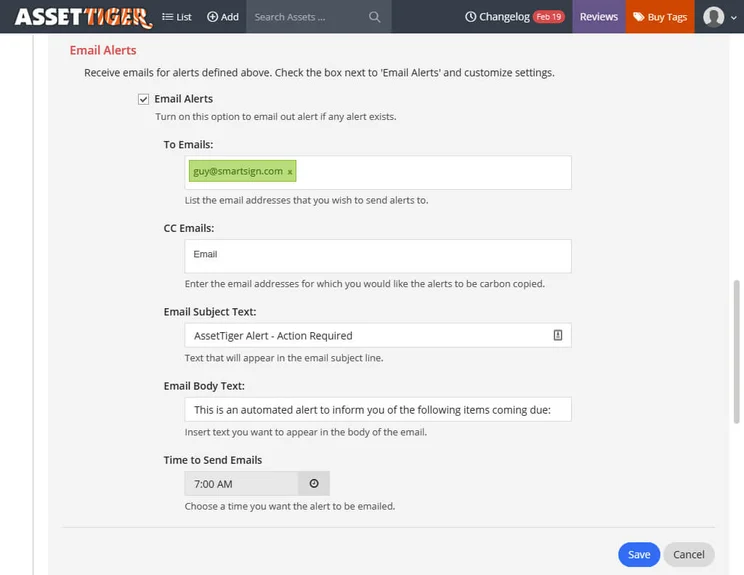
The customizable email alerts form in AssetTiger
Source: AssetTiger
Organization features
AssetTiger offers a wide range of maintenance tracking features that can give your team detailed information about the status of repairs in real time. As you can see from the image below, the platform provides comprehensive information about your maintenance needs.
However, there are a lot of organizational features that AssetTiger is missing, particularly when compared with its competitors. For example, it offers no work order, insurance, or fuel tracking capabilities. While no asset tracking providers offer all three, not having any is a notable absence.
Samsara offers fuel tracking, Asset Panda offers work order tracking, and FleetUp offers insurance tracking, so if these features are important to you, these options are available – but they won’t be free.
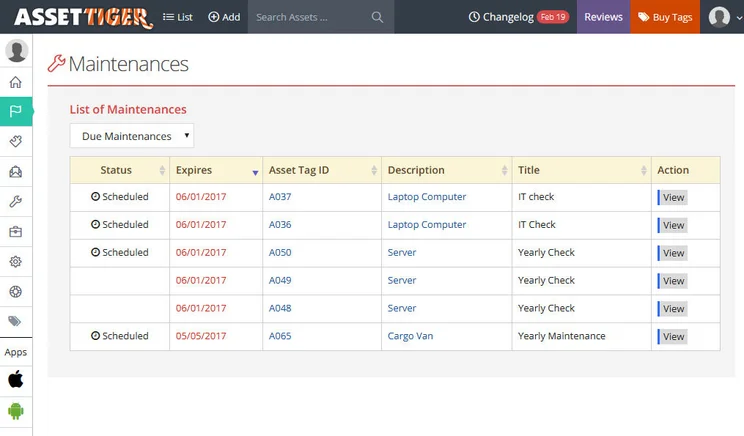
The list of maintences page in AssetTiger
Source: AssetTiger
Tags
AssetTiger is only compatible with bar code and QR code tags, which means that you won’t get to utilize GPS tracking, one of the biggest drawbacks of AssetTiger, as competitors like FleetUp, ATTI, Azuga, Tenna, Samsara, and Cloudhawk all offer GPS tracking tags. There are also no NFC or RFID tags available with AssetTiger.
Technically, AssetTiger is just the software platform that can track your assets and manage your business. The company is affiliated with MyAssetTags.com, which provides a wide range of tags that can help you track your assets more effectively. It prides itself on the heatproof nature of the tags, with the ability to withstand up to 1,000° Celsius.
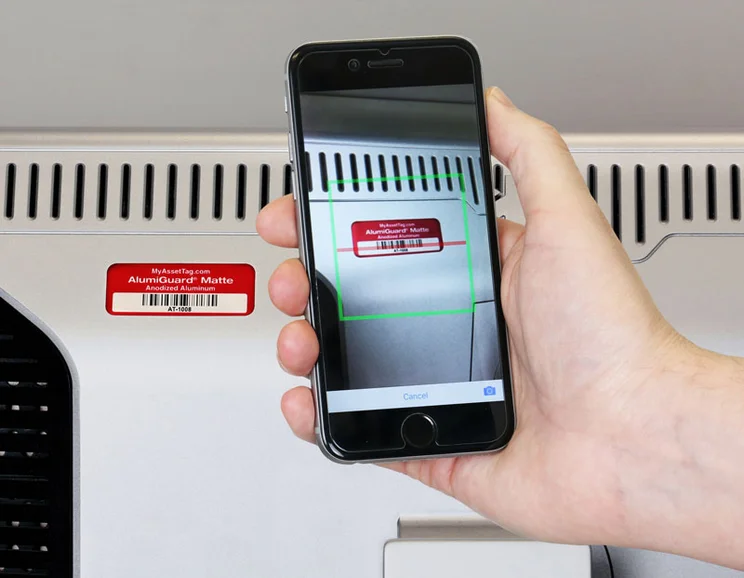
The barcode scanner in the AssetTiger mobile app
Source: AssetTiger
How Does AssetTiger Compare With Other Providers?
One of the main differences between AssetTiger and other asset tracking providers is the fact that it offers a free plan. Spiceworks and Snipe-IT are the only other providers in our research that offer free plans, but Snipe-IT’s premium plans is pricier overall. Other competitors to AssetTiger include ATTI.
If you’re running a bigger business with more assets, a paid for plan is going to be necessary. Of these options, Samsara offers more features, better hardware, and more alerts, so bigger team can work more efficiently.
If you want to see how AssetTiger compares with other asset tracking providers that don’t necessarily offer a free plan, check out our guide to the best asset tracking companies and scroll through our comprehensive table below:
|
Free version
|
Paid version
|
Best for
|
Pros
|
Cons
|
|||||
|---|---|---|---|---|---|---|---|---|---|
|
|
SPONSORED
 |
BEST RATED
 |
 |
 |
 |
 |
 |
 |
 |
|
AssetTiger |
Freshservice |
Samsara |
Tenna |
Verizon Connect |
AssetCloud by Wasp |
Azuga |
ATTI |
Snipe-IT |
SysAid IT Asset Management |
|
Yes |
14-day free trial |
No |
Demo |
Free demo |
Demo |
Demo available |
Demo |
Yes |
Free trial |
|
$20/500 assets/month |
Price on request |
Starts at: $108/user/month |
Price on request |
Price on request |
Custom |
||||
|
Best overall |
IT businesses |
Features |
Diverse operations |
Larger companies |
Small companies with fixed assets |
Moveable assets |
Companies with heavy equipment |
Programmers who want an open API |
On-premise hosting |
|
|
|
|
|
|
|
|
|
|
|
|
|
|
|
|
|
|
|
|
Our Methodology
In order to rate asset tracking providers and enable you to make the best decision for your business, here at Tech.co we take a hands-on approach. We are confident telling you which provider is best for you, because we’ve done the research.
We compare providers across multiple criteria, including the features that the software provides, how easy it is to use, and the customer service experience.
Here are just a few areas we look at in our in-depth research:
- Price: While price isn’t everything, we know that it’s important to many businesses. We rate the pricing of each provider, as well as telling you if there is a free tier, or even a free trial, so you can try it before you commit.
- Types of asset trackers: What sort of tools does the provider offer? Different types of asset tracker tags offer various levels of trackability. Barcodes might be a cheap option, and suitable for smaller businesses, but businesses operating across multiple sites will want something that can offer real-time tracking, like GPS or RFID tags.
- Alerts: When tracking assets, you want to be sure that you know where they are at all times. Some platforms can tell you when an asset leaves a certain location, or is being used outside of work hours. We factor these features into our research when rating each provider.
- Mobile apps: A good mobile app can make or break a platform. A good one makes every process seamless, while a bad one can render the whole platform nothing more than a headache. We look at the quality of the apps on offer, take into account user reviews, and rate them accordingly.
If you want to learn more about the process by which we rate and rank business software providers, take a look at our in-depth research guide for more information.
If you’re running a small business that needs to track a small number of assets for as cheap as possible, AssetTiger is absolutely worth it. With a free forever plan that allows for 250 assets to be tracked and plenty of standard asset tracking features, AssetTiger represents one of the best value options in the industry.
It does have its downsides, particularly if you have a large business that has more assets to track and requires more robust functionality to keep track of it all. Essentially, AssetTiger offers easy accessibility to asset tracking, but forgoes the advanced features in favor of affordability.
Check out our handy comparison tool to find out how much AssetTiger and other asset tracking software will cost your business.
Frequently Asked Questions
Yes, AssetTiger does have a free plan, which allows you to track up to 250 assets at no charge to your business. However, once you exceed that amount, you’ll have to pay an annual fee, which starts at $120 per year.
No online data is entirely secure, but AssetTiger assures its users that it takes privacy seriously. According to the company’s privacy policy, all data — from financial information to personal data — is “stored on access-controlled, secure servers.”
AssetTiger is an asset tracking software that allows businesses to effectively manage their assets. It offers features that enable users to scan barcodes, schedule maintenance, and track other important information about your assets.
If you click on, sign up to a service through, or make a purchase through the links on our site, or use our quotes tool to receive custom pricing for your business needs, we may earn a referral fee from the supplier(s) of the technology you’re interested in. This helps Tech.co to provide free information and reviews, and carries no additional cost to you. Most importantly, it doesn’t affect our editorial impartiality. Ratings and rankings on Tech.co cannot be bought. Our reviews are based on objective research analysis. Rare exceptions to this will be marked clearly as a ‘sponsored’ table column, or explained by a full advertising disclosure on the page, in place of this one. Click to return to top of page


