
Freshservice is an IT service management solution by Freshdesk that has all the necessary features you’ll need to track and maintain hardware and software assets, such as a straightforward, intuitive repository. According to our research, it’s actually the best asset-tracking company for IT teams.
Freshservice’s cheapest plan retails at $19 per agent, per month, with three additional plans that cost $49, $95, and $119 per agent, per month, and considering the number of additional organizational and management features available – as well as how easy the platform is to use – it’s a great option for businesses wanting to track fixed assets. However, Freshservice’s asset tracking capabilities require an Internet connection, so it isn’t suitable for moving assets.
Is Freshservice right for your business, can you use it for free, and how does it compare to similar software offered by competitors? We cover all of this and more in our Freshservice review – so read on to find out the answers.
Freshservice

In Short
-
Pros
- Connects assets with work orders, so you know who has what
- Includes IT service management tools
- Free AI assistant available as an add-on
- Asset tracking starts at $49/user/month
-
Cons
- Capped at 100 assets
- Adding more costs $125/500 assets/month
- No GPS tracking offered
Images

Freshservice: Quick Factfile
Freshservice is an IT service management and helpdesk solution that includes some asset tracking and management features. Here are some key points about the platform:
- Ease of Use: Freshservice offers an intuitive, straightforward interface that doesn’t overwhelm you with technical jargon or excessive detail. However, users with no prior experience may find the raft of available features overwhelming,
- Customer Support: Email-based support is available 24/7 for Freshservice customers, while phone-based support is available 24/5. Support options are included on all of Freshservice’s plans. However, some users have reported poor experiences with the company’s customer service.
- ITIL compliance: Freshservice is compliant with the Information Technology Infrastructure Library (ITIL), which is the primary framework used to dictate good practice across IT service management.
- Organizational Features: Freshervice is an IT service management platform, so it offers lots of team-focused organizational features such as a workspace splitter and an awards/trophy feature to gamify. However, the raft number of features can become overwhelming for businesses that just need an asset-tracking solution.
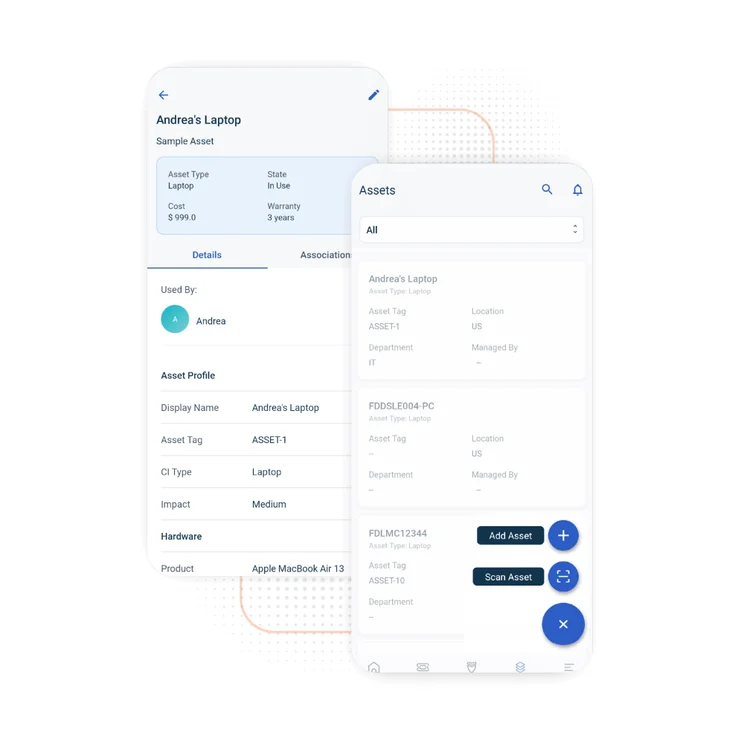
- Supported platforms: Along with standard desktop computers, Freshservice is available as an Android and iOS application, so it can be used on the go.
- Asset limits: If you want to manage more than 100 assets, you’ll have to purchase an asset pack add-on.
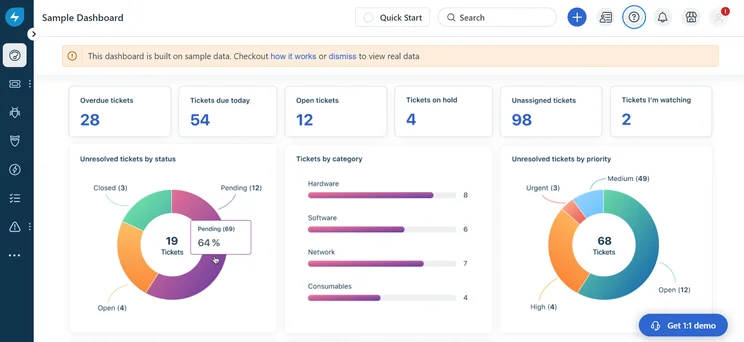
An example of a Freshservice dashboard. Samples and instructions are provided, which makes building your own pretty straightforward. Image: Tech.co
Is Freshservice Right for Your Business?
The term “asset tracking” refers to a broad industry with numerous providers who all specialize in tracking different kinds of assets. Freshservice is exclusively used for tracking fixed IT assets (such as software licenses or computers), so it will only be suitable for your business if this is precisely what you need.
Freshservice only scores 2/5 for tag types in our latest round of research, as it only offers one type of asset-tagging option – QR/bar codes. These can be designed and printed using the free asset label designer application that you can download for free from the Freshworks marketplace and attached to fixed, physical assets. Freshservice then provides Android and iOS apps so you can scan the QR/bar codes and upload asset data directly to the platform. The downside is that you’ll always have to have an internet connection to scan and upload asset data to Freshservice – but as most IT devices require an internet connection to work, that shouldn’t be a huge problem for most businesses.
Also contributing to its low score in this assessment area is the fact that Freshservice doesn’t provide support for RFID tags – which utilize a system of radio frequency identification tags to track business equipment – or GPS tags, which use satellite data. However, these two types of tags aren’t as useful for managing fixed IT assets as it is in freight or vehicle tracking.
Freshservice will suit any large business that needs additional operational transparency and insights to improve efficiency and productivity through refining the ITSM process. However, the first Freshservice plan, the Starter plan, only includes service and helpdesk features and you’ll need the Growth plan for 100 managed assets. It’ll then cost an additional fee to add more (more on this below).
|
Plan
|
Price
|
User limit
|
Key Features
|
|
|---|---|---|---|---|

|
|
|
|
|
|
Unlimited |
Unlimited |
Unlimited |
Unlimited |
|
|
Everything in the Starter plan plus:
|
Everything in the Growth plan plus:
|
Everything in the Pro plan plus:
|
Does Fresh Service Have a Free Plan?
No, Freshservice doesn’t have a free plan. However, its first plan, the Starter plan, is only $19 per agent, per month, which is quite cheap considering how much asset-tracking software can cost.
Freshservice does offer a 14-day free trial of its software so that you can see if it works for your organization before you sign up. Some asset tracking companies do offer free plans, but they’re typically very limited.
Freshservice Review: Key Features
Here’s a quick rundown of all the most important features you’ll have at your disposal when using Freshservice:
Managing IT assets
As we’ve covered, instead of tracking assets using GPS data like Verizon and Samsara, Freshservice uses scannable bar and QR codes to track assets. There are 100 managed assets included in the Growth plan, and it’ll then cost you an additional $75 per month for a pack of 500 assets, or $1,500 per month for unlimited assets.
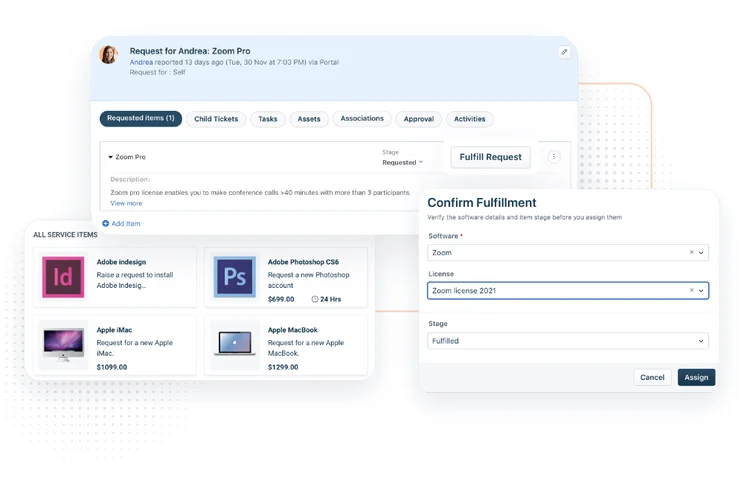
Freshservice has tools that can facilitate the management of assets throughout their entire life cycle, from rollout to depreciation. Your central asset-tracking hub is the product catalog, into which all the products being used and tracked by your organization can be added to. Once you’ve added all your hardware and software, this area will effectively function as your asset repository.
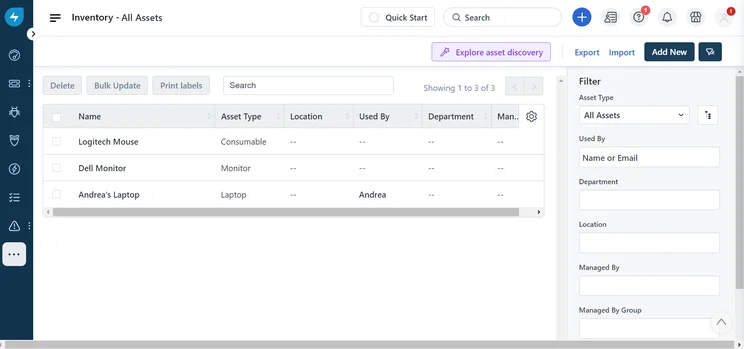
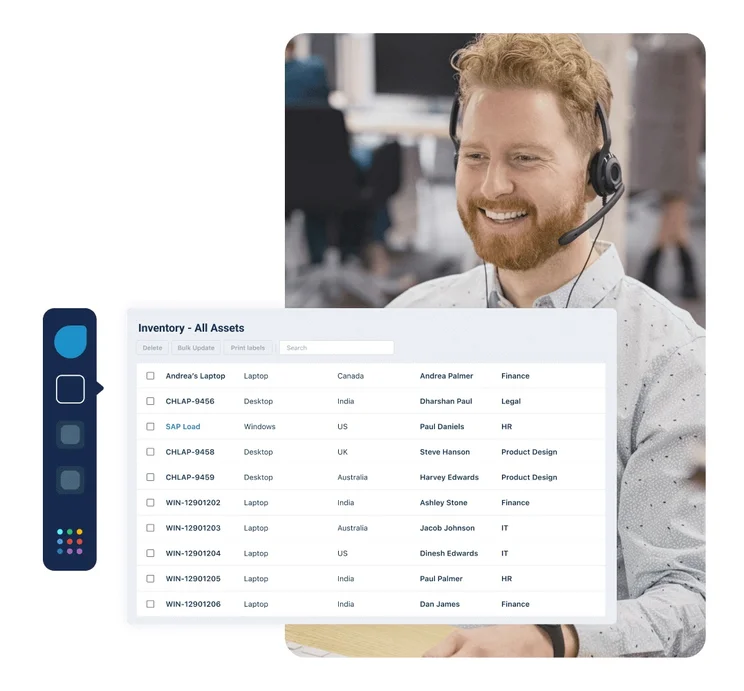
Freshservice’s inventory area will let you filter your assets by location and/or type. Image: Tech.co
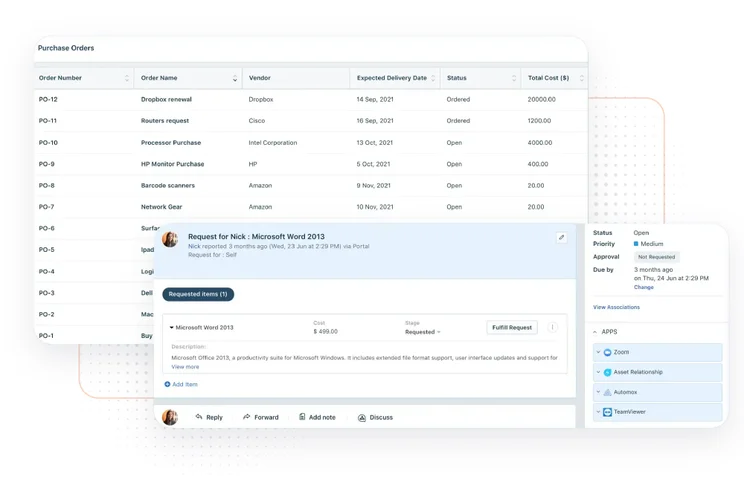
With Freshservice, you’ll be able to split assets up by type (e.g. hardware and software), track assets against vendors, calculate and follow asset depreciation, manage purchase orders, and add asset location details to different assets. After this is done, you’ll be able to split up and view your assets how you like, seeing Freshservice receive a respectable 3/5 score for organization.
Freshservice’s ability to help you track non-physical assets will be particularly useful for certain types of users, such as IT departments, as software asset management has its own distinct set of requirements. In addition to providing features to order known assets, Freshservice has a “discovery probe” that can scan your network for other assets. You can then add any that you’re currently not tracking in the software.
Running a helpdesk
Although you can capably track and manage assets with Freshservice, there are many useful helpdesk and service management features included, too.
Freshservice provides a simple way to perform incident management and will give your IT team a clear breakdown of resolved and unresolved/open tickets. You’ll be able to customize this view to include as much information about specific tickets by adding or removing columns.
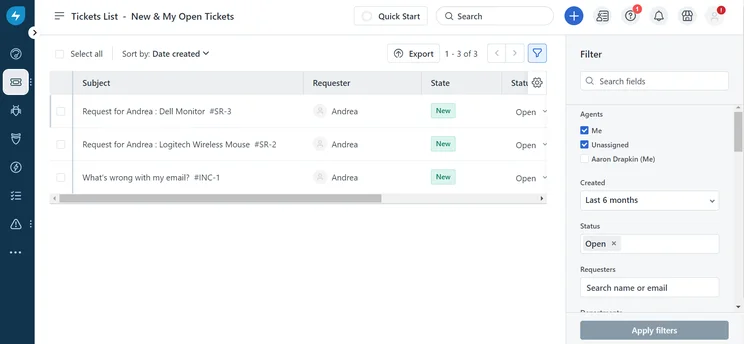
The open ticket queue in Freshservice was easy to navigate to using the left-hand menu bar. Image: Tech.co
Alternatively, you can use the new Kanban board feature, which is currently in beta. You may find this slightly clearer, especially when it comes to understanding the size of your ticket backlog – which is why it’s become a popular feature for project management tools.
You can then use the analytics tools provided to monitor your service desk performance, giving you a clear picture of progress from the analytics dashboard. There are also many preset dashboards and analytics reports you can use to get yourself up and running, as shown in the image below:
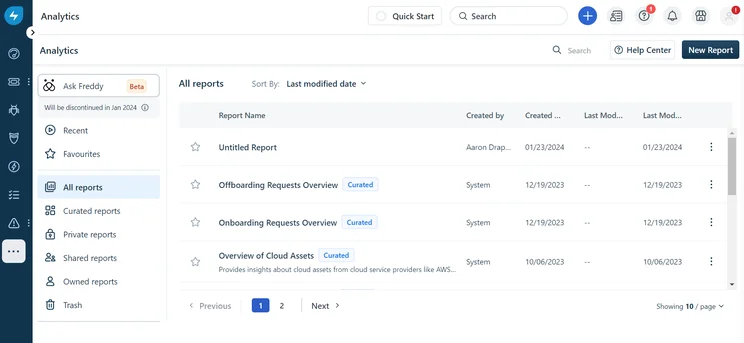
Pre-built analytics reports you’ll find in Freshservice, which we found useful as inspiration when building our own, customized reports. Image: Tech.co
The Starter plan only has a small selection of analytics tools, so you’ll need the Pro plan if you want access to the advanced features to glean insights from large asset repositories.
The platform will also let you build your own knowledge base, which, along with the self-service portal, will help your IT team cut down on tickets by giving employees the tools to solve issues on their own.
On the pricier plans, you’ll find problem, release, and change management tools are provided, making it easier to roll out changes and solve issues in bulk.
Management/team features
With Freshservice, you can silo different departments in your business with the workspaces feature, while the Workflow Automator is perfect for shoring up repetitive tasks that take up valuable time in the day.
You can also use the automation tools to create automatic approval workflows, creating consistency and avoiding confusion around approvals. An employee onboarding process, on the other hand, can be set up to save you time every time you hire into your IT department.
There’s a team dashboard for displaying team goals and built-in game mechanics in the Feshservice Arcade, such as trophies and awards for completing specific duties.
Freshservice add-on features
Along with the platform’s core features, there are several add-ons you can buy to use with your Freshervice software. The headline add-on is Freddy AI – an assistant built by Freshdesk that works with any of its software programs. You can use it to set up a service bot to assist your team, or get it to identify similar historical incidents to any currently being resolved to speed up the process.
There’s also a tool called “Freddy Insights,” which provides AI-generated actionable insights and “relevant trends.” Both of the Freddy products are free to download if you already have a Freshservice subscription.
There’s also a project management add-on available for the Freshservice Pro and Enterprise plan, which will facilitate members of your businesses collaborating with your IT team on projects by providing them with access to a project management module.
How Does Freshservice Compare With Its Competitors?
Freshservice has a couple of key features that help it stand out when compared to other IT asset management platforms, as well as more general-use asset tracking platforms.
For one, Freshservice offers 24/7 email support and 24/5 phone support, and this is a lot more than is offered by the likes of GLPI and Snipe-IT, neither of which include any round-the-clock support on any of their plans (this costs ). Snipe-IT is another IT service management solution and closely comparable to Freshservice – at least in the broad world of asset tracking. There are other areas where Freshservice comes out on top; Snipe-IT will help you manage assets and licenses, but it doesn’t have the raft of helpdesk-focused features that Freshservice does.
Freshservice is also much easier to use than ServiceNow, an older but still popular helpdesk solution that has a much more old-fashioned user interface. This is one of the key advantages of Freshdesk because its modern interface makes it easy to set up and deploy. You don’t need any experience with ITSM tools to understand the platform, which is lightweight and speedy.
We found that Freshservice’s advanced management and organizational features put it ahead of Spicework’s free IT and asset management software. Although it’s perfectly serviceable for a free tool, it’s not at the same level as Freshservice’s feature-rich plans (even the Starter plan).
Verizon Connect and Samsara, on the other hand, are asset tracking and management platforms geared towards vehicles, machinery, freight, and other heavy equipment, rather than hardware devices and software licenses. If this is the sort of asset-tracking platform you need, simply fill in our short form and get a recommendation based on your business’s needs.
Neither of these providers have any additional IT management tools though, so Freshservice is a much better choice for your business’s IT team. We’ve also done a rundown of the top asset-tracking companies we’ve tested:
|
Price
|
Free version
|
Best for
|
Pros
|
Cons
|
|||
|---|---|---|---|---|---|---|---|
 |
 |
 |
 |
 |
|||
|
Samsara |
Tenna |
Verizon Connect |
AssetCloud by Wasp |
Freshservice |
|||
|
Custom |
Custom |
Custom |
$108/user/month |
$49/user/month |
|||
|
No |
Demo |
Free demo |
Demo |
14-day free trial |
|||
|
Best overall |
Businesses with both fixed and movable assets |
Range of features |
Small companies with fixed assets |
IT businesses |
|||
|
|
|
|
|
|||
|
|
|
|
|
|||
| See Pricing | Compare Quotes | Compare Quotes | Compare Quotes | Try Freshservice |
Our Methodology: How We Assessed Freshservice
The asset tracking software market is a diverse one, with different types of asset tracking devices that are all geared towards different types of assets.
However, they should all provide a core group of essential features that you’d want from such a program – and these provided the basis for the latest research we’ve conducted to identify the top providers on the market.
This involved judging a range of platforms against a criteria of almost 20 core factors split up into five overarching categories: pricing, types of asset tags, alerts, organization, and hardware. Individual category scores then feed into an overall score.
While we do have commercial partnerships with some of the companies that feature on our site, results from our independent research completely determine their ranking or rating. This allows us to remain editorially independent.
Yes, Freshservice is certainly worth it if you need an IT service and asset management solution. Its starting price is much lower than the likes of Snipe-IT, and all things considered, you get a lot for what you pay for.
The additional team management features that Freshservice provides – such as the ability to build your knowledge base – aren’t offered by any of the other asset-tracking programs on this list. Customer support – including 24/5 phone support – is also included in the full price of the plan, helping Freshervice score a 4.6/5 overall.
Freshservice is relatively easy to set up and fast to deploy, so if you’re looking for a high-quality IT asset-tracking solution that won’t take you ages to set up, Freshservice is your best bet. Still unsure? Try the 14-day free trial.
Freshservice Review FAQs
Freshservice is used by IT teams to order and resolve technical issues and keep track of a business’s IT assets and operations. It can also be used to scan for new assets on a network, generate reports, roll out software updates, and automate repetitive duties that IT workers typically have to complete.
Freshdesk is a general helpdesk solution or customer service software, while Freshservice is an IT service management platform. It performs some of the same functions as a help desk, but it’s focused around the processes and priorities of teams providing technical support and monitoring assets.
Yes, Freshervice is best described as an IT service management platform, with all the necessary features you’ll need to manage and resolve incoming tickets, track assets, and roll out changes. Although it has some of the same features as a helpdesk solution, ITSM is a much more accurate description.


